

Power Your Software Testing with AI Agents and Cloud
The Native AI-Agentic Cloud Platform to Supercharge Quality Engineering. Test Intelligently and Ship Faster.


- TestMu AI (Formerly LambdaTest)
- /
- Blog
- /
- Cross Browser Typography Compatibility Testing
Cross Browser Typography Compatibility Testing
Improve Your Website's Typography Compatibility Across Different Browsers with TestMu AI's Comprehensive Guide. Learn How to Achieve Consistent Typography Across Multiple Devices and Browsers for Enhanced User Experience.
Last Updated on:
Cross browser typography testing catches cases where a font renders beautifully in Mozilla yet breaks in Opera because the browser lacks support for the underlying tag, which is why developers combine formats like WOFF, the compressed format Mozilla introduced in 2009, inside one @font-face fallback stack targeting every engine.
How to make sure which font format to use and when?
Well, there are many types of font formats available with the most common ones like EOT, OTF, TTF, WOFF, SVG. You may find it very amazing to select from a huge palette but it isn’t as simple as it sounds because there is not even a single font format that is supported in all the browsers. So you have to somehow use the combinations of font formats to make it support in all browsers.
What are the font format choices you have?
You’ll find a wide choice of font formats while designing your website. The various file extensions that you’ll come across include:
| Extension | File Type |
|---|---|
| .ABF | Adobe Binary Screen Font File |
| .ACFM | Adobe Composite Font Metrics File |
| .AFM | Adobe Font Metrics File |
| .AMFM | Adobe Multiple Font Metrics File |
| .BDF | Glyph Bitmap Distribution Format |
| .CHA | Character Layout File |
| .CHR | Borland Character Set File |
| .COMPOSITEFONT | Windows Composite Font File |
| .DFONT | Mac OS X Data Fork Font |
| .EOT | Embedded OpenType Font |
| .ETX | TeX Font Encoding File |
| .EUF | Private Character Editor File |
| .F3F | Crazy Machines Font File |
| .FEA | AFDKO Feature Definitions File |
| .FFIL | Mac Font Suitcase |
| .FNT | Windows Font File |
| .FON | Generic Font File |
| .FOT | Font Resource File |
| .GDR | Symbian OS Font File |
| .GF | METAFONT Bitmap File |
| .GLIF | Glyph Interchange Format File |
| .GXF | General CADD Pro Font File |
| .LWFN | Adobe Type 1 Mac Font File |
| .MCF | Watchtower Library Font File |
| .MF | METAFONT File |
| .MXF | Maxis Font File |
| .NFTR | Nintendo DS Font Type File |
| .ODTTF | Obfuscated OpenType Font |
| .OTF | OpenType Font |
| .PCF | PaintCAD Font |
| .PFA | Printer Font ASCII File |
| .PFB | Printer Font Binary File |
| .PFM | Printer Font Metrics File |
| .PFR | Portable Font Resource File |
| .PK | Packed METAFONT File |
| .PMT | PageMaker Template File |
| .SFD | Spline Font Database File |
| .SFP | Soft Font Printer File |
| .SUIT | Macintosh Font Suitcase |
| .TFM | PageMaker Template File |
| .TTC | TeX Font Metric File |
| .TTE | TrueType Font Collection |
| .TTF | Private Character Editor File |
| .TXF | Celestia Font Texture File |
| .UFO | Unified Font Object File |
| .VFB | FontLab Studio Font File |
| .VLW | Processing Font File |
| .VNF | Vision Numeric Font |
| .WOFF | Web Open Font Format File |
| .WOFF2 | Web Open Font Format 2.0 File |
| .XFN | Ventura Printer Font |
| .XFT | ChiWriter Printer Font |
| .YTF | Google Picasa Font Cache |
Out of all these formats, the most common ones are EOT, OTF, TTF, WOFF, SVG. So, I’ll focus around the compatibility of these formats.
EOT (Embedded Open Type Font)
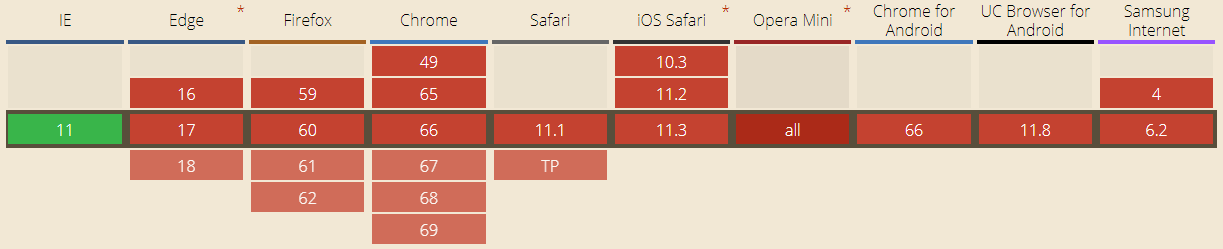
EOT is a proprietary Microsoft font format built only for Internet Explorer. Internet Explorer is now retired, so EOT no longer matters for modern browser support and most developers rely on WOFF2 and TTF instead.
TTF( TrueType Font)
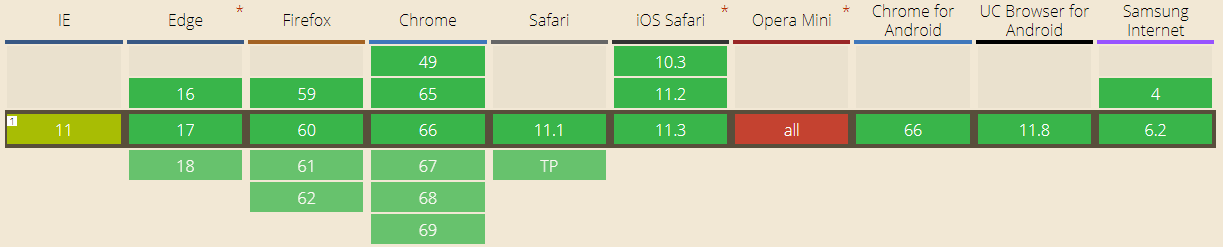
TTF was developed by Apple and Microsoft late in 1980s. It is the most common font format for both Windows and Macintosh operating systems.
OTF(OpenType Font)
An evolution of TTF, OTF is developed by combined efforts of Adobe and Microsoft. Supported in Mac and Windows OS OTF provides support for various platforms and has expanded character sets. It support is same for browsers as of TTF.
WOFF( Web OpenFont Format)
As the name suggests, WOFF is an essential font format for web pages. The major feature that WOFF provides is fast loading web pages since it uses the compressed versions of TTF and OTF fonts. Developed by Mozilla in 2009, WOFF is now a W3C recommendation.
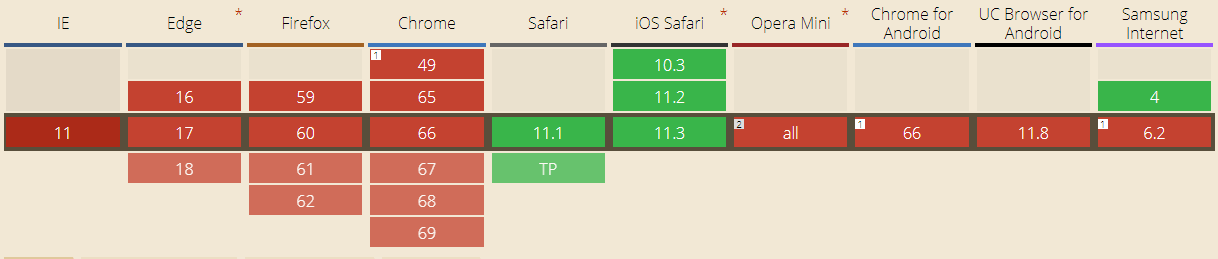
The upgraded version of WOFF, WOFF2 has support for different browser sets:
SVG(Scalable Vector Graphics Font)
SVG fonts files contain the glyph outlines which are generally represented as standard SVG elements and attributes, just like they were single vector objects in the SVG image. These files have pretty large size and are uncompressed unlike EOT, WOFF.
Browsers And Font Format Support
The major issue that you might face is your font don’t render properly in all browsers so you have to make sure that you add font files to your web code. To make sure of this, you need to be aware the font format support in various browsers. Table depicts the support for various font types in different desktop browsers.
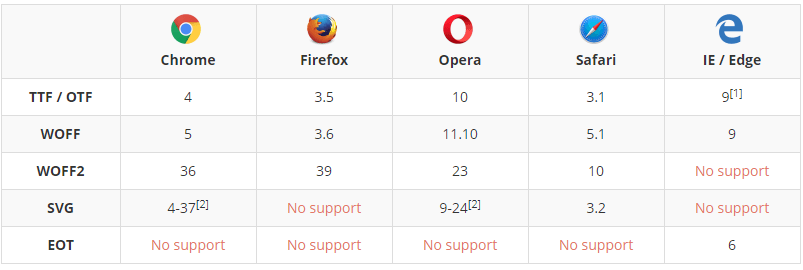
For mobile browsers the font format support goes as follows:
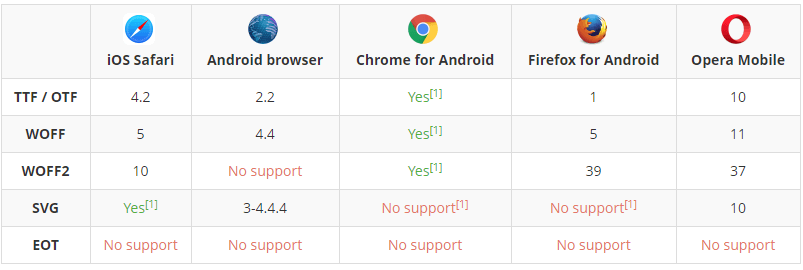
So, there is no single font format that is supported in all browsers and browser versions. As you may notice, TTF and WOFF file formats are supported in nearly all latest web browsers (except opera mini). As a developer it would make your life quite easier if you use TTF and WOFF web formats. But still, you would need to have a combinations of font formats to make all the fonts supported in all browsers.
You can use caniuse to find out version support in font formats based on your cross browser support strategy.
How To Avoid Browser Font Incompatibility?
Knowing which browsers support a font family is one thing and making them support is another. So to make sure that your font family is rendered properly in every browser even if the user doesn’t have the font family installed on his local computer is to use @font-face in CSS style.
Addition of @font-face allows a webpage to download the font from the hosted location and display it in the CSS as specified.
Add the code to use stylesheet before any styles:
@font-face {
  font-family: 'MyWebFont';
  src: url('webfont.eot'); /* IE9 Compat Modes */
  src: url('webfont.eot?#iefix') format('embedded-opentype'), /* IE6-IE8 */
       url('webfont.woff2') format('woff2'), /* Super Modern Browsers */
       url('webfont.woff') format('woff'), /* Pretty Modern Browsers */
       url('webfont.ttf')  format('truetype'), /* Safari, Android, iOS */
       url('webfont.svg#svgFontName') format('svg'); /* Legacy iOS */
}
Once you make sure to add the above code, you can use it to style elements like this:
body {
  font-family: 'MyWebFont', Fallback, sans-serif;
}
If you want to style a heading, this code format can be used:
h1 {
font-family: DeliciousRoman, Helvetica, Arial, sans-serif;
}
You can see a working example of how you can use it on w3schools.
Using a bold font:
@font-face {
    font-family: myFirstFont;
    src: url(sansation_bold.woff);
    font-weight: bold;
}
This might help you make support font formats in all browsers.
Fixed? Now It’s Time For Some Cross Browser Testing.
Having made sure that your browsers render all the fonts properly in all browsers you need to test them if it is fixed or not. For this, you need to test your website for cross browser compatibility.
Now with TestMu AI, You can perform cross browser testing on various mobile devices such as test on MotoG 2nd and test on Xperia Tipo 4.
Font rendering is a part of visual appeal. You can use TestMu AI’s Visual UI testing feature to test visual appearance of your website. Take screenshots on various browsers and compare them if they look the same.
So, it’s time you checked your website if the fonts render properly for your users too or it just looks perfect for you.

How Do AI Coding Agents Handle Font Compatibility Testing in 2026?
AI coding agents such as GitHub Copilot, Claude Code, and Cursor can draft a complete @font-face fallback stack in seconds, then use a browser automation agent to check how it actually renders.
Tools like the Playwright MCP server and browser-use let an agent open a real Chromium, Firefox, or WebKit session, load the page, and pull back a screenshot of the rendered text, instead of a developer opening each browser by hand.
- Fallback code generation: Copilot and Cursor write the
@font-facesrc list and font-display value from a plain-language prompt, cutting out the manual format lookup. - Cross-engine screenshot capture: The Playwright MCP server and browser-use drive real browser sessions so an agent pulls rendered screenshots from multiple engines in one run.
- The visual judgment gap: An agent can confirm a font file loaded, but it cannot reliably judge whether a fallback font shifted kerning or line height enough to break a layout, so a person still reviews the screenshot diff.
This does not remove the need to test real devices, but it cuts the repetitive part of cross browser font checks down to a single prompt.
Author

Deeksha Agarwal
Blogs: 34


Deeksha is a Senior Product Manager at The Economic Times and a Community Evangelist with 8+ years of experience. She is followed by 6,000+ QA professionals, software testers, tech leaders, and enthusiasts across global communities. Deeksha has authored 40+ expert bios for TestMu AI, focusing on cross-browser testing, mobile app testing, regression testing, usability testing, and automation. Previously at TestMu AI, she drove product growth in native app testing and responsive browser features, combining product leadership with deep QA expertise.


Did you find this page helpful?
More Related Blogs
TestMu AI forEnterprise
Get access to solutions built on Enterprise
grade security, privacy, & compliance
- Advanced access controls
- Advanced data retention rules
- Advanced Local Testing
- Premium Support options
- Early access to beta features
- Private Slack Channel
- Unlimited Manual Accessibility DevTools Tests