

Power Your Software Testing with AI Agents and Cloud
The Native AI-Agentic Cloud Platform to Supercharge Quality Engineering. Test Intelligently and Ship Faster.


- TestMu AI (Formerly LambdaTest)
- /
- Blog
- /
- Proper Documentation in Agile Software Development
Proper Documentation in Agile Software Development
Learn what proper documentation in Agile software development covers, which documents QA and dev teams need, and how to keep them accurate every sprint.
Last Updated on:
On This Page
Proper documentation in Agile software development is the set of records a team keeps so product knowledge survives people joining and leaving. The Agile Manifesto states a preference for working software over comprehensive documentation, and Agile Modeling adds two tests: document stable things, and update a document only when not updating would cause harm. This guide covers the types of project documentation, the Agile Manifesto, the importance of documentation in software testing, the benefits for QA and dev teams, how much is enough, the tools teams use, and how AI coding agents read it.
Key Takeaways
- The Agile Manifesto phrase "working software over comprehensive documentation" is widely misread as permission to skip documenting, but documentation stays necessary in any Agile team.
- QA and development teams document test plans, test cases, test scripts, bug reports, test strategy, traceability matrices, and risk registers so knowledge survives when team members join or leave.
- Documented reproduction steps let testers and developers recreate a production defect, and detailed tickets in tools such as Jira or Azure give auditors the trace required in healthcare, finance, and aerospace.
- Agile Modeling sets two tests for how much documentation is enough: document stable things rather than speculative things, and update a document only when not updating it would cause harm.
- Documentation stays accurate when teams write it continuously as the work happens and tie each update to a trigger, such as a changed acceptance criterion or a resolved production defect.
- Gherkin scenarios written as Given, When, and Then steps and run by Cucumber serve as both the specification and the automated test, so a behavior change makes the scenario fail instead of silently going out of date.
Types of Project Documentations
Now, we see a lot of different styles of documentation, some drawn, some written, some recorded, etc. The important aspect here is as long as a vital feature of your application or project that needs to be documented, is documented.
Documents can be any of the following:
- Mindmap
- Diagram
- Wiki page information
- Video
- Charter
- Powerpoint presentation

Key Takeaway: A project document can be a mindmap, a diagram, a wiki page, a video, a charter, or a slide deck, and the format matters less than whether the vital parts of the project are recorded somewhere.
Agile Manifesto
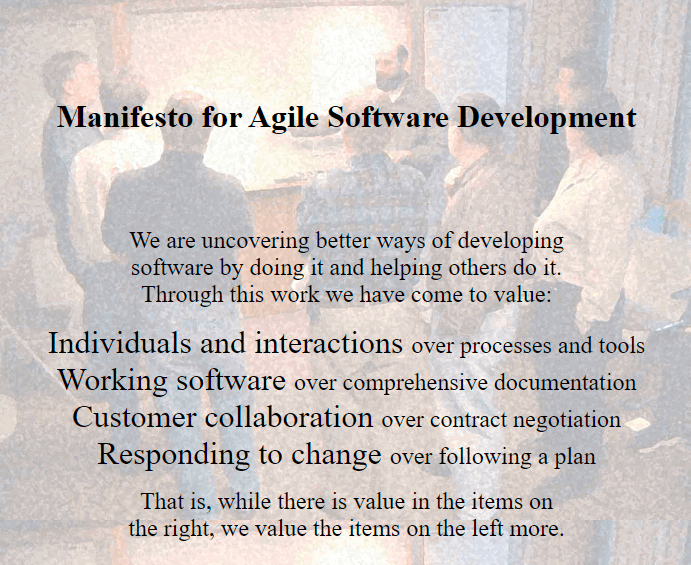
Throughout my career, I have seen this one statement being misled, "Working software, over comprehensive documentation". As a trainer, many testing trainees would also question me as to why can't we just focus on the working application and focus on its functionality rather than documenting. I wish it was easier like that, however, it is vital to document details even in an agile team, regardless of any methodology documentation is important.
You may have to showcase something to another team one day, and having documents handy would be a great sense of relief, someone joins your team and would like to understand the product, so having a document or a diagram documented could be of big help. There are various scenarios and it's not a discussion why one should not document things. Remember if you know something others don't, document it.
One of the primary benefits of documentation in software testing teams is its role in knowledge transfer and retention. In a dynamic team environment, where members may come and go, comprehensive documentation serves as a repository of knowledge. Test plans, test cases, procedures, and other relevant documentation ensure that critical information is preserved and accessible to all team members. This facilitates smoother onboarding of new team members and minimizes the risk of knowledge loss due to personnel changes.
Key Takeaway: The Agile Manifesto value "working software over comprehensive documentation" is not an argument against documenting, because test plans, test cases, and procedures keep critical product knowledge available when team members change.
Importance of Documentation in Software Testing
Documentation in the software testing world is pretty critical. It is actually a vital component of the quality engineering process. Many testers use this as a way to capture and communicate important information about the system under testing alongside the results and any testing efforts. In a nutshell, any documentation for testing provides a structured way to communicate their findings. As mentioned above, documentation helps ensure everyone is involved and on the same page.
Documentation serves as a valuable repository of historical data and lessons learned within software testing teams. Past test results, decisions made, challenges encountered, and strategies employed are captured in documentation, providing a wealth of information for future reference and a comprehensive test analysis creating insightful reports for your team.
By reviewing historical documentation and test analytics, teams can identify patterns, assess the effectiveness of past approaches, and learn from both successes and failures. This iterative process of reflection and improvement drives continuous evolution and maturation within the testing team.
There are various types of documents that a tester documents such as:
- Test plans
- Test cases
- Test scripts
- Exit reports
- Bug reports, covered in the advanced guide on writing a bug report
- Test Strategy
- Test key performance indicators
- Traceability matrix
- Risk registers, an output of risk based testing
- Requirement/Gaps analysis
Key Takeaway: Test documentation gives testers a structured way to communicate findings and builds a historical record of past results, decisions, and challenges that teams review to spot patterns and improve later testing.
Benefits of Documentation for QA and Dev Teams
Documentation can be a mundane task, however, if this benefits even one person in your team, your hard work is paid off. Writing definitions of done's or even ways of working for your team can take a long time and even months to get it right. I have also come across many documents where the information is presented in pictures or diagrams and fewer words, which works wonderfully for some, however, some still prefer more words. It is totally up to you and your team what is a good document for your team. Documentation provides transparency.
Reproducibility of Issues
When a defect goes into production, the entire team faces a lot of stress as to where something went wrong/unexpected. However, it is important to think about documenting this vital information, to resolve it for once and for all rather than this defect creeping back into production. Many people including testers and developers in a team rely on documentation in order to recreate the defect and understand where and how the system did not behave as expected.
So, having a document based on the reproducibility of issues can help diagnose and provide a resolution that can aid higher management in understanding what has happened.
Auditing reasons
Many of us work on tools like JIRA or Azure creating tickets which essentially is a document too, as your task details are on it. If we avoid adding the right details or even creating these tickets it is not easy to trace back to important details or even audit. An Auditor may struggle to even pass the audit. Complying with industry standards is a must not just for the Tech world but industries like healthcare, finance, aerospace, etc. Moreover, if this is done accurately your team is adhering to the correct procedures and working alongside the auditors' recommendations.
Continuous Improvement
Post a major defect or a defect getting into production, there is always that one document that would help other areas learn called the lessons learned. This means the issue has been resolved, however, what did the team learn from it and what would they do differently next time?
By documenting improvements your team is not only foreseeing and planning ahead of time but also identifying areas of enhancements optimizing their ways of working and becoming effective and efficient with risk management strategies.
I have worked with many teams and this one team has always taken my interest when they run a risk register. This is an amazing way of understanding potential risks and making the right decisions for impacting components and how to work around them. If we manage risk well, we are also on a continuous improvement and stable path as a team.
Training and Onboarding
When we are hiring a new team member, what I have noticed is that any type of documentation is the most crucial document that helps newcomers understand the way a team works. Of course, working on a project also puts things in perspective. Any training resource in my opinion is vital documentation to help familiarize anyone with the project details, onboarding, or how to use a specific tool for instance. Also if someone has left the team, their offboarding and documentation will help the team continue smoothly and help the newcomer with the handover too.
By providing structured guidance and reference materials, documentation accelerates the learning curve for new team members, empowering them to contribute effectively to testing efforts from the outset.
Context for AI Coding Agents
Coding agents now read project documentation before they change code, so a document has a second reader that is not a person. The AGENTS.md convention, an open Markdown format stewarded by the Agentic AI Foundation under the Linux Foundation, gives an agent a predictable file for build commands, test commands, code style rules, and pull request conventions. Agents read the nearest AGENTS.md in the directory tree, so a team can keep one file at the repository root and a narrower one beside a single service. If your definition of done, test data rules, and environment setup live only in a chat thread, an agent cannot use any of it, and neither can a new joiner.
Key Takeaway: Documentation pays QA and development teams back through defect reproducibility, audit compliance, lessons learned after production issues, faster onboarding, and machine-readable project context that AI coding agents read from an AGENTS.md file.
How Much Documentation Is Enough in an Agile Team?
Enough is the point where a document returns more than it costs to write and keep current. Agile Modeling sets two tests for that line: document stable things, not speculative things, and update a document only when not updating it hurts. A sprint plan that is rewritten every week fails the first test. A login flow that has not changed in six months passes it. The same essay scores a finished document on five questions: is the content correct, will the document be read, will it be understood, will the advice be followed, and will the advice be trusted. A document that fails any one of those still costs maintenance time and returns nothing.
Accuracy is a scheduling problem more than a writing problem. Documentation written in one batch at the end of a release describes a system that has already moved on, which is why the standard guidance is to document continuously as the work happens instead of waiting for the project to finish. Tie each document to a trigger rather than to a date. A changed acceptance criterion updates the test case. A resolved production defect updates the lessons learned entry. An onboarding question nobody could answer updates the ways of working page.
Some of your documentation can check itself. Agile Modeling recommends preferring executable work products such as customer tests and developer tests over static ones. Gherkin, the format Cucumber reads, is a working example. A scenario written with Given, When and Then steps reads as a plain description of behavior and runs as an automated test, so one file is both the specification and the check. When the behavior changes, the test fails, and someone corrects the description as part of the fix. A wiki page gives no such warning when it goes out of date.
Key Takeaway: Documentation is enough when a document returns more than it costs to keep current, which Agile Modeling tests by asking whether the subject is stable and whether skipping an update would cause harm.
Tools for documenting your thoughts
If you do not know where to start, here are some applications to help your documentation become more fun and insightful:
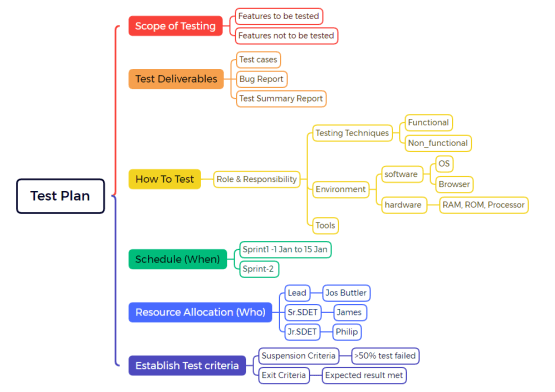
- Mind Map applications
- Excalidraw
- Miro
- Microsoft applications - One note
- Wiki pages
- Asana
- Confluence
Where a document lives now matters as much as what it says. Documentation kept in the repository is reviewed in the same pull request as the code it describes, so a reviewer sees both together and catches text that no longer matches the behavior. For documentation that has to stay in Confluence, Jira, or a similar system, Model Context Protocol servers expose those tools to AI assistants over an open standard, so the content stays reachable without anyone copying it into the codebase. Pick one home per document type and record that choice in your ways of working, otherwise the same fact ends up in three places and two of them go out of date.
Key Takeaway: Tools such as Excalidraw, Miro, OneNote, Asana, and Confluence can hold Agile documentation, and choosing one home per document type stops the same fact from living in three places and going stale in two of them.
How Do AI Coding Agents Use Your Agile Documentation?
AI coding agents read project documentation as input before they write code, which gives every document a second audience that cannot ask a follow-up question. The AGENTS.md format is the current convention for that input. It is plain Markdown with no required fields, it is stewarded by the Agentic AI Foundation under the Linux Foundation, and the project reports use across more than 60,000 open source repositories. The sections it suggests map closely to what a new human joiner asks for: a project overview, build and test commands, code style guidelines, testing instructions, and security considerations.
Documentation that lives outside the repository can still reach an agent. The Model Context Protocol is an open standard for connecting AI applications to external systems, and it is supported by Claude, ChatGPT, Visual Studio Code, and Cursor. A Confluence space or a Jira project exposed through an MCP server becomes readable by an assistant without anyone pasting the content into the codebase.
The limitation is worth stating plainly. An agent treats whatever it reads as current, because it has no way to check a wiki page against the running system. A page that still describes a retired login flow does not merely slow an agent down. It points the agent at the wrong behavior, and the code that comes back looks correct until a test catches it. Stale documentation used to cost your team time. It is now also a defect source in your tooling, which raises the value of the trigger-based update habit described above.
Key Takeaway: AI coding agents read project documentation before changing code, so an AGENTS.md file in the repository and Confluence or Jira content exposed through a Model Context Protocol server both become agent input, and a stale page misleads the agent rather than just slowing a person down.
Wrapping Up
Documentation is indispensable to the success of software testing teams, playing a multifaceted role in facilitating knowledge transfer, reproducibility of issues, compliance and auditing, continuous improvement, risk management, communication and collaboration, training and onboarding, and historical reference.
By prioritizing documentation as an integral component of the testing process, teams can enhance their efficiency, effectiveness, and ultimately, the quality of the software they deliver. Embracing a culture of documentation empowers testing teams to navigate complexity, mitigate risks, and achieve excellence in software quality assurance.
Platforms like TestMu AI keep test configurations, environments, and run results in one place, so the record of how a test was executed sits next to its outcome and stays accessible to the whole team.

Author

Himanshu Sheth
Blogs: 142


Himanshu Sheth is the Director of Marketing (Technical Content) at TestMu AI, with over 8 years of hands-on experience in Selenium, Cypress, and other test automation frameworks. He has authored more than 130 technical blogs for TestMu AI, covering software testing, automation strategy, and CI/CD. At TestMu AI, he leads the technical content efforts across blogs, YouTube, and social media, while closely collaborating with contributors to enhance content quality and product feedback loops. He has done his graduation with a B.E. in Computer Engineering from Mumbai University. Before TestMu AI, Himanshu led engineering teams in embedded software domains at companies like Samsung Research, Motorola, and NXP Semiconductors. He is a core member of DZone and has been a speaker at several unconferences focused on technical writing and software quality.
Reviewer

Abhishek Mishra
Reviewer
Abhishek Mishra is a Technical Product Manager at TestMu AI, where he owns Test Manager, the test management product. He has over 8 years of experience in product management and market analysis. His expertise spans across AI-native software testing, product strategy, and analytics. Previously, Abhishek served as the Product Lead at IndiaClan and co-founded Gartley618 Technologies, where he led innovative projects in quantitative trading and blockchain. He holds a B.Tech degree.


Agile Documentation FAQs
Did you find this page helpful?
More Related Blogs
TestMu AI forEnterprise
Get access to solutions built on Enterprise
grade security, privacy, & compliance
- Advanced access controls
- Advanced data retention rules
- Advanced Local Testing
- Premium Support options
- Early access to beta features
- Private Slack Channel
- Unlimited Manual Accessibility DevTools Tests