

Power Your Software Testing with AI Agents and Cloud
The Native AI-Agentic Cloud Platform to Supercharge Quality Engineering. Test Intelligently and Ship Faster.


- TestMu AI (Formerly LambdaTest)
- /
- Blog
- /
- Progressive Enhancement for Cross Browser Compatibility
Progressive Enhancement for Cross Browser Compatibility
Learn how progressive enhancement builds a website in layers, from semantic HTML to CSS and JavaScript, so core content works in every browser.
Last Updated on:
On This Page
- What is Progressive Enhancement?
- How Is Progressive Enhancement Different From Graceful Degradation?
- What Are The Different Layers Of Progressive Enhancement?
- How Do You Detect Browser Support Before Adding an Enhancement?
- How Do AI Coding Agents Change Progressive Enhancement?
- Cross Browser Testing A Common Ground for Progressive Enhancement & Graceful Degradation
Progressive enhancement delivers cross browser compatibility by building a page in layers, so core content works in every browser before optional features load.
The base layer is semantic HTML, CSS adds presentation, and JavaScript adds behavior only after a feature check such as CSS.supports() or the @supports at-rule confirms browser support.
This guide covers what progressive enhancement is, how it differs from graceful degradation, its three layers, how to detect browser support before adding an enhancement, how AI coding agents change the practice, and where cross browser testing fits.
Key Takeaways
- Progressive enhancement builds a website in layers, starting with core content that works everywhere and adding optional features on top, so a page stays usable on a browser that lacks the newer capabilities.
- Graceful degradation runs in the opposite direction to progressive enhancement, starting from a full-featured design built for the latest browsers and dropping features as it steps down to older ones.
- The three layers of progressive enhancement are rich semantic HTML markup for content, CSS for presentation, and unobtrusive JavaScript for behavior.
- MDN documents four feature detection patterns that decide whether an enhancement runs: the in operator, CSS.supports(), the @supports at-rule, and window.matchMedia().
- Browserslist stores the browsers a project supports in package.json or a .browserslistrc file, and eslint-plugin-compat reads those targets and reports any Web API they do not support.
- Web Platform Baseline marks a feature widely available after it has worked in Chrome, Edge, Firefox and Safari for 30 months, which makes such features a safe choice for the core layer of a page.
What is Progressive Enhancement?
Progressive Enhancement is a technique of creating cross browser compatible web design wherein the highest priority while developing is keeping the core web page content, while the other complex add-ons and features remain secondary.
Consider that you are into building decorative walls. The most basic requirement in all cases would be first to build the wall and whitewash it.
Now you can add the foundation paint to give it some color. Once the color is complete, you would ideally discuss ideas with your client and paint designs on the wall. Finally, you would add wall hangings to enhance its grace.
From this analogy, you can easily deduce the building of the wall or the base as using HTML. CSS comes in as the painting on the wall. Discussions with the client, choosing the wall hanging and other decorative items as a finishing touch would be the job forJavascript.
While using a progressive enhancement technique for cross browser compatible web design, the main focus is kept on building a website using minimal web design technologies to deliver a functionally strong result.
Once it is ensured that the website is strong enough to work with high functional accuracy, then, other addon features are taken into account.
Progressive Enhancement technique lays more emphasis on robustness and functionality of the website above anything else. And thus the development process starts from a simple design and gradually gears up to a more complex one with added features and enhancements.
This ensures the core functionality of the website is accessible across different web browsers, minimizing cross-browser compatibility issues, mainly its effects on functionalities. Therefore, it is important for a better cross-browser compatibility.
Key Takeaway: Progressive enhancement is a web design technique that gives the core content of a web page the highest priority and treats complex add-ons and features as secondary, so the page stays functional on every browser.
How Is Progressive Enhancement Different From Graceful Degradation?
Another web development technique is Graceful degradation. In this web design technique, the website is designed in full scale with advanced UI (User Interface), features and enhancements as per the latest version of the web browser.
Then it slowly steps down with each step, only keeping the core functionality by the end. This way the direction of layers remains opposite for Progressive Enhancement and Graceful Degradation.
While the main idea behind the two methodologies is to establish a cross browser compatibility, where the functionality of the website remains intact on different browsers. The Progressive Enhancement methodology is implemented keeping the basic versions of the browsers in mind, on the other hand, Graceful Degradation focuses more on the advanced versions of web browser and slowly drops down enhancements to be compatible with the lower versions.
Also, since Progressive Enhancement methodology retains the core content in all the versions, it delivers good results for SEO(Search Engine Optimization) of the website, where the keywords could be detected in all the versions. This makes Progressive Enhancement a preferred technique in web development.
Key Takeaway: Progressive enhancement builds upward from the basic browser versions while graceful degradation starts at the latest browsers and drops enhancements downward, and keeping core content in every version also makes progressive enhancement better for SEO.
What Are The Different Layers Of Progressive Enhancement?
As we have seen in the previous sections, that Progressive Enhancement is a multi-layered web design methodology, wherein the add-ons and features are added with each step as we move from the basic to the advanced versions of the web browsers in order to avoid cross browser compatibility issues.
Let us now discuss these different layers of Progressive Enhancement to have a deeper understanding of how this methodology efficiently deals with the cross browser compatibility issues.
1. Content Layer: Rich Semantic HTML Markup
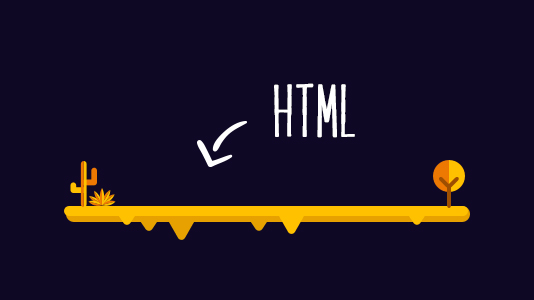
This is the layer which focuses on the core content of the web page by using rich semantic HTML markup. Rich Semantic HTML markup tags ensure a properly structured content which conveys required meaning and idea to the end user.
HTML tags such as nav, footer, article, aside etc. are used to ensure a well defined structure of the content. These tags are used to replace the common generic block div and inline tag span in order to achieve a clean web page with the evolving HTML5 standards of web design.
The generic object tag is also replaced by the audio and video tags, which carry their own meaning and give the browser native playback controls without a plugin.
The main aim of a Rich Semantic HTML markup is to allow text-based, speech-based, antiquated and robotic user agents to be able to navigate the content of the website diligently.
2. Presentation Layer: Styling Website With CSS
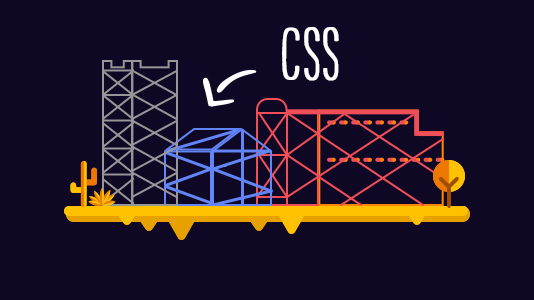
With the evolution of HTML5 with Semantic HTML markup, website styling have also seen an evolution in the face of CSS3. HTML5 and CSS3 blend together very well allowing the web page to become more attractive with colors, images, backgrounds, gradients, shadowing, text effects and lot many elements to enhance the overall User Experience.
While at times the web browsers might have their own different set of elements and media types defined in a specific way for their use at different instances.
Feature queries let you build this layer without guessing. The CSS @supports at-rule applies a block of styles only when the browser understands the declaration you test for, so you write the fallback rule first and put the enhancement inside the query. MDN records @supports as Baseline widely available and supported across browsers since September 2015, so the test itself is safe to depend on. A browser that fails the check keeps the fallback styling instead of rendering a broken layout.
The idea behind the second layer i.e. presentation is to enable the visuals based user agents to be able to display or alter the visual representation of the website's content. Also, this layer plays a major role in enhancing the User Experience (UX) by many folds.
3. Scripting Behaviors Layer: JavaScript
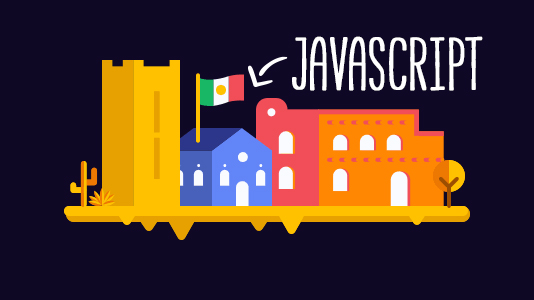
This layer accumulates the above layers together to build up a strategically smart web page. It focuses more on the performance of the web design, using unobtrusive JavaScript that layers behavior on top of markup that already works.
JavaScript enables the robustness of the features by maintaining them as separate modules. This allows the features to be independently available despite a few scripts not been able to run successfully due to browser compatibility issues.
This layer does not restrict the accessibility of the content instead it enriches the availability of content for a wider range of users.
JavaScript enables the user agents that are already capable of using it to provide the end users with maximum usability and an optimum user experience.
The above-explained 3 layers for website development using Progressive Enhancement technique will certainly help in achieving cross-browser compatibility. As Progressive Enhancement focuses on providing the bare minimum high-quality functionality to the end user with the addon enhancements for the users with higher versions of web browsers.
Using Progressive Enhancement as an approach for web development not only helps you in serving the purpose of the website by catering higher functionality to the end user, but also helps in SEO of the website by laying emphasis on the core content.
Key Takeaway: The three layers of progressive enhancement are rich semantic HTML markup for content, CSS for presentation, and unobtrusive JavaScript for behavior, and building them in that order gives every browser a working page before any enhancement loads.

How Do You Detect Browser Support Before Adding an Enhancement?
You test for the feature in code, and you run the enhancement only when the test passes. MDN documents four feature detection patterns for this. Use the in operator to check for a member of an object, as in if ("geolocation" in navigator). Call CSS.supports() to test a CSS declaration from JavaScript. Use the @supports at-rule to run the same test inside a stylesheet. Call window.matchMedia() to evaluate a media query in script. Each pattern returns a boolean, which keeps the fallback as the default path and makes the enhancement the branch. When a feature has no usable substitute, MDN points to a polyfill that supplies the missing behaviour in JavaScript instead.
Detection works better once the team writes down which browsers it supports. Browserslist stores that list in package.json or a .browserslistrc file, and it accepts Baseline queries such as baseline widely available, baseline newly available, and a year form such as baseline 2022. Autoprefixer, babel-preset-env, postcss-preset-env and stylelint-no-unsupported-browser-features all read that same list, so one declaration drives the build instead of four separate opinions.
That list can also fail your build. eslint-plugin-compat lints the browser compatibility of your code against your Browserslist targets and reports a Web API those targets do not support. By default it does not report an API you have already wrapped in a conditional check, so a correct feature detection clears the warning on its own. For stylesheets, the use-baseline rule in the @eslint/css plugin warns on properties, at-rules, functions, units and selectors that are not Baseline, with an available option that defaults to widely and also accepts newly or a year. Together these move progressive enhancement from a habit someone has to remember into a check that runs on every commit.
Key Takeaway: Feature detection runs an enhancement only when a boolean test for that feature passes, which keeps the fallback as the default path, and a Browserslist file plus eslint-plugin-compat turns that check into part of the build.
How Do AI Coding Agents Change Progressive Enhancement?
They move the browser support decision into your tooling, because an agent writes the enhancement and the fallback in one pass and you only read the result. A model answers from its training data, so it can reach for a CSS property or a Web API that is not supported everywhere yet, and it can just as easily reach for an old workaround when the platform already has a native solution.
Two projects hand the agent real compatibility data instead of leaving it to guess. The Chrome team publishes Modern Web Guidance, a set of agent skills that embeds web platform expertise and browser compatibility data into a coding agent. It covers 108 modern web features, split into 54 CSS and layout features, 21 HTML and DOM features and 33 JavaScript and API features, across 135 developer use cases. Its guidance separates a purely additive enhancement, which an older browser can safely skip, from a critical behavior that needs a low overhead fallback. That is the progressive enhancement rule written as instructions a machine can follow. It installs into Claude Code, GitHub Copilot CLI, Google Antigravity, OpenAI Codex and Vercel Skills, ships under Apache 2.0, and is still a preview release.
Mozilla covers the reference side. The MDN MCP server, announced on June 15, 2026, exposes MDN documentation and browser compatibility data to an agent over the Model Context Protocol, and MDN states that the server is experimental. Neither project removes the need to verify. Keep the use-baseline lint rule and the browser test in the pipeline, and treat agent output as a draft of the layer rather than proof that the fallback works.
Key Takeaway: An AI coding agent picks web platform features from its training data, so compatibility data has to reach it through a skill set such as Chrome Modern Web Guidance or the MDN MCP server, and the lint rule plus the browser test still decide whether the fallback holds.
Cross Browser Testing A Common Ground for Progressive Enhancement & Graceful Degradation
Irrespective of your pick out of Graceful Degradation and Progressive Enhancement there lies a common objective for adapting any of these 2 web development approaches i.e Cross Browser Compatibility.
In order to achieve the common goal a detailed Cross Browser Testing is vital to ensure that your website or web app runs seamless across modern as well as legacy browsers before making the website go live.
Baseline gives your team a shared rule for deciding what belongs in each layer. The Web Platform Baseline project marks a feature as newly available once it works in the core browser set of Chrome, Edge, Firefox and Safari across desktop and mobile, and marks that feature widely available after 30 months in the set, as MDN documents. Build the layers your users depend on from widely available features, treat newly available features as the enhancement, and test that enhancement path on older browser versions rather than assuming it falls back cleanly.
TestMu AI provides the right cross browser testing solutions, it is an AI-native test orchestration and execution platform that lets you perform manual and automated tests across 3000+ browser and OS combinations on real devices, so you can exercise the core layer and the enhancement layer on the browsers your users actually run.
- Real Time Test - You can perform live interactive testing across all major browsers and their assorted versions inside a VM hosted on their cloud servers. You can record your testing sessions, capture screenshot inside the running VM and can even push it to various bug tracking tools using TestMu AI Integrations.
- Automated Screenshot Testing - To capture bulk screenshots across various browsers in a single go.
- Responsive Testing - To test your RWD(Responsive Web Design) across various devices and screen sizes.
- TestMu AI Tunnel - To securely test your locally hosted websites over an encrypted tunnel connection.
There are many more features and integrations on the platform. Run the core layer and the enhancement layer through the same browser set so you can see which of the two actually breaks.
Key Takeaway: Cross browser testing on modern and legacy browsers before a website goes live is what proves that progressive enhancement or graceful degradation actually delivered cross browser compatibility, and Web Platform Baseline shows which features are safe for the core layer.
Related Posts:
1. Complete Guide On Creating Browser Compatible HTML And CSS
2. Automated Cross Browser Testing
3. Performing Cross Browser Testing with TestMu AI
4. Cross Browser Testing Strategy Explained in Three Easy Steps
5. Free Online Virtual Machine

Author

Akshay Pai
Blogs: 11


Akshay Pai is a community contributor with 10+ years of experience in building and delivering enterprise-scale AI and data-driven systems. He specializes in agentic AI, generative AI platforms, and cloud-native architectures, with hands-on experience designing systems that are production-ready, scalable, and resilient. As a Technical Architect and Project Manager, Akshay has led cross-functional teams across global projects and brings a strong focus on system reliability, performance, and quality-driven engineering practices. He holds a Bachelor’s degree in Information Technology.


Progressive Enhancement FAQs
Did you find this page helpful?
More Related Blogs
TestMu AI forEnterprise
Get access to solutions built on Enterprise
grade security, privacy, & compliance
- Advanced access controls
- Advanced data retention rules
- Advanced Local Testing
- Premium Support options
- Early access to beta features
- Private Slack Channel
- Unlimited Manual Accessibility DevTools Tests