

Power Your Software Testing with AI Agents and Cloud
The Native AI-Agentic Cloud Platform to Supercharge Quality Engineering. Test Intelligently and Ship Faster.


- TestMu AI (Formerly LambdaTest)
- /
- Blog
- /
- Migrate From qTest to TestMu AI Test Manager in One Click
Migrate From qTest to TestMu AI Test Manager in One Click
Move your entire qTest test library, including projects, folder structures, custom fields, attachments, and linked Jira requirements, into TestMu AI Test Manager without export files, mapping spreadsheets, or scripts.
Last Updated on:
TestMu AI Test Manager now supports migrating complete qTest projects in one click. Test cases, steps, folder hierarchies, custom fields, attachments, and linked Jira requirements all move over automatically.
Until now, moving off qTest meant weeks of manual work: CSV exports that flatten folder trees, custom fields rebuilt by hand, attachments re-uploaded one case at a time. That effort is why teams keep renewing tools they have already outgrown.
It now takes an instance URL, an API token, and a project selection. The migration runs in the background, stays read-only against your qTest data, and emails you when it is done. Start it on a Friday, and review your entire test library inside TestMu AI on Monday.
Why Migration Was the Blocker
Manual test case migration fails the same way every time:
- CSV exports flatten your folder tree - the hierarchy collapses into a single column that someone rebuilds by hand. Six months later, nobody can find anything.
- Custom dropdowns arrive as plain text - the values survive, but the constraints and the reporting built on them do not.
- Attachments do not export at all - downloading and re-uploading them means touching every test case, one at a time.
- Jira traceability simply breaks - the links that were hardest to establish are the first thing lost.
So migration projects sit in the backlog forever, and teams keep paying for a tool they have already decided to leave. One-click migration removes that specific problem. It is also the step that stalls most shortlists of qTest alternatives, long after the replacement has been chosen.
Start Migrating in 2 Steps
- Log in to TestMu AI, open Test Manager > Projects, click Import data, and select qTest. Enter your qTest instance URL and API token. Credentials are validated before anything runs.
- Pick one or more projects and click Start Migration. It runs in the background, survives page reloads, and emails you on completion. Migrated projects appear tagged qTest Migrated.
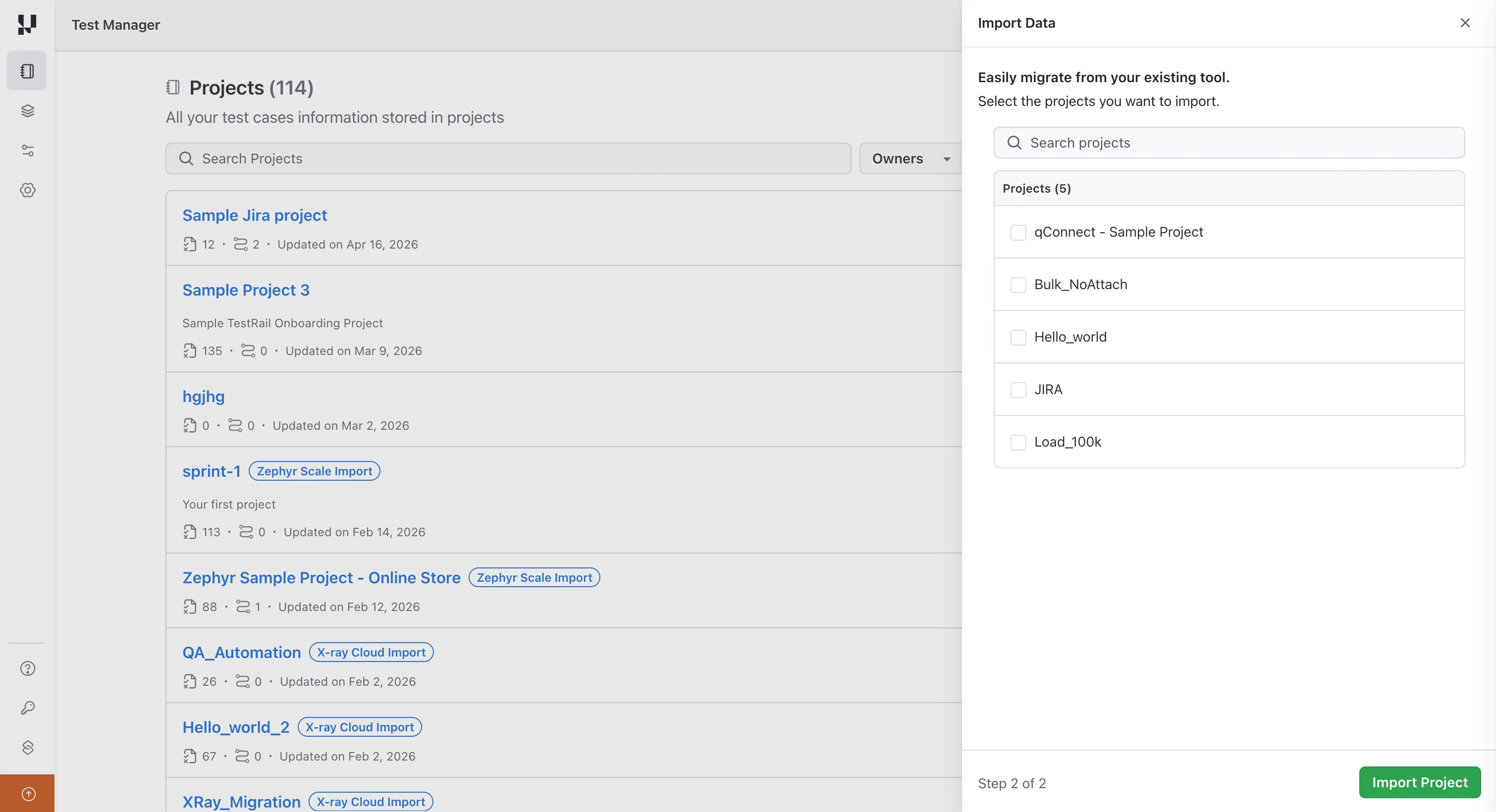
One thing to know: the migration covers test design data. Execution history, meaning runs, results, and defects, stays in qTest, so keep that accessible if you need it for audits. The migration guide covers prerequisites, scope, and troubleshooting in full.
qTest is the fourth tool with a one-click path into Test Manager, alongside TestRail, X-Ray, and Zephyr Scale.
What One Click Migration Does
The migration reads your qTest projects through the qTest API and rebuilds them inside Test Manager, structure and all:
- Folder hierarchy preserved - the qTest module and folder tree is recreated with the same ordering, so nobody has to relearn where things live.
- Custom fields created automatically - dropdowns, multi-selects, user fields, and checkboxes are detected and created at the org level, with required-field flags intact.
- Attachments carried over - files at the test case and step level are pulled from qTest and stored in TestMu AI. Inline images inside step content are re-uploaded with refreshed links so nothing renders broken.
- Jira links kept - if your Jira instance is integrated with TestMu AI, linked requirements on test cases carry over.
- Traceability back to source - original qTest IDs are stored as external IDs and tags, so every migrated case can be traced to where it came from.
- Read-only on the qTest side - your source data is never modified. You can validate everything in Test Manager before committing to anything.
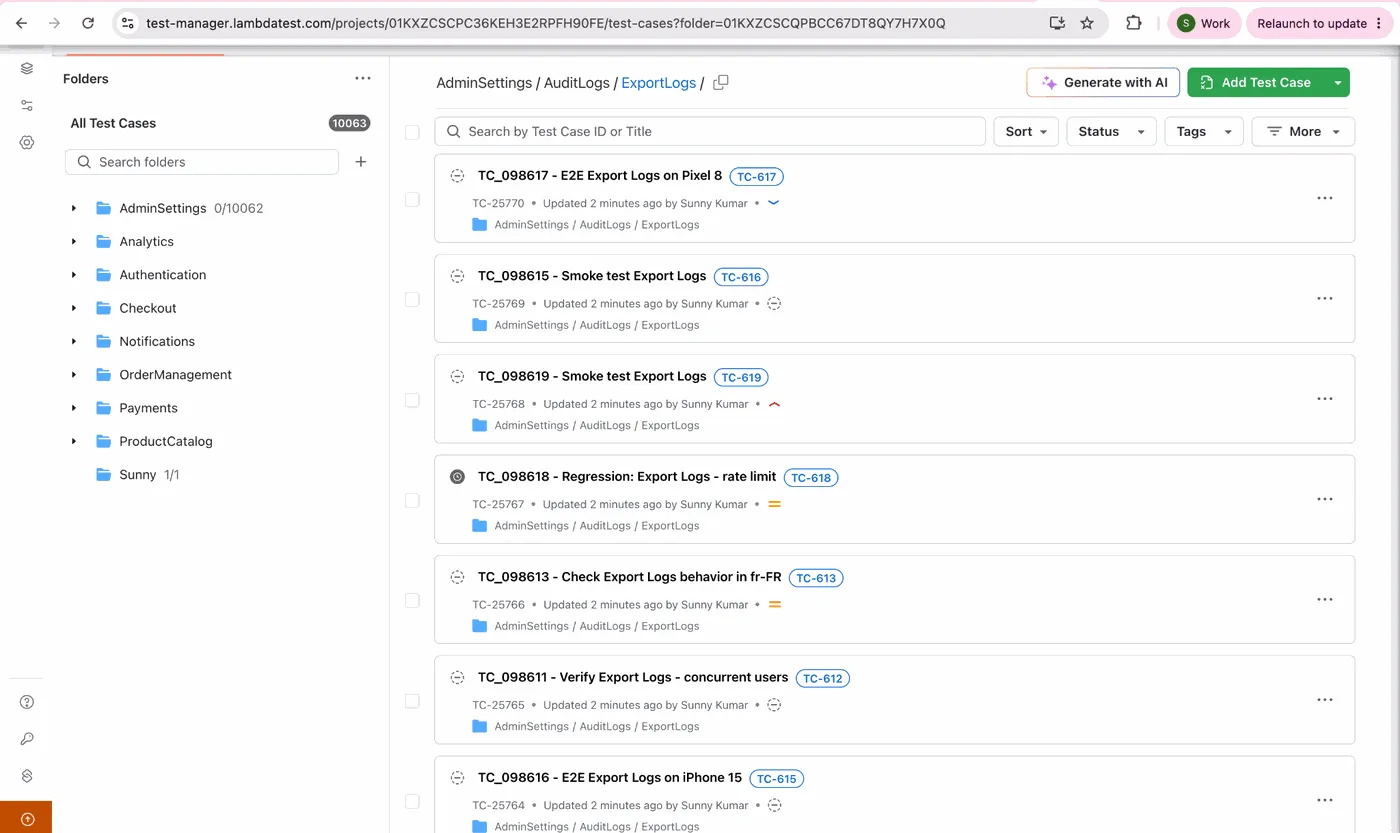
In the migrated repository above, the nested folder path survives on every one of the 10,063 test cases, and each case carries two identifiers: its new Test Manager ID and the original source ID as a tag beside the title. That pairing is what makes the migration auditable months later, without a mapping spreadsheet somebody has to keep alive. That pairing is what keeps test case management auditable after a migration.

Note: Migrate a real qTest project today and evaluate TestMu AI against your actual test cases, not sample data. The migration is read-only, so nothing in qTest changes. Try it now
Why Choose TestMu AI Over qTest
Migration answers how to move. Here is why teams make the move, on the capabilities that matter most once your test cases arrive. Every qTest column entry below reflects what Tricentis states on its own live product pages as of August 2026. The Test Manager documentation covers the import options in detail. Migration is the moment most teams also re-examine their wider test management setup.
| Capability | TestMu AI Test Manager | qTest |
|---|---|---|
| End-to-end testing | Authoring, execution, and reporting in a single platform | Authoring, execution, and reporting in-platform, but automated end-to-end runs orchestrate third-party frameworks or Tosca |
| AI test case generation | AI-native, from text, PDFs, audio, video, images, Figma flows, and Jira tickets | Agentic Test Creation, built in, from requirements and images |
| Manual + automated unified | One dashboard | Insights dashboards report manual and automated runs together, broken out by test type |
| Cross-platform execution | Built-in cloud with 3,000+ browser and OS combinations and 10,000+ real devices | Plugin / API only; no browser or device cloud of its own, so runs execute on your own Automation Host machines |
| Insights and reports | Real-time dashboards | Real-time analysis with customizable cross-project dashboards, heat maps, and drill-down |
| Pricing | Scalable and transparent | Quote-only |
For the full feature-by-feature and pricing breakdown, see the TestMu AI vs qTest comparison.
Summing Up
The hardest part of leaving qTest was never deciding to leave. It was the migration project nobody wanted to own. That project is now a background job: connect, select, and review the results when the email arrives, with your source data untouched the whole way through. If you are weighing the field more broadly, our roundup of test management tools sets out the comparison criteria.
If your test cases have been stuck in qTest because moving them felt like a quarter of manual work, that reason is gone. Log in to Test Management Platform and open Import data to see your qTest library inside TestMu AI, with the migration guide open alongside it for prerequisites and troubleshooting.
If you are rethinking process at the same time as tooling, the test management fundamentals are a good place to start once your cases have landed, and agentic test management covers what the agent stack does with them afterwards.
Author

Bhavya Hada
Blogs: 28


Bhavya Hada is a Community Contributor at TestMu AI with over three years of experience in software testing and quality assurance. She has authored 20+ articles on software testing, test automation, QA, and other tech topics. She holds certifications in Automation Testing, KaneAI, Selenium, Appium, Playwright, and Cypress. At TestMu AI, Bhavya leads marketing initiatives around AI-driven test automation and develops technical content across blogs, social media, newsletters, and community forums. On LinkedIn, she is followed by 4,000+ QA engineers, testers, and tech professionals.
Reviewer

Abhishek Mishra
Reviewer
Abhishek Mishra is a Technical Product Manager at TestMu AI, where he owns Test Manager, the test management product. He has over 8 years of experience in product management and market analysis. His expertise spans across AI-native software testing, product strategy, and analytics. Previously, Abhishek served as the Product Lead at IndiaClan and co-founded Gartley618 Technologies, where he led innovative projects in quantitative trading and blockchain. He holds a B.Tech degree.


qTest Migration FAQs
Did you find this page helpful?
More Related Blogs
TestMu AI forEnterprise
Get access to solutions built on Enterprise
grade security, privacy, & compliance
- Advanced access controls
- Advanced data retention rules
- Advanced Local Testing
- Premium Support options
- Early access to beta features
- Private Slack Channel
- Unlimited Manual Accessibility DevTools Tests