

Power Your Software Testing with AI Agents and Cloud
The Native AI-Agentic Cloud Platform to Supercharge Quality Engineering. Test Intelligently and Ship Faster.


- TestMu AI (Formerly LambdaTest)
- /
- Blog
- /
- Getting Started With Nuxt Testing [A Beginner’s Guide]
Getting Started With Nuxt Testing [A Beginner’s Guide]
How does Nuxt Testing work? How to perform cross browser testing for Nuxt.js applications? Let’s explore it in detail.
Last Updated on:
On This Page
- What has captivated the audience towards Nuxt.js applications?
- How does the Nuxt.js framework work?
- Differences Between Vue and Nuxt Frameworks
- Different approaches to test Nuxt.js applications
- Different methodologies to test Nuxt.js applications
- Nuxt Test Utils
- How to perform Nuxt testing using TestMu AI?
Nuxt testing checks that a Nuxt.js application renders correctly, routes properly, and behaves the same way across browsers and devices. It combines unit tests, component tests, and end-to-end cross browser testing run through Playwright, covering the same workflow this article walks through with screenshots and recorded videos. This guide covers how the Nuxt.js framework works, how it differs from Vue, and how to set up and run Playwright tests for a Nuxt project.
TL;DR
- Nuxt testing confirms that a Nuxt.js application renders, routes, and behaves consistently across browsers and devices.
- Unit testing, component testing, and end-to-end testing are the three methodologies available for testing a Nuxt.js application.
- Playwright runs the end-to-end layer against a real browser and saves screenshots and recorded videos of each test run.
- Vue runs entirely on the client, while Nuxt.js adds server-side rendering, better SEO, and automatic code-splitting.
- Composables like useFetch need the Nuxt-runtime environment from @nuxt/test-utils, which a plain Vue unit test cannot reproduce.
- TestMu AI runs manual and automated cross browser testing over an online browser farm of 3000+ browsers and operating systems.
What has captivated the audience towards Nuxt.js applications?
Nuxt.js is winning laurels among the business audience. There are umpteen reasons for its success, be it simplified options to conduct web testing in case of Nuxt testing or advanced usability features.
Some of its unique features are:
- Server-side rendering.
- Improved SEO performance.
- Improvements in managing the meta tags.
Here are the top reasons why Nuxt.js is a great choice for your next web applications:
- Create universal web applications without any hassles.
- The same code can be shared between the client and server so that you can focus on the overall logic related to the web application.
- It exposes import.meta.client and import.meta.server so your code can branch on whether it is running on the client or the server.
- It provides a starter template to help you start a project.
- You can manage your code structure in the best possible manner. This means that there are no hassles when it comes to organizing your web application.
Perform Nuxt testing flawlessly. Try TestMu AI Now!

How does the Nuxt.js framework work?
The Nuxt.js maintains its contents in a folder structure mechanism. This means that some different folders and files will be used to get the work done. If you are a newbie developer who is not familiar, then it is important to understand the folder structure before you start practically implementing the concepts.
These are the following elements that you should be aware of before you move on to Nuxt testing.
- Assets: This is the folder where you can see all the un-compiled files such as font files, images, JS files, etc.
- Components: This contains all the reusable components the developers can create
- Layouts: This allows you to store the application-specific layouts. This can be useful when designing an application with different layout requirements.
- Middleware: This is the folder where you can place your essential JS files before a page is rendered.
- Pages: This is a folder specific to developer use.
- Plugins: This folder allows storing files that should be running before mounting the Vue.js root application.
- nuxt.config.js: This file allows you to handle configuration settings for your application.
Application Types Supported in Nuxt.js
Before we delve deeper into Nuxt testing, It allows developers to create three different application types, depending upon the development requirements:
- Static Generated Pages These applications do not require any API requests to fetch page content, which means that most of the content is already available in the HTML file itself. A great example of a static site is a product landing page where the content is already available once loaded.
- Single Page Application Most JavaScript frameworks like Angular, React, etc. are single-page applications with content populated with fast transitions. You can use HTML5 history API or location hash for routing purposes.
- Server-Side Rendering This is a technique developers use to display and fetch client-side data on the server.
Limitations of Nuxt.js framework
Here are some limitations you should know before using the Nuxt.js framework for web development.
- It has a smaller community, which means that there are fewer resources available online. The product documentation also needs improvement in the long run.
- The overall high traffic can impact the server performance.
- Some of the solid plugins or components must be maintained well so that third-party integrations can be performed seamlessly.
Differences Between Vue and Nuxt Frameworks
We discussed how the Nuxt.js framework offers great benefits for front-end development. But two frameworks are being talked about. These two frameworks handle the logic differently. Vue is running on the client-side while Nuxt is not. Nuxt.js applications were not a preferred choice in the past as they faced a lot of criticism from experts that it is not ready for enterprise-scale apps.
However, it has improved on its existing capabilities and has made a mark on the development ecosystem. There will always be challenges when you are trying to implement any new framework, but once you are familiar with the functionalities, then it becomes a lot easier to execute the concepts in real-time. Some features such as better SEO, faster development, and automatic code-splitting, which are possible with the Nuxt framework, are not possible with the Vue framework.
Different approaches to test Nuxt.js applications
Cross browser testing is a method of quality assurance used to perform web application testing across multiple browsers. This is done to ensure that the overall functionality is validated across a range of devices and operating systems to check its compatibility.
It ensures:
- The look and feel of the pages remain the same in different browsers.
- The overall functionality is working as expected.
Cross browser testing is usually performed by the QA team, who know which functional testing tools to use. Other stakeholders can also contribute to this activity if the need arises.
Nuxt testing can be performed in two ways:
- Manual Testing
- Automated Testing
Manual testing is all about identifying bugs by executing the test cases on different browsers and operating systems manually. The bugs reported are closed during that iteration. It is impossible to cover all the major browsers, and this can be time-consuming and costly.
Automated testing involves executing the same set of test cases multiple times on different browsers. This fast and effective approach where automation testing tools can save time and effort. If you are looking to perform cross browser testing, then this is the best approach going forward.
Different methodologies to test Nuxt.js applications
Apart from using the specialized cross-browser testing platform, other supported methods can be implemented for testing the Nuxt.js application. The following three types of Nuxt testing can be performed:
- Unit Testing: Unit testing is performed by developers to test the procedures or impacted functionalities. You can use many unit testing frameworks to perform it.
- Component Testing: Component testing is used to perform usability testing of each component.
- End-to-End(E2E) Testing: In end-to-end testing, you perform the testing of the entire application from start to finish.
Time to simplify end-to-end tests. Try TestMu AI Now!

How to perform Nuxt testing using Playwright?
You can use the Playwright framework to perform cross browser testing of your Nuxt.js application. You can use Playwright as a testing framework for your testing requirements, but having a basic knowledge of Nuxt.js will always be a great value add.
- You need to install a new Nuxt project and all the required dependencies.
- Once the project is installed, it is required to build a reusable component. You can always create your components by following standard coding. We are building a reusable component named as JobRoles.vue:
<template> <li> <nuxt-link :to="link" class="block hover:bg-gray-50"> <div class="px-4 py-4 sm:px-6"> <div class="flex items-center justify-between"> <p class="text-md font-medium text-blue-500 truncate"> {{ title }} </p> <div class="ml-2 flex-shrink-0 flex"> <p class="px-2 inline-flex text-xs leading-5 font-semibold rounded-full bg-green-100 text-green-800"> {{ salary }} </p> </div> </div> </div> </nuxt-link> </template> <script> export default { props: { title: { type: String, default: '' }, salary: { type: String, default: '' }, link: { type: String, default: '' } } } </script> - We will now use the JobRoles component as a template:
pages/index.vue <template> <div class="max-w-sm mx-auto mt-8"> <div> <h2 class="text-xl"> Job Board </h2> <span class="text-xs block pb-4">Awesome Jobs for awesome IT people</span> </div> <div class="shadow overflow-hidden sm:rounded-md"> <ul id="job-list" role="list" class="divide-y divide-gray-200"> <JobRoles v-for="job in jobs" :key="job.title" :title="job.title" :salary="job.salary" :link="job.link" /> </ul> </div> </div> </template> <script> export default { data () { return { jobs: [ { title: 'Java Developer', salary: '90000', link: '/job/java-developer' }, { title: 'Devops Developer', salary: '120000', link: '/job/devops-developer' }, { title: 'Reactjs Developer', salary: '21000', link: '/job/reactjs-developer' } ] } } } </script> - Once you run the app and view the changes in the browser, the following output is displayed:
Job Board Awesome Jobs for awesome IT people Java developer 90000 DevOps Developer 120000 Reactjs Developer 21000 - You need to set up your test environment. Create a predefined folder structure to set up your test infrastructure.
- For the test run, you can add a test script to the package.json. Once the required test scripts are added, you can run your tests using the following command:
yarn test
Now, you can build your end-to-end test setup with a Playwright test runner. This means you are performing browser testing instead of unit testing. You can add additional libraries based on your requirements. You can start writing your tests.
Now you can test whether the changes related to the job board are correct or not. You can also save screenshots and even record videos that can be used for future reference. Once all the changes are validated, you can execute your tests. You can also perform automation testing for your test results so that you do not have to perform additional steps every time.
If you are new to Playwright, you can watch this video to learn how to set up the Playwright test automation framework and get started with Playwright testing.

Subscribe to the TestMu AI YouTube channel if you want the most reliable content on testing concerning cross browser compatibility, responsiveness testing, and learning about the most industry-loved methods for testing.
Performing Nuxt testing using third-party tools
There are many Nuxt testing tools that can help you quickly take screenshots of your site in a range of browsers and versions that you are choosing. The great part about such tools is their free-of-cost availability. This works best when you are working on simple content pages.
You can also use codeless automation testing tools, which allow you to automate repetitive tasks across multiple browsers. If you sign up, you can find several demo test suites that can help you understand the tool much better. You can have a free and paid version of this tool based on your requirements.
How Does @nuxt/test-utils Change Nuxt.js Testing Today?
@nuxt/test-utils changes Nuxt.js testing today by adding an official Nuxt-runtime test environment for composables like useFetch that a plain Vue unit test cannot reproduce, closing a gap this article's unit and component testing methods do not cover on their own. The official Nuxt testing documentation splits tests into two locations and lets you choose the runner for each.
- test/unit/ tests: run in a plain Node environment for speed, without starting the Nuxt runtime.
- test/nuxt/ tests: run inside a simulated Nuxt runtime so composables, NuxtLink, and route middleware behave the way they do in the browser.
- DOM environment choice: happy-dom or jsdom render the page for a Nuxt-runtime test, with Vitest as the supported runner for that environment.
- Runner choice for end-to-end tests: Vitest, Cucumber, Jest, or Playwright can each run end-to-end tests, though only Vitest currently works inside the Nuxt-runtime environment itself.
- Built-in Playwright support: @nuxt/test-utils also uses Playwright under the hood for full end-to-end browser tests, in addition to the Playwright setup this article walks through separately.
These options sit alongside the Playwright walkthrough covered earlier in this article, so a team can add Nuxt-runtime coverage without replacing existing unit and end-to-end tests.
How to perform Nuxt testing using TestMu AI?
Looking for a complete end-to-end platform for cross browser testing your Nuxt.js application? This is when you can use a unified platform such as TestMu AI that helps you to automate your test scenarios. It is a cloud-based cloud testing tool that allows you to perform seamless testing across multiple browsers, operating systems, and devices.
TestMu AI allows you to perform cross browser testing at scale over an online browser farm of 3000+ browsers and operating systems.
Here are some great features that make the TestMu AI platform a trusted choice for organizations worldwide:
- Live testing of your websites, web apps, and mobile apps.
- Automated browser testing using frameworks like Selenium, Cypress, Playwright, Puppeteer, etc.
- Real device cloud to test web and mobile apps.
- Mobile app test automation using frameworks like Appium, Espresso, and XCUITest.
- Get 70% faster execution with HyperExecute. Watch this webinar to know how HyperExecute can help businesses achieve quicker time-to-market by intelligently reducing the test execution time.
- Perform responsive testing and smart UI testing.
- You can perform local page testing so your application or website can discover the issues before they are deployed onto the production environment.
- You can perform geolocation testing from different locations, indicating that different teams can easily collaborate to deliver exceptional outcomes.
The features mentioned above indicate that the TestMu AI platform is here to make an impact in the long run. It means providing the right cloud-based platform so that development and testing teams can perform testing intelligently.
You can also compare other cross browser testing tools available online for testing across multiple browsers.
TestMu AI is still far ahead of its competitors regarding performance and end-user experience. When you are using cloud-based technology, you can save additional costs when it comes to IT infrastructure and standalone deployments. This means you are not required to set up different teams for test design, infrastructure, and deployment. The cloud-based approach is an end-to-end solution for infrastructure and deployment requirements.
Let us try and understand how these two different testing approaches can be implemented in the TestMu AI platform:
- Manual Cross Browser Testing The manual testing approach, in contrast to the automation testing approach, is all about a human intervention that takes a lot of time and effort. You must decide on the test cases executed across multiple devices and operating systems. Once the test cases are finalized, you must execute them on different browsers and operating systems. This type of testing can be handy when the testing requirements are not that complex and you are well aware of the testing scope. In the case of an iterative development approach where development and testing go hand in hand, it becomes a lot more challenging to perform manual testing because the system functionality changes drastically. We can then automate our testing requirements to achieve the desired results.
- Automation Cross Browser Testing Automated browser testing leads the way in testing complex web and mobile applications. TestMu AI allows you to monitor and track your automated builds to check your application’s progress in real-time. It all comes down to choosing the right automation tool based on your testing requirements.
Performing automated Nuxt testing using TestMu AI
Here is the step-by-step procedure to kickstart configuration for automated cross browser testing using TestMu AI:
Step 1: Sign up or Log in to your TestMu AI account.
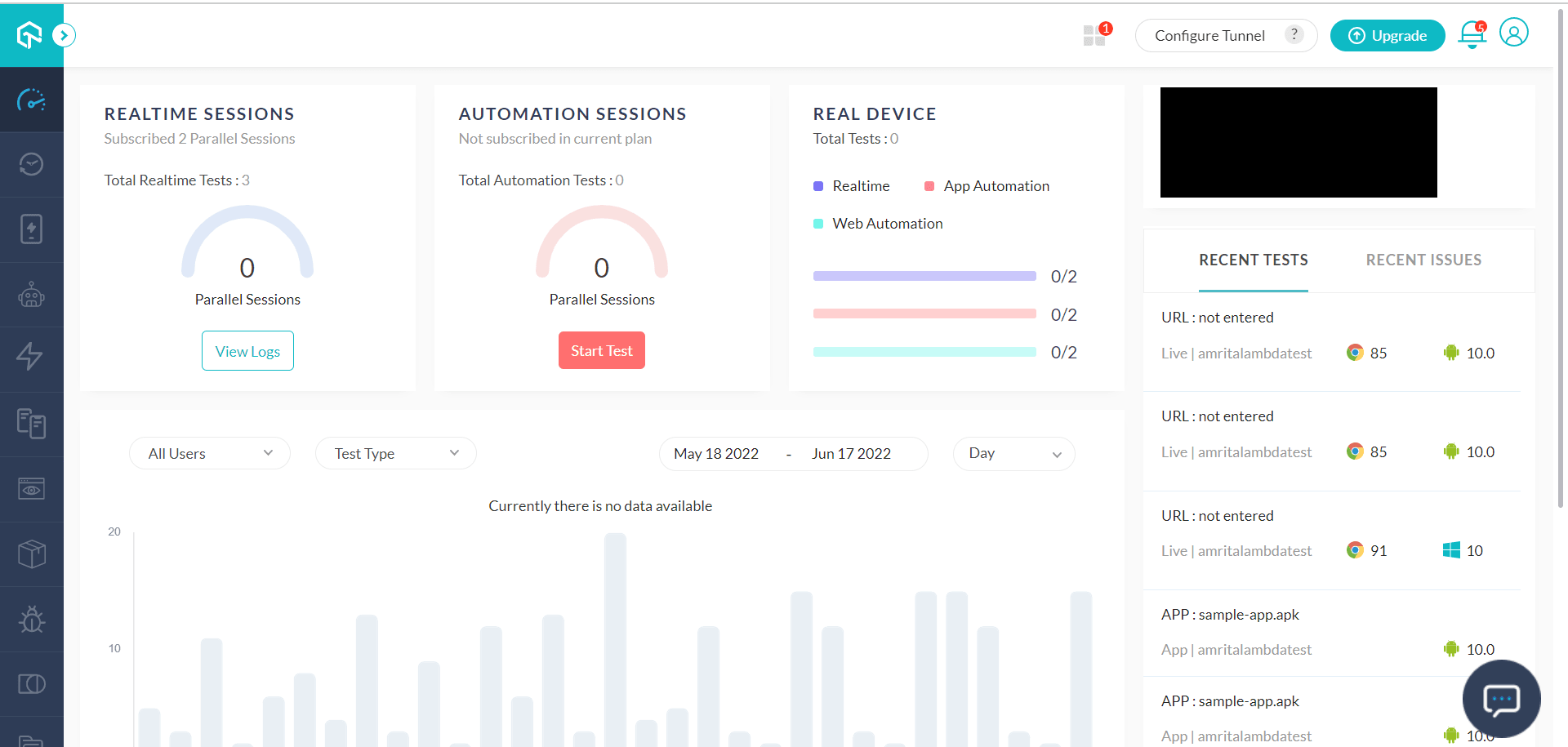
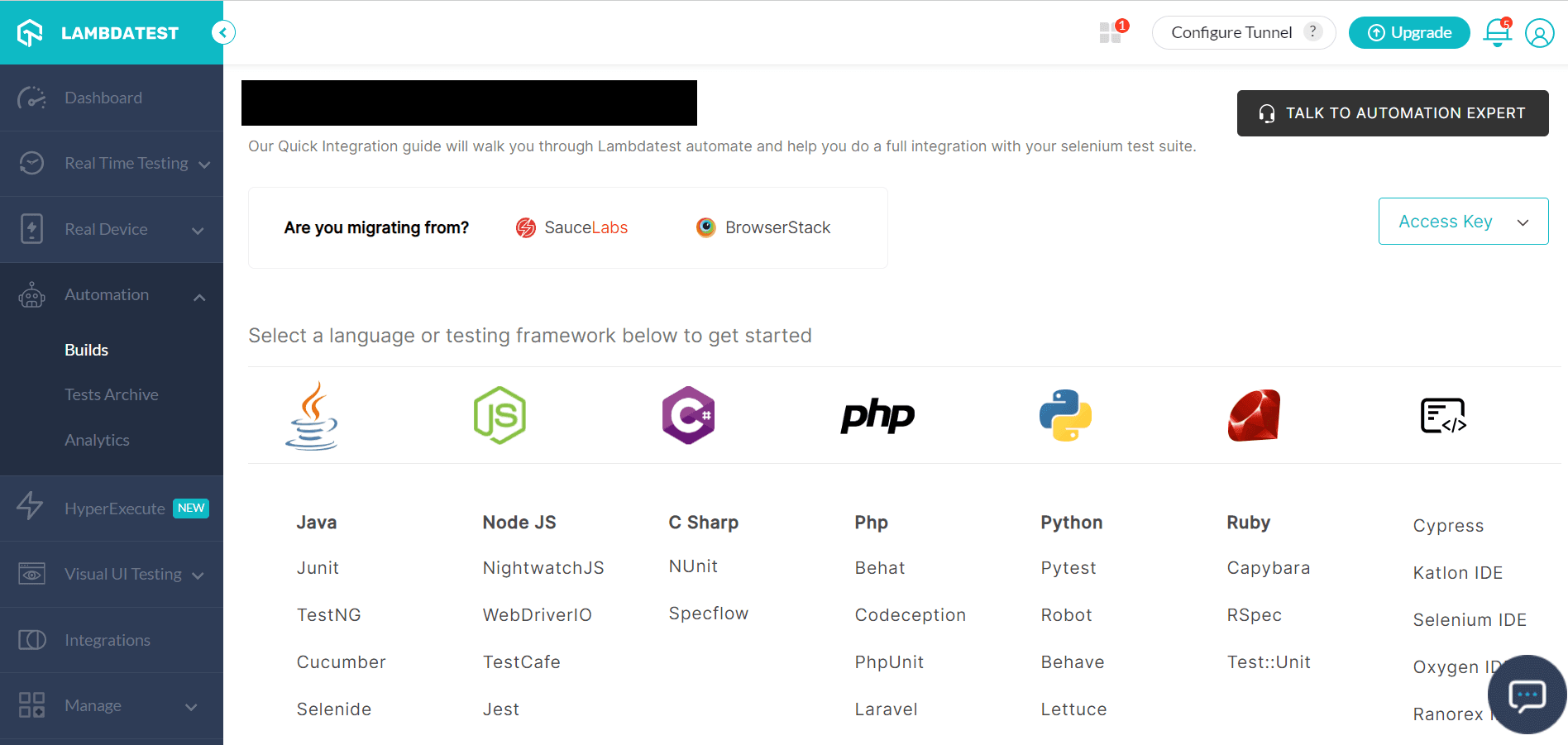
Step 2: You can click the Automation tab in the left navigation, which allows the following options:
- Builds
- Test Archive
- Analytics
You can migrate your changes from SauceLabs, BrowserStack or Headspin. If not, you can select a language or testing framework from the options available on the UI.
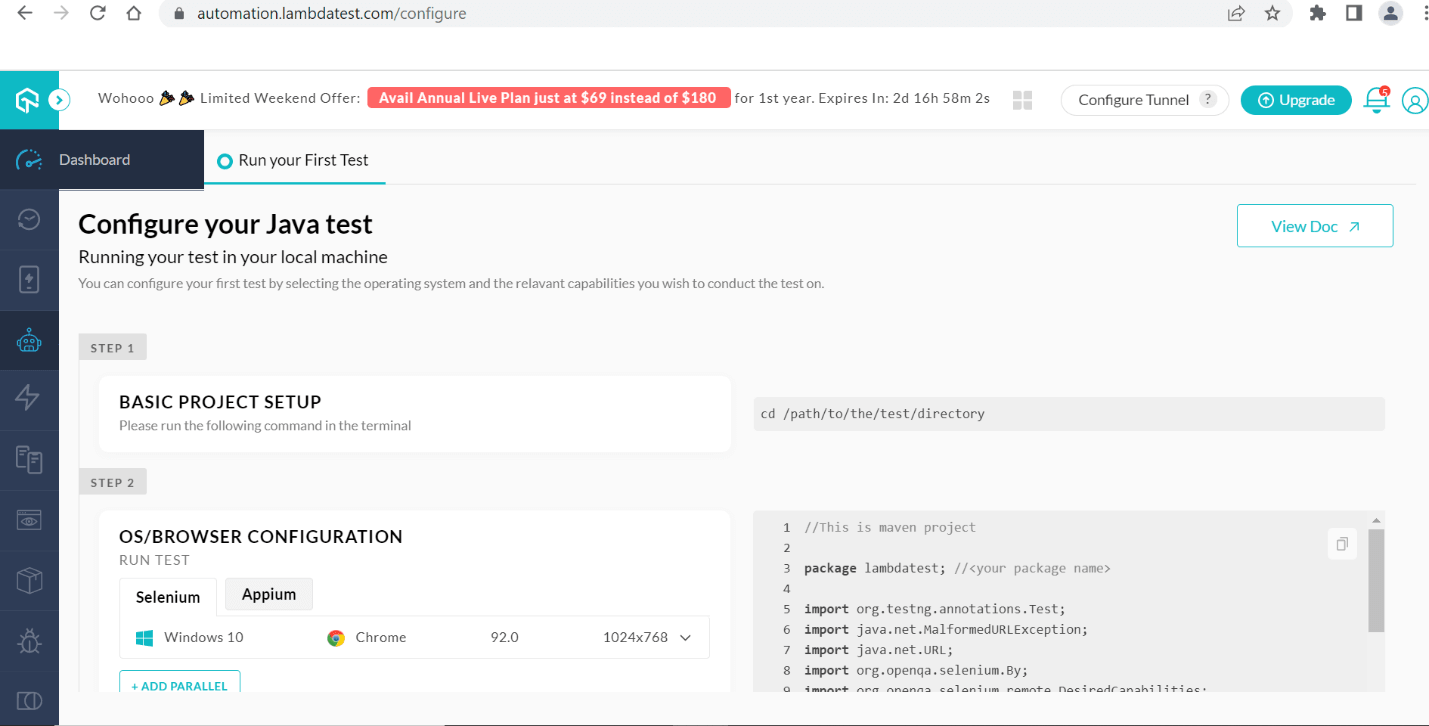
Step 3: If we select Java as the language, you must configure the project setup and OS/Browser configuration using the following screen. You can execute your test case by configuring the required details.
Now that you know the dynamics behind Manual and Automation testing, you can explore the TestMu AI platform for performing cross browser testing of your Nuxt.js applications. It is always preferable to automate your test requirements for better system performance and productivity.
Performing manual Nuxt testing using TestMu AI
If you want to skip automation testing, TestMu AI allows you to perform cross browser testing using different browsers and operating systems instead of depending upon different testing frameworks. You can get it done in a few steps in a shorter time.
The following options are provided under Real Time Testing:
- Browser Testing
- Mobile App (Virtual)
- LT Browser
You can perform cross browser testing on either desktop or mobile devices. Follow these steps to perform online browser testing on virtual machines:
Step 1: Sign up or Log in to your TestMu AI account.
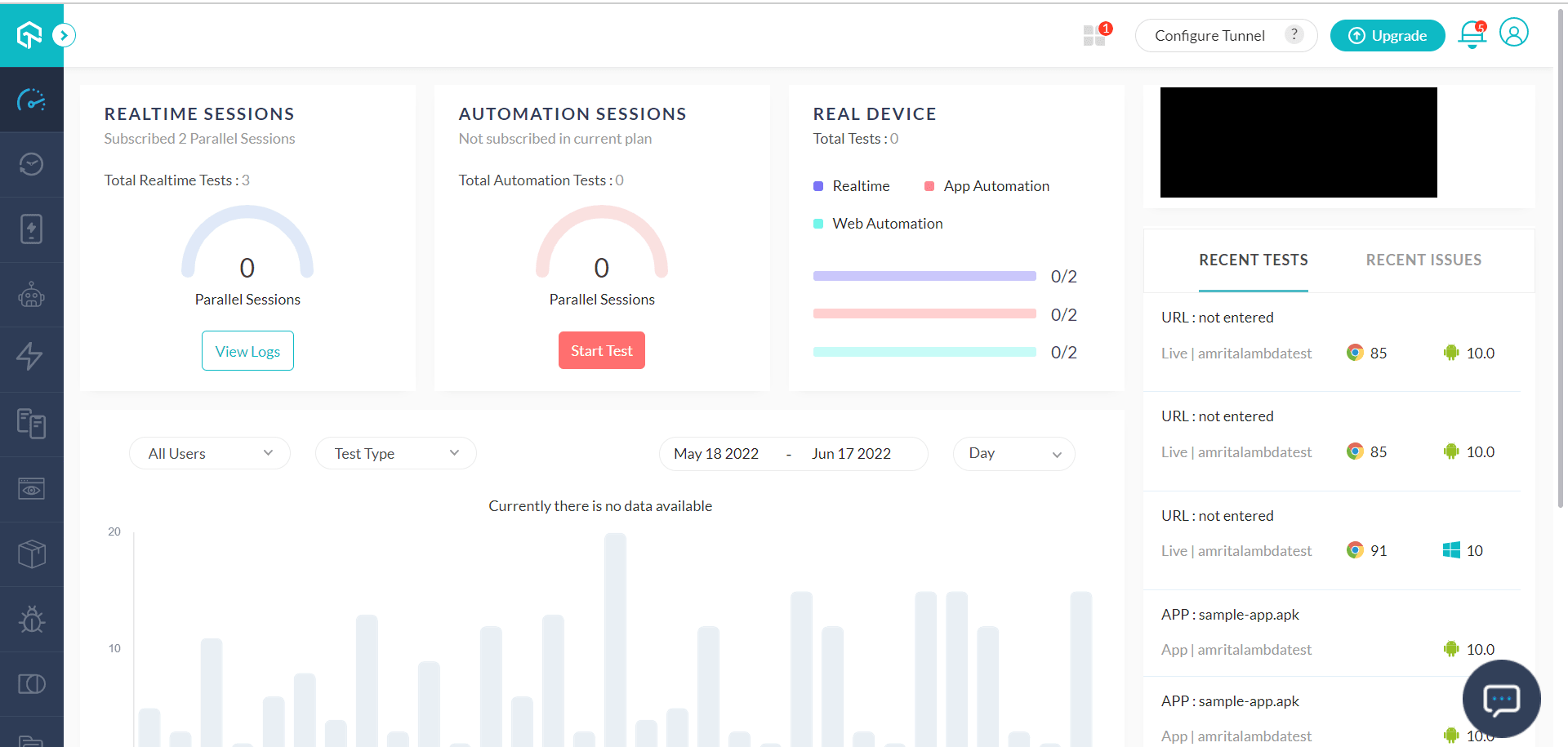
Step 2: Go to Real Time Testing -> Browser Testing. Select the browser, OS, and resolution from the available options.
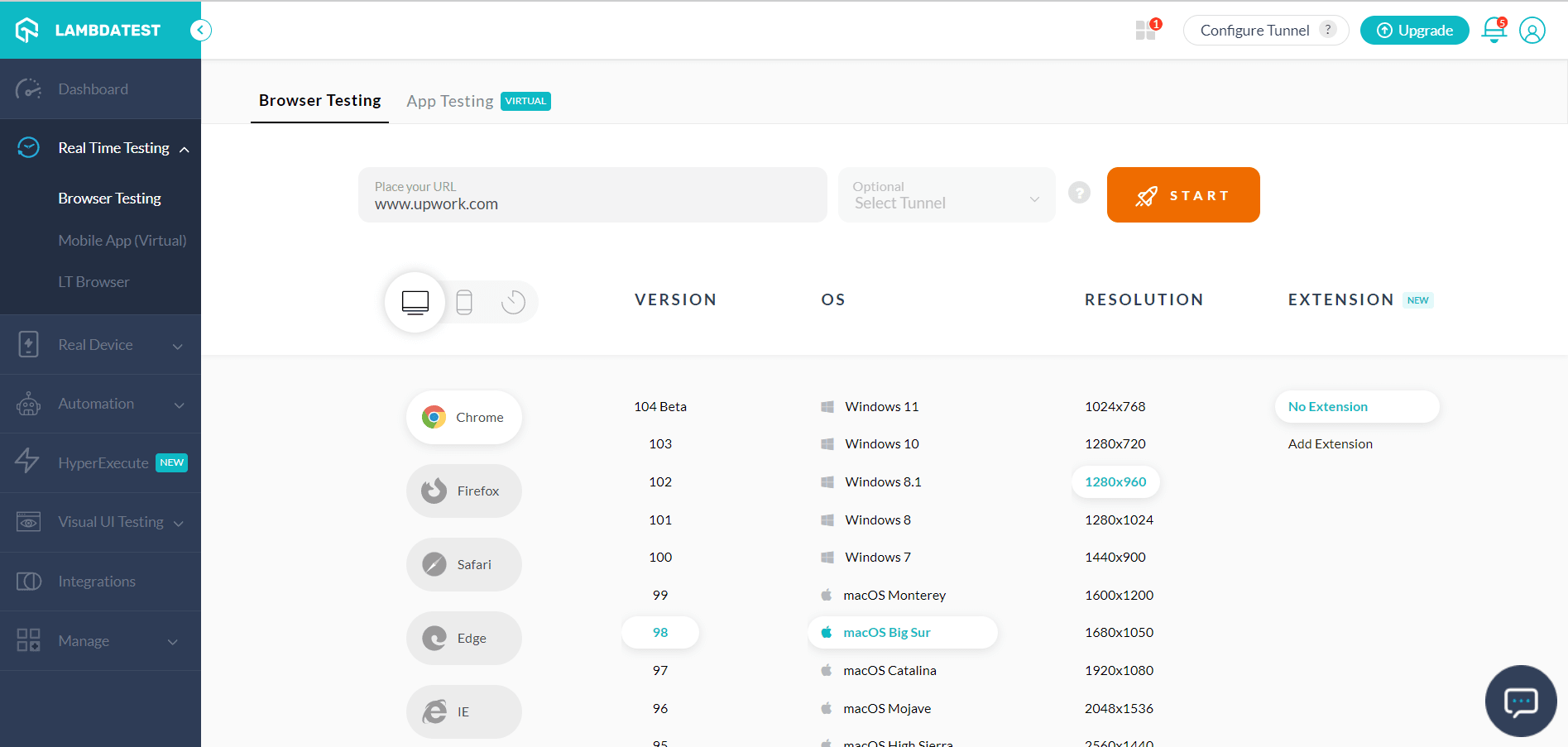
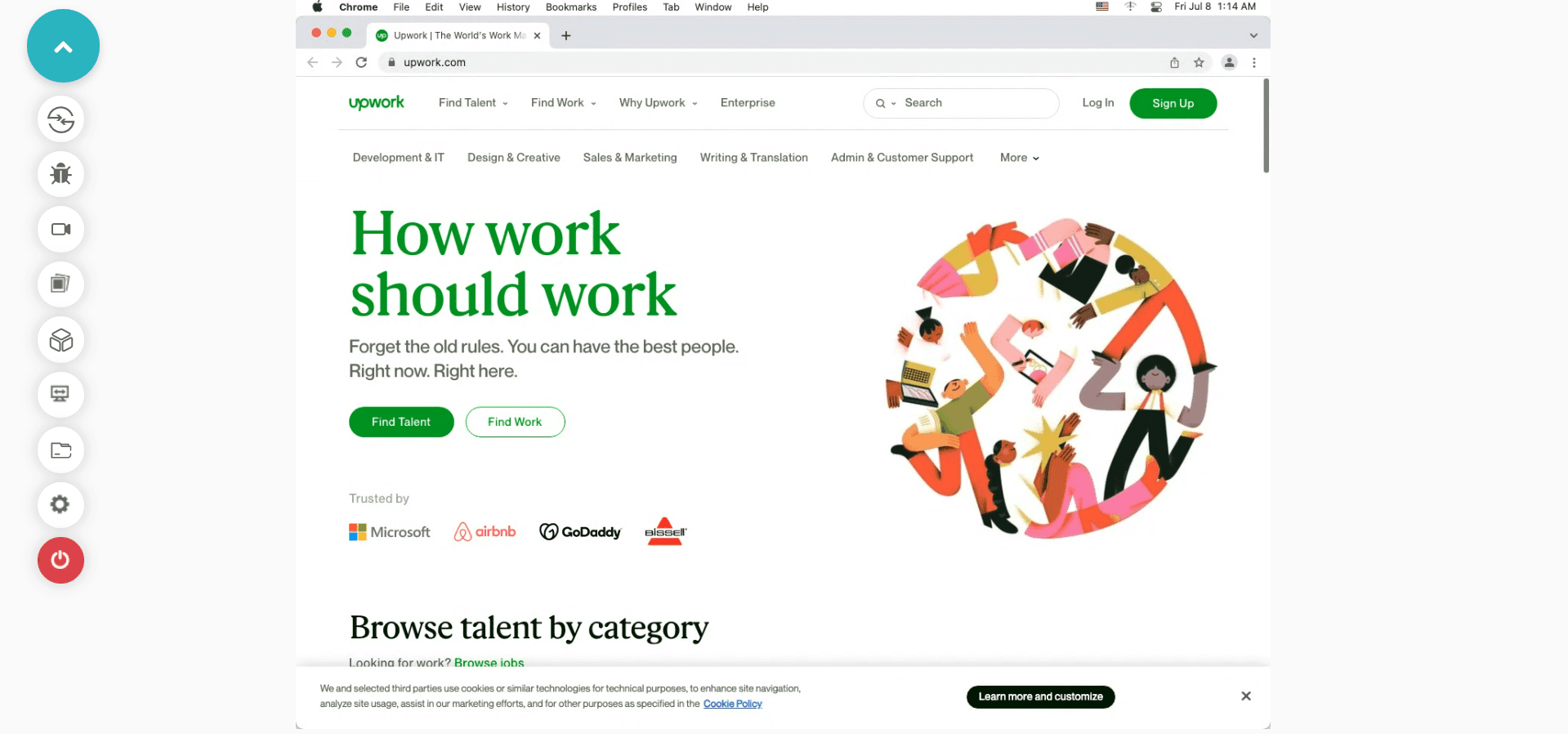
Step 3: Once all the required details are entered, click START. You can now perform Nuxt testing on your selected Nuxt website.

Conclusion
We have discussed how you can perform cross browser Nuxt testing of your Nuxt.js application using Playwright, specialized tools, and the TestMu AI platform. The Playwright is a testing framework that helps you to perform end-to-end testing. TestMu AI is a complete platform that has simplified the way we perform testing. From browser testing to automation to using a visual testing tool, it helps organizations achieve their desired testing outcomes quickly.
If you are an established organization or a startup looking for a comprehensive testing solution, you can try TestMu AI. You can request a demo or talk to the technical team so that they can assist you better in implementing the technical requirements. The global customer base clearly shows that they believe in providing a world-class end-user experience worldwide. Nuxt testing is all about making your website user-friendly and simple to use.
Author

Irshad Ahamed
Blogs: 11


Irshad Ahamed is a Technical Writer and Information Architect with over 4 years of experience working across notable companies like Amazon, IBM, and Symantec. He specializes in crafting high-quality documentation, technical writing, and content strategies for software development, APIs, and process documentation. Irshad’s expertise spans across product documentation, creating instructional content, and collaborating with cross-functional teams to ensure clear, concise, and easily understandable outputs. His certifications include PMI-ACP and Camtasia 2019 Essentials.
Reviewer

Srinivasan Sekar
Reviewer
Srinivasan Sekar is Director of Engineering at TestMu AI (formerly LambdaTest), where he leads engineering and open-source initiatives behind the Selenium and Appium automation grid and owns TestMu AI's MCP Server. A committer to Appium and a contributor to Selenium, WebdriverIO, Taiko, and AppiumTestDistribution, he brings over 15 years of experience in quality engineering and open-source technologies. He is the author of the Apress book 'The MCP Standard: A Developer's Guide to Building Universal AI Tools with the Model Context Protocol,' a Certified Kubernetes and Cloud Native Associate, and an international conference speaker. Before TestMu AI he spent over eight years at Thoughtworks as a Principal Consultant and Quality Architect. Srinivasan holds a B.Tech in Information Technology from Anna University.


Nuxt Testing FAQs
Did you find this page helpful?
More Related Blogs
TestMu AI forEnterprise
Get access to solutions built on Enterprise
grade security, privacy, & compliance
- Advanced access controls
- Advanced data retention rules
- Advanced Local Testing
- Premium Support options
- Early access to beta features
- Private Slack Channel
- Unlimited Manual Accessibility DevTools Tests