

Power Your Software Testing with AI Agents and Cloud
The Native AI-Agentic Cloud Platform to Supercharge Quality Engineering. Test Intelligently and Ship Faster.


- TestMu AI (Formerly LambdaTest)
- /
- Blog
- /
- Virtualization in Software Testing: How It Works
Virtualization in Software Testing: How It Works
Virtualization creates a virtual version of an operating system, storage, server, network, or desktop instead of the physical one. A tester runs that virtual system on existing hardware and builds the exact memory, OS, and browser configuration a test needs.
Last Updated on:
On This Page
- What Exactly is Virtualization ?
- Various virtualization techniques
- What happens when you virtualize software testing?
- How virtualization in software testing benefits you?
- What is service virtualization in software testing?
- How do AI coding agents use virtualization in software testing?
- Problems you can face while virtualizing software testing
Virtualization in software testing runs a virtual operating system, server, or desktop on existing hardware so one machine can cover many test configurations. A hypervisor creates and runs those virtual machines, and a crash inside a virtual environment leaves the physical hardware and its files untouched. This guide covers what virtualization is, the main virtualization techniques, what happens when you virtualize software testing, the benefits, service virtualization, how AI coding agents use virtualization, and the problems you can face.
Key Takeaways
- Virtualization in software testing creates a virtual version of an operating system, storage, server, network, or desktop that runs on existing hardware instead of a separate physical machine.
- A tester can check an application against many memory, operating system, and browser combinations on one physical machine, which removes the cost of buying separate hardware for every configuration.
- When a virtual test environment crashes, the physical hardware and its files stay unaffected, and a replacement virtual environment can be created within a few minutes.
- Server virtualization supports a 10:1 virtual-to-physical ratio, so a single physical server can run ten virtual servers for testing.
- Service virtualization simulates a dependency such as a payment API, so tests can run before the real dependency is built or while a shared staging service is down.
- Unsupported drivers, low memory, performance below a physical machine, and architecture mismatch between x86_64 images and ARM64 hosts are the main problems teams hit when virtualizing software testing.
What Exactly is Virtualization ?
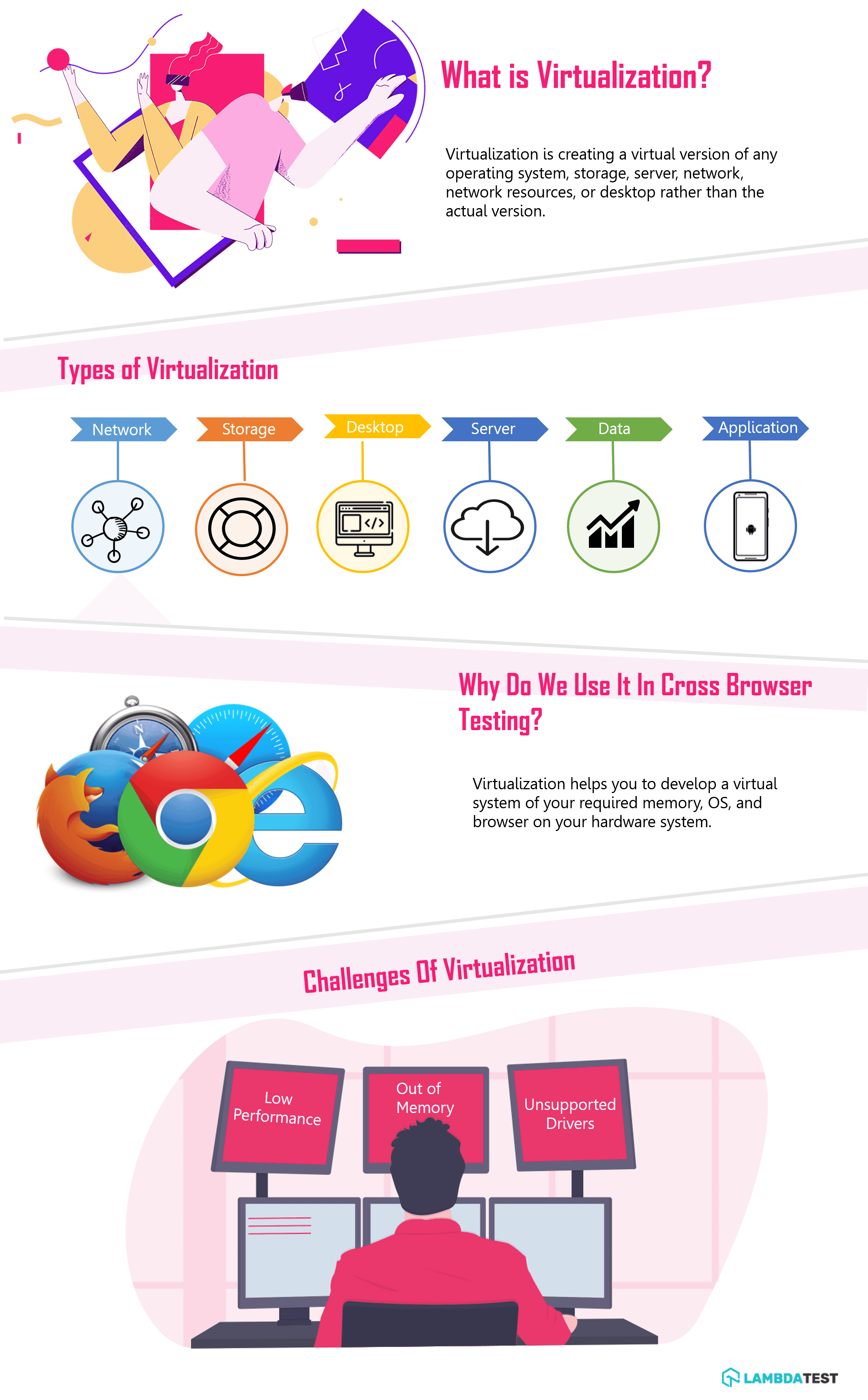
Virtualization is creating a virtual version of any Operating system, storage, server, network, network resources, or desktop rather than the actual version. You can visualize this as a completely different system running inside your own computer. With the help of virtualization, you can develop a system of your required memory, OS, browser, and other specifications on your hardware system. Operating system virtualization allows a single piece of hardware to run multiple operating systems at the same time keeping the hardware unaware of the fact that the operating systems being run are virtual.
The software layer that creates and runs those virtual machines is called a hypervisor. IBM splits hypervisors into two kinds. A Type 1 or bare-metal hypervisor replaces the traditional operating system on the host and is used for virtual server deployments. A Type 2 hypervisor runs as an application on an existing operating system and carries performance overhead, because it depends on that host OS. A tester running a virtual machine on a laptop is almost always using a Type 2 hypervisor, which is why that virtual machine feels slower than the physical machine underneath it.
Key Takeaway: Virtualization creates a virtual version of an operating system, storage, server, or desktop that runs on existing hardware, and operating system virtualization lets one physical machine run several operating systems at the same time.
Various virtualization techniques
Virtualization is a big field. You can quite literally segment and virtualize your solutions and infrastructure on multiple points. The major types of virtualization techniques that you will encounter in day to day life include:
- Network Virtualization
- Storage Virtualization
- Server Virtualization
- Data Virtualization
- Desktop Virtualization
- Application Virtualization
Containers are often grouped with this list, but they work differently. A virtual machine carries a full guest operating system on top of a hypervisor, so a Linux host can run a Windows guest. A container shares the host kernel and packages only the application and its dependencies, so it starts in seconds and uses far less memory. Because a container shares the kernel, the code inside it has to match the architecture of the host. Most teams use both: containers for a fast, repeatable application runtime, and virtual machines when the test needs a different operating system or a full desktop with a real browser.

Austin Siewert
Co-Founder, Steadfast Systems
Discovered @TestMu AI yesterday. Best browser testing tool I've found for my use case. Great pricing model for the limited testing I do 👏
2M+ Devs and QAs rely on TestMu AI
Deliver immersive digital experiences with Next-Generation Mobile Apps and Cross Browser Testing Cloud

Whenever a tester encounters a testing project he does so in a series of steps that involve creating a test environment, testing the application, and reporting the results. This setup takes some time. You may argue that most of the time of a tester is expected to be spent on testing rather than creating a test environment, setting up configurations, creating backup files, and configurations. But it is necessary for the tester to be sure that the infra is running smoothly so that in cases such as system crashes, the files are not lost. But what if we develop a virtual environment which automatically creates the backup files and in case if the system crashes then it will not be the actual operating systems that crash, just the virtual environment created on the actual hardware. This method of creation of virtual desktop or environment on the actual hardware system is called 'Desktop Virtualization'.
Key Takeaway: The main virtualization types are network, storage, server, data, desktop, and application virtualization, and a virtual machine differs from a container because a virtual machine carries a full guest operating system instead of sharing the host kernel.
What happens when you virtualize software testing?
So, now the question is how does virtualization help the testers in Software Testing? While performing software testing a tester needs to test the software/application on all the possible combinations of memory, OS, browsers and list of browsers. Doing this with the actual hardware will not be possible as it will add up to the company's cost and manual efforts. Virtualization here provides a possible solution by giving the tester the environment where he can actually test the software on all possible configurations on a single hardware system. He can very easily customize the system according to his requirements of different configurations. This not only helps the tester to test in various environments but also to protect the actual hardware system from potential bugs and crashes. If the virtual system crashes it will not affect the actual system and within a few minutes a new virtual environment will be created.
Key Takeaway: Virtualizing software testing gives a tester every required memory, operating system, and browser combination on one hardware system, and a crash inside the virtual environment leaves the actual machine untouched.
How virtualization in software testing benefits you?
Virtualization can effectively reduce man-hours and increase efficiency if properly applied to software testing. It provides the following benefits to software testing :
Server Consolidation
With Virtualization, you can achieve server consolidation of 10:1 virtual-to-physical server. Or you can run 10 virtual servers on a single physical server. This adds more numbers of users which can test the same software.
It also allows you to run the latest application technology on the old physical systems by selecting the latest system configurations.
Disaster Recovery
Virtualization also prevents your physical system from any bugs, if encountered while testing. Some bugs can be very harmful to the system that they can even crash the software and it becomes almost impossible to track where they entered into the system and they can keep on smashing your system again and again. Virtualization provides you a major relief in this context as if the tester is performing testing on a virtual environment and a potentially harmful bug is encountered then it will crash the virtual desktop and the physical desktop will remain unaffected.
Time-saving
Virtualization saves setup time because you do not have to install a long list of libraries and tools on your own desktop for every configuration. When a system crashes, you copy the saved virtual image back instead of spending hours on a fresh install.
High availability
Use of virtual system makes your software available at any place for testing. You have to select the configurations and test the system. This also provides flexibility and easy portability of your software system.
Less complexity
The virtual system removes most of the hardware, device, and driver setup a tester would otherwise handle by hand. That cuts the number of physical machines a team has to buy and maintain.
Secure data
Virtualization helps you to secure your data as in case if the server fails the application stays up and the data can be easily recovered.

Key Takeaway: Virtualization benefits software testing through server consolidation at a 10:1 virtual-to-physical ratio, disaster recovery that keeps the physical desktop safe from crash-inducing bugs, faster environment setup, and data that survives a server failure.
What is service virtualization in software testing?
Service virtualization simulates a dependency that your application calls, such as a payment API or a partner system, so your tests can run before that dependency exists. Machine virtualization gives you the operating system and the browser. Service virtualization gives you the services behind them. The two solve different shortages, and most teams need both. A virtual machine does not help when the checkout API is still being built, when a shared staging service is down, or when a third party charges for every call your suite makes.
WireMock builds these simulations by proxy recording. You point it at the real API once, it captures the traffic, and it writes JSON stub mappings that it serves as soon as recording stops. Microcks takes a specification-first route instead. It is a Cloud Native Computing Foundation incubating project, and it generates mocks from OpenAPI, AsyncAPI, gRPC/Protobuf, GraphQL and SOAP artifacts, so one tool covers both synchronous and event-driven APIs.
What changed recently is who operates the mock. WireMock documentation states that WireMock Cloud has native AI integration through the Model Context Protocol, and that agents can create, manage, record and validate mock APIs directly from your editor or terminal. The same page says assistants such as Claude, GitHub Copilot and Cursor already have working knowledge of WireMock stub format, request matching DSL and response templating syntax, and can generate stub mappings for a repository outbound HTTP calls in a single pass. Writing and maintaining stubs by hand was the slow part of service virtualization, and that work now sits in the same loop as the code.
Key Takeaway: Service virtualization simulates a dependency such as a payment API so tests can run before the real service exists, with WireMock recording live traffic into stub mappings and Microcks generating mocks from OpenAPI and other specifications.
How do AI coding agents use virtualization in software testing?
AI coding agents do their work inside a disposable virtual environment, so a failed test or a bad command destroys a throwaway machine instead of your laptop. GitHub documentation states that the Copilot coding agent works in its own ephemeral development environment, powered by GitHub Actions, and uses that environment to explore your code, make changes, and execute automated tests and linters. That is the same isolation a tester gets from a virtual machine, applied to an automated agent instead of a person.
Testcontainers covers the dependency side of the same problem. Its own description calls it an open source library for providing throwaway, lightweight instances of databases, message brokers, web browsers, or just about anything that can run in a Docker container. An agent that writes an integration test can start a real database in a container for that one test and drop it afterwards, instead of pointing the test at a shared server it can damage.
The isolation has a documented limit. GitHub documentation states that Copilot access to the internet is limited by a firewall by default, that the firewall only applies to processes started by the agent via its Bash tool and only operates within the GitHub Actions appliance environment, and that it should not be considered a comprehensive security solution. A test that calls an external service can fail inside the agent environment and pass on a developer machine, so check the firewall allowlist before you debug the test itself. Because the firewall is not complete protection, treat the agent environment as an isolation boundary you still have to verify rather than one you can assume.
Key Takeaway: AI coding agents rely on the same isolation testers use, with the Copilot coding agent running in an ephemeral GitHub Actions environment and Testcontainers supplying throwaway databases and browsers, and the agent firewall is limited by default so a test can fail there and pass locally.
Problems you can face while virtualizing software testing
The major problems that you'll face while virtualizing software testing can be:
- Unsupportive drivers Some virtualization drivers may not be supported in your system.
- Out of memory If you are running short of memory then the system will not be able to save backup files and screenshots(if generated) by the virtual machine.
- Low performance Even the virtual machines provide you with everything you need but its performance will be lower than the actual machine.
Architecture mismatch is a fourth problem, and it is the one that catches teams reusing older images. Apple silicon Macs and ARM64 cloud instances are now common, while many existing test images were built for x86_64. An image built for one architecture does not run natively on the other, so the host falls back to emulation. Emulation works, but it is much slower than native execution on compute-heavy steps such as compilation. Check the architecture of your laptops and your CI runners first, then keep a matching image for every architecture your team supports.
Virtualization is evolving continuously and is proving to be a helping hand for software testing. If we properly implement this technology in our real life, we can avoid most of the problems and simplify our testing methods.
Key Takeaway: The common problems with virtualized software testing are unsupported drivers, insufficient memory, performance below a physical machine, and architecture mismatch that forces slow emulation when an x86_64 image runs on ARM64 hardware.

Author

Deeksha Agarwal
Blogs: 34


Deeksha is a Senior Product Manager at The Economic Times and a Community Evangelist with 8+ years of experience. She is followed by 6,000+ QA professionals, software testers, tech leaders, and enthusiasts across global communities. Deeksha has authored 40+ expert bios for TestMu AI, focusing on cross-browser testing, mobile app testing, regression testing, usability testing, and automation. Previously at TestMu AI, she drove product growth in native app testing and responsive browser features, combining product leadership with deep QA expertise.


Virtualization in Software Testing FAQs
Did you find this page helpful?
More Related Blogs
TestMu AI forEnterprise
Get access to solutions built on Enterprise
grade security, privacy, & compliance
- Advanced access controls
- Advanced data retention rules
- Advanced Local Testing
- Premium Support options
- Early access to beta features
- Private Slack Channel
- Unlimited Manual Accessibility DevTools Tests