

Power Your Software Testing with AI Agents and Cloud
The Native AI-Agentic Cloud Platform to Supercharge Quality Engineering. Test Intelligently and Ship Faster.


- TestMu AI (Formerly LambdaTest)
- /
- Blog
- /
- 9 Best AWS Device Farm Alternatives in 2026
9 Best AWS Device Farm Alternatives in 2026
Compare 9 AWS Device Farm alternatives for Appium, Espresso and XCUITest on real devices, mapped to AWS's own documented limits, with a tested migration path.
Published on:
AWS Device Farm runs from a single AWS Region, US West (Oregon), and the AWS Device Farm endpoints and quotas page sets a 150-minute limit on each automated test run per device that you cannot raise.
Those numbers work well for a team whose suites finish in half an hour and whose backend sits in the US. They start to hurt when a regression pack grows past two hours, when your users and servers are in Europe or Asia, or when your release pipeline produces Android App Bundles that Device Farm does not accept.
I build mobile test infrastructure, including the open-source appium-device-farm plugin, and I work at TestMu AI, which runs one of the platforms on this list. Every claim below comes from each vendor's own documentation, which I read in October 2026, and TestMu AI does not get the first slot by default.
Key Takeaways
- The strongest AWS Device Farm alternatives in 2026 fall into three groups: managed real-device clouds, enterprise or private device labs, and Google's Firebase Test Lab, which shuts down on September 30, 2027.
- AWS Device Farm runs only in us-west-2, stops each automated run and remote session at 150 minutes, starts with 5 concurrent metered devices, and does not accept .aab uploads.
- If your pipeline ships Android App Bundles, check .aab support first, because some platforms document only APK uploads for Android.
- Moving an Appium suite usually means deleting the AWS test spec, pointing the driver at a new hub URL, and turning the DEVICEFARM_ variables into explicit capabilities.
- TestMu AI runs Appium, Espresso and XCUITest suites on 10,000+ real Android and iOS devices, with public, dedicated and on-premise deployment options.
- Staying on AWS Device Farm makes sense when your suites finish well inside 150 minutes and your pipeline, IAM roles and private endpoints already live in AWS.
What Is AWS Device Farm?
AWS Device Farm is Amazon's hosted remote device farm for testing Android, iOS and web apps on real, physical phones and tablets. You use it in two ways: remote access sessions, where you control one device from your browser or drive it with Appium from your own machine, and automated runs, where you upload your app and test package and Device Farm runs them on its own test hosts.
AWS has kept shipping changes, so several complaints in older comparisons no longer hold. The AWS Device Farm document history records these recent updates:
- Managed Appium endpoint - Since November 17, 2025, a remote access session exposes an Appium server URL, so you can run and debug tests from your local IDE instead of only uploading test packages.
- macOS Tahoe test host - Since August 3, 2026, iOS runs in custom test environments can use the macos_tahoe host.
- Test Insights reports - Since August 6, 2026, AWS's own reports show passed, failed, skipped and errored counts with stack traces and execution times.
- Xcode 27 - Since September 14, 2026, the macos_tahoe host supports iOS 18 to 27.
The same history shows that AWS deprecated standard mode test runs in December 2023. Every automated run now goes through a custom test environment driven by a YAML test spec, and that file is the main thing you replace when you migrate.
Why Do Teams Look for AWS Device Farm Alternatives?
Most moves start with one of the hard limits in the Limits in AWS Device Farm guide or on the quotas page, rather than with a missing feature. Check your own suite against each of these before you compare vendors:
- One Region - Device Farm is only available in the us-west-2 (Oregon) Region, so you cannot choose a Region closer to your users or keep test data in an EU Region.
- 150-minute hard caps - An automated test run and a remote access session each stop at 150 minutes per device, and AWS marks neither quota as adjustable.
- Five devices at a time - Metered accounts run automation on 5 devices at once by default and remote access on 2, so a larger device matrix needs a quota increase or unmetered device slots.
- Queue and job ceilings - Scheduled runs can stay queued for up to 24 hours, and an account can hold 250 in-flight jobs, including queued ones, under a soft limit.
- No Android App Bundles - Apps can be up to 4 GB, but AWS states that it does not currently accept .aab files for Android, so you have to build an APK just for testing.
- Appium endpoint limits - The managed endpoint supports only the UiAutomator2 and XCUITest drivers, with no Appium plugins and no WebDriver BiDi, and any single command times out after 4 minutes.

Note: TestMu AI accepts .apk, .aab and .ipa uploads and runs Appium, Espresso and XCUITest on real devices, so you can test the exact bundle you ship to Google Play. Start testing for free.
When Should You Stay on AWS Device Farm?
Device Farm is a good fit when the rest of your testing already lives inside AWS, and I would not move a team off it in these situations:
- Your suites finish well inside 150 minutes and run on fewer devices than your concurrency quota, so the limits above never come into play.
- Your release pipeline runs in AWS CodePipeline, which has supported Device Farm runs as test actions since July 2018, according to the document history.
- Your app talks to private endpoints inside a VPC, and Device Farm's test hosts and devices can connect securely to that VPC to reach them.
- Your finance and security teams want device testing on the same AWS bill and under the same IAM controls as the rest of your infrastructure.
If cost is what is pushing you to look around, the TestMu AI vs AWS Device Farm comparison explains how the two platforms bill for device time.
How I Chose and Ordered These Alternatives
I only included platforms that run the kinds of tests AWS Device Farm runs, which are Appium, Android instrumentation tests such as Espresso, and XCTest or XCUITest, on real Android and iOS devices. For each one, I read the vendor's product pages and documentation in October 2026 and recorded what they state, so where a page says nothing about a capability, the comparison table says so instead of guessing.
I then grouped the nine platforms by how they deliver devices:
- Managed real-device clouds - Sauce Labs, TestMu AI, Kobiton, pCloudy and Bitbar offer shared public devices with dedicated or private options, which is the closest match to how most teams use Device Farm today.
- Enterprise and private device labs - Perfecto, HeadSpin and TestGrid lead with dedicated, on-premise or performance-focused setups for larger organizations.
- Google's device testing service - Firebase Test Lab is the closest service from another cloud provider, with a shutdown date you need to plan around.
Within each group, platforms that document Appium, Espresso and XCUITest support plus .aab uploads for automation come first. I left out pricing because every vendor here bills differently and changes it often, and I did not link to any vendor site. If you are not leaving AWS specifically, our wider roundup of real device cloud platforms compares the field without that lens.
What Are the Best AWS Device Farm Alternatives?
Each entry covers what the vendor documents, where it improves on AWS Device Farm, and the one thing I would check before signing a contract.
1. Sauce Labs Real Device Cloud
Sauce Labs runs a public real-device cloud plus an enterprise-only private device pool, and its documentation lists Appium, Espresso and XCUITest among its frameworks, along with Flutter and Maestro. Its documented data center endpoints are US West, US East, EU Central and Asia South, which is the clearest answer on this list to Device Farm's single Region.
- App formats - Mobile App Storage accepts .apk and .aab files for Android and .ipa or .zip files for iOS, up to 4 GB, and keeps them for up to 60 days.
- XCUITest scope - XCUITest runs on real devices only, because Sauce Labs does not support automated XCUITest runs on simulators.
- Check first - On real devices, newCommandTimeout is capped at 90 seconds, so any step that leaves the device idle for longer than that between commands will end the session.
2. TestMu AI (Formerly LambdaTest)
TestMu AI's Real Device Cloud gives you 10,000+ real Android and iOS devices, which you can use as a shared public cloud, a dedicated cloud reserved for your team, or an on-premise cloud behind your firewall. Appium, Espresso and XCUITest suites run on those devices, and you can upload .apk, .aab or .ipa files directly or from a URL.
- Migration path - Appium tests keep their code and only change the hub URL and capabilities, while Espresso and XCUITest builds upload as an app plus a test package, the same pair Device Farm uses. The Espresso testing tutorial shows that upload flow end to end.
- Scale - Suites run in parallel across many devices, and HyperExecute splits large suites into shards for up to 70% faster runs.
- Evidence - Each session can capture device logs, network logs and video, so a failed run arrives with what you need to debug it.
- Check first - Appium sessions run on emulators and simulators unless you set isRealMobile to true, and the most requested flagship phones on the shared public cloud can queue briefly at peak times.
For a product-level view of the two platforms, the AWS Device Farm alternative page compares the two products on billing, device access and session launch times.
3. Kobiton
Kobiton is a real-device platform that also offers Android virtual devices for manual sessions, and you can run it in its cloud, on privately hosted device slots, or fully on premise. Its pricing page lists scripted Appium, Selenium, Espresso and XCUITest, and its documentation covers Android 8 through 17 and iOS 12 through 27.
- App formats - Kobiton accepts .apk, .aab, .ipa and .zip uploads of up to 4 GB.
- Scriptless automation - Interactions captured during a manual session can be replayed as an automated test.
- XIUM - Kobiton describes XIUM as its own high-speed reimplementation of the Appium server.
- Check first - For native and hybrid apps, the first request must arrive within 30 minutes and every later request within 10 minutes, or the session ends.
4. pCloudy
pCloudy offers real iOS and Android devices with no emulators or simulators, and it runs Appium, Espresso and XCUITest automation alongside manual testing. You can buy public cloud access, reserve dedicated devices, or move to a private cloud or on-premise deployment, and its single-tenant private cloud is hosted across India, the USA, Dubai and Singapore.
- Android App Bundles - pCloudy accepts .aab files and converts them into device-specific APKs before installing them.
- Device features - Its docs cover image injection into the Android gallery and Face ID or Touch ID testing on iOS.
- Performance data - pCloudy advertises 60+ app performance metrics across speed, memory, CPU, battery and network.
- Check first - Published plans go up to 20 parallel tests, and anything above that needs a custom agreement with their sales team.
5. Bitbar (SmartBear)
Bitbar tests on real devices only, hosted in data centers in Poland and the United States. Its documentation lists Appium, Android Instrumentation, Espresso, Flutter and Robot Framework for Android, and Appium, Flutter, XCTest and XCUITest for iOS. You can also bring your own framework as a Docker container on Android or a customized VM on iOS, which is the nearest equivalent to Device Farm's custom test environments.
- Deployment - Choose dedicated devices reserved for your team in the public cloud, or a separate private cloud with dedicated devices and desktop browsers.
- Test length - The default test timeout is 1,800 seconds, and teams with an active plan can adjust it.
- Biometrics - Biometric authentication testing works in live testing and in both client-side and server-side Appium runs.
- Check first - Bitbar documents Android App Bundles for live testing, while its Appium app capability lists .apk and .app files, so confirm .aab support for automation before you rely on it.
6. Perfecto (Perforce)
Perfecto, part of Perforce, offers real and virtual devices, and Perforce says it manages more than 10,000 devices across 11 global data centers. Its help center documents Espresso for Android 4.3 or later, XCUITest for iOS 15 or later, and Appium 2, with Selenium and Playwright for desktop web testing.
- App formats - Real devices take IPA, APK, APKS or AAB files, while virtual devices take ZIP files for iOS and APK or APKS files for Android.
- Private clouds - Perfecto offers private, dedicated clouds for teams that do not want to test on a shared public pool.
- Camera injection - You can inject images to simulate the camera, which helps with barcode readers and banking apps.
- Check first - Appium 1 executions ended on December 21, 2025, so any suite still pinned to Appium 1 needs an upgrade before it moves.
7. HeadSpin
HeadSpin focuses on testing under real-world conditions with SIM-enabled devices in 50+ locations worldwide, along with browsers, OTT media devices and smart TVs. Its integrations include Appium, Selenium, XCTest and Espresso, and you can deploy it as a shared cloud, a dedicated cloud, an air-gapped on-premise lab, or on-premise devices connected through a VPC.
- Performance KPIs - HeadSpin tracks 130+ built-in KPIs across UI, network, device and experience metrics.
- Video quality - Reference-free Video MOS scores what users see on screen, which matters for streaming and other video-heavy apps.
- Usage tiers - The entry tier is public cloud only with 40 hours of usage a month, while higher tiers add dedicated and air-gapped devices.
- Check first - I could not find documented .aab support on its public pages, so ask about it before you migrate a bundle-based pipeline.
8. TestGrid
TestGrid offers real iOS and Android devices in its cloud, dedicated hosted devices, and on-premise device labs that sit behind your firewall. Its documentation lists Appium, Selenium, Cypress, XCUITest, Espresso, Detox and WebdriverIO, and it runs XCUITest and Appium on real iOS devices without a jailbreak.
- Codeless authoring - Record and play and low-code automation sit alongside scripted tests in the same platform.
- Queueing - Tests that target the same device follow that device's concurrency limit and wait in a first in, first out queue.
- Check first - The app management docs list APK and IPA uploads only, so plan to keep building an APK if your pipeline produces .aab files.
9. Firebase Test Lab (Google)
Firebase Test Lab runs tests on real devices in a Google data center, plus virtual Android devices, and it accepts .aab files. It supports Espresso and UI Automator instrumentation tests, the Robo crawler that explores your app without a script, and XCTest on iOS, but Appium is not among its documented test types.
Google has deprecated Firebase Test Lab and will shut it down on September 30, 2027, according to the notice on its documentation. The suggested replacement, Developer Device Platform on Google Cloud, is in Preview and currently runs Android instrumentation and iOS XCTest tests through the gcloud beta device-run CLI.
- Test length - Tests default to 15 minutes, with a maximum of 45 minutes on physical devices and 60 minutes on virtual devices.
- Sharding - Sharding limits are 50 for physical devices, 200 for Arm virtual devices and 500 for x86 virtual devices.
- Check first - Moving here means planning a second migration within a year, so I would only pick it for Android-heavy teams already committed to Google Cloud.
If you would rather own the hardware, DeviceFarmer (formerly OpenSTF) is a free, Apache 2.0 licensed web app for controlling Android devices from a browser, and version 3.8.0 shipped in September 2026. It does not support iOS and its README does not list Appium or Espresso support, so read our guide to building an open source device farm before you commit to running one.
Which AWS Device Farm Limits Does Each Alternative Remove?
This table puts the documented answers side by side, with AWS Device Farm as the baseline. Where a cell says "Not documented", I could not find the claim on the vendor's own pages, which makes it a good question for their sales team.
| Platform | .aab uploads for automation | Appium, Espresso and XCUITest | Private or on-premise devices | Watch out for |
|---|---|---|---|---|
| AWS Device Farm | No | Yes, as Appium, Instrumentation and XCTest UI | Private devices hosted by AWS, no on-premise option | us-west-2 only and a 150-minute cap per run |
| Sauce Labs | Yes | Yes | Private device pool on enterprise plans; on-premise not documented | 90-second limit between commands on real devices |
| TestMu AI | Yes | Yes | Dedicated and on-premise clouds | Set isRealMobile to true for real devices |
| Kobiton | Yes | Yes | Private device slots and full on-premise | 10-minute limit between requests |
| pCloudy | Yes, converted to APKs | Yes | Dedicated devices, private cloud and on-premise | Custom plans above 20 parallel tests |
| Bitbar | Documented for live testing only | Yes | Dedicated devices and private cloud | Confirm .aab support for Appium runs |
| Perfecto | Yes, on real devices | Yes | Private, dedicated clouds | Appium 2 only since December 2025 |
| HeadSpin | Not documented | Yes | Dedicated, air-gapped and VPC-connected on-premise | Ask about .aab before migrating |
| TestGrid | No, APK and IPA only | Yes | Dedicated devices and on-premise labs | Keep an APK build in your pipeline |
| Firebase Test Lab | Yes | Espresso and XCTest, but no Appium | Google-hosted devices only | Shuts down on September 30, 2027 |
Start with the "Watch out for" column. If your suite never trips the item in that column, the platform deserves a trial run with your own app.
How Do You Move an Appium Suite Off AWS Device Farm?
How much work this takes depends on the Device Farm mode you use today. Server-side runs upload a test package plus a YAML test spec, and client-side runs drive a remote access session through the managed Appium endpoint.
Map the Test Spec to Capabilities
In a server-side run, your test spec starts Appium on AWS's test host and passes the device details in through DEVICEFARM_ environment variables. This trimmed excerpt follows the Appium Android example in AWS's test spec reference:
version: 0.1
android_test_host: amazon_linux_2

phases:
  install:
    commands:
      - devicefarm-cli use node 22
      - devicefarm-cli use appium 3
      - devicefarm-cli use java 17
  pre_test:
    commands:
      # Starts Appium on the AWS test host. The device details arrive as variables:
      # $DEVICEFARM_DEVICE_NAME, $DEVICEFARM_DEVICE_UDID,
      # $DEVICEFARM_DEVICE_OS_VERSION and $DEVICEFARM_APP_PATH
      - appium --default-capabilities "<built from the variables above>" >> $DEVICEFARM_LOG_DIR/appium.log 2>&1 &
  test:
    commands:
      - cd $DEVICEFARM_TEST_PACKAGE_PATH
      - java org.testng.TestNG -testjar *-tests.jar -d $DEVICEFARM_LOG_DIR/test-output

artifacts:
  - $DEVICEFARM_LOG_DIR
A hosted grid needs no test spec, because the Appium server already runs in the cloud. Your test creates a remote session instead, and the values AWS injected as environment variables become explicit capabilities:
- Server URL - Point the driver at the TestMu AI mobile hub with your username and access key, instead of the local Appium server on port 4723 of the AWS test host.
- Device selection - Replace DEVICEFARM_DEVICE_NAME and DEVICEFARM_DEVICE_OS_VERSION with deviceName and platformVersion, and drop udid, because the cloud assigns a matching device for you.
- App - Replace DEVICEFARM_APP_PATH with the lt:// app ID that the upload API returns when you push your build.
- Real hardware - Add isRealMobile: true, or the session runs on an emulator or simulator.
- Client-side runs - If you used the Appium endpoint, delete the GetRemoteAccessSession call that fetched remoteDriverEndpoint and add the device capabilities back, since AWS's endpoint rejects udid and platformVersion.
Run the Same Test on Real Devices in Parallel
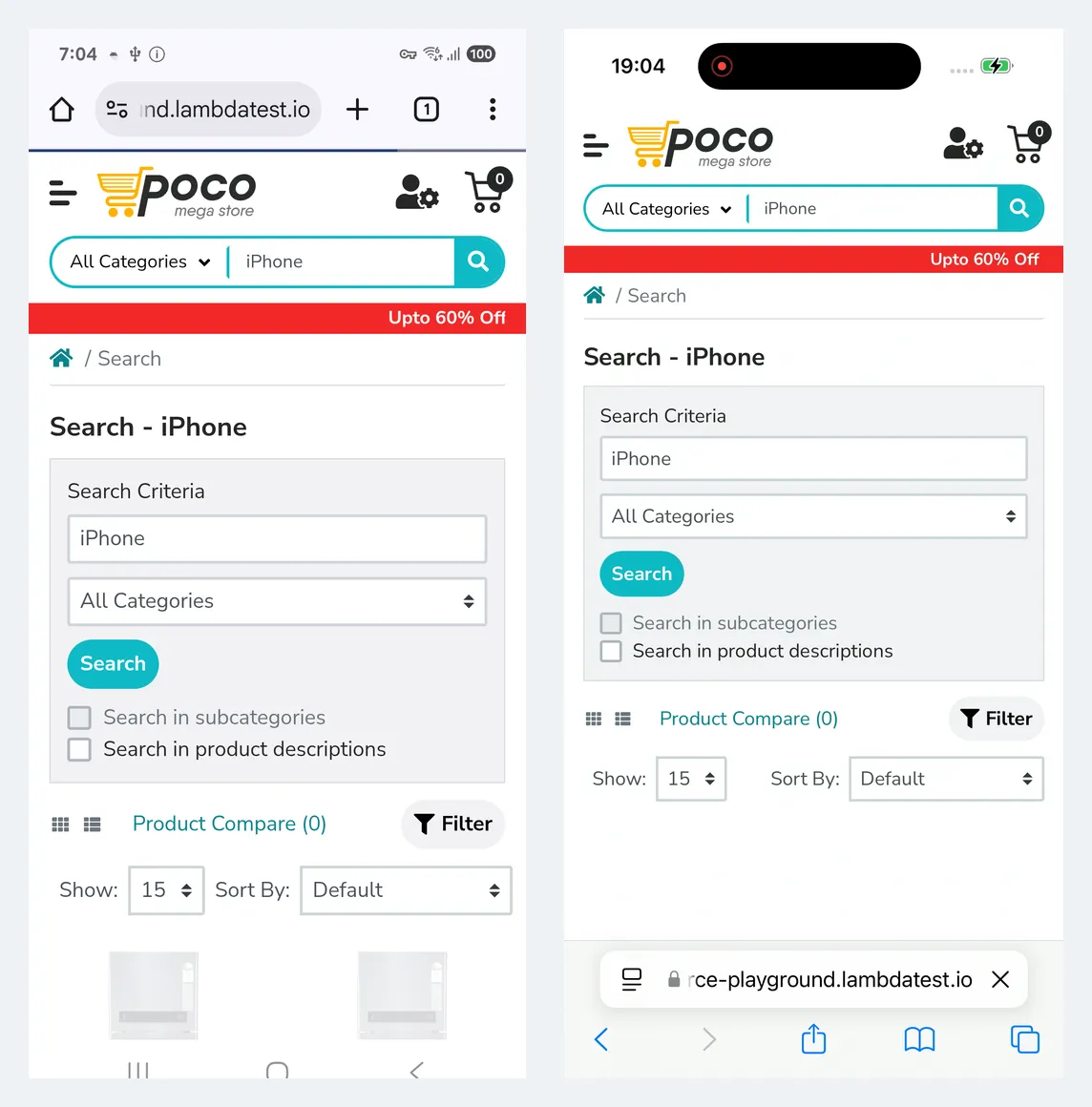
To check this path end to end, I ran one search test from the Ecommerce Playground on a Galaxy S25 with Android 15 and an iPhone 16 with iOS 18, both real devices, at the same time. This is the exact script I ran with Node.js and selenium-webdriver:
// npm install selenium-webdriver
const { Builder, By, until } = require("selenium-webdriver");

const HUB = "https://" + process.env.LT_USERNAME + ":" + process.env.LT_ACCESS_KEY + "@mobile-hub.lambdatest.com/wd/hub";

const devices = [
  {
    platformName: "Android",
    browserName: "Chrome",
    "lt:options": {
      deviceName: "Galaxy S25",
      platformVersion: "15",
      isRealMobile: true,
      build: "AWS Device Farm migration check",
      name: "Search - Galaxy S25",
      w3c: true
    }
  },
  {
    platformName: "iOS",
    browserName: "Safari",
    "lt:options": {
      deviceName: "iPhone 16",
      platformVersion: "18",
      isRealMobile: true,
      build: "AWS Device Farm migration check",
      name: "Search - iPhone 16",
      w3c: true
    }
  }
];

async function searchTest(caps) {
  const started = Date.now();
  const driver = await new Builder().usingServer(HUB).withCapabilities(caps).build();
  const sessionStart = (Date.now() - started) / 1000;
  let status = "failed";
  try {
    await driver.get("https://ecommerce-playground.lambdatest.io/index.php?route=product/search&search=iPhone");
    const first = await driver.wait(until.elementLocated(By.css(".product-layout h4 a")), 20000);
    const title = await first.getAttribute("textContent");
    if (!/iphone/i.test(title)) throw new Error("Unexpected first result: " + title);
    status = "passed";
  } finally {
    await driver.executeScript("lambda-status=" + status);
    await driver.quit();
  }
  console.log(caps["lt:options"].deviceName + ": " + status + ", session start " + sessionStart + "s, total " + (Date.now() - started) / 1000 + "s");
}

Promise.all(devices.map(searchTest)).catch((err) => {
  console.error(err);
  process.exitCode = 1;
});
This was the console output from the run on October 8, 2026:
Galaxy S25: passed, session start 31.681s, total 36.106s
iPhone 16: passed, session start 33.817s, total 38.81s
Across three runs on October 8, getting a real device took between 30 and 35 seconds, and the test itself finished in under 10 seconds on both phones. Both devices returned the same search results page:
Compare Results Before You Switch Off AWS
Run your real suite on both platforms for at least one release cycle before you cancel anything. Compare pass rates per device, how long each session waits for a device, and the evidence you get when a test fails, because those are what tell you whether the move saved your team time.
TestMu AI's App Automation dashboard lists each build's sessions with their results, video and logs, which makes that side-by-side review quicker than downloading artifacts job by job.

Final Words
Start by exporting the models in your current Device Farm device pools and checking each one against the platform on your shortlist, since device coverage is the one gap you cannot fix later in test code. Then move a single Appium suite with the capability changes above and let it run beside AWS for a release cycle.
If TestMu AI is on that shortlist, the Appium testing getting started guide walks you through credentials, app upload and your first real-device run.
Author

Sai Krishna
Blogs: 24

Sai Krishna is Director of Engineering at TestMu AI (formerly LambdaTest), where he leads agentic AI for quality engineering, building AI agents that autonomously drive mobile and conversational test automation. His current focus is Agent Testing and Model Context Protocol (MCP) support for mobile. He is a core contributor and member of the Appium open-source project and the creator of AppiumTestDistribution and appium-device-farm. With over 14 years of experience including more than 9 years at Thoughtworks as a Principal Consultant, he holds a BSc in Electronics and speaks regularly at TestMu and Appium Conf on Appium, mobile automation, and agentic AI in testing.
Reviewer

Srinivasan Sekar
Reviewer
Srinivasan Sekar is Director of Engineering at TestMu AI (formerly LambdaTest), where he leads engineering and open-source initiatives behind the Selenium and Appium automation grid and owns TestMu AI's MCP Server. A committer to Appium and a contributor to Selenium, WebdriverIO, Taiko, and AppiumTestDistribution, he brings over 15 years of experience in quality engineering and open-source technologies. He is the author of the Apress book 'The MCP Standard: A Developer's Guide to Building Universal AI Tools with the Model Context Protocol,' a Certified Kubernetes and Cloud Native Associate, and an international conference speaker. Before TestMu AI he spent over eight years at Thoughtworks as a Principal Consultant and Quality Architect. Srinivasan holds a B.Tech in Information Technology from Anna University.


AWS Device Farm Alternatives FAQs
Did you find this page helpful?
More Related Blogs
TestMu AI forEnterprise
Get access to solutions built on Enterprise
grade security, privacy, & compliance
- Advanced access controls
- Advanced data retention rules
- Advanced Local Testing
- Premium Support options
- Early access to beta features
- Private Slack Channel
- Unlimited Manual Accessibility DevTools Tests