

Power Your Software Testing with AI Agents and Cloud
The Native AI-Agentic Cloud Platform to Supercharge Quality Engineering. Test Intelligently and Ship Faster.


- TestMu AI (Formerly LambdaTest)
- /
- Blog
- /
- A Practical Approach To Angular Testing
A Practical Approach To Angular Testing
Angular testing verifies components, modules, and services with unit, integration, and end-to-end tests. Learn how to use TestBed, Jasmine, Karma, and Vitest.
Last Updated on:
Angular testing verifies that components, directives, services, and modules behave correctly, using unit, integration, and end-to-end tests. The Angular CLI generates a working test setup for every new project, and TestBed simulates the Angular runtime so a component renders and can be asserted in isolation. This guide covers what Angular is, the LEGO blocks of an Angular application, how to test an Angular application, testing an Angular module, how AI coding agents fit in, and how to keep tests fast as the application grows.
Key Takeaways
- TestBed: TestBed builds a throwaway Angular testing module for a spec, so a component can be declared, given stub providers, and rendered in isolation.
- Vitest default runner: New Angular CLI projects scaffold Vitest with jsdom as the test runner, and Karma stays supported for suites that were generated with Karma.
- ng test command: Running ng test builds the Angular workspace in watch mode and executes every .spec.ts file the workspace contains.
- Module smoke test: Testing an Angular module means asserting that every declared import resolves at the defined path, which is a smoke test rather than a behavioural test.
- Unit versus integration tests: An Angular unit test mocks a component dependency, while an integration test keeps the real collaborators and checks that components and service calls work together.
- Angular CLI MCP server: The Angular CLI MCP server, started with npx @angular/cli mcp, lets an AI coding agent list projects, run ng test, and read build logs.
What is Angular?
Angular is an open-source TypeScript-based front-end framework that aims to ease the development and testing of web applications. It is based on the client-side model-view-controller (MVC) architecture or client-side model-view-viewmodel (MVVM) architecture. It has risen to become one of the most popular web frameworks in demand since its initial release as AngularJS on October 20, 2010. The current stable major release is Angular 22.
Angular makes it very easy to create responsive applications on any device, be it a desktop, laptop, tablet, or mobile platform. Angular helps you build a Single page frontend application in days rather than months. It offers a complete set of tools and libraries to support unit testing and integration testing for reducing quality assurance (QA) time. Also, Angular is considered to be one of the best web development frameworks.
Also read – Testing A Single Page AngularJS Applications
Angular comes out of the box with a rich set of user documentation and has one of the largest user-based community support to help answer questions that you may encounter during your development process. Now that’s what is called Powerful.
Also read- How to Perform Angular.io Visual Testing On Cloud
Google builds several of its own products on Angular, and the framework is widely used across enterprise web applications that need a structured, opinionated front end.
Key Takeaway: Angular is a TypeScript front-end framework maintained by Google, and its component-based structure is what makes unit, integration, and end-to-end testing of an Angular application practical.
LEGO blocks of an Angular application
Angular applications are based on the following fundamental concepts:
- Modules – A Module in an Angular application refers to a TypeScript file where developers can declare the components, providers (service classes) and can even import other modules of the application. Apart from the root module in Angular, each application feature can be defined as a module for logical grouping and better application maintenance.
- Components – These form the basic building blocks of an Angular app. It comprises templates (HTML partials), Directives, Pipes, and uses Services.
- Services – Services in Angular are defined to deal with data (read or write) related to external systems and to carry out processing logic that is independent of user views. A service can be shared across multiple components.
- Routing – Used to define navigation in an Angular application
These are fundamentally the LEGO blocks of an Angular application, which together enable a developer to build a responsive, robust, and reliable Single Page Application (SPA).
Key Takeaway: An Angular application is built from modules, components, services, and routing, and each of those four blocks needs its own unit testing strategy.

How to test an Angular application?
The reason I have talked about the building blocks of an Angular application is that it is important to understand these fundamental concepts before diving into the aspect of testing each of these items in an Angular application.
In further sections of this article on Angular testing, we will see whether to test these basic building blocks. And if yes, how to go about testing those? So, without further delay, let’s dive into the details of testing an Angular application.
Angular testing tools
On a side note, you can refer to our detailed guide on Angular E2E Testing to learn how to perform End-To-End Testing With JavaScript And Karma.
At the outset, let’s go through the testing tools provided by Angular as an out of the box choice:
- Test runner – Vitest, the default for new Angular CLI projects
- Test framework – Jasmine, still used by a large number of existing Angular suites
- Test runner – Karma, still supported for projects that were generated with it
- Test environment facilitated by TestBed (Part of Angular Core)
New Angular CLI projects now scaffold Vitest with jsdom, which runs unit tests in Node.js and emulates the browser DOM. Karma remains supported, so an existing Karma suite keeps working. See the Angular testing guide for the current defaults.
This is just one choice of tools provided as the default option while creating an Angular app through CLI to test Angular applications, however, it’s your call to decide on the testing tools and incorporate them in your Angular application test cycle.
For instance: one could use Jest for unit and integration tests instead of Jasmine. Spectator in place of TestBed, if you feel there is too much boilerplate code to deal with in the case of Angular TestBed.
Executing the Unit and Integration tests
Hopefully, you would have got your environment set up with Angular CLI as part of the beginning phase of your Angular application development. If not, install it by executing the following command (Note: It is assumed that you already have npm installed on your machine):
```shell or bash
npm install -g @angular/cli
```
The above command will install Angular CLI in your environment and make the ng command available as well.
To execute the tests, run the command:
```shell or bash
ng test
```
Basically, the above command will execute all files of the naming convention, spec.ts, which usually represents a test TypeScript file. The above test command execution also launches a configured browser(s), and auto navigates to http://localhost:9876/ to track the progress of test execution and, finally, the results.

Austin Siewert
Co-Founder, Steadfast Systems
Discovered @TestMu AI yesterday. Best browser testing tool I've found for my use case. Great pricing model for the limited testing I do 👏
2M+ Devs and QAs rely on TestMu AI
Deliver immersive digital experiences with Next-Generation Mobile Apps and Cross Browser Testing Cloud

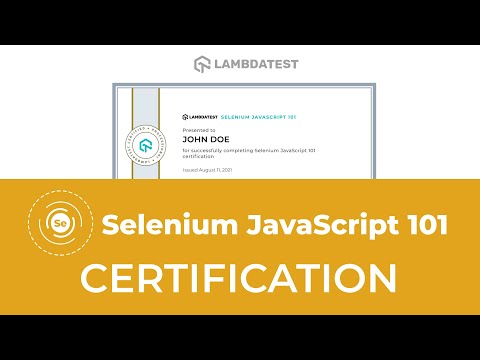
To empower yourself and advance your career, you can use this certification as proof of skill in the field of test automation using JavaScript.
Here’s a short glimpse of the Selenium JavaScript 101 certification from TestMu AI:
Key Takeaway: Running ng test executes every .spec.ts file in the Angular workspace, so the fastest route into Angular testing is to write specs next to the code they cover rather than build a separate test project.
Testing an Angular Module
Now that we have scratched the surface in the Angular testing world to understand the list of out-of-the-box testing tools and how to execute the tests using Angular CLI, let’s see how we can go about dealing with testing an Angular module.
From the earlier definition of Angular Modules, modules form the basis of Angular applications. They usually contain important metadata related code as shown below:
```TypeScript

import { BrowserModule } from '@angular/platform-browser';
import { NgModule } from '@angular/core';
import { FormsModule } from '@angular/forms';


import { AppComponent } from './app.component';
import { AppDetailComponent } from './app-detail/app-detail.component';


@NgModule({
  declarations: [
    AppComponent,
    AppDetailComponent
],

  imports: [
    BrowserModule,
    FormsModule
  ],
  bootstrap: [AppComponent]
})

export class AppModule { }

```
The above code snippet of Angular Module is written in TypeScript, and it contains no application processing logic, yet it is hard to test as it involves only metadata/configuration information.
So how do we go about testing the Modules in an Angular app, and what aspects are enough to be covered in the case of Angular Modules?
The answer is: it is enough if we just carry out a smoke testing by testing if the imports made are correct and available at the defined path.
For example: To test the above Angular module, we can write a test code as shown below:
```TypeScript

import { TestBed } from '@angular/core/testing';
import { AppModule } from './app.module';

describe('AppModule', () => {
  beforeEach(() => {
    TestBed.configureTestingModule({
      imports: [AppModule],
    });
  });

  it('Checks for AppModule Initialization', () => {
    const module = TestBed.inject(AppModule);
    expect(module).toBeTruthy();
  });
});

```
As part of this code snippet, we import and use the built-in Angular testing module called TestBed to check if the AppModule defined earlier gets imported into an Angular app without any errors.
Unit Testing an Angular Component, Directives, Pipes, and Services
Angular components require unique support for unit testing, so that their interlinkage with various parts of the application such as services, templates, and other components can be isolated and checked for correctness. One could use the mocking capability of the test framework to mock the external services/any external dependencies during unit testing of Angular components.
Every unit test should have an assertion phase that needs to ensure the expected results match the actuals.
As mentioned earlier, ng command options can be used to create or manage an Angular project. When an Angular project is created using the ng new command, the libraries and tools necessary for unit and integration tests are automatically installed in that environment.
Following is a simple test code snippet to confirm that the libraries and tools are set fine in the project.
```TypeScript
describe("Jasmine Test Suite Setup", () => {
 it("is successful", () => expect(true).toBe(true));
});
```
You could place the above snippet of code in the right place of your src/tests directory within a file named app.component.spec.ts and execute the command, ng test.
Once the setup is ready and the components to be tested are in place, write down what the Component does, as it would help structure the unit test formation in a test suite. For instance: Let’s say we have a simple component named “hello-world.component.ts” and all it does is have a simple div tag with text containing, Hello World!!!.
```TypeScript
import { Component } from "@angular/core";
@Component({
 selector: "simple-component",
 template: `<div>Hello World!!!</div>`
})

export class HelloWorldComponent { }
```
As part of the unit test of this Angular component, you can define the Angular TestBed to include this HelloWorld component and call the createComponent method of TestBed to later assert whether the component is then getting created or not and to check the content inside the div tag is seen, once the component rendering is complete.
```TypeScript

import { TestBed, async } from '@angular/core/testing';
import { HelloWorldComponent } from './hello-world.component';


describe('HelloWorld Component', () => {
  beforeEach(async(() => {
    TestBed.configureTestingModule({
      declarations: [
        HelloWorldComponent
      ],
    }).compileComponents();
  }));


 it('should create the component', async(() => {
    const fixture = TestBed.createComponent(HelloWorldComponent);
    const helloWorldComponent = fixture.debugElement.componentInstance;
    expect(helloWorldComponent).toBeTruthy();
  }));

 it('should render Hello World!!! in a div tag', async(() => {

    const fixture = TestBed.createComponent(HelloWorldComponent);

    fixture.detectChanges();

    const dom = fixture.debugElement.nativeElement;

    expect(dom.querySelector('div').textContent).toContain('Hello World!!!');

  }));


});

```
The above code snippets are just a simple example to give you a feel on how to write the unit test for an Angular component. There are other complex scenarios where you might need to mock the external service call that is made from a component. For instance: One could use the Jasmine.createSpy method to mock an external service call. Please refer to the Jasmine documentation for such examples.
Using the above examples as a reference, and by using Angular’s TestBed, Jasmine test framework, and TypeScript, one could develop unit tests for Angular Directives, Pipes, and Services as well.
With this, I have laid the foundation in the form of a road, you could just follow the same path to develop unit test suites for these other LEGO blocks of an Angular application.
Also read – 11 Best Unit Testing Frameworks For Selenium Automation
Unit testing the view layer of a Component using browsers
In the earlier section, we have seen how to go about a script-based approach for unit testing a component. In this section of this article on Angular testing, I will guide you on how to carry out unit testing of the view layer of a component using browsers.
Like any browser-based application testing, it can fall into two parts:
- Manual testing
- Automated testing
First, let’s consider a unit test use case for a better understanding of how to go about this web testing of a component’s view layer.
Let’s assume we have a common header area in our Angular application. This header is going to hold something special to represent the brand of the organization, such as a logo. The header background should be in a color which is contrast enough to make the logo more apparent and visually appealing to the users of the application. No matter what changes or features are going to be brought into the application, the header should remain unaffected. We need to have some test cases to cover this very aspect to make sure the header remains the same.
Manual testing approach
Let’s see two different approaches that we could consider as part of manual testing.
- Using the Tester’s machine
As part of this approach, the tester can open the Angular application in a browser that is installed on his/her machine and check for any changes in the header area by visually checking it. And then, go one level deeper for testing by using browser-based debug tools to inspect if the element’s style/visual characteristics remain the same by comparing it against the values or results recorded during the first approved version of the application.
You can see how clerical such a task is and to do such checks after every change in an application is quite cumbersome. Additionally, there is a limitation in the kind and number of environments in which such tests are being carried out. What I mean by that is, a tester’s machine might be dealing with one or few operating systems (considering the virtual machine setup exists with guest operating systems running on the tester’s machine) and one or few browsers (again, only if multiple browsers are installed in the machine).
So how to deal with the need to test in multiple environments so as to certify our Angular application in all those numerous environment aspects? Let’s see the solution in our next section.
- Real time browser-based testing in the desired environment
Wouldn’t it be productive, cost-effective, and just amazing if we have our reach towards something that could offer multiple operating systems, multiple browsers, and hardware configurations? Yes, there is something like that in our reach. Cloud-based cross browser testing platforms like TestMu AI do exactly that.
With the TestMu AI platform, you can straightaway get access to testing on unlimited web applications and native apps on an online browser farm of 3000+ real browsers, operating systems, and device combinations!!!
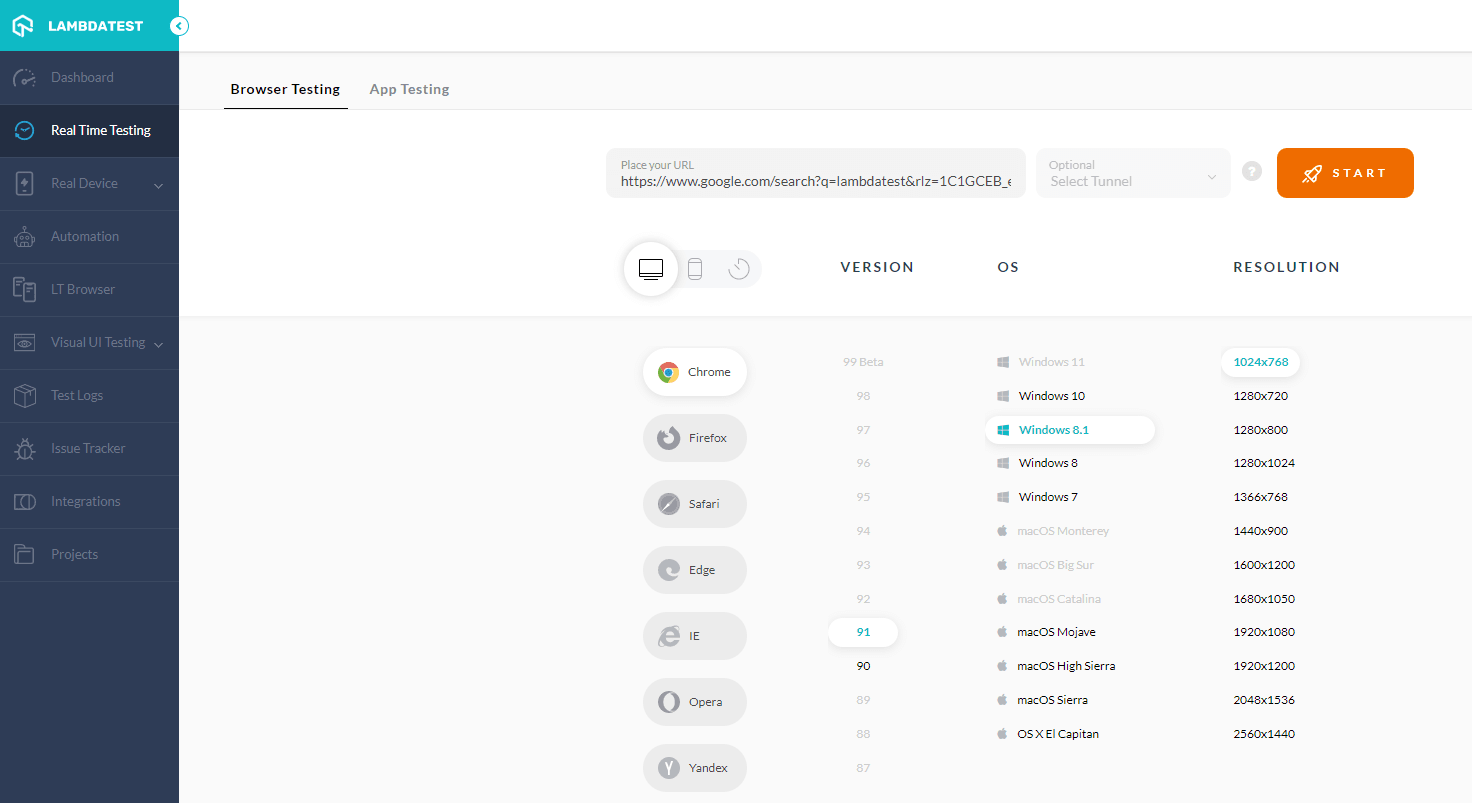
Test automation platform like TestMu AI provides real-time browser testing, which is a must-try feature to deal with manual live testing of your Angular application. You can explore this real-time browser testing feature by creating an account on TestMu AI and try this amazing technique available with your Angular project.
Given below is a screenshot corresponding to TestMu AI’s real-time browser testing feature where different flavors of environment access are available at your fingertips.
Automated testing approach
With the current advancement in tools and technologies, there are multiple ways to lead the automation of testing a web application’s view layer. Let’s go through them one by one.
- Script oriented testing
Since our intention is to verify the view layer of the Angular application using a browser, and Selenium is well known for such aspects, our choice for this matter should be Selenium automation.
Assuming you know how to write Selenium automation scripts, let’s say you have done the same for testing the header component. You can now execute Selenium scripts as part of a regular test cycle in an automated manner to verify the defined test case.
- Screenshot oriented testing
With the emergence of platforms such as TestMu AI, you can use their Automated Screenshot testing capability to verify such use cases that we had considered as an example. To give a brief overview of this snapshot testing approach, an image snapshot is carried out for the rendered view layer of our Angular application, and this is then checked against the base/reference snapshot taken earlier for yielding a success/failure result.
With this Screenshot Testing Tutorial, you will learn how to perform Automated Screenshot Testing on the TestMu AI platform.

- TestMu AI Automation for Angular testing
With TestMu AI’s online Selenium Grid, you have a plethora of integration choices with multiple test frameworks and languages.
Here’s a quick video on performing Selenium automation testing on the TestMu AI platform.
You can also Subscribe to the TestMu AI YouTube Channel and stay updated with the latest tutorials around automated browser testing, Selenium testing, CI/CD, and more.
See the screenshot below to get an idea of the TestMu AI Automation feature:
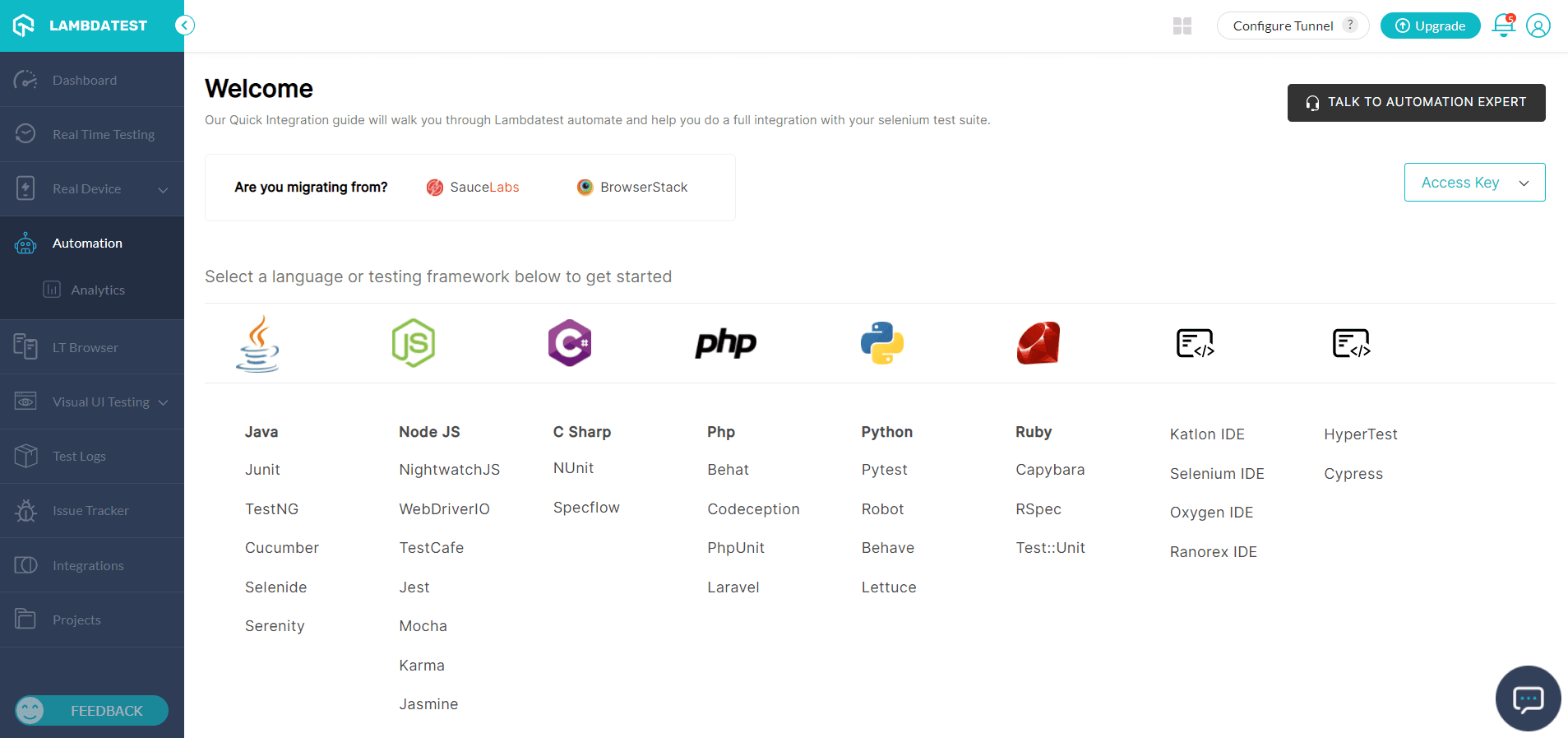
It is evident that you are given plenty of frameworks and languages to choose from for carrying out your tests. Jasmine, Karma, Jest, and many more are available on the list.
Also read: Automated Cross Browser Testing With Jasmine Framework &; Selenium
Once you have selected your framework of choice, let’s say, Jasmine, you will be taken to another screen with detailed instructions on how to carry out the test setup, code samples, and automated test execution in the TestMu AI platform.
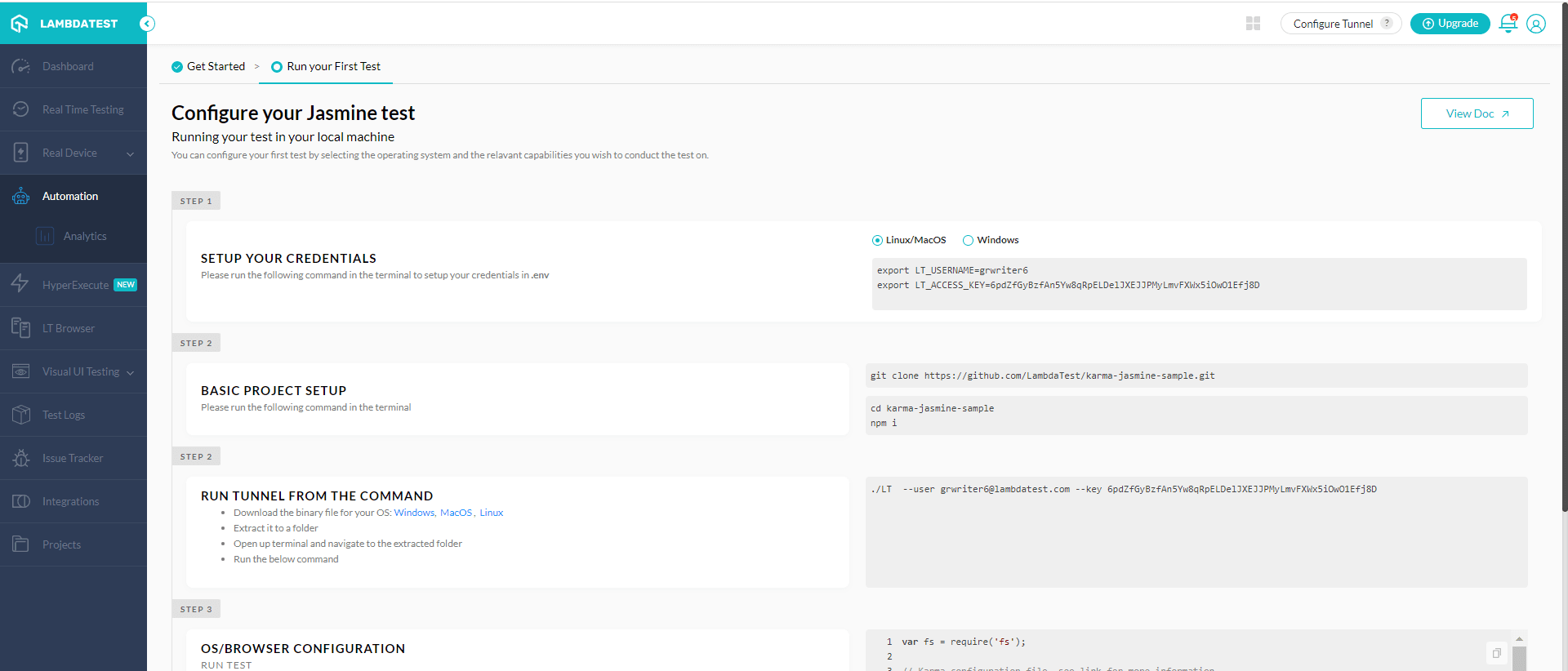
Integration testing of a Component
In the case of integration testing of an Angular component, one could use the same Jasmine/Jest framework (not a default option with Angular CLI) along with Karma. Remember, the key goal of integration test cases in Angular applications is to verify the designated interlinked components or external service calls work as expected when being called for use.
For instance, your Angular app might involve the usage of Redis Database while a user is making a login attempt, and hence to verify the user authentication feature from an integration testing point of view, you must develop an integration test coverage logic to ensure that your Angular app and Redis database are communicating as needed.
In addition to the above-defined use case, the integration tests might involve testing the Angular application user interface in a browser. These tests may involve replicating the user actions, such as user input in the form, mouse click events, scroll bar events, and other types of user interactions that could potentially trigger various components-based processing logic in your Angular application.
End-to-end testing of an Angular application
The unit tests and integration tests that we have discussed so far focus on the front-end aspect. However, when considering the usability of an Angular application, we need to carry out an end-to-end testing from the user’s perspective. This is because, when the entire Angular application is tested, including the front-end screen usage, back-end service calls, database or other storage-based reads or writes, infrastructure aspects, etc., a new type of issue might get encountered.
Therefore, it is necessary to carry out end-to-end tests to catch such issues in advance before the production release.
Also, coming back to how to carry out the end-to-end testing part? The manual mode of end-to-end tests involves a considerable testing effort, longer time consumption, is error-prone, and cannot be repeated often, we need to have the end-to-end tests automated.
You can use the Cypress test framework to carry out the end-to-end testing of an Angular application.
Key Takeaway: Testing an Angular module starts with a TestBed smoke test that proves every import resolves, and only then moves down to component, directive, pipe, and service specs.
How Do AI Coding Agents Help With Angular Testing?
AI coding agents help with Angular testing by reading the workspace through the Angular CLI MCP server and then generating, running, and reading back specs without you switching tools. Angular ships that server in the CLI, so the agent works against real project configuration instead of guessing.
Start it with the command below, then register it in the MCP client you use:
```shell or bash
npx @angular/cli mcp
```
The tools it exposes map directly onto an Angular testing loop:
- run_target: executes a configured target such as test, build, or lint, so the agent runs your real ng test and reads the failures.
- list_projects: reads angular.json and tells the agent which applications and libraries exist before it writes a single spec.
- get_best_practices: returns the official Angular best practices guide, which keeps generated specs on current patterns rather than old ones.
- search_documentation: searches angular.dev, so an answer about TestBed or Vitest comes from the docs and not from model memory.
- devserver.start and devserver.wait_for_build: start the dev server and hand back build logs, which is what an agent needs to debug a failing component render.
- onpush_zoneless_migration: analyses the workspace and plans an OnPush and zoneless migration, a change that usually breaks existing specs.
Two flags matter for safety. Run the server with --read-only to stop an agent writing files, and with --local-only to stop it reaching the network. Source: the Angular CLI MCP server documentation.
The limit is judgement. An agent can write a spec that passes without asserting anything useful, so review generated assertions the same way you would review a human pull request, and keep the agent inside a continuous testing loop where a red build still blocks the merge.
Key Takeaway: The Angular CLI MCP server, started with npx @angular/cli mcp, lets an AI coding agent list projects, run ng test through run_target, and read build logs, which turns Angular test generation into a checkable loop instead of a guess.
How to test fast and efficiently as your Angular application evolves into a complex application?
When you are starting off your application, it might have few features and a few tens or few hundreds of unit test cases. However, as your application evolves to something big with several features along with several hundred or thousands of unit test cases, integration, and end to end test cases, executing the entire test suite in a single server-based environment might not be enough to make the test execution faster.
You might also encounter the need for executing the tests in different operating systems, browsers, and devices (mobile/laptop, etc.) as you would need to certify your Angular app to be functional in all these different environments.
Therefore, you must find an answer to the following set of questions
- How to execute the entire application test suites in a parallel and faster manner
- How to improve the Angular application’s overall environment-based test coverage?
The TestMu AI platform is an excellent choice for such use cases.
TestMu AI’s HyperExecute is a test execution service in the Cloud that is up to 70% faster than a traditional Selenium Grid cloud.
Key Takeaway: A growing Angular suite gets slow because it runs serially on one machine, so the fix is parallel execution across a cloud grid plus environment-specific runs that widen browser and device coverage at the same time.

Summary
In this article on Angular testing, we explored practical ways to approach Angular testing.
We began by introducing the Angular framework, followed by listing and understanding the building blocks of an Angular application. Next, we have gone through the list of Angular testing tools that come out of the box through Angular-CLI, followed by how to go about executing the unit and integration tests.
We then moved on to the topics dealing with the testing of an Angular module, Components, Directives, Pipes, and Services. We also discussed Unit testing, Integration testing, and End-to-End Angular testing, along with the guidance that showed the different ways to carry out Manual and Automated testing.
We have also got to know about a smarter and more flexible way to carry out the Angular testing using the TestMu AI platform.
Author

Gifthiya Begum
Blogs: 4

Gifthiya Begum is a technical writer and information architect with more than 15 years of experience in the IT services industry. She has authored software-testing tutorials on TestMu AI (formerly LambdaTest) and specializes in software documentation and structured authoring using tools like Oxygen XML Editor.


Angular Testing FAQs
Did you find this page helpful?
More Related Blogs
TestMu AI forEnterprise
Get access to solutions built on Enterprise
grade security, privacy, & compliance
- Advanced access controls
- Advanced data retention rules
- Advanced Local Testing
- Premium Support options
- Early access to beta features
- Private Slack Channel
- Unlimited Manual Accessibility DevTools Tests