

Power Your Software Testing with AI Agents and Cloud
The Native AI-Agentic Cloud Platform to Supercharge Quality Engineering. Test Intelligently and Ship Faster.


- TestMu AI (Formerly LambdaTest)
- /
- Blog
- /
- 11 Best AI Code Assistants for Testing in 2026
11 Best AI Code Assistants for Testing in 2026
AI code assistants for testing, compared across 11 tools: what each emits, which run your suite, where they fail on end-to-end, and how to verify the output.
Published on:
AI code assistants for testing fall into two groups: test-specific tools like Qodo, Diffblue Cover and Keploy, and general coding agents like Claude Code, Cursor and GitHub Copilot. Google measured Java WebDriver tests at 10.45% flaky and Python WebDriver at 18.72% against a 1.65% baseline across its own suite, so a single green run from any assistant proves very little.[1]
This guide covers the four assistant categories, how to evaluate one for testing work, 11 tools compared, Playwright and Selenium generation, where these assistants fail on end-to-end work, how to verify what they wrote, and how to choose.
Key Takeaways
- Four assistant categories: Sort candidates by execution surface first, because terminal agents run your suite and editor plugins hand the run back to you.
- Oracle problem: A generator that reads only the implementation writes assertions that match current behaviour, so the suite passes even when the behaviour is the defect.
- Runtime blind spot: No assistant sees the rendered DOM, the real status code or the redirect chain, so it guesses selectors that fail on the first execution.
- WebDriver flake rate: Google recorded 10.45% flakiness on Java WebDriver tests, which means one browser run is a sample rather than a verdict.
- Same failing-test task: Score every candidate on one drifted-selector repair and check whether it runs the suite, reads the output and re-runs until green.
- Browser verification step: Add a step that opens Chrome, walks the flow and returns pass or fail with per-step evidence before the pull request merges.
What Types of AI Coding Assistants Can Write and Run Tests?
AI coding assistants split four ways: terminal agents such as Claude Code and Gemini CLI, AI-native editors such as Cursor and Devin Desktop, IDE plugins such as GitHub Copilot and Tabnine, and test-specific tools such as Qodo, Diffblue Cover and Keploy. The split matters because only two of the four execute anything.
Terminal agents hold a write, run, read, fix loop: shell access lets them start the suite, read the failure output and edit until it passes. IDE plugins write the test next to the code and stop. That is the most useful sorting rule when you shortlist candidates.
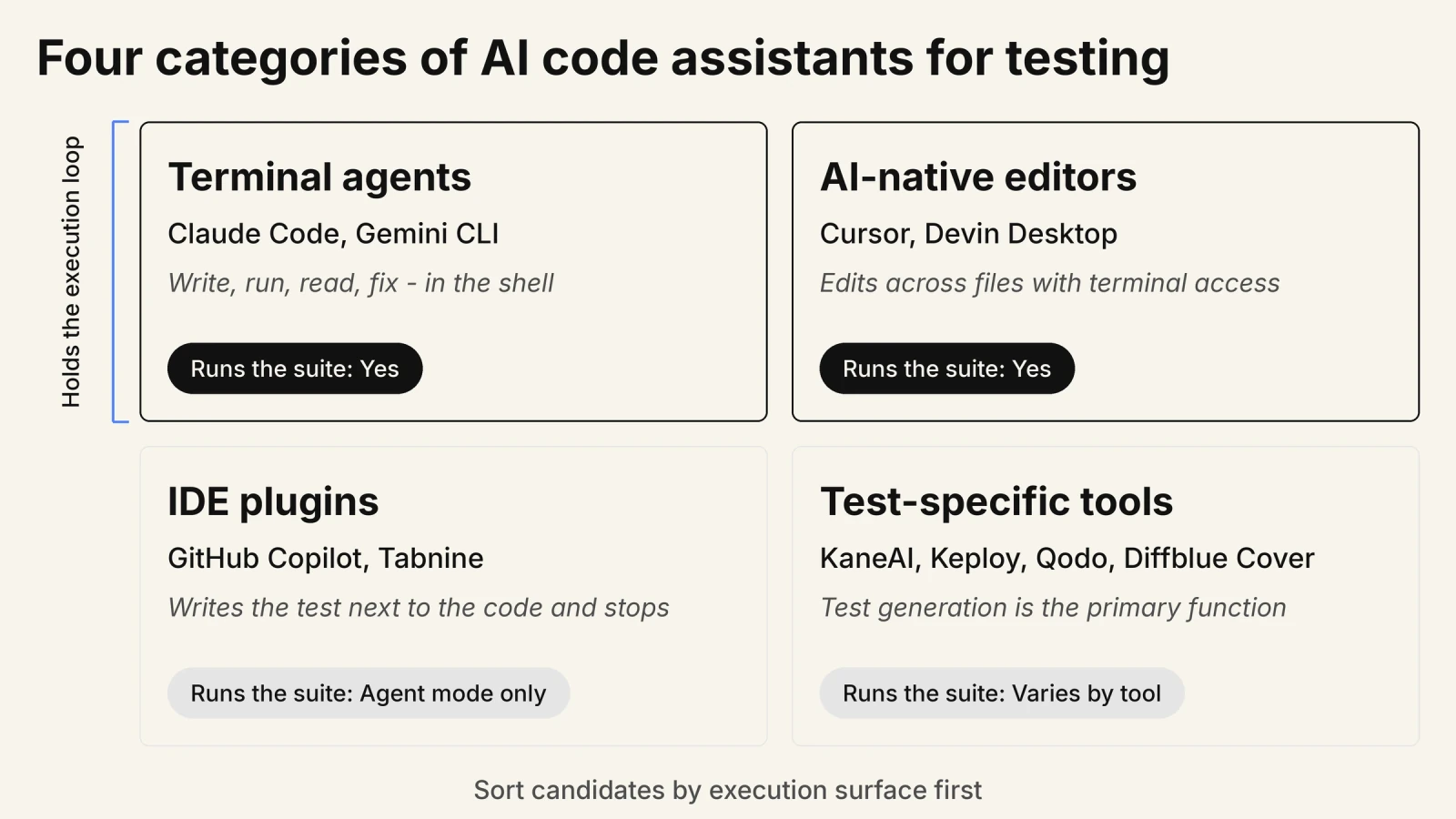
Generation, execution and verification are three separate jobs, and unit tests and browser tests are two separate problems. Most roundups merge all five into one column called "writes tests".
Underneath every category sits a model layer that is easy to confuse with the tool layer. Claude is the model and Claude Code is the agentic coding tool built on it. Gemini is the model, while Gemini CLI and Gemini Code Assist are the tools. The model comparison is a separate question, covered in best LLM for coding.
Can AI Coding Assistants Write Unit Tests You Can Trust?
Yes for syntax, no for judgement. Claude Code, GitHub Copilot and Qodo emit runnable pytest, Jest and JUnit files, but the assertions come from the code under test, so the suite compiles and passes without proving the behaviour was ever right.
Researchers at the University of Luxembourg found that LLM-based test generation produces oracles capturing the actual program behaviour rather than the expected one. Classical generators such as EvoSuite have the same failing.[2] The same work found LLM-generated oracles have higher fault detection potential than EvoSuite's, so this is an inherited limit rather than a regression.
The consequence shows up in execution. In a study of ChatGPT-generated unit tests, 85.5% of failed executions were caused by assertion errors rather than compilation problems.[3]
Claude Code, GitHub Copilot and Qodo win the mechanical half: fixtures, parameterised cases, boilerplate and test data. Hand the assistant the requirement, not just the file, and review every assertion before merge.
How Do You Evaluate an AI Code Assistant for Testing Work?
Give every candidate the same failing test task, then score four things: whether it runs the suite, reads the real failure output, fixes the drifted selector, and re-runs until green. A demo on a clean repository tells you nothing, because the failure output is where assistants separate.
Use your own repository, and pick a test already broken for a boring reason: a renamed data attribute, a changed redirect, a component that renders one element deeper.
- Execution: Does the assistant start the suite itself, or hand you a file to run?
- Failure reading: Does it parse the real stack trace and locator error, or guess from the source alone?
- Repair quality: Does it re-derive the selector from the real page, or lengthen the timeout and call it fixed?
- Iteration: Does it re-run after editing, or declare success without a second execution?
Iteration separates a terminal agent from an editor plugin, and it is worth more than any published benchmark score.
What Are the Best AI Code Assistants for Testing in 2026?
Qodo, Diffblue Cover and Keploy generate tests as their primary function, while Claude Code, Cursor and GitHub Copilot generate them as one capability inside a general coding agent. The 11 tools below are grouped by execution surface rather than ranked, because the right pick follows your stack.
Methodology: each tool was assessed on what it emits, whether it executes the suite itself, whether it returns attachable evidence, and its published price, read from each vendor's own pricing page in August 2026. Vendors publishing no price are marked as such, never estimated.
| Tool | Surface | Emits | Runs the suite | Price |
|---|---|---|---|---|
| Claude Code | Terminal | pytest, Jest, Playwright | Yes | Not published |
| Gemini CLI | Terminal | Any, via shell tools | Yes | Free tier[4] |
| GitHub Copilot | IDE plus PR | Unit tests, PR review | Agent mode | $0 to $100[5] |
| Tabnine | IDE plus CLI | Test code, chat | Agentic tier | $39 to $59[6] |
| Amazon Q Developer | IDE, CLI, console | Unit tests | Agents | Free tier and Pro |
| JetBrains AI Assistant | JetBrains IDEs | Tests in the IDE runner | Junie | Not published |
| Cursor | AI-native editor | Multi-file test edits | Yes | Free to $40[7] |
| Devin Desktop | Desktop plus cloud | Suites, async jobs | Yes | Free to $200[8] |
| Qodo | IDE plus PR | Tests, PR review | Partly | $30 per month[9] |
| Diffblue Cover | IDE, CLI, CI | JUnit for Java | Yes | Not published |
| Keploy | CLI plus cluster | API tests, mocks | Yes | Open source core |
| OpenAI Codex CLI | Terminal plus IDE | Tests, CI runs | Yes | Not published |
| Aider | Terminal | Any, via your model | Yes | Free, bring a key |
| Amp | CLI plus editors | Tests across models | Yes | Not published |
1. Claude Code
- Best for: writing a test, running it, and iterating on the failure in one terminal loop.
- Not for: confirming the page a user sees renders correctly.
Claude Code is Anthropic's terminal coding agent. It reads project files, runs shell commands and connects to tools through the Model Context Protocol. Its documented headline example is a testing task: write tests for the auth module, run them, and fix any failures. Claude Code Kane CLI verification covers the browser half.
2. Gemini CLI
- Best for: a free terminal agent that scaffolds a test file and runs the suite.
- Not for: teams needing a published enterprise support contract first.
Gemini CLI is Google's open-source terminal agent under Apache 2.0. Its shell-command and file-write tools scaffold a spec, run the suite and read the output without leaving the terminal. A personal Google account gives 60 requests a minute and 1,000 a day.[4] The pairing is covered in Gemini CLI Kane CLI verification.
3. GitHub Copilot
- Best for: catching thin coverage on the pull request before a reviewer opens it.
- Not for: a single terminal loop, since work spreads across editor, PR and cloud agent.
GitHub Copilot writes test bodies inline as you type a test name, generates and runs test files in agent mode across Visual Studio Code, Visual Studio, JetBrains IDEs, Eclipse and Xcode, and reviews pull requests where coverage gaps surface pre-merge. For prompt patterns see master test writing with GitHub Copilot.
4. Tabnine
- Best for: regulated teams whose test code cannot leave the network.
- Not for: teams wanting a standalone test-generation product, which Tabnine does not ship.
Tabnine gives codebase-grounded completion and chat for test code, and its agentic tier can invoke testing frameworks as tools. The draw for regulated QA teams is deployment: Tabnine offers self-hosted and fully air-gapped installation on both paid tiers, and the Agentic Platform adds the Tabnine CLI.
5. Amazon Q Developer
- Best for: carrying an existing Java suite through a version upgrade.
- Not for: teams with no AWS footprint, where the upgrade agents add nothing.
Amazon Q Developer names unit test generation as a distinct capability, alongside agents that implement, document, test, review and refactor code. Its differentiator for legacy work is the agents that handle Java version upgrades and .NET porting, both of which require the existing suite to be carried across and re-validated. Surfaces: Visual Studio Code, JetBrains IDEs, Visual Studio, Eclipse, the CLI and the AWS Console.
6. JetBrains AI Assistant
- Best for: generating tests into the IDE test runner you already use.
- Not for: budget planning, since JetBrains publishes no fetchable AI pricing.
JetBrains AI Assistant is native to IntelliJ IDEA, PyCharm and WebStorm, so generated tests land in the existing runner and inspection tooling rather than a detached file. Junie is the separate autonomous agent that executes a task across files instead of suggesting completions. JetBrains publishes no fetchable AI pricing, so no figure is quoted here.
7. Cursor
- Best for: multi-file test refactors driven from the editor.
- Not for: headless CI, where a terminal-first agent fits better.
Cursor is an AI-native editor built as a Visual Studio Code fork. Its agent edits across files with terminal access, so a request to add tests for a module and make them pass runs end to end inside the editor. Bugbot reviews team pull requests, which is where weak coverage surfaces.
8. Devin Desktop
- Best for: handing a scoped test-backfill ticket to an agent, reviewing the PR later.
- Not for: tight inner-loop work where you watch each step happen.
Devin Desktop from Cognition manages fleets of local and cloud agents from one surface, running several test-writing agents in parallel. The cloud Devin agent takes a scoped ticket, runs tests and build commands in its own environment, and iterates on failures, which suits asynchronous regression fixes.
9. Qodo
- Best for: flagging missing coverage during pull request review.
- Not for: per-seat budgeting, since Qodo bills by pooled credits.
Qodo leads with agentic code review and code governance, with test generation as a real but secondary capability. Qodo Gen generates tests for code changes inside Visual Studio Code and JetBrains IDEs as a local self-review before you commit, and Qodo Merge reviews pull requests. Billing is credit-based and pooled across the team rather than per seat.
10. Diffblue Cover
- Best for: backfilling a coverage baseline across a legacy Java estate.
- Not for: polyglot teams, since Diffblue Cover is built around Java.
Diffblue Cover writes Java unit tests autonomously at scale, shipping as an IDE plugin, a CLI and a CI step. Diffblue positions it as an AI testing agent for enterprise unit testing. The classic use is the one no engineer volunteers for: a first coverage baseline across a legacy codebase nobody tested. Diffblue publishes no pricing.
11. Keploy
- Best for: turning real traffic into replayable API tests with mocks attached.
- Not for: greenfield services with no traffic to record yet.
Keploy captures incoming requests and outgoing dependency calls using eBPF and network-level interception, without requiring application code changes, then converts the captured behaviour into editable tests and mocks.[10] That removes hand-maintained mocks for databases, queues and caches. The core is Apache 2.0, one of several open source AI testing tools worth evaluating.
Use Claude Code or Gemini CLI to run and repair the suite in the shell, GitHub Copilot or JetBrains AI Assistant to write tests beside the code, and Diffblue Cover or Keploy to backfill coverage at scale. OpenAI Codex CLI, Aider and Amp cover the same terminal ground and are compared in agentic coding CLI tools.
Can AI Code Assistants Write Playwright and Selenium End-to-End Tests?
Yes. Claude Code, Cursor and GitHub Copilot generate Playwright and Selenium specs from plain-English scenarios, usually through Playwright MCP, which hands the agent a real browser and its accessibility tree. Without that tool the assistant writes selectors against a DOM it has never seen.
End-to-end generation is harder for one reason: the selector is produced after hydration, not present in the source the assistant read. Checkly's engineering team put it plainly when testing AI-generated Playwright suites: the LLM simply cannot know how the target site is structured.[11] Give it a browser and the failure mode changes from invented selectors to real ones that drift.
What is Playwright MCP and why do coding agents need it?
Playwright MCP is Microsoft's Model Context Protocol server that gives Claude Code, Cursor or GitHub Copilot a real browser and returns accessibility-tree snapshots, so the agent explores the page before writing a line. Microsoft ships that ordering in its own agent definitions: the Playwright Generator agent verifies selectors and assertions live as it performs the scenarios.[12] Execution comes first by design.
Can AI code assistants write API tests from an OpenAPI spec?
Yes. Claude Code and Cursor generate pytest and Jest request tests from an OpenAPI schema, because the schema supplies the contract they otherwise lack: paths, methods, status codes and response shapes. Keploy instead records real traffic with eBPF. Schema-driven generation covers documented behaviour; traffic capture covers what your service actually does.
What Does a Terminal AI Agent Add to Testing That an IDE Assistant Cannot?
A terminal agent runs your test suite in the shell, reads the real failure output, and edits until it passes. An IDE assistant writes the test beside the code and leaves the run to you. Shell access is the difference between a suggestion and an execution.
That access also makes the agent scriptable: it composes with git, exit codes and CI in a way an editor panel does not. The ceiling matters though. A terminal agent starts a test process and reads its output, but cannot confirm a rendered page works, because that process never opened a browser.

Note: Run your Playwright and Selenium suites across 3,000+ browser and OS combinations with TestMu AI. Try free!
Which AI Code Assistant Generates the Best Unit Tests?
Qodo targets test generation directly, Diffblue Cover autogenerates JUnit suites for Java, and Claude Code reads files across the repository within its context window, so the pick follows your stack rather than a scoreboard. There is no published benchmark that settles this across languages.
Two jobs hide behind the word "best" here. Generating a file for code you are writing now is inner-loop work, and any general agent does it. Backfilling a suite across an untested codebase is batch work, where a purpose-built generator earns its price.
Which languages and IDEs do AI code assistants support for test generation?
Diffblue Cover covers Java with JUnit, and Claude Code, Cursor and OpenAI Codex emit pytest, Jest, Vitest and Playwright specs across Python, JavaScript and TypeScript. GitHub Copilot spans Visual Studio Code, Visual Studio, JetBrains IDEs, Eclipse and Xcode, while JetBrains AI Assistant stays inside the JetBrains line. Framework coverage is rarely the deciding factor.
Claude Code, Cursor or GitHub Copilot: Which One Should a Tester Pick?
Claude Code runs in the terminal and executes your suite, Cursor edits across files in a Visual Studio Code fork, and GitHub Copilot reviews tests on the pull request. Each covers a different point in the loop, which is why many teams end up running two.
Pick on where the test gets touched. Repairing a broken suite favours the terminal loop, because the failure output is right there. Writing tests alongside a feature favours the editor. Stopping thin coverage from merging favours the pull request layer. Published head-to-head accuracy percentages disagree across sources, so none are quoted here.
Why Do AI Code Assistants Struggle With End-to-End Testing?
AI code assistants write end-to-end tests from a summary of your app, not the running app. They never see the rendered DOM or a second run, so the test stays green while the bug reaches production. Five separate limits produce that outcome, and they compound.
Claude Code, Cursor and GitHub Copilot are genuinely good at development work, and that is worth holding on to. The boundary is not intelligence, it is access.
In my experience the tell is a Playwright spec that goes green on the first run and stays green after you break the behaviour it claims to cover. The assistant asserted what the component rendered when it read the file, not what the ticket asked for.
Why does the context window stop assistants from writing good end-to-end tests?
An end-to-end test needs the DOM, the spec, the API contract and the existing suite. That set outgrows the window the assistant reads well, so Claude Code compacts the conversation and Cursor retrieves chunks instead of loading everything.
Vendor ceilings are large: 1 million tokens for Claude Fable 5, Claude Opus 5 and Claude Sonnet 5, and 200,000 for Claude Haiku 4.5.[13] Gemini 3 takes 1 million input tokens and returns up to 64,000.[14]
Size still bites at the page level. One practitioner writing on DEV Community reported that a complex page in the production application he was testing consumed 50k+ tokens per query when the full DOM was serialised into context.[15]
So every assistant ships a lossy compression layer rather than failing loudly. Anthropic's documentation states that when a long session compacts, Claude Code summarizes the conversation history to fit the context window, and that the assistant no longer holds the exact code it read earlier.[16]
Cursor's search subagent keeps the main conversation focused by summarizing results instead of dumping raw file contents.[17] Raising the ceiling does not remove the pressure, because attention creates n squared pairwise relationships for n tokens.[18]
The advertised window is a ceiling, not a usable budget. The NoLiMa benchmark found that 11 of 13 models score at or below half their short-context baseline by 32,000 tokens.[19] A deeper treatment lives in AI context.
The testing consequence is specific. When the spec and the contract sit outside the window, the only ground truth left inside it is the implementation.
Why do AI-generated tests pass when the code is wrong?
Because the assistant derives the assertion from the implementation it just read. A test has two halves, and only one is derivable from source. The prefix, meaning the setup and the call, comes straight from a signature. The oracle, meaning the assertion, encodes intent, and intent lives in the ticket rather than the file.
With one ground truth in context, the assistant writes current behaviour into the assertion. The test is then true by construction, including when the current behaviour is the defect.
It gets worse when the same agent writes the implementation and the test in one session, because both artefacts share a single definition of correct. The suite turns into a lock on existing behaviour: loud during a refactor, silent during a regression.
Can an AI code assistant run the application it is testing?
No. The assistant predicts tokens over static files, so it never sees the rendered DOM or the network response. It guesses the selector, and the first run times out waiting for a locator that was never going to resolve.
Four things exist only at runtime: the hydrated DOM, real status codes and error shapes, auth and session state, and timing. Classical generators such as EvoSuite close that loop by construction, because they execute the program as they build the test.
Researchers describe the gap directly: LLMs can barely run and analyze the generated test cases, so they are hard to obtain the testing feedback including error messages or coverage feedback of the test code.[20]
A second-order effect follows. With no registry, type system or rendered page resolving names, invented packages and methods arrive with the same confidence as real ones.
A USENIX Security 2025 study of generated package names found 440,445 of them, or 19.7%, were hallucinations, and 43% of hallucinated packages repeated across all 10 queries.[21] Regenerating returns the same fake name rather than a different one.
Does one green test run prove an end-to-end test works?
No. Google measured Java WebDriver tests at 10.45% flaky and Python WebDriver at 18.72% against a 1.65% all-tests baseline, so a browser result is a distribution over runs rather than a value.[1] One execution cannot separate a passing test from a lucky one.
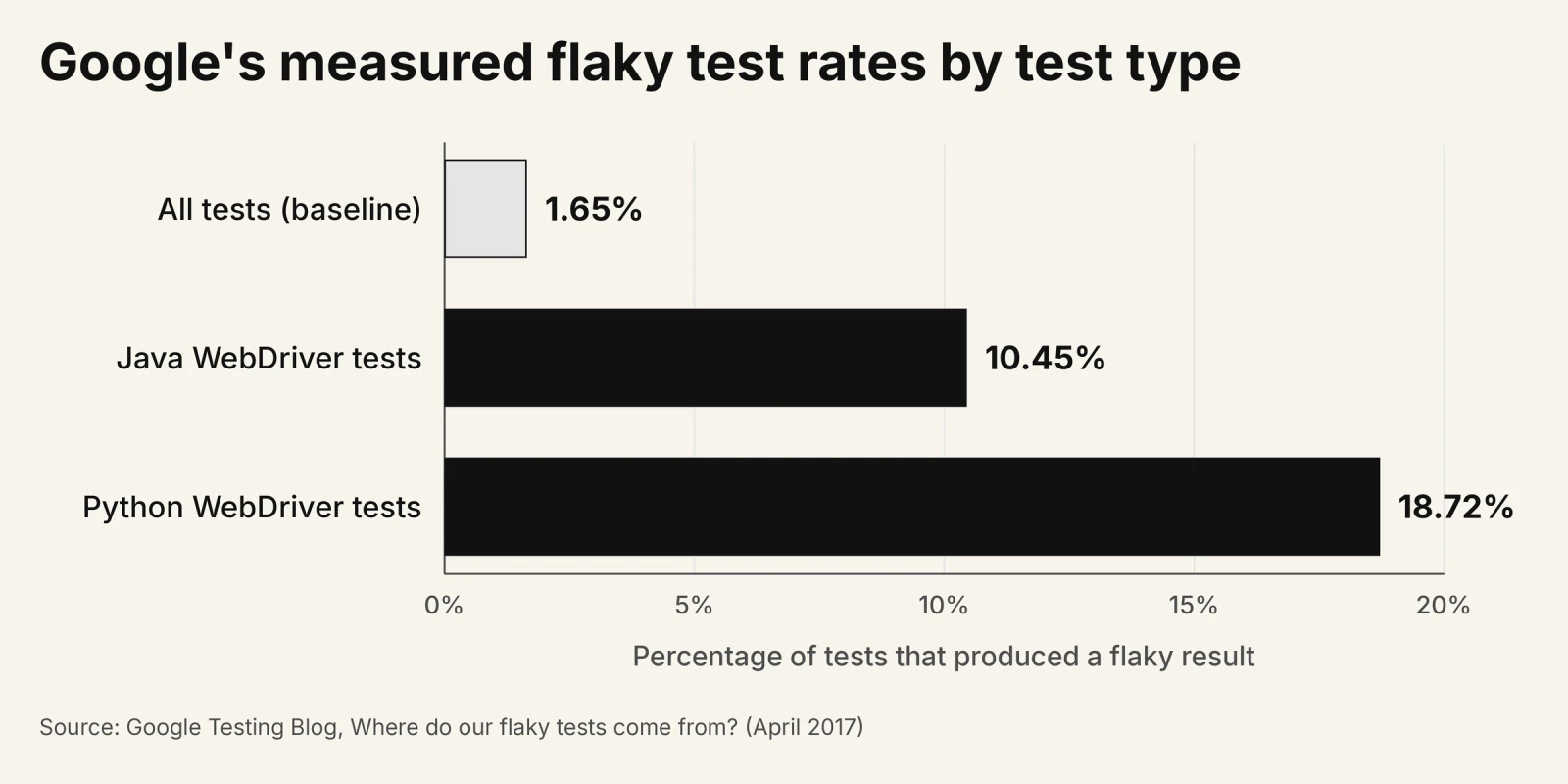
Google's week-long study of its own suite showed the same gradient by test size: 0.5% of small tests, 1.6% of medium tests and 14% of large tests were flaky, where large is Google's internal size classification rather than a browser-specific label.[1] Deciding whether an end-to-end test is correct therefore needs repeated execution, which is exactly what does not scale at that layer.
Meta evaluated its TestGen-LLM system on Instagram Reels and Stories. There, 75% of test cases built correctly, 57% passed reliably, and 25% increased coverage.[22] Researchers studying UI flakiness reach the opposite conclusion for browsers: UI tests tend to be more complex and resource-heavy, making them unsuited for detection techniques involving rerunning test suites multiple times.[23]
Why does an AI-written test pass on Chrome and fail on Safari?
The browser engine decides the rendered result, and the source code does not contain it. Blink, WebKit and Gecko diverge on the same markup, and the assistant cannot know which engine, version, viewport or device the user runs.
The size of that gap is measurable. Across the features browser makers themselves prioritised for Interop 2025, only 29% of the selected tests passed across all browsers at the start of the year, and the score reached a 97% pass rate by the end after coordinated work by Apple, Google, Microsoft, Mozilla, Igalia and Bocoup.[24]
Those figures cover a deliberately chosen set of known-problematic features, not the whole web platform. The practical shape is still familiar. The spec passes headless Chromium locally and in CI, then Safari on a real iPhone puts the consent banner over the submit button.
Paste that failure to the assistant and you get a confident selector rewrite, because nothing in the source is wrong. The assistant has nothing true to say about an engine it cannot see.
In the Reddit thread "Selenium vs Playwright + AI testing tools - what actually works in real QA projects?" on r/softwaretesting, QA engineers reported that the agent prioritizes a passing test over a test that checks the product, and narrows a flaky test's scope instead of hardening it. One commenter's conclusion was that how you write the test matters more than which tool writes it.
How Do You Verify What an AI Coding Assistant Just Wrote?
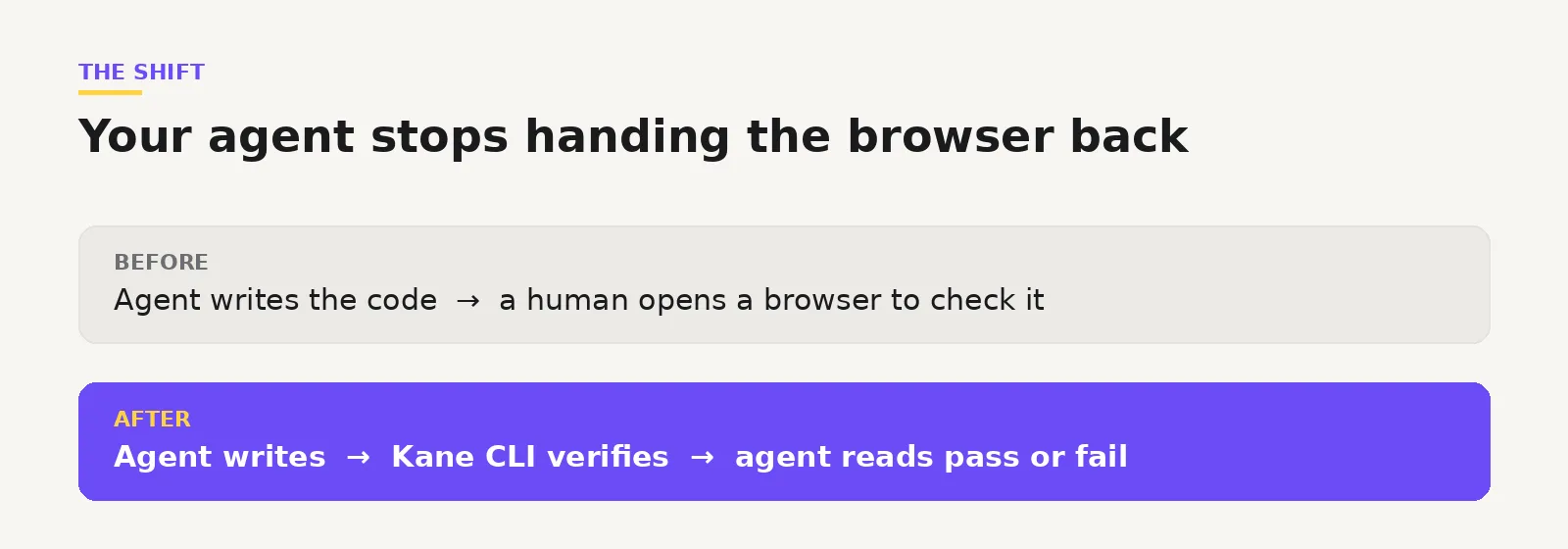
Run the flow in a real browser and read the verdict. A terminal verification step drives Chrome against the running app and returns pass or fail with per-step evidence attached, which is the one signal a static-file reader cannot produce for itself.
This is a missing tool rather than a prompting problem. Unit tests, type checks and linters confirm that code compiles and matches its own assertions, and none of them render the application. Independent evaluation of autonomous systems is covered in AI agent testing.
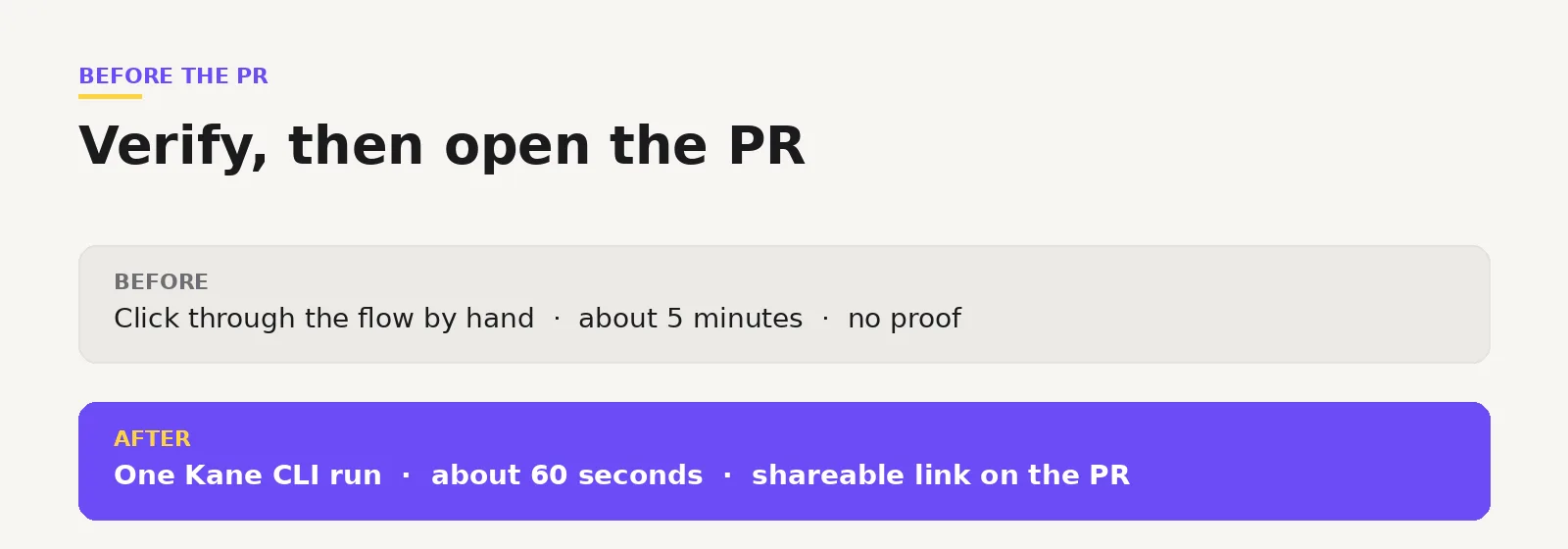
An AI coding assistant works in the terminal, so the check that proves its code renders correctly has to reach the terminal too. Kane CLI from TestMu AI (formerly LambdaTest) runs browser automation there: you give it a plain-English objective, it drives real Chrome, and it returns pass or fail with shareable proof.
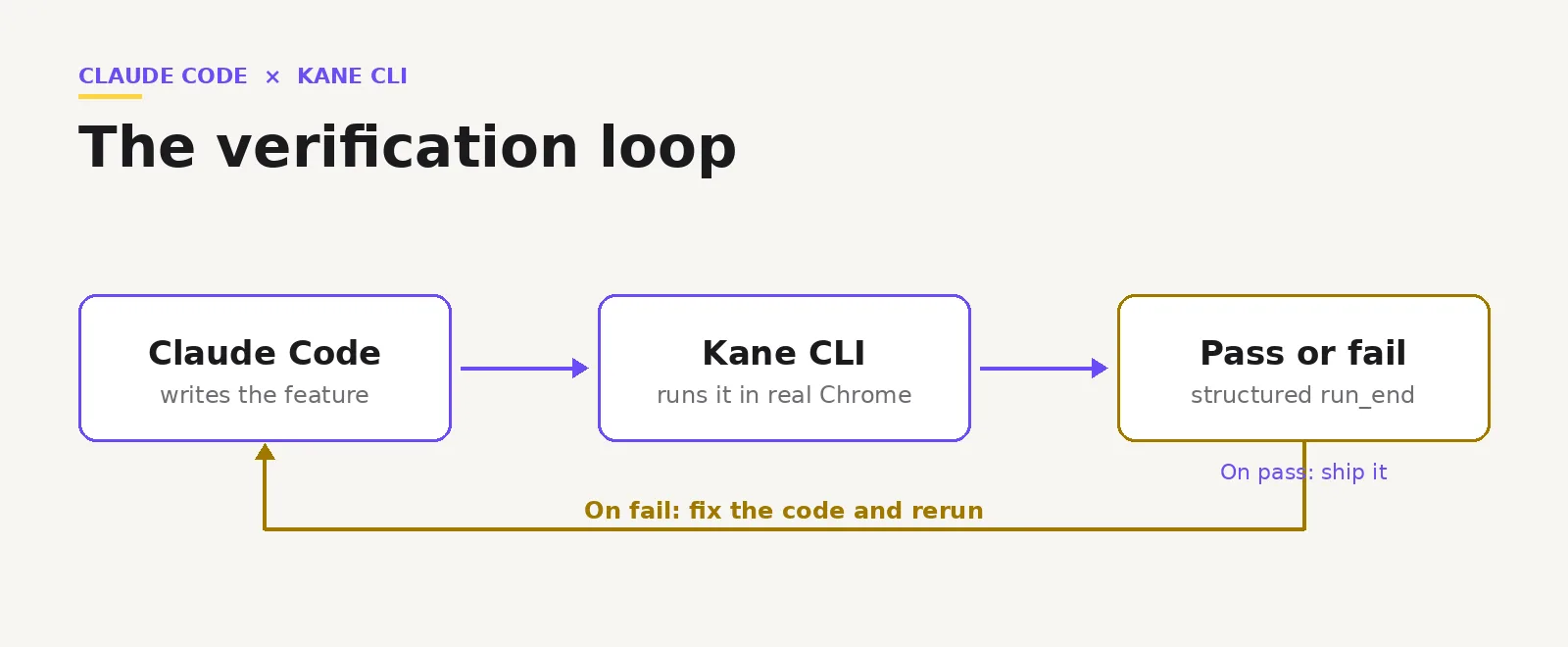
The walkthrough below runs the loop end to end. This video shows the same sequence against a real app.
Step 1: Install Kane CLI and authenticate
Kane CLI needs Node.js 18 or higher and Google Chrome on PATH, and runs on macOS, Linux x64 and Windows x64.
npm install -g @testmuai/kane-cli
kane-cli login
kane-cli whoami
The whoami command prints the authenticated account, which confirms auth is live before you run anything. In CI, use kane-cli login with a username and access key from secrets, because the plain login command opens a browser for OAuth and a runner has none. Background on the tool is in introducing Kane CLI.
Step 2: Teach your assistant to reach for it
Copy the skill file into the assistant's skills directory. After that the assistant recognises browser tasks and builds the command itself instead of being handed flags.
mkdir -p ~/.claude/skills/kane-cli
curl -o ~/.claude/skills/kane-cli/SKILL.md \
  https://raw.githubusercontent.com/LambdaTest/kane-cli/main/skills/claude/SKILL.md
Gemini CLI uses the same pattern with the gemini skills path. Codex CLI appends the skill to AGENTS.md read from the project root, and Cursor reads AGENTS.md too, so Cursor uses the Codex skill.
Step 3: Run the flow in real Chrome
Describe the flow in plain English and pass the application URL. A real Chrome window opens and walks the steps.
kane-cli run "log in, add an item to the cart, assert the total shows '$29.99'" \
  --url http://localhost:3000
The assertion clause is what can fail, so an objective without one can pass while proving nothing. Use the literal form store X as 'name' when you need a value captured, because vague phrasing such as "tell me the price" will not reliably persist it.
Step 4: Read the verdict and the evidence
The terminal prints a per-step trace, a pass or fail verdict, and a ShareLink: a 7-day public URL on TestMu AI Test Manager that shows the run summary, screenshots and step trace without project access.
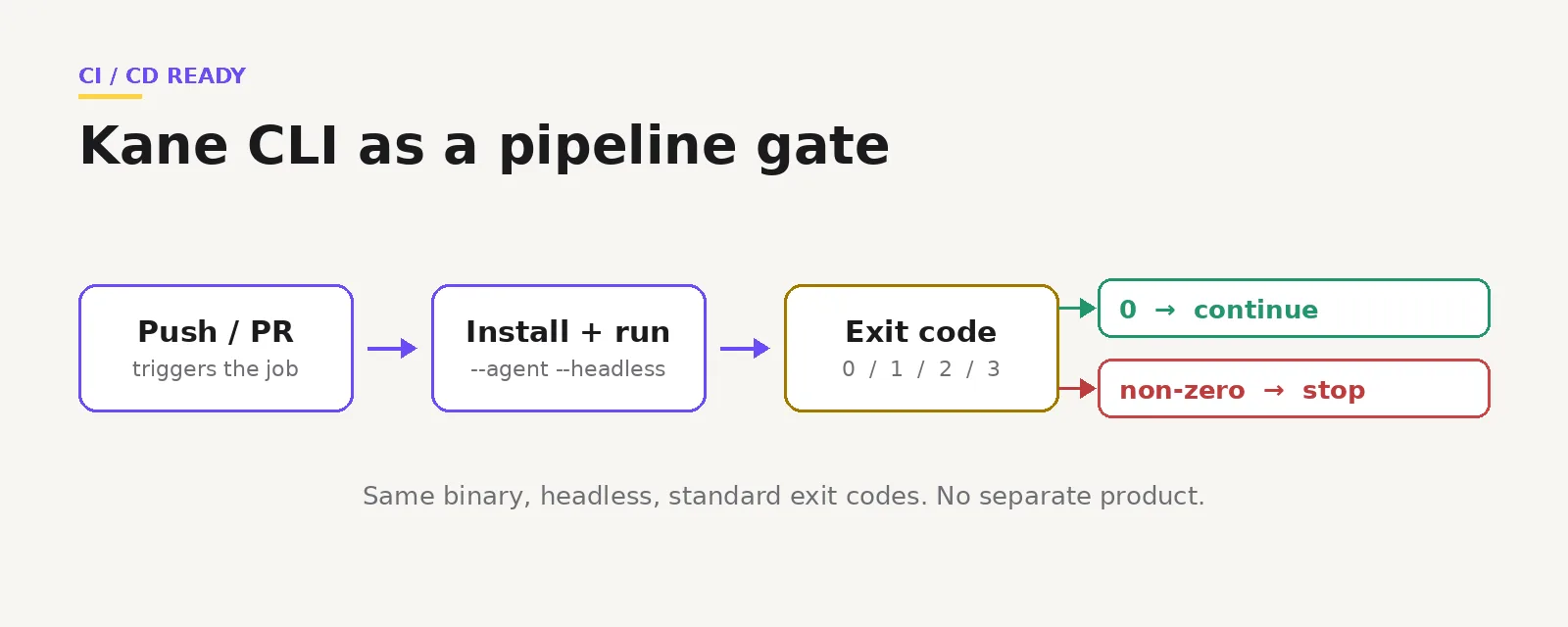
Kane CLI sets a standard process exit code from the outcome: 0 for passed, 1 for failed, 2 for an error such as auth or setup, and 3 for a timeout or cancellation.
When a flow hits an OTP screen, a CAPTCHA or a payment confirmation, Kane CLI pauses and fires an ask_user event rather than failing silently. That prompt auto-disables when stdin is not a terminal, so it never hangs a pipeline. Full command reference sits in the Kane CLI documentation.
Step 5: Hand the result back to the assistant
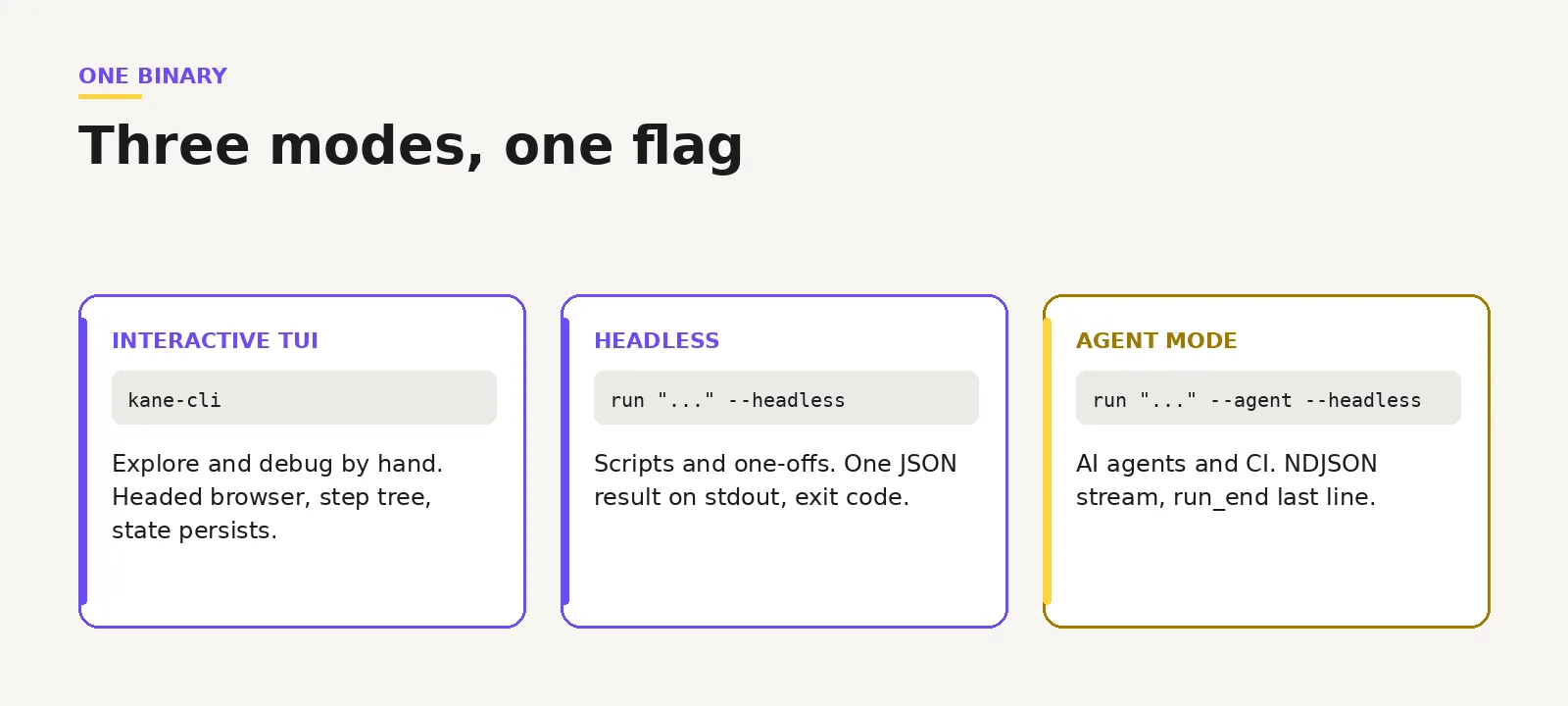
Add the agent flag and Kane CLI writes one JSON object per line to stdout instead of a terminal UI. The run terminates on a run_end event carrying status, summary and the Test Manager run URL.
kane-cli run "<objective>" --url <url> --agent --headlessThe flag matters because without it the assistant receives box-drawing characters and escape codes it cannot parse. On a pass the assistant moves on. On a fail it gets the failing step plus screenshots and logs, which is a better repair signal than a stack trace. The Kane CLI three modes comparison covers when to use each.
Step 6: Move the check into CI
The same command runs in the pipeline with credentials from secrets, so the gate is the exit code and nothing has to be parsed.
kane-cli run "log in, assert the dashboard shows 'Welcome'" \
  --url https://staging.myapp.com \
  --headless --agent --timeout 300 \
  --username "$LT_USERNAME" --access-key "$LT_ACCESS_KEY"
One binary and one syntax cover all three contexts: an interactive terminal while building, headless for scripts, and agent mode for assistants and pipelines. The flow you debugged locally is the flow the pipeline runs, so there is no second source of truth. Always set a timeout in CI, because a hung run must not block the pipeline.
The shift this produces is small and specific. The human stops being the verification step and starts reviewing outcomes, with a ShareLink as the artifact attached to the pull request.
Will AI Code Assistants Replace QA Engineers?
No. AI code assistants replace scripted manual execution, not quality engineering. Exploratory testing, test strategy, oracle design and risk-based prioritisation stay with engineers, and review workload grows as Claude Code, Cursor and GitHub Copilot produce more tests than any team wrote by hand.
The job shifts rather than shrinks. Deciding what deserves a test, spotting the usability failure no requirement described, and judging whether an assertion encodes intent are all judgement work. Teams building that review layer can look at Kane CLI the AI agent for QA.

How Should You Choose Between AI Code Assistants for Testing?
Choose on execution surface first: terminal agents for scripted CI loops, IDE assistants for tests written beside the code, and test-specific tools when coverage has to be backfilled at scale. Language and price decide between candidates inside a category, not across them.
- Solo developer: Gemini CLI or Aider, both free and running the suite in the shell.
- QA team on a monorepo: Claude Code for the repair loop, GitHub Copilot reviewing coverage on the PR.
- Regulated or air-gapped: Tabnine, which supports self-hosted and air-gapped deployment.
- Legacy Java estate: Diffblue Cover for the JUnit baseline, a general agent for new work.
- Service with real traffic: Keploy, which records live calls with eBPF instead of hand-written mocks.
What should you pilot first?
Pilot one assistant and one verification step together, not three assistants alone. Pick the flow that breaks most often in production, have the assistant write the test, then run it in a real browser and compare the results.
If the generated test passes while the browser run fails, you have measured the gap on your own application in an afternoon. Teams standardising that check in the pipeline can start from agent testing CLI.
Conclusion
Sort AI code assistants for testing on execution surface first, then run the failing-test evaluation from this guide against your own repository before you buy anything. The 11 tools above differ less in what they emit than in whether they execute, and that property predicts how much review work lands back on your team.
The limits are structural, not temporary: the assistant reads files, and an end-to-end result exists only at runtime. Pair whichever assistant you pick with a step that opens a real browser and returns a verdict. You can try Kane CLI free and run your first flow in minutes.
Sources and References Used
- [1] Where do our flaky tests come from? - Jeff Listfield, Google Testing Blog (April 2017)
- [2] Do LLMs generate test oracles that capture the actual or the expected program behaviour? - Konstantinou, Degiovanni and Papadakis, University of Luxembourg (October 2024)
- [3] No More Manual Tests? Evaluating and Improving ChatGPT for Unit Test Generation - Yuan et al., Fudan University (May 2023)
- [4] Gemini CLI repository and free-tier limits - Google (August 2026)
- [5] GitHub Copilot plans and pricing - GitHub (August 2026)
- [6] Tabnine pricing and deployment options - Tabnine (August 2026)
- [7] Cursor pricing tiers - Cursor (August 2026)
- [8] Devin and Devin Desktop pricing - Cognition (August 2026)
- [9] Qodo pricing and credit model - Qodo (August 2026)
- [10] Keploy eBPF traffic capture and test generation - Keploy (August 2026)
- [11] Generating end-to-end tests with AI and Playwright MCP - Checkly Engineering Blog
- [12] Playwright Test Agents documentation - Microsoft (2026)
- [13] Claude models overview and context windows - Anthropic (August 2026)
- [14] Gemini 3 developer guide, input and output token limits - Google (2026)
- [15] Why AI Can't Write Good Playwright Tests (And How to Fix It) - DEV Community (December 2025)
- [16] Explore the context window, Claude Code documentation - Anthropic (2026)
- [17] Semantic search documentation - Cursor (2026)
- [18] Effective context engineering for AI agents - Anthropic Engineering (2025)
- [19] NoLiMa: Long-Context Evaluation Beyond Literal Matching - Modarressi et al., ICML 2025
- [20] Improving LLM-based Unit test generation via Template-based Repair - Gu, Fang, Zhang, Tian, Zhou and Chen (2024)
- [21] We Have a Package for You! A Comprehensive Analysis of Package Hallucinations by Code Generating LLMs - Spracklen et al., USENIX Security 2025
- [22] Automated Unit Test Improvement using Large Language Models at Meta - Alshahwan et al., FSE 2024
- [23] An Empirical Analysis of UI-based Flaky Tests - Romano, Song, Grandhi, Yang and Wang (2021)
- [24] Interop 2025: A year of convergence - WebKit Blog, Apple (2026)
Author

Prince Dewani
Blogs: 30

Prince Dewani is a Community Contributor at TestMu AI specializing in AI agents, software testing, QA, and SEO. He is certified in Selenium, Cypress, Playwright, Appium, Automation Testing, and KaneAI, and presented academic research on AI agents at PBCON-01. At TestMu AI, he has also carried out extensive cross-browser research on the support of modern web technologies such as WebGPU, WebAssembly, WebXR, WebGL2 and other web technologies, validating their compatibility and feature parity across major browsers and rendering engines through rigorous hands-on testing. Prince has hands-on experience building AI agent workflows using Anthropic Claude, Google Antigravity, n8n, LangChain, and other agentic frameworks, and works regularly with MCP and A2A protocols. He shares his work with 5,500+ QA engineers, developers, DevOps experts, tech leaders, and AI agent practitioners on LinkedIn.
Reviewer

Anubhav Singhmaar
Reviewer
Anubhav Singhmaar is an AI Product Manager at TestMu AI driving Kane CLI, the command-line tool that brings browser automation to the terminal, turning natural-language flows into runs in a real Chrome browser that return pass or fail with shareable proof. He owns the roadmap and prioritization and works with engineering to ship developer-facing features. Before TestMu AI, he spent over four years at Sprinklr owning enterprise voice AI across APAC and EMEA. A mechanical engineer turned product manager, he grounds guidance in real QA workflows.


AI Test Generation FAQs
Did you find this page helpful?
More Related Blogs
TestMu AI forEnterprise
Get access to solutions built on Enterprise
grade security, privacy, & compliance
- Advanced access controls
- Advanced data retention rules
- Advanced Local Testing
- Premium Support options
- Early access to beta features
- Private Slack Channel
- Unlimited Manual Accessibility DevTools Tests