

Power Your Software Testing with AI Agents and Cloud
The Native AI-Agentic Cloud Platform to Supercharge Quality Engineering. Test Intelligently and Ship Faster.


- TestMu AI (Formerly LambdaTest)
- /
- Blog
- /
- Verify Gemini CLI Output with Kane CLI
Gemini CLI is an excellent terminal utility for drafting code, modifying files, and applying git diffs from a prompt. Like all terminal-scoped LLM engines it has one limit: it cannot interact with live user interfaces. It can write a flawless React component but has no native way to open a browser, click through the rendering, and confirm the component works.
Connecting Gemini CLI with Kane CLI gives the terminal agent a browser verification layer.
Extending LLM Coding Capabilities to the Browser
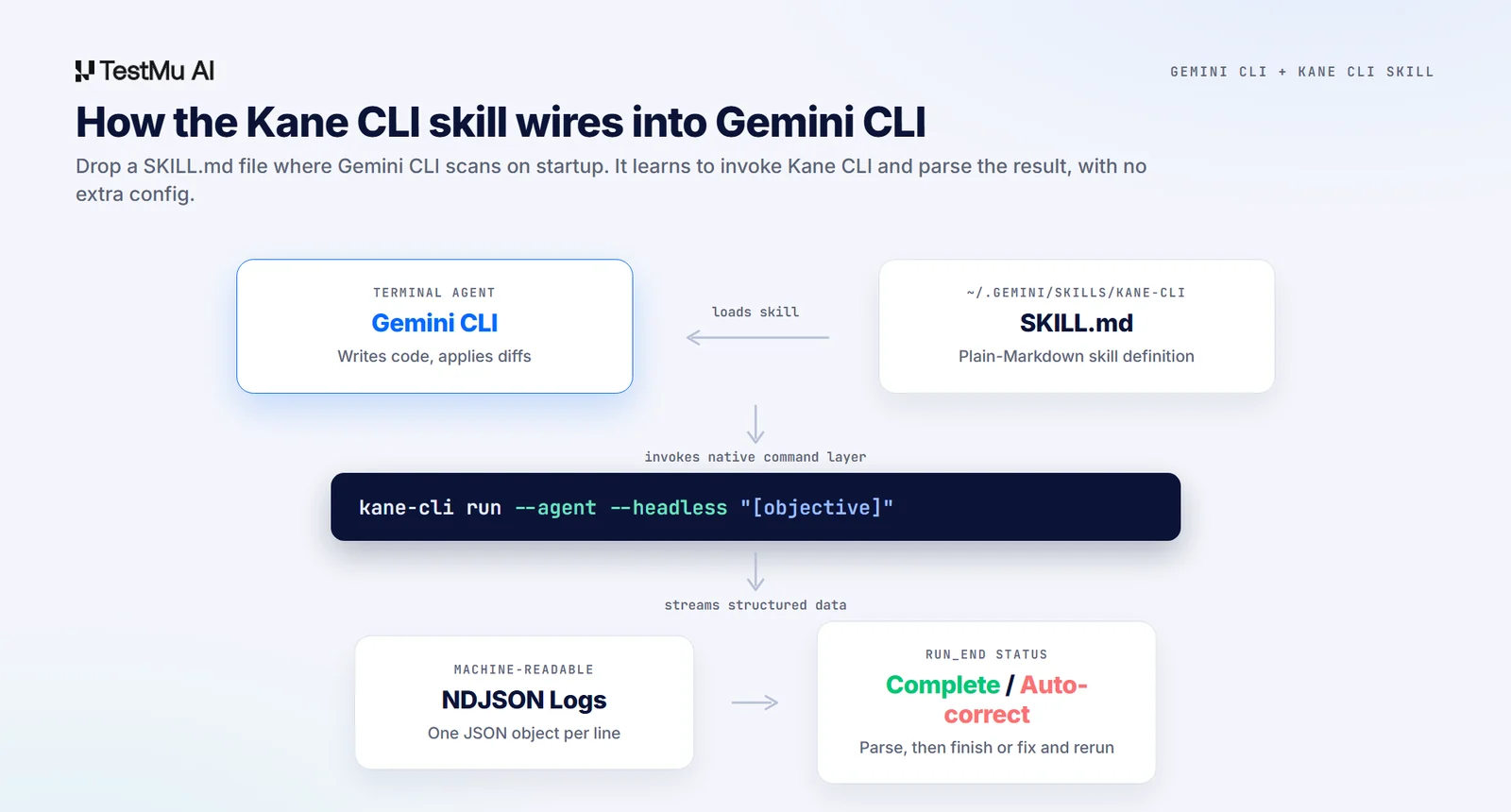
With the Kane CLI skill active, Gemini CLI translates validation requirements into plain-English browser checks, runs them in real Chrome, and reads the deterministic outcome.

Note: Give your terminal agent a real browser and a deterministic pass or fail. Start free. Try Kane CLI
Step-By-Step Skill Installation
Gemini CLI uses structured Markdown skill definitions. You can configure the Kane CLI skill globally or scoped to a single repository.
Option A: Global Environment Setup
mkdir -p ~/.gemini/skills/kane-cli
curl -o ~/.gemini/skills/kane-cli/SKILL.md \
  https://raw.githubusercontent.com/LambdaTest/kane-cli/main/.agents/skills/kane-cli/SKILL.md
Option B: Scoped Project Setup
mkdir -p .gemini/skills/kane-cli
curl -o .gemini/skills/kane-cli/SKILL.md \
  https://raw.githubusercontent.com/LambdaTest/kane-cli/main/.agents/skills/kane-cli/SKILL.md
Gemini CLI scans these directories on startup. No extra config is required; it understands how to invoke and parse Kane CLI operations.
The Autonomous Verification Loop
Once the skill is linked, Gemini CLI moves to a continuous closed-loop workflow.
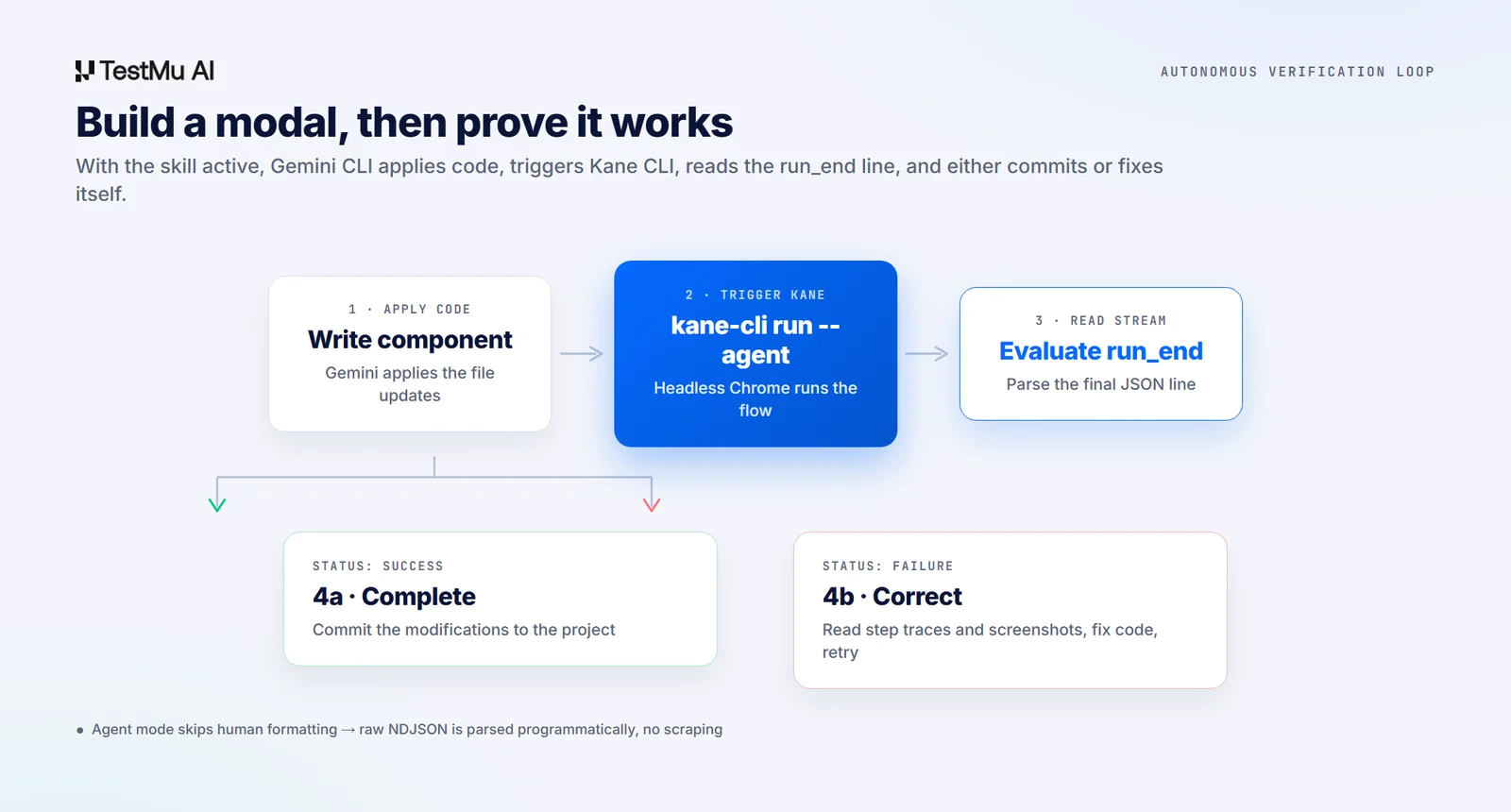
When asked to build or modify a web workflow, the agent applies file updates, constructs a clean kane-cli run --agent command, and runs the check headless. In agent mode it skips human formatting and streams raw NDJSON.
It parses the stream, reads the run_end payload, and handles the outcome programmatically: on a pass it commits, on a fail it uses the structured failure logs and screenshots to fix its own code.
This is the same loop another coding agent closes when Claude Code writes a feature and Kane CLI proves it works.
Skill-Driven Multi-Processing
The skill file instructs the model how to coordinate complex testing. If a task needs multiple disjoint routes tested at once, Gemini CLI uses shell subprocesses to trigger parallel Kane CLI runs. It tracks each background process, parses the distinct logs, and summarizes a scannable report.
Note: Want the agent mode and skill setup behind this loop? Read the Kane CLI docs. Read the docs
The same skill drives interactive, headless, and agent workflows, so once it is installed you can pick whichever fits the moment. See how the three modes of Kane CLI map onto everyday development, or watch a full run where I built a Salesforce clone with Claude and verified it with Kane CLI. In an agentic IDE the same loop is packaged as an installable bundle, which is how the Kane CLI power adds browser verification to Kiro.
For the wider loop, including running Antigravity CLI headless and chaining the browser check onto it in CI, see how to test code written by Antigravity CLI.
Author

Bhawana
Blogs: 75


Bhawana is a Community Evangelist at TestMu AI with over 3 years of experience creating technically accurate, strategy-driven content in software testing. She has authored 50+ blogs on test automation, cross-browser testing, mobile testing, and real device testing. She also serves as Product Marketing Manager for Kane CLI, the command-line tool that runs browser automation from the terminal using natural-language flows in a real Chrome browser. Bhawana is certified in KaneAI, Selenium, Appium, Playwright, and Cypress, reflecting her hands-on knowledge of modern automation practices. On LinkedIn, she is followed by 6000+ QA engineers, testers, AI automation testers, and tech leaders.


Frequently asked questions
Did you find this page helpful?
More Related Blogs
TestMu AI forEnterprise
Get access to solutions built on Enterprise
grade security, privacy, & compliance
- Advanced access controls
- Advanced data retention rules
- Advanced Local Testing
- Premium Support options
- Early access to beta features
- Private Slack Channel
- Unlimited Manual Accessibility DevTools Tests