
Power Your Software Testing with AI Agents and Cloud
The Native AI-Agentic Cloud Platform to Supercharge Quality Engineering. Test Intelligently and Ship Faster.


- TestMu AI (Formerly LambdaTest)
- /
- Blog
- /
- Agent Testing CLI: CLI Based Testing for AI Agents
Agent Testing CLI: CLI Based Testing for AI Agents
Agent testing CLI guide: what CLI based testing for AI agents checks, how to red team an agent, and how to gate evaluations inside a CI/CD pipeline.
Last Updated on:
TestMu AI's Agent Testing platform now has a CLI. Here's what that means for your workflow.
AI agents are in production. Chatbots handle customer queries at scale. Voice assistants route support tickets. Calling agents close loops without a human in the loop and most QA teams are still testing these systems by hand, one conversation at a time.
That bottleneck is exactly what TestMu AI built Agent Testing to fix. Today, we're extending it to the command line.
Here's what a full evaluation run looks like from your terminal:
Key Takeaways
- Three assertion targets: Every command-line test checks the exit code, stdout, and stderr, and a test that reads only the exit code will pass a tool that prints the wrong answer.
- Black-box over unit: Run the built binary as a subprocess instead of importing its functions, because that is the code path a real user actually executes.
- Runner choice by stack: Pick Bats for Bash tools, pytest with subprocess for Python, and the CLI Testing Library for Node.js rather than writing a bespoke harness.
- Non-deterministic output: An AI agent returns a different answer every run, so assert on scored quality dimensions and thresholds instead of on an exact output string.
- Nine red team categories: Run adversarial checks for prompt injection, jailbreak, data exfiltration, and PII leakage before launch, not after an incident.
- Exit code as the gate: Set a pass threshold and let a non-zero exit fail the CI step, which turns an evaluation report into an actual deployment gate.
What Is CLI Based Testing?
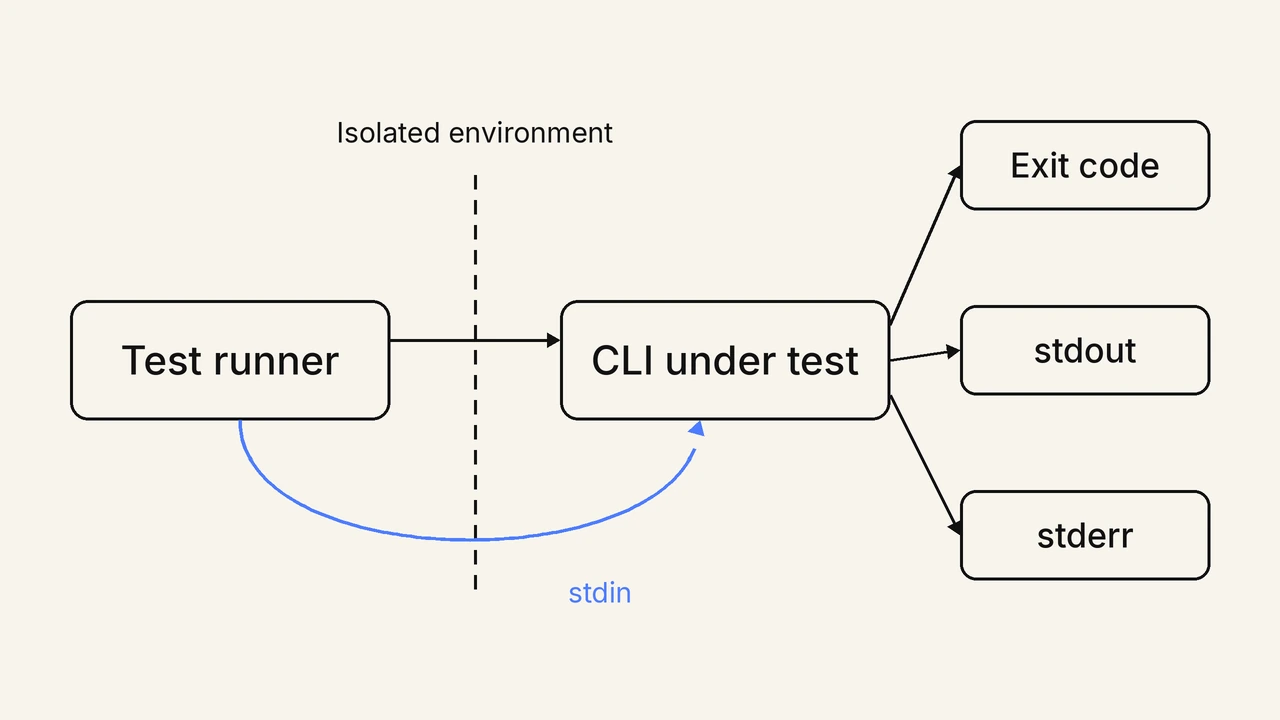
CLI based testing runs a command-line tool the way a user runs it, then asserts on three outputs: the exit code, stdout, and stderr. ISTQB defines it as submitting commands to the software under test.
The scope is wider than correctness alone. Command-line interface testing verifies the functionality, usability, and performance of an application through its command-line interface, so that commands, arguments, options, and outputs all work as expected.[2]
The distinction that matters is black-box versus unit. A unit test imports a function out of the tool and calls it directly, which proves the function works but not that the tool does. A black-box test spawns the built binary as a subprocess, so it exercises argument parsing, config loading, environment handling, and output formatting in one pass.
Georgy Marchuk argues the same case in Smashing Magazine. He borrows the Testing Library principle that the more your tests resemble the way your software is used, the more confidence they give you.[3] For a CLI, resembling real use means a shell command, not an imported module.
Compared with GUI testing, the surface is much smaller. A GUI test needs a browser or device, a locator strategy, and a wait strategy. A terminal has no rendering layer to race against, so command-line tests run faster and stay far less flaky.
What Does a Command-Line Test Suite Check?
A command-line test suite checks the exit code, stdout, stderr, and the reply to stdin. Exit code 0 means success, stdout is the API scripts parse, and stderr carries errors. Bats and pytest run them.
- Exit code: Assert the exact number, not just non-zero, because a tool that distinguishes 1 from 2 is telling a CI script which failure occurred.
- Stdout contract: Treat machine-readable output as an API and assert against a stable format such as JSON, since users will parse whatever the tool prints.
- Stderr separation: Confirm errors go to stderr and results go to stdout, because a tool that mixes them corrupts every downstream pipe.
- Interactive prompts: Write to stdin when a prompt appears and assert on the reply, which is the only way to cover a wizard or a confirmation step.
- Environment isolation: Run each case in a clean working directory with a controlled environment so a leftover config file cannot make a broken test pass.
Pick a runner that already handles subprocess plumbing rather than building one. Bats is a TAP-compliant testing framework for Bash, and shelltestrunner reads plain-text specs of a command, its input, and its expected output.
Judo, an open-source framework from Intuit, is driven from a YAML file that declares which commands to run and how to assert the outcome. Judo can also respond to stdin when an expected stdout string appears, which is what makes an interactive prompt testable.[4]
The CLI Testing Library offers Testing Library-style utilities for end-to-end CLI tests and lets you bring your own testing framework.[5] Python teams generally reach for subprocess inside pytest, which already gives clean access to all three outputs. The same plumbing question comes up in MCP vs CLI when agent tooling has to be driven programmatically.
How Does AI Agent Testing Differ From CLI Based Testing?
The assertion changes. CLI based testing compares stdout to an exact string. An AI agent replies differently every run, so agent-testing-cli runs evaluations that score quality dimensions against a threshold instead.
The replacement is a scored assertion. Instead of checking that the agent said a specific sentence, the evaluation scores the response across quality dimensions and compares those scores to a threshold. A hallucination score below the configured bar fails the run; the exact wording never enters the assertion.
Coverage stops being a fixed list of cases and becomes a generated population of scenarios, because no engineer writes 200 adversarial prompts by hand. And a single run is no longer proof, since a non-deterministic system can pass once and fail the next time, which is why scenario count and a pass threshold both matter more than any individual result.
The shape of the test stays familiar. The command still runs as a subprocess, still writes structured output, and still exits non-zero when the run falls below the bar, so it drops into the same pipeline step as any other command-line test.
What Is the Agent Testing CLI (agent-testing-cli)?
The Agent Testing CLI is agent-testing-cli, a Python package that runs Agent Testing evaluations from your terminal. It runs saved suites for chat, voice, and phone agents: chat and voice conversations are scored across nine quality dimensions, and phone calls across 30+ call metrics.
TestMu AI's Agent Testing platform now has a CLI, and today we're extending it to the command line. Here's what that means for your workflow.
AI agents are in production. Chatbots handle customer queries at scale. Voice assistants route support tickets. Calling agents close loops without a human in the loop, and most QA teams are still testing these systems by hand, one conversation at a time.
That bottleneck is what TestMu AI built Agent Testing to fix, and the command line is now a first-class way to reach it. Here's what a full evaluation run looks like from your terminal:
# Install
pip install agent-testing-cli

# Authenticate (prompts for your username and access key)
agent-testing-cli login

# Find your project and its saved suites
agent-testing-cli projects
agent-testing-cli --project PROJECT_ID suites

# Run a Chat evaluation from a saved suite
agent-testing-cli --project PROJECT_ID --json run \
  --workflow WORKFLOW_ID \
  --suite SUITE_ID \
  --yes
The nine chat and voice quality dimensions scored out of the box are hallucination detection, bias detection, completeness, context awareness, response quality, conversation flow, tone consistency, positive user outcome, and root-cause understanding.
How to Evaluate AI Agents at Scale From the Terminal?
Run a saved suite with agent-testing-cli, and the platform's autonomous evaluators work through its scenarios against your agent in parallel, with the scores available as JSON. For an agent built on Google Cloud, the guide to Vertex AI agent testing also covers scoring responses and tool-call trajectories with Google's Gen AI evaluation service.
Let's take this into practice.
Use case: Your team has built a customer support chatbot for an e-commerce platform. It handles order queries, refund requests, and product FAQs.
You're three days from shipping it to production and you need to know: does it hallucinate? Does it stay on topic when users go adversarial? Does it handle edge cases around refund policy correctly?
The old way: A QA engineer writes 30-50 test scripts manually, runs them one by one, and files bugs based on what they notice. It takes days. It misses edge cases because humans don't think adversarially at scale.
With agent-testing-cli: Connect your agent's endpoint once in a TestMu AI project, let the platform generate realistic and adversarial scenarios from your spec, and run the suite from the terminal while autonomous evaluators work through it in parallel. In minutes, you have structured quality scores across Hallucination Detection, Bias Detection, Response Quality, Conversation Flow, and more. No scripts, no manual review.
The customer support example is just one case. The same pattern applies anywhere you are shipping a conversational AI system:
- Chatbots: Need validation across hundreds of user intent paths before going live.
- Voice assistants: Handle phone calls and must stay coherent across multi-turn conversations.
- Calling agents: Book appointments or handle escalations, where one wrong response has real consequences.
- Internal AI tools: Interact with employees and must stay within compliance boundaries.
- Embedded LLM features: Ship inside products, where hallucinations and off-topic responses are silent failures.
Spin up your Agent Testing CLI in minutes with this detailed documentation.
Spin up your Agent Testing CLI in just minutes with this detailed documentation.
How to Red Team an AI Agent Before Production?
Run a saved adversarial suite with agent-testing-cli. Agent Testing's adversarial suites follow the OWASP Top 10 for LLM applications, from prompt injection to PII leakage, and the results show which attacks the agent failed to refuse. For other ways to run the same attacks, the roundup of AI red teaming tools covers options from open-source scanners to managed platforms.
One of the most important uses of agent-testing-cli, and the one most teams don't think of until it's too late, is running an adversarial suite. It measures whether a motivated user can break the agent.
# Run the saved adversarial suite against the agent
agent-testing-cli --project PROJECT_ID --json run \
  --workflow WORKFLOW_ID \
  --suite ADVERSARIAL_SUITE_ID \
  --yes
The suites cover prompt injection, insecure output handling, sensitive-information disclosure and PII leakage, data exfiltration, jailbreak, and policy violations, and toxicity, bias, and harmful content are scored as metrics alongside them. Jailbreaking in general spans role-play, Base64 encodings and many-shot prompts, and our guide to jailbreak AI shows how to test for each technique family.
If your agent handles sensitive data, makes decisions with real-world consequences, or is customer-facing, red teaming before launch is not optional. The CLI makes it a single command. Teams that also need coverage of the whole application pair red teaming with AI penetration testing, which works through a scoped checklist of weaknesses.
Can You Test Voice and Phone Agents From the Command Line?
Yes. agent-testing-cli runs Phone Caller suites from the command line, alongside chat testing. The platform places real inbound and outbound calls and scores each one against 30+ call metrics.
# Run a saved Phone Caller suite and wait for the result
agent-testing-cli --project PROJECT_ID run \
  --suite SUITE_ID \
  --yes --wait --poll 5 --timeout 1800

# Read one call's result
agent-testing-cli call --id CALL_ID
Three flags shape a call run from the terminal. --yes confirms a run that will place real calls, --wait holds the command until the final suite result, and --timeout caps how long it waits, in seconds. Inbound or outbound, the number to dial, and the maximum call duration are set on the suite's scenarios.
Background noise presets and DTMF detection cover the real conditions a voice agent meets in production. Multi-turn coherence, intent handling under noise, and escalation behavior are all testable from the terminal.
For a deeper look at the audio metrics behind those scores, including MOS, PESQ, POLQA, WER, endpointing latency, and the multi-turn failure modes that production reveals, see this complete guide to voice quality testing for VoIP and AI voice agents.
How to Make Agent Evaluations Repeatable With Saved Suites?
Save the scenarios as a suite in your TestMu AI project, keep the project and suite IDs in your pipeline's variables, and run the same suite by ID. Every environment then executes the identical evaluation.
For teams who want repeatable evaluation runs, the saved suite is the unit that repeats, and its IDs live as variables in the pipeline:
# Keep the IDs in the pipeline's variables
export TESTMU_PROJECT_ID="your-project-id"
export TESTMU_WORKFLOW_ID="your-workflow-id"
export TESTMU_SUITE_ID="your-suite-id"

# Run the same saved suite in every environment
agent-testing-cli --project "$TESTMU_PROJECT_ID" --json run \
  --workflow "$TESTMU_WORKFLOW_ID" \
  --suite "$TESTMU_SUITE_ID" \
  --yes
A practical split: the interactive agent-testing-cli tui for picking and running suites during development, and agent-testing-cli run with fixed IDs for pipeline-controlled evaluation gates.
Keeping the IDs in the pipeline also puts the gate under review: switching the suite a release runs against becomes a pull request that a reviewer can see.
A threshold change in an AI agent evaluation is risky to approve without knowing what each quality score measures. A wrong threshold on a hallucination or bias score either blocks good builds or lets bad ones through.
The Agent Testing Certification by TestMu AI covers how to score and review chatbots, voice agents and autonomous AI agents, and helps you decide when each quality score should fail a build.

How to Verify Browser Flows From the Same Terminal?
Run Kane CLI headless. It takes a natural-language objective, drives a real Chrome browser, prints JSON on stdout, and exits non-zero on failure, the same contract agent-testing-cli uses.
agent-testing-cli scores conversations rather than rendered pages. That gap is normally covered by a browser test framework, and the cost is selector maintenance. A button gets a new CSS class, a label is reworded, a layout shifts, and the test fails on a change no user would notice. Teams end up maintaining locators instead of checking behavior.
Kane CLI takes a different input. You write the objective in natural language, it drives a real Chrome browser, and it returns a pass or fail with test run evidence attached. Its headless mode is built for exactly the pipeline step this article has been describing:
kane-cli run "Verify the homepage loads and the signup form submits" --headlessThree behaviors matter when a browser check runs unattended:
- Vision-based waiting: The agent watches the rendered viewport rather than network idle or DOM ready, so canvas elements, shadow DOM, and streamed renders do not produce false failures.
- Autoheal with confidence scoring: The objective is anchored to the user-facing element, so a reworded label re-resolves instead of failing, and a low-confidence match is rejected rather than passed silently.
- Step ceiling: A run pushes through cookie banners and redirects up to 50 steps by default, tunable with --max-steps, so long journeys are split deliberately rather than dying halfway.
The limits are worth stating. A vision-driven run costs more wall-clock time than a selector assertion, and a deliberately strict regression test is still better served by an exact selector. The contract, though, is the same one every command-line test uses: run it, read the exit code, parse stdout.
Why Is the Agent Testing CLI Important for Your Pipeline?
The Agent Testing CLI is important because a terminal command can fail a build and a browser console cannot. agent-testing-cli turns a failed test into a build-blocking exit code.
The Agent Testing platform has always had a clear thesis: you can't use deterministic, script-based QA to validate non-deterministic AI systems. Static test cases don't adapt, they miss edge cases.
Agent Testing answers that thesis by deploying autonomous evaluators that emulate real users and intelligent adversarial interactions. Until now, reaching that capability meant going through the TestMu AI browser-based console. The CLI changes that for teams who live in the terminal, run tests in CI/CD pipelines, and want evaluation results feeding directly into deployment gates.
Drop agent-testing-cli run into your GitHub integration or a Jenkins step. Set metric thresholds on the platform. Fail the build when a completed test fails. Results come back as structured JSON with --json, parseable, alertable, and ready to feed into any dashboard.
CLI based testing for AI agents gives an agent team the same deployment gate that unit tests already give a service team. Start by running one evaluation against a staging endpoint and reading the scores before you set a threshold, because a bar chosen without a baseline either blocks every deploy or none of them. On Salesforce, Agentforce regression testing works the same way, re-running a versioned suite after every change and comparing the results with a saved baseline.
A general-purpose agent can drive a browser too, but it optimizes for finishing the task rather than proving it works. Kane CLI vs Manus walks through where that difference shows up in QA work.
This CLI grades what an agent says. For agents that act instead, writing files, calling APIs, and issuing refunds, Agent Assurance grades the effect against observed evidence and reports the criteria it could not verify.
Sources and References Used
- [1] CLI Testing - ISTQB Glossary, Advanced Test Automation Engineer Syllabus (2016)
- [2] What Is Command-Line Interface Testing? - Onion Training Glossary
- [3] Testing The CLI The Way People Use It - Georgy Marchuk, Smashing Magazine (April 2022)
- [4] Judo: CLI Integration Testing Framework - Intuit, GitHub
- [5] CLI Testing Library Documentation - cli-testing.com
Author

Anubhav Singhmaar
Blogs: 49

Anubhav Singhmaar is an AI Product Manager at TestMu AI driving Kane CLI, the command-line tool that brings browser automation to the terminal, turning natural-language flows into runs in a real Chrome browser that return pass or fail with shareable proof. He owns the roadmap and prioritization and works with engineering to ship developer-facing features. Before TestMu AI, he spent over four years at Sprinklr owning enterprise voice AI across APAC and EMEA. A mechanical engineer turned product manager, he grounds guidance in real QA workflows.
Reviewer

Srinivasan Sekar
Reviewer
Srinivasan Sekar is Director of Engineering at TestMu AI, where he leads engineering and open-source initiatives behind the Selenium and Appium automation grid and owns TestMu AI's MCP Server. A committer to Appium and a contributor to Selenium, WebdriverIO, Taiko, and AppiumTestDistribution, he brings over 15 years of experience in quality engineering and open-source technologies. He is the author of the Apress book 'The MCP Standard: A Developer's Guide to Building Universal AI Tools with the Model Context Protocol,' a Certified Kubernetes and Cloud Native Associate, and an international conference speaker. Before TestMu AI he spent over eight years at Thoughtworks as a Principal Consultant and Quality Architect. Srinivasan holds a B.Tech in Information Technology from Anna University.


CLI Based Testing FAQs
Did you find this page helpful?
More Related Blogs

TestMu AI forEnterprise
Get access to solutions built on Enterprise
grade security, privacy, & compliance
- Advanced access controls
- Advanced data retention rules
- Advanced Local Testing
- Premium Support options
- Early access to beta features
- Private Slack Channel
- Unlimited Manual Accessibility DevTools Tests