

Power Your Software Testing with AI Agents and Cloud
The Native AI-Agentic Cloud Platform to Supercharge Quality Engineering. Test Intelligently and Ship Faster.


- TestMu AI (Formerly LambdaTest)
- /
- Blog
- /
- AI Context: What It Is, How It Works, and Its Real Limits
AI Context: What It Is, How It Works, and Its Real Limits
AI context is the information a model can reference in one request. Learn what fills the context window, real 2026 window sizes, and why accuracy drops.
Published on:
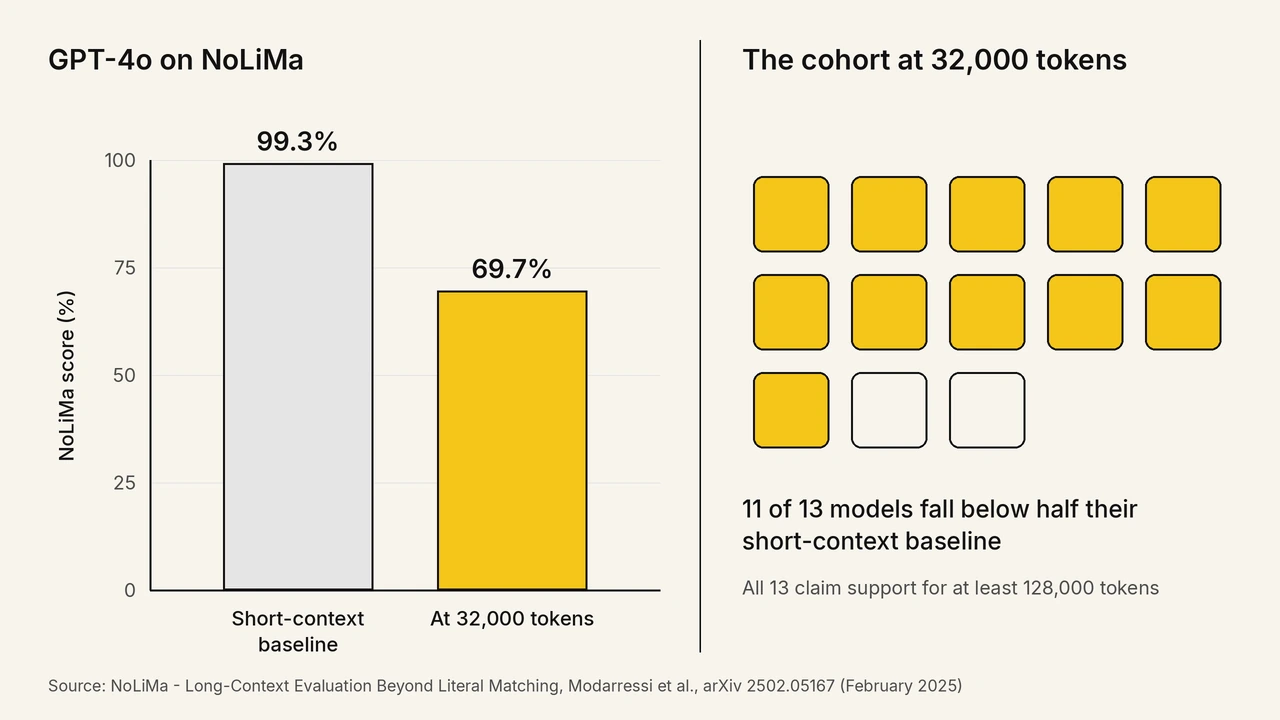
AI context is everything a language model can reference while answering one request: the system prompt, the conversation so far, tool definitions, attached files, and its own reply. Anthropic's documentation states that accuracy and recall degrade as token count grows,[1] and the NoLiMa benchmark measured 11 of 13 long-context models falling below half their short-context accuracy at 32,000 tokens, with GPT-4o dropping from 99.3% to 69.7%.[2]
This guide covers what fills a context window, how tokens set its size, current model limits, why bigger windows do not mean better answers, and how to measure your effective limit.
Key Takeaways
- Context rot: Anthropic documents that accuracy and recall degrade as token count grows, so treat the advertised window as a ceiling rather than a working target.
- Effective context limit: NoLiMa measured 11 of 13 models below half their short-context accuracy at 32,000 tokens, so test your own workload before trusting a 128K claim.
- Position bias: Accuracy is highest when the needed fact sits at the start or the end of the input, so place the decisive instruction in one of those two positions.
- Tool definitions: Tool schemas, tool results, images, and the model's own reply all draw on the same token budget, so audit those before attaching more documents.
- 1 million tokens: Google measures 1 million tokens as roughly 50,000 lines of code or 8 average-length English novels, which sets the practical ceiling on a single request.
- Needle test: Run a retrieval check at your real input lengths to find where recall drops, then cap prompts below that point.
What Is AI Context?
A model's context is the complete set of tokens it reads before producing a response. Anthropic's engineering team defines context as the set of tokens included when sampling from a large language model.[3] That set is assembled fresh on every request and discarded when the request ends.
The reassembly is the part most explanations skip, and it drives both cost and behavior. A language model holds no state between API calls. Every turn of a chat re-sends the entire prior conversation, so turn 40 transmits turns 1 through 39 again.
Two consequences follow. Total input cost across a session grows faster than the turn count, because every turn pays again for all the turns before it. Any fact the model appears to remember was re-sent by the application on that call. Nothing persists inside the model between calls.
What Fills a Context Window?
Five inputs fill a context window: the system prompt, conversation history, tool definitions, attached files, and the model's own generated reply. Anthropic's documentation confirms that tool definitions and extended thinking tokens draw on the same budget as user text.[1]
- System prompt: The standing instruction set sent on every request, which means a 2,000-token system prompt costs 2,000 tokens on turn 1 and again on turn 50.
- Conversation history: Every previous user message and assistant reply, preserved in full unless the application compacts or truncates them.
- Tool definitions: The JSON schema for every tool the model can call, loaded before the user says anything.
- Attached content: Documents, images, and tool results. A single Claude request accepts up to 600 images or PDF pages on 1 million token models.
- Generated output: The reply itself, including extended thinking tokens on models that keep them, which is why input and output share one ceiling.
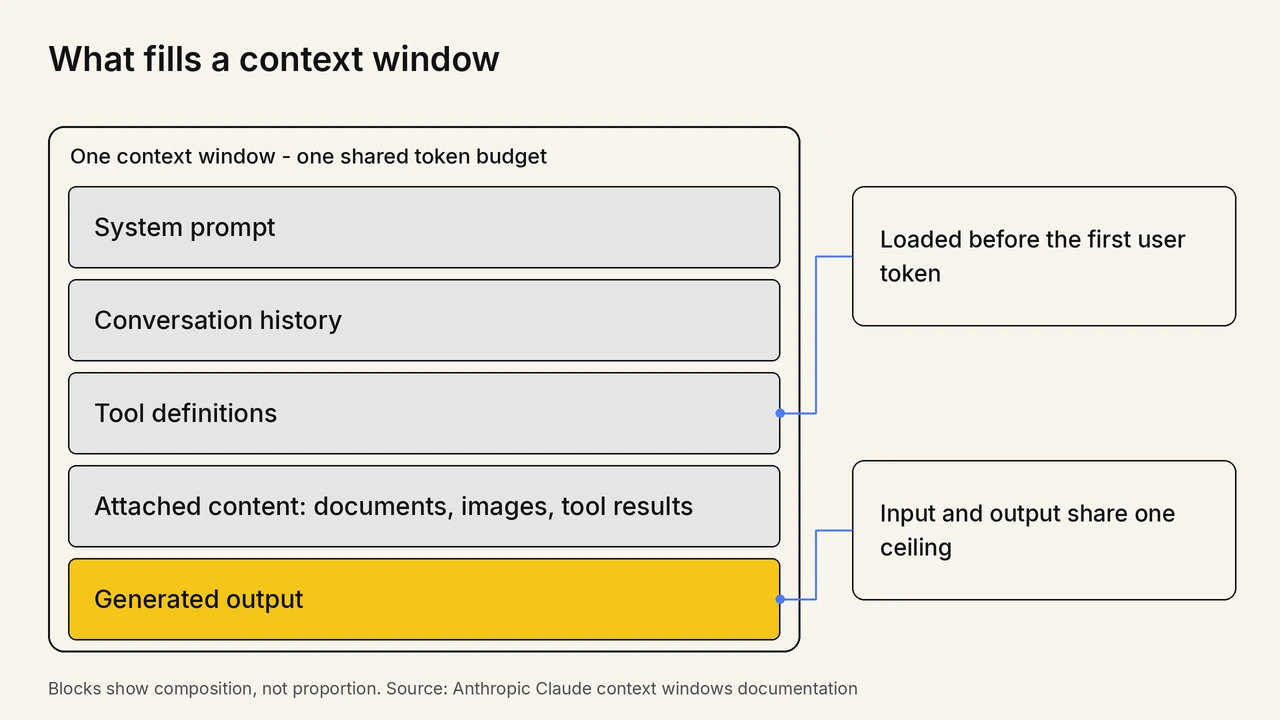
Tool definitions are the line item teams underestimate. They are loaded before the first user token and scale with the number of connected tools. An agent wired to a dozen servers can spend a large share of its window on schemas describing capabilities it will not use in that session.
Anthropic ships a tool search tool and separate tool-context guidance specifically to defer those definitions until a tool is needed.[1]
How Do Tokens Set the Size of a Context Window?
Tokens set context size because models measure input in text fragments, not words. Google's documentation puts 1 million tokens at roughly 50,000 lines of code at 80 characters per line, 8 average-length English novels, or transcripts of over 200 average-length podcast episodes.[4]
Tokenization is uneven, and that decides how much real material fits. Prose tokenizes efficiently because common English words map to single tokens. Code, JSON, and minified payloads do not.
The practical effect shows up in agent workloads. A 200-line JSON tool response can consume more of the window than a page of English, so a chatty API returning verbose objects becomes a context problem before it becomes a latency problem. Non-English text with heavy diacritics also splits into more tokens per visible character.
How Big Are Context Windows in 2026?
Frontier context windows now run from 200,000 to 1 million tokens. Anthropic lists a 1 million token window for Claude Opus 5 and Claude Sonnet 5, and 200,000 tokens for Claude Sonnet 4.5.[1] OpenAI lists a 400,000 token window for GPT-5.[5]
| Model | Context window | Max output |
|---|---|---|
| Claude Opus 5 and Claude Sonnet 5 | 1,000,000 tokens | 128,000 tokens |
| Claude Sonnet 4.5 | 200,000 tokens | Not stated in the context window documentation |
| GPT-5 | 400,000 tokens | 128,000 tokens |
| Gemini long-context models | 1,000,000 tokens or more | Varies by model |
Read the output column alongside the window, because they share one budget. Anthropic states that a single request to a 1 million token model can generate up to 128,000 output tokens, so the input and the reply compete for the same space and generation can stop mid-answer once the combined total runs out.[1]
Does a Bigger Context Window Mean Better Answers?
No. A bigger window raises what a model will accept, not how accurately it reads. Chroma tested 18 models and reported that models do not use their context uniformly, and that performance grows increasingly unreliable as input length grows.[6]
Three independent results point the same direction. Chroma's July 2025 study by Kelly Hong, Anton Troynikov, and Jeff Huber covered GPT-4.1, Claude 4, Gemini 2.5, and Qwen3 models and found the decline is continuous rather than a cliff at the advertised limit.[6]
NoLiMa put numbers on the gap. Ali Modarressi and co-authors evaluated 13 models that claim support for at least 128,000 tokens, and at 32,000 tokens 11 of them dropped below half their short-length baselines.[2] The design detail matters: NoLiMa removes literal word overlap between the question and the target fact, which stops a model from succeeding through keyword matching alone.
Position compounds length. Nelson F. Liu and co-authors at Stanford found performance is often highest when relevant information occurs at the beginning or end of the input context, and degrades significantly when models must access relevant information in the middle of long contexts.[7] A fact buried at 50% depth is the hardest one for a model to use.
In the Reddit thread "Exposing the True Context Capabilities of Leading LLMs" on r/LocalLLaMA, practitioners compared effective context lengths from NVIDIA's RULER benchmark across GPT-4, Command-R, Yi-34B, Mixtral 8x7B, and LongChat-13B. The post notes that RULER omitted Gemini and Claude 3, and commenters pressed for the methodology paper. The thread concluded that all models experience a performance drop as context length increases, without exception.
Treat window size as a capacity figure and set the working limit from measurement. Anthropic names the effect context rot and states plainly that curating what sits in context matters as much as how much space is available.[1] The four ways context degrades in agent systems are broken down further in why AI agents forget.

Note: Validate how your AI agents handle long conversations with TestMu AI. Try free!
How Is AI Context Different From Memory and Training Data?
Context is temporary working memory for one request, while training data is fixed in the model's weights. Anthropic's documentation draws the line directly, stating the context window is different from the corpus the model was trained on and instead represents working memory.[1]
- Training data: Fixed in the weights during pretraining, identical for every user, and unchangeable at inference time.
- Context window: Assembled per request, unique to that call, and gone the moment the response completes.
- Persistent memory features: An external store outside the model that selects saved facts and writes them back into the context window on the next request.
Persistent memory features are the row that causes confusion. A memory feature is a retrieval step that re-injects selected facts into the same token budget, so enabling memory makes every subsequent request larger and moves the workload closer to the degradation curve.
This distinction changes how you debug. When a model gets a fact wrong, check whether the fact was in the window on that specific call, and whether it sat in a position the model actually reads.
How Does Information Get Into the Context Window?
Four mechanisms put information into a context window: the prompt itself, retrieval augmented generation, tool call results, and file attachments. Each one writes tokens into the same budget before the model begins reading. Anthropic's documentation confirms that tool results, images, and documents all count against that budget alongside user text.[1]
- Direct inclusion: Text pasted into the prompt or set in the system prompt, the simplest path and the one with no selection logic to get wrong.
- Retrieval augmented generation: A search step ranks passages from a corpus and inserts only the top matches, keeping the window small at the cost of retrieval quality.
- Tool and function results: Output returned by an API call, database query, or Model Context Protocol server, written into the window verbatim unless the application trims it.
- Attachments: Documents, PDFs, and images uploaded with the request and tokenized alongside the text.
Long context does not retire retrieval. Google Cloud's guidance states that long context is not ideal when data updates frequently or requires pulling from multiple sources, and recommends context caching to control the latency and cost of repeated queries over the same material.[8] Choosing between the two is a retrieval-quality decision, and the trade-offs are covered in RAG evaluation tools.
Model Context Protocol changes the plumbing, not the ceiling. It standardizes how a tool describes itself and returns data, but every schema and every response still lands in the same window, which is why connecting many servers has a measurable token cost. Selecting servers with that budget in mind is covered in MCP servers for test automation.
What Happens When You Exceed the Context Window?
Exceeding the context window produces an error or a silent truncation unless the application compacts the conversation first. Anthropic's API returns a 400 invalid_request_error reading prompt is too long when the input alone exceeds the window.[1] On Claude 4.5 and newer, a request that runs out during generation stops with stop_reason model_context_window_exceeded instead.
Three distinct behaviors hide behind the phrase running out of context, and they fail in different ways.
- Hard rejection: The input alone exceeds the window and the API refuses the request before any generation happens, which is loud and easy to catch in a log.
- Mid-generation stop: On Claude 4.5 and newer, the request is accepted and generation halts with stop_reason model_context_window_exceeded, leaving a partial answer that looks complete to naive parsing.
- Rolling truncation: Chat interfaces drop the oldest turns on a first in, first out basis, so nothing errors and the model simply stops seeing the start of the conversation.
Rolling truncation causes the most support tickets because it has no error to alert on. A user watches the assistant contradict something agreed 30 turns earlier and concludes the model is unreliable, when the earlier turn was evicted before the request was ever sent. Compaction and summarization strategies that trade detail for room are covered in advanced techniques for production ai.
How Do You Measure Your Model's Effective Context Limit?
Measure the effective limit by running a retrieval test on your own inputs at increasing lengths and recording where accuracy falls. Chroma's method places a target fact inside inputs of growing size, varies the depth at which that fact sits, and scores recall at each step.[6]
- Assemble inputs from your real production material at 4,000, 8,000, 16,000, 32,000, and 64,000 tokens rather than from generic filler text.
- Plant the fact the model must use at three depths in each input: near the start, at the midpoint, and near the end.
- Write the question so it shares no distinctive wording with the planted fact, which forces genuine retrieval instead of keyword matching.
- Run at least 20 trials per length and depth combination, then score exact recall for each cell.
- Set your working prompt cap below the first length where accuracy drops materially, and re-run the grid after every model upgrade.
Writing the question without shared wording is the step teams get wrong. A needle test whose question repeats the needle's distinctive words measures string matching, not comprehension, and it will report a flattering limit. NoLiMa was built to strip that lexical overlap, and under its needles GPT-4o fell from a 99.3% baseline to 69.7%.[2]
Test for multiple facts, not one. Google's documentation notes that where you have multiple needles or specific pieces of information to find, the model does not perform with the same accuracy as on a single retrieval.[4] Most real prompts need several facts at once, so a single-needle pass says very little about production behavior.
In the Reddit thread "How can I fine-tune a LLM to increase effective context?" on r/LocalLLaMA, a developer reported that LLaMA 3.1 8B, which advertises a 128,000 token context length, degraded severely on a JSON output task once input passed 5,000 tokens. The practical takeaway is that the gap between advertised and usable length is task-specific, so measure it against your own task rather than the model card.
Instrument the run as well as the result. Anthropic exposes a token counting API for estimating a request before sending it, and every response reports actual consumption in its usage field, which turns context budgeting into a measured quantity instead of a guess.[1]
How Do You Test Whether an AI Agent Uses Context Correctly?
Test context handling with multi-turn scenarios that plant a fact early and require it many turns later. A single-turn assertion cannot catch context loss, because the failure only appears once the conversation grows long enough for the early fact to fall out of reach.
The failure has a recognizable shape in production. A customer gives an account number in turn 2, the conversation runs another 15 turns, and the agent asks for the account number again. Nothing throws an error and no assertion fails, so the regression reaches users intact.
TestMu AI's agent testing platform scores that behavior as a standard metric instead of leaving it to manual review, so a context regression shows up as a number that moves between runs.
- Context Awareness metric: Measures whether the agent retains and correctly uses information from earlier in the conversation, catching the case where a user says they already gave an account number and the agent asks for it again.
- Four evaluation surfaces: Runs the same scenario set against chat, voice, phone caller agents both inbound and outbound, and image analyzer agents.
- Personas and scenario library: Replays defined multi-turn scenarios so the same context-retention check runs again after every model or prompt change.
You can explore the official documentation to get started with agent testing.
Behavioral scoring suits non-deterministic systems, and the wider evaluation approach is covered in AI agent testing and in LLM testing.
Catch Context Failures Before Your Users Do

Conclusion
Measure before you upgrade. Run a retrieval grid across the input lengths you actually ship, record the length where recall drops, and use that number rather than the model card to set your prompt budget.
Treat AI context as a budget you spend on purpose. Put the decisive instruction at the start or the end of the input, keep tool definitions lean, retrieve the few passages that matter instead of attaching everything, and re-run the grid after every model upgrade because the curve moves. The published ceilings keep rising, and the published evidence keeps showing that accuracy falls well before the ceiling does.
If your product puts an agent in front of customers, add a multi-turn context-retention check to the release gate and score it on every build, the same way you would score a flaky test rate. The testmu-a2a-cli documentation covers wiring that check into a pipeline.
Sources and References Used
- [1] Context windows - Anthropic Claude Developer Documentation (accessed August 2026)
- [2] NoLiMa: Long-Context Evaluation Beyond Literal Matching - Modarressi et al., arXiv (February 2025)
- [3] Effective Context Engineering for AI Agents - Anthropic Engineering (2025)
- [4] Long context - Gemini API Documentation, Google (accessed August 2026)
- [5] GPT-5 Model Reference - OpenAI API Documentation (accessed August 2026)
- [6] Context Rot: How Increasing Input Tokens Impacts LLM Performance - Hong, Troynikov and Huber, Chroma (July 2025)
- [7] Lost in the Middle: How Language Models Use Long Contexts - Liu et al., arXiv (July 2023)
- [8] The Prompt: What Is Long Context and Why Does It Matter for Your AI - Google Cloud (2024)
Author

Prince Dewani
Blogs: 30

Prince Dewani is a Community Contributor at TestMu AI specializing in AI agents, software testing, QA, and SEO. He is certified in Selenium, Cypress, Playwright, Appium, Automation Testing, and KaneAI, and presented academic research on AI agents at PBCON-01. At TestMu AI, he has also carried out extensive cross-browser research on the support of modern web technologies such as WebGPU, WebAssembly, WebXR, WebGL2 and other web technologies, validating their compatibility and feature parity across major browsers and rendering engines through rigorous hands-on testing. Prince has hands-on experience building AI agent workflows using Anthropic Claude, Google Antigravity, n8n, LangChain, and other agentic frameworks, and works regularly with MCP and A2A protocols. He shares his work with 5,500+ QA engineers, developers, DevOps experts, tech leaders, and AI agent practitioners on LinkedIn.
Reviewer

Sai Krishna
Reviewer
Sai Krishna is Director of Engineering at TestMu AI (formerly LambdaTest), where he leads agentic AI for quality engineering, building AI agents that autonomously drive mobile and conversational test automation. His current focus is Agent Testing and Model Context Protocol (MCP) support for mobile. He is a core contributor and member of the Appium open-source project and the creator of AppiumTestDistribution and appium-device-farm. With over 14 years of experience including more than 9 years at Thoughtworks as a Principal Consultant, he holds a BSc in Electronics and speaks regularly at TestMu and Appium Conf on Appium, mobile automation, and agentic AI in testing.


AI Context FAQs
Did you find this page helpful?
More Related Blogs
TestMu AI forEnterprise
Get access to solutions built on Enterprise
grade security, privacy, & compliance
- Advanced access controls
- Advanced data retention rules
- Advanced Local Testing
- Premium Support options
- Early access to beta features
- Private Slack Channel
- Unlimited Manual Accessibility DevTools Tests