

Power Your Software Testing with AI Agents and Cloud
The Native AI-Agentic Cloud Platform to Supercharge Quality Engineering. Test Intelligently and Ship Faster.


- TestMu AI (Formerly LambdaTest)
- /
- Blog
- /
- One Binary, Three Modes: How Kane CLI Runs
Most tools make you choose a product for each context. One for local work, another for CI, a third for whatever the agent needs. Kane CLI does not. It has one binary and three modes, and you pick the mode with a flag.
Same syntax, same objectives, same engine. Only the output and the surface change.
Interactive TUI for Exploring and Debugging by Hand
Run kane-cli with no arguments and you get a full terminal interface. A chat prompt, a status bar, and a step tree that fills in as the agent thinks, observes the page, and acts.
The browser is headed, so you see what the agent sees. State persists across runs in a session, which makes multi-step debugging iterative without re-running earlier steps. This is the inner-loop mode, for when you are building and want to watch.
Headless Mode for Scripts and Quick One-Offs
Add --headless and the interface goes away. Kane CLI streams progress to stderr, prints the final result as a single JSON object on stdout, and exits with a status code.
kane-cli run "verify the homepage loads" --headless > result.jsonNo display server, no UI, nothing to click. This is the mode for a shell script or a quick one-off where you just want the result captured into a file or a variable.
Agent Mode for AI Coding Agents and Pipelines
Add --agent --headless and the output becomes structured NDJSON, one JSON object per line. The interface is fully suppressed and stdin is not used.
kane-cli run "log in and assert the dashboard shows 'Welcome'" --agent --headlessEach event in the run becomes a typed line, and the final run_end line carries the full result. This is what AI coding agents and CI runners consume, because they need machine-parseable output, not prose.

Note: Want to try all three from your terminal? Start free. Try Kane CLI
How to Pick the Right Mode for the Job
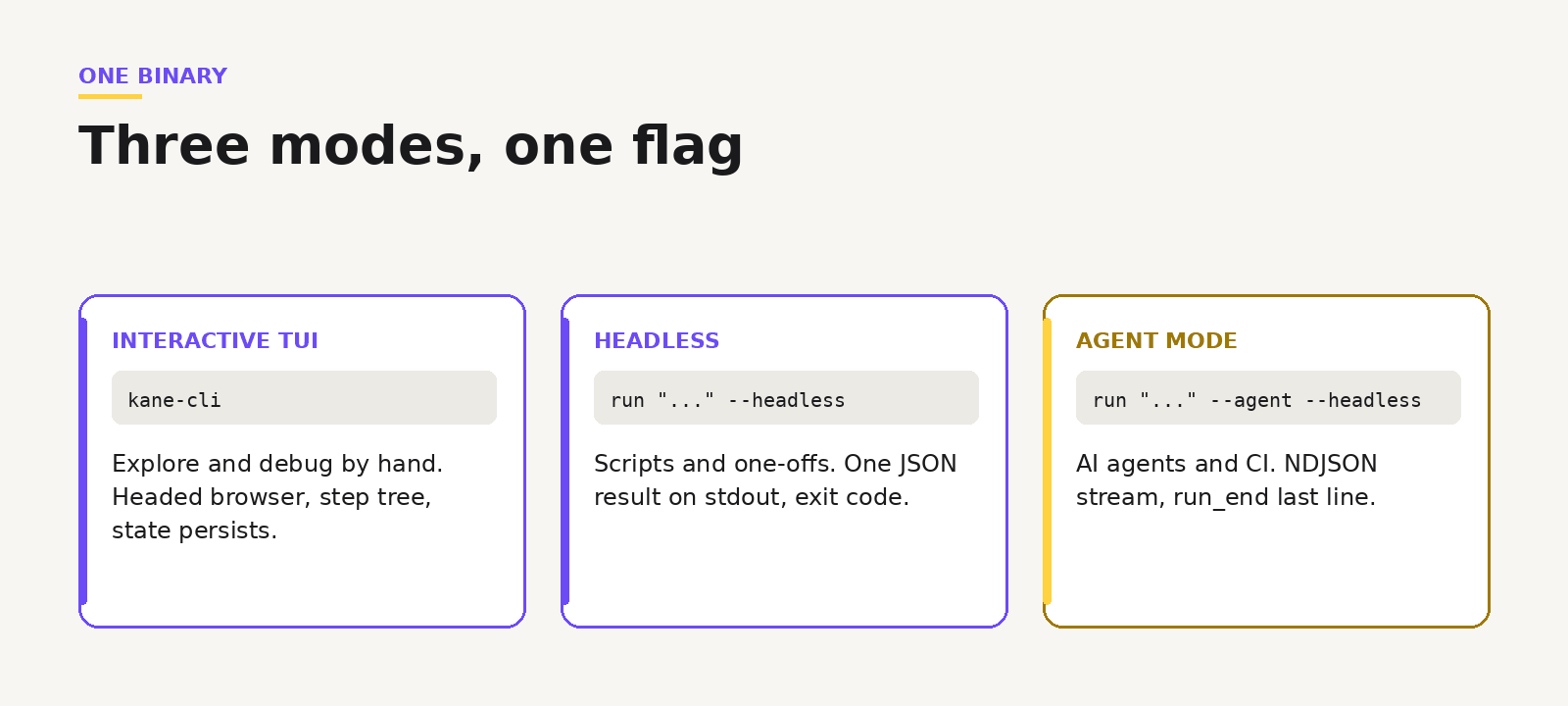
The rule is short. Debugging at your workstation? Use the TUI. Running a quick scripted one-off? Use headless. Driving it from an AI agent, a GitHub Actions job, or a cron run? Use agent mode with headless. Showing a live demo with a visible browser? Back to the TUI.
One thing worth knowing for automation: the ask_user prompt auto-disables when stdin is not a terminal, so in CI and agent contexts it never blocks a run.
Note: Want the full mode matrix and flags? Read the Kane CLI docs. Read the docs
The Same Engine Underneath Every Mode
Switching modes does not change what Kane CLI does. It drives a real Chrome browser, runs your plain English objective, and returns pass or fail. The mode only decides how the result reaches you. For how these modes fit the wider tool category, see the guide to the best AI browser testing CLI.
Note: Want to see how it is wired? Open the repo. Open the repo
One binary covers your laptop, your scripts, your agents, and your pipeline. You learn the objectives once, then choose a flag for wherever the run needs to happen. That makes it a natural fit for CLI and terminal browser testing in any environment.
The Kane CLI Certification is free and covers all three modes, so you can prove you know which one to reach for on any run.

Author

Bhawana
Blogs: 77


Bhawana is a Community Evangelist at TestMu AI with over 3 years of experience creating technically accurate, strategy-driven content in software testing. She has authored 50+ blogs on test automation, cross-browser testing, mobile testing, and real device testing. She also serves as Product Marketing Manager for Kane CLI, the command-line tool that runs browser automation from the terminal using natural-language flows in a real Chrome browser. Bhawana is certified in KaneAI, Selenium, Appium, Playwright, and Cypress, reflecting her hands-on knowledge of modern automation practices. On LinkedIn, she is followed by 6000+ QA engineers, testers, AI automation testers, and tech leaders.


Did you find this page helpful?
More Related Blogs
TestMu AI forEnterprise
Get access to solutions built on Enterprise
grade security, privacy, & compliance
- Advanced access controls
- Advanced data retention rules
- Advanced Local Testing
- Premium Support options
- Early access to beta features
- Private Slack Channel
- Unlimited Manual Accessibility DevTools Tests