
Power Your Software Testing with AI Agents and Cloud
The Native AI-Agentic Cloud Platform to Supercharge Quality Engineering. Test Intelligently and Ship Faster.


- TestMu AI (Formerly LambdaTest)
- /
- Learning Hub
- /
- What is White Box Testing? Types, Techniques, and Examples
What is White Box Testing? Types, Techniques, and Examples
White box testing in software testing designs tests from source code. Learn its types, techniques from branch to MC/DC coverage, and a worked example.
Last Updated on:
White box testing in software testing is a method where the tester reads the source code and designs test cases from its internal structure. Its main techniques are statement coverage, branch (decision) coverage, condition coverage, MC/DC, path coverage, control flow testing, and data flow testing, each checking how much of the logic in the code the tests exercised.
The output is usually a coverage report, and a report that reads 100% feels like a finish line. It tells you every line of code ran during your tests, which is a different claim from every line of code being correct. Production bugs slip through the gap between those two claims, and the worked example below shows one doing exactly that.
TL;DR
White box testing is a software testing method where the tester can read the source code and designs test cases from its internal structure rather than from the requirements alone. It uses coverage techniques such as statement, branch, and path coverage to measure which lines and decisions a suite actually executed.
What Are the Main White Box Testing Techniques?
- Statement coverage: Statement coverage measures the percentage of executable lines the test suite runs at least once. It is the weakest of the three techniques, because a line can execute under one input and still be wrong for every other input.
- Branch coverage: Branch coverage, also called decision coverage, measures whether every decision in the code was taken both ways. An if statement with no else still has two outcomes, and branch coverage is the technique that forces a test for the untaken one.
- Path coverage: Path coverage measures whether every feasible route through a function was exercised. Path coverage is the strongest technique and the least practical, since the number of routes grows quickly with each added decision.
- Cyclomatic complexity: Cyclomatic complexity counts the decisions in a function and adds one, giving the number of independent paths a basis path suite needs. It is a sizing metric for how much testing a function will require.
Does 100% Code Coverage Mean the Code Is Correct?
No. Code coverage records execution, not correctness. Two coverage tools can report 100% and 50% branch coverage for the same file and the same test, because they count decisions differently, so the number alone is not a safety signal.
Code coverage also cannot see the rendered page. TestMu AI's Kane CLI checks that layer by validating the rendered UI in a real Chrome browser from a natural language objective.
What is White Box Testing?
White box testing is a testing method in which the internal structure of the code is visible to the tester and is used to design the test cases. It is also called glass box, clear box, transparent box, or structural testing, and all five names point at the same property, which is that the implementation is not hidden. The "white" or "clear" box is a container you can see into, the opposite of the opaque box in black box testing.
That visibility changes what a test can target. In black box testing you can only reach the code through its public surface, so a branch that no realistic input triggers stays untested and unnoticed. With the source open in front of you, that branch is a line number, and you can write a test that drives execution straight into it.
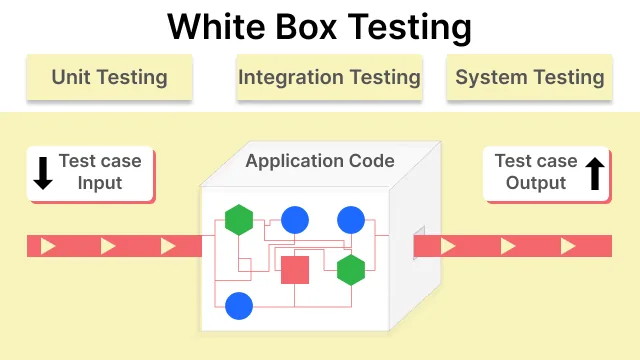
It sits at the lower levels of the test pyramid. Unit testing is almost always white box, because the person writing the test can see the function under test. Code-level integration testing usually is too. By the time you reach system and acceptance testing, the implementation is normally treated as opaque again.
The practical output of white box testing is a coverage number, and the rest of this guide is largely about reading that number correctly.
Why Perform White Box Testing?
Black box testing tells you whether the feature works for the inputs you thought to try. White box testing tells you which parts of the implementation nobody tried at all. Those are different questions, and only the second one can find code that no test has ever executed.
Teams invest in it for these benefits:
- It finds untested code, not just failing code. A coverage report names the exact lines your suite never reached. No amount of black box testing can produce that list, because it has no view of the lines.
- Defects are cheapest here. White box testing runs at the unit level, which is the earliest point a defect can be caught by an automated test. The same bug found in production costs orders of magnitude more to fix.
- It exposes dead and unreachable code. Branches no input can trigger show up as permanently uncovered, which is a maintenance signal you cannot get from the outside.
- Security work depends on it. Tracing untrusted input from entry point to sink requires reading the code. This is why static application security testing and white box penetration testing both sit in this category.
It is most worth the cost on code where a silent wrong answer is expensive: pricing, tax, permissions, payment handling, and anything a regulator might ask about later. It is least worth the cost on thin presentation code that changes weekly.
White Box Testing Example With a Pricing Function
The core move in white box testing is to read the code, find each path through it, and pick an input that drives execution down that path. Take a function that applies volume discounts against a published price sheet promising 5% off from 10 units and 15% off from 50 units.
function applyBulkDiscount(units, unitPrice) {
  let rate = 0;
  if (units > 10) {
    rate = 0.05;
  }
  if (units > 50) {
    rate = 0.15;
  }
  return Number((units * unitPrice * (1 - rate)).toFixed(2));
}
Reading the code before writing any test shows three routes through it, and each route needs its own input:
- units = 5 - both checks are false, rate stays 0, and the customer pays list price.
- units = 20 - the first check is true and the second is false, so the 5% rate applies.
- units = 60 - both checks are true, the second assignment overwrites the first, and the 15% rate applies.
A black box tester working from the price sheet might pick the same order sizes by chance. A white box tester picks them because the code shows that each one reaches different lines. Those three inputs are the starting set, and the steps below turn them into a suite that finds real bugs.
Step one is counting the decisions. There are two, so cyclomatic complexity is 3 and the basis path set needs three tests. Two if statements suggest four combinations, but one is unreachable: units cannot exceed 50 without also exceeding 10, so the combination "first false, second true" can never occur.
Step two is designing a test per technique. This is where the three core coverage techniques stop being abstract:
| Technique | Test cases it demands | What it leaves untested |
|---|---|---|
| Statement coverage | One case, units = 60, which executes every line including both if bodies | Every input below a threshold. The false side of both decisions is never evaluated. |
| Branch coverage | Adds units = 9, forcing both decisions to evaluate false at least once | The exact threshold values, unless you deliberately choose them as your inputs. |
| Path coverage | Three cases, one per feasible path: below both tiers, in the middle tier, in the top tier | Nothing structural, though it still says nothing about whether the returned number is correct. |
Step three is choosing the input values, and this is the step that finds the bug. Boundary values are the ones worth picking, so instead of testing 9 and 60, test the thresholds themselves:
test('9 units pay list price', () => {
  assert.strictEqual(applyBulkDiscount(9, 10), 90);
});

test('10 units get the 5 percent tier', () => {
  assert.strictEqual(applyBulkDiscount(10, 10), 95);
});

test('50 units get the 15 percent tier', () => {
  assert.strictEqual(applyBulkDiscount(50, 10), 425);
});
Two of the three fail on a real run:
✔ 9 units pay list price
✘ 10 units get the 5 percent tier
    actual: 100, expected: 95
✘ 50 units get the 15 percent tier
    actual: 475, expected: 425

ℹ tests 3
ℹ pass 1
ℹ fail 2
Both conditions use a strict greater-than where the price sheet says "or more". A customer ordering exactly 50 units is overcharged by 50 dollars, and a customer ordering exactly 10 gets no discount at all. Changing both to >= turns the suite green.
Counting decisions tells you how many tests to write, the technique tells you which outcomes they must reach, and the boundary values decide whether they find anything. A coverage percentage will never prompt you to make that last choice.
White Box Testing Techniques
White box techniques fall into two groups. Coverage criteria (statement, branch, condition, MC/DC, and path coverage) set how much of the logic a suite must exercise, and each stronger criterion costs more tests. Flow-based methods (control flow testing and data flow testing) are how you find the paths and variables those tests have to reach. Each one is applied below to the applyBulkDiscount function from the example above.
Statement Coverage
Statement coverage is the percentage of executable lines run at least once, calculated as executed statements divided by total statements. It is the cheapest technique and the easiest to satisfy, which is exactly why it is the easiest to be fooled by. The single 60-unit test from the example reaches 100% statement coverage on a function containing two bugs.
Branch Coverage
Branch coverage, also called decision coverage, asks whether every decision has been evaluated both true and false. The function has two if statements, so four outcomes need exercising. The 60-unit test covers two of them, which is why a strict branch counter reports 50% for it, as the coverage tool comparison below shows. Reaching 100% requires at least one input below each threshold, and writing those inputs is what exposed the boundary bugs.
Branch coverage is the single highest-value technique to enforce in a pipeline. It is achievable on real codebases, and unlike statement coverage it cannot be satisfied without thinking about the negative case.
Condition Coverage, Multiple Condition Coverage, and MC/DC
Branch coverage treats each decision as a single true or false outcome. Many decisions combine several conditions, and the stronger criteria test those conditions one by one. Suppose the price sheet adds a members-only tier written as if (isMember && units >= 10):
- Condition coverage - every individual condition evaluates to true and to false at least once. In languages that evaluate every operand, it can be met without the decision itself ever going both ways, which is why it is normally combined with branch coverage into a single criterion called condition/decision coverage.
- Multiple condition coverage - every combination of condition outcomes inside a decision is tested. The member rule needs four tests (true/true, true/false, false/true, false/false), and the count doubles with each added condition, so a decision with five conditions needs 32.
- MC/DC (modified condition/decision coverage) - every condition is shown to change the outcome on its own while the others stay fixed. Three tests do it for the member rule: a member ordering 20 units gets the discount, a non-member ordering 20 does not (so isMember matters), and a member ordering 5 does not (so the unit check matters). MC/DC needs at least n + 1 tests for n conditions, which keeps it linear where multiple condition coverage grows exponentially.
MC/DC comes from safety-critical engineering: NASA's practical tutorial on modified condition/decision coverage was written for aviation software that must comply with DO-178B Level A guidance. In applyBulkDiscount every decision holds a single condition, so condition coverage, MC/DC, and branch coverage demand the same tests there. They diverge only on compound decisions like the member rule.
Path Coverage and Cyclomatic Complexity
Path coverage requires every feasible route through the function to be exercised. As the example showed, two sequential if statements give three feasible paths rather than four, because units cannot be 51 or more without also being 11 or more.
That number is predictable in advance. Cyclomatic complexity, the metric formalized in NIST Special Publication 500-235, counts the decision points in a function and adds one. Two decisions gives a complexity of 3, which is the size of the basis path set, and it matches the three feasible paths exactly.
Complexity is a useful budgeting tool. A function with a complexity of 3 needs three tests. A 200-line function with fifteen nested conditions needs a number nobody is going to write, which is a signal to split the function rather than a signal to test harder.
Control Flow Testing With a Control Flow Graph
Control flow testing draws the function as a control flow graph, in which each node is a statement or block and each edge is a possible jump between them, and then designs tests to cover the nodes, edges, or paths of that graph. Statement coverage corresponds to covering every node, and branch coverage to covering every decision edge. This is the graph for applyBulkDiscount:
| Node | Code | Edges out |
|---|---|---|
| N1 | let rate = 0 | To N2 |
| N2 | if (units > 10) | True to N3, false to N4 |
| N3 | rate = 0.05 | To N4 |
| N4 | if (units > 50) | True to N5, false to N6 |
| N5 | rate = 0.15 | To N6 |
| N6 | return the discounted total | Exit |
The graph has 6 nodes and 7 edges, so the graph form of the cyclomatic complexity formula, edges minus nodes plus 2, also gives 3. The three feasible paths are N1, N2, N4, N6 (10 units or fewer), N1, N2, N3, N4, N6 (11 to 50 units), and N1, N2, N3, N4, N5, N6 (more than 50 units). The fourth route, N1, N2, N4, N5, N6, would need an order of 10 units or fewer that is also above 50, so no input reaches it.
Data Flow Testing
Data flow testing follows variables instead of decisions. Each place a variable is assigned is a definition, each place it is read is a use, and tests are chosen so that every definition reaches the uses that depend on it. In applyBulkDiscount, rate has three definitions and one use, the return statement:
- rate = 0 - reaches the return only when both checks are false, so it needs an order of 10 units or fewer.
- rate = 0.05 - reaches the return only when the second check is false, so it needs 11 to 50 units.
- rate = 0.15 - reaches the return when both checks are true, so it needs more than 50 units.
Data flow analysis also flags anomalies: a variable read before it is assigned, one assigned and never read, or one assigned twice with no read in between. The last pattern appears here, since an order of 60 units sets rate to 0.05 and overwrites it with 0.15 before the return. It is harmless in this function, but in longer code the same pattern often marks a bug or a missing else.
Why Do Two Coverage Tools Report Different Branch Coverage?
A second failure mode comes from the tooling. The tool reporting your coverage may not count decisions the way you assume.
Using the single 60-unit test from the example above, on Node.js v24.18.0, the coverage reporter built into the Node.js test runner reports a clean sweep:
$ node --test --experimental-test-coverage

file       | line % | branch % | funcs % | uncovered lines
-----------------------------------------------------------
pricing.js | 100.00 |   100.00 |  100.00 |
-----------------------------------------------------------
The same file and the same test, measured with nyc 18.0.0, the Istanbul-based reporter:
$ npx nyc --reporter=text node --test

File        | % Stmts | % Branch | % Funcs | % Lines | Uncovered Line #s
------------|---------|----------|---------|---------|-------------------
 pricing.js |     100 |       50 |     100 |     100 | 3-6
A fifty point disagreement on branch coverage, and the two bugs from the example live in exactly the lines Istanbul flags. The reason is the counting model. V8-based reporters count executed blocks, and an if statement with no else has no separate block for the untaken path, so nothing is flagged as missed. Istanbul instruments the syntax tree instead and creates a counter for both outcomes of every decision, including the implicit else.
The practical takeaway is short. Before you set a coverage threshold that anyone is held to, run both kinds of reporter once on the same file and see whether they agree. A gate set against the more permissive model can be passed by a suite that never tests a negative case.
Types of White Box Testing
The techniques above describe how you measure. These are the places the method gets applied:
- Unit testing is the largest category by volume. Functions and classes are tested in isolation by the developer who wrote them, and defects found here are the cheapest to fix in the entire lifecycle.
- Basis path testing derives the minimum test set from the control flow graph using cyclomatic complexity, as shown in the techniques above.
- Loop testing targets simple, nested, and concatenated loops at the values that break them. For a simple loop that allows at most n passes, the usual test set is zero passes, one, two, a typical count, and then one fewer than n, exactly n, and one more than n. Nested loops are tested from the innermost loop outward, with the outer loops held at their minimum counts.
- Mutation testing deliberately introduces small faults into the code and checks whether the suite fails. A mutant that survives means a test is executing that line without asserting anything about it, which is the flaw the coverage run above demonstrated.
- Memory leak testing traces allocation and release through the implementation, which cannot be done from the outside on a long-running service.
- Static white box testing covers everything examined without execution, including code review and linting. It catches undefined variables and unreachable statements before a test ever runs.
- White box penetration testing applies the same full visibility to security, as described in the next subsection.
White Box Penetration Testing
White box penetration testing is a security assessment in which the tester starts with full knowledge of the target: source code, architecture diagrams, configuration, and often credentials for every user role. Instead of tracing which branches a test reached, the tester traces untrusted input from each entry point to the places it is used, such as a database query, a shell command, or an HTML response.
That access changes what the assessment finds. A black box penetration test starts from the outside, as a real attacker would, and spends much of its time on reconnaissance. A grey box test gives partial knowledge, often a user account and the API documentation. A white box test skips the guessing, so the time goes into authentication logic, injection points, hard-coded secrets, weak cryptography, and insecure configuration that an outside scan would rarely reach.
The trade-off is realism. A white box test shows what is exploitable given full knowledge, not how far an outsider would actually get, so security teams often pair it with static application security testing in the pipeline and a black box test before release. The security testing guide covers where each one fits.
How to Perform White Box Testing, Phase by Phase
The white box testing process runs through the same phases for every unit of code, in this order:
- Pick a unit small enough to reason about. A single function or class. The smaller the target, the closer you can get to exhausting its behaviour, which is the whole point of the method.
- Map the control flow. List every decision and count them, or draw the control flow graph as in the techniques section. The count plus one gives the number of independent paths, which tells you how many tests to budget before writing any.
- Write a test per path, starting with the negative cases. Most developers write the happy path first and stop, which is precisely how the 100% reading above happened. Reverse the order and the boundary cases get written while you still have attention left.
- Measure with a tool whose counting model you have checked. Run both an Istanbul-based and a V8-based reporter once on the same file to see whether they agree. If they do not, standardize on the stricter one before setting any threshold in CI.
- Re-run on every change and treat a coverage drop as a review comment. Coverage is most useful as a delta. An absolute threshold invites gaming, whereas a drop on a specific pull request points at a specific untested branch.
Step two is where most teams stop investing, and it is the step that determines whether the rest is worth doing. Detailed guidance on turning a control flow map into cases is in our guide on writing test cases effectively.
White Box vs Black Box Testing
The two methods fail in opposite directions, which is why mature suites run both. White box testing cannot tell you a required feature was never built, because there is no code to cover. Black box testing cannot tell you a branch is unreachable, because it never sees the branch.
| Aspect | White box testing | Black box testing |
|---|---|---|
| Test cases derived from | The implementation, including branches, loops, and boundary conditions visible in the code | The specification, requirements, and expected user behaviour |
| Performed by | Developers and SDETs who can read the codebase | Testers, and often people with no access to the source |
| Starts when | The implementation exists, since the code is the input | The requirements exist, so test design can begin before any code is written |
| Primary metric | Code coverage: statement, branch, and path percentages | Requirements coverage and defect detection rate |
| Catches well | Untested branches, unreachable code, boundary and logic errors, memory issues | Missing features, misread requirements, integration and usability failures |
| Misses | Anything that was never implemented, because absent code cannot be covered | Dead code and rarely triggered branches no realistic input reaches |
| Cost of a refactor | High, since tests are coupled to the structure they measure | Low, since tests survive any refactor that preserves behaviour |
| Typical level | Unit and code-level integration | System, acceptance, and functional testing |
Grey box testing sits between them, giving the tester partial knowledge such as the database schema or the API contract without the full source. The table below places all three side by side, and the black box vs white box testing comparison goes deeper on the first two.
| Aspect | Black box testing | Grey box testing | White box testing |
|---|---|---|---|
| Knowledge of internals | None | Partial, such as the architecture, schema, or API contract | Full access to the source code |
| Test cases come from | Requirements and specifications | Specifications plus known internal structure | Code structure: branches, conditions, and paths |
| Usually performed by | Testers and end users | Testers, integration and security specialists | Developers and SDETs |
| Typical test level | System and acceptance | Integration and end-to-end | Unit and code-level integration |
| Example techniques | Equivalence partitioning and boundary value analysis | Matrix testing and regression testing against known data | Branch, MC/DC, and path coverage |
How White Box Testing Fits With Other QA Methods
White box testing covers one layer of a test strategy and works best next to the methods that cover the rest. In the order a change usually meets them:
- Before merge - static checks such as code review, linting, and static code analysis read the code without running it.
- On every commit - dynamic white box tests, mostly unit tests with a coverage report, run in CI. Branch coverage gates and the boundary tests from the example belong here.
- After the unit layer passes - integration tests check that modules work together, with white box knowledge for code-level interfaces and grey box knowledge for services.
- Before release - black box system, acceptance, and regression testing check behaviour against the requirements, which catches the missing features no coverage tool can see.
- Checking the tests themselves - mutation testing plants faults in the code and confirms a test fails, so it measures the strength of the white box suite rather than how much of the code it ran.
Moving more of this work into the developer's own loop, before code is merged, is the idea behind shift-left testing.

White Box Testing Tools
White box tooling splits into two jobs: the framework that runs your tests, and the reporter that measures what they touched. The pairing matters more than either choice alone, as the fifty-point disagreement above showed.
| Tool | Ecosystem | What it does |
|---|---|---|
| nyc / Istanbul | JavaScript and TypeScript | AST-instrumented coverage reporting. Counts both outcomes of every decision, including implicit else branches, which makes it the stricter option. |
| Node.js built-in reporter | JavaScript | V8 block coverage through the native test runner, with no dependency to install. Faster, but more permissive on branch counting. |
| Jest and Vitest | JavaScript and TypeScript | Test frameworks with coverage built in, both delegating to Istanbul or V8 depending on configuration. |
| JaCoCo | Java and JVM | Bytecode-level coverage with separate line, branch, and cyclomatic complexity counters, and the usual choice for Maven and Gradle builds. |
| Coverage.py | Python | Statement and branch coverage for pytest and unittest suites, with per-file thresholds. |
| gcov and lcov | C and C++ | Compiler-integrated coverage through GCC, reporting line and branch execution counts. |
| PIT | Java | Mutation testing that measures whether tests actually assert on the lines they execute, which is the gap coverage alone cannot see. |
| SonarQube | Multi-language | Static analysis that aggregates coverage alongside complexity and code smells, and enforces quality gates on pull requests. |
A note on older guides, including earlier versions of this one: JSUnit and CSUnit are frequently still listed as white box tools. Both have been unmaintained for well over a decade and should not be used on new projects. Their modern replacements are Jest or Vitest for JavaScript and NUnit or xUnit for .NET.
Advantages and Limitations of White Box Testing
White box testing earns its cost at the unit level and loses it quickly above that. The advantages first:
- Coverage is measurable. It is one of the few testing methods that produces an objective number, which makes it possible to spot regressions in test quality on a pull request.
- It runs fast and automates cleanly. Unit-level tests execute in seconds and need no environment, so they can gate every commit rather than every release.
- Testing can start before the UI exists. The code is the input, so the suite does not wait on a finished interface.
- It localizes defects precisely. A failing unit test names the function. A failing end-to-end test names the journey and leaves you to find the function.
- It surfaces dead code. Permanently uncovered branches are a maintenance signal no black box method can produce.
And the limitations, which are worth budgeting for rather than arguing with:
- Tests are coupled to structure. A refactor that preserves behaviour can still invalidate the suite, because it was written against the branches rather than the contract. This is the tax you pay for precision.
- Exhaustive path testing is infeasible. Feasible paths grow with every added decision, and loops make the count unbounded in principle. Basis path testing is the practical compromise.
- It requires people who can read the code. That limits who on the team can contribute, and makes it expensive on codebases in unfamiliar languages.
- It cannot find missing features. Absent code cannot be covered, so a requirement nobody implemented is invisible to every technique here.
- High coverage reads as safety. The most expensive limitation, because it is social rather than technical. A green 100% ends conversations that should still be happening.
The way to hold coverage honestly is to treat it as a floor that catches regressions, never as evidence the behaviour is right. Our comparison of code coverage versus test coverage works through the distinction, and the test coverage guide covers what to measure alongside it.
Checking the Rendered UI After White Box Tests Pass
Every technique in this guide operates on one surface: the source code. Statement coverage, branch coverage, mutation testing, and static analysis all read the implementation and reason about it. That shared surface is their strength and also their ceiling.
Nothing in a coverage report knows what the customer saw. In the run above, the fixed function returns 425 for 50 units, and a passing unit test proves that. It does not prove the checkout page displayed 425, that the discount line item rendered, or that the total the payment processor received matched the one on screen. Those failures live in the rendered result, and no amount of code-level coverage reaches them.
This gap widened once AI coding agents entered the loop. An agent reads code, writes code, and verifies with unit tests, type checkers, and linters, every one of which operates on that same closed code surface. When the agent reports "passed", it is reporting on the code, not on the page.
Kane CLI is built to close that specific gap. It is a deterministic browser agent that drives a real Chrome instance through the Chrome DevTools Protocol and validates the rendered UI from a natural language objective, with no selectors to maintain. It does not read your code. It watches what the code produced.
npm install -g @testmuai/kane-cli

kane-cli run "add 50 units of the standard plan to the cart, \
assert the order total reads 425.00" --url http://localhost:3000
A pass is granted only on explicit evidence, meaning DOM state, URL changes, network responses, screenshots, or console logs, so the outcome is reproducible even though the model reasoning behind it is not. Every run leaves a session directory containing a step-by-step record of the agent's actions, screenshots, and a full trace, which is the artifact a coverage percentage never gives you.
The division of labour is clean. Branch coverage proves the discount tier was exercised. Kane CLI proves the customer was charged 425.

Note: Coverage proves the line ran. Driving the flow in a real browser proves the number on screen is right. Kane CLI does the second from your terminal. Read the Kane CLI docs
White Box Testing Best Practices
These practices separate a suite that catches regressions from one that only produces a number:
- Gate on branch coverage, not statement coverage. Statement coverage can be satisfied without ever testing a negative case. Branch coverage cannot, which is why it is the only one of the two worth enforcing.
- Always test at the boundary, never near it. Testing 9 and 60 units passes. Testing 10 and 50 finds the bug. Off-by-one errors live exactly on the threshold and nowhere else.
- Track coverage as a delta, not an absolute. A fixed threshold invites gaming with assertion-free tests. A drop on a specific pull request points at a specific untested branch.
- Split functions that score high on complexity. A cyclomatic complexity above roughly 10 means the test count needed is no longer realistic. That is a refactoring signal, not a reason to test harder.
- Add mutation testing where correctness is expensive. It is the only cheap way to detect tests that execute a line without asserting anything about it, which is the failure the example above demonstrates.
- Pair it with a method that sees the rendered result. Code-level coverage is blind to what the user was shown, which is the gap the rendered UI section above covers.
Conclusion
White box testing is the only method that can tell you which parts of your implementation your tests never touched. That is a genuinely valuable answer, and it is a narrower one than the percentage on the dashboard suggests. The experiment in this guide took one function, one test, and two standard tools to produce readings of 100% and 50% on the same code, with two live overcharging bugs sitting in the difference.
Start by enforcing branch coverage rather than statement coverage, since only the former forces a test for the negative case. Then check which counting model your reporter uses before you set a threshold anyone is held to. And pair the code-level suite with something that verifies the rendered result, because no coverage tool can see the page.
Once the unit layer is solid, the next constraint is usually environments rather than logic. TestMu AI runs your Selenium, Cypress, and Playwright suites across 3,000+ browser and OS combinations on Automation Cloud, and the automation docs cover wiring coverage reporting into that pipeline.
Author

Sakshi John


Sakshi John is an experienced technical content writer with over 5 years of expertise in automation, AI-driven testing, and cross-browser testing. She has contributed to prominent platforms like TestMu AI and worked as a Communications Consultant at the United Nations APCTT. Sakshi holds a Master's degree in International Relations and has authored numerous technical blogs, enhancing her credibility in the software testing industry.
Reviewer

Salman Khan
Reviewer
Salman is a Test Automation Evangelist and Community Contributor at TestMu AI, with over 6 years of hands-on experience in software testing and automation. He has completed his Master of Technology in Computer Science and Engineering, demonstrating strong technical expertise in software development, testing, AI agents and LLMs. He is certified in KaneAI, Automation Testing, Selenium, Cypress, Playwright, and Appium, with deep experience in CI/CD pipelines, cross-browser testing, AI in testing, and mobile automation. Salman works closely with engineering teams to convert complex testing concepts into actionable, developer-first content. Salman has authored 120+ technical tutorials, guides, and documentation on test automation, web development, and related domains, making him a strong voice in the QA and testing community.


White Box Testing FAQs
Did you find this page helpful?
More Related Learning Hubs

TestMu AI forEnterprise
Get access to solutions built on Enterprise
grade security, privacy, & compliance
- Advanced access controls
- Advanced data retention rules
- Advanced Local Testing
- Premium Support options
- Early access to beta features
- Private Slack Channel
- Unlimited Manual Accessibility DevTools Tests