

Power Your Software Testing with AI Agents and Cloud
The Native AI-Agentic Cloud Platform to Supercharge Quality Engineering. Test Intelligently and Ship Faster.


- TestMu AI (Formerly LambdaTest)
- /
- Blog
- /
- Android Emulators: Features, Benefits, Limitations, and Top 8 Picks
What Is an Android Emulator? Complete Guide [2026]
Discover Android emulators' features, benefits, limitations, and our top 8 picks in this comprehensive guide to streamline app development.
Last Updated on:
On This Page
- What is an Android Emulator?
- Features of Android Emulator
- How does the Android Emulator work?
- 8 Popular Android Emulators for App Development
- How does the Android Emulator help in Development and Testing?
- What are the limitations of the Android Emulator?
- What are Cloud Emulator Solutions and How do they work?
- Benefits of Cloud Emulator Solutions
- Real Android Emulator vs. Cloud Emulators
An Android emulator is software that runs Android on your computer. It replicates the Android operating system, screen, and hardware so you can use Android apps without a phone or tablet.
Developers use emulators to test apps. Testers use them to find bugs. Gamers use them to play mobile games on a bigger screen with a keyboard and mouse. You can run multiple Android versions on one computer.You can test different screen sizes. You can simulate GPS, cameras, and sensors. All without buying a single device.Key Takeaways
- An Android emulator is software that runs Android on a computer by replicating the Android operating system, screen, and hardware, so Android apps run without a physical phone or tablet.
- Most Android emulators use QEMU to translate the phone processor's instructions, and hardware acceleration through Intel HAXM or Hyper-V on Windows, or the Hypervisor framework on Mac, gives emulators near-native speed.
- A single Android virtual device uses 2 to 4 GB of RAM plus several gigabytes of disk space, so running multiple Android emulators at once needs a computer with enough RAM and disk space for every virtual device.
- The Official Android Emulator (AVD) in Android Studio suits a broad range of Android development and testing, Genymotion is known for speed, and BlueStacks and NoxPlayer are built mainly for gaming.
- Android emulators cannot fully replicate real device performance, GPU graphics, battery drain, touch responsiveness, or hardware such as fingerprint sensors and NFC, and some bugs appear only in emulators.
- Android emulators fit new feature development, quick checks across Android versions, and automated CI/CD tests, while real devices are needed for battery, GPS, camera, fingerprint, touch, 4G/5G network, and app store submission testing.
- Cloud emulator solutions give remote access to real mobile devices and emulated environments hosted in data centers, which saves teams the cost of buying and maintaining a physical device inventory.
- TestMu AI Real Device gives testers real mobile devices from different manufacturers, models, and Android versions for compatibility testing in the cloud.

Note: Test web and mobile applications in “Real Time” on Android and iOS, including the latest iPhone 15 on cloud! Try TestMu AI Today!
What is Android Emulator?
An Android emulator is software that simulates Android devices on your computer, allowing you to run and test Android applications without needing a physical device. It replicates the Android OS environment, enabling developers and users to experiment with different apps and features.
Check out this video to learn what is an Android Emulator.
8 Features of Android Emulator
Android emulators are indispensable tools for developers and testers working on Android applications. They offer several powerful features that streamline the development and testing process and ensure a smoother and more efficient workflow. Here are some of the outstanding features of Android emulators:
- Device Simulation: Android emulators replicate the features and characteristics of real Android devices, including Android version OS, screen size, resolution, and hardware features. This allows testing applications on a wide range of virtual devices.
- App installation: Developers can install Android apps (APK files) on emulators like on a physical device. This allows easy testing of apps in a controlled environment.
- Mobile Browser Emulation: Android emulators also offer mobile browser emulation, allowing developers and testers to simulate the mobile browsing experience. This feature is invaluable for ensuring that web applications are responsive and function seamlessly on mobile devices. It simplifies cross-browser testing by identifying and addressing compatibility issues across various mobile browsers like Chrome, Firefox, Safari, and Edge.
- Multiple Android Versions: Emulators support numerous Android versions, enabling you to test your app across various API levels and Android OS versions. This ensures that your app functions correctly on both older and newer devices.
- Debugging tools: Android emulators offer several debugging tools and features, such as breakpoints, logging, and real-time code inspection, that make it easier to detect and fix problems in the app’s code.
- Performance profiling: Developers can analyze the performance of an app on emulators to optimize it for different device configurations and screen sizes.
- Multi-touch support: Many Android emulators support multi-touch gestures, making it possible to test applications that rely on complex touch interactions.
- Hardware simulation: Some emulators allow you to simulate various hardware components, such as GPS location and accelerometer, and even simulate incoming calls and text messages for testing purposes.
How does the Android Emulator Work?
An android emulator create a virtual Android phone inside your computer. They trick Android apps into thinking they're running on real hardware.
The Engine Behind It
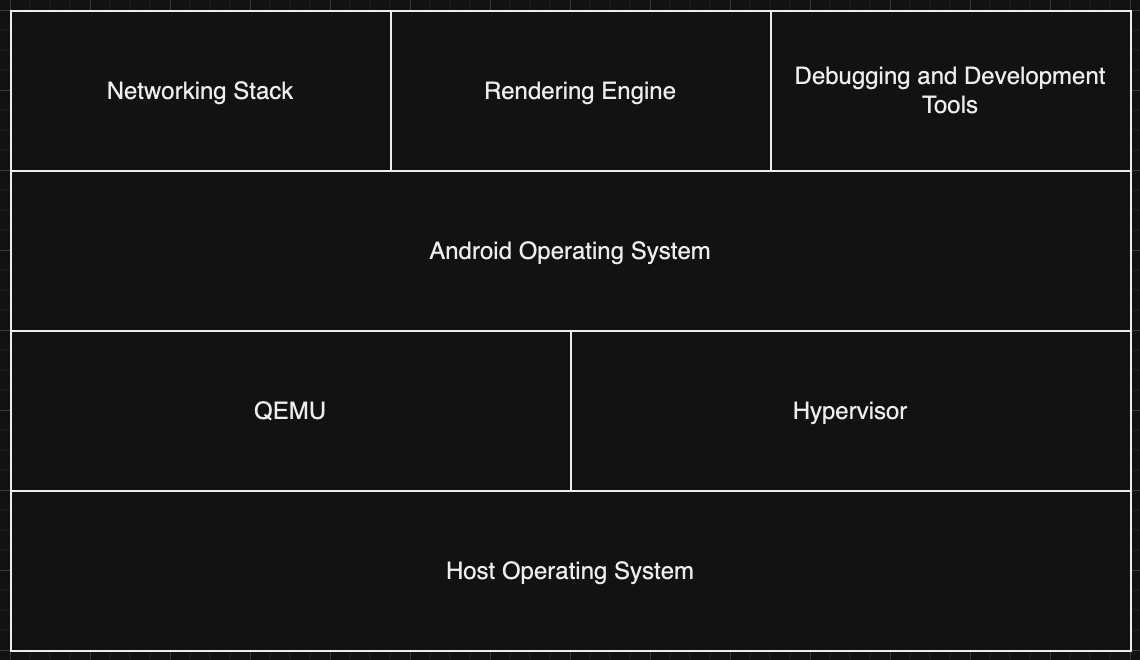
Most emulators use QEMU (Quick Emulator) under the hood. QEMU copies the phone's processor and translates its instructions into something your computer understands. This translation takes time. That's why emulators used to be slow.
Hardware Acceleration Fixes the Speed Problem
Modern emulators use your computer's built-in virtualization features. On Windows, this means Intel HAXM or Hyper-V. On Mac, it's the Hypervisor framework. Hardware acceleration skips the slow translation step. The result? Near-native speed.
Setting Up a Virtual Device
When you create a virtual device, you pick its specs. Screen size. RAM. Storage. Android version. The emulator then boots a full Android system with those settings. You can install apps, browse the web, and test features just like on a real phone.
What It Costs Your Computer
Emulators need resources. A single virtual device uses 2-4 GB of RAM. It also takes several gigabytes of disk space. Running multiple emulators at once? Your computer needs to be powerful enough to handle it.
Following are the key components work together to provide a controlled, efficient, isolated virtual Android environment on a host computer. This virtualization technology allows developers and testers to create, test, and debug Android apps under various conditions without relying on physical Android devices.
8 Popular Android Emulators for App Development
Several Android emulators are available across operating systems like Windows, Linux, and macOS, each offering different features and use cases. These tools are designed to meet the varied needs of developers and testers, which is why multiple types of emulators exist. Here are the top 8 Android emulators:
- Official Android Emulator (Android Virtual Device, AVD): This emulator is provided by Google as part of the Android Studio development environment. It is versatile and offers a wide range of configuration options, allowing developers to create custom virtual devices with various Android versions, screen sizes, and hardware profiles. It’s suitable for a broad range of Android development and testing scenarios.
- Genymotion: Genymotion is a popular third-party Android emulator designed primarily for developers. It offers a range of pre-configured virtual devices, including different Android versions and device models. Genymotion is known for its speed and ease of use, making it a favorite among Android developers.
- BlueStacks: BlueStacks is an Android emulator that runs Android apps on Windows and macOS. It’s often used for gaming and provides features like keyboard and mouse mapping for better gaming experiences. BlueStacks is known for its compatibility with a wide range of Android apps.
- Andy (Andyroid): Andy is an Android emulator designed for gaming and productivity. It offers features like multi-touch support, cloud save, and compatibility with both Windows and macOS. Andy is particularly popular among gamers.
- NoxPlayer: NoxPlayer is another Android emulator primarily designed for gaming. It provides a range of gaming-oriented features such as keymapping, controller support, and the ability to run multiple instances for multi-instance gaming. It’s available for both Windows and macOS.
- ARChon: ARChon is unique because it’s not a traditional Android emulator but a runtime environment that allows you to run Android apps as Chrome extensions on a desktop Chrome browser. It’s a niche solution for those who want to run Android apps within a web browser.
- Bliss OS: Bliss OS is an open-source Android emulator that allows you to install Android on your computer, turning it into an Android device. It’s more complex to set up but provides an authentic Android experience on your computer.
- Remix OS Player: Remix OS Player is another Android emulator that offers a complete Android experience on your computer. It’s designed for productivity and can be used for various tasks, including running Android apps and games.
Additionally, you may would like to check out the following list of Android Emulators:
- Best Android Emulators for Linux
- Best Android Emulators for Mac
- Best Android Emulators for Windows and Mac
And if you are on Apple hardware, you can even run Android apps on iPhone using dedicated emulator options.
How Does the Android Emulator Help in Development and Testing?
For Developers
- Test across devices without buying them. One computer can simulate dozens of Android versions, screen sizes, and hardware setups.
- Save money. No need to spend thousands on physical devices. A single workstation does the job.
- Iterate faster. Change code, hit run, see results in seconds. No cables, no waiting.
- Debug with precision. Simulate edge cases like GPS drops, slow networks, or low memory with one click.
- Work on any OS. Windows, macOS, or Linux. Same experience everywhere.
For Testers
- Verify compatibility at scale. Run the same test across Android 11, 12, 13, 14, and 15 in minutes.
- Catch regressions early. Automated checks on every build. Broken features surface immediately with Regression Testing.
- Test accessibility. Screen readers, voice commands, and keyboard navigation all work in emulators.
- Profile performance. Measure CPU, memory, and rendering speed. Find bottlenecks before users do.
- Simulate real networks. Slow 3G, spotty Wi-Fi, total disconnection. Control the conditions.
- Integrate with automation tools. Appium, Espresso, and other frameworks connect directly.
What are the Limitations of the Android Emulator?
- Performance gaps. Real devices have hardware optimizations that virtual environments can't fully replicate. Resource-heavy apps and games often run slower.
- Missing hardware features. Fingerprint sensors, NFC, and certain device-specific sensors don't work in emulators. You can't test features that need physical components.
- Weaker graphics. Dedicated mobile GPUs outperform emulated ones. Games and animations may stutter or look different.
- No real battery testing. Power consumption, screen brightness adjustments, and battery drain behave differently on actual hardware.
- Inaccurate sensors. Simulated GPS and accelerometer data doesn't match real-world conditions. Location-based apps need real device validation.
- Touch feels different. Multitouch gestures, pressure sensitivity, and screen responsiveness can't be fully replicated with a mouse.
- Heavy on resources. High-end device emulation needs a powerful computer. Older machines struggle with multiple instances.
- Emulator-only bugs. Some issues appear only in emulators and don't exist on real devices. This creates confusion during debugging.
- Network simulation limits. Fluctuating signal strength, carrier-specific behavior, and real-world latency are hard to replicate accurately.
When to Use Emulators vs Real Devices?
Emulators and real devices solve different problems. Knowing when to use each saves time and catches more bugs.
Use Emulators When:
- You're building and testing new features
- You need to check multiple Android versions quickly
- You're running automated tests in a CI/CD pipeline
- You want to simulate edge cases like low memory or slow networks
- You're debugging and need quick access to logs
- You don't have budget for dozens of physical devices
Use Real Devices When:
- You're testing battery drain or CPU performance
- You need accurate GPS, camera, or fingerprint testing
- You're checking touch responsiveness and gestures
- You're validating on real 4G/5G networks
- You're preparing for app store submission
- You need to test manufacturer-specific features
What are Cloud Emulator Solutions and How do they work?
Cloud emulator solutions, also known as cloud-based emulators or device clouds, provide developers and testers with remote access to a wide range of real-world mobile devices and emulated environments over the Internet. These solutions simulate various devices, operating systems, and network conditions, allowing users to test their mobile apps and websites fully. Here’s how cloud emulator solutions work:
- Device Library: Cloud emulator solutions maintain a vast library of real mobile devices, including smartphones and tablets, across different manufacturers and models. These devices are hosted in data centers. A vast device library means that users of cloud emulators have access to an extensive range of real mobile devices, including various manufacturers, models, and configurations.
- Emulated Environments: Besides real devices, cloud emulator solutions offer emulated environments for simulating specific devices, operating systems, and configurations. This allows for a broader range of testing scenarios.
- Remote Access: Users can access these devices and emulated environments remotely through a web-based interface or dedicated software provided by the cloud emulator service.
- Interaction: Users interact with the devices and emulated environments in real-time, sending touch gestures, keyboard inputs, and other commands as if they were physically handling the device.
- App Installation: Users can install their mobile apps or access websites on these remote devices, just as they would on their physical devices.
- Testing and Debugging: Developers and testers can perform various activities, including functional testing, UI testing, performance testing, and debugging, on these devices and emulated environments.
This diversity is crucial because the Android ecosystem is highly fragmented, with thousands of device models running different Android operating system versions. Access to this diversity ensures that apps and websites can be thoroughly tested across various devices.
Benefits of Cloud Emulator Solutions
Cloud emulator solutions offer several significant benefits to developers and enterprises working on cloud-based applications and services. Here are some of the key benefits of using cloud emulator solutions:
- Device Diversity: Cloud emulator solutions offer access to a vast array of real devices and emulated environments, ensuring that apps and websites are tested on various platforms, screen sizes, and configurations.
- Cost-Efficiency: Organizations can save costs by avoiding the need to purchase and maintain a large inventory of physical devices. This is especially beneficial for smaller development teams and startups.
- Scalability: Cloud emulator solutions can scale resources up or down based on demand, allowing organizations to accommodate testing needs during peak development phases.
- Remote Accessibility: Developers and testers can access devices and emulated environments remotely, enabling collaboration among team members in different geographical regions.
- Rapid Testing: Users can simultaneously test on multiple devices and configurations, accelerating the testing process and reducing time-to-market.
- Automation Compatibility: Many cloud emulator solutions integrate with test automation frameworks, allowing for automated testing across various devices and scenarios.
- Network Simulation: Cloud emulators often include network simulation features, enabling testing under various network conditions, including different speeds, latency, and network types (3G, 4G, Wi-Fi).
- Maintenance and Updates: The cloud emulator service provider is responsible for maintaining and updating the devices and emulated environments, ensuring they are up-to-date with the latest operating system versions and patches.
- Global Reach: Cloud emulator solutions typically have data centers in various regions worldwide, ensuring low-latency access for users regardless of their geographic location.
Among the leading cloud Android emulator solutions, TestMu AI Real Device stands out as a powerful tool for developers and testers. With an extensive library of real mobile devices, TestMu AI Real Device offers unparalleled device diversity, enabling comprehensive compatibility testing across different manufacturers, models, and Android versions.
Note: Test web and mobile applications in “Real Time” on Android and iOS, including the latest iPhone 15 on cloud! Try TestMu AI Today!
Real Android Emulator vs. Cloud Emulators
Real Android emulators and cloud emulators serve similar purposes in mobile app testing, but they have distinct differences in terms of implementation, advantages, and limitations. Here’s a comparison between the two:
| Aspects | Real Android Emulators | Cloud Emulators |
|---|---|---|
| Implementation | Real Android emulators are software-based and run locally on a developer's computer. They simulate the Android environment and allow testing on a single machine. | Cloud emulators are hosted on remote servers in data centers and accessed online. Users interact with devices and emulated environments through a web-based interface or client software. |
| Access to Local Hardware | They have direct access to the host computer's hardware resources, which can provide more accurate simulations of device features such as sensors, cameras, and touch input. | They offer access to a vast library of real mobile devices and emulated environments, allowing testing on various platforms, screen sizes, and configurations. |
| Operating System Versions | Real emulators allow developers to install and test apps on specific Android OS versions and configurations. | Cloud emulators provide access to various Android OS versions, making it easier to test on multiple platforms. |
| Development Integration | Real emulators can be tightly integrated with development environments like Android Studio, enabling seamless debugging and code testing. | Some cloud emulators offer integration with popular development and testing tools, but the integration may not be as seamless as real emulators. |
| Resource Requirements | Real emulators can be resource-intensive, requiring a powerful computer to run multiple emulated devices simultaneously. | Cloud emulators offload the computational and resource requirements to the cloud server, making them accessible to users with lower-end hardware. |
| Cost | There is typically no ongoing cost associated with using real emulators, but the initial setup may require some investment in hardware. | Cloud emulators offload the computational and resource requirements to the cloud server, making them accessible to users with lower-end hardware. |
| Location | There is typically no ongoing cost associated with using real emulators, but the initial setup may require some investment in hardware. | Cloud emulators offload the computational and resource requirements to the cloud server, making them accessible to users with lower-end hardware. |
Conclusion
Android emulators are essential tools, providing a controlled app development and testing environment. We’ve explored key features, hardware requirements, and the Android Studio Emulator’s versatility. Emulators offer real-time testing, accessibility evaluation, and performance profiling benefits. However, they have limitations in replicating every real-world device aspect accurately. We also introduced Cloud Emulator Solutions, offering cost-efficient, scalable, and accessible testing environments. Developers can choose the best fit for their projects by comparing real Android emulators to cloud solutions. Emulators, in all their forms, empower efficient Android app development, enhancing the overall development experience.
Author

Siddhant Sinha
Blogs: 7

Siddhant Sinha is a Lead Member of Technical Staff at TestMu AI architecting Kane CLI, the command-line tool for browser automation from the terminal, where natural-language flows run in a real Chrome browser and return pass or fail with shareable proof. He has spent over three years at TestMu AI (formerly LambdaTest) building scalable platforms that run tests at scale on real Android and iOS devices. His expertise covers platform architecture, large-scale distributed systems, and CLI design, shaped by earlier cloud-native engineering at Semut.io, including building Elasticsearch as a service.
Reviewer

Shivam Singh
Reviewer
Shivam Singh is a Lead Member of Technical Staff at TestMu AI (formerly LambdaTest), architecting the Real Device Cloud that runs automated app and web tests on real Android and iOS devices. He designed the architecture for real-device app and web automation and wrote the microservices from scratch in Golang, including the XCUITest and Espresso execution layers for iOS and Android. His platform reached peak parallel concurrency of 150+ for app automation while handling roughly 500,000 tests a month, and he leads the team that keeps the automation grid running. He brings over eight years of engineering experience and holds a B.Tech in Computer Science.


Android Emulators FAQs
Did you find this page helpful?
More Related Blogs
TestMu AI forEnterprise
Get access to solutions built on Enterprise
grade security, privacy, & compliance
- Advanced access controls
- Advanced data retention rules
- Advanced Local Testing
- Premium Support options
- Early access to beta features
- Private Slack Channel
- Unlimited Manual Accessibility DevTools Tests