
Power Your Software Testing with AI Agents and Cloud
The Native AI-Agentic Cloud Platform to Supercharge Quality Engineering. Test Intelligently and Ship Faster.

- TestMu AI (Formerly LambdaTest)
- /
- Learning Hub
- /
- Timeout of 30000ms Exceeded: What It Means and How to Fix It in Each Tool
Timeout of 30000ms Exceeded: What It Means and How to Fix It in Each Tool
Timeout of 30000ms exceeded means a step waited 30 seconds and gave up. Match the message to Playwright, Puppeteer, Axios, Mocha, Jest, Cypress or Selenium.
Published on:
A CI job goes red, and the last line of the log reads timeout of 30000ms exceeded. That line does not say which tool gave up or what it was waiting for. Thirty seconds is a built-in default in Playwright Test, the Playwright library, Puppeteer and Cypress's response timer, and the same number appears whenever someone sets a 30000 ms limit in Axios, Mocha or Jest.
The wording around the number identifies the tool. This guide maps each exact message to the tool and timer behind it, using output from runs of current versions on local Node.js and on the TestMu AI cloud grid, and gives the fix for each.
TL;DR
Timeout of 30000ms exceeded means an operation waited its full 30-second limit (30000 milliseconds) without finishing. It is a symptom: the page, element, response or promise the step waited for never arrived. The exact wording identifies the tool, and the fix is to repair that wait before raising the limit.
Which Tool Prints Timeout of 30000ms Exceeded?
- Playwright Test: "Test timeout of 30000ms exceeded." means the whole test, including fixtures and beforeEach hooks, used its default 30-second budget while a step such as a click was still waiting.
- Playwright library: "page.goto: Timeout 30000ms exceeded." or "locator.click: Timeout 30000ms exceeded." comes from a script calling the library directly, where each navigation and action waits up to 30 seconds by default.
- Puppeteer: "Navigation timeout of 30000 ms exceeded", with a space before ms, means page.goto() never reached its waitUntil event. A waitForSelector() timeout hides the number in error.cause instead.
- Axios: "AxiosError: timeout of 30000ms exceeded" with code ECONNABORTED means an HTTP request hit a limit someone configured, because Axios ships with no timeout at all.
- Mocha: "Error: Timeout of 30000ms exceeded" followed by a hint about done() means a test or hook outlived a limit set with this.timeout() or --timeout; Mocha's own default is 2000 ms.
- Jest: "Exceeded timeout of 30000 ms for a test" means a test given a 30000 ms limit never finished. Jest's default limit is 5000 ms, so the 30000 was set in code or config.
- Cypress: "cy.request() timed out waiting 30000ms for a response from your server" comes from responseTimeout, which defaults to 30000 ms and also covers responses awaited by cy.wait().
- Selenium WebDriver: "Wait timed out after 30113ms" in JavaScript comes from an explicit wait in your code, since Selenium's implicit wait defaults to 0. The figure is the measured wait time.
How Do I Fix Timeout of 30000ms Exceeded?
Find what the step waited for: read the method name, check a screenshot or trace from the moment of failure, and fix the selector, wait condition or slow dependency. Raise the limit only for work that is legitimately slow. On the TestMu AI cloud grid, each session can record network logs, console logs and video, which show whether the page or an API call stalled.
What Does Timeout of 30000ms Exceeded Mean?
Timeout of 30000ms exceeded means a tool stopped waiting after 30000 milliseconds, which is 30 seconds. Browser drivers, test runners and HTTP clients each cap how long they wait for a page, an element, a response or a promise, and this error is that cap firing. It tells you where the waiting stopped; the cause is whatever the step was waiting for.
The 30-second figure is often a default rather than a choice. Playwright Test gives every test 30 seconds, and that budget includes fixture setup and beforeEach hooks, according to Playwright's test timeouts docs.
Before you change any number, answer these from the error and its stack trace:
- Which timer fired - a whole-test budget (Playwright Test, Mocha, Jest) or a single operation such as a navigation, a selector wait or an HTTP request.
- Where the 30000 came from - a tool default (Playwright, Puppeteer, Cypress responses) or a value set in code or config (Axios, Mocha, Jest, Selenium explicit waits).
- What the step waited for - a page event, an element, a network response or a promise. That dependency is what you fix.
Timeout of 30000ms Exceeded Messages by Tool
Each message below comes from a run of the listed version: against a local server that accepts the connection and never answers, a selector that never appears on the TestMu AI Selenium Playground, or a promise that never settles. Browser runs used local Chromium or Chrome 156 on Windows 11 on the TestMu AI grid. The Cypress row is the message template from Cypress's driver source, filled in with the default.
| Exact message | Tool (version run) | Timer that fired | Default | Change it with |
|---|---|---|---|---|
Test timeout of 30000ms exceeded. | Playwright Test 1.65.0 | Whole test, including fixtures and beforeEach hooks | 30000 ms | timeout in the config, test.setTimeout(), test.slow() |
page.goto: Timeout 30000ms exceeded. | Playwright library 1.65.0 | One navigation | 30000 ms | page.setDefaultNavigationTimeout(), a per-call timeout option |
locator.click: Timeout 30000ms exceeded. | Playwright library 1.65.0 | One action | 30000 ms | page.setDefaultTimeout(), a per-call timeout option |
Navigation timeout of 30000 ms exceeded | Puppeteer 25.16.0 | One navigation | 30000 ms | page.setDefaultNavigationTimeout() |
Waiting for selector ... failed, with cause Waiting failed: 30000ms exceeded | Puppeteer 25.16.0 | waitForSelector() or waitForFunction() | 30000 ms | page.setDefaultTimeout() |
AxiosError: timeout of 30000ms exceeded, code ECONNABORTED | Axios 1.21.0 | One HTTP request (idle socket in Node.js) | 0, no timeout | timeout in the request or instance config |
Error: Timeout of 30000ms exceeded. For async tests and hooks, ensure "done()" is called | Mocha 12.0.3 | One test or hook | 2000 ms | this.timeout(), --timeout, .mocharc |
thrown: "Exceeded timeout of 30000 ms for a test. | Jest 30.5.2 | One test or hook | 5000 ms | testTimeout, the third argument to test(), jest.setTimeout() |
cy.request() timed out waiting 30000ms for a response from your server. | Cypress (driver source) | One response | 30000 ms (responseTimeout) | responseTimeout, a per-command timeout option |
Wait timed out after 30113ms | selenium-webdriver 4.52.0 | One explicit wait | None; the implicit wait is 0 | The second argument to driver.wait() |
Small details in the wording tell the tools apart when you search a CI log:
- A space before "ms" - Puppeteer navigations ("30000 ms") and Jest ("Exceeded timeout of 30000 ms"). Playwright, Axios, Mocha and Cypress write "30000ms".
- "Test timeout of" - Playwright Test's whole-test budget. A library call that times out on its own reads "Timeout 30000ms exceeded." after the method name.
- Lowercase "timeout of" with AxiosError - an HTTP request through Axios, often inside an API test or an SDK that wraps Axios.
- "ensure done() is called" - Mocha. The hint appears for promise-based tests too, so it does not mean your test uses done().
- A number above 30000 - selenium-webdriver reports the measured wait, so the figure is rarely round.
Playwright: Test Timeout of 30000ms Exceeded
Playwright Test sets no separate limit for actions or navigations by default, so a click that never succeeds keeps waiting until the 30-second test budget ends. The error then carries two lines: the test timeout and the step that was stuck. Playwright 1.65.0 printed this for a click on a locator that matched nothing on the page:
Test timeout of 30000ms exceeded.

Error: locator.click: Test timeout of 30000ms exceeded.
Call log:
  - waiting for locator('#start-download')
Scripts that call the Playwright library directly, outside the test runner, fail with different wording, because each library call has its own 30-second default. The Playwright Page API reference lists that default for both the Node.js and Python APIs.
A click on a missing element, run through the library on the TestMu AI grid, printed this:
TimeoutError: locator.click: Timeout 30000ms exceeded.
Call log:
  - waiting for locator('#order-confirmation')
The line after the timeout names the step to fix. Then set the timers so the next failure is faster and clearer:
- Fix the named step - a locator that matches nothing, or an assertion waiting for text that never renders, fails at the same step on every run. Repair the locator or the condition.
- Give steps their own limits - set actionTimeout and navigationTimeout below the test timeout so a stuck click fails in seconds under its own name instead of using up the whole budget.
- Mark slow tests - test.slow() gives a known slow test triple the default timeout without changing the rest of the suite.
- Raise the budget last - increase timeout in the config only for suites that are long by design, such as end-to-end checkout flows.
import { defineConfig } from '@playwright/test';

export default defineConfig({
  timeout: 60_000, // whole test, fixtures and beforeEach hooks (default 30_000)
  expect: { timeout: 10_000 }, // each web-first assertion (default 5_000)
  use: {
    actionTimeout: 10_000, // each click, fill or check (default: no limit)
    navigationTimeout: 20_000, // each navigation, such as page.goto() (default: no limit)
  },
});
Hook, fixture, expect and global timeouts each have their own wording, and the guide to Playwright timeouts covers every one with examples. If the pytest-timeout plugin also wraps Python Playwright tests, its limit is separate from Playwright's, as covered in pytest timeouts.
Puppeteer: Navigation Timeout of 30000 ms Exceeded
Puppeteer's WaitForOptions reference lists a default timeout of 30000 ms and a default waitUntil value of 'load'.
page.goto() takes those options, so a navigation waits up to 30 seconds for the load event unless you change either one.
In Puppeteer 25.16.0, a page.goto() to a server that accepted the connection and never answered failed after 30016 ms with TimeoutError: Navigation timeout of 30000 ms exceeded. Common causes:
- networkidle0 on a busy page - networkidle0 waits until there are no network connections for at least 500 ms. Pages with analytics beacons, chat widgets or long polling may never get there.
- An unreachable or slow server - a browser on a cloud grid cannot open localhost on your machine unless a tunnel connects the two, so the navigation hangs until the timer fires. See testing locally hosted pages.
- An element that never renders - waitForSelector() and waitForFunction() share the 30-second default, and in Puppeteer 25 the waitForSelector() message leaves the number out.
The last case is easy to misread. This script waits for an element that does not exist on the Selenium Playground, using Chrome on the TestMu AI grid:
import puppeteer from 'puppeteer-core';

const capabilities = {
  browserName: 'Chrome',
  browserVersion: 'latest',
  'LT:Options': {
    platform: 'Windows 11',
    build: 'Timeout 30000ms Hub Repro',
    name: 'Puppeteer waitForSelector',
    user: process.env.LT_USERNAME,
    accessKey: process.env.LT_ACCESS_KEY,
  },
};

const browser = await puppeteer.connect({
  browserWSEndpoint: `wss://cdp.lambdatest.com/puppeteer?capabilities=${encodeURIComponent(JSON.stringify(capabilities))}`,
});
const page = await browser.newPage();

try {
  await page.goto('https://www.testmuai.com/selenium-playground/simple-form-demo/', { waitUntil: 'domcontentloaded' });
  await page.waitForSelector('#order-confirmation');
} catch (error) {
  console.log(`${error.name}: ${error.message}`);
  console.log(`cause: ${error.cause?.message}`);
  await page.screenshot({ path: 'at-timeout.png' });
} finally {
  await browser.close();
}
TimeoutError: Waiting for selector `#order-confirmation` failed
cause: Waiting failed: 30000ms exceededThe 30000ms appears only in error.cause, so log the cause and take a screenshot inside the catch block. The screenshot below shows the page fully loaded with no order confirmation on it, which points at the selector, not at page speed.
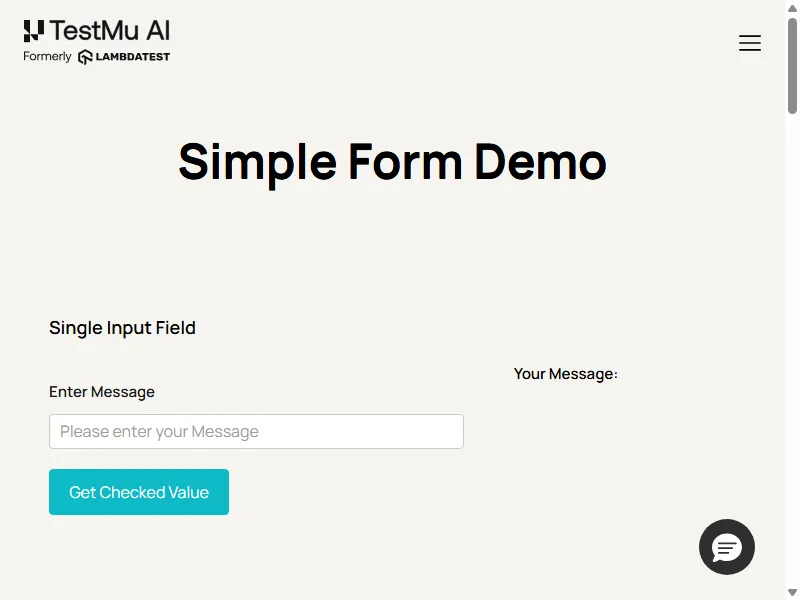
For the navigation case, wait for domcontentloaded and then for the element you need instead of using networkidle0. When a page really is slow, set page.setDefaultNavigationTimeout() for navigations and page.setDefaultTimeout() for waits, and keep both finite. The Puppeteer testing docs cover the grid connection settings, and Puppeteer vs Playwright compares the two tools with timed benchmarks.

Note: Puppeteer, Playwright and Selenium scripts run on the TestMu AI cloud grid by pointing them at the grid endpoint, and each session can record video, console logs and network logs for debugging timeouts. You can start free.
Axios: AxiosError Timeout of 30000ms Exceeded
Axios has no timeout by default: axios.defaults.timeout prints 0 in Axios 1.21.0. An Axios timeout of 30000ms exceeded error therefore means your code, an axios.create() instance or a library built on Axios set timeout: 30000. Against a server that never answered, Axios rejected after 30034 ms with AxiosError: timeout of 30000ms exceeded and code ECONNABORTED.
Axios reports a timeout as ECONNABORTED unless transitional.clarifyTimeoutError is set to true, in which case it throws ETIMEDOUT, which separates timeouts from other aborts, according to the Axios guide to handling errors.
In Node.js, Axios hands the limit to Node's request.setTimeout() once the connection is up.
Node's documentation for socket.setTimeout() defines that timer as a timeout after the given number of milliseconds of inactivity on the socket.
A response that keeps sending data can therefore outlast the limit. A test server that sent one byte every 5 seconds took 45.2 seconds to finish, and Axios with timeout: 30000 returned it without an error. The same request with signal: AbortSignal.timeout(30000) stopped at 30.0 seconds with CanceledError: canceled and code ERR_CANCELED.
This client handles both: the idle limit from timeout and a hard deadline from an AbortSignal. Against a server that never answers, it prints the idle timeout first:
import axios from 'axios';

const api = axios.create({
  baseURL: 'http://localhost:4010',
  timeout: 30000, // idle limit in Node.js
  transitional: { clarifyTimeoutError: true }, // ETIMEDOUT instead of ECONNABORTED
});

try {
  await api.get('/orders/42', { signal: AbortSignal.timeout(45000) }); // hard deadline
} catch (error) {
  if (error.code === 'ETIMEDOUT') console.log(`idle timeout: ${error.message}`);
  else if (error.code === 'ERR_CANCELED') console.log(`deadline reached: ${error.message}`);
  else throw error;
}
idle timeout: timeout of 30000ms exceeded- Check the server first - if the server logged the request and answered slowly, fix the endpoint or give that call a larger per-request timeout. If it never logged the request, look at DNS, proxies or the network path.
- Set limits per call - pass timeout on the slow request instead of raising it on the shared instance, so every other call still fails fast.
- Catch both codes - with an AbortSignal deadline, handle ERR_CANCELED as well as ECONNABORTED or ETIMEDOUT.
- Retry only idempotent requests - a POST that timed out on the client may already have succeeded on the server.
For assertions on status codes, payloads and response times, see the guide to API testing.
Mocha: Error Timeout of 30000ms Exceeded
Mocha's default test timeout is 2000 milliseconds, per Mocha's CLI reference.
So 30000ms in a Mocha error means someone raised the limit with this.timeout(30000), --timeout 30000 or a .mocharc file.
Mocha 12.0.3 printed this for an async test whose promise never settled:
  1) order API
       returns the order within 30 s:
     Error: Timeout of 30000ms exceeded. For async tests and hooks, ensure "done()" is called; if returning a Promise, ensure it resolves.
The done() hint is generic: Mocha prints it for promise-based tests too. The usual causes are an awaited promise that never settles, such as an event that never fires or a server that never started, and a callback-style test that never calls done().
Arrow functions are the other trap. Mocha's arrow functions page says lambdas lexically bind this and cannot access the Mocha context.
With an arrow describe and an arrow it, this.timeout(30000) threw TypeError: this.timeout is not a function. With an arrow it inside a regular describe, the same call silently changed the timeout for the whole suite.
Set limits from regular functions instead:
describe('order API', function () {
  this.timeout(30000); // every test and hook in this suite

  it('returns the playground page', async function () {
    this.timeout(45000); // this test only
    const res = await fetch('https://www.testmuai.com/selenium-playground/');
    if (res.status !== 200) throw new Error(`status ${res.status}`);
  });
});
For hooks, reporters and suite structure, see Mocha unit testing.
Jest: Exceeded Timeout of 30000 ms for a Test
Jest gives each test 5000 milliseconds by default through the testTimeout option, per the Jest configuration reference.
Its message words the limit differently from Playwright and Mocha, with a space before ms. Jest 30.5.2 printed this for a test given 30000 ms whose promise never settled:
thrown: "Exceeded timeout of 30000 ms for a test.
Add a timeout value to this test to increase the timeout, if this is a long-running test. See https://jestjs.io/docs/api#testname-fn-timeout."
Raise the limit where the slowness lives: the third argument to test() for one test, testTimeout in the config for the project, or jest.setTimeout() at the top of a file. Hooks take the same argument, as in beforeAll(fn, timeout).
// jest.config.js
module.exports = { testTimeout: 30000 };

// order.test.js
test('returns the playground page', async () => {
  const res = await fetch('https://www.testmuai.com/selenium-playground/');
  expect(res.status).toBe(200);
}, 45000);
For async patterns that keep promises from hanging in the first place, see unit testing with Jest.
Cypress: Timed Out Waiting 30000ms for a Response
Cypress uses separate timers: defaultCommandTimeout is 4000 ms, requestTimeout is 5000 ms, responseTimeout is 30000 ms and pageLoadTimeout is 60000 ms, per the Cypress configuration reference.
A 30000ms Cypress error therefore points at responseTimeout. The message templates in Cypress's driver source read like this with the default filled in:
`cy.request()` timed out waiting `30000ms` for a response from your server.

`cy.wait()` timed out waiting `30000ms` for the 1st response to the route: `getOrder`. No response ever occurred.
Fix the dependency first: confirm the server answers and that the cy.intercept() route matches the request you wait on. For one slow endpoint, the timeout option on cy.request() overrides responseTimeout for that request only, as the cy.request() documentation describes.
// cypress.config.js
const { defineConfig } = require('cypress');

module.exports = defineConfig({
  e2e: {
    responseTimeout: 30000, // cy.request() and cy.wait() responses (default 30000)
  },
});

// in a spec: give one slow endpoint more time
cy.request({ url: '/api/orders/42', timeout: 60000 });
On TestMu AI, Cypress builds also take a max_duration run setting, a session-level limit that is separate from these command timers, as described in the Cypress run settings docs. For request-level checks, see Cypress API testing.
Selenium WebDriver: Wait Timed Out After 30000ms
Selenium's implicit wait defaults to 0, which means a missing element returns an error immediately, according to the Selenium documentation on waiting strategies.
A 30-second timeout in selenium-webdriver therefore comes from an explicit wait in your code. With selenium-webdriver 4.52.0 on the TestMu AI grid, driver.wait(until.elementLocated(By.css('#order-confirmation')), 30000) failed with this:
TimeoutError: Waiting for element to be located By(css selector, #order-confirmation)
Wait timed out after 30113ms
The reported time is the measured wait, so it lands a little over 30000. Fix it the way you would a Playwright locator timeout: confirm the locator matches an element on the page you actually reached, and wait for a specific condition instead of adding fixed sleeps. Selenium waits covers explicit and fluent waits across language bindings.
SmartWait on the TestMu AI Grid
On TestMu AI, the smartWait capability runs actionability checks before each command, so plain findElement() calls wait for an element without explicit waits in the code. It accepts 5 to 120 seconds, per the SmartWait docs.
This script sets smartWait to 30 and looks up one element that exists and one that does not:
import { Builder, By } from 'selenium-webdriver';

const capabilities = {
  browserName: 'Chrome',
  browserVersion: 'latest',
  'LT:Options': {
    platform: 'Windows 11',
    build: 'Timeout 30000ms Hub Repro',
    name: 'selenium-webdriver SmartWait 30',
    smartWait: 30, // seconds, 5 to 120
  },
};

const driver = await new Builder()
  .usingServer(`https://${process.env.LT_USERNAME}:${process.env.LT_ACCESS_KEY}@hub.lambdatest.com/wd/hub`)
  .withCapabilities(capabilities)
  .build();

let start = Date.now();
try {
  await driver.get('https://www.testmuai.com/selenium-playground/simple-form-demo/');
  start = Date.now();
  await driver.findElement(By.id('user-message'));
  console.log(`present element found after ${Date.now() - start} ms`);
  start = Date.now();
  await driver.findElement(By.css('#order-confirmation'));
} catch (error) {
  console.log(`${error.name} after ${Date.now() - start} ms`);
} finally {
  await driver.quit();
}
present element found after 217 ms
NoSuchElementError after 30155 msThe present element came back in 217 ms. The missing one failed after about 30 seconds with NoSuchElementError, the same error Selenium raises without SmartWait, only later. SmartWait removes explicit waits from the code, but a wrong selector still fails.
For a quick visual walkthrough of this concept, watch the video below from TestMu AI.

Subscribe to the TestMu AI YouTube channel for more tutorials on testing and automation.
Raise the Timeout or Fix the Wait
Raising the limit is the right fix only when the step is long-running by nature. Use the failure pattern to decide:
| Symptom | Likely cause | What to do |
|---|---|---|
| Same step fails on every run | A selector, wait condition or route that never matches | Fix the locator or condition; a larger limit only delays the same failure |
| A different step fails each run, near 30 seconds in total | The test is long by design | Raise the test budget, mark the test as slow, or split it |
| Fails only in CI or on a cloud grid | A slower machine, a longer network path, or an app the remote browser cannot reach | Compare step timings, add a tunnel for local apps, raise per-step limits for that environment only |
| An HTTP call times out only under load | The server is slow | Fix the endpoint, set per-call limits, retry only idempotent requests |
| Fails on some runs and passes on others with no code change | A race between the test and the app | Treat it as a flaky test and find the race before touching the limit |
Do not set the limit to 0 in CI. Zero disables the timer in Playwright, Puppeteer, Mocha and Axios, so a stuck step hangs until something else ends the run instead of failing with a message that names the step.
A GitHub Actions job runs for up to 360 minutes by default before GitHub cancels it, per the GitHub Actions workflow syntax reference.
A timeout that comes and goes between runs usually signals a race rather than a slow step, which makes it a flaky test to fix rather than a limit to raise.

Debugging 30-Second Timeouts on a Cloud Grid
A timeout message says where waiting stopped, and session artifacts show why. TestMu AI's Automation Cloud runs existing Selenium, Cypress, Playwright and Puppeteer scripts on 3,000+ browser and OS combinations and records network logs, console logs, video, screenshots and command logs for each session.
- Network logs - show whether the request a step waited on was pending, failed or slow, which separates an app problem from a test problem.
- Video and screenshots - show whether the element ever rendered, as in the Puppeteer screenshot above.
- Command logs - show which command used up the 30 seconds.
- Grid idle timeout - a Selenium session that receives no command ends after 600 seconds by default, separate from your framework's timers. The idleTimeout capability changes it, as listed in Selenium automation capabilities.
When the same timeout keeps coming back across builds, TestMu AI's test intelligence groups failures by error category. Its AI root cause analysis accepts custom categories such as API Timeout Errors, so recurring timeouts collect in one place. Treat each RCA report as a lead to verify, not a verdict.
Conclusion
Copy the full timeout line and the line after it from the failing log, and match them against the table above to find the tool and the timer. Then fix what the step was waiting for, and raise the limit only for work that is slow by design.
To see what the page and network were doing when timeout of 30000ms exceeded appeared, run the same test on the TestMu AI grid and open the session's video and network log. The Playwright testing docs show the grid connection for Playwright.
Testing from the terminal? Kane CLI by TestMu AI lets SDETs and developers plan, write, run and debug tests from the command line.
Author

Harshit Paul
Blogs: 97


Harshit Paul is Director of Product Marketing at TestMu AI, with over 8 years of experience in product and growth marketing for developer and QA tools, leading the Agentic AI in Quality Engineering space. He has authored 80+ technical articles for TestMu AI on software testing and automation, and hosted webinars on Selenium, automation testing, browser compatibility, DevOps, and continuous testing. He has led go-to-market and technical marketing initiatives across software testing products, contributing to SEO, content strategy, and developer marketing. He began his career as a certified Salesforce developer at Wipro Technologies, where he worked for 2 years before moving into marketing. Harshit holds a degree in computer programming from Vivekananda Institute of Professional Studies.
Reviewer

Himanshu Sheth
Reviewer
Himanshu Sheth is the Director of Marketing (Technical Content) at TestMu AI, with over 8 years of hands-on experience in Selenium, Cypress, and other test automation frameworks. He has authored more than 130 technical blogs for TestMu AI, covering software testing, automation strategy, and CI/CD. At TestMu AI, he leads the technical content efforts across blogs, YouTube, and social media, while closely collaborating with contributors to enhance content quality and product feedback loops. He has done his graduation with a B.E. in Computer Engineering from Mumbai University. Before TestMu AI, Himanshu led engineering teams in embedded software domains at companies like Samsung Research, Motorola, and NXP Semiconductors. He is a core member of DZone and has been a speaker at several unconferences focused on technical writing and software quality.


Timeout of 30000ms Exceeded FAQs
Did you find this page helpful?
More Related Learning Hubs

TestMu AI forEnterprise
Get access to solutions built on Enterprise
grade security, privacy, & compliance
- Advanced access controls
- Advanced data retention rules
- Advanced Local Testing
- Premium Support options
- Early access to beta features
- Private Slack Channel
- Unlimited Manual Accessibility DevTools Tests