
Run Web Automation Tests at Scale with Agentic AI
Generate tests with AI agents or automate test suites with Selenium, Playwright and other frameworks. Run tests in parallel on TestMu AI scalable cloud grid.

- TestMu AI (Formerly LambdaTest)
- /
- Learning Hub
- /
- Puppeteer Timeout: How to Set, Increase and Fix TimeoutError
Puppeteer Timeout: How to Set, Increase and Fix TimeoutError
Puppeteer timeout guide for v25: each 30-second default, setDefaultTimeout vs per-call limits, protocolTimeout, Jest and grid limits, and the error each throws.
Published on:
A Puppeteer script that passes on a laptop and fails in CI with TimeoutError: Navigation timeout of 30000 ms exceeded has run out one of several separate limits, and the fix depends on which one. Puppeteer keeps one limit for browser start, one for navigation, one for element waits and one for each DevTools Protocol call, and none of them knows about the timeout your test runner enforces.
This guide covers each Puppeteer timeout in Puppeteer 25.16.0, the current release at the time of writing, and every error message quoted below is the one that version prints. Timeouts are one chapter of the Puppeteer tutorial, which starts from installation.
TL;DR
A Puppeteer timeout is the maximum time, in milliseconds, that a Puppeteer operation waits before it throws TimeoutError, and most operations default to 30,000 ms. It exists so a stuck wait fails with a message instead of hanging the run. Change one call with its timeout option, or one page with page.setDefaultTimeout().
What Is the Default Timeout in Puppeteer?
- Navigation timeout: page.goto(), page.reload() and page.waitForNavigation() wait 30,000 ms for the waitUntil event, which is load by default. page.setDefaultNavigationTimeout() changes it for one page and overrides page.setDefaultTimeout() for navigation.
- Wait and locator timeout: waitForSelector(), waitForFunction(), waitForNetworkIdle() and locator actions also wait 30,000 ms. Applies to every page: No. page.setDefaultTimeout() changes one page, and a page opened later starts again at 30 seconds.
- Launch timeout: puppeteer.launch() waits 30,000 ms for the browser to start and print its DevTools endpoint. The launch timeout option bounds browser startup only and has no effect on later page waits.
- protocolTimeout: Each single DevTools Protocol call, such as one page.evaluate(), gets 180,000 ms. Throws TimeoutError: No. Puppeteer throws ProtocolError, so a catch block that checks only TimeoutError misses it.
- Jest testTimeout: Jest stops each test after 5,000 ms, well before a 30-second Puppeteer wait ends, and prints its own message instead of the Puppeteer error. Set testTimeout above the longest Puppeteer wait in the test.
- Mocha timeout: Mocha stops each test and hook after 2,000 ms by default. Raise it with --timeout or this.timeout() so the Puppeteer TimeoutError, not the runner, reports the failure.
How Do You Fix a Puppeteer Timeout Error?
- "Navigation timeout of 30000 ms exceeded": page.goto() never saw its waitUntil event. Check that the server answers, choose the event the page reaches, and wait for the content you need separately.
- "Waiting for selector ... failed": waitForSelector() never matched the selector in the requested state. Check the selector and the visible or hidden option, then wait for the data rather than a fixed delay.
- "Increase the 'protocolTimeout' setting": one protocol call, usually a long page.evaluate(), ran past 180,000 ms. Split the work into shorter calls, or raise protocolTimeout in launch() or connect().
On TestMu AI's Puppeteer grid, the session video and command log show what the page was doing when a wait expired.
What Is a Puppeteer Timeout?
A Puppeteer timeout is the maximum time, in milliseconds, that a Puppeteer operation keeps waiting before it gives up and throws. Every wait has one, from browser start to a single click.
The Puppeteer API reference says TimeoutError "is emitted whenever certain operations are terminated due to timeout", and gives page.waitForSelector and puppeteer.launch as example operations.
Take a test that clicks Save and waits for an order summary. If the API answers in 2 seconds, a 30-second wait passes after 2 seconds; if the selector has a typo, the same wait holds the test for the full 30 seconds and then throws.
An empirical study of flaky tests in JavaScript analyzed 452 commits from large, top-scoring JavaScript projects on GitHub and found that flakiness caused by concurrency-related issues, such as async wait, race conditions or deadlocks, is the most dominant reason for test flakiness.
A Puppeteer limit set too tight for a slow but healthy page produces exactly that kind of flaky test: it passes or fails depending on how fast the server answered that run.
What Is the Default Timeout in Puppeteer?
The WaitForOptions reference for navigation gives timeout a default of 30000 milliseconds, says to pass 0 to disable it, notes that the default can be changed with page.setDefaultTimeout() or page.setDefaultNavigationTimeout(), and sets waitUntil to load by default.
The WaitForSelectorOptions reference gives the waitForSelector() timeout a default of 30_000 (30 seconds) and says to pass 0 to disable it.
The ConnectOptions reference describes protocolTimeout as the timeout setting for individual protocol (CDP) calls, with a default of 180_000.
The table maps every limit that can end a Puppeteer test, including the two that belong to the test runner and the cloud grid.
| Timeout | Default | Set it with | What it covers |
|---|---|---|---|
| Launch | 30,000 ms | puppeteer.launch({ timeout }) | Browser start, until Chrome prints its DevTools endpoint |
| Navigation | 30,000 ms | page.setDefaultNavigationTimeout() or a timeout option on the call | goto(), goBack(), goForward(), reload(), setContent() and waitForNavigation() |
| Default | 30,000 ms | page.setDefaultTimeout() or a timeout option on the call | waitForSelector(), waitForFunction(), waitForNetworkIdle(), waitForResponse(), locator actions, and navigation while no navigation timeout is set |
| Locator | The page default | locator.setTimeout() | Every check and action on that locator |
| Network idle | 500 ms of quiet within 30,000 ms | waitForNetworkIdle({ idleTime, timeout }) | Waits until no request has run for idleTime |
| protocolTimeout | 180,000 ms | launch() or connect() option | Each single DevTools Protocol call, such as one page.evaluate() |
| Jest testTimeout | 5,000 ms | testTimeout in config, or a third argument to test() | The whole test body |
| Mocha timeout | 2,000 ms | --timeout or this.timeout() | Each test and each hook |
| TestMu AI idleTimeout | 300 s, maximum 1,800 s | idleTimeout in LT:Options | How long a cloud session waits for the next command |
page.setDefaultTimeout() also governs page.goto() until page.setDefaultNavigationTimeout() is set, and both setters apply to one page only, so a page opened later with browser.newPage() starts again at 30 seconds.
How Do You Set a Timeout in Puppeteer?
Set a Puppeteer timeout at the narrowest level that fits: a timeout option on the call wins, then the page's navigation default for navigation calls, then the page's general default, then the built-in 30 seconds. The snippet below sets each level and notes which limit each line runs under.
import puppeteer from 'puppeteer';

const browser = await puppeteer.launch({ timeout: 60_000 }); // browser start only
const page = await browser.newPage();

page.setDefaultTimeout(10_000);           // waits, locators and navigation
page.setDefaultNavigationTimeout(45_000); // goto, reload, waitForNavigation

await page.goto('https://www.testmuai.com/selenium-playground/');      // 45 s limit
await page.waitForSelector('a[href*="simple-form-demo"]');             // 10 s limit
await page.locator('a[href*="simple-form-demo"]').setTimeout(5_000).click(); // 5 s limit
await page.waitForSelector('#user-message', { timeout: 15_000 });      // 15 s limit

await browser.close();
With page.setDefaultTimeout(1000) and page.setDefaultNavigationTimeout(5000) on the same page, a page.goto() to a server that answers in 3 seconds succeeds under the navigation default, while page.waitForSelector() on a missing element fails after 1 second under the general one.
- Per call - pass
{ timeout }to the one wait that is slow by design, such as a report export, and leave every other wait on the default. - Per page - call setDefaultTimeout() and setDefaultNavigationTimeout() in the helper that opens pages; a tab opened anywhere else falls back to 30 seconds.
- Per locator - locator.setTimeout() clones the locator and returns the copy with the new limit, so chain it or assign the result; calling it on its own changes nothing.
- Per browser start -
puppeteer.launch({ timeout })bounds startup only, which matters on cold CI runners that unpack Chrome before the first test.
How Do You Increase or Disable the Puppeteer Timeout?
Increase a Puppeteer timeout with the same setters and a larger number, and disable it with 0.
The LaunchOptions reference applies the same rule to browser start: the timeout is the "Maximum time in milliseconds to wait for the browser to start", and you "Pass 0 to disable the timeout."
A value of 0 does not skip the wait; it removes the upper bound. Point page.goto() with { timeout: 0 } at a server that takes 35 seconds to answer, and the call returns after those 35 seconds instead of failing at 30. If the server never answers, the script hangs until the CI job's own limit kills it, with no Puppeteer error in the log.
// Raise the limit for the one step that is slow by design
await page.goto('https://www.testmuai.com/selenium-playground/table-sort-search-demo/', {
  timeout: 90_000,
});

// timeout: 0 removes the limit; this wait ends only when a row appears
await page.waitForSelector('table tbody tr', { timeout: 0 });- Raise it - for a step that is slow by design: a large report, a staging server that starts cold, or a cloud session in a distant region.
- Fix the wait instead - when the page is ready but Puppeteer waits for the wrong event, such as load on a page that keeps loading ads, or for a selector that never matches.
- Avoid 0 in CI - a large finite number still fails with a readable TimeoutError; 0 turns the same failure into a silent hang.

What Does Each Puppeteer TimeoutError Message Mean?
Each message names the limit that ran out. The table lists what Puppeteer 25.16.0 prints at the default limits; the number inside a message is the limit in force for that call, so a call with { timeout: 5000 } prints 5000.
| Message | Thrown by | Limit that ran out |
|---|---|---|
TimeoutError: Navigation timeout of 30000 ms exceeded | page.goto(), page.reload(), page.waitForNavigation() | Navigation timeout |
TimeoutError: Waiting for selector `#id` failed, with the cause Waiting failed: 30000ms exceeded | page.waitForSelector() | Default timeout |
TimeoutError: Waiting failed: 30000ms exceeded | page.waitForFunction() | Default timeout |
TimeoutError: Timed out after waiting 30000ms | Locator actions, page.waitForNetworkIdle(), page.waitForResponse() | Default or locator timeout |
TimeoutError: Timed out after 30000 ms while waiting for the WS endpoint URL to appear in stdout! | puppeteer.launch() | Launch timeout |
ProtocolError: Runtime.callFunctionOn timed out. Increase the 'protocolTimeout' setting in launch/connect calls for a higher timeout if needed. | page.evaluate() and any other single protocol call | protocolTimeout |
thrown: "Exceeded timeout of 5000 ms for a test." | Jest | Jest testTimeout |
Error: Timeout of 2000ms exceeded. | Mocha | Mocha timeout |
The waitForSelector message hides its number. The top line reads only "Waiting for selector `#id` failed", and the limit sits in error.cause, so log both lines when you report the failure:
TimeoutError: Waiting for selector `#does-not-exist` failed
  cause: TimeoutError: Waiting failed: 2000ms exceeded
page.$eval() does not wait at all, so a selector that matches nothing fails at once with Error: failed to find element matching selector, which a TimeoutError handler never sees.
How Do You Fix "Navigation Timeout of 30000 ms Exceeded"?
Pick the waitUntil event the page actually reaches, then wait separately for the content or behavior you need. page.goto() waits for the load event unless you pass another one.
The PuppeteerLifeCycleEvent reference defines four lifecycle events: load, domcontentloaded, networkidle0 and networkidle2.
page.goto() accepts any of them as its waitUntil value:
- load - waits for the page's load event, which one slow image or third-party script can hold back.
- domcontentloaded - waits for the DOMContentLoaded event, when the HTML has been parsed.
- networkidle0 - waits until there are no network connections for at least 500 ms.
- networkidle2 - waits until there are no more than 2 network connections for at least 500 ms.
The two networkidle events never settle on a page that polls. A page that fetches every 200 ms keeps page.waitForNetworkIdle() waiting until its timeout, so chat widgets, analytics beacons and live dashboards turn networkidle0 into a navigation timeout on every run.
An event that fires too early causes the opposite failure on client-rendered pages. On the Selenium Playground's dynamic data loading demo, each run below started a fresh browser, as a CI job does, and clicked Get Random User with page.locator('#save').click() right after page.goto():
| Wait before the click | Click took effect | page.goto() time |
|---|---|---|
| waitUntil: domcontentloaded | 0 of 6 runs | Fastest |
| waitUntil: load (default) | 3 of 6 runs | About 0.6 s |
| waitUntil: networkidle2 | 6 of 6 runs | 2.4 to 3.1 s |
| waitUntil: networkidle0 | 6 of 6 runs | 3.5 to 5.5 s |
| load, then click until the page reacts | 6 of 6 runs | 0.8 to 1.9 s, with 1 or 2 clicks |
The locator did its job in every run: the button was visible, enabled and stable, so the click went through. The page's script had not attached its click handler yet, so nothing happened, and the wait for the profile ran out. The simplest fix that passed every run was a later waitUntil event:
await page.goto('https://www.testmuai.com/selenium-playground/dynamic-data-loading-demo/', {
  waitUntil: 'networkidle2',
});
await page.locator('#save').click();
await page.waitForSelector('#loading img', { visible: true, timeout: 10_000 });
On a page that never goes quiet, wait for proof that the page responds instead. The helper below clicks, waits up to 1 second for the page's own reaction, and clicks again only if nothing changed; use it only on buttons that are safe to press twice.
async function clickUntilItReacts(page, selector, reacted, attempts = 5) {
  for (let i = 0; i < attempts; i++) {
    await page.locator(selector).click();
    const ok = await page
      .waitForFunction(reacted, { timeout: 1_000 })
      .then(() => true, () => false);
    if (ok) return;
  }
  throw new Error(`${selector} did not respond after ${attempts} clicks`);
}

await page.goto('https://www.testmuai.com/selenium-playground/dynamic-data-loading-demo/');
await clickUntilItReacts(page, '#save', () =>
  document.querySelector('#loading')?.textContent.trim(),
);
await page.waitForSelector('#loading img', { visible: true, timeout: 10_000 });- Server never answers - no timeout value fixes an unreachable host; check the URL, the VPN and, for a local app on a cloud grid, the tunnel before changing any number.
- Navigation already finished - calling waitForNavigation() after the click that triggers it can miss the event; start both together with
Promise.all([page.waitForNavigation(), page.click(selector)]).

Note: Run these Puppeteer timeout checks on 3,000+ browser and OS combinations with TestMu AI, with a video and command log recorded for every session. To begin, start free.
How Do You Fix a waitForSelector Timeout in Puppeteer?
A waitForSelector timeout means the selector never matched in the state you asked for before the limit ran out. Check three things in order: the selector, the state option, and the signal that the content is ready.
- Selector - test it in DevTools against the same page state; one typo, or a generated class name that changes on each build, makes the wait run its full 30 seconds.
- visible and hidden - with
{ visible: true }, an element that exists but stays hidden still times out, and the message is the same as for a missing element: waitForSelector('head', { visible: true }) fails with "Waiting for selector `head` failed". - Readiness - wait for what the user waits for, the data itself, rather than a fixed delay.
The Puppeteer v22.0.0 release notes list "remove waitForTimeout" among the breaking changes.
On the same dynamic data demo, the profile comes from an outside API about 2 seconds after the click. A 1-second wait fails and a 10-second wait passes on the same page; on the TestMu AI grid, the 10-second wait returned after 2,411 ms.
await page.locator('#save').click();
try {
  await page.waitForSelector('#loading img', { visible: true, timeout: 1_000 });
} catch (error) {
  console.log(error.message, '|', error.cause?.message);
}
Waiting for selector `#loading img` failed | Waiting failed: 1000ms exceededFor actions, prefer the locator API. The page interactions guide calls locators the recommended way to select an element and interact with it, and lists what a locator checks before clicking: it ensures the element is in the viewport, waits for it to become visible or hidden, waits for it to become enabled, and waits for it to have a stable bounding box.
locator.setTimeout() bounds all of those checks with one number. None of them confirms that the page has attached its click handler, which is why the cold-browser runs above still needed a later signal.
How Do You Catch a TimeoutError in Puppeteer?
Import TimeoutError and ProtocolError from Puppeteer and check the error with instanceof. Every timeout in the error table is a TimeoutError except two: protocolTimeout throws ProtocolError, and a wait canceled through an AbortSignal throws a plain Error whose cause is a DOMException named TimeoutError.
import { TimeoutError, ProtocolError } from 'puppeteer';

async function waitOrReport(page, selector, timeout) {
  try {
    return await page.waitForSelector(selector, { visible: true, timeout });
  } catch (error) {
    if (error instanceof TimeoutError) {
      console.error(`${error.message} (${error.cause?.message ?? 'no cause'})`);
      await page.screenshot({ path: 'timeout.png', fullPage: true });
    } else if (error instanceof ProtocolError && error.message.includes('protocolTimeout')) {
      console.error('A protocol call ran past protocolTimeout:', error.message);
    }
    throw error;
  }
}
The screenshot in the catch block shows whether the page was blank, half loaded or showing an error banner when the wait expired; the Puppeteer screenshot chapter covers full-page and element captures.
Retry a timeout only when the cause sits outside the page under test, such as a staging server waking up. Retrying a wrong selector three times turns one 30-second failure into a 90-second one.
Why Does Jest or Mocha Time Out Before Puppeteer?
The Jest configuration reference lists testTimeout as the default timeout of a test in milliseconds, with a default of 5000.
A Puppeteer wait left at its 30-second default is therefore still running when Jest ends the test.
Mocha is stricter: its --timeout option defaults to two seconds (2,000 milliseconds) for each test case.
This is what Jest 30 prints when it ends a test that is still inside page.waitForSelector() on Puppeteer's default:
● Puppeteer default (30 s) inside Jest default (5 s)

  thrown: "Exceeded timeout of 5000 ms for a test.
  Add a timeout value to this test to increase the timeout, if this is a long-running test. See https://jestjs.io/docs/api#testname-fn-timeout."
The runner message never names the selector, the page or the limit. Mocha 12 does the same with "Error: Timeout of 2000ms exceeded. For async tests and hooks, ensure "done()" is called". Give the runner the longer limit and Puppeteer the shorter one:
// jest.config.js: the runner limit sits above every Puppeteer limit in a test
export default { testTimeout: 60_000 };

// .mocharc.json
// { "timeout": 60000 }

// In each test file, keep Puppeteer below the runner
page.setDefaultTimeout(15_000);
With Puppeteer below the runner, the same failing test reports the real error and its cause:
TimeoutError: Waiting for selector `#does-not-exist` failed
  Cause:
TimeoutError: Waiting failed: 3000ms exceeded- Hooks count too - a beforeAll() that launches Chrome and opens the first page runs under the same runner limit, so pass it a timeout of its own on cold CI machines.
- Size the runner limit - keep it above the longest single Puppeteer wait in the test, plus browser start when the test launches its own browser.
How Do Puppeteer Timeouts Work on a Cloud Grid?
On a cloud grid, Puppeteer connects over a WebSocket instead of launching Chrome, so the launch timeout no longer applies and two other limits do: the grid's idle timeout, and the time a session spends waiting for a free slot.
TestMu AI's Automation Cloud runs existing Puppeteer scripts across 3,000+ browser and OS combinations and records network logs, console logs, a video and a command log for every session. The connection below uses the endpoint and capabilities from the Puppeteer testing guide, and marks the session passed or failed with the timeout message as its remark:
import puppeteer from 'puppeteer-core';

const capabilities = {
  browserName: 'Chrome',
  browserVersion: 'latest',
  'LT:Options': {
    platform: 'Windows 11',
    build: 'Puppeteer Timeouts',
    name: 'waitForSelector on dynamic data',
    user: process.env.LT_USERNAME,
    accessKey: process.env.LT_ACCESS_KEY,
    idleTimeout: 300,
    video: true,
    network: true,
    console: true,
  },
};

const browser = await puppeteer.connect({
  browserWSEndpoint: `wss://cdp.lambdatest.com/puppeteer?capabilities=${encodeURIComponent(JSON.stringify(capabilities))}`,
  protocolTimeout: 180_000,
});
const page = await browser.newPage();

try {
  await page.goto('https://www.testmuai.com/selenium-playground/dynamic-data-loading-demo/', {
    waitUntil: 'networkidle2',
  });
  await page.locator('#save').click();
  await page.waitForSelector('#loading img', { visible: true, timeout: 10_000 });
  await setStatus(page, 'passed', 'Profile loaded');
} catch (error) {
  await setStatus(page, 'failed', `${error.message} (${error.cause?.message ?? ''})`);
  throw error;
} finally {
  await browser.close();
}

function setStatus(page, status, remark) {
  return page.evaluate(() => {}, `lambdatest_action: ${JSON.stringify({
    action: 'setTestStatus',
    arguments: { status, remark },
  })}`);
}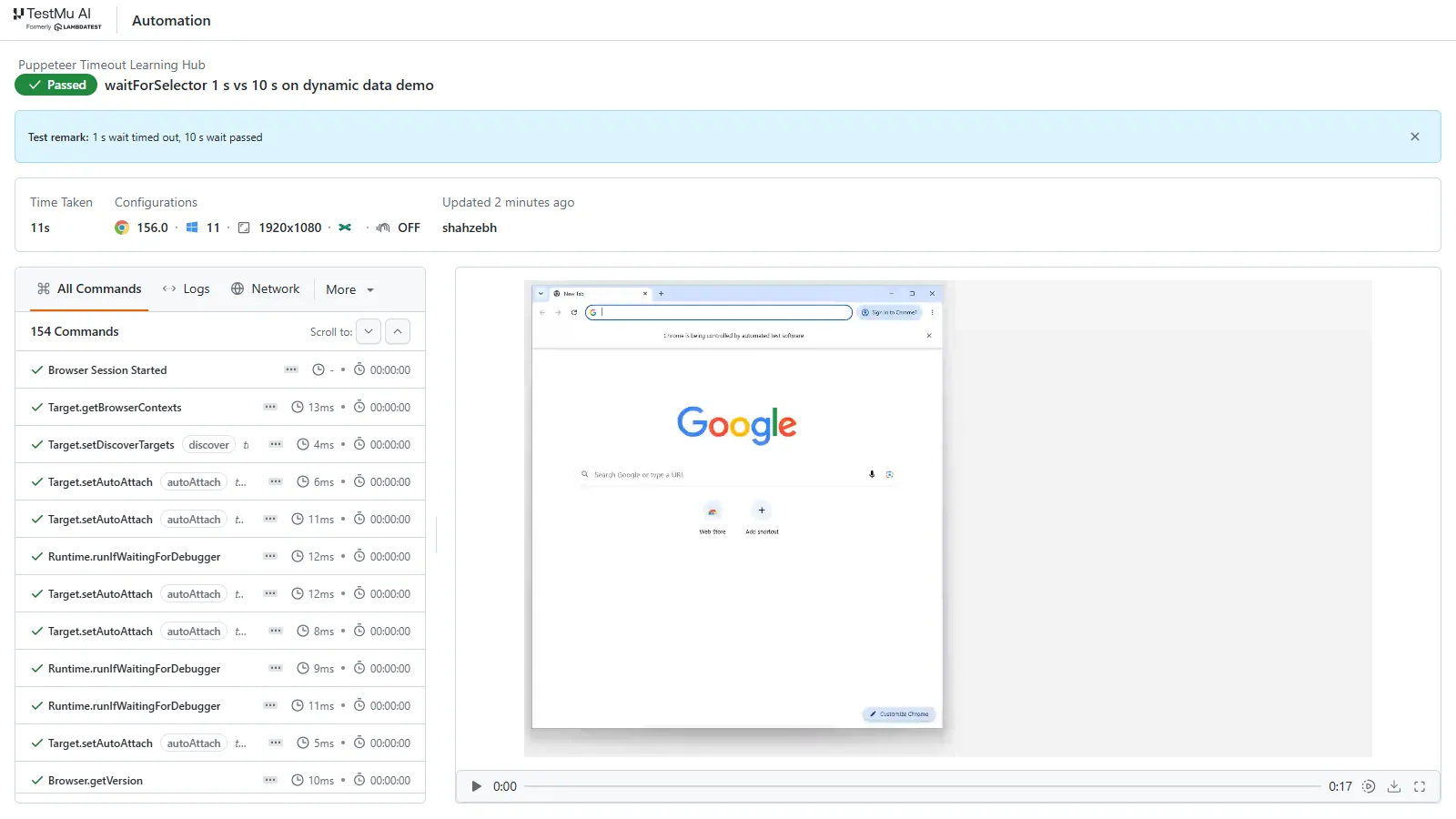
The dashboard shows the session from the dynamic data demo: the Passed status and remark set from the script, Chrome 156 on Windows 11, and each DevTools Protocol command with its duration beside the session video.
- idleTimeout - the capabilities for Puppeteer list it in seconds, with a default of 300 and a maximum of 1800; a larger value is set to 1800.
- What an idle close looks like - a session left on a blank page with no commands closed about 300 seconds later, and the next Puppeteer call failed at once with a plain Error, not a TimeoutError:
Error: Attempted to use detached Frame 'CE7D19D9F0B266425903484B36A240D4'.- Low idleTimeout values - with idleTimeout set to 30, a session still answered page.title() after 75 idle seconds, so close the browser in a finally block rather than relying on the grid to end it.
- connect() has no timeout of its own - ConnectOptions offers protocolTimeout for each call but nothing for the connection, and when every parallel slot is busy, connect() waits in the queue; a session started beside a running one connected after about 90 seconds, with no error.
- Remote calls take longer - each protocol call crosses the network, and connect() itself took 7 to 9 seconds to return a usable browser, so a 1-second wait that passes on a laptop can fail on a remote browser.
The timeout settings in this guide carry over to the grid unchanged; the Puppeteer testing page lists the supported browsers and setup options.
Conclusion
Start with the message, because it names the limit that ran out. Then set page.setDefaultTimeout() and page.setDefaultNavigationTimeout() in the helper that opens your pages, give the test runner a limit above both, and replace any timeout of 0 with a finite number that still fails with a readable error.
For the wider API, the Puppeteer browser automation guide covers scraping, PDFs and request interception, and Playwright timeouts works through the same limits in Playwright Test.
Testing from the terminal? Kane CLI by TestMu AI lets SDETs and developers plan, write, run and debug tests from the command line.
Author

Himanshu Sheth
Blogs: 144


Himanshu Sheth is the Director of Marketing (Technical Content) at TestMu AI, with over 8 years of hands-on experience in Selenium, Cypress, and other test automation frameworks. He has authored more than 130 technical blogs for TestMu AI, covering software testing, automation strategy, and CI/CD. At TestMu AI, he leads the technical content efforts across blogs, YouTube, and social media, while closely collaborating with contributors to enhance content quality and product feedback loops. He has done his graduation with a B.E. in Computer Engineering from Mumbai University. Before TestMu AI, Himanshu led engineering teams in embedded software domains at companies like Samsung Research, Motorola, and NXP Semiconductors. He is a core member of DZone and has been a speaker at several unconferences focused on technical writing and software quality.
Reviewer

Sri Harsha
Reviewer
Sri Harsha is Engineering Manager of the Open Source Program Office at TestMu AI, where he leads open-source engineering behind the Selenium and Appium automation grid and builds agentic AI systems for quality engineering. He is a member of the Selenium Technical Leadership Committee and a committer to WebdriverIO and Appium, and was recognized with the LambdaTest Delta Award 2023 for Best Contributor in open-source testing. He brings over 10 years of experience in software testing and automation, with earlier roles at EPAM Systems and ZenQ. Sri Harsha holds a B.Tech in Computer Science from Jawaharlal Nehru Technological University.
Puppeteer Timeout FAQs
Did you find this page helpful?
More Related Learning Hubs

TestMu AI forEnterprise
Get access to solutions built on Enterprise
grade security, privacy, & compliance
- Advanced access controls
- Advanced data retention rules
- Advanced Local Testing
- Premium Support options
- Early access to beta features
- Private Slack Channel
- Unlimited Manual Accessibility DevTools Tests