

Power Your Software Testing with AI Agents and Cloud
The Native AI-Agentic Cloud Platform to Supercharge Quality Engineering. Test Intelligently and Ship Faster.


- TestMu AI (Formerly LambdaTest)
- /
- Learning Hub
- /
- AI UI Testing Techniques & Tools for Intelligent Automation
AI UI Testing Techniques & Tools for Intelligent Automation
How AI UI testing boosts reliability and cuts maintenance: cloud-native intelligent testing, framework integration, and the limits of AI automation.
Last Updated on:
On This Page
- What Does AI Bring to Workflows?
- AI vs Traditional UI Testing
- Key Benefits of AI UI Testing
- AI + Traditional Frameworks
- How to Implement AI in UI Testing
- What Tools Are Available for AI UI Testing?
- What Are Some Advanced AI UI Testing Techniques?
- Limitations of AI in Testing
- What Are the Common Implementation Challenges?
- What About Security and Privacy Considerations?
- How Can You Measure Your AI Testing Success
- What Does the Future Hold for AI UI Testing?
AI UI testing uses artificial intelligence, such as computer vision, machine learning, and natural language processing, to author, run, and maintain UI tests that adapt to changes instead of breaking on them. It exists because traditional UI testing is fragile: tests break on minor UI changes, maintenance eats more time than writing new tests, and flaky tests erode confidence, all of which worsens as apps grow and release cycles accelerate.
AI-powered UI testing turns that brittle automation into something resilient: instead of fixed locators, it finds elements with machine learning, heals tests when the UI changes, and validates what users actually see. This guide covers the techniques, tools, and workflows that make UI tests more intelligent.
Overview
To make UI automation resilient and self-healing, use TestMu AI's KaneAI for natural-language test generation and SmartUI for automated visual regression testing across browsers. These tools replace fragile, hardcoded selectors with machine learning and computer vision to automatically adapt to interface changes.
Key Aspects of AI UI Testing
- Best for adapting to DOM changes: Self-Healing Automation - This technique dynamically adapts locators when UI elements change to prevent test failures.
- Best for layout validation: Computer Vision - This technology detects visual regressions, misalignments, and rendering bugs across browsers and devices.
- Best for non-coder test creation: Natural Language Processing - This capability enables teams to create executable test scripts using plain English instructions.
- Best for proactive maintenance: Predictive Analytics - This approach forecasts test failures and flags at-risk tests before a release breaks them.
Popular AI UI Testing Tools
- Best for natural-language test generation: KaneAI - This AI-native test agent by TestMu AI converts plain-English instructions into Selenium and Playwright scripts, executing them on a cloud grid.
- Best for automated visual regression: SmartUI - This platform performs pixel-perfect screenshot comparisons across 3,000+ browser and OS combinations, integrating with Selenium, Cypress, and Playwright.
- Best for fast test execution: HyperExecute - This AI-driven test orchestration platform integrates with SmartUI to accelerate test execution cycles.
- Best for open-source browser driving: Selenium - This foundational WebDriver framework integrates with AI layers to add self-healing locators and visual checks to existing test suites.
- Best for developer-friendly testing: Cypress - This open-source end-to-end framework features built-in retries and automatic waiting, supporting AI-assisted checks through its plugin ecosystem.
- Best for cross-browser automation: Playwright - This Microsoft framework provides built-in screenshot assertions and supports natural-language test creation via codegen and AI agents.
- Best for open-source self-healing: Healenium - This machine-learning library automatically detects broken Selenium locators and swaps in working alternatives to prevent test failures.
Benefits and Future of AI UI Testing
- Best for efficiency: Faster testing cycles - AI-powered automation accelerates execution and reduces manual scripting bottlenecks.
- Best for resource saving: Reduced maintenance effort - Self-healing locators absorb routine UI changes, allowing engineers to focus on expanding test coverage.
- Best for quality assurance: Higher accuracy and coverage - Combining functional assertions with visual checks catches rendering bugs that traditional tests miss.
- Best for risk reduction: Early defect detection - Predictive models surface fragile tests and bugs early, lowering the cost of late-stage fixes.
- Best for autonomous workflows: Future AI Agents - Autonomous agents are expected to perform exploratory testing and adaptive workflows with minimal human intervention.
What Does AI Bring to UI Testing Workflows?
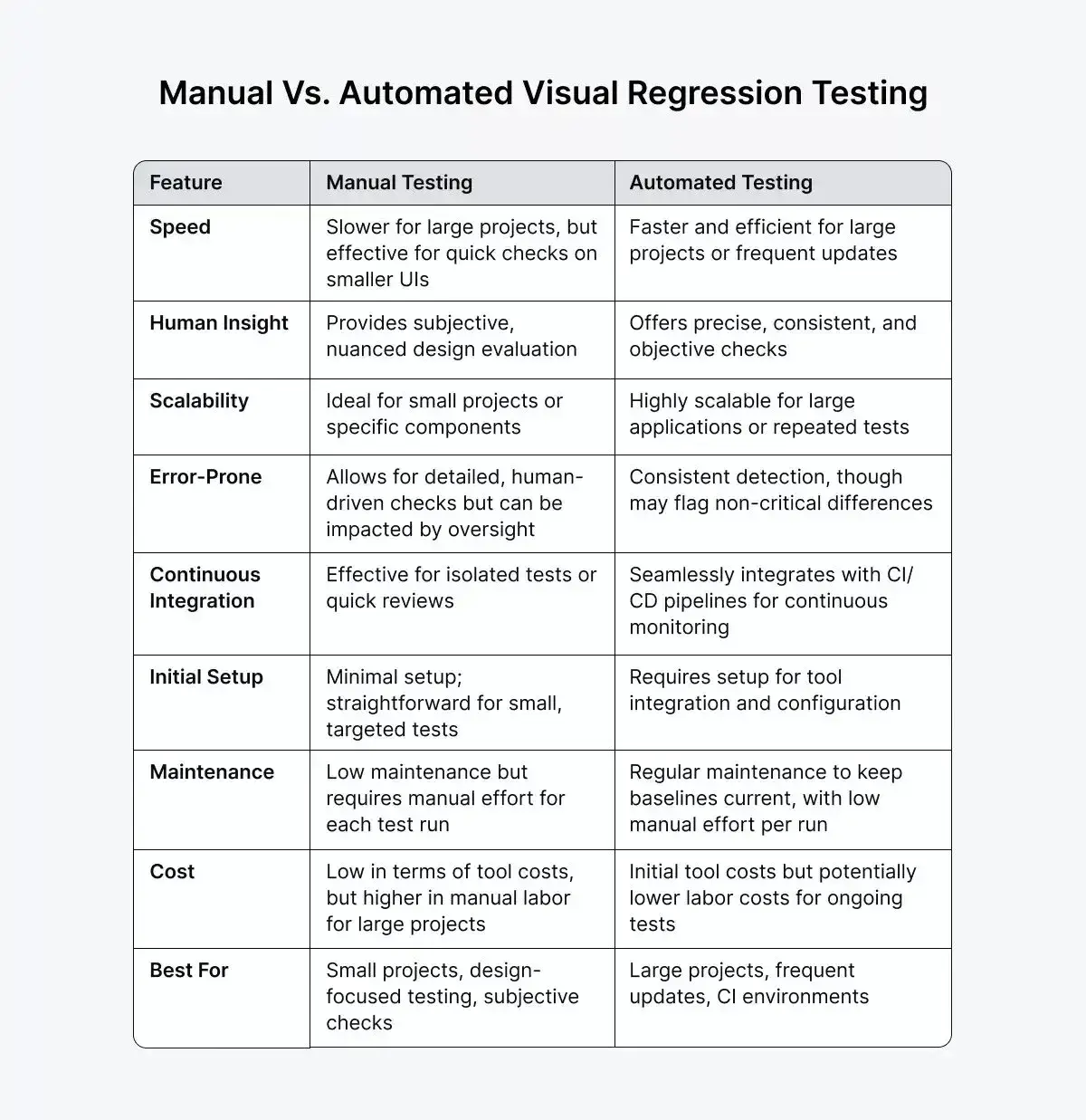
AI adds several new capabilities to traditional UI testing (read traditional vs AI testing) and validation workflows. For instance, machine learning algorithms can analyze application behavior patterns, predict potential fail points, and automatically heal tests when the interface is updated.
Then there's computer vision. These systems examine screenshots pixel-by-pixel to catch visual regressions that traditional selectors might miss. Add natural language processing, and you can create tests through conversational instructions instead of complex scripting.
These capabilities mean you can create an AI prompt for the test script once and not touch it again, even when your app updates.
But the takeaway is, you always need human oversight. While AI is powerful, you need to balance those capabilities with good judgment to keep testing quality high.
How Does AI UI Testing Differ From Traditional UI Testing?
Traditional UI testing pins each step to a fixed locator and a static baseline, so any redesign forces a manual rewrite. AI UI testing replaces that rigidity with element recognition, visual understanding, and self-healing, so the same test survives a UI change instead of failing on it. The table below maps the practical differences a QA team feels day to day.
| Dimension | Traditional UI Testing | AI UI Testing |
|---|---|---|
| Element location | Hardcoded selectors (ID, XPath, CSS) that break when the DOM changes. | Multi-attribute and visual recognition that adapts when locators shift. |
| Maintenance | Manual rewrites after most UI updates, the largest time sink in the suite. | Self-healing updates locators automatically, reducing reactive fixes. |
| Visual checks | Functional assertions only; layout and rendering bugs slip through. | Computer vision flags misalignment, color, and font regressions. |
| Test authoring | Requires scripting skills in a specific framework and language. | Natural-language prompts let non-coders create executable tests. |
| Failure handling | Tests fail and wait for a human to triage and repair them. | Predictive models flag at-risk tests before a release breaks them. |
Key Benefits of AI UI Testing
- Lower maintenance: Self-healing locators absorb routine UI changes, so engineers spend less time repairing tests and more time expanding coverage.
- Broader visual coverage: Pixel and layout comparison catches rendering bugs that functional assertions never see, across browsers and screen sizes.
- Faster authoring: Plain-language test creation brings manual testers and product managers into automation without a scripting bottleneck.
- Earlier defect detection: Predictive maintenance surfaces fragile tests before a build ships, shrinking the cost of late-stage fixes.
The point is not to discard your existing suite. AI UI testing layers onto it, healing the brittle parts first and adding visual and predictive coverage where manual scripting cannot keep pace.
How AI Integrates with Traditional Testing Frameworks
AI does not throw out Selenium, Playwright, or Cypress. It layers on top of them. Your existing framework still drives the browser and runs the assertions; AI adds resilience and intelligence around it.
- Self-healing locators: when a selector breaks after a UI change, AI reformulates it from other attributes so the test keeps running instead of failing.
- Visual validation: AI-driven visual checks catch rendering and layout regressions that DOM-based assertions miss, sitting alongside your functional tests.
- Natural-language authoring: AI agents can generate framework code (Selenium or Playwright) from plain-English steps, then keep it updated as the app evolves.
The practical difference shows up in maintenance:
| Aspect | Traditional framework alone | Framework + AI |
|---|---|---|
| Element location | Fixed locators that break when the DOM changes. | Self-healing locators that adapt to change. |
| UI redesign | Manual rewrite of every affected test. | Tests auto-heal and flag the change for review. |
| Visual bugs | Missed unless explicitly asserted in code. | Caught automatically by computer-vision diffing. |
| Maintenance effort | High, and grows with the size of the suite. | Lower, as AI absorbs most of the churn. |
Because the AI sits on top, you keep your framework, language, and CI pipeline. TestMu AI's KaneAI follows exactly this model, generating and healing Selenium and Playwright tests that then execute on the cloud grid.

Note: Author and self-heal Selenium and Playwright UI tests with KaneAI on TestMu AI. Start testing free.
How Do You Implement AI in UI Testing?
To actually implement AI in your UI testing, you need systematic planning and gradual adoption. So here’s a simple step-by-step guide to the implementation.
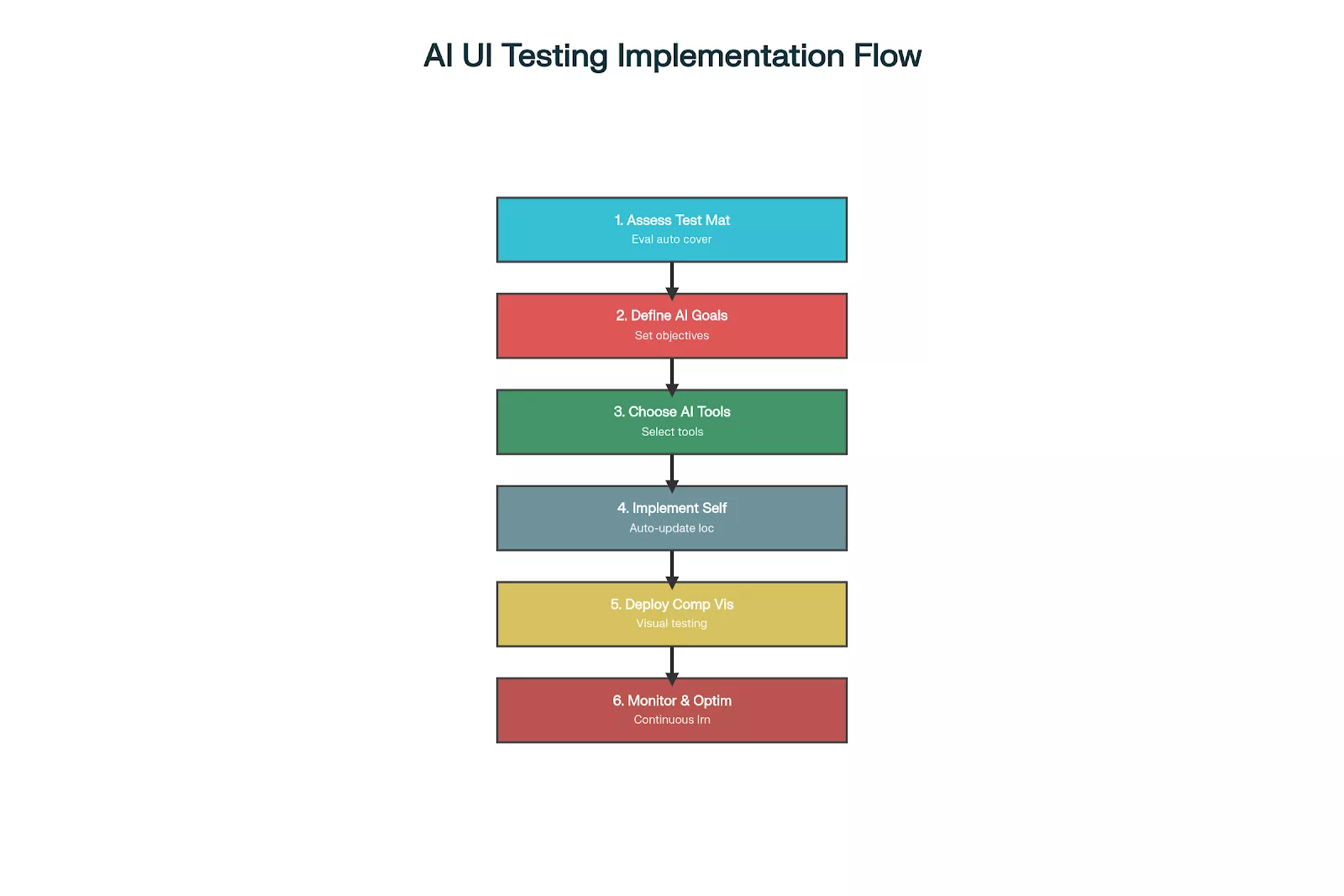
Step 1: Assess Current Testing Maturity
Begin by taking a close look at where your testing automation stands today.
You'll want to get a sense of how frequently your tests actually run, how much time you're spending keeping them up to date, and what your failure rates look like. Pay particular attention to how much effort goes into fixing tests that break after you make changes to your application. This is often where teams lose the most time.
As you dig into this, you'll start to notice patterns around which types of tests demand the most hands-on attention. This understanding becomes your roadmap, helping you figure out which AI tools will actually solve your problems and where you should focus your implementation efforts first.
Step 2: Define Clear AI Testing Goals
Once you understand your baseline, it's time to set some concrete goals for what you want AI to accomplish. Think in terms of specific, measurable outcomes.
For example, you may want to:
- Cut test maintenance time by 70%
- Reduce false positives by 50%
- Increase test coverage to 95%+ consistently
- Include 1000 more devices in your tests
Having these clear targets serves two important purposes: it gives you a way to objectively assess whether the AI tools are delivering real value. And it provides the concrete evidence you'll need when explaining the investment to stakeholders who control the budget.
Step 3: Choose the Right AI Testing Tools
When it comes to selecting tools, focus on what your team actually needs rather than getting swept up in marketing promises. Think through the practical realities:
- How complicated will it be to integrate this tool with your existing setup?
- Does your team have the technical skills to work with it effectively?
- Will it play nicely with your application's technology stack?
The best way to answer these questions is to run pilot programs with a few promising options. This hands-on testing lets you see whether a tool actually delivers on its promises in your specific environment before you commit significant resources to rolling it out across your entire testing operation. If authoring capacity is your real bottleneck rather than execution speed, put a QA agent in the pilot too, and judge it on how many of the tests it writes from natural language steps still run after your next redesign.
Step 4: Start with Self-Healing Automation
Self-healing automation is a great place to start AI app testing because it builds directly on the tests you already have. The idea is to add intelligence that helps your tests adapt when the application changes, rather than breaking immediately.
Here's how to make it work:
- Configure your systems to capture multiple attributes for each UI element when you're creating tests. This gives the AI multiple ways to recognize an element if one method fails.
- Then turn on automatic locator updating so that when the primary way of finding an element stops working, the system can try alternative approaches.
- As this runs, keep an eye on how often the healing actually succeeds and use that information to fine-tune the algorithms based on the specific patterns in your application.
Step 5: Deploy Computer Vision Testing
Once you have self-healing in place, the next step is to layer in visual validation alongside your functional tests.
Start by capturing baseline screenshots when you run your tests for the first time, these become your reference points. Then you'll need to set tolerance levels that define what counts as an acceptable visual variation.
Think of this as teaching the system the difference between a meaningful change (like a button that's moved to a different location) and trivial rendering differences (like a font that's one pixel off due to browser quirks).
After you've configured these settings, integrate the visual testing into your continuous integration pipelines so it happens automatically with every build.
Step 6: Monitor and Optimize Performance
The final step is to establish ongoing monitoring so you can see whether your AI testing investment is actually paying off. Keep an eye on key metrics like how often the self-healing successfully adapts to changes, how accurate your visual comparisons are, and whether your overall test execution time is improving.
But don't just look at the numbers, talk to your team about how well the tools are working in practice and whether they're actually making the workflow easier. Use all this information to continuously refine your AI models, adjusting them as your application evolves and new testing patterns emerge.
In this TestMu Conf 2026 session, The Full Agentic QA Loop for Web Applications, Siddhant Sinha runs the loop end to end with kane-cli, an agentic test tool, authoring coverage, capturing what actually happened, assuring it against intent, and keeping the suite from rotting as the product changes.

What Tools Are Available for AI UI Testing?
AI UI testing spans AI-native platforms, the open-source frameworks tests actually run on, and specialized open-source tools you can bolt onto an existing suite. Here are the main options.
1. SmartUI: AI-Native Visual Regression
SmartUI provides pixel-perfect visual regression testing integrated with the HyperExecute test orchestration platform.
The system performs automated screenshot comparisons across multiple browsers and devices simultaneously. Smart UI captures baseline images during initial test execution, then compares subsequent runs against these references. The platform identifies visual discrepancies while ignoring minor browser-specific rendering differences.
Smart UI integrates seamlessly with popular frameworks, including Selenium, Cypress, and Playwright. Teams can configure tolerance levels for visual comparisons, allowing flexibility for acceptable variations while flagging significant changes. The system supports cross-browser testing across 3,000+ browser and OS combinations, ensuring consistent visual presentation across different environments.
2. Selenium: The Framework AI Builds On
Selenium is the open-source WebDriver framework most AI UI testing tools plug into rather than replace. It drives the actual browser interactions, and self-healing locators and visual-AI checks layer on top of an existing Selenium suite without a rewrite. Its broad language and browser coverage make it the common execution engine underneath much AI UI tooling.
3. Cypress: Developer-Friendly End-to-End Testing
Cypress is an open-source end-to-end framework with built-in retries, time-travel debugging, and automatic waiting that reduce flaky UI tests. Visual and AI-assisted checks plug in through its plugin ecosystem, making it a common base for intelligent UI testing on modern web apps.
4. Playwright: Cross-Browser Automation with Built-In Visuals
Playwright is an open-source framework from Microsoft with auto-waiting that cuts timing flakiness and built-in screenshot assertions for visual comparison out of the box. Its AI ecosystem, including codegen and MCP-based agents, adds natural-language test creation across Chromium, Firefox, and WebKit.
5. Healenium: Open-Source AI Self-Healing
Healenium is an open-source self-healing library for Selenium-based UI tests. It uses machine learning to detect when an element locator has broken after a UI change and automatically swaps in a working alternative, so tests keep passing instead of failing on brittle selectors. It is the open-source take on the self-healing built into commercial AI platforms.
What Are Some Advanced AI UI Testing Techniques?
Beyond basic automation, AI enables sophisticated testing approaches that address complex validation scenarios.
1. Adaptive Element Recognition
Computer vision systems identify UI elements through visual characteristics rather than code-based selectors. Instead of relying on brittle element IDs or CSS classes, these systems analyze what elements actually look like: their shapes, colors, text content, and where they sit relative to other elements.
This approach maintains accurate identification even when the underlying DOM structure changes, which makes visual recognition particularly valuable for testing legacy applications, virtualized environments like Citrix, or applications where identifiers change frequently.
2. Predictive Test Maintenance
Machine learning algorithms analyze test execution patterns, code changes, and historical failure data to predict which tests require updates before they actually break. These predictive models can identify tests most likely to fail after application changes, which allows teams to prioritize maintenance efforts where they'll have the biggest impact.
Instead of waiting for tests to break and then scrambling to fix them, these systems suggest specific test modifications ahead of time, cutting down on reactive debugging work.
3. Intelligent Test Data Generation
AI systems generate realistic test data based on production patterns and application requirements. Machine learning models analyze existing data structures, user behavior patterns, and business logic to create representative test datasets that actually make sense for your application.
The generated data maintains referential integrity, meaning relationships between data points stay valid, while providing comprehensive coverage of edge cases and boundary conditions that you might not think to test manually.
4. Multi-Modal Testing Integration
Advanced platforms can combine functional testing, visual validation, performance monitoring, and accessibility checking all in a single test execution. AI orchestrates these different testing types and correlates the results to give you a comprehensive quality assessment.
Instead of running separate tests for each concern, you get unified reports showing functional failures alongside performance issues discovered during the same test run, making it much easier to understand the full picture of your application's health.
The Downsides and Limitations of AI in Test Automation
AI makes testing more resilient, but it is not a replacement for judgment. Be clear-eyed about where it falls short:
- The black-box problem: many AI models cannot explain why they flagged or healed something. Without explainable AI, a false pass or a wrong heal is hard to audit or trust.
- It cannot judge subjective business logic: AI can confirm a button renders and clicks, but it cannot tell whether the resulting behavior matches what the business actually intended. That call stays human.
- Team complacency and over-reliance: when self-healing quietly patches tests, teams stop watching. A test that heals onto the wrong element can pass while the feature is broken, hiding a real regression.
- Setup and cost: training or tuning models, and running them at scale, adds compute cost and complexity that a simple assertion never had.
The answer is not to avoid AI but to keep a human in the loop: review what AI heals, assert on business outcomes explicitly, and treat self-healing as a maintenance aid rather than a correctness guarantee.
What Are the Common Implementation Challenges?
When you're implementing AI UI testing, you'll run into some practical challenges. Here's how to navigate them.
Technical Challenges
False Positive Management
AI systems sometimes flag legitimate application changes as test failures. For instance, visual comparison algorithms might detect acceptable design updates as regressions. Self-healing mechanisms might incorrectly update test logic based on temporary application states.
You'll need to configure appropriate tolerance levels and validation mechanisms to minimize false positives while keeping your testing effective.
Model Training Requirements
Machine learning systems need sufficient training data to work accurately, and this can take time to build up. Visual recognition models, for example, need diverse screenshot samples across different browsers, devices, and application states.
Self-healing algorithms need to observe multiple UI change patterns before they can develop reliable adaptation strategies. The key is to plan for extended training periods and make sure you're providing comprehensive example data so the AI can reach optimal performance.
Organizational Challenges
Integration Complexity
Your existing testing infrastructure might need significant modifications to accommodate AI-powered tools. Legacy systems might lack the APIs or data formats required for AI integration, and team training requirements can delay implementation timelines.
The best approach is to budget adequate time and resources for integration planning and team skill development so you're not caught off guard by these challenges.
Performance Considerations
AI processing adds computational overhead to test execution. Image analysis for visual testing requires significant processing power and memory resources, and complex machine learning operations might slow overall test execution despite the automation benefits.
You'll need to balance AI capabilities with performance requirements, sometimes it makes sense to implement selective AI usage rather than applying it everywhere, so you can get optimal results without sacrificing speed.
What About Security and Privacy Considerations?
AI testing systems often need access to sensitive application data and user interfaces. Computer vision tools capture screenshots that might contain confidential information. Machine learning models process application behavior data that could reveal business logic or security vulnerabilities.
Make sure you implement appropriate data protection measures and ensure your AI testing complies with organizational security policies. Cloud-based AI testing platforms raise additional privacy concerns since application data might be processed on external systems.
When you're selecting AI testing tools, take a close look at data residency requirements, encryption standards, and access controls. Some teams prefer on-premises AI implementations despite potential scalability limitations, simply because they want to keep their data in-house and maintain tighter control over security.
How Can You Measure Your AI Testing Success
To measure AI testing effectiveness, you need comprehensive metrics beyond traditional test execution counts. Key performance indicators include test maintenance time reduction, false positive rates, test coverage expansion, and overall testing cycle acceleration.
For self-healing automation, you'll want to keep an eye on how often the system successfully adapts to application changes without needing manual intervention. When it comes to visual testing, look at how accurate the comparisons are and what percentage of the flagged issues are actually meaningful regressions rather than false alarms.
The real proof of AI implementation value shows up in your overall testing velocity is as you should see faster feedback cycles and less time spent on manual maintenance work.
What Does the Future Hold for AI UI Testing?
This is still early. Expect natural language to make test creation more conversational, computer vision to move from pixel-level checks to semantic understanding of UI elements, and autonomous agents to run exploratory testing that generates new scenarios, finds untested areas, and adapts strategy from defect patterns.
Visual correctness is where AI UI testing delivers first. Traditional pixel-based testing flags anti-aliasing, rendering noise, and dynamic content as failures, so teams waste hours on false positives, and plain diffs show what changed without explaining why.
That is exactly what SmartUI by TestMu AI, an AI-native visual regression platform, solves. It detects and eliminates visual bugs to keep UIs pixel-perfect across browsers, devices, and platforms, with:
- AI-Native Visual Engine: cuts false positives through noise filtering, precise shift detection, anti-aliasing handling, and smart differentiation between critical and non-critical changes.
- Smart Ignore Technology: automatically ignores irrelevant elements like dynamic content, ads, timestamps, loading states, and non-deterministic rendering.
- Automated Visual Insights: AI-powered root cause identification, impact assessment, and change categorization from critical to low.
Author

Ninad Pathak
Blogs: 5


Ninad Pathak works as an Enterprise Marketing Manager at TestMu AI, where he plans and creates content that makes sense of complex topics in automation testing and AI for enterprise teams. With over six years in the tech industry, he focuses on breaking down complex subjects like agentic testing and Agent Testing to help developers and organizations reach their testing goals faster. His experience as a developer turned marketer helps him bring a unique perspective while combining storytelling with practicality.
Reviewer

Shahzeb Hoda
Reviewer
Shahzeb Hoda is the Associate Director of Marketing and a Community Contributor at TestMu AI, leading strategic initiatives in developer marketing, content, and community growth. With 10+ years of experience in quality engineering, software testing, automation testing, and e-learning, he has authored and reviewed 70+ technical articles on software testing and automation. Shahzeb holds an M.Tech in Computer Science from BIT, Mesra, and is certified in Selenium, Cypress, Playwright, Appium, and KaneAI. He brings deep expertise in CI/CD pipeline automation, cross-browser testing, AI-driven testing practices, and framework documentation. On LinkedIn, he is followed by 3,700+ engineers, developers, DevOps professionals, tech leaders, and enthusiasts.


AI UI Testing FAQs
Did you find this page helpful?
More Related Learning Hubs
TestMu AI forEnterprise
Get access to solutions built on Enterprise
grade security, privacy, & compliance
- Advanced access controls
- Advanced data retention rules
- Advanced Local Testing
- Premium Support options
- Early access to beta features
- Private Slack Channel
- Unlimited Manual Accessibility DevTools Tests