

Next-Gen App & Browser Testing Cloud
Trusted by 2 Mn+ QAs & Devs to accelerate their release cycles


The Challenges of Visual Testing [With Solutions] [2026]
Learn how to overcome visual testing challenges along with solutions. Ensure websites and mobile apps are consistent across browsers, devices, and OS combinations.

Saniya Gazala
February 11, 2026
In the fast-changing world of software development, it is difficult to maintain the software’s quality, look, and feel. Major issues arise when developers try to add new features by modifying the existing code, ensuring the new feature works as expected without breaking the application’s visual appearance.
Making sure the software application UI is user-friendly and easy to use by users is essential. It means buttons and navigation must be in the right place on all different screen sizes, devices, and browsers. Maintaining consistency takes time and effort. To overcome these challenges, QA teams use a testing method called visual testing to make the application UI look perfect and ensure it’s user-friendly across various devices and browsers.
Visual testing helps identify any unintended changes in visual presentation or functionality. This type of testing involves comparing the initial version of the application with the recent version to identify any visual inconsistencies that may have occurred.
In this blog, we will look into the concept of visual testing, why it is essential, some visual testing challenges with mobile and web applications, and their solutions.
What is Visual Testing?
Visual testing, also known as visual UI testing, is a testing method to ensure that software applications look appealing and user-friendly and function as expected. It checks the appearance of the software application and finds any visible problems. Visual testing compares how the software should look with how it looks.
In visual testing, everything that appears to the user is examined to ensure that the shapes, sizes, and positions of each element are correct on different browsers, devices, and operating systems. It also checks different functionalities of the application, like the labels, buttons, navigation, and other features.
This testing type helps software developers ensure users have a consistent experience across different devices, browsers, and operating systems. By comparing expected and actual results, developers can quickly find and fix issues in the software’s visual appearance. It also ensures the software meets usability standards and works well on different devices.
Why is Visual Testing Essential?
Achieving a smooth integration of functionality and an appealing user interface requires constant communication and collaboration between developers and testers throughout the Software Development Life Cycle (SDLC). This approach ensures that the software not only meets the functional requirements but also provides a user experience that is user-friendly and easy to use.
Visual testing is essential for many reasons, especially when delivering software with top-notch quality and a better user interface. Let us see some key reasons why visual testing is considered necessary.
- UX AssuranceThis ensures that the UI meets the design specifications and provides a positive user experience. These design specifications consist of the layout of the application, its colors, fonts, and images to be displayed correctly.
- Cross-Browser and Cross-Device CompatibilityThe developed application may work well on one set of OS, device, and browser, but it may fail to render the same UI effect on various browsers (e.g., Chrome, Firefox, Safari) and devices (e.g., desktops, tablets). This approach is to verify that your application looks and functions the same on various platforms.
- Localization and InternationalizationDeveloping software for a global audience helps ensure the UI element’s text is correctly displayed and the application is localized or internationalized to support different languages, regions, and cultural preferences.
- Regression TestingAs the software application undergoes frequent updates and new releases, changes in the code base can unintentionally raise issues and break the application’s visual appearance. Visual regression testing helps identify bugs and ensure these recent changes or bugs do not introduce visible defects.
- Speeding Up Testing CyclesThe traditional testing approach involves manual testing, which is time-consuming. Automated visual testing helps test faster and provides a more efficient way of verifying the visual aspects.
- AccessibilityWhen performing visual testing, one must verify that the application fulfills the accessibility standards. It helps ensure that every individual with disabilities uses the application and that those visual elements are presented in a way that supports accessibility features.
To summarize, it is essential to maintain the quality and consistency of software applications for customer satisfaction. It helps identify and address visual issues early in the development stage by reducing the risk of defects identified by the end-users after the release and improving the overall reliability of the software.

Note: Identify the difference between old and recent visuals in your application and quickly fix it. Try TestMu AI Today!
Now that we understand what and why visual testing is essential, let us look into the challenges of visual testing concerning mobile and web applications.
Visual Testing Challenges
In this section, we will discover the visual testing challenges specific to mobile applications and web applications, along with the solutions.
Visual Testing Challenges with Mobile Applications [With Solutions]
The number of mobile users is increasing daily; every individual uses mobiles, and having a consistent look and feel of any application viewed by users on any device is challenging. This section will discuss visual testing challenges with mobile applications and their solutions. You can learn more about it through this blog on visual testing for mobile apps.
Challenge 1: Device Fragmentation
Ensuring the application UI is rendered across various mobile devices (iOS and Android) with multiple screen sizes and resolutions.
Real-time Scenario: Consider testing an e-commerce app on an iPhone 12 and a Samsung Galaxy S21 simultaneously to ensure the product’s images and details are consistently displayed and well-organized on different screen sizes and resolutions.
Solution: For simultaneously testing an e-commerce app on an iPhone 12 and a Samsung Galaxy S21, it is essential to utilize automated visual testing tools. These efficient tools can replicate numerous devices, precisely mimicking their unique screen sizes and resolutions. By using this approach, we can ensure thorough testing and code coverage, verifying that all product images and information are uniformly displayed and well-organized on various devices.
Through this, we enhance the application’s reliability and ultimately improve the user experience. Many other platforms allow you to perform visual testing to verify the consistency of your application. One such platform is TestMu AI. It is an AI-native test orchestration and execution platform that lets you run manual and automated visual tests at scale with over 3000+ real devices, browsers, and OS combinations.
For automated visual testing, TestMu AI offers Smart UI to run visual tests across desktop and mobile environments, providing several advanced features, including a smart crop tool specifically for mobile app testing, the capability to compare PDF files, a command-line interface for conducting visual regression testing, and the option to perform visual tests on a real device cloud. It also includes DOM comparisons, smart baseline branching for efficient version control, and test analytics that provide actionable insights, among other functionalities.

This platform also facilitates mobile app testing by offering access to its mobile testing lab, which allows you to address device fragmentation comprehensively by providing real device testing, parallel testing, and smooth integration with CI/CD, ensuring consistent user experiences.
Challenge 2: Search Functionality Design Inconsistency Between iOS and Android
Creating smooth and visually appealing search functionality is a unique challenge when developing mobile applications for both iOS and Android platforms. The design guidelines and expectations of users for search elements differ between these operating systems, which leads to potential inconsistencies in user experience.
Real-time Scenario: Consider an e-commerce app with a search bar at the top of the screen. iOS typically features a search bar with rounded corners, while Android has a more rectangular design. The challenge is to ensure that the search bar aligns with the design expectations of each platform, providing a smooth and familiar experience for users.
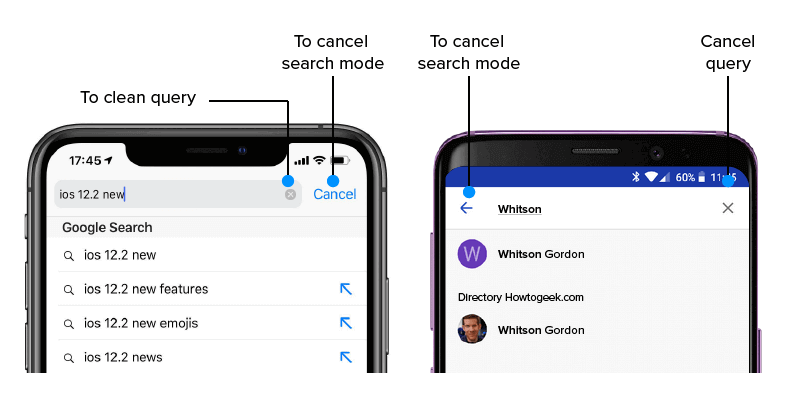
Solution: Develop visual tests focusing on the search bar’s design elements, considering the shape, size, and placement differences that iOS and Android design guidelines recited. Use an automated visual testing tool to capture screenshots of the search functionality on both iOS and Android devices, comparing them against the platform-specific design standards. This approach guarantees that users on each platform encounter a visually consistent and platform-specific search experience.
Challenge 3: Touch Gestures and Interactions
Ensuring smooth visual responses to touch interactions.
Real-time Scenario: Testing a gaming app to ensure that the swipe gestures for in-game actions are visually responsive and work smoothly across various devices, maintaining a consistent gaming experience.
Solution: To handle touch simulation, you can leverage the automation capabilities of various automated visual testing tools available. You can follow a manual testing approach to ensure consistent touch interactions on various devices.
Below, we will look at implementing automated testing for touch simulation and manual testing for touch interaction on some common devices.
Automated Testing with Touch Simulation
The implementation of automated testing for touch simulation utilizes specialized tools to replicate the exact behavior on devices. This technique guarantees both efficiency and precision in verifying the mobile functionality, responsiveness, and overall user experience by automating touch-based gestures such as taps, swipes, and gestures.
- Choose an Automated Testing ToolFirst and foremost, select an automation testing tool that allows you to perform touch simulation. Some examples are Appium, Selenium with TouchActions, and platform-specific tools like XCUITest (iOS) or Espresso (Android).
If you want to learn how to perform mobile app testing using Appium, follow the video tutorial below and enhance your testing experience. You can also perform testing on other automation testing tools like XCUITest, Espresso, and more.
- Develop Automated Test ScriptsCreate automated test scripts that simulate various touch interactions, such as tapping, swiping, pinching, and scrolling. Make these scripts adaptable to handle different screen sizes and resolutions.
- Include Visual Validation ChecksIntegrate visual validation checks into your automated scripts for added assurance. This will capture any changes in the visual presentation of the application. Following these steps, you can effectively implement touch simulation in automation testing and ensure visually cohesive touch interactions for a seamless user experience.
- Parameterize for Device VariabilityEnsure your test scripts can handle device specifications, screen sizes, and resolution variations. This guarantees that your automated tests will function effectively on various devices.
Manual Testing on Representative Devices
Manual testing on representative devices is an interactive approach where testers use various devices to assess a software application’s functionality and user experience. This method helps identify any potential issues that may arise in real-world usage scenarios. Some scenarios are mentioned below.
- Key Representative DevicesChoose representative devices with varying screen sizes, resolutions, and operating systems to ensure comprehensive coverage. Be sure to include devices that are popular among your target audience.
- Create Manual Test ScenariosDevelop a set of manual test scenarios that heavily focus on touch interactions. Consider incorporating diverse gestures and interactions that users will likely engage in during real-life scenarios.
- Perform Visual Consistency ChecksConduct manual tests on all relevant devices and carefully examine touch interactions to ensure visual consistency. Confirm the uniformity of UI elements, responsiveness, and overall visual display.
- DocumentationOnce testing is complete, carefully record any observed inconsistencies or problems in the visual presentation. Include specific details about the device, the issue detected, and steps to replicate it.
One of the biggest challenges during manual testing is ensuring consistent and responsive visuals across different devices, particularly touch interactions. Identifying and recording any inconsistencies in UI elements and the overall visual presentation is critical.
Actively engaging in touch interactions during live sessions to validate visual consistency and responsiveness by performing manual testing can be challenging. Using real-time testing offered by the TestMu AI can be beneficial. This approach helps improve the efficiency of manual testing, ensuring visual integrity is maintained across diverse devices.
Watch the video tutorial for a detailed guide on performing real-time testing using the TestMu AI platform.
Subscribe to the TestMu AI YouTube Channel and get the latest tutorials on Selenium visual regression testing, Playwright visual regression testing, Appium visual testing, and more.
Challenge 4: Orientation Changes
Ensuring a seamless visual experience when the device orientation shifts.
Real-time Scenario: Social media apps effortlessly accommodate portrait and landscape orientations, flawlessly maintaining the legibility and proper alignment of all images and text.
Solution: Conduct thorough visual inspections to assess UI changes when adjusting orientation, utilizing emulators and physical devices to ensure visual consistency in multiple orientations.
Now that we have seen the real-time challenges faced during visual testing for mobile, let us discover some challenges faced during visual testing for web applications in the following section.
Visual Testing Challenges with Web Apps/Applications [With Solutions]
Testing web applications for visual elements presents a series of hurdles, including compatibility with different browsers, fine-tuning for responsive design, and handling dynamic content display. Achieving perfect user interfaces is the goal for developers; thus, it is crucial to overcome these challenges to ensure a flawless and balanced visual experience on various platforms. Some of the visual testing challenges on web applications are mentioned below.
Challenge 1: Responsive Design Across Viewports
Ensuring a smooth visual transition across diverse screen sizes.
Real-time Scenario: Ensuring that the online shopping site UI is perfect on desktop and mobile devices involves inspecting product grids to adjust well for an excellent and easy-to-use layout that customers need.
Solution: Adding responsive design principles and visual testing tools helps UI elements adapt smoothly to different screen sizes.
Challenge 2: Dynamic Content Loading
Content loaded dynamically may cause visual inconsistency.
Real-time Scenario: The team ensures a smooth and engaging reading experience when users explore the news website. Thorough tests are conducted on the dynamic loading of articles and images. The main objective is to fix any visual inconsistency or glitches, aiming for a smooth and visually appealing browsing experience in real time.
Solution: Integrating visual testing into the continuous integration pipelines and creating test scenarios that cover dynamic content loading. This approach helps ensure the early detection of visible defects during the development process.
Challenge 3: Browser Extensions and Plugins
Possible issues arise from third-party browser extensions that may affect visual elements.
Real-time Scenario: In the dynamic environment of an e-learning platform, it is critical to maintain the consistency and functionality of visual components. It includes scenarios where users have browser extensions installed, like ad blockers or screen readers.
Solution: To address this concern, the team systematically evaluates the effects of activating and deactivating commonly used browser extensions on visual displays. Following this assessment, clear guidelines are provided to users, assisting them in navigating any conflicts that may arise. The goal is to ensure users’ seamless and functional visual experience on the e-learning platform.
Challenge 4: Cross-Browser Compatibility
Different browsers can inconsistently interpret visual elements.
Real-time Scenario: In a web-based financial application’s testing phase, ensure that interactive charts and graphs are visually consistent and accurately displayed on all significant internet browsers. It includes thorough assessment using Chrome, Firefox, and Safari to guarantee a fluid and precise user experience.
Solution: Enhance your testing process by leveraging powerful tools like TestMu AI to automate visual tests across various browsers. It enables you to identify and address rendering inconsistencies by implementing CSS adjustments adapted to specific browsers.
Now that we are aware of the challenges faced along with their solutions, let us look into some best practices that we need to remember when performing visual testing.
Best Practices for Visual Testing
When it comes to testing, the area that demands special attention is visual testing. Unlike functional or unit testing, this type of testing requires a critical eye for verifying the appearance and arrangement of graphical user interfaces. To tackle the unique obstacles of visual testing, here are a few essential best practices to remember.
- Define Clear RequirementsTo create a smooth user experience, setting clear visual guidelines for your application is crucial. It means outlining the layout and design. These details guide development and design teams, helping everyone share the same vision and communicate effectively throughout the project.
- Use Automated Visual Testing ToolsUse automated visual testing tools to capture and compare screenshots effortlessly. Incorporating reliable tools like Applitools, Percy, or BackstopJS is crucial in pinpointing and emphasizing any inconsistency in your application’s visual elements. These handy tools simplify the visual testing procedure, making it easier to spot any potential concerns and ensuring the consistent visual integrity of your software.
- Baseline ImagesCreate baseline images that capture the different states of your application. These images provide a reliable standard for comparison, allowing you to easily detect any visual variations or inconsistencies during future tests.
- Handle Dynamic ContentWhen performing visual tests, it’s important to remember the ever-changing nature of dynamic content, such as ads. To avoid false positives in your evaluations, it’s crucial to implement strategies that effectively handle this type of content. This will help guarantee the accuracy and reliability of your visual tests as they adapt to the constantly evolving elements within the application.
- Parameterize TestsImprove your testing process by implementing parameters to cover a wide range of screen sizes, browsers, and devices. This thorough approach ensures extensive coverage that enables you to evaluate the effectiveness of your application’s visual components in various environments. By conducting tests across multiple scenarios, you can pinpoint and resolve any issues related to responsiveness, ultimately enhancing the overall user experience on diverse platforms.
- Continuous IntegrationIntegrate visual testing smoothly into your continuous integration (CI) pipeline by setting up automated triggers with each code commit. This proactive approach ensures that visual tests are executed automatically, allowing for the early detection of any regressions. By incorporating visual testing into the CI workflow, you establish a reliable mechanism for consistently assessing the visual aspects of your application, enhancing the efficiency of the development and testing process.
- Version Control for BaselinesIncorporating version control into your project can significantly enhance the management of your baseline images and updates to visual assets. You can systematically monitor and document changes to your baseline images over time by leveraging robust version control systems. It provides a clear and structured history of visual alterations and facilitates team collaboration and a deeper understanding of the visual evolution of your application throughout its development journey.
- Collaborate Across TeamsStrengthen the bond between development, testing, and design teams to facilitate a unified approach to visual testing. It is essential to align the visual testing procedures with design specifications and adhere to user experience guidelines. With this collaboration, teams can work smoothly to uphold visual continuity, meet design standards, and provide a positive user experience. This collaborative effort enhances the overall quality of the application.
- Performance ConsiderationsImproving performance in visual testing is essential for maintaining an efficient process. Refining and streamlining the tests without sacrificing accuracy is vital to achieve this. By incorporating optimization techniques, like selective testing or parallel execution, you can balance speedy completion and thorough examination of visual elements. This approach effectively manages performance concerns and enhances the speed and effectiveness of the visual testing workflow.
- Regular MaintenanceRegular maintenance is crucial to conducting visual testing effectively. Regularly update baseline images by including legitimate changes in your application. It guarantees that your reference points accurately depict the current state of visual elements. Also, keep your test suite streamlined by removing outdated or irrelevant visual tests.
By consistently updating baseline images and cleaning up the test suite, you enhance the efficiency and relevance of your visual testing procedures. It enables them to better adapt to the changing demands of your application.
- Educate TeamsPromote awareness among your teams about the critical role of visual testing in creating a top-notch user experience. By highlighting the importance of visual testing, team members will better understand its impact on delivering a polished and user-friendly product. Encourage a collaborative mindset, where every team member takes ownership in maintaining visual quality. This shared responsibility approach guarantees that the visual standards are upheld, resulting in a cohesive and visually impressive user experience.
Conclusion
As we have seen, these challenges are complex and span various areas, from adapting the design to different devices to navigating the complexities of mobile app testing and even addressing the finer details of web application visuals. It is crucial to follow established best practices to tackle these challenges successfully.
This includes setting precise requirements, utilizing automated tools, and seamlessly integrating visual testing into the development process. Through a collaborative approach between development, testing, and design teams, we can ensure that visual consistency is maintained across various platforms, browsers, and devices.
It is crucial to prioritize mobile responsiveness and effectively manage dynamic content. This requires a commitment to continuous learning, streamlining testing procedures, and proactively addressing maintenance needs. By proactively addressing visual testing challenges, teams deliver visually appealing and consistent applications and uphold the high standards of quality and usability that modern users demand in a fast-paced, visually focused digital world.


Frequently asked questions
Did you find this page helpful?
More Related Hubs
TestMu AI forEnterprise
Get access to solutions built on Enterprise
grade security, privacy, & compliance
- Advanced access controls
- Advanced data retention rules
- Advanced Local Testing
- Premium Support options
- Early access to beta features
- Private Slack Channel
- Unlimited Manual Accessibility DevTools Tests