

Power Your Software Testing with AI Agents and Cloud
The Native AI-Agentic Cloud Platform to Supercharge Quality Engineering. Test Intelligently and Ship Faster.


- TestMu AI (Formerly LambdaTest)
- /
- Blog
- /
- Point of Sale (POS) Testing: Types and Best Practices
Point of Sale (POS) Testing: Types and Best Practices
POS testing checks that point of sale systems price, charge, and record every sale correctly. Learn test types, hardware checks, PCI DSS, and 8 best practices.
Last Updated on:
On This Page
- What is a Point of Sale (POS) System?
- Consequences of a Failing Point of Sale(POS) System
- Importance of Point of Sale(POS) Testing
- Types of Point of Sale(POS) Testing
- Physical Components of POS Systems and How to Test Them?
- How is Point of Sale(POS) Testing Different?
- Challenges in Point of Sale(POS) Testing
- AI Agents in POS Testing
- 8 Best Practices for Point of Sale(POS) Testing
Point of sale (POS) testing checks that a POS system scans, prices, charges, and records every sale correctly, keeps card data secure, and works with its printers, scanners, and card readers. A failure at the till stops sales on the spot, which is why POS systems are tested more like payment infrastructure than like ordinary apps.
This guide covers what a POS system is, the types of POS testing, how to test the physical components, how POS testing differs from other software testing, and 8 best practices.
TL;DR
- POS testing checks that a point of sale system scans, prices, charges, and records every sale correctly and keeps card data secure.
- Application-level testing covers functions, compatibility, and usability; enterprise-level testing covers security, performance, regression, and integrations.
- Hardware matters: terminals, barcode readers, printers, cash drawers, and card readers each need their own checks.
- PCI DSS v4.0.1 is the only active version, and its future-dated requirements took effect on March 31, 2025.
- Test network failures: in a 2026 test, an add-to-cart request failed during a network drop with no message to the user.
What is a Point of Sale (POS) System?
Point of Sale(POS) system is a digital cash register in retail stores and restaurants. It helps calculate the total cost of the items, add tax, take payment, manage inventories, sales reports, customer data, and transactions. It is the central point where customers pay for goods or services. POS testing is quality control for these digital cash registers. POS testing is a practice of testing the functionalities of a POS System. It includes security, peripheral device connectivity, and payment processing, ensuring a dependable and error-free transaction experience for both consumers and companies.
Consequences of a Failing Point of Sale(POS) System
When a POS system fails, the consequences can be severe:
- Lost Sales - Transaction failures can result in lost sales, and customers may abandon their purchases due to delays or errors.
- Customer Frustration - Frustrated customers may avoid returning to a business with a malfunctioning POS system, impacting customer loyalty.
- Data Breaches - Security vulnerabilities can lead to data breaches, potentially causing severe financial and legal consequences.
- Operational Chaos - Businesses can experience overstocking or shortages when their POS system does not work.
Remember Target's 2013 data breach? According to Target's announcement, approximately 40 million credit and debit card accounts may have been affected between November 27 and December 15, 2013, after attackers reached its point of sale systems. It teaches us that protecting POS systems is pivotal in ensuring customer data security and trust in the digital world.
Importance of Point of Sale(POS) Testing
POS testing ensures the smooth operation of Point of Sale systems. Let's look at the crucial role of POS testing in maintaining system functionality.
- Transaction Accuracy - POS systems handle a high volume of transactions daily. POS testing ensures that they accurately calculate prices, apply discounts, and process various payment methods without errors.
- Data Security - Customer payment information and personal data are at stake. POS testing verifies that these systems are secure against data breaches and unauthorized access.
- Inventory Management - Many POS systems are integrated with inventory management. POS testing guarantees that inventory levels are accurately tracked and prevent discrepancies.
- Business Reputation - A well-functioning POS system enhances customer experience, enhancing a business's reputation. It ensures that customers can complete transactions smoothly and without delays.
Types of Point of Sale(POS) Testing
The POS system operates at two levels, each requiring distinct types of testing:
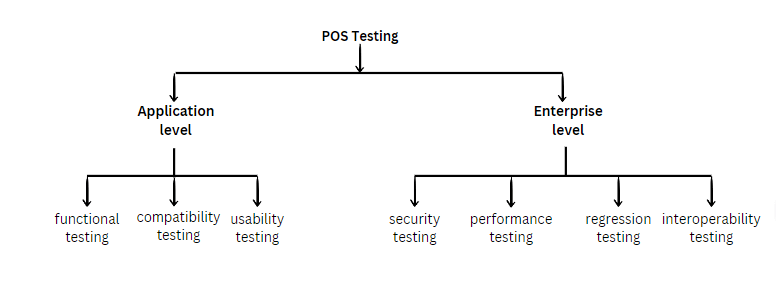
Application Level
At the application level, the testing primarily concentrates on the functionalities and user interface of the POS system. Different types of testing used at this level are:
- Functional Testing: Checks if the POS system functions as expected. Ensures core functionalities like item scanning, payment processing, and receipt generation work accurately without errors.
- Compatibility Testing: Checks compatibility with different hardware and software configurations. Ensures seamless operation with diverse hardware components and software environments, offering flexibility for businesses with varying equipment.
- Usability Testing: Evaluates the system's user-friendliness and customer experience. Ensures the POS interface is intuitive, easy to navigate, and meets customer expectations, enhancing the checkout process and customer satisfaction.
Enterprise Level
At the enterprise level, the testing focuses on broader aspects like security, performance, and integration with external systems. Different types of testing used at this level are:
- Security Testing: Identifies vulnerabilities and weaknesses in the system's security. Assesses the system's resistance to data breaches and unauthorized access, ensuring customer payment information is encrypted and protected.
- Performance Testing: Evaluate the system's performance under various conditions. Ensures the system can handle peak transaction loads without slowdown or crashes, optimizing performance and preventing delays during busy hours.
- Regression Testing: Verifies that updates or changes do not negatively impact existing functionalities. Maintains system stability and reliability by preventing new bugs or issues from being introduced with software updates.
- Interoperability Testing - Assesses how well the system integrates with external systems. Examines the integration with payment gateways, inventory management, and CRM systems, ensuring smooth communication and data exchange.
Take your Point of Sale (POS) testing strategies to the next level with Top 267+ Retail Test Cases.
Physical Components of POS System and How to Test Them?
Each physical component of a POS system needs its own checks:
- Terminal - The POS terminal is the primary interface for transaction entry. Testing professionals validate the accuracy of product lists, pricing, offers, payment modes, verify the network connection, and update the operating system for software support.
- Display Pole - Display showcases the price of scanned items. Testing professionals verify the accuracy of the prices here and ensure these are in sync with the POS terminal.
- Barcode Reader - It is used to scan the product and perform backend checks. Testing professionals carefully check the system to make sure that all inventory items are scanned accurately, paying special attention to those without price tags. They also confirm that the scanning process is spot-on for items with the right price tags.
- Cash Register - This acts as the central location for cash transactions. When the point-of-sale operator chooses the cash payment option, the Cash Register opens automatically. A thorough validation of financial transactions is ensured by ensuring the Cash Register accurately records deposited/refunded amounts.
- Handheld Device - This facilitates wireless card payments. Testers verify the precision of manual amount entry, guaranteeing accuracy in every wireless card transaction.
- Printer - Printer is connected to terminals for receipt generation. It is tested for receipt printing precision, alignment, text, and font accuracy. Error handling scenarios, such as printer readiness and paper availability, including system responses during printer downtime mid-transaction.
- Magnetic Swipe Reader (MSR) - It is designed for swiping payment cards. Testers validate balance checks, expiry dates, and payment transactions to ensure efficient initiation and prompt issuance of printed receipts.
How is Point of Sale(POS) Testing Different?
Point of Sale (POS) testing is distinct from conventional software testing processes due to its unique focus on customer-facing transactions and its critical role in a business's daily operations.
| Aspect | POS Testing | Conventional Software Testing |
|---|---|---|
| Focus | Customer-facing transactions, payment processing, and system integration with peripheral devices. | Overall software functionality, including features, usability, and performance across different services. |
| Purpose | Ensures accuracy, efficiency, and security of point-of-sale operations. | Ensures software quality, reliability, and usability for the business's end users. |
| Testing Focus | Customer experience, data security, and system performance under high transaction volumes. | Overall software behavior, identifying bugs, and ensuring user acceptance. |
| Compliance | Validates adherence to PCI DSS (Payment Card Industry Data Security Standard) v4.0.1, the only active version since v4.0 was retired on December 31, 2024. | Ensures compliance with industry standards and regulatory requirements, depending on the business domain. |
| Peripheral Devices | Tests integration with barcode scanners, receipt printers, and card readers. | Primarily focuses on software functionalities, and may not extensively test hardware integrations. |
| Criticality | Critical for businesses relying on POS systems for daily transactions, ensuring smooth customer experience; for example, a retail store. | Important for all software applications, but time-sensitiveness depends on the business domain. |
Many POS front ends now run on Android tablets or in the browser, so they can be tested like other apps. TestMu AI Real Device Cloud runs manual and automated tests on 10,000+ real Android and iOS devices, and its browser grid covers 3,000+ browser and OS combinations.

Challenges in Point of Sale(POS) Testing
Let's have a look at the challenges faced in POS testing:
- Diverse Hardware and Software Environments - POS systems need to work with a wide range of hardware components, such as barcode scanners, receipt printers, and various software environments, including different operating systems. Ensuring compatibility across this diversity is a significant challenge.
- Data Security Concerns - Given the sensitive nature of customer payment data, maintaining data security is a top priority. Testing for vulnerabilities and ensuring robust encryption is challenging but essential to protect customer information.
- Integration with External Systems - Interoperability with external systems like payment gateways and inventory management is critical.
- Scalability - As businesses(like retail stores, restaurants, and hotels) grow, the POS system must scale. Ensuring the system accommodates increasing products, customers, and transactions without performance degradation is a persistent challenge.
- Data Backup and Recovery - Testing the effectiveness of data backup and recovery processes to safeguard against data loss or hardware failures requires meticulous planning.
How Do AI Agents Handle POS Testing Automation Now?
AI test agents now write, run, and repair POS test scripts on their own, cutting the manual script maintenance that used to follow every terminal firmware update. They still cannot judge physical hardware feedback such as a printer's paper alignment, a barcode scanner's beam angle, or a card reader's swipe response.
- Self-healing locators - An agent built on Playwright's accessibility-tree snapshots re-finds a payment button after a firmware update repositions it, instead of failing on a fixed x-y coordinate the way older record-and-playback scripts did.
- Natural-language test generation - A tester describes a checkout flow in plain English, and an LLM agent connected through a Model Context Protocol (MCP) server converts it into an Appium script that drives the POS terminal's Android layer, including tap sequences on the payment screen.
- Autonomous exploratory runs - Agents work through discount codes, split-tender payments, and refund flows overnight, comparing each screen against its last known state and flagging changes without a pre-written test case.
- Hardware feedback gap - No agent yet checks a receipt's print alignment, a scanner's beam angle, or the tactile response of a card swipe, so the physical-component checks covered earlier in this guide still need a human tester at the terminal.
8 Best Practices for Point of Sale(POS) Testing
Let's look at some of the best practices which one must adhere to for POS Testing:
- Clear Test Plan - Develop a well-structured test plan outlining the scope, objectives, and specific test cases for a comprehensive evaluation of the POS system.
- Realistic Test Data - Use diverse and real-world test data, including various product types, prices, and payment methods to replicate actual scenarios.
- End-to-end Testing - Ensure end-to-end testing that covers the complete sales process, from item scanning to payment processing and receipt generation, to evaluate the smooth operation of the entire system.
- User Acceptance Testing (UAT): Engage actual users or representatives of your target audience to conduct UAT. Their feedback is essential to validate the system's user-friendliness and alignment with user expectations.
- Use Automation - Consider implementing test automation tools to speed up repetitive and regression testing, saving time and enhancing test coverage.
- Data Backup and Recovery Testing - Regularly verify the efficiency of data backup and recovery procedures to ensure critical data can be restored in case of hardware failures or data loss.
- Compliance Testing - Test against PCI DSS v4.0.1. According to the PCI Security Standards Council, v4.0.1 was published in June 2024, and the new requirements that were future-dated took effect on March 31, 2025.
- Offline and Network Failure Testing - Cut the network in the middle of a sale and check what the cashier and customer see, whether the transaction queues, and whether it syncs once the connection returns.
What an untested network drop looks like - On September 30, 2026, I simulated a connection loss on the TestMu AI ecommerce playground checkout in Chrome 154 on the TestMu AI cloud:
| Step | What happened |
|---|---|
| Network cut, then Add to Cart clicked | The request failed with net::ERR_INTERNET_DISCONNECTED |
| What the shopper saw | No error message; the cart count stayed at 0 |
| Network restored, Add to Cart clicked again | The item was added and the cart count became 1 |
The failure was silent: the sale did not go through and nothing told the user. At a physical till, that same gap becomes a cashier retrying a card payment without knowing whether the first attempt was charged, which is why offline behavior belongs in every POS test plan.
Conclusion
Test the POS system end to end, from scan to receipt, against PCI DSS v4.0.1, with its real peripherals, and with the network switched off mid-sale. For the tablet and browser front ends, TestMu AI App Automation runs Appium tests on real devices, and the Appium testing documentation covers setup.
Author

Urwashi Priya
Blogs: 7


Urwashi is a passionate software engineer with a knack for crafting elegant solutions to complex problems. With a deep understanding of cutting-edge technologies and a strong desire to share knowledge, she is a dedicated professional in the tech industry. Her expertise lies in creating engaging and insightful blog posts that provide valuable insights into the world of software engineering.
Reviewer

Mayank Bhola
Reviewer
Mayank Bhola is Co-Founder and Head of Products at TestMu AI (formerly LambdaTest), where he leads the entire product portfolio across KaneAI, Kane CLI, HyperExecute, SmartUI, the Real Device Cloud, Accessibility, and other software testing product lines. As an early Lead Architect he designed and built the company's flagship Tunnel technology from scratch, created the React-based automation platform, and architected the data-intensive pipelines and FAAS services that scale it. He brings more than 10 years of experience in software development and product engineering, with earlier roles as Head of Technology at Juggernaut Books and Senior Software Engineer at PressPlay TV and Zomato. Mayank holds a B.Tech in Computer Engineering from JIIT Noida.


POS Testing FAQs
Did you find this page helpful?
More Related Blogs
TestMu AI forEnterprise
Get access to solutions built on Enterprise
grade security, privacy, & compliance
- Advanced access controls
- Advanced data retention rules
- Advanced Local Testing
- Premium Support options
- Early access to beta features
- Private Slack Channel
- Unlimited Manual Accessibility DevTools Tests