

Power Your Software Testing with AI Agents and Cloud
The Native AI-Agentic Cloud Platform to Supercharge Quality Engineering. Test Intelligently and Ship Faster.


- TestMu AI (Formerly LambdaTest)
- /
- Blog
- /
- October’23 Updates: Live With Intelligent UI Inspector, Major Upgrades to HyperExecute, Smart UI, and More
October’23 Updates: Live With Intelligent UI Inspector, Major Upgrades to HyperExecute, Smart UI, and More
In October, we released new features, including the Intelligent UI Inspector, Google Pixel 8 and 8 Pro on real device cloud, upgrades to App Automation, Smart UI, HyperExecute, and more.
Last Updated on:
On This Page
- Inspects Mobile Apps With Intelligent UI Inspector
- Test Your Mobile Apps on Google Pixel 8 and 8 Pro
- New Features in App Automation
- HyperExecute Latest Features – Available Now
- Live With New Smart UI Features
- Mobile App Testing on Android 14 Emulators
- Newest Additions in TestMu AI Tunnel and Account Management
- Zenkit Integration
- Stay Tuned for More
As the autumn leaves shed and the season shift, we’re back to share some cool stuff we’ve been working on here at TestMu AI. To make your testing experience even better, our team has been busy crafting new features and enhancements to make sure you get the best out of our offerings.
The new features include the Intelligent UI Inspector, real device cloud support for Google Pixel 8 and 8 Pro, and major upgrades to App Automation, Smart UI, and HyperExecute.
Let’s check out what’s new this October!

Inspects Mobile Apps With Intelligent UI Inspector
Inspecting app elements is a crucial step in resolving mobile issues across various devices and operating systems. While traditional UI Inspectors have been the go-to choice for UI inspection, the complexity of modern UI demands tools with advanced features to perform precise UI inspections.
These include the ability to create custom XPaths for pinpointing specific elements within an app’s user interface and handling hybrid app inspection. To meet these needs, we’ve introduced an Intelligent UI Inspector on real device cloud that effectively addresses these challenges. It simplifies the process of interacting with app elements, reducing the need to repeatedly open and close the inspector.
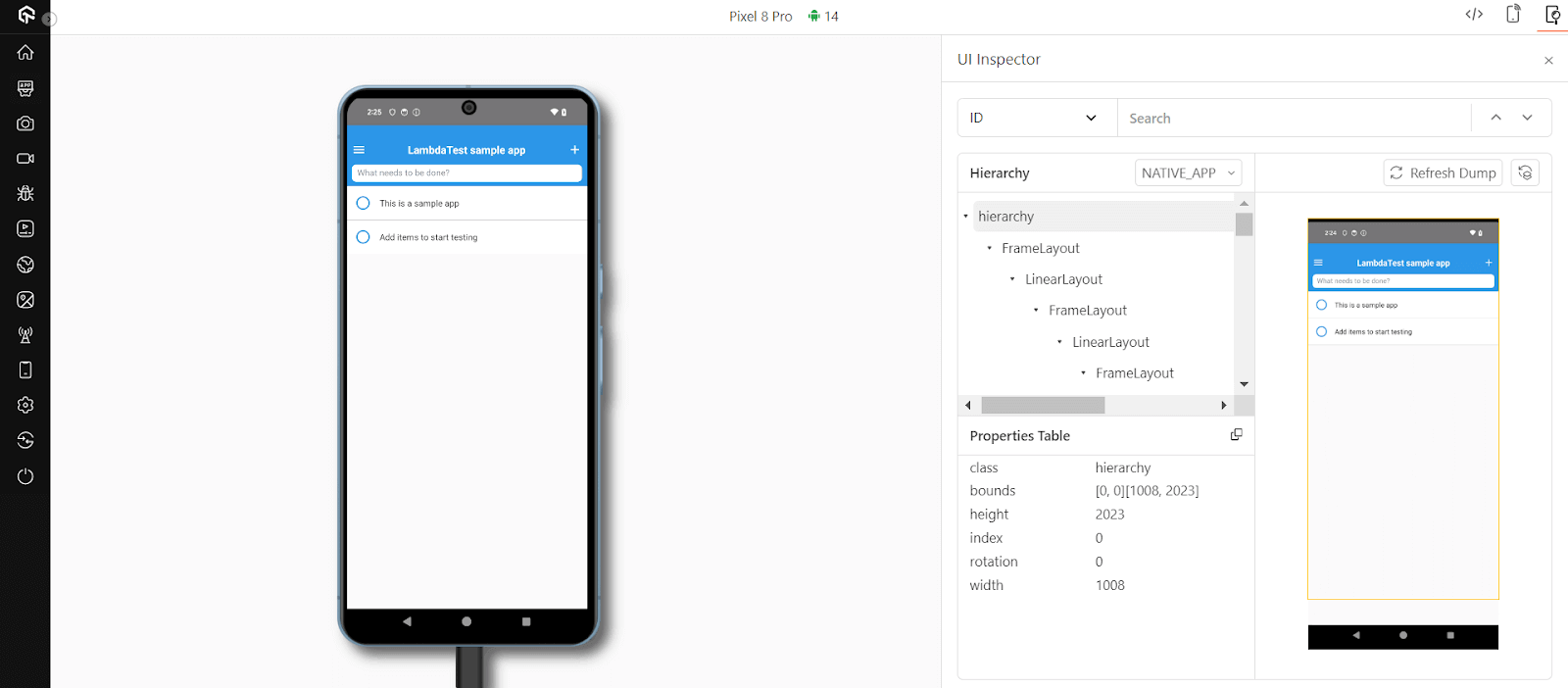
This Intelligent UI Inspector allows you to create custom XPaths and provide UI inspection for hybrid applications. Also, you don’t have to juggle with frequent app relaunches, saving your valuable time. All of these capabilities are presented through an intuitive interface that caters to the diverse preferences of users, ultimately enhancing the overall user experience.
Here are some features that the Intelligent UI Inspector offers:
- Different Locators: The UI Inspector offers different ways to pinpoint elements within your app, like using IDs, XPaths, or Names. These options give you the flexibility to easily find and interact with different parts of your app during testing.
- Hierarchy View: In the Hierarchy section, you can see how elements are organized within your app’s user interface. This helps you understand how elements relate to each other, making it easier to work with them, especially in terms of parent-child relationships.
- Properties Table: The Properties table provides detailed information about the selected UI element’s attributes and properties. This is handy for getting in-depth insights into the element you’re examining, which can be very useful for troubleshooting and testing.
- Refresh Functionality: The Refresh Dump feature lets you update the information and properties related to the element you’re inspecting. This is particularly useful for dynamic mobile apps, ensuring you always have the latest data about the element you’re working with. It keeps your testing accurate and up-to-date.
Test Your Mobile Apps on Google Pixel 8 and 8 Pro
Another major addition to our mobile device lab is the inclusion of Google’s latest flagship smartphones, the highly-anticipated Google Pixel 8 and Google Pixel 8 Pro. Now, you can put your web and mobile apps to the test on these latest Google Pixel devices.
What sets this apart is that these devices run on the latest Android 14, giving you the perfect opportunity to ensure your apps are in sync with the latest tech stacks. It’s all about making sure your web and native applications work seamlessly and meet the standards associated with Google’s flagship smartphones, catering to a broader user base and enhancing your overall mobile experience.
So, go ahead and give your web and native apps a spin on these Pixel devices.

New Features in App Automation
TestMu AI App Automation has introduced fresh features to make your process of creating, testing, and deploying high-quality mobile apps smoother than ever.
New Lambda Hooks
We have added two Lambda Hooks – lambda-testCase-start and lambda-testCase-end that help in addressing the debugging challenges. You can now differentiate between different test cases within a single Appium session.
These hooks are incredibly valuable as they allow you to isolate and focus on specific test cases that might be causing errors or slowing down the testing process. This helps in quicker issue resolution and more efficient testing.
Refer to the documentation to get started: Lambda Hooks for Appium Automation.
Highlighted Elements
This feature lets you highlight elements in both live and saved videos when using the findElement method in Appium automation. This feature allows you to effortlessly pinpoint the elements with which your script interacts during test execution and enables you to review saved videos to gain insights into how your tests performed and their interactions with the elements.
To use this feature, enable the instrumented: true capability in your test script.
Live Video Support
With live video support for web automation on real devices, you can now receive real-time video feedback as your web automation scripts run on real Android and iOS devices. This feature greatly simplifies issue identification, enhances the overall quality of testing, and allows for direct validation of the user experience.
Here are the main benefits:
- Live Monitoring: You can view your web automation tests running in real-time on real devices.
- Simplified Debugging: Identifying issues becomes simpler as you can see what’s happening during the test.
- Quality Assurance: You can directly verify the user experience by viewing the live video, ensuring that your web application functions as intended on real devices.
HyperExecute Latest Features – Available Now
HyperExecute is ready to supercharge your testing efforts with the following new features, including AI-Native test failure analysis, Semaphore CI integration, new frameworks support, and more.
AI-Native Test Failure Analysis
AI-native test failure analysis to make it easy for you to quickly spot different error types and provide a detailed summary of why they happen. This examines your test logs and pinpoints what’s causing the failures, allowing you to make fixes more quickly and effectively.
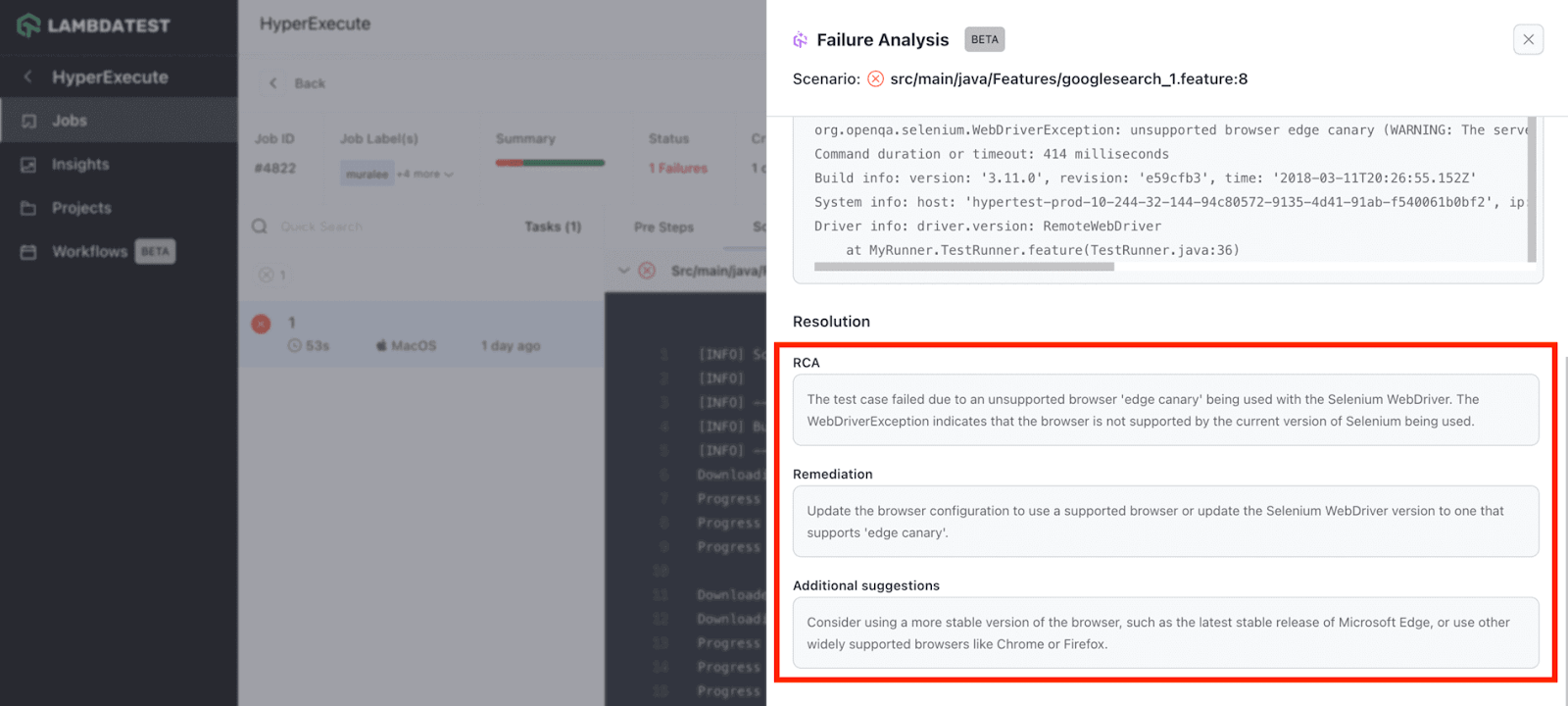
Follow the documentation to get started: AI-Native Test Failure Analysis in HyperExecute.
Semaphore CI Integration With HyperExecute
Semaphore CI and HyperExecute have teamed up to bring you a seamless testing experience. Semaphore CI is a well-known cloud-based platform used by engineering teams to streamline building, testing, and deploying software applications. Now, with the new integration between Semaphore CI and HyperExecute, teams can effortlessly run their tests on HyperExecute’s cloud infrastructure.
For more in-depth information, check out the documentation: Semaphore CI Integration With HyperExecute.
Cypress Testing for Smart UI Using HyperExecute
HyperExecute now supports the Cypress framework for running Smart UI tests. Teams can now run their UI tests on blazing fast test orchestration cloud, enhancing the quality of their tests and reducing the time required for testing web applications.
If you wish to get started, head over to the documentation: Smart UI on HyperExecute Using Cypress
New Frameworks Support
Last but not least, HyperExecute has expanded its support to include four widely used testing frameworks: Maven JUnit4, Maven JUnit5, WDIO Mocha, and WDIO Jasmine. This means teams can execute tests in a broader spectrum of test automation frameworks.
Refer to the documentation: HyperExecute YAML Version 0.2.
Snooper Command
A snooper is a command designed for identifying the feature file scenarios that will be subsequently executed based on the provided value in the testRunnerCommand. The snooper command requires two arguments:
1. featureFilePaths: This indicates the path to the feature files you intend to explore.
2. framework: This denotes the framework employed for your tests.
As an example, using the following command will unveil the feature file scenarios located in the “features” folder that utilize the Java framework:
snooper --featureFilePaths=features/ --framework=java
Refer to the documentation: Snooper Command.
In addition, we now provide support for Android SDK Runtime in HyperExecute to elevate your testing process.
Live With New Smart UI Features
We have added a new batch of features to TestMu AI's AI-native visual testing tool, Smart UI. For a broader comparison of options, see our roundup of the best visual testing tools. Check out below:
Smart UI Testing With Storybook 7
This powerful combination of Smart UI and Storybook 7 offers enhanced component visualization, testing capabilities, and collaborative features. Want to get started? Visit the documentation: Smart UI testing With Storybook 7.
Smart Baseline Strategy
To ensure your UI testing is as efficient as possible, we have introduced a smart baseline strategy—this strategy simplifies the process of updating baselines for approved screenshots. By reducing manual intervention, it frees up your team’s valuable time and minimizes the risk of human error.
Check out the documentation: Smart Baseline Strategy for Smart UI.
Overwrite Screenshot Feature
We have now introduced the handy overwrite screenshot feature. This feature allows you to replace the latest screenshot with the previous ones in the same build, providing a quick and efficient way to track changes and improvements over time. No more sifting through countless screenshots to find the right one – with Smart UI, you’ll always have the most up-to-date visual data at your fingertips.
Head over to the documentation: Overwrite Screenshot Feature in Smart UI.
Mobile App Testing on Android 14 Emulators
You can now ensure the compatibility of your web and mobile apps with the latest Android 14 by testing them on TestMu AI’s virtual device cloud, which features cutting-edge Android 14 Emulators.
Test your mobile app compatibility on the following Emulators:
Google Pixel 7 Pro Google Pixel 7 OnePlus 11 5G realme GT2 Pro
Newest Additions in TestMu AI Tunnel and Account Management
The latest updates in TestMu AI’s account management and TestMu AI Tunnel bring a host of new features to enhance user control and accessibility. These additions include streamlined ways to manage user accounts, set up access policies, and maintain account security.
Enhanced Tunnel Security
Within the TestMu AI Tunnel, you’ll find a suite of robust features to finely adjust your security preferences, including the ability to limit tunnel creation to specific users, turn tunnel sharing on or off, and determine which local domains can be accessed or restricted via the tunnel.
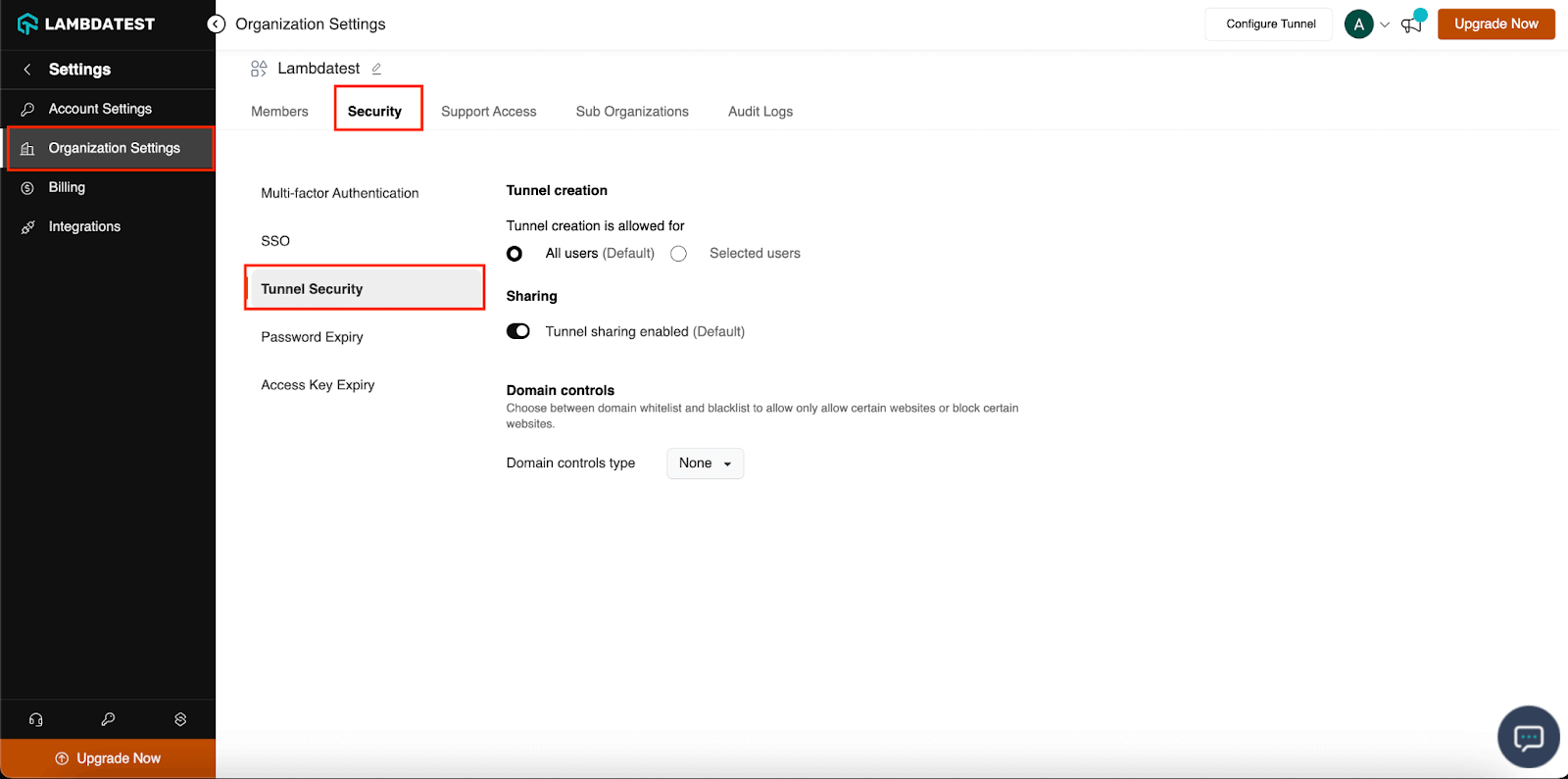
Refer to our documentation to check out new security enhancements in TestMu AI Tunnel.
Comprehensive Audit Logs
TestMu AI Tunnel now includes comprehensive audit logs, providing insights into both user and organization-level activities. This lets you keep an eye on account actions, spot unauthorized access, investigate any security incidents, and keep a detailed history of user and organization-level activities. Moreover, it aids in ensuring compliance with security policies. Check our guide on how to access audit logs.
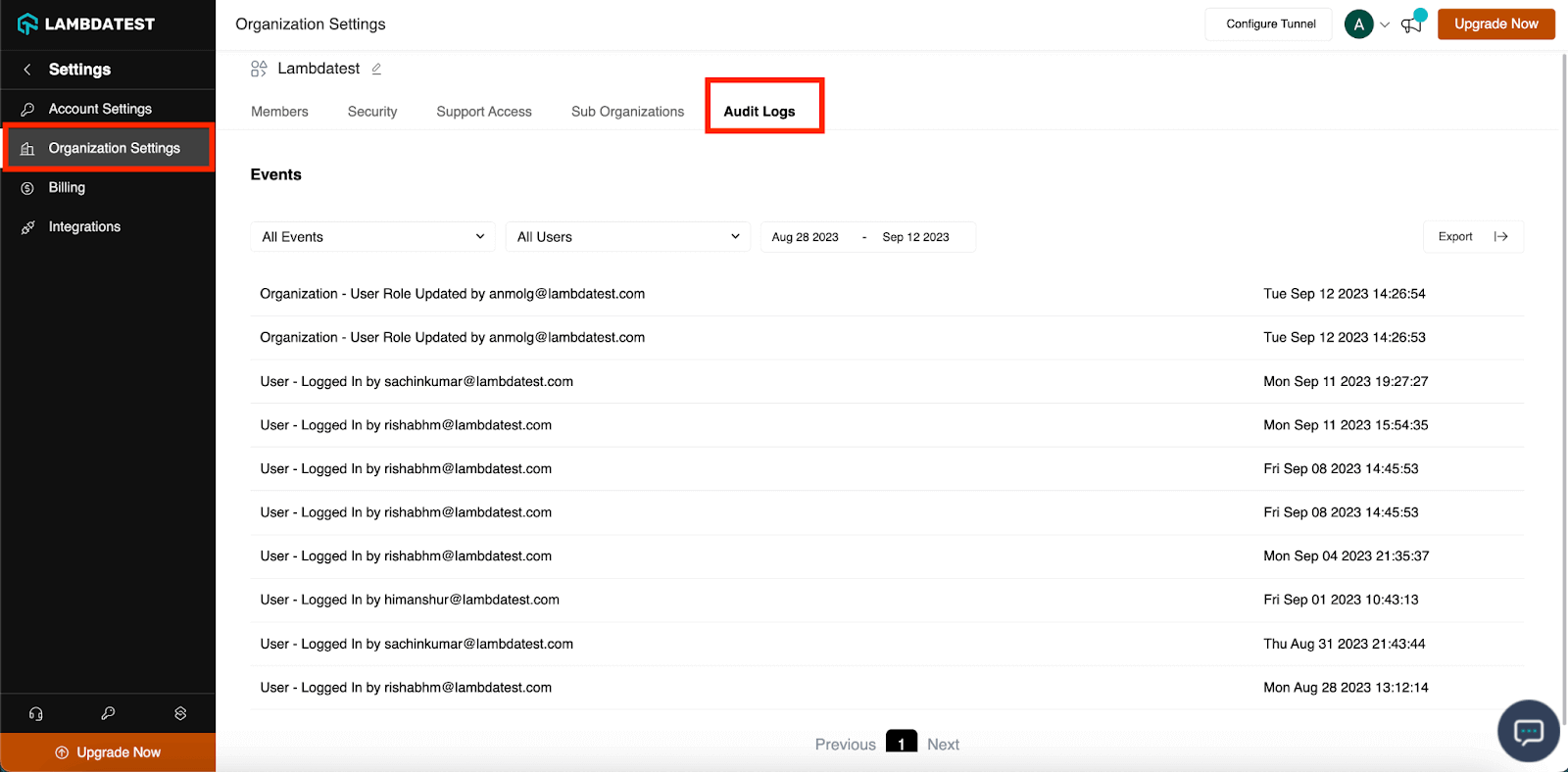
Password and Access Key Expiry Policy
Organization administrators can now define the duration of password and access key expiration with our new policy. Once the expiration time is reached, users can reset their password or regenerate their access key.
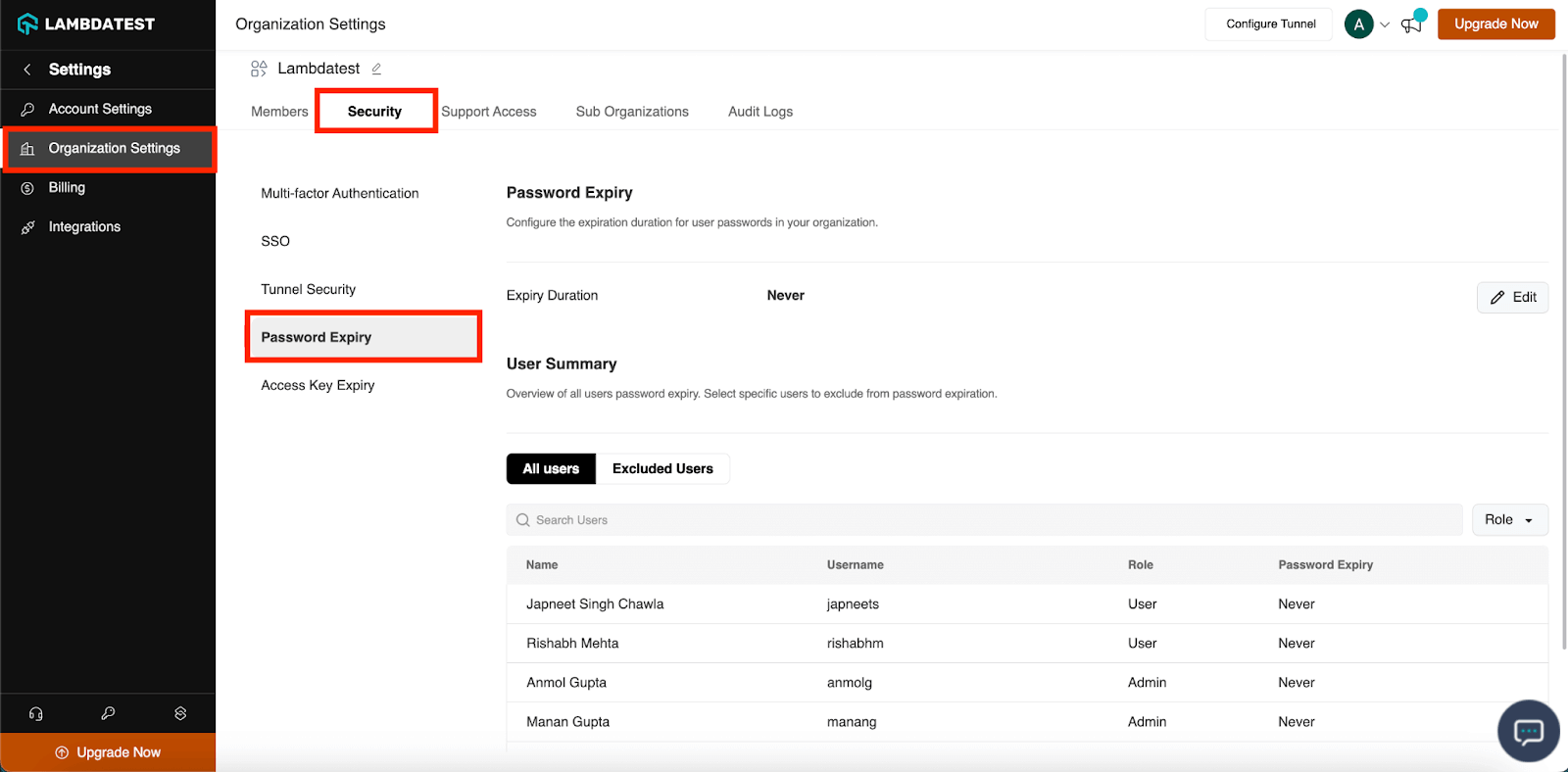
Administrators can also enjoy the flexibility to exempt specific users from adhering to this policy, allowing them greater control over account security. Read the TestMu AI Password and Access Key Expiry Policy.

Note: Test your local websites across 3000+ real environments. Try TestMu AI Today!
Zenkit Integration
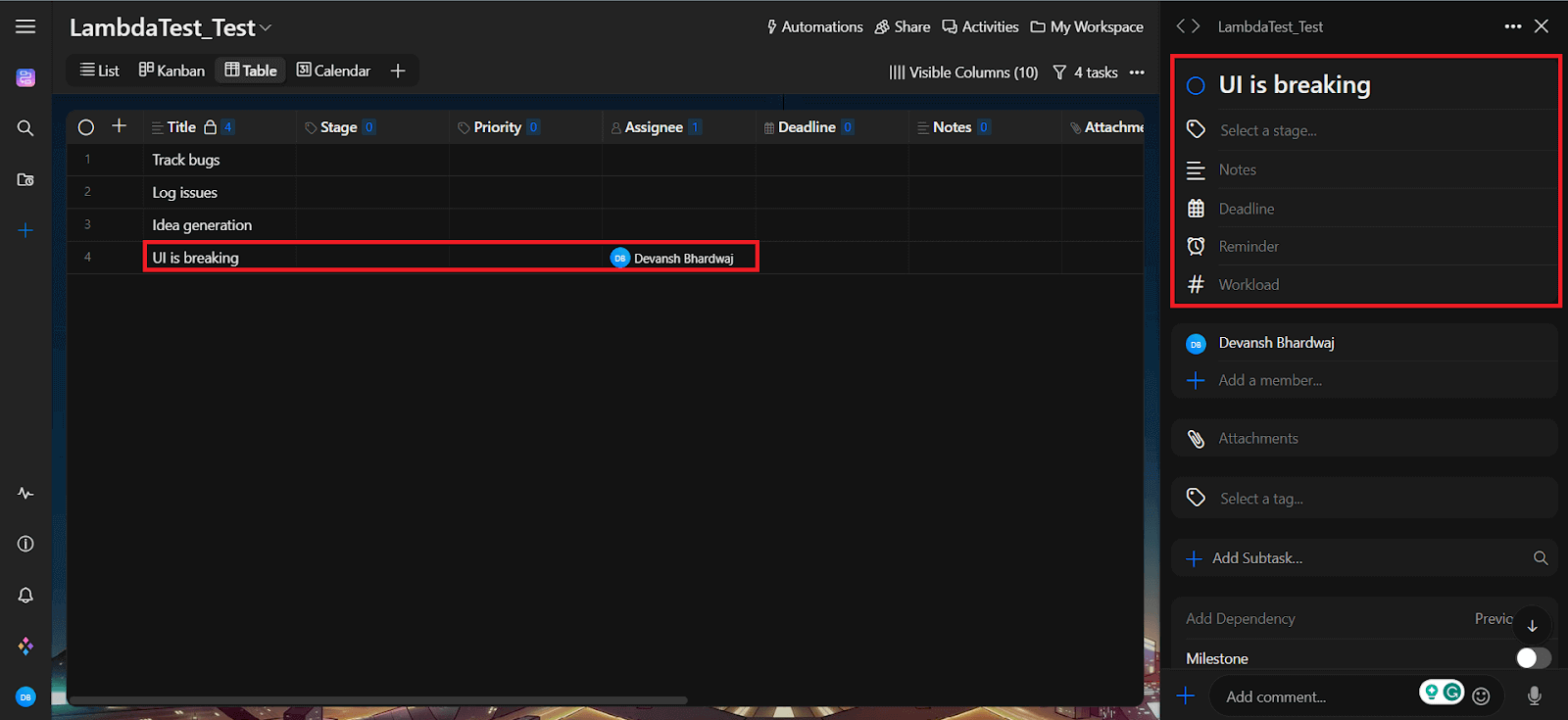
We now have another integration in our bucket, and this time it is Zenkit. It is a SaaS platform for project management and collaboration.
Zenkit integration with TestMu AI provides a streamlined solution for tracking and managing bugs discovered during browser testing. This integration eliminates manual effort by allowing developers to log bugs directly from TestMu AI into their Zenkit workspace, enhancing collaboration and improving task management.
Stay Tuned for More
We’re working on adding more features to our platform to make manual and automation testing easier for you. Give our new features a try, and please share your feedback.
If you have any questions or suggestions, feel free to reach out to our 24/7 in-app customer chat support or send an email to support@testmuai.com. You can also drop your suggestion on TestMu AI Community under the category – TestMu AI Feature Requests. And remember to subscribe to our Changelog to stay in the loop about our latest developments.
Happy testing 😊
Author

Salman Khan
Blogs: 138


Salman is a Test Automation Evangelist and Community Contributor at TestMu AI, with over 6 years of hands-on experience in software testing and automation. He has completed his Master of Technology in Computer Science and Engineering, demonstrating strong technical expertise in software development, testing, AI agents and LLMs. He is certified in KaneAI, Automation Testing, Selenium, Cypress, Playwright, and Appium, with deep experience in CI/CD pipelines, cross-browser testing, AI in testing, and mobile automation. Salman works closely with engineering teams to convert complex testing concepts into actionable, developer-first content. Salman has authored 120+ technical tutorials, guides, and documentation on test automation, web development, and related domains, making him a strong voice in the QA and testing community.


Did you find this page helpful?
More Related Blogs
TestMu AI forEnterprise
Get access to solutions built on Enterprise
grade security, privacy, & compliance
- Advanced access controls
- Advanced data retention rules
- Advanced Local Testing
- Premium Support options
- Early access to beta features
- Private Slack Channel
- Unlimited Manual Accessibility DevTools Tests