

Power Your Software Testing with AI Agents and Cloud
The Native AI-Agentic Cloud Platform to Supercharge Quality Engineering. Test Intelligently and Ship Faster.


- TestMu AI (Formerly LambdaTest)
- /
- Blog
- /
- March'24 Updates: TestMu AI Accessibility DevTools, Feature Additions in HyperExecute, and More!
March’24 Updates: Accessibility DevTools, Latest Additions in HyperExecute, Real Device Analytics, and More!
Our March update brings TestMu AI Accessibility DevTools, HyperExecute enhancements, real device analytics, and more. Read to know more!
Last Updated on:
At TestMu AI, we’re committed to empower developers and testers by rolling out exciting new features to streamline their test execution process. Last month, we released some new features, including the TestMu AI Accessibility DevTools Chrome extension, new features in HyperExecute and Test Analytics, some new integrations, and much more.

Introducing the TestMu AI Accessibility DevTools
Making your website accessible to everyone is an integral part of the software development process. To make your accessibility testing a bit faster and effortless, TestMu AI has now rolled out the Accessibility DevTools Chrome extension.
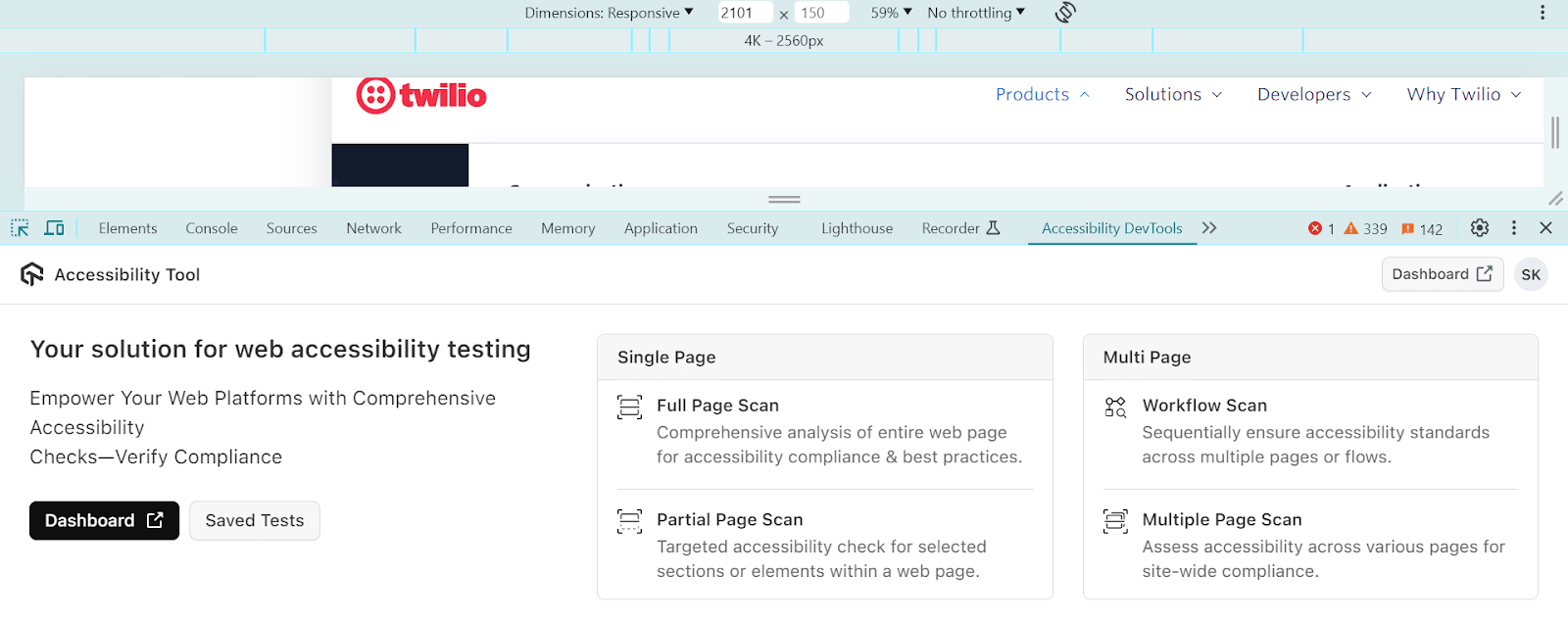
Here is what our new TestMu AI Accessibility DevTools has to offer:
- You can choose to scan entire web pages or focus on specific elements that give you flexibility in how you evaluate your site’s accessibility.
- This extension can automate scans across multiple URLs at once, saving you time and effort.
- The ability to capture accessibility issues from user interactions and page redirections allows for ongoing testing of your website’s accessibility.
- Detailed summaries and customizable settings help you identify and fix accessibility quickly.
- Having a centralized dashboard for managing your accessibility tests makes it easier to track progress and identify any recurring issues.
To get started, check out our guide – TestMu AI Accessibility DevTools.
Latest Additions in HyperExecute
We’ve now supercharged HyperExecute with some new feature additions: manage secrets with ease using the –job-secret-file flag, test on theMicrosoft Edge Canary for macOS, trigger jobs directly with your local Selenium WebDriver, leverage Playwright for real device cloud testing, and run SmartUI tests seamlessly within HyperExecute.
- Secret Management: You can now use a –job-secret-file flag to store sensitive information like passwords and API keys. This file is only accessible for the current test run and reducing the risk of accidentally exposing your secrets and making your testing more secure.
--job-secret-file <RELATIVE_PATH_OF_YOUR_SECRET_FILE>
To get started, check our guide – HyperExecute CLI flags.
But with support for local Selenium WebDriver in HyperExecute, you can simplify this process significantly. Here’s how it benefits you:
- Say goodbye to manual code changes and configurations needed for Remote WebDriver. With HyperExecute, you can integrate quickly without all the usual setup hassles.
- You won’t have to worry about making major modifications, making the transition smoother.
- Whether you’re running web tests with Selenium or mobile automated tests with Appium, you won’t need to make platform specific changes.
In addition to all of these features, we have also added the Microsoft Edge Canary browser for HyperExecute testing.

Run Cypress Tests Using SmartUI SDK
You can perform effortless visual regression testing at scale using SmartUI SDK with Cypress. The SmartUI SDK integrates with your Cypress test suite and streamline the entire test process.
Here’s what you get:
- Integrate SmartUI SDK into your existing Cypress tests with ease.
- Capture and compare and analyze screenshots across various browsers and resolutions and ensuring thorough visual coverage.
- SmartUI robust solution empowers you to run visual tests with confidence.
New Enhancements in Web Automation
Here are some major enhancements made to the TestMu AI Web Automation:
- Faster Boot Time for iOS Simulators: TestMu AI Web Automation now enables faster simulator boot times, allowing you to execute your iOS web and app tests at lightning speed. This will help you save time and a smoother testing workflow.
- Sock Protocol Support: We also improved the local testing using TestMu AI Tunnel to the next level with enhanced Sock protocol support. This will streamline communication between your local machine and remote testing environments, ensuring a reliable testing experience.
Gain Deep Insights With Enhanced Real Device Analytics
We have introduced the latest updates to Test Analytics, offering you deeper insights into your testing activities. This release brings enhancements right from concurrency trends to testing summaries and trends.
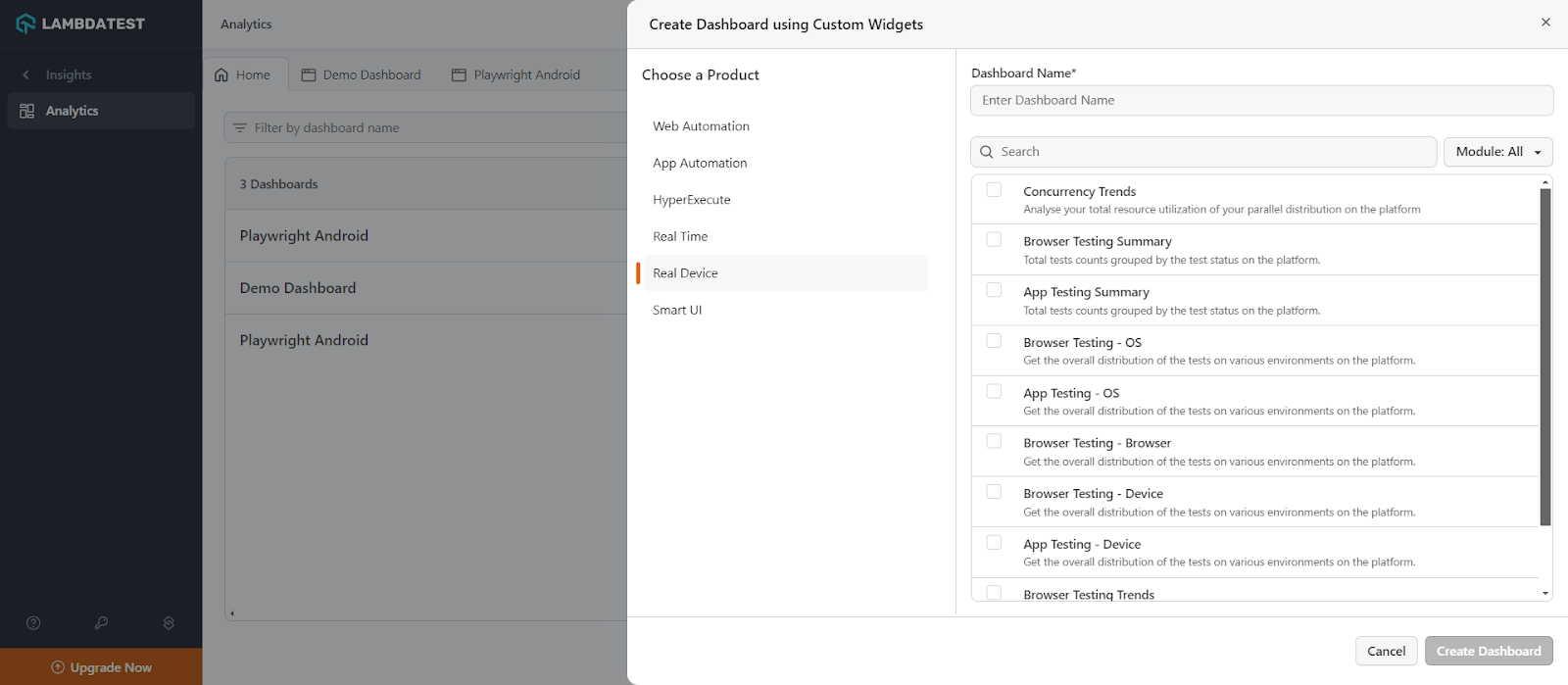
Here’s what’s new:
- Concurrency Trends: This advanced feature now allows you to analyze total resource utilization and offering detailed insights into how your resources are distributed and used across parallel tasks on our platform.
- Browser Testing Summary: With this widget, you can easily view the total count of tests categorized by their status and provide a quick assessment of your browser testing efforts.
- App Testing Summary: Similarly, for mobile app testing, you can now see the total counts of tests group by their status and give a clear picture of the test results.
- Browser Testing OS and Device: You can gain insights into the overall distribution of browser tests across different operating systems and devices. This can help you plan better and target your testing strategies.
- App Testing OS and Device: Like browser testing, app testing now provides detailed distribution data for tests across different operating systems and devices, ensuring your mobile apps deliver a seamless user experience everywhere.
- Browser Testing Trends: You can analyze the trends of tests executed on the platform for browser testing and providing valuable insights into how your testing strategies are evolving over time.
- App Testing Trends: This widget will give a clear picture of the trends in app testing. This will enable you to adjust your testing approaches based on historical data and forecasted patterns.
New Integrations
We’ve expanded our integrations to include Inflectra’s SpiraTeam, Netlify, and Buildkite. This means you can seamlessly integrate TestMu AI with these platforms to enhance your testing workflow and streamline your processes.
- Inflectra’s SpiraTeam integration: SpiraTeam is a platform for handling every aspect of your software development journey. From planning projects in an Agile environment to managing requirement, test cases, documents and source code, SpiraTeam has you covered.
- Netlify integration: Netlify is a cloud computing platform that simplifies the process of deploying and hosting websites.
- Buildkite integration: Buildkite is a CI/CD platform that integrates with a version control system to automate website testing.
By integrating TestMu AI with SpiraTeam, teams can get a comprehensive solution that addresses key aspects of software development. This includes managing applications, portfolios, gathering requirements, managing test cases and handling task workflows – all within one unified framework.
By integrating TestMu AI with Netlify, you can achieve effortless visual regression testing using SmartUI within your development workflow. This ensures your website functions and renders consistently across various browsers without any visual deviations.
With TestMu AI and Buildkite integration, you perform automation testing to ensure that your development code displays flawlessly across a wide range of browsers. Teams can leverage online Selenium Grid that offers over 3000 real browsers running on cloud based machines and ensuring thorough testing of your web applications.

Note: Run your Selenium tests across 3000+ environments. Try TestMu AI Today!
All in All
Ready to streamline your testing workflow? Give a spin on these new features and deploy quality software applications. Let TestMu AI take care of the busywork so you can focus on what matters most – creating a flawless user experience.
For more information on our new product updates, visit the TestMu AI Changelog.
Author

Salman Khan
Blogs: 138


Salman is a Test Automation Evangelist and Community Contributor at TestMu AI, with over 6 years of hands-on experience in software testing and automation. He has completed his Master of Technology in Computer Science and Engineering, demonstrating strong technical expertise in software development, testing, AI agents and LLMs. He is certified in KaneAI, Automation Testing, Selenium, Cypress, Playwright, and Appium, with deep experience in CI/CD pipelines, cross-browser testing, AI in testing, and mobile automation. Salman works closely with engineering teams to convert complex testing concepts into actionable, developer-first content. Salman has authored 120+ technical tutorials, guides, and documentation on test automation, web development, and related domains, making him a strong voice in the QA and testing community.


Did you find this page helpful?
More Related Blogs
TestMu AI forEnterprise
Get access to solutions built on Enterprise
grade security, privacy, & compliance
- Advanced access controls
- Advanced data retention rules
- Advanced Local Testing
- Premium Support options
- Early access to beta features
- Private Slack Channel
- Unlimited Manual Accessibility DevTools Tests