

Power Your Software Testing with AI Agents and Cloud
The Native AI-Agentic Cloud Platform to Supercharge Quality Engineering. Test Intelligently and Ship Faster.


- TestMu AI (Formerly LambdaTest)
- /
- Blog
- /
- How Browsers Work: From Request to Rendered Page
How Browsers Work: From Request to Rendered Page
Explore how browsers work behind the scenes delving into their core components and the rendering process that builds and displays web pages.
Last Updated on:
A browser turns a URL into pixels through a fixed sequence: it fetches the document, parses HTML into the DOM and CSS into the CSSOM, builds a render tree, lays that tree out, paints it, and composites the result on screen. When Internet Explorer led the market, developers treated the engine as a black box and could only inspect the rendered output. The engines behind Chrome, Edge, Safari, and Firefox are open source today, so you can read the C++ that does the work. This guide walks through each stage.
Key Takeaways
- A browser turns a URL into pixels in a fixed order: it fetches the document, parses HTML into the DOM and CSS into the CSSOM, builds the render tree, runs layout, paints, and composites the final frame.
- A browser is built from seven components: the user interface, browser engine, rendering engine, user interface backend, JavaScript interpreter, networking layer, and data storage.
- Chrome, Edge, and Firefox give each site its own renderer process, so a crash in one tab cannot close the whole browser and one site cannot read the memory of another site.
- Layout gives every renderer a size and position, starting from a root renderer placed at coordinate (0,0) whose dimensions define the viewport.
- Animating transform and opacity keeps the work on the compositor thread, while changing width, top, or margin forces the browser to run layout and paint again.
- AI browser agents such as Playwright MCP read the accessibility tree instead of painted pixels, so a control with no role and no accessible name stays invisible to those agents.
Structure of a Browser
Primary components of a browser are
- User Interface - This consists of forward and back button, bookmarks, address bar etc. along with the window that displays the requested page.
- Browser engine - It commands action between rendering engine and the user interface.
- Rendering engine - The main function of rendering engine is to display the content that is requested. For example, if an HTML content is requested, the engine parses CSS and HTML and when the content is parsed, it is displayed on the screen.
- User Interface backend - It can be used for painting basic images like windows or combo box. The backend exposes only a generic platform independent interface. Beneath it, user interface methods are used by the operating system.
- JS Interpreter - JavaScript and all other types of scripting is parsed and executed by the inbuilt interpreter.
- Networking - Performs implements of HTTP request and response.
- Data Storage - All types of data, like cookies are saved locally by the browser. The storage mechanisms available today are localStorage, sessionStorage, IndexedDB, and the Cache API. Web SQL is no longer one of them, because Chrome removed Web SQL access in all contexts in Chromium 119 and now points developers to IndexedDB or to SQLite compiled to WebAssembly (Chrome for Developers, Deprecating and removing Web SQL).
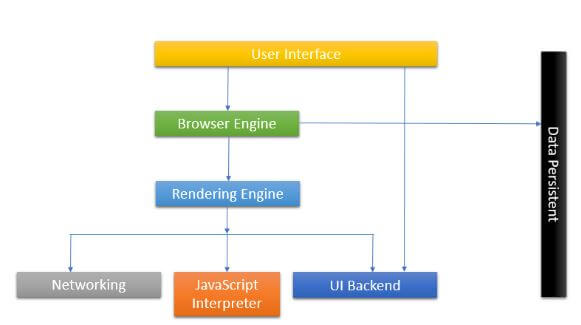
Modern browsers split these components across several operating system processes instead of running them all in one. Chrome, Edge, and Firefox give each site its own renderer process, and they keep networking, GPU work, and extensions in separate processes. This site isolation stops a crash in one tab from closing the whole browser, and it prevents one site from reading another site's memory.

Key Takeaway: A browser is made of seven components, from the user interface and rendering engine through to networking and data storage, and modern browsers run those components in separate operating system processes so one site cannot crash or read another.
Process Flow
Before any parsing starts, the browser has to fetch the document. It resolves the hostname to an IP address through a DNS lookup, opens a TCP connection with a three-way handshake, and negotiates TLS when the URL uses HTTPS. The interval between the request and the arrival of the first byte of HTML is Time to First Byte. Only once that byte arrives does the rendering engine have anything to work with.
The networking layer provides the rendering engine with contents of the document that is requested. The contents are generally transferred in chunks of size 8kb each. Once that happens, the following flow occurs.
- A content tree is created by the rendering engine where the HTML elements get parsed and get converted to DOM nodes. Style data in both internal and external CSS are parsed and visual information along with styling is used to create the render tree.
- Rectangles with specific colors and dimensions are arranged inside the rendered tree. They are meant to be in the right order to be rendered on the screen.
- Once the rendered tree is constructed, it follows the layout process where each node is given the exact coordinates, according to which they should be displayed on the screen.
- The final stage is the painting. Each node in the render tree will be designed according to the code written in the backend layer of the UI. Painting usually takes place in an order
- Background color is assigned first.
- It is immediately followed by background image.
- Border is assigned.
- Children are stacked.
- Outline of the page is created.
All the processes that occur inside the rendering industry take place gradually. However, the job of a render engine is to display content on the screen as soon as possible for providing better user experience. That is why, instead of parsing the HTML and building the entire content of the render tree in one go, it starts building few parts of the tree while other parts get parsed and build in the backend. Let's take a detailed look at Layout, a complex part of a page's lifecycle.

Austin Siewert
Co-Founder, Steadfast Systems
Discovered @TestMu AI yesterday. Best browser testing tool I've found for my use case. Great pricing model for the limited testing I do 👏
2M+ Devs and QAs rely on TestMu AI
Deliver immersive digital experiences with Next-Generation Mobile Apps and Cross Browser Testing Cloud

Here's a short glimpse of the Selenium 101 certification from TestMu AI:

Key Takeaway: The rendering engine parses HTML into DOM nodes, applies parsed CSS to build the render tree, assigns exact coordinates during layout, and paints each node in a set order that starts with background color and ends with the page outline.
DOM and CSS Object Model Construction
In the very first step of the rendering engine, an HTML document is parsed and the parsed elements are converted into nodes in the document object model tree. Each element in the tree is represented to be a parent node, within which the child elements are contained.
The main thread is not the only reader of that markup. A preload scanner runs ahead of the parser and requests high priority resources such as stylesheets, scripts, and fonts before the main parser reaches them, so those downloads start earlier than they otherwise would.
While the browser is working on the parsing of HTML, it faces the "link" tag which references the external CSS linked to the page. It anticipates that the link is needed to render the complete page. A request is sent immediately to parse the CSS page.
Key Takeaway: The rendering engine converts parsed HTML elements into parent and child nodes of the DOM tree, and requests the external stylesheet as soon as it meets a link tag, because that CSS is needed to render the complete page.
Layout
When a renderer is added to the tree after creation, it does not have any size or position. The layout is the means of calculating those values.
A flow-based Layout model is used by HTML. This means that in most cases, the layout is completed in a single pass. Elements that are placed later in the layout tree do not impact the geometry of elements that are placed earlier. So, the layout can proceed in an omnidirectional way. Although there may exist some exceptions. More than one passes are required in tables.
All renderers consist of a layout method, which occurs recursively through the child elements in the frame hierarchy. In a default html page, a root renderer is placed at (0,0) coordinate and its dimensions serve as a part of the browser window that is visible, known as viewport.
Process flow followed by a layout:
- The rendered Parent decides the width.
- It goes over children and sets their horizontal and vertical coordinates.
- Child layout is called only when needed.
- The accumulative height, margin, and padding of a child are used by the parent to figure out its own height, which will thereby, be used by the parent renderer that lies above it in the hierarchy.
- The value of the dirty renderer is set to false.
- If you take a look at the developer console, you will find a box-like structure containing a series of rectangular boxes, one placed inside the other. This is CSS Box model which is made of containers which represent the element in the document tree and laid out in a way according to the visual model.
- Each box contains a content area and may or may not contain surrounding border, padding, margin etc.
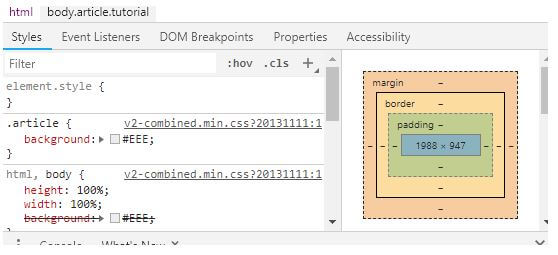
Key Takeaway: Layout calculates the size and position of every renderer, usually in a single pass, starting from a root renderer placed at coordinate (0,0) whose dimensions form the viewport.
Painting
In Painting, the paint() method is called to render the UI infrastructure, custom styles, etc. on the component. Painting occurs either globally, where the whole render tree is painted at once, or in incremental order, where the elements are stacked context wise.
When any custom style of the webpage is changed, the browser performs minimal action required, since any small change will result in the repaint of the entire element, layout change in its position and re-rendering of the entire tree.
Painting is not the last step. The browser passes the painted layers to a compositor thread, which uploads them to the GPU and draws the final frame. Because the compositor runs off the main thread, changes to transform and opacity can animate without a fresh layout or paint, while changes to width, top, or margin force both. These stages map onto the Core Web Vitals: unexpected layout runs feed CLS, the paint of the largest element sets LCP, and main thread work that blocks the compositor shows up as poor INP.
Key Takeaway: Painting draws each element and then hands the layers to a compositor thread on the GPU, which is why transform and opacity can animate without a fresh layout or paint while width, top, and margin changes force both.
How Do AI Agents Read a Rendered Page?
Most AI browser agents read the accessibility tree, not the painted pixels. The browser builds that tree during parsing, alongside the DOM, and agent tooling queries it as structured text. MDN documents the accessibility tree as a separate output of the same parse, describes the accessibility object model as a semantic version of the DOM, and notes that content is not accessible to screen readers until that tree is built (MDN, Populating the page: how browsers work).
Playwright MCP, the Model Context Protocol server Microsoft publishes for browser automation, states that it "uses Playwright's accessibility tree, not pixel-based input" and needs "no vision models" because it operates purely on structured data (playwright-mcp on GitHub). The practical consequence is that painting an element is not enough. A div that carries a click handler but no role and no accessible name is drawn on screen and still absent from the snapshot the agent reads. Semantic HTML and ARIA names decide whether an agent can find a control and operate it.
Chrome DevTools MCP enters the pipeline at a different point. The Chrome DevTools team wrote that coding agents "are not able to see what the code they generate actually does when it runs in the browser" (Chrome for Developers). That server drives a real Chrome through Puppeteer, so an agent can record a performance trace, read console messages and network requests, and inspect the DOM and CSS of a live page. It gives the agent the layout, paint, and compositing data described above instead of an inference drawn from source code. The rendering pipeline now has a second consumer: people see the painted frame, and agents read the trees behind it.
Key Takeaway: AI browser agents read the accessibility tree that a browser builds during parsing, so semantic HTML and ARIA names, not painted pixels, decide whether an agent can find and operate a control on the page.
Layered Display of Elements
The z-index property of an element deducts where the element will be placed in the stack. In the stack, elements that are aligned at the back gets painted first and elements with higher z-index value are arranged on the front and get painted at the last. These stacks usually have 2 types:
- Containers or boxes having z-index property forms the local stack.
- Viewport of the HTML forms the outer stack.
Browsers used nowadays are mostly freeware and fully functional that can render and display not only web pages but web applications as well. The old NPAPI plug-in model that once handled multimedia has been dropped, and browsers now extend themselves through extensions and built-in web platform APIs instead. Getting a clear understanding of how a browser works is highly beneficial for a web developer before using the developer console and building an interactive web application as every browser is developed differently, hence, it renders differently.
This is the main reason why a website looks different on different browsers. So, cross browser testing on every browser your users run is necessary for any website. You can use TestMu AI to test your websites on different browsers like Firefox, Chrome, Safari, Edge, Yandex, and mobile browsers as well.
So, understand the browsers, develop, and test!
Happy developing and happy testing.

Key Takeaway: The z-index property decides stacking order on a web page, so elements sitting at the back are painted first and elements with a higher z-index are painted last, on top of everything below them.
Author

Arnab Roy Chowdhury
Blogs: 69


Arnab Roy Chowdhury is a community contributor with 10+ years of experience working across software development, web UI engineering, and technical content writing. Currently a Senior Consultant at Capgemini, he has hands-on experience in building and maintaining cross-browser compatible web interfaces using HTML5 and modern frontend practices. Arnab has also contributed as a freelance web developer and writer, combining practical development expertise with clear technical documentation. He holds a Bachelor’s degree in Computer Engineering.


How Browsers Work FAQs
Did you find this page helpful?
More Related Blogs
TestMu AI forEnterprise
Get access to solutions built on Enterprise
grade security, privacy, & compliance
- Advanced access controls
- Advanced data retention rules
- Advanced Local Testing
- Premium Support options
- Early access to beta features
- Private Slack Channel
- Unlimited Manual Accessibility DevTools Tests