
Power Your Software Testing with AI Agents and Cloud
The Native AI-Agentic Cloud Platform to Supercharge Quality Engineering. Test Intelligently and Ship Faster.


- TestMu AI (Formerly LambdaTest)
- /
- Blog
- /
- Ecommerce Testing: Types, Test Cases, Checklist and Tools
Ecommerce Testing: Types, Test Cases, Checklist and Tools
Ecommerce testing checks the purchase funnel end to end. Learn the test types, 13 funnel test cases, a 9-step process, a verified Playwright example, and tools.
Published on:
An online store fails in ways a content site never does: a coupon that applies twice, a card declined at the last step, a cart that empties when the tab regains focus on an older iPhone. Ecommerce testing is the set of checks that catches those failures before a customer does, across every browser, device, and payment path the store supports.
Baymard Institute puts the average documented cart abandonment rate at 70.22% across 50 studies. In its survey of reasons for abandoning during checkout, 17% of shoppers said the website had errors or crashed, and 10% said their card was declined.
Those two reasons are test cases rather than marketing problems, and the cost of missing them is measurable. This guide covers the test types an online store needs, the test cases for each funnel stage, a step-by-step process, a Playwright example that was run on the TestMu AI cloud while the guide was written, and a release checklist.
Overview
Ecommerce testing verifies that an online store lets a shopper find a product, add it to the cart, pay, and receive the order, correctly and on every supported browser, device, and payment method. It combines functional, payment, performance, security, compatibility, usability, and accessibility checks around the purchase funnel, with the checkout path tested most often.
Which test types does an online store need?
- Functional testing: Search, filters, cart math, coupons, and account flows behave to spec. It is the largest share of ecommerce test cases and the first candidate for automation.
- Payment testing: Approved, declined, and authentication-challenged transactions run through the gateway's sandbox, with no real card data entering logs, in line with PCI DSS.
- Performance testing: Checkout and search hold their response times at peak traffic, measured before sale events rather than during them.
- Compatibility testing: The same funnel works on the browser and device mix shoppers use, where mobile carries about 59% of global web traffic.
- Security and accessibility testing: OWASP Top 10 checks on login, payment, and account pages, plus WCAG 2.2 Level AA checks so every shopper can complete a purchase.
How do you run ecommerce tests at scale?
Automate the revenue path first and run it on a cloud grid: TestMu AI's ecommerce testing cloud runs the same scripts across 3,000+ browser and OS combinations and 10,000+ real devices, so the device matrix stops being the bottleneck.
What Is Ecommerce Testing?
Ecommerce testing is the practice of checking that an online store works end to end for a shopper: catalog, search, product pages, cart, checkout, payment, order confirmation, and the account and support flows around them. It differs from general web testing in ways that shape every test plan.
- Money moves - A defect in price calculation, tax, coupon logic, or payment capture costs revenue directly or creates refunds, so cart math and payment paths get the most coverage.
- Third parties sit in the critical path - Payment gateways, tax services, shipping rate APIs, fraud screening, and analytics tags all run during checkout, and each one can fail independently of your code.
- Traffic arrives in spikes - Sale events compress months of normal load into hours, so performance testing is tied to the calendar rather than to the release cycle.
- Every shopper is an edge case - Guest and registered checkout, saved cards, multiple addresses, back-orders, partial refunds, and regional tax rules multiply the paths through the same screens.
The purchase funnel is the spine of the plan. The ecommerce test case templates on this site list more than 50 cases by module; this guide explains which types of testing those cases belong to, how to sequence them, and how to automate the ones that run on every build.
Checkout Failures and the Tests That Catch Them
Baymard's reasons-for-abandonment survey reads like a defect taxonomy. Several of the reasons shoppers give for leaving a checkout are conditions a test suite can reproduce before release.
| Reason shoppers abandon | Share | Test type that catches it | Example check |
|---|---|---|---|
| Website had errors or crashed | 17% | Functional and performance | Complete checkout under peak load on the top five browser and device combinations |
| Checkout too long or complicated | 17% | Usability | Count steps and required fields from cart to confirmation; confirm guest checkout works |
| Could not see the total cost up front | 12% | Functional | Assert shipping, tax, and discounts appear in the cart before the payment step |
| Credit card was declined | 10% | Payment | Run the gateway sandbox's declined, expired, and insufficient-funds cards and check the message shown |
| Not enough payment methods | 9% | Integration | Verify every configured wallet and method renders and completes on mobile and desktop |
The shares come from the Baymard Institute cart abandonment statistics page linked in the introduction; the survey excludes shoppers who were only browsing. The remaining reasons, such as shipping costs and return policies, are business decisions, which is a useful line to draw when a stakeholder asks what testing can and cannot fix.

Note: Run your checkout tests on 3,000+ browser and OS combinations and 10,000+ real devices with TestMu AI. Start free
Types of Ecommerce Testing
Each type answers a different question about the store, and most releases need several of them. The last column is the cadence that keeps the cost proportionate to the risk.
| Type | Question it answers | Typical checks | When to run |
|---|---|---|---|
| Functional testing | Does every feature behave to spec? | Search relevance, filters, cart math, coupons, wishlists, account pages | Every build |
| Payment and checkout testing | Can every shopper pay? | Card, wallet, and installment flows; declined and authentication-challenged cases; refunds | Every build for the main path, every gateway change for the edge cases |
| Performance and load testing | Does it hold at peak? | Checkout and search latency at target concurrency, CDN and cache behavior | Before sale events and after infrastructure changes |
| Security testing | Can data or money leak? | OWASP Top 10 checks on authentication, sessions, injection, and payment pages | Every release that touches auth or payment code, plus scheduled scans |
| Compatibility testing | Does it work where shoppers are? | Browser, OS, device, and viewport matrix for the full funnel | Every release, weighted by traffic share |
| Usability and accessibility testing | Can everyone complete a purchase? | Task completion, form errors, keyboard and screen reader checkout, WCAG 2.2 Level AA | Each redesign plus a recurring audit |
| Localization testing | Does it work in each market? | Currency, tax, address formats, shipping rules, translated strings | Each new market and each pricing change |
| Integration and API testing | Do the services agree? | Inventory sync, order export to the ERP, tax and shipping APIs, webhook retries | Every build in CI |
| Visual regression testing | Did the layout change? | Product grid, product page, cart, and checkout screenshots against a baseline | Every front-end change |
| Regression testing | Did a change break something that worked? | The automated revenue path plus the modules the change touched | Every build |
Payment testing never uses a real card. Every major gateway provides a sandbox with test card numbers that trigger approved, declined, expired, and authentication-challenged responses, and the store's logs and screenshots must never capture a real card number. The PCI Security Standards Council describes PCI DSS as a baseline of technical and operational requirements designed to protect payment account data; test the store's own handling of card data against that baseline, and prefer gateway-hosted card fields so card numbers never reach your pages.
Security checks follow the OWASP Top 10:2025, the current edition of the list, with authentication, session, injection, and access-control cases run against the account, checkout, and admin surfaces. Accessibility checks follow WCAG 2.2, a W3C Recommendation dated 12 December 2024, at Level AA, because a checkout that cannot be completed with a keyboard or a screen reader fails the shoppers who rely on them.
Ecommerce Test Cases by Funnel Stage
Organizing test cases by funnel stage keeps coverage honest: a stage with no cases is a stage nobody is testing. The table lists the cases every store needs, and the last column marks the ones that belong in the automated regression suite.
| Stage | Test case | Expected result | Automate |
|---|---|---|---|
| Homepage | Load with promotional banners, navigation, and search visible on mobile and desktop | All sections render, no console errors, every link resolves | Yes |
| Search | Search by product name, SKU, and a misspelling | Relevant results first; the zero-result page offers alternatives | Yes |
| Category and filters | Apply price, brand, and size filters, then sort | Result count updates, filters combine correctly, sort order holds | Yes |
| Product page | Select a variant and quantity; view price, stock, and shipping estimate | Price updates per variant; out-of-stock variants cannot be added | Yes |
| Cart | Add, change quantity, remove, and apply a coupon | Line totals, discounts, tax, and shipping recalculate; coupon rules are enforced | Yes |
| Cart persistence | Close the browser and return; log in from a second device | Cart survives the session and merges on login per the store's rule | Partly |
| Guest checkout | Complete a purchase without an account | Order placed, confirmation email sent, account prompt optional | Yes |
| Address and shipping | Enter addresses with unit numbers, PO boxes, and international formats | Validation accepts valid formats; shipping rates match the carrier table | Yes |
| Payment | Pay with approved, declined, expired, and authentication-challenged sandbox cards | The success path confirms; failure paths show a clear message and keep the cart | Yes |
| Order confirmation | Review the order number, items, totals, and delivery estimate on screen and in email | All values match the cart; the order appears in the account | Yes |
| Inventory | Buy the last unit from two sessions at the same time | Only one order succeeds; the other sees an out-of-stock message | Partly |
| Returns and refunds | Request a return and process a partial refund from the admin | Refund amount, restocked inventory, and customer email are correct | Manual first, then automated |
| Account | Register, reset the password, update a saved address and card | Emails arrive, sensitive fields are masked, sessions expire | Yes |
Record expected totals to the cent for every cart case. A test that asserts "a total is shown" passes when tax is applied twice; a test that asserts the exact figure does not.
How to Test an Ecommerce Website
The order below front-loads the work that decides everything else: which paths matter and where shoppers are.
- Map the revenue paths - List the flows that create or lose money: search to purchase, cart recovery, coupon redemption, returns. Tests get written in that order.
- Build the browser and device matrix from analytics - Weight it by your own traffic, then sanity-check it against market data: StatCounter puts mobile at 58.99% of worldwide web traffic for September 2026, desktop at 39.26%, and tablet at 1.76%. A store that tests only on desktop Chrome covers a minority of its shoppers.
- Prepare test data and a sandbox gateway - Create catalog items with every variant and stock state, coupon codes with every rule, and use the gateway's sandbox cards. For form validation runs, the free credit card number generator produces test numbers that never belong to a real account.
- Write the funnel test cases - Start from the table above, add the store's own rules such as loyalty points, bundles, and subscriptions, and record the expected totals.
- Automate the regression path - Guest checkout with one product, one coupon, and one approved card is the first script, and it runs on every build. The next section shows one.
- Run the matrix on real browsers and devices - Mobile checkout bugs show up on real hardware: a payment sheet that works in an emulator can fail on a device with a biometric prompt or a slow radio. TestMu AI's Real Device Cloud gives the suite 10,000+ real Android and iOS devices with 2G to 5G network profiles and geolocation across 170+ countries, so the same checkout script runs on the devices and conditions a store's shoppers use rather than on office Wi-Fi.
- Load test before the calendar does - Model the peak hour of the last sale with a margin, hit checkout and search, and read p95 latency and error rate. The load testing guide covers planning the run and reading the results.
- Scan for security and accessibility issues - Run OWASP-based checks on the authentication and payment surfaces and WCAG 2.2 Level AA checks on the checkout, both in CI, so a regression fails the build rather than an audit.
- Gate releases in CI - Run the automated revenue path on every pull request and the full matrix nightly. HyperExecute splits the suite across parallel machines for up to 70% faster execution, so a full-matrix regression finishes in minutes instead of hours.

How to Automate Ecommerce Testing With Playwright
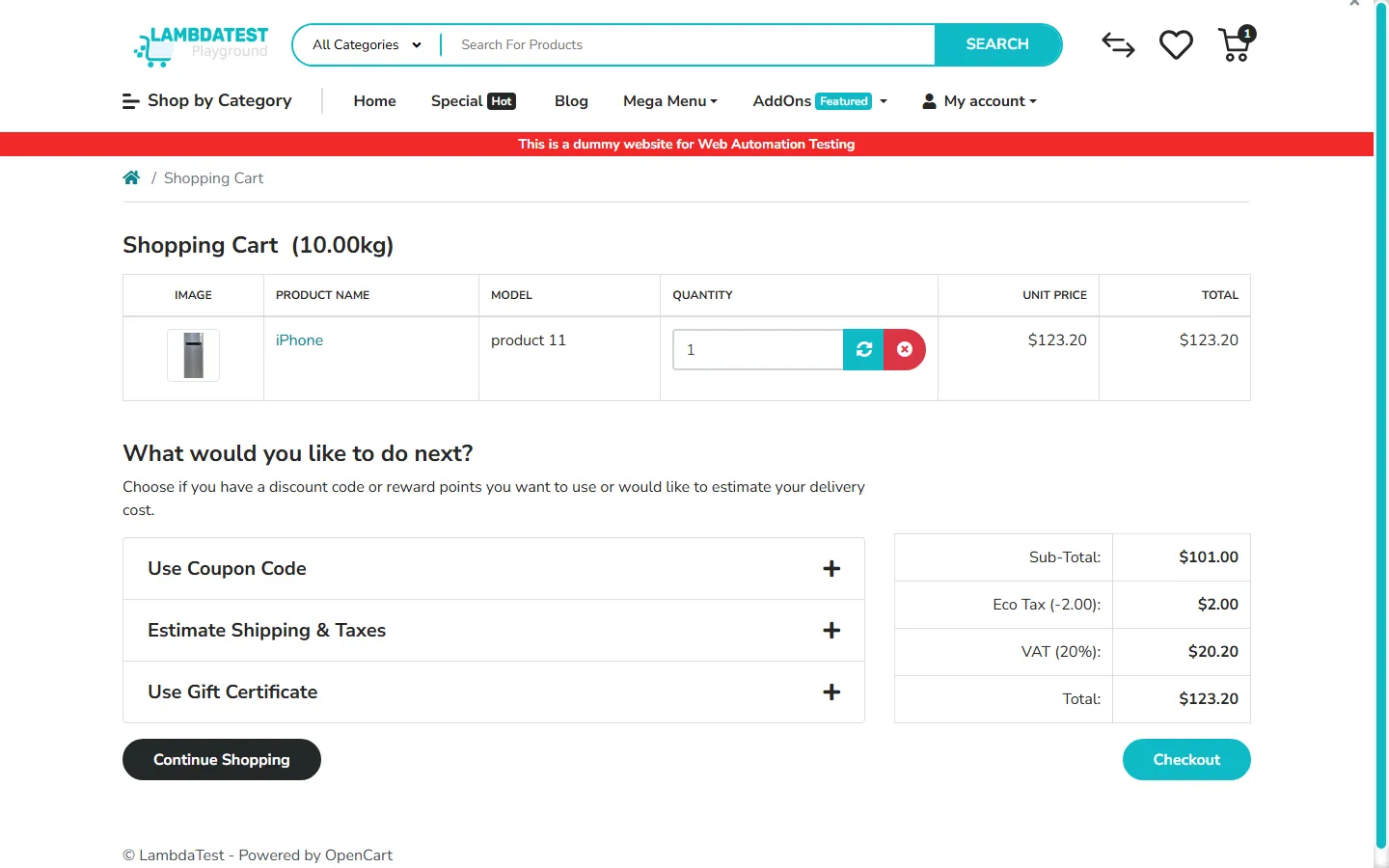
The script below is the first regression test every store needs: open a product, add it to the cart, and prove the cart shows the same product at the same price. It runs against the Ecommerce Playground, a public demo store built for this kind of practice, and it executes on the TestMu AI cloud so the same file can later cover the browser matrix by changing only the capabilities.
const { chromium } = require('playwright');
const assert = require('node:assert/strict');

const capabilities = {
  browserName: 'Chrome',
  browserVersion: 'latest',
  'LT:Options': {
    platform: 'Windows 11',
    build: 'Ecommerce Testing Guide',
    name: 'Add iPhone to cart and verify price',
    user: process.env.LT_USERNAME,
    accessKey: process.env.LT_ACCESS_KEY,
    network: true,
    video: true,
    console: true,
  },
};

const store = 'https://ecommerce-playground.lambdatest.io/index.php';

(async () => {
  const browser = await chromium.connect(
    'wss://cdp.lambdatest.com/playwright?capabilities=' +
      encodeURIComponent(JSON.stringify(capabilities))
  );
  const page = await browser.newPage();
  let status = 'failed';
  let remark = '';

  try {
    // Product page: read the name and price the shopper sees
    await page.goto(store + '?route=product/product&product_id=40');
    const name = (await page.locator('h1').first().textContent()).trim();
    const price = (await page.locator('h3.price-new').first().textContent()).trim();

    // Add to cart from the product form (the playground theme scopes it under #entry_216842)
    await page.locator('#entry_216842 button.btn-cart').click();
    await page.waitForTimeout(2000);

    // Cart page: the same product must appear at the same price
    await page.goto(store + '?route=checkout/cart');
    const cart = await page.locator('#content').innerText();
    assert.ok(cart.includes(name), 'product name missing from cart');
    assert.ok(cart.includes(price), 'cart price differs from product page');

    status = 'passed';
    remark = name + ' in cart at ' + price;
    console.log('PASS:', remark);
  } catch (error) {
    remark = error.message;
    console.log('FAIL:', remark);
  } finally {
    // Report the verdict to the TestMu AI dashboard, then end the session
    await page.evaluate(() => {}, 'lambdatest_action: ' + JSON.stringify({
      action: 'setTestStatus',
      arguments: { status, remark },
    }));
    await browser.close();
  }
})();
This script was run on the TestMu AI grid on October 16, 2026, while the guide was written. The console line and the session record returned by the automation API afterwards:
PASS: iPhone in cart at $123.20

test_id:     DA-WIN-17458-1792159111289216789QAF
build_name:  Ecommerce Testing Guide
name:        Add iPhone to cart and verify price
browser:     chrome 155.0
platform:    win11
status_ind:  passed
duration:    12 s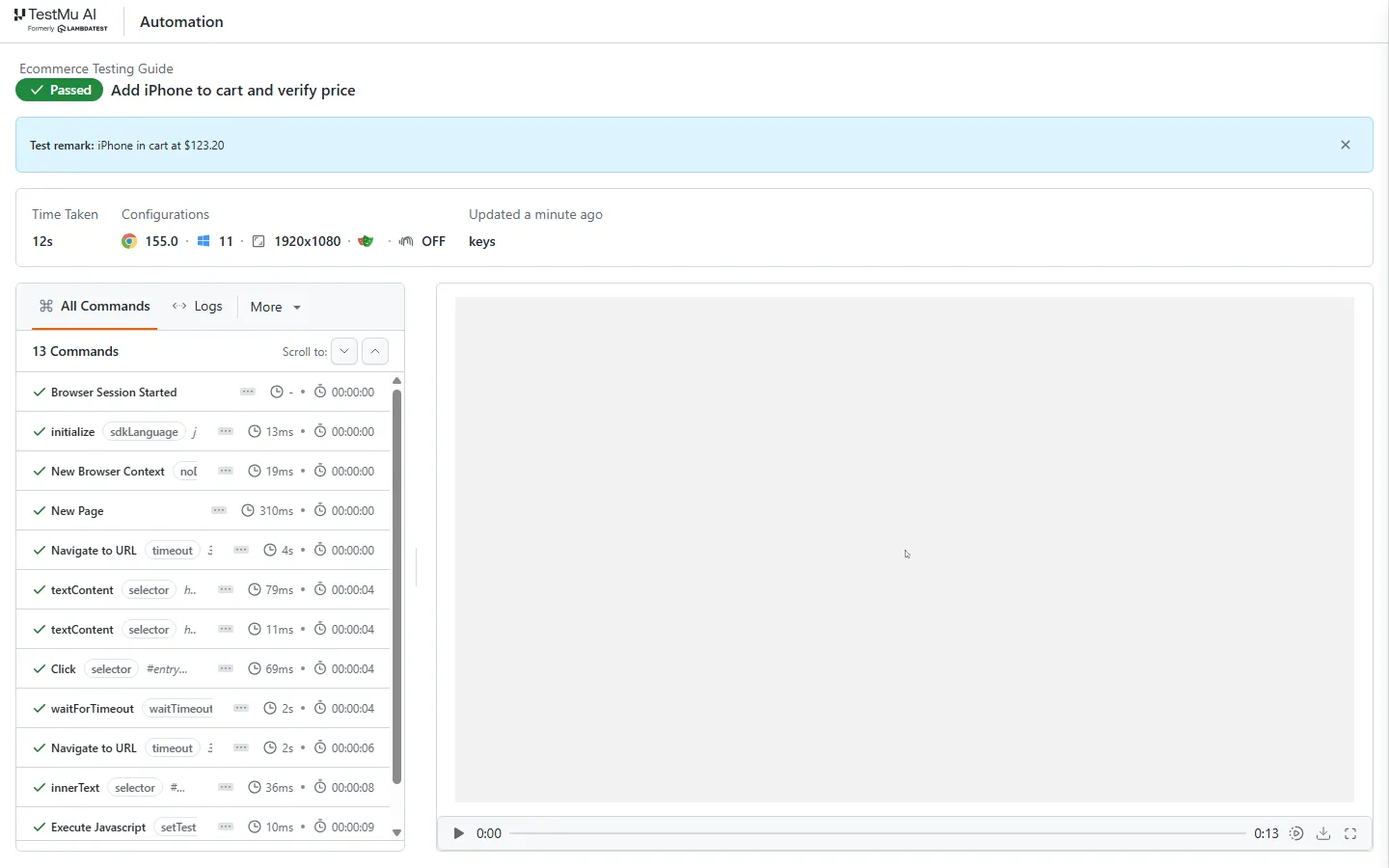
To cover the matrix, keep the test and vary the capabilities: Safari on macOS, a Pixel or iPhone from the real device cloud, a 3G network profile for the checkout step. The Playwright tutorial covers the framework itself, and the same flow ports to Selenium testing stacks in Java or Python.
For teams without automation engineers, KaneAI authors the same test from a plain-English prompt such as "Log in, add the first product to cart, and verify the cart total updates", resolves elements by intent instead of selectors, self-heals steps when the storefront's markup changes, and exports the result to Selenium, Playwright, Cypress, or Appium so the team keeps ownership of the code. The KaneAI getting started guide covers the first run.
Anton Angelov's walkthrough on the TestMu AI channel shows the same approach with Selenium and Java, including timezone, network speed, and geolocation checks on a cloud grid.

Ecommerce Testing Checklist
The checklist groups the checks by cadence so nothing waits for a release that only ships twice a year.
Before every release
- Guest and registered checkout pass on the top browser and device combinations from analytics.
- Cart totals, tax, shipping, and coupons match expected values to the cent.
- Approved, declined, and authentication-challenged sandbox payments show the right outcome and message.
- Order confirmation page and email agree with the cart.
- Search, filters, and product pages pass on mobile viewports.
- Visual baselines for the product grid, product page, cart, and checkout are reviewed, not auto-approved.
- No console errors or failed network calls during the funnel.
- Accessibility scan on the checkout reports no new Level A or AA failures.
Before a sale event
- Load test checkout and search at the expected peak with a safety margin; record p95 latency and error rate.
- Promotional pricing, countdowns, and stock limits are verified in the staging store with the event's data.
- Inventory race conditions are tested with concurrent purchases of the last unit.
- Payment gateway and tax service rate limits are confirmed with the vendors.
- Rollback and feature-flag paths are rehearsed.
On a recurring schedule
- Security scan of authentication, account, checkout, and admin surfaces against the OWASP Top 10.
- Full accessibility audit of the funnel with a screen reader, not only an automated scan.
- Browser and device matrix refreshed from the latest analytics.
- Expired test cards, coupons, and sandbox credentials rotated.
Ecommerce Testing Tools
Tools map to the test types rather than the other way round. The table pairs each need with widely used open-source options and the TestMu AI capability that runs it at scale; the pairing does not rank them.
| Need | Open-source options | On TestMu AI |
|---|---|---|
| Browser automation | Playwright, Selenium, Cypress | The same scripts across 3,000+ browser and OS combinations, orchestrated by HyperExecute |
| Mobile checkout | Appium, Espresso, XCUITest | 10,000+ real Android and iOS devices with network and geolocation profiles |
| Load and performance | k6, JMeter, Gatling | Run from CI against the staging store before each sale event |
| Security scanning | OWASP ZAP | Schedule scans in CI and validate findings by hand |
| Accessibility | axe-core | Accessibility testing suite built on axe-core with WCAG, ADA, and Section 508 checks |
| Visual regression | BackstopJS, Playwright screenshot assertions | SmartUI visual regression with baselines per browser and viewport |
| Authoring without code | Record-and-replay tools | KaneAI natural-language tests with export to Selenium, Playwright, Cypress, or Appium |
| API and integration | Postman with Newman, REST Assured | Run in the same CI stage as the UI suite so seam failures surface together |
Two earlier posts on this site go deeper on the automation side: impact-driven automation testing for ecommerce websites covers how to prioritize what to automate, and digital testing for ecommerce web and mobile apps covers the mobile app side of the same funnel.

Common Challenges in Ecommerce Testing
The same problems appear in most ecommerce test suites, and each has a standard fix.
- Test data drifts - Catalog, prices, and coupons change daily, so yesterday's expected totals fail today. Seed a dedicated test catalog through the admin API at the start of each run instead of relying on live products.
- Third-party sandboxes misbehave - Gateway and tax sandboxes go down or rate-limit. Stub them for the functional suite and reserve the real sandboxes for a smaller payment suite that runs on a schedule.
- Device and browser fragmentation - The matrix is larger than any local lab. Weight it by traffic, run it on a cloud grid, and treat the top ten combinations as blocking while the rest run nightly.
- Flaky checkout tests - Timing on payment redirects and shipping calculators causes intermittent failures. Wait for the specific element or network response that signals the step is done, never for a fixed delay.
- Staging stores behind a firewall - Cloud browsers cannot reach a private staging URL directly. A secure tunnel such as the one described in the locally hosted pages documentation connects them without exposing the store.
- Peak-season pressure - Load tests get skipped when the calendar is tight. Put the load test on the release calendar the day the sale date is set, with the peak-hour model from last year as the starting point.
Conclusion
Start with the guest checkout test: copy the Playwright script above, point it at your staging store, and run it on the browsers and devices your analytics rank highest using TestMu AI's Automation Cloud. Then add the payment edge cases from the test case table and put the next sale's load test on the calendar. The HyperExecute getting started guide shows how to run the full matrix in parallel once the suite grows.
Author

Harshit Paul
Blogs: 95


Harshit Paul is Director of Product Marketing at TestMu AI, with over 8 years of experience in product and growth marketing for developer and QA tools, leading the Agentic AI in Quality Engineering space. He has authored 80+ technical articles for TestMu AI on software testing and automation, and hosted webinars on Selenium, automation testing, browser compatibility, DevOps, and continuous testing. He has led go-to-market and technical marketing initiatives across software testing products, contributing to SEO, content strategy, and developer marketing. He began his career as a certified Salesforce developer at Wipro Technologies, where he worked for 2 years before moving into marketing. Harshit holds a degree in computer programming from Vivekananda Institute of Professional Studies.
Reviewer

Srinivasan Sekar
Reviewer
Srinivasan Sekar is Director of Engineering at TestMu AI, where he leads engineering and open-source initiatives behind the Selenium and Appium automation grid and owns TestMu AI's MCP Server. A committer to Appium and a contributor to Selenium, WebdriverIO, Taiko, and AppiumTestDistribution, he brings over 15 years of experience in quality engineering and open-source technologies. He is the author of the Apress book 'The MCP Standard: A Developer's Guide to Building Universal AI Tools with the Model Context Protocol,' a Certified Kubernetes and Cloud Native Associate, and an international conference speaker. Before TestMu AI he spent over eight years at Thoughtworks as a Principal Consultant and Quality Architect. Srinivasan holds a B.Tech in Information Technology from Anna University.


Ecommerce Testing FAQs
Did you find this page helpful?
More Related Blogs

TestMu AI forEnterprise
Get access to solutions built on Enterprise
grade security, privacy, & compliance
- Advanced access controls
- Advanced data retention rules
- Advanced Local Testing
- Premium Support options
- Early access to beta features
- Private Slack Channel
- Unlimited Manual Accessibility DevTools Tests