

Power Your Software Testing with AI Agents and Cloud
The Native AI-Agentic Cloud Platform to Supercharge Quality Engineering. Test Intelligently and Ship Faster.


- TestMu AI (Formerly LambdaTest)
- /
- Blog
- /
- Mobile App Localization Testing: Process, Checklist, Tools
Mobile App Localization Testing: Process, Checklist, and Tools
Mobile app localization testing checks translated text, date and currency formats, RTL layouts, and text expansion on real devices, with a real test.
Last Updated on:
On This Page
- What is App Localization?
- Why is App Localization Important?
- Is App Localization the Same as Internationalization?
- App Localization Failures that led to Negative Brand Perception
- What are the Common App Localization Challenges?
- What are the Elements You Should Consider while Localizing your App?
- How to Create an App Localization Strategy?
- How to Localize your Mobile App?
- How to Perform Localization Testing?
- What does the Localization Testing Lifecycle look like?
- AI Agents in Localization Testing
- How can Localization Testing Make your App Stand Out?
- Localization Testing Best Practices
- App Localization is the key to business success!
App localization testing verifies that a mobile app behaves correctly in every language and region it ships to, covering translated strings, date and currency formats, right-to-left layouts, and locale-specific input.
The work runs as a six-step lifecycle: analysis, translation, review, bug resolution, integration, and product launch, so defects such as truncated strings or a wrong currency symbol are caught before release.
TL;DR
- App localization adapts a mobile app's text, date and time formats, currency, names, numbers, and imagery to one target region.
- Internationalization prepares an app to support any locale, while localization adapts an internationalized app to one specific language and market.
- Localization testing runs as six steps: analysis, translation, review, bug resolution, integration, and product launch.
- Publishing raw machine translation without native-speaker review is the most common cause of public localization failures.
- Text expansion, right-to-left layouts, and locale-specific input fields break on small screens, so localization testing needs real devices per region.
- Pseudolocalization exposes truncated strings and hardcoded text before translation starts, which cuts rework later in the release cycle.
What is App Localization?
App localization is adapting a mobile application for different languages and regions. It involves translating text, adjusting date formats, and modifying content to suit the cultural preferences of specific target audiences.
For example if you use emojis to show an action or describe a function- you should keep in mind that while these emojis could be harmless in the U.S, but could actually be very offensive in another country. Regardless, these can be huge factors in the success of your app abroad.
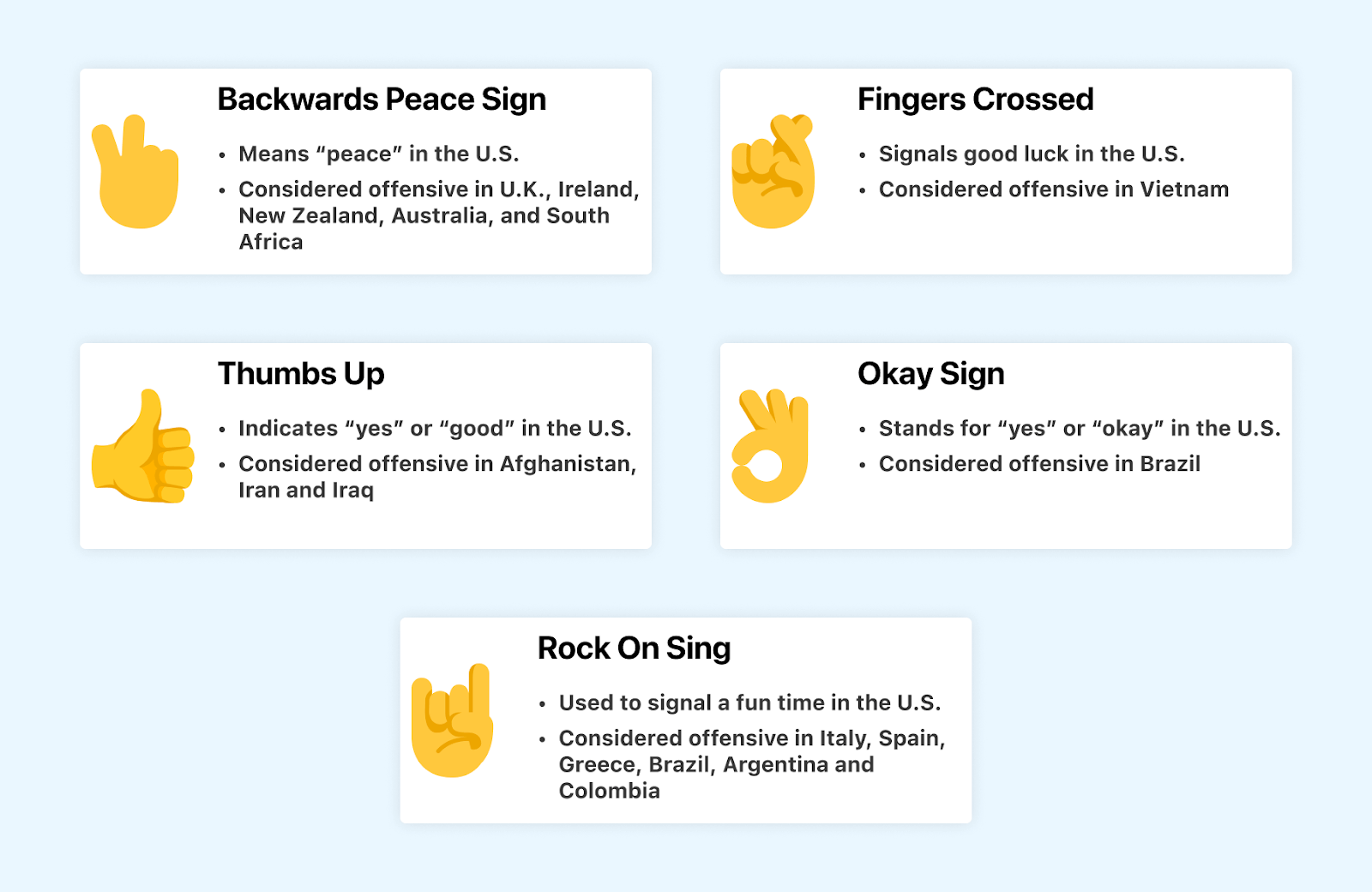
Key Takeaway: App localization adapts a mobile app's text, date formats, and visual content to the language and cultural expectations of a specific region.
Why is App Localization Important?
Neglecting app localization may lead to missed opportunities in markets where users expect a native-language interface. Some of the other potential benefits include:
- Unlocking higher growth market with a localized app - App localization is a key strategy for expanding into diverse markets. By customizing apps to different languages and cultures, businesses can access high-growth markets effectively.. Beyond market reach, effective localization ensures a consistent and user-friendly experience globally. For example, the language learning app, Duolingo was successfully able to localize their app by tailoring its content to meet the specific language learning needs of users from various regions.
- Boosting app searchability through different search engines - Enhancing your app's searchability is a key advantage of localization. It increases the likelihood of your app appearing under location filters when users search for similar products on app marketplaces. Users are more inclined to download a localized version of your app when it is presented in their language or tailored to their country, compared to encountering a default English version available worldwide.
- Driving more app downloads in the targeted geography - When you tailor your app to the language, culture, and preferences of a specific target market, you create a more engaging and user-friendly experience. Leading to higher download rates.
- Better app retention and increased engagement - Enhancing the user experience on a global scale is crucial for widespread app engagement and usability. A lack of consistency in user experience can negatively affect your overall performance. Despite initial downloads, users are quick to uninstall apps that provide a subpar user experience or fail to meet their linguistic requirements.
- Positive Impact on the Revenue Improving the Bottom Line - Research from CSA Research shows that business buyers are willing to pay more for a product adapted to their language and market, and that consumers report the same preference at a lower rate. This highlights that buyers not only consider purchasing the product but are also willing to invest more for an enhanced experience, leading to higher revenue and customer satisfaction rates.
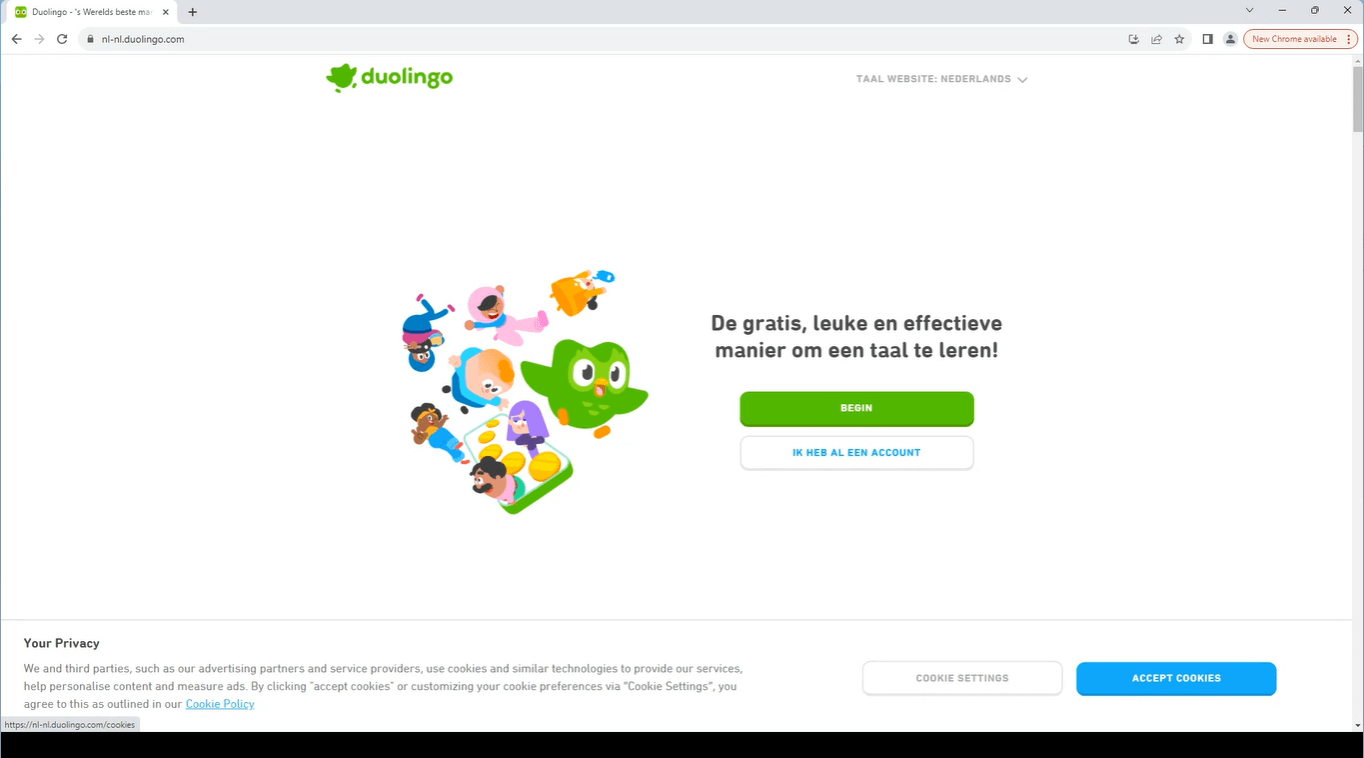
German Version of the App
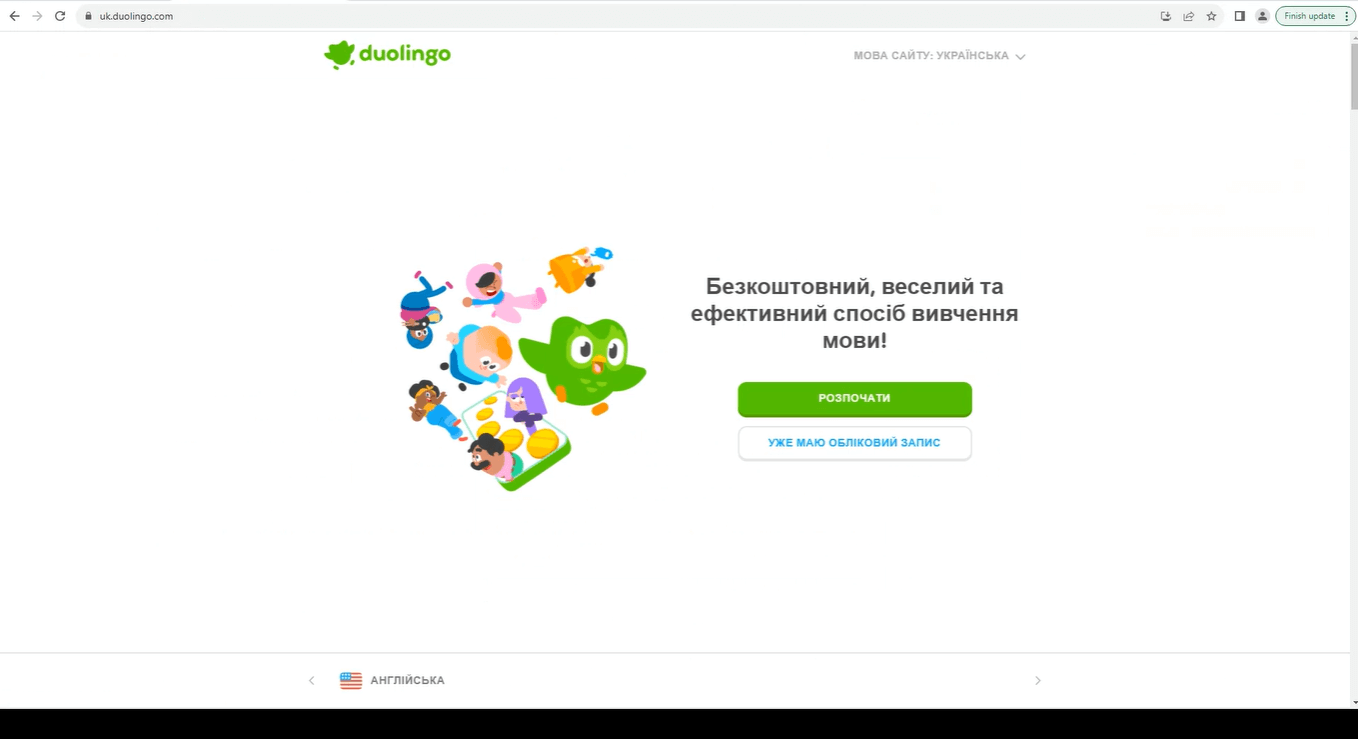
Turkish Version of the App
Moreover, a well-received localized version contributes to higher rankings in app stores. Achieving a high rating is one effective method to boost your app's visibility, emphasizing the importance of offering a localized experience.
For example- In targeting the Japanese market, a gaming app originally in English undergoes app localization. This involves translating the interface, instructions, and promotional content into Japanese, adding elements that match Japanese gaming preferences. As a result, the app becomes more relatable and enjoyable for Japanese users. This tailored approach significantly boosts downloads in Japan, as users find the app culturally relevant and accessible in their language.
Neglecting globalization puts you at risk of falling behind competitors. As competitors increasingly adopt such technologies in response to growing consumer demand, offering localized options sets you apart from the competition.
Key Takeaway: Localized apps rank higher in regional app stores and keep users who would otherwise uninstall an English-only interface.
Is App Localization the Same as Internationalization?
Though the two terms are often used synonymously, there is actually a difference between app internationalization and localization. In simpler terms, localization involves adapting app content for a specific language or region, including website, app, images, video, and more. Internationalization, on the other hand, focuses on creating a globally adaptable product from the start. The aim of localizing mobile apps is to ensure a natural user experience in their native language, ultimately boosting user affinity, downloads, and revenue.
| Aspect | Localization | Internationalization |
|---|---|---|
| Purpose | Adapts app for specific culture | Prepares app for global use |
| Timing | After app development | During initial development |
| Content Modification | Adjusts text, images and cultural elements | Focuses on structural changes for language support |
| Target | Specific regions or languages | General language adaptability |
| Dependency | Requires an internationalized app | Can occur independently |
Read more: Localization Testing Guide
Key Takeaway: Internationalization builds an app that can support any locale, while localization adapts that internationalized app to one specific language and market.
App Localization Failures that led to Negative Brand Perception
As we discussed, when expanding your brand into foreign markets, it's important to put in the necessary research and effort to truly understand the culture of your target audience. Let's have a look at some real world examples showcasing how app localization failures impacted these brands:
- Amazon's Hilarious Blunders in the Swedish Launch - In 2020, Amazon faced criticism during the launch of its Swedish website due to translation errors. The company mistakenly used the Argentinian flag instead of the Swedish one and didn't fix machine translations from English to Swedish. This resulted in product descriptions filled with mistranslations, some even turning amusing or inappropriate, like replacing "rooster" with a Swedish term for private parts and labeling a frying pan as a "product for women."
- Not Quite Right- Brave's Spanish UI Translation - Brave, a web browser known for its privacy features, shipped a jumbled Spanish translation in its user interface. Various elements displayed in both English and Spanish, and many translated parts had not been checked for errors. For instance, "Cerca" (meaning "near") was used instead of "Cerrar" as a caption for closing a tab.
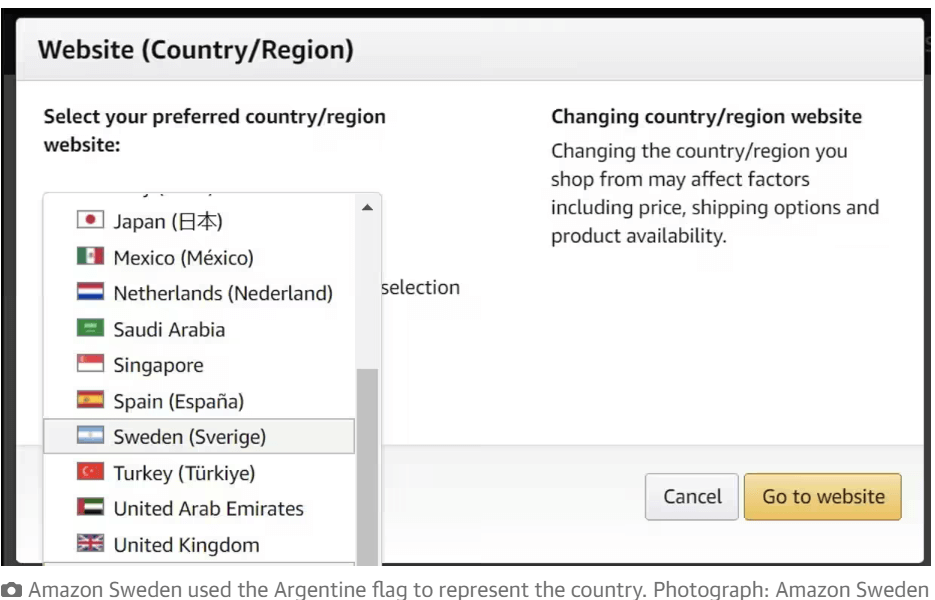
Source: Image
Key Takeaway: Publishing raw machine translation without native-speaker review caused the public localization failures at Amazon Sweden and in the Brave browser Spanish interface.
What are the Common App Localization Challenges?
Having discussed the need of app localization, it's crucial to understand the challenges that you might face before or during the process and how to overcome them:
- Tailored Experience Gaps in Localized Versions - The most common localization challenge involves the inability of localized versions to fully adapt to the specific cultural and user experience expectations of different regions. Technical constraints could limit the app's ability to dynamically adjust content presentation, resulting in a suboptimal user experience for the new audience.
- Overlooking Global Expansion Impacting Costs and Timelines - Commonly software or app developers overlook the importance of designing and coding apps with future global expansion in mind, neglecting localization until it becomes a last-minute concern. This oversight can lead to complications during app adaptation for new markets, resulting in issues that may be challenging and costly to rectify.
- Localization Bugs Leading to Bad App Reputation at Release - Many localized apps face problems at release due to localization errors, such as mistranslations or incomprehensible app strings, rendering the app unusable. These issues can harm the app's reputation, drive users away, and lead to negative reviews.
- Localization Falling Behind Development in Fast-paced Workflows - In fast-paced development workflows, if localization operates separately from the agile framework, it may lag behind app development. This delay can increase costs, hinder app release, and impede developers from working on new features while waiting for translation.
- Workflow Inefficiencies due to Limited App Localization Tools - Using the wrong app web or mobile app localization tools can lead to workflow inefficiencies, prolonged email exchanges, difficulties in tracking app strings, and longer release times. Inadequate tools contribute to undetected mistakes and compromised localization quality.
Solution: Implement a robust system that allows for dynamic adjustments in the app's design and content based on the cultural preferences of each region. This may involve creating modular components that can be easily customized for different markets without compromising the app's overall functionality. Conduct thorough technical assessments to ensure that the app's architecture supports these adaptive features for a tailored and immersive user experience across diverse locales.
Solution: To minimize costs and speed up app localization, it's crucial to integrate internationalization into the early stages of app development. Designing the app to support multiple languages from the beginning allows for more efficient management of localization efforts and costs.
Solution: To prevent localization errors at app release, invest in testing and quality assurance for each language. If testing every single element is not feasible, consider using pseudolocalization tools to identify issues before the translation process. Various pseudolocalization tools on platforms like GitHub can aid in testing usability, readability, and other key aspects.
Solution: To prevent localization from falling behind, establish a localization process within the agile app development framework. Involve localizers in development teams from the start, fostering collaboration, knowledge sharing, and regular feedback loops. Breaking down silos and promoting constant communication ensures an app that's localized .
Solution: Adopting a dedicated app localization platform designed with developers, product teams, and localizers in mind can help in solving this challenge. A reliable platform automates data collection, centralizes localization projects, manages translations efficiently, integrates with development tools, and simplifies communication to enhance overall workflow.
Key Takeaway: The five recurring app localization challenges are shallow cultural adaptation, late planning, release-time translation bugs, localization lagging agile development, and inadequate tooling.
What are the Elements You Should Consider while Localizing your App?
Localizing your app involves adapting various elements to suit the preferences and cultural nuances of specific regions. Here are some essential elements that should be considered for effective app localization:
- Language - Often it is observed that sometimes even the best apps can't adapt to their users' native language. To get this right, developers solely rely on translation tools like Google Translate but they might not capture the nuances correctly. Instead, an easier way is to involve native speakers to ensure accurate translations.Consider cultural differences and unique phrases, like proverbs, that might not have direct equivalents in other languages.differences and unique phrases, like proverbs, that might not have direct equivalents in other languages. For example:
- Keywords - Keywords play a crucial role when it comes to SEO and ASO and their effectiveness varies by country. Conduct thorough research to identify region-specific keyword volumes and incorporate these relevant keywords into your app listings. If prioritizing localization, focus on adapting app store pages for countries with the highest download volumes. Tailoring unique pages for specific regions not only encourages user engagement but also is a valuable indicator for prioritizing more comprehensive localization efforts in those countries.
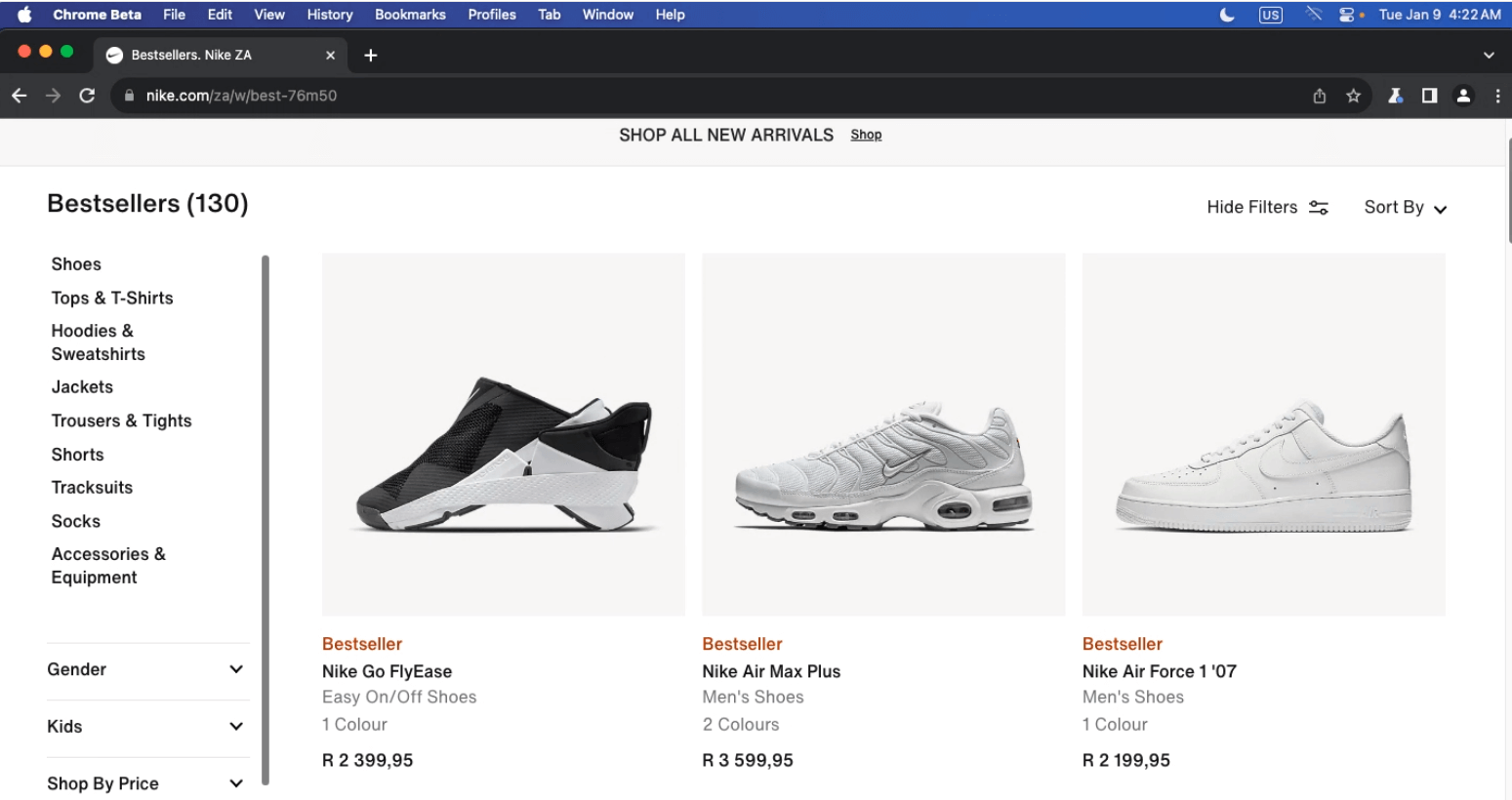
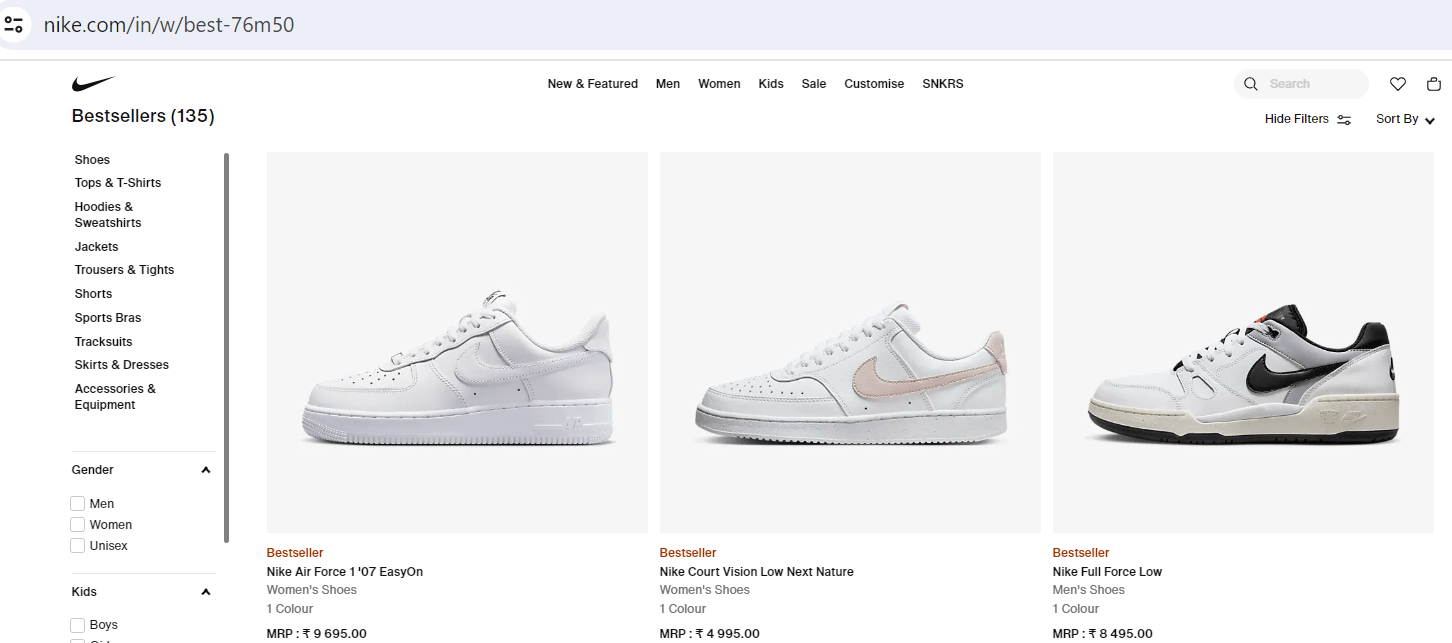
- Currency - Considering currency localization in mobile apps is crucial, especially for apps that involve transactions, payments, or financial interactions. For example- In USA the currency symbol is denoted by $ while in South Africa it is R or ZAR and in India it is denoted by ₹ or Rs.
- Colors - In different cultures, each color has a different meaning. While as a developer you may think that it's just a color and how it could offend someone, it's possible that folks may perceive your app negatively just because of the color scheme you picked. Here are some colors that depict different meanings in every culture or country. Keep in mind that these interpretations can vary within cultures, and individual preferences also play a role. It's essential to consider cultural nuances and do specific research for the target audience you are catering to.
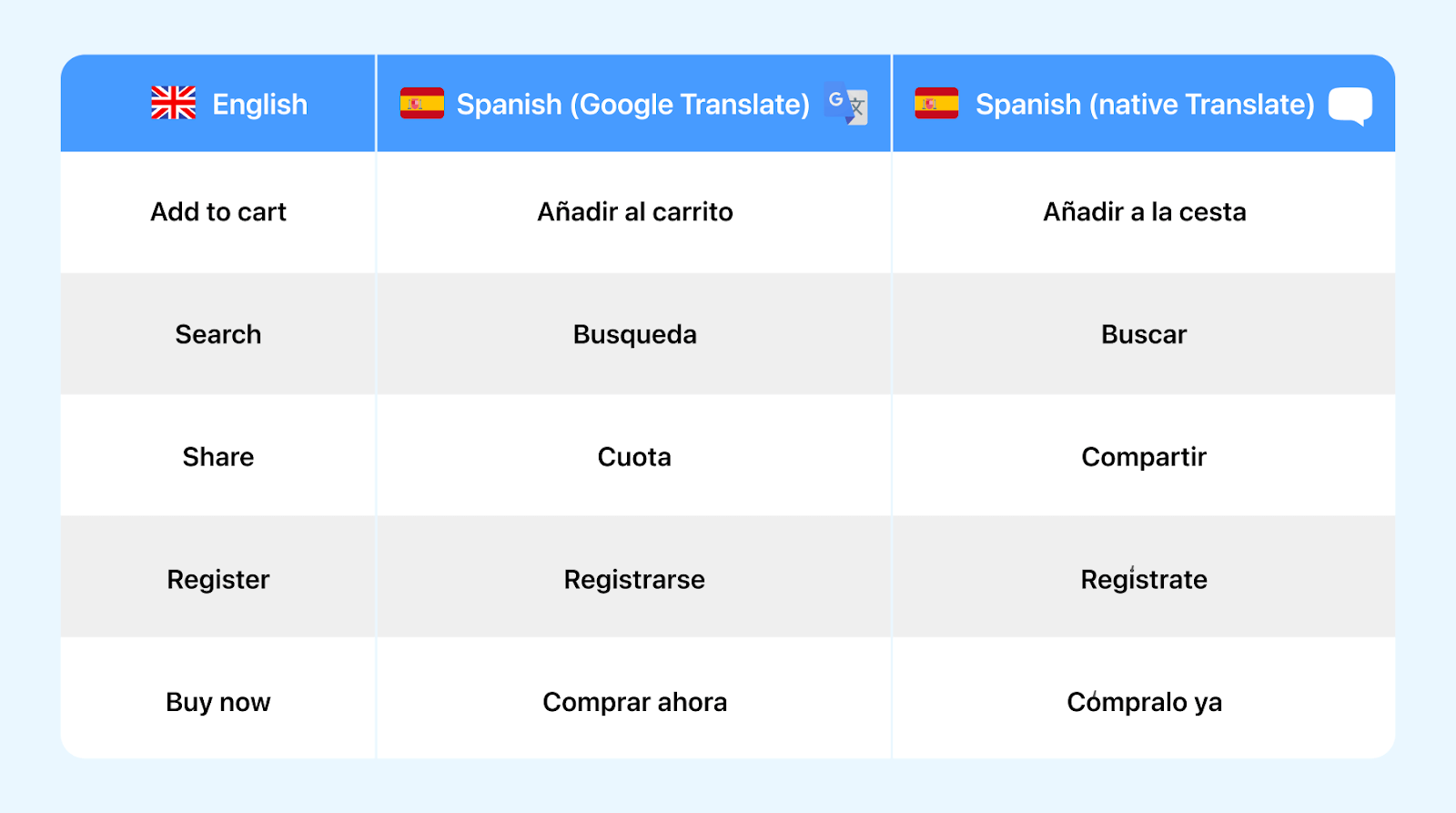
For example: you have a language-learning app, and you're localizing it for both English-speaking and Spanish-speaking users. In the English version, you might focus on keywords like "language learning," "vocabulary," and "English lessons." However, for the Spanish version, you'd need to research and incorporate keywords like "aprendizaje de idiomas," "vocabulario," and "clases de español." By tailoring your keywords to each language, you enhance the visibility of your app in specific regions, making it more likely for users to find and download it.
| Culture | Western Interpretation | Eastern Interpretation | Other Culture Interpretations |
|---|---|---|---|
| Red | Love, Passion | Good Fortune, Happiness | Warning (South Africa) |
| Blue | Calm, Trust | Wisdom, Immortality | Mourning (Iran) |
| Green | Health, Nature | Infidelity (Some culture) | Color of Islam (Saudi Arabia) |
| Yellow | Happiness, Energy | Sacred, Imperial | Mourning (Egypt) |
| White | Purity, Innocence | Mourning (Some cultures) | Death (China) |
| Black | Mourning, Elegance | Power, Sophistication | Death (Some Middle Eastern Countries) |
| Purple | Royalty, Luxury | Wealth, Prosperity | Mourning (Brazil) |
| Orange | Energy, Enthusiasm | Spirituality | Mourning (Egypt) |
Key Takeaway: A complete localization pass covers language, app store keywords, imagery, date and time formats, currency, name and number formats, and the dominant device platform per market.
How to Create an App Localization Strategy?
To avoid the common challenges that may arise while localizing your mobile app, you should be ready with a strategy that can include these basic steps:
- Define the Target Market
- Start by choosing the language you want to translate your app into.
- Prioritize based on actual usage data from app analytics, ensuring a targeted approach.
- Study the Feedback
- Analyze feedback from customer support and app reviews to identify potential localization opportunities.
- Look beyond visitor data to understand demographics and usage patterns in selected countries.
- Consider Customer Requests
- While customer requests are important, carefully evaluate them, especially if they involve targeting a new language or region.
- Choose requests that align with your overall strategy and potential user base.
- Do Market and Competitor Research
- Explore competitors' strategies and market research to identify potential new markets.
- Understand the unique aspects of each market, considering the challenges and benefits of localization.
- Focus on One Language at a Time
- Plan your budget and approach, focusing on one language for localization at a time.
- This staged approach ensures quality and precision in the development and implementation of changes.
- Cover All Available Locales
- If your app is already in English (US), consider easy translations to English (UK) to reach additional markets.
- Evaluate options carefully, considering the benefits of each locale for expansion.
- Find a Great Translation Service
- Opt for professional translation services like OneSky, Wordbee, or PhraseApp to ensure accurate and culturally sensitive translations.
- Native speakers are crucial for quality translations that resonate with users.
Key Takeaway: An app localization strategy starts by defining the target market from real app analytics data rather than assumption.
How to Localize your Mobile App?
Once you have come up with the right app localization strategy, the next step is to execute the process:
- Prioritize Localization by Geography -
Consider prioritizing translations based on target continents or regions. Address the localization needs of specific geographical areas first to optimize the impact of your app in those markets.
- Create an XML File for Translation -
Prepare an XML file encompassing all app strings for professional translation. Including comments for context aids in ensuring a smooth translation process, facilitating accurate and meaningful translations.
- Translate Non-String Content -
In addition to strings, extend translation efforts to cover diverse elements such as text, images, video, audio, date format, numbers, and currency. Stay vigilant for potential translation challenges and uphold a professional standard throughout the process.
- Translate App Store Content -
Localize the content on your Google Play or App Store page to offer users a seamless experience. By presenting app information in their native language, you minimize confusion and enhance user engagement.
- Implement the Finished Translation -
Thoroughly review all translations before implementation to prevent errors. Insert the translated XML file into your app, and proceed with testing to validate the effectiveness of the localization.
- Internally Test Your Localized App -
Conduct smoke testing to assess functionality without language comprehension. Ensure that the localization doesn't adversely affect app performance, maintaining a positive user experience.
- Make the Translation Available to Users -
Release the translated app to users who speak the language. Act on gathered feedback and data to promptly address any issues or implement improvements, ensuring a successful localized app launch.
Key Takeaway: Localizing a mobile app means extracting every string into a translation file, translating non-string assets and app store listings, then smoke testing the localized build before release.
How to Perform Localization Testing?
Since we've already discussed how to perform app localization and what elements should be localized, localization testing will ensure that a software or app functions in different regions by validating language translations, cultural adaptations, and regional settings. It involves testing elements to guarantee a smooth user experience in diverse locales. This process aims to identify and rectify any issues related to the specific requirements of each target region, ensuring the product aligns with local expectations.
Run Localization Testing on Real Devices and Browsers
Now let's discuss how can you go ahead with the geolocation testing of your mobile and web apps:
- Start with a Test Plan - Begin by outlining the objectives of the localization testing, specifying goals like ensuring accurate translations and cultural appropriateness. Describe the test environment, including language settings and device types. Define test cases, expected results, and list necessary resources such as translation services or physical devices.
- Simulate the UX - Whether using emulators or physical devices, recreate the user's experience by testing the website or app in their native language, location, device type, operating system, and browser preference. This ensures a realistic evaluation of the site's functionality and appearance.
- Initiate High Level Testing - Conduct regional, linguistic, and UI testing, focusing on eliminating translation errors, ensuring cultural appropriateness, and confirming the adapted layout. Verify that the translated content maintains the original message, fits the layout, and upholds the brand personality for the new audience.
- Implement Functionality Testing - Evaluate the website's or the app's functionality by checking buttons, hyperlinks, and page loading across supported languages. Ensure a smooth user journey, identifying and addressing any issues that may arise during the website interaction or checkout process.
- Documenting the Findings - Compile all testing observations in a consolidated report to share with translators, developers, and relevant team members. This ensures prompt identification and resolution of issues discovered during testing.
In order to fasttrack your website and app localization testing you can opt for a cloud-based test execution platform like TestMu AI to run localized tests on 3000+ real browsers and devices.
Key Takeaway: Localization testing runs as a test plan, a simulated locale environment, regional and linguistic checks, functional checks, and a documented defect report for translators and developers.
What a localization test catches - I rendered the same "Add to cart" button, a price of 1,234.50 euros, and the date September 30, 2026 in five locales in Chrome 154 on the TestMu AI cloud, at a 390-pixel phone width with a 116-pixel-wide button:
| Locale | Button label | Label width in a 116 px button | Price | Short date |
|---|---|---|---|---|
| en-US | Add to cart | 116 px (fits) | €1,234.50 | 9/30/26 |
| de-DE | In den Warenkorb legen | 186 px (cut off) | 1.234,50 € | 30.09.26 |
| fr-FR | Ajouter au panier | 138 px (cut off) | 1 234,50 € | 30/09/2026 |
| ja-JP | カートに追加 | 116 px (fits) | €1,234.50 | 2026/09/30 |
| ar-SA | أضف إلى السلة | 116 px (fits) | ١٬٢٣٤٫٥٠ € | ٣٠/٩/٢٠٢٦ |
Two of the five labels no longer fit: the German label needs 186 pixels, 60% more than the English one, and the French label needs 138. The formats differ too: the same price is written three different ways across English, German, and French, and Arabic uses Arabic-Indic digits and a right-to-left layout. None of these are translation errors, which is why localization testing checks rendered screens, not only translated strings.
What does the Localization Testing Lifecycle look like?
To make it easier to understand lets breakdown the localized testing into several small steps:
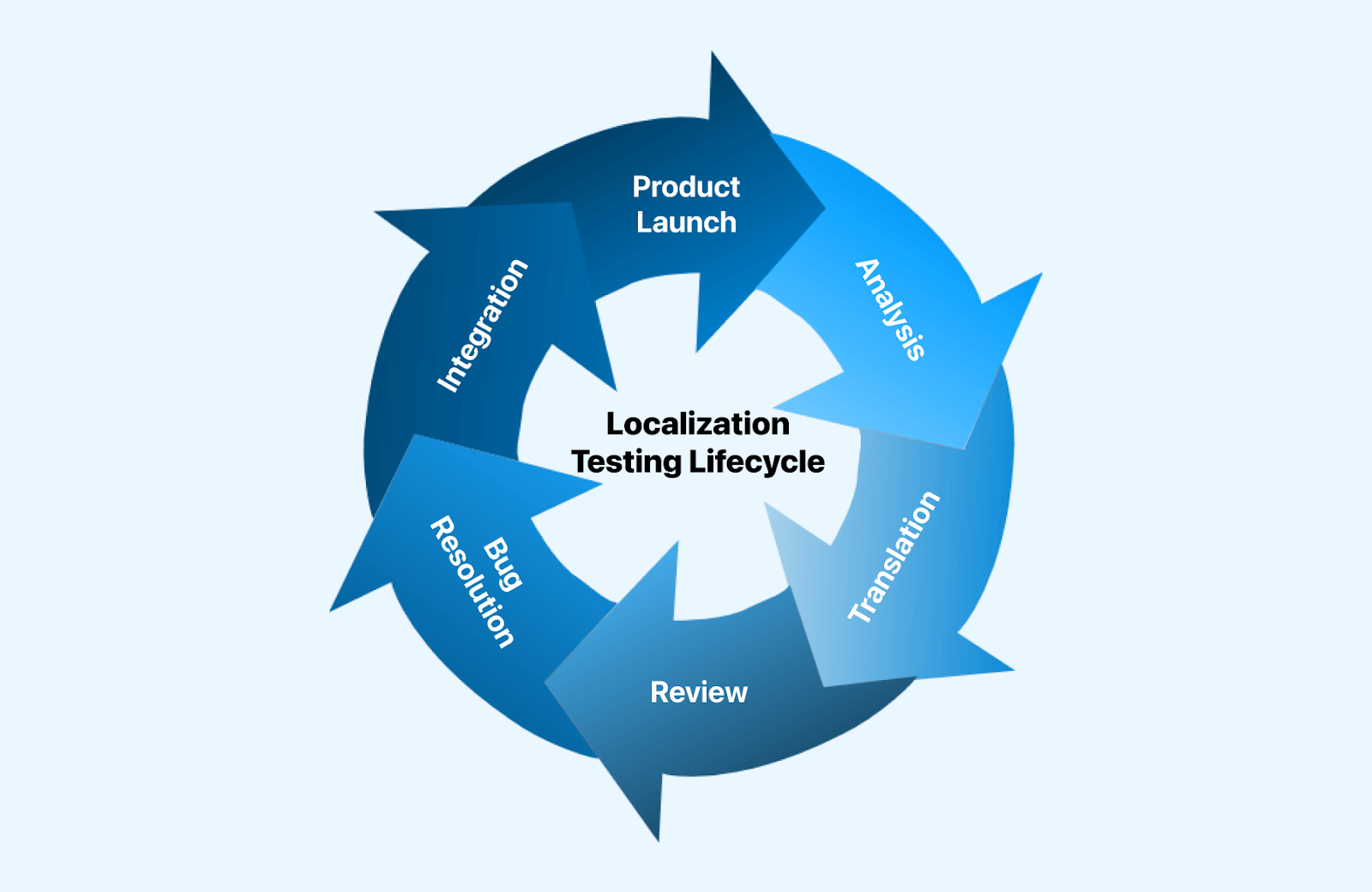
- Analysis - Assess the software's requirements and determine the extent of localization needed.
- Translation - Accurately translate content into the relevant local language(s).
- Review - Thoroughly examine and evaluate the localized content and user interface.
- Bug Resolution - Address and resolve any issues or bugs identified during the review.
- Integration - Seamlessly integrate the localized components into the software.
- Product Launch - Launch the localized product in the target market.
Key Takeaway: The localization testing lifecycle has six stages: analysis, translation, review, bug resolution, integration, and product launch.
How Do AI Agents Change App Localization Testing?
AI agents now run the repetitive half of app localization testing: generating locale test data, driving the app in each language, and flagging layout breaks. Native-speaker review still decides whether the meaning is right.
Six changes matter for teams that already run mobile app testing across many locales:
- LLM-assisted string review - a language model flags tone, register, and placeholder errors across thousands of translated strings in one pass, before a human reviewer sees them.
- Pseudolocalization in CI - an automated pseudolocalization step pads every string and swaps in accented characters, so truncation and hardcoded text surface before real translation starts.
- Agentic UI exploration - an agent opens every screen in each locale and reports where translated text overflows a button or a right-to-left layout mirrors incorrectly.
- Per-locale visual diffing - visual regression testing compares screenshots of the same screen across locales and catches clipped labels that a text-only assertion misses.
- Locale switching APIs - Xcode String Catalogs on iOS and the Android LocaleManager per-app language API let a test harness change locale at runtime instead of reinstalling the build.
- What agents still miss - an agent cannot judge whether an icon, a color, or an idiom is acceptable in a market, so cultural review stays a human task.
Key Takeaway: AI agents speed up app localization testing by generating locale test data and flagging layout breaks, but a native speaker still has to approve meaning and cultural fit.
How can Localization Testing Make your App Stand Out?
Some of the potential benefits of localization testing include:
- Market Expansion - Localizing a product enables its use by diverse regional users, enhancing overall user experience through language and cultural adaptation.
- Global Outreach - Broaden the product's reach to a wider audience across various regions, thereby expanding its potential market share.
- Regulatory Compliance - Ensures product adherence to local laws and regulations in targeted markets, minimizing the risk of legal complications.
- Competitive Edge - Attain a competitive advantage by offering a localized product, distinguishing the company from competitors lacking regional adaptations.
- Enhanced Communication - Mitigates the risk of misunderstandings or cultural insensitivity by localizing the product, safeguarding the company's reputation.
- Improved Testing - Localization testing improves the entire testing process by simplifying QA operations, saving time and money.

Key Takeaway: Localization testing delivers market expansion, regulatory compliance in each target country, and protection against culturally insensitive copy reaching users.
What are the Best Practices for Localization Testing?
Follow some of the best practices to implement the localization testing process of an international or multilingual website:
- Finding the Right Resources - Building a well-localized website or app doesn't happen overnight. It requires time to gather the needed resources and for marketing teams to research their diverse target audience. Understanding users is key for successful optimization and to achieve this human testers need to step into their shoes to design test cases accordingly.
- Early and frequent testing - Don't leave localization testing until the last minute. It's not just about translations- factors like text arrangement and product/service inclusions must be considered early in the development process. Expect that developers will need time to make necessary code edits. Combining human testing with automation, using tools like Selenium or Cypress, can help achieve a balance between speed and accuracy.
- Real devices and browser testing - Test your website or app on real devices and browsers. Device fragmentation is a concern, with thousands of devices globally accessing the internet. To ensure seamless performance, optimization for various configurations, viewports, and screen resolutions is essential.
Key Takeaway: The core localization testing best practices are researching the target audience early, testing localization continuously rather than at release, and validating on real devices and browsers.
Conclusion
Start with pseudolocalization to catch hardcoded strings and truncation early, then test each target locale on the devices your users in that region own. TestMu AI Real Device Cloud gives access to 10,000+ real Android and iOS devices, so you can check layouts, fonts, and locale settings on real hardware; the real device app testing guide covers the first session.
Author

Nishtha Gupta
Blogs: 6


Nishtha Gupta is a community contributor with 4+ years of experience in product marketing and content development across B2B SaaS and software testing platforms. She has worked extensively on product messaging, go-to-market strategy, and sales enablement at TestMu AI, creating content around testing platforms, customer use cases, and QA-focused solutions.
Reviewer

Mayank Bhola
Reviewer
Mayank Bhola is Co-Founder and Head of Products at TestMu AI (formerly LambdaTest), where he leads the entire product portfolio across KaneAI, Kane CLI, HyperExecute, SmartUI, the Real Device Cloud, Accessibility, and other software testing product lines. As an early Lead Architect he designed and built the company's flagship Tunnel technology from scratch, created the React-based automation platform, and architected the data-intensive pipelines and FAAS services that scale it. He brings more than 10 years of experience in software development and product engineering, with earlier roles as Head of Technology at Juggernaut Books and Senior Software Engineer at PressPlay TV and Zomato. Mayank holds a B.Tech in Computer Engineering from JIIT Noida.


App Localization Testing FAQs
Did you find this page helpful?
More Related Blogs
TestMu AI forEnterprise
Get access to solutions built on Enterprise
grade security, privacy, & compliance
- Advanced access controls
- Advanced data retention rules
- Advanced Local Testing
- Premium Support options
- Early access to beta features
- Private Slack Channel
- Unlimited Manual Accessibility DevTools Tests