
Test on 50,000+ Real Android and iOS Devices
Live and Automated Real Device Testing on 50,000+ iOS and Android Devices. No Need to Buy or Maintain Device Lab

Android Bug Report: How to Capture It, Read It and Share It
Capture an Android bug report from Developer options or adb, find ANRs and crashes in the ZIP, and share it safely. Commands and search strings inside.
Published on:
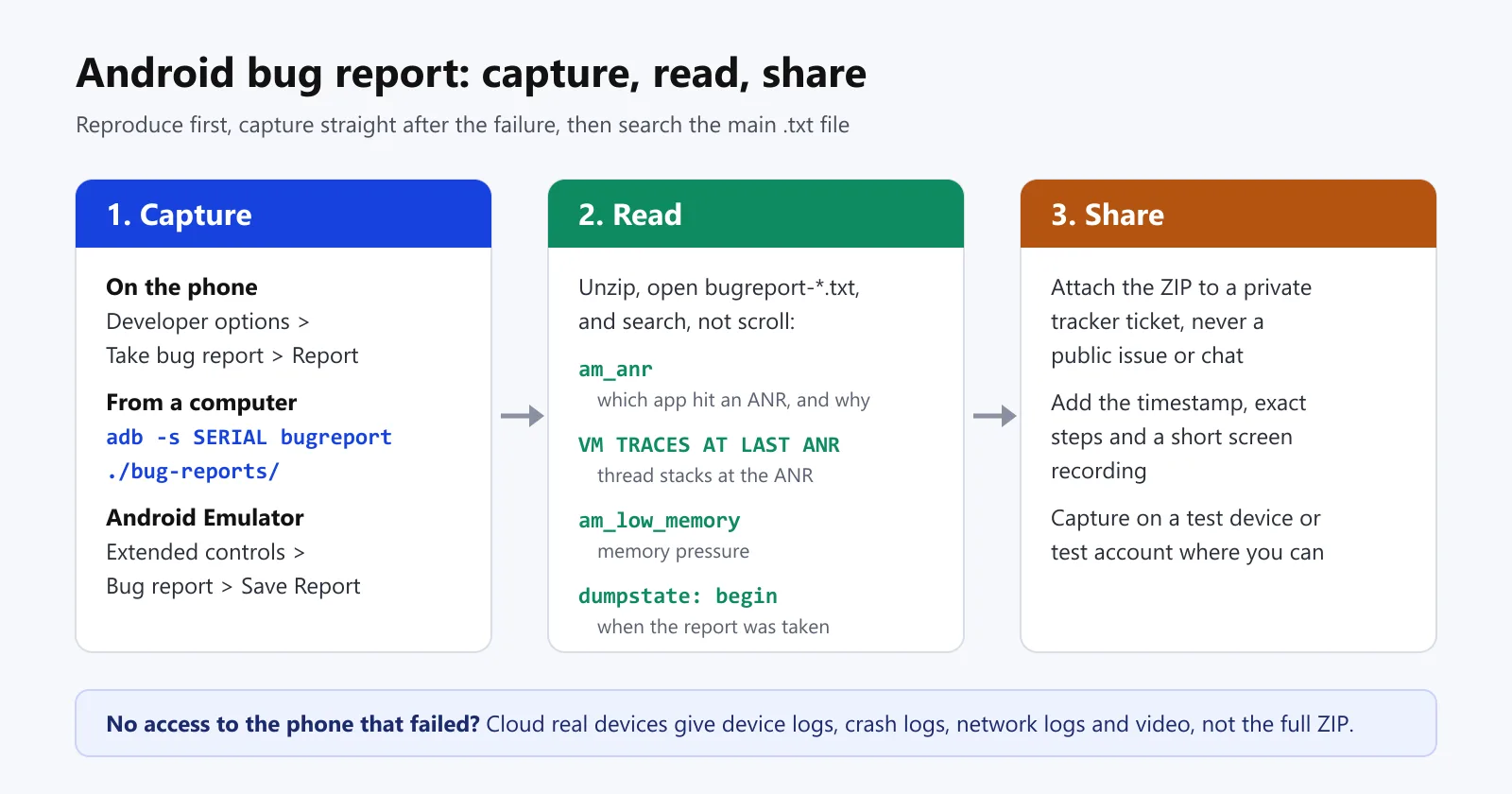
An Android bug report is a ZIP file containing system diagnostics: logcat, dumpsys and dumpstate output, plus files copied off the device. You can generate one from Developer options > Take bug report or run adb bugreport from a PC. Open up the main bugreport .txt file and look for am_anr to find the ANRs, stalls, and memory pressure.
TL;DR
An Android bug report is a ZIP of system diagnostics that you capture from Developer options or with adb bugreport, then read by searching the main bugreport text file for strings such as am_anr. Share it only through a private ticket, because it holds device logs and system state from a real phone.
How Do You Capture and Read an Android Bugreport?
- Take bug report: The Take bug report option in Android Developer options builds the full bug report ZIP on the phone and offers it through a notification. Needs a computer: No.
- adb bugreport: The adb bugreport command saves the Android bug report ZIP from a computer over USB debugging, to the path you pass or the current directory. Add -s with the device serial when several devices are connected. Needs a computer: Yes.
- am_anr: Searching the main bugreport text file for am_anr finds the event log entry that names the app that hit an ANR and the reason.
- VM TRACES AT LAST ANR: This section of the main bugreport text file holds the thread stacks at the last ANR; match the PID and read the main thread.
Should You Use adb bugreport or adb logcat?
- adb logcat: adb logcat streams an Android device's log messages to your terminal. It shows crash stack traces, but not the system service dumps, event log or kernel log that a bug report adds.
- Android bug report: An Android bug report adds dumpsys output, the event log and the kernel log to logcat in one capture, the context you need for ANRs, deadlocks and battery drain.
- Cloud real devices: TestMu AI records device logs, crash logs, network logs and video for each session on cloud real Android devices, but not the full bugreport ZIP. Needs a phone on your desk: No.
What Is an Android Bug Report?
An Android bug report is a snapshot of the entire device at that one point in time, not just your app's log. The Android developer documentation refers to the main text file as containing diagnostic output from system services (dumpsys), error logs (dumpstate) and system message logs (logcat). Stack traces from crashes and messages that your app has written using the Log class are all in that same file.
Since Android 7.0 (Nougat), dumpstate has been writing the bug report as a ZIP file in accordance with the bugreport file format notes. Prior to that, it was a single flat text file. That difference is important if you're using an older tool or script that is expecting a .txt file.
Many Android bugs show up only on certain phone models or Android versions, so QA teams pair bug reports with real device testing: the bug report explains the failure, and the real device lets you reproduce it.
For a quick visual walkthrough of this concept, watch the video below from TestMu AI.
Subscribe to the TestMu AI YouTube channel for more tutorials on testing and automation.
How Do You Take a Bug Report on an Android Phone?
Android devices can generate a bug report on the device itself, with no PC attached.
- Turn Developer options on: go to Settings, head to About phone (the location varies by device), and tap the Build number seven times.
- Open Developer options and tap 'Take bug report'.
- Choose the report type that the dialog provides and tap Report.
- Just wait for the notification that says the bug report is ready, then tap on that to share the ZIP.
On-device capture is the right thing to do when the tester spots the bug whilst they're away from their desk. You reproduce the problem first, then take the report straight away so the logs still have the failure.
How Do You Capture an Android Bug Report With adb?
The adb tool will pull a bug report from the computer over USB debugging. It will save the ZIP in the current directory if you don't specify a path.
#!/usr/bin/env bash
# capture-bugreport.sh: pass the device serial as the first argument
set -euo pipefail
DEVICE_SERIAL="$1"
mkdir -p ./bug-reports
adb devices                                  # confirm the serial is attached
adb -s "$DEVICE_SERIAL" bugreport ./bug-reports/
Use the -s flag whenever you have more than one device or emulator connected, as otherwise adb won't know which device to read from.
Bug reports taken earlier on the device are stored in /bugreports. The most recent ZIP is pulled by name (the file names have a date stamp at the end, so a name sort will give you the reports from the same build):
LATEST=$(adb -s "$DEVICE_SERIAL" shell ls /bugreports/ | tr -d '\r' | grep '\.zip$' | sort | tail -n 1)
adb -s "$DEVICE_SERIAL" pull "/bugreports/$LATEST" ./bug-reports/
The older releases just produce a flat text file rather than a ZIP. The Battery Historian README has adb bugreport > bugreport.txt for Android 6.0 and below.

Reproduce it on the devices your users actually carry.
Note: TestMu AI gives you live sessions on real Android devices straight from your browser, with device logs, network logs and video for debugging. Start an App Live session.
How Do You Capture One From the Android Emulator?
The Android Emulator has its own bug report screen. In the emulator panel, click More, select Bug report from the Extended controls window, add your reproduction steps, wait for collection to finish, and then click Save Report. The emulator screen will also show a screenshot and the virtual device config alongside the log.
Which Capture Method Should You Use?
Each method trades convenience for depth. This table compares the four options a QA team uses most:
| Method | What you get | Best for | Needs a computer |
|---|---|---|---|
| Developer options > Take bug report | Full bugreport ZIP, shared from a notification | Testers reproducing on their own phone | No |
| adb bugreport | Full bugreport ZIP saved to a folder you choose | Developers and scripted capture in a lab | Yes (USB debugging) |
| Emulator > Extended controls > Bug report | Bug report plus screenshot and virtual device config | Bugs that reproduce on an emulator | Yes |
| TestMu AI Real Device Cloud | Device logs (logcat), crash logs, network logs and session video from cloud real devices | Reproducing on models you don't own, and attaching evidence to a ticket | No local device needed |
What's in the Android Bug Report ZIP?
The ZIP is named bugreport-BUILD_ID-DATE.zip by default. These are the entries you will open most:
| Entry | What it holds |
|---|---|
bugreport-BUILD_ID-DATE.txt | The main report: dumpsys, dumpstate and logcat output, including stack traces |
version.txt | The Android release letter, per Android's developer documentation |
FS/ | Files dumpstate copied from the device file system, at their original paths under FS |
main_entry.txt | The name of the main text entry |
title.txt and description.txt | A one-line summary and a detailed description, added only when the person filing the report supplies them |
systrace.txt | Present only when systrace was enabled |
Start with the main .txt file. Everything else is just to support it.
How Do You Read an Android Bug Report?
Read an Android bug report by searching rather than scrolling. The Android Open Source Project's guide to reading bug reports has a list of the strings you can search for to get to the useful bits. Just unzip the report and search the main file:
unzip -o ./bug-reports/bugreport-*.zip -d ./br
MAIN=$(ls ./br/bugreport-*.txt | grep -v dumpstate_log | head -n 1)
grep -n "am_anr" "$MAIN" # which app hit an ANR, and why| What you want to find | Search for | Where it appears |
|---|---|---|
| App not responding (ANR) | am_anr | Event log: the app and the reason |
| CPU load around an ANR | ANR in | Logcat |
| Thread stacks at the ANR | VM TRACES AT LAST ANR or VM TRACES JUST NOW | dumpsys VM traces; match the PID and check the main thread |
| System server deadlock | WATCHDOG KILLING SYSTEM PROCESS | The log entry written when the watchdog kills the system server |
| Which screen had focus | am_focused_activity | Event log |
| Process churn | am_proc_died and am_proc_start | Event log; a burst in a short window suggests thrashing |
| Memory pressure | am_low_memory | Event log: when the last cached process died |
| Screen on and off | screen_toggled | Event log: 0 = off, 1 = on, 2 = keyguard done |
| Installed app versions | DUMP OF SERVICE package | dumpsys |
| When the report was taken | dumpstate: begin | Logcat |
Two caveats from the same source: the kernel log is in seconds since the bootloader finished, in UTC, so you'll need to adjust it to your local time zone. Taking a bug report puts a significant load on the system, which can in turn skew your thrashing numbers. Always check the timestamps before you go off and blame a spike on your app.
For a crash, open the logcat section of the main file around the time the tester reported it and just read the stack trace from the top frame in your package. For an ANR that you find in this way, the Android ANR guide has the thresholds and fixes.
How Do You Analyze Battery Drain From a Bug Report?
Battery Historian is the go-to tool for battery questions. It takes a bug report and presents the system and app events on a timeline, shows the battery stats since the last full charge, and can compare two reports. It's for Android 5.0 and above.
Know where it stands before you go relying on it. Google archived the Battery Historian repo on 29th December 2022, and it's now read-only. It'll still run off the Docker image as described in the README, but no fixes are going to be applied. For the vast majority of "why is my phone awake?" queries, the screen_toggled and wake lock entries in the bug report will be sufficient without it.
Why Does My Android Phone Say It's Taking a Bug Report?
A bug report notification essentially means someone has started a capture from Developer options (usually by accident). On Pixel devices, Google's support page states that enabling the 'Bug report shortcut' in Developer options will add a 'Bug report' button to the power menu (hold Power + Volume Up), and the device will vibrate when the report is ready (this can take up to 2 minutes).
To prevent accidental captures, simply turn the 'Bug report shortcut' off or turn 'Use developer options' off entirely. Menu names will of course vary from brand to brand.
How Do You Get Bug Reports From Users of an App You've Published?
You can't have every user running adb, so production apps will just rely on crash reporting. Android Vitals in the Google Play Console will give you the user-perceived crash and ANR rates from devices that have opted in.
An in-app crash reporter like Firebase Crashlytics will give you real-time alerts for new, regressed, and growing issues. A full bug report is useful if you can get a tester or a willing user to reproduce the issue on a specific phone.
How Do You Report an Android Bug to Google?
Bugs in Android itself (not in your app) go to the Google Issue Tracker. The AOSP guide to reporting bugs asks you to search for an existing bug first and to include log files with a new one. So attach the bug report ZIP and remove anything you wouldn't be comfortable making public.
How Do You Get the Logs When the Phone Is in a Device Cloud?
Cloud real devices provide you with the same evidence during the test session as you would get via a USB cable. TestMu AI's Real Device Cloud captures all of this:
- Live sessions: Real Device Cloud enables you to view device logs, inspect network activity, and use the UI Inspector to explore the element hierarchy as you tap through the app on a real device, with device logs, network logs and video available for debugging.
- One-click bug marking: you can mark issues as bugs during a session with screenshots, device details and session info all attached automatically.
- Automated runs (App Automation): set
devicelog: trueinsidelt:optionsto record the Android logcat for each test. Crash logs are captured automatically when the app crashes and will contain the fatal exception plus its stack trace. Both of these are available in the Logs section of the session (with a download icon), as per the debugging logs documentation, which details every tab.
{
 "lt:options": {
   "devicelog": true,
   "network": true
 }
}
These cloud outputs are Logcat-based device logs and crash logs, not the full bugreport ZIP. If you need dumpsys-level detail (e.g., wake locks, VM traces, etc.), then you need to reproduce on a physical phone that you have control of and take a bugreport from that.

The 6-Point Android Bug Report Checklist
Run this checklist before you attach an Android bug report to a ticket:
- Reproduce first, capture second. Take the report straight after the failure so the logs still have it.
- Note the time. Write down the wall-clock time of the failure; you'll match that against the logcat.
- Pick the correct device. Use the serial with
adb -sand record the model and Android version. - Check the format. ZIP on Android 7.0 and above, .txt on 6.0 and below.
- Search before you send. Run the above search strings and paste the matching lines into the ticket.
- Protect personal data. Private tracker only; test accounts where possible.
Conclusion
An Android bug report turns "the app froze on my phone" into evidence a developer can act on: the event log names the ANR, the VM traces show the stuck thread, and the timestamps tie it to the tester's steps. Capture it right after the failure, search it with the strings above, and share it privately.
Need the bug on a phone you don't own? Reproduce it on real Android devices in TestMu AI's Real Device Cloud, with device logs, crash logs, and video for every session. Start testing on real devices for free.
Author

Shantanu Wali
Blogs: 27

Shantanu Wali is Vice President of Product Management at TestMu AI, where he owns several product lines across the testing platform, including the Real Device Cloud and the Digital Experience Testing Cloud. He has also contributed significantly to the development and scaling of KaneAI, TestMu AI's flagship GenAI-native testing agent that uses natural language to make software testing faster and more reliable in this AI era. He brings 7+ years of experience across software development and product management, starting as a backend developer at Infosys building solutions for Fortune 500 clients. Shantanu holds an MBA from IIM Calcutta and a B.Tech in Mechanical Engineering.
Reviewer

Mayank Bhola
Reviewer
Mayank Bhola is Co-Founder and Head of Products at TestMu AI, where he leads the entire product portfolio across KaneAI, Kane CLI, HyperExecute, SmartUI, the Real Device Cloud, Accessibility, and other software testing product lines. As an early Lead Architect he designed and built the company's flagship Tunnel technology from scratch, created the React-based automation platform, and architected the data-intensive pipelines and FAAS services that scale it. He brings more than 10 years of experience in software development and product engineering, with earlier roles as Head of Technology at Juggernaut Books and Senior Software Engineer at PressPlay TV and Zomato. Mayank holds a B.Tech in Computer Engineering from JIIT Noida.


Android Bug Report FAQs
Did you find this page helpful?
More Related Blogs











TestMu AI forEnterprise
Get access to solutions built on Enterprise
grade security, privacy, & compliance
- Advanced access controls
- Advanced data retention rules
- Advanced Local Testing
- Premium Support options
- Early access to beta features
- Private Slack Channel
- Unlimited Manual Accessibility DevTools Tests