
Run End-to-End Tests from Your Terminal with Kane CLI
Author and Run Tests Right from the Terminal in Natural Language, with an Evidence-Backed Pass or Fail from a Real Browser.
npm install -g @testmuai/kane-cli
- TestMu AI (Formerly LambdaTest)
- /
- Blog
- /
- How to Use Claude Agent in Xcode 27 and Verify Its Code on Real iPhones
How to Use Claude Agent in Xcode 27 and Verify Its Code on Real iPhones
Set up Claude Agent in Xcode 27 (or Claude Code via xcrun mcpbridge), then verify its Swift code on real iPhones with XCUITest or Kane CLI.
Published on:
Claude Agent is Anthropic's coding agent that's available in Xcode 26.3 and onwards. You install it via Xcode > Settings > Intelligence. It can plan, edit Swift, build, write and run tests, check SwiftUI previews, and in Xcode 27 it can drive a simulator via Device Hub.
The agent that wrote the code will grade all of those checks. To prove that the app actually works on a real iPhone, you add in a check that the agent doesn't grade, i.e., XCUITest or Kane CLI on a real device cloud.
Checked against Apple and Anthropic docs as of 9th November 2026. Xcode 27.2 is the current release; 27.3 is in beta.
TL;DR
To use Claude Agent in Xcode, install it from Xcode > Settings > Intelligence in Xcode 26.3 or later and sign in with your Claude account. Its builds, tests and Previews are graded by the same agent that wrote the code, so verify the result on real iPhones with Kane CLI by TestMu AI or XCUITest.
How to Use Claude in Xcode
- Built-in Claude Agent: Install Claude Agent under Intelligence > Agents in Xcode 27, sign in from the Account row, allow the command-line tools it may run under Permissions, then type /plan to get a plan before any code changes. Apple Silicon Mac required: Yes.
- xcrun mcpbridge: The Claude Code Xcode MCP setup keeps you in the terminal. Allow external agents under Intelligence > Model Context Protocol, register xcrun mcpbridge with claude mcp add, and keep the project open in Xcode while Claude Code works.
How to Test an iOS App Built With Claude
- Xcode Previews vs UI tests: Previews, unit tests and Device Hub runs make a fast inner loop, but Claude Agent wrote those checks itself. A UI test launches the whole app, so it catches permission prompts, networking and lifecycle bugs that a Preview never runs.
- Kane CLI by TestMu AI: Kane CLI runs a plain-English objective against your .ipa on a real iPhone in the TestMu AI cloud and exits 0 on pass and 1 on fail, so Claude Code or a CI job can gate a merge on the result.
- XCUITest real device runs: Package the app and the UI-test runner as .ipa files, upload both, and list a device matrix in one build request. TestMu AI runs every listed iPhone in parallel, with video and device logs when enabled.
What Is the Claude Agent in Xcode?
Claude Agent in Xcode is Anthropic's coding agent. It's based on the Claude Agent SDK, runs as part of the Xcode coding assistant, and is capable of planning, editing, building, and testing an iOS project. It was announced on 3rd February 2026 along with Xcode 26.3 RC.
The SDK is the same harness that underpins Claude Code, so Claude Agent has sub-agents, background tasks and plugins available within Xcode. (Building your own agent on the SDK is a completely different proposition. See the section on testing agents built on the Claude Agent SDK.)
Prior to 26.3, Claude in Xcode was a chat assistant that would deal with one request at a time. Claude Agent takes a goal instead. As per Anthropic's announcement, it will explore the project structure (SwiftUI, UIKit, SwiftData), break the goal down into steps, edit the files, search Apple's docs, and then iterate when something doesn't work.
| Release | Date | What changed |
|---|---|---|
| Xcode 26 | Sep 2025 | Claude Sonnet 4 in the coding assistant (chat, one turn at a time) |
| Xcode 26.3 | Feb 2026 | Claude Agent and OpenAI Codex built in. Xcode tools exposed over MCP. Agents capture Previews to check their work. |
| Xcode 26.5 | May 2026 | Message queueing. Agents can ask clarifying questions. |
| Xcode 27 | Sep 14, 2026 | Gemini added. /plan mode. Agents write and run tests and interact with the simulator through Device Hub. Plug-ins, including ones that connect Agent Client Protocol (ACP) agents. |
| Xcode 27.2 | Oct 29, 2026 | Current release |
How Do You Set Up a Claude Agent in Xcode 27?
You set up Claude Agent in Xcode from the Intelligence settings pane. Per Apple's "Setting up coding intelligence" documentation:
- Update Xcode. Install Xcode 27 or later. Xcode 27 requires an Apple Silicon Mac running macOS Tahoe 26.6 or later.
- Open Intelligence settings. Either go to Xcode > Settings > Intelligence or click 'Get Started with Agents' in the coding assistant sidebar.
- Install the agent. Under Agents, click 'Get' next to Claude Agent and then 'Install'. Xcode will update it automatically where it can.
- Sign in. Click the More (…) button in the Account row and complete the sign-in in the browser. Anthropic's help article for Claude in Xcode was written specifically for the Xcode 26 chat integration. It references Pro, Max and Ultra plans as well as premium Team and Enterprise seats. Anthropic has not published separate plan terms for Claude Agent, so you'll need to check your plan prior to rolling it out to a team.
- Set the permissions. Under Permissions, look at which tools Claude Agent is allowed to use. Add the command-line tools it is allowed to run under Allowed Commands. You'll use this for the Kane CLI later on.
- Give it a goal. Open the Coding Assistant. Type
/planto have it explore and come up with a plan without actually touching any code, or/to list the built-in skills.
To set a default model, you add MCP servers or add skills, and put your config files in ~/Library/Developer/Xcode/CodingAssistant/ClaudeAgentConfig. Those settings only apply when the agent is running inside Xcode.
How Do You Connect the Claude Code CLI to Xcode?
To work from the terminal, connect Claude Code to Xcode's built-in MCP server. Apple documents three steps:
- In Xcode > Settings > Intelligence, under Model Context Protocol, set 'Allow External Agents to Use Xcode Tools' to 'Always' or 'While Xcode is Open'.
- Register the bridge with Claude Code:
claude mcp add --transport stdio xcode -- xcrun mcpbridge claude mcp list # confirm "xcode" is listed - Open the project in Xcode before you prompt Claude Code.
Xcode will show an alert if an external agent connects. For Codex, the command is codex mcp add xcode -- xcrun mcpbridge. Project hints for external agents go in CLAUDE.md or AGENTS.md.
What Can the Claude Agent in Xcode Actually Check on Its Own?
Claude Agent in Xcode uses the tools that Xcode provides to check its own work. Apple's list of things it does includes building and fixing errors, writing and running tests, rendering Previews, trying code in Playgrounds, and in Xcode 27 it can actually tap and swipe in the simulator via Device Hub.
Xcode 27's device interaction tool can also be directed at an iPhone that's plugged into your Mac. That inner loop is very fast and catches the real bugs: the type errors, the broken layouts, the logic errors that the agent's unit tests are going to catch.
The weak point is who actually wrote the check. If the same agent writes the code, the tests, and the definition of done, then a passing run merely proves that the agent agrees with itself. Tests written by the same agent are going to have the same blind spots as the code they're testing.
A Preview is a render of one view with some sample data in it. It doesn't actually run the app's networking, permissions, or lifecycle.
| Check | Claude Agent in Xcode | Real-device check |
|---|---|---|
| Does it compile? | Yes. The agent builds and fixes errors. | Not needed |
| Does a SwiftUI view render? | Yes. It captures Previews. | Not needed |
| Do unit tests pass? | Yes, for tests the agent wrote and ran | Partly. The agent wrote both sides. |
| Does the flow work in the simulator? | Yes, in Xcode 27 via Device Hub | Not needed |
| Does it work on a physical iPhone? | Only on a device connected to your Mac, and the agent grades its own run | Yes. Clean installs on cloud iPhones, with a verdict the agent doesn't write |
| Does it work across iOS versions and models? | Only the simulators and devices you have | Yes. A device matrix |
| Real camera input, SIM-based SMS/OTP, Apple Pay on real hardware | The simulator can fake a Face ID match or an Apple Pay sheet, but has no camera feed and no SIM | Yes. Camera image injection, SIM-enabled devices, Face ID/Touch ID pass or fail |
| Slow or offline networks | Not part of the agent loop | Yes. Network throttling |
| Regressions across the whole suite on every PR | No. It checks the task in front of it. | Yes. Parallel runs in CI |
| Evidence a reviewer can replay | A chat transcript | Yes. Video, device logs, step evidence |
How Do You Verify the Claude Agent's Swift Code on Actual iPhones?
You verify Claude Agent's code on real iPhones via a check that the agent doesn't grade. Use Kane CLI, XCUITest, or both.
Option 1: Kane CLI, Plain-English Checks From the Terminal
Kane CLI is TestMu AI's testing agent for the terminal. It works in conjunction with Claude Code, Codex, Cursor, and Gemini CLI. You specify the outcome you're looking for, and Kane CLI will run that against your build on a real iPhone in the TestMu AI cloud.
It returns a pass/fail exit code and an evidence file. There's a separate inspection step (not the model that's driving the steps) which makes the pass/fail decision against your acceptance criteria. Once saved, the test will simply re-run the same steps on every run.
npm install -g @testmuai/kane-cli
kane-cli login

# List real iPhones available on iOS 17
kane-cli devices list --target ios --remote --os-version 17

# Verify Claude Agent's change on a real iPhone
kane-cli run "Add the first item to the cart, open the Cart tab and confirm it shows 1 item" \
  --target ios --device-name "iPhone.*" --os-version 17 \
  --app ./build/MyApp.ipa --agent --timeout 600
With no terminal attached, or with --agent, the device list prints one JSON line per device. At the time of writing, iOS 17 returns 15 real devices, iPads included:
{"name":"iPad 10.2 (2019)","brand":"Apple","os_versions":["17"]}
{"name":"iPad Air 13 (2024)","brand":"Apple","os_versions":["17"]}
{"name":"iPad Pro 11 (2024)","brand":"Apple","os_versions":["17","26"]}
{"name":"iPad Pro 12.9 (2021)","brand":"Apple","os_versions":["17"]}
{"name":"iPad Pro 12.9 (2022)","brand":"Apple","os_versions":["16","17"]}
{"name":"iPad Pro 13 (2024)","brand":"Apple","os_versions":["17","26","27"]}
{"name":"iPhone 12 Mini","brand":"Apple","os_versions":["14","15","16","17"]}
{"name":"iPhone 13","brand":"Apple","os_versions":["15","16","17","18","26","27"]}
{"name":"iPhone 13 Pro","brand":"Apple","os_versions":["15","17","26"]}
{"name":"iPhone 13 Pro Max","brand":"Apple","os_versions":["15","17","27"]}
{"name":"iPhone 14","brand":"Apple","os_versions":["16","17","18","26"]}
{"name":"iPhone 15","brand":"Apple","os_versions":["17","26"]}
{"name":"iPhone 15 Pro","brand":"Apple","os_versions":["17","18","26","27"]}
{"name":"iPhone 15 Pro Max","brand":"Apple","os_versions":["17","26"]}
{"name":"iPhone SE (2020)","brand":"Apple","os_versions":["14","17"]}
{"total":15,"platform":"ios","kind":"real-device"}
What to know first (Kane CLI 0.9+ docs, checked Nov 9, 2026):
- Exit codes are 0 = pass, 1 = fail, 2 = setup or auth error, and 3 = timeout or cancel. That way, the CI and coding agents can gate on them.
--agentprints out structured NDJSON that Claude can read and act upon.--timeoutis in seconds.- Real device runs require an .ipa (not a simulator .zip), you install the app fresh for every run, and you need KaneAI Max or a Real Device Plus Automation Cloud plan. Plans, parallel limits, and heal rules are all in the Kane CLI on real iOS and Android devices.
Run it from inside Xcode: add kane-cli to Xcode > Settings > Intelligence > Permissions > Allowed Commands. Then just tell the Claude Agent to run your check with --agent after each task. If the agent comes back with "command not found," then allow the full path that kane-cli prints out in Terminal.
From Claude Code: install the Kane plugin via the Claude Plugin Marketplace (add LambdaTest/kane-claude-plugin and then claude plugin install kane-qe@lambdatest). The full workflow is detailed in the 'How to use Claude Code for testing with Kane CLI' guide. (TestMu AI was formerly LambdaTest, so some of the plugin and API names will still be lambdatest.)

Try it on your next Claude Agent task.
Note: Install the Kane CLI, claim the free credits on the Kane CLI page, and run your very first plain English check on your local iOS simulator today. Add on KaneAI Max or a Real Device plan when you're ready to gate merges on real iPhones. Start free with Kane CLI.
Option 2: XCUITest Suites on the Real Device Cloud
If you already have XCUITest suites, then just keep those as your release gate and run XCUITest on real iPhones. Have Claude Agent write the UI tests as well, but have a human review the assertions. A test is only of any value if someone other than the agent has decided what "correct" is.
Here's a small XCUITest that covers something that Previews never get to: a system permission alert on a fresh install.
import XCTest

final class CheckoutFlowUITests: XCTestCase {

    override func setUpWithError() throws {
        continueAfterFailure = false
    }

    func testAddFirstItemToCart() throws {
        let app = XCUIApplication()
        app.launch()

        // A fresh install shows the location prompt. It's SpringBoard's prompt not ours.
        let springboard = XCUIApplication(bundleIdentifier: "com.apple.springboard")
        let allow = springboard.buttons["Allow While Using App"]
        if allow.waitForExistence(timeout: 5) {
            allow.tap()
        }

        let addButton = app.buttons["product.addToCart.0"]
        XCTAssertTrue(addButton.waitForExistence(timeout: 10))
        addButton.tap()

        app.tabBars.buttons["Cart"].tap()

        let count = app.staticTexts["cart.itemCount"]
        XCTAssertTrue(count.waitForExistence(timeout: 5))
        XCTAssertEqual(count.label, "1 item")
    }
}
The product.addToCart.0 and cart.itemCount identifiers are the ones we'd use in our views, assuming we'd set .accessibilityIdentifier(...) on them. Having Claude Agent add in some stable identifiers is a good first thing to do.
To run the suite on real devices, you build for testing with signing set to your group. Then you wrap the app, and the test runner .app bundles up in a Payload folder and zip each one as an .ipa:
xcodebuild build-for-testing -scheme MyApp \
  -destination 'generic/platform=iOS' -derivedDataPath build/dd

cd build/dd/Build/Products/Debug-iphoneos
mkdir Payload && cp -R MyApp.app Payload/ && zip -qr ../../../../MyApp.ipa Payload && rm -rf Payload
mkdir Payload && cp -R MyAppUITests-Runner.app Payload/ && zip -qr ../../../../MyAppUITests-Runner.ipa Payload && rm -rf Payload
cd -
Then upload both and start a build through the TestMu AI XCUITest API, as documented in XCUITest on TestMu AI:
# Upload the app and the test suite (each returns an lt://APP... id)
curl -u "$LT_USERNAME:$LT_ACCESS_KEY" -X POST \
  "https://manual-api.lambdatest.com/app/uploadFramework" \
  -F "appFile=@MyApp.ipa" -F "type=xcuit-ios"

curl -u "$LT_USERNAME:$LT_ACCESS_KEY" -X POST \
  "https://manual-api.lambdatest.com/app/uploadFramework" \
  -F "appFile=@MyAppUITests-Runner.ipa" -F "type=xcuit-ios"

# Start a build on real iPhones (devices in the list run in parallel)
curl -X POST "https://mobile-api.lambdatest.com/framework/v1/xcui/build" \
  -H "Authorization: Basic $(printf '%s' "$LT_USERNAME:$LT_ACCESS_KEY" | base64)" \
  -H "Content-Type: application/json" \
  -d '{
    "app": "lt://APP_ID",
    "testSuite": "lt://TEST_SUITE_ID",
    "device": ["<iPhone model>-<iOS version>", "<iPhone model>-<iOS version>"],
    "video": true,
    "devicelog": true,
    "build": "claude-agent-pr-142"
  }'
Pick devices from the Real Device Cloud list in the format "model-iOS version". The Real Device Cloud supports XCUITest along with network throttling, Face ID and Touch ID, camera image injection, SIM-based OTP, Apple Pay and VoiceOver checks, video and device logs for every session. For any suites that have to finish in a PR window, run them on HyperExecute (which is up to 70% faster than a traditional grid).
How Do You Gate Claude Agent's Xcode Changes on Actual iPhones?
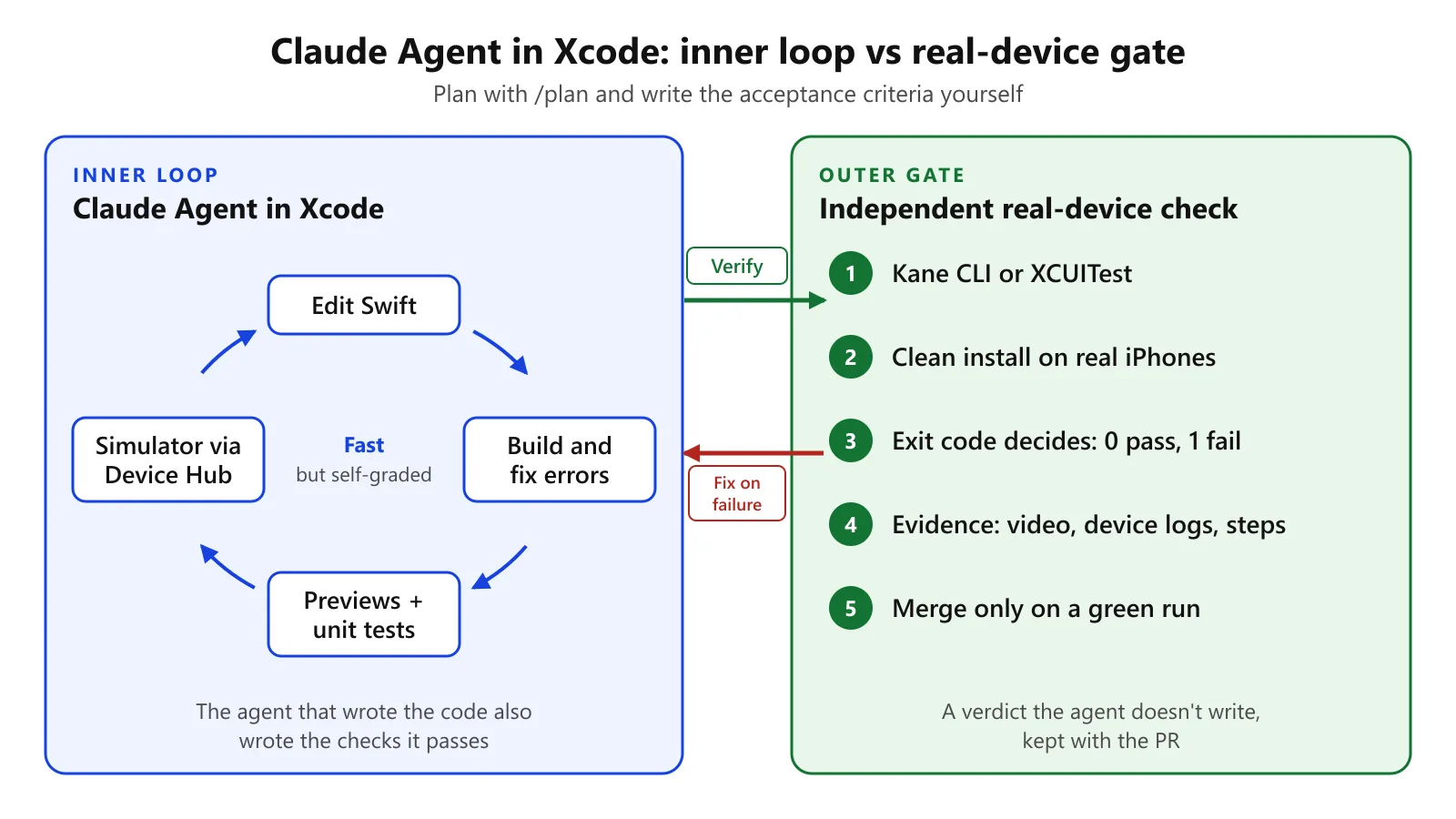
A working setup keeps Claude Agent fast and keeps the verdict independent:
- Plan. Run
/planin Xcode and write out the acceptance criteria yourself in plain English. - Build. Claude Agent edits, builds, and checks Previews and unit tests. That's the inner loop.
- Verify. The Claude Agent calls Kane CLI or the CI runs the XCUITest suite against real iPhones. It's the exit code that determines success, not the agent's summary.
- Fix. On a failure, hand the evidence (video, device log, failing step) back to the Claude Agent.
- Gate. Only merge on a green real device run and keep the evidence with the PR.
What Are the Limits of This Approach?
- Real devices are slower than the simulator. Keep the simulator and Previews as your inner loop and use real devices as your gate.
- Claude Agent isn't the only author of the test oracle. If it's writing out the XCUITest assertions, then those need to be reviewed just as rigorously as the feature code.
- Agent tooling still changes fast. Developers on Apple's forums reported Intelligence regressions in Xcode 26.4, including lost sign-in tokens and stalled tasks. Setup details can change between Xcode point releases, so check the date on this page.
Following Steps
- Read why coding agents can't be the only check on their own code.
- See what Xcode 27 changed for UI testing.
- Browse the iOS testing guide or give the online iOS simulator and real iPhone 18 testing a go.
Conclusion
Claude Agent writes the code. Something else will have to prove it works. Run your first check with the Kane CLI: one npm install, one plain English objective, an exit code, and an evidence file.
Free credits will cover your local simulator runs. Real iPhones require KaneAI Max or a Real Device plan.
Testing from the terminal? Kane CLI by TestMu AI lets SDETs and developers plan, write, run and debug tests from the command line.
Author

Akshay Verma
Blogs: 4

Akshay Verma is a Senior Product Manager at TestMu AI, where he drives adoption and product-led growth across the testing platform, focusing on onboarding, time-to-value, and unlocking new markets. Earlier in the company he drove the execution of product features that contributed to a 2x revenue-growth trajectory within a year. Before TestMu AI he helped build the Revenue Intelligence product from scratch at Next Quarter, which went on to drive 43% of that company's revenue. Akshay holds a B.Tech in Computer Science from Delhi Technological University.
Reviewer

Srinivasan Sekar
Reviewer
Srinivasan Sekar is Director of Engineering at TestMu AI, where he leads engineering and open-source initiatives behind the Selenium and Appium automation grid and owns TestMu AI's MCP Server. A committer to Appium and a contributor to Selenium, WebdriverIO, Taiko, and AppiumTestDistribution, he brings over 15 years of experience in quality engineering and open-source technologies. He is the author of the Apress book 'The MCP Standard: A Developer's Guide to Building Universal AI Tools with the Model Context Protocol,' a Certified Kubernetes and Cloud Native Associate, and an international conference speaker. Before TestMu AI he spent over eight years at Thoughtworks as a Principal Consultant and Quality Architect. Srinivasan holds a B.Tech in Information Technology from Anna University.


Claude Agent in Xcode FAQs
Did you find this page helpful?
More Related Blogs

TestMu AI forEnterprise
Get access to solutions built on Enterprise
grade security, privacy, & compliance
- Advanced access controls
- Advanced data retention rules
- Advanced Local Testing
- Premium Support options
- Early access to beta features
- Private Slack Channel
- Unlimited Manual Accessibility DevTools Tests