

Power Your Software Testing with AI Agents and Cloud
The Native AI-Agentic Cloud Platform to Supercharge Quality Engineering. Test Intelligently and Ship Faster.


- TestMu AI (Formerly LambdaTest)
- /
- Learning Hub
- /
- Progressive Web Apps (PWA): A Complete Guide to Building and Testing
Progressive Web Apps (PWA): A Complete Guide to Building and Testing
A complete guide to Progressive Web Apps (PWAs): learn how to build PWAs and how PWA testing validates service workers, offline caching, installability, and cross-browser performance.
Last Updated on:
OVERVIEW
Progressive Web Apps (PWAs) provide a seamless, app-like experience across various browsers and devices. They offer advantages like faster load time, offline usage capacity, and enhanced performance, enabling businesses to improve user engagement across different platforms.
Key Takeaways
- Progressive web apps rest on three foundations: HTTPS for secure data transfer, service workers for offline capability, and a web app manifest whose metadata lets the app behave like a native application.
- Service workers let a progressive web app cache assets and API responses, so a user can browse content and submit forms offline and the data syncs once connectivity returns.
- One progressive web app codebase runs on desktops, tablets and smartphones with a modern browser, which removes the cost of maintaining separate Android and iOS versions of the same app.
- Search engines index progressive web apps, so a PWA can be found through organic search rather than only through an app store listing.
- PWA testing covers the manifest.json installability metadata, the service worker install, activate and fetch lifecycle, Cache API behavior offline, push notification delivery, and the add to home screen prompt.
- Browsers treat localhost as a secure origin, so service workers and installability can be checked locally without a certificate even though a production PWA requires HTTPS.
- Chrome DevTools inspects a PWA through the Application panel for service workers, manifest and Cache Storage, which is also where installability is read since Lighthouse removed its PWA category in version 12.
- TestMu AI runs manual and automated tests across 3,000+ browser and OS combinations plus 10,000+ real devices, which covers the PWA environments a single local machine cannot reproduce.
What Are Progressive Web Apps (PWAs)?
The PWAs are applications that deliver app-like experiences through the browser. They merge the characteristics of web and native applications, using the latest web technologies to enable fast, reliable, and engaging experiences across all platforms. The accessibility of PWAs via a URL makes them easier to use compared to the traditional app download from an app store.
These progressive web applications are built on three foundational aspects:
- HTTPS allows for secure data transfer.
- Service workers that facilitate offline capability.
- Web app manifest that provides metadata that enables the app to be able to work like a native application.
They simplify updates and reduce development costs, making them both user and developer-friendly.

Subscribe to the TestMu AI YouTube Channel to get more tutorial videos around responsive testing, mobile-friendly tests and more.
Advantages of Progressive Web Apps
Progressive web apps are transforming the way businesses approach web development, bridging the gap between native apps and the wide reach of web platforms. This transformation is achieved through complex technologies such as service workers, web app manifests, and secure HTTPS protocols, ensuring a very responsive and engaging user experience.
Here, you will learn the essential advantages of PWAs, including improved performance, offline capabilities, cross-platform compatibility, and an app-like seamless experience. These advantages are cost-effective and easy to maintain.
- Improved Performance and Speed: PWAs improve performance by using service workers and caching to enable quick loading time and smooth navigation, even in less-than-ideal network conditions. By pre-caching principal resources and files, PWAs decrease repeat network requests to a significant level. This mechanism leads to significantly less latency for the users and engagement with the app instantaneously, just like a native app.
- Offline Functionality: PWAs are characterized by their ability to work offline. By using service workers, an application can cache necessary resources and content, allowing users to continue using the app even without an internet connection.
- Cross-Platform Compatibility: PWAs are natively cross-platform, meaning the application can run on any device with a modern web browser. With a single codebase, developers are able to develop apps that work perfectly without glitches on desktops, tablets, and smartphones, which serves to reduce the time and money needed for development as it does not require separate operating systems, such as Android and iOS do not require different versions of the same app to be developed.
- SEO and Discoverability: Search engines index PWAs, making them easier to discover through organic search. This search engine friendliness increases the app's visibility and helps attract more users. By following the SEO best practices, businesses can improve their PWA's ranking in search results, as it allows them to drive more traffic and increase user engagement.
- Cost-Effectiveness: A single codebase for PWAs reduces development and maintenance costs compared to separate native apps for different platforms. Businesses save on resources and can focus on enhancing features and user experience. This cost efficiency improves return on investment.
- Security and Reliability: They are served over HTTPS, ensuring that the data exchanged between the user and the app is secure. This encryption helps protect sensitive information and builds user trust, a critical factor for apps handling personal or financial data. The use of HTTPS also helps prevent malicious activities like man-in-the-middle attacks, providing a safe browsing experience.
- App-like Experience: PWAs offer an app-like experience by offering features like push notifications, splash screens, and home screen icons. These allow users to interact with the web app similarly to native apps. They also enable access features such as a camera, geolocation, and offline storage.
- No Downloads Required: It can be accessed directly via web browsers, bypassing app store downloads. This eliminates storage concerns and reduces friction, encouraging adoption and frequent use. The instant accessibility simplifies user engagement, enhancing retention rates.
- Easy Updates and Maintenance: They are web-based, and updates are seamless. Users receive the latest version automatically without manual downloads. For developers, updates and bug fixes apply across all platforms simultaneously, reducing maintenance efforts and ensuring consistent user experiences.
These web apps are designed to optimize power management and resource utilization, resulting in efficient operations across devices and screen sizes. This adaptability is vital to providing uniform and responsive user experiences; thus, faster loading times and enhanced performance help boost user engagement and satisfaction while achieving retention rates and overall app performance.
This feature provides immense value to users in poor internet environments, enabling them to access critical features and information even offline. PWAs offer significant benefits in terms of access, making online experiences less frustrating when connection issues arise. For example, users can browse content, submit forms, and perform other actions offline, with the data waiting to be synced once connectivity is restored. With these features, uninterrupted business services and high user engagement become possible without concerns about network conditions.
This cross-platform nature ensures consistency of the user experience, as the interface and functionality are identical regardless of the device. Users can start a task on one device and continue it on another without any disruption. For businesses, this means reaching a broader audience without the overhead of maintaining multiple app versions, making PWAs a cost-effective solution for modern web development.
By improving discoverability through enhanced SEO, PWAs allow businesses to more effectively meet their growth objectives by giving them access to an expanded audience base.
Regarding reliability, in PWAs, service workers handle network requests and support offline functionality. This means a user should be able to keep interacting with the application even if network failures occur. With security as well as reliability enhanced, PWAs are an extremely reliable choice for users and developers alike, supporting consistency in user experience as well as safety.
Additional advantages include adding PWAs to the home screen, which provides easy, rapid access without downloading and installing them from an app store. This effortless access maximizes the chances of more users frequently using PWAs.
Key Takeaway: The advantages of a progressive web app come from the same three technologies. Service workers and pre-caching cut repeat network requests for faster loading and keep the app usable offline, HTTPS secures the data exchange and blocks man-in-the-middle attacks, and the manifest supplies the push notifications, splash screen and home screen icon that give the app-like feel. A single codebase covering desktop, tablet and phone keeps development and maintenance costs down, and because updates ship over the web, every user gets the latest version without an app store download.

Note: Enhance PWA performance, enable offline functionality, and deliver app-like experiences. Leading digital experience testing for insurance sector.
Progressive Web Apps Process
Progressive web apps (PWAs) provide speed, reliability, and better user engagement while requiring no installation from an app store. Whether you're a seasoned developer or a novice, building a PWA is a very rewarding and engaging development project that interlinks modern web technologies and powerful functionalities.
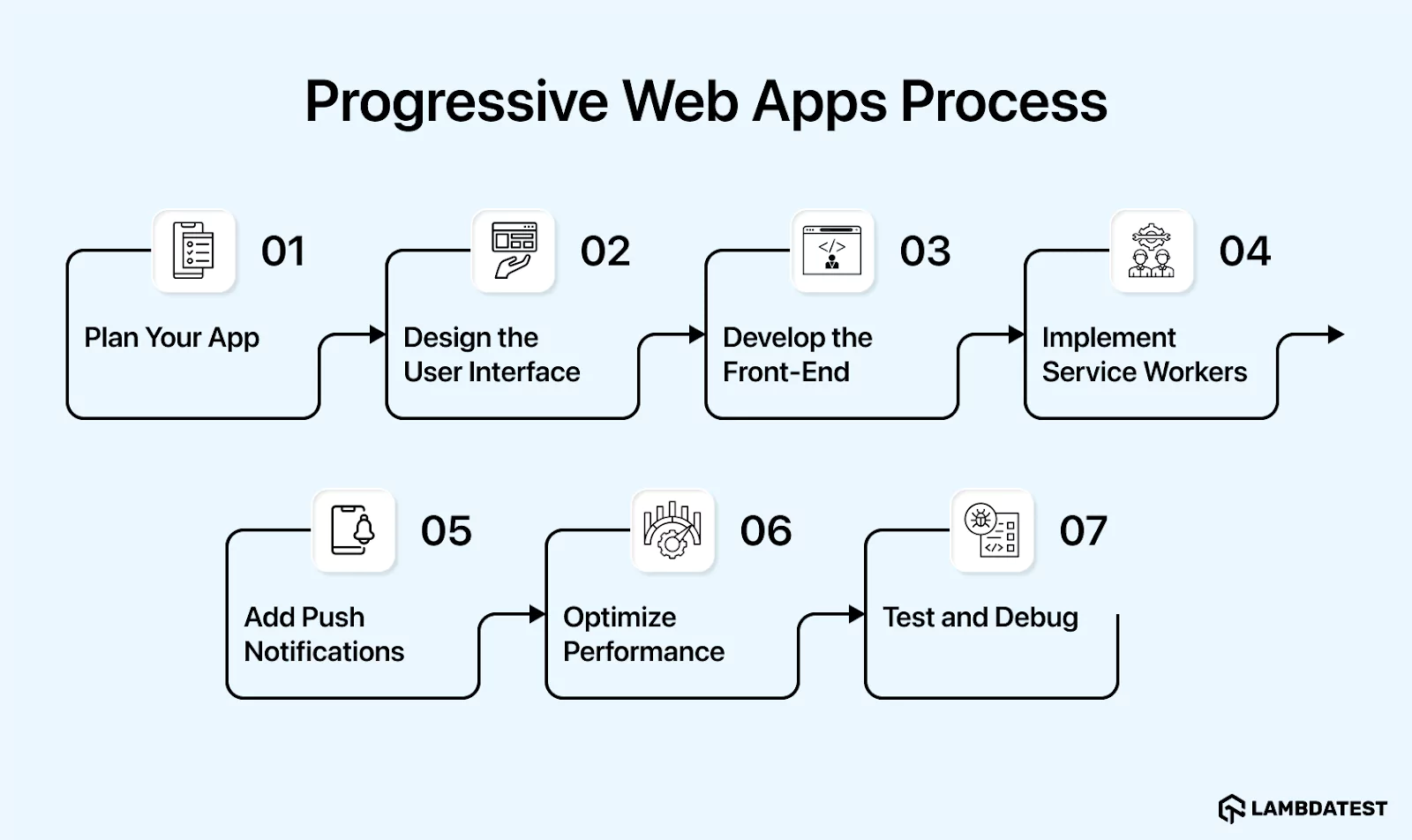
Below are the steps that are needed to be followed when building a PWA.
- Plan Your App
- Identify your goals and features based on user needs.
- Understand your target audience through user personas and demographics.
- Create a roadmap outlining the steps to build and launch your app.
- Design the User Interface
- Ensure responsive design to adapt layouts for various devices and screen sizes.
- Use frameworks like Bootstrap or Material Design for efficient development.
- Create an intuitive and user-friendly design; conduct usability tests for feedback.
- Include accessibility features to make the app usable for all users.
- Develop the Front-End
- Use HTML for structure, CSS for styling, and JavaScript for interactivity.
- Adopt scalable and maintainable PWA frameworks like React, Angular, or Vue.js.
- Modularize code for easier management and updates.
- Use version control systems like Git for collaboration.
- Apply progressive enhancement to support older browsers while leveraging modern features and various progressive web app frameworks .
- Implement Service Workers
- Use service workers to act as a proxy between the app and the network.
- Enable offline functionality by caching assets and API responses.
- Register a service worker and define a caching strategy, such as cache-first or network-first.
- Handle push notifications and background sync to keep users engaged.
- Add Push Notifications
- Implement notifications using the Push API and Notifications API.
- Request user permission and offer customizable notification preferences.
- Ensure notifications are informative, non-intrusive, and optimized based on user feedback.
- Optimize Performance
- Audit performance using tools like Google Lighthouse.
- Minify and compress assets (CSS, JavaScript, images) to reduce load times.
- Use lazy loading for images and resources.
- Optimize JavaScript bundle size with code-splitting and tree shaking.
- Test and Debug
- Test your PWA on various devices and browsers to ensure compatibility.
- Use cross-browser testing tools for thorough testing across a wide range of environments.
- Debug issues with browser developer tools and monitor performance using tools like Google PageSpeed Insights and WebPageTest.
Enhancing the progressive web app development process can sometimes hold challenges, especially when testing across various devices, screen sizes, and browsers. It is important to ensure consistent performance across cross-platforms, and responsive design can become time-consuming. This is where a cloud-based platform like TestMu AI proves beneficial.
TestMu AI is an AI-Native test execution platform that allows you to run manual and automated tests on your web across 3,000+ browsers and OS combinations, along with 10,000+ real devices.
When performing progressive web app testing , TestMu AI ensures that your web app performs seamlessly across various environments, helping you easily validate speed, responsiveness, and offline functionality.
For effective testing of progressive web apps, it's essential to cover multiple browsers and devices to ensure consistency and compatibility. TestMu AI makes this process effortless by offering a diverse range of environments for comprehensive testing. It helps you validate performance, optimize responsiveness, and debug issues efficiently, providing valuable insights to enhance your app's performance.
Key Takeaway: Building a progressive web app runs through seven steps: plan the goals and audience, design a responsive and accessible interface, develop the front end with a framework such as React, Angular or Vue.js, implement service workers with a caching strategy, add push notifications through the Push and Notifications APIs, optimize assets and bundle size, then test and debug across devices and browsers. Performance work leans on Lighthouse, PageSpeed Insights and WebPageTest, and the final step is the one that needs breadth of browsers and devices rather than depth of code.

Core Areas of PWA Testing
PWA testing goes beyond standard web testing because a progressive web app relies on browser features that behave differently across environments. To confirm that your app installs, loads offline, and re-engages users reliably, QA teams should validate the following core areas:
- Web App Manifest: Verify that the manifest.json exposes the required installability metadata, such as name, icons, start_url, display, and theme_color, so the browser can register the app as installable.
- Service Worker Lifecycle: Confirm that the service worker moves correctly through its install, activate, and fetch events, and that new versions activate without leaving stale caches behind.
- Offline Caching Behavior: Test that assets and responses are stored and served through the Cache API, so the app continues to load when the network is unavailable.
- Push Notification Delivery: Validate that permission prompts, subscriptions, and push message delivery work as expected across supported browsers.
- Add to Home Screen: Check that the installability prompt appears when the criteria are met and that launching the installed app opens it in standalone mode.
How to Test a PWA Locally
You can validate most PWA behavior on your own machine before testing at scale. While PWAs require HTTPS in production, browsers treat localhost as a secure origin, so service workers and installability work on localhost without a certificate.
Open Chrome DevTools and go to the Application panel to inspect the running Service Workers, the parsed Manifest, and the entries stored under Cache Storage. To confirm offline support, switch to the Network tab and set the throttling profile to Offline, then reload the page and verify that cached content still renders. Lighthouse removed its PWA category in version 12, so installability is now read from the Application panel itself, where Chrome lists the manifest problems that block an install. The remaining Lighthouse categories still cover performance, accessibility, best practices, and SEO for the same page.
Automating PWA Tests with Playwright and Cypress
Manual checks are useful, but automating PWA tests keeps offline and installability behavior from regressing as your app evolves. With Playwright or Cypress, you can programmatically toggle offline mode to assert that cached routes still load without a network connection. Both tools support network interception, letting you stub or block requests to confirm that the service worker serves responses from the Cache API rather than the network.
You can also assert that the service worker registers successfully by evaluating navigator.serviceWorker.controller in the page context after load. To run these automated checks across a wide range of real browsers, devices, and operating systems, you can execute your Playwright and Cypress suites on TestMu AI's automation cloud for consistent, real-world PWA testing at scale.
Best Practices for Progressive Web App Development
To create high-performing, user-friendly progressive web apps, consider the following best practices:
- Your PWA must work on various browsers. It should be tested on browsers such as Chrome, Firefox, Safari, Edge, and others. Use feature detection. When handling browser-specific features, introduce fallbacks for unsupported features.
- Use service workers to cache essential assets and data. Create a custom offline page to inform users when they are offline. Implement offline forms and data synchronization so that work can be done even when the connection is not present.
- Allow users to link directly to specific parts of your app. Implement URL routing to handle deep links and maintain the app state. Ensure your app handles deep links correctly, both when the app is already open and when it is launched from a deep link.
- Optimize your asset size to reduce the load times. Use effective caching methodologies and make use of a CDN from where it can be fetched from locations closer to the actual users.
- Ensure your app is usable by everyone, including people with disabilities. Follow accessibility guidelines like WCAG to make your app accessible, and use various accessibility testing tools.
- To enhance the user experience, use the app shell model to create a native app feel and implement seamless transitions and animations. This innovative approach bridges the gap between web and native applications.
- Regularly update your PWA to keep it fresh and secure. Implement a versioning strategy to manage updates, notify users about changes, and allow them to refresh the app. Use service workers to handle updates and cache management, ensuring seamless performance across different environments.
Conclusion
Progressive web apps build the bridge between web and native applications that exist in a way that provides everything: cost-effectiveness, flexibility, and an attractive user experience across different devices and platforms and is the future of app development. The process given above, having the understanding of its advantages over native applications businesses can choose to build progressive web apps that can provide high-quality, user-friendly applications that meet modern needs.
Citation
- Progressive Web App (PWA): Optimal Strategies & Challenges: https://www.ijres.org/papers/Volume-12/Issue-3/1203174180.pdf
- Progressive Web App: https://www.jetir.org/view?paper=JETIR2107594
Author

Isha Vyas
Blogs: 8

Isha Vyas is a Lead Member of Technical Staff at TestMu AI (formerly LambdaTest), building the frontend of the quality engineering platform. She works across React.js, responsive web design, and jQuery to ship and maintain the platform's user-facing web interfaces. She brings nearly seven years of frontend engineering experience at the company, with earlier work as a Software Developer at Mantra Labs. Isha holds a B.Tech in Computer Science from Swami Keshwanand Institute of Technology, Management and Gramothan, Jaipur.
Reviewer

Rahul Mishra
Reviewer
Rahul Mishra is a Lead Member of Technical Staff at TestMu AI (formerly LambdaTest), leading frontend engineering and accessibility testing across the quality engineering platform. He mentors frontend engineers, runs code reviews and sprint planning, optimizes React.js rendering performance, and makes product features accessible to users with disabilities through WCAG and ADA-compliant accessibility audits. He brings 10+ years of experience across React.js, VueJS, TypeScript, Swift, Objective-C, and AWS, with earlier work as a Technical Lead at VectoScalar Technologies. Rahul holds a B.E. in Information Technology.


Progressive Web App FAQs
Did you find this page helpful?
More Related Learning Hubs
TestMu AI forEnterprise
Get access to solutions built on Enterprise
grade security, privacy, & compliance
- Advanced access controls
- Advanced data retention rules
- Advanced Local Testing
- Premium Support options
- Early access to beta features
- Private Slack Channel
- Unlimited Manual Accessibility DevTools Tests