
Author End-to-End Tests in Natural Language with KaneAI
Plan, Author, and Evolve E2E Tests for Web and Mobile Apps in Natural Language.

What Is Tosca? How the Tricentis Tosca Testing Tool Works
What Tricentis Tosca is, how its model-based testing works (Modules, TestCases, TestSheets), what changed in 2026, system needs, and where Tosca fits.
Published on:
Tosca (Tricentis Tosca) is a codeless, model-based test automation tool from Tricentis for end-to-end testing of enterprise applications. Testers scan an application into reusable Modules, build TestCases from those Modules without code, drive them with test data, and run them on Windows agents or in Tosca Cloud. Tricentis says Tosca supports 200+ enterprise technologies, including SAP and Salesforce.
This guide explains how Tosca works, the vocabulary you will meet on day one, what changed in 2026, and where Tosca fits next to code frameworks and AI-native tools. Facts about Tosca are taken from Tricentis's product page and documentation as of November 2026.
TL;DR
Tricentis Tosca is a commercial, codeless test automation tool built on model-based testing. XScan turns each application screen into a reusable Module, testers build TestCases from Modules with values and ActionModes, and TestSheets expand one template into many data-driven tests. Tosca runs on Windows, as Tosca Commander on your own machines or as the Tosca Cloud SaaS.
Tosca at a Glance
- Model-based testing: Tosca stores the technical details of each screen once in a Module, apart from test logic and test data. When the UI changes, you fix that one Module and every TestCase that uses it picks up the fix.
- Tosca Commander and Tosca Cloud: Tosca Commander is the Windows desktop client, with 2026.1 LTS as the current long-term-support release. Tosca Cloud is the Tricentis-hosted SaaS, where the Tosca CLI, the MCP server and agentic test generation all shipped first in 2026.
- Windows requirement: Tosca Commander, and the personal and team agents that run Tosca Cloud tests, need 64-bit Windows 10, Windows 11 or Windows Server. Native macOS or Linux support: no, so Mac and Linux users work through a Windows virtual machine or remote desktop.
- Quote-based pricing: Tosca is commercial, not open source, and its free option is a 14-day trial. Tricentis does not list prices on the Tosca product page, so cost is agreed per contract.
- Remote grid execution: Tosca browser TestCases run on a remote Selenium grid when you set the Browser and HubAddress Test Configuration parameters. The TestMu AI grid adds 3,000+ browser and OS combinations to the browsers on your Windows agents.
What Is Tricentis Tosca Used For?
Tricentis Tosca is used to automate functional and regression tests across business processes that span several applications, for example an order that starts in a web shop, is created in SAP, and is invoiced in another system. Tricentis describes Tosca as "codeless, AI-powered test automation" and lists 200+ supported technologies on its product page.
Typical Tosca users:
- Enterprises running packaged apps such as SAP, Salesforce and Oracle, where tests follow business processes rather than code modules.
- Business testers and manual testers who know the process but do not write code.
- Regulated industries (banking, insurance, pharma, healthcare) that need requirement-linked, risk-weighted test evidence.
Tosca is a commercial product. Tricentis offers a free trial and demos; prices are not listed on the product page and are agreed per contract.
How Does Tosca Work?
Tosca is model-based: the technical description of the application (where a field is, how to click it) is stored once as a Module, separately from the test logic and the test data. When the UI changes, you update the Module and every TestCase that uses it picks up the change.
A Tosca workspace is split into sections, each with its own colour in Tosca Commander (Tricentis docs):
| Tosca section | What it holds |
|---|---|
| Requirements | Requirements with risk weights; shows which TestCases cover each one |
| TestCase-Design | Test data and combinations (TestSheets), designed with techniques such as equivalence classes |
| Modules | The technical model of the application, created by scanning screens with XScan |
| TestCases | Tests built from TestSteps that use Modules |
| Execution | Runs, logs and results (ExecutionLists in Tosca Commander) |
| Configurations | Central test configuration parameters (browser, environment, URLs) |
| Test Data Management | Reusable test data |
| Issues | Defects linked to TestCase logs |
| Reporting | Status reports on the project |
The Tosca Workflow, Step by Step
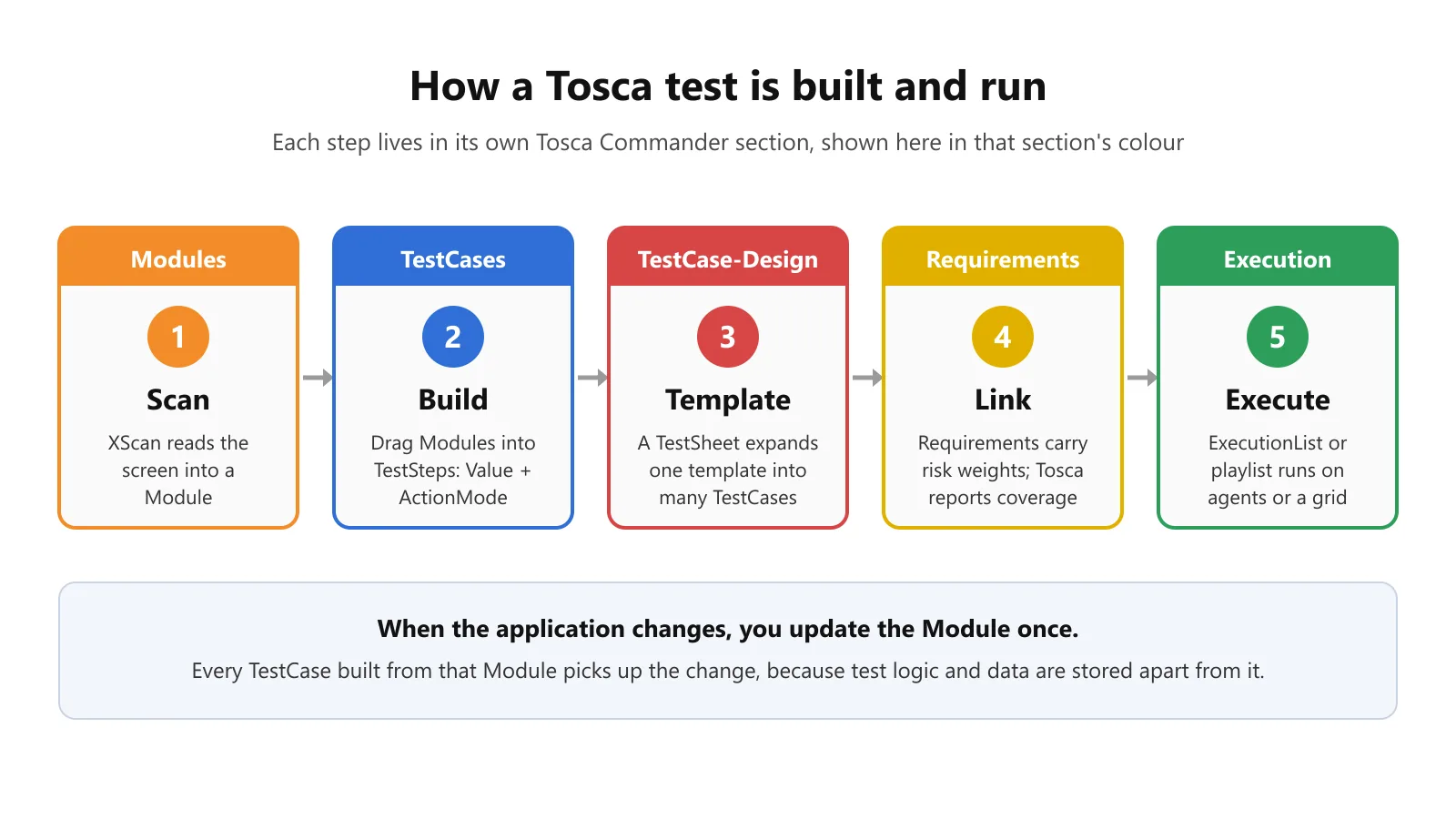
- Scan the application with XScan. XScan identifies controls (text boxes, buttons, tables) and stores them as Module Attributes.
- Build a TestCase by dragging Modules into a TestCase. Each TestStep sets a Value and an ActionMode for each attribute, for example
Inputto type a value,Verifyto check one, orBufferto save a value for a later step. - Template the TestCase and connect it to a TestSheet in TestCase-Design, so one template expands into many TestCases, one per data combination.
- Link TestCases to Requirements so Tosca can report risk coverage: which business-critical requirements are tested, and how much of the risk weight has passed.
- Execute from an ExecutionList (or a playlist in Tosca Cloud), locally or on distributed agents, and review logs and results.
Tosca Concepts for Selenium and Playwright Engineers
If you come from code frameworks, most Tosca terms map to something you already know. This table is the quickest way to get productive in a Tosca team:
| Tosca term | Closest code-framework equivalent | Note |
|---|---|---|
| Module | Page object | Stored as data in the repository, not as a class |
| Module Attribute | Locator plus element wrapper | Created by XScan; edited in the UI |
| TestStep | One page-object method call | Values and ActionModes instead of code |
ActionMode Input / Verify / Buffer | fill() / expect() / assigning a variable | Verify failing fails the step |
| TestCase template + TestSheet | Parameterised test plus data provider | Combinations designed in TestCase-Design |
| ExecutionList / playlist | Test suite or CI job | Holds runs and logs |
| Test Configuration parameters | Config file or environment variables | Inherited down the folder tree |
| Requirement risk weight | No direct equivalent | Drives Tosca's risk-coverage reporting |
| Reusable TestStepBlock / library | Shared helper or fixture | Reused across TestCases |
The biggest mindset difference: in Tosca the test is data inside a repository, edited in a desktop or browser UI. In Selenium or Playwright the test is code in Git, reviewed in pull requests. That affects code review, branching and how you diff a change.
What Can Tosca Test?
Tosca covers more technologies than most web-first tools. Per Tricentis and the Tosca 2026.1 release notes, supported areas include:
- Web applications in common browsers
- SAP: SAP GUI and SAP Fiori
- Salesforce, including pilot support for OmniStudio in 2026.1 (key features)
- Desktop applications, for example PowerBuilder controls, which gained new steering options in 2026.1
- APIs, with API simulation for services that are not available, including async protocols such as Kafka, MQ and RabbitMQ
- Mobile apps, PDFs, and BI/data warehouse testing
What Changed in Tosca in 2026?
Tosca now comes in two forms: Tosca on your own infrastructure (Tosca Commander, current long-term release 2026.1 LTS) and Tosca Cloud, a managed SaaS with cloud and on-prem execution agents. The 2026 changes that matter most, from the Tosca Cloud release notes and Tricentis announcements:
| Month (2026) | Change | Where |
|---|---|---|
| February | Agentic Test Automation: AI agents generate end-to-end TestCases from plain-language descriptions, using TBox or Vision AI control recognition. Requires a Tosca cloud or hybrid deployment and comes with a limited number of prompts (Tricentis ShiftSync) | Tosca Cloud / hybrid |
| August | Tosca CLI to manage workspaces and run playlists from a terminal or CI pipeline | Tosca Cloud |
| September | Agentic conversion of manual test cases (for example from qTest) into automated tests; review of self-healing changes in results | Tosca Cloud |
| October | MCP server with a one-step installer for AI assistants; MCP tools to trigger runs and manage requirements | Tosca Cloud |
| November | MCP tools to build and edit TestCases; Playwright integration that starts Playwright tests through a GitHub workflow module; gRPC for API tests | Tosca Cloud |
| 2026.1 LTS | Engine updates (API, PDF, Salesforce), .NET 10 runtime, OAuth 2.0 for Tosca Server mail | Tosca (on-prem) |
The practical takeaway: most new AI features land in Tosca Cloud first. Teams on an on-prem Tosca Commander installation should check availability for their version before planning around them.
What Are Tosca's System Requirements?
Tosca is Windows software. Per the Tosca 2026.1 system requirements:
- Operating system: Windows 10 or Windows 11, 64-bit; Windows Server 2019, 2022 or 2025
- Runtime: Microsoft .NET 10 Desktop Runtime and .NET 10 Hosting Bundle (installed by setup if missing)
- Memory: 8 GB minimum, 16 GB recommended
Tosca Cloud moves authoring and administration to the browser, but its personal and team execution agents still run on Windows 10/11 or Windows Server 2022/2025 x64 (Tosca Cloud requirements). Tosca Agentic Test Automation also needs Windows 10 or 11. Mac and Linux users run Tosca through a Windows VM or remote desktop.
Where Does Tosca Fit, and Where Does It Cost You?
Tosca is a strong fit for some teams and a heavy one for others. A fair summary:
| Tosca is a good fit when | Tosca costs you when |
|---|---|
| Tests follow business processes across SAP, Salesforce, desktop and web | Most of your product is a modern web or mobile app owned by developers |
| Testers are business or manual testers who will not write code | Engineers want tests in Git, reviewed in pull requests with the app code |
| Auditors want requirement-linked, risk-weighted coverage | Your team works on macOS or Linux and does not want Windows agents |
| You need SAP GUI or other desktop technologies | You need tests that can move to another tool: Tosca models live in Tosca's own repository, not as exportable framework code |
| A central QA team owns automation for many applications | Budget planning needs public pricing (Tosca is quote-based) |
Many enterprises run Tosca for packaged-app regression and a code framework (Playwright, Selenium, Cypress) for product teams. The November 2026 Playwright integration in Tosca Cloud is Tricentis acknowledging that mix.
How Do You Run Tosca Web Tests on a Cloud Browser Grid?
Tosca's browser tests can run on a remote Selenium grid instead of local browsers, which helps when you need browser and OS combinations your Windows agents do not have. TestMu AI documents this setup for its cloud grid of 3,000+ browsers, alongside 50,000+ real devices for mobile testing (integration guide):
- Get your TestMu AI username, access key and hub URL from the Automation dashboard.
- In Tosca Commander, scan the target pages with XScan and build the TestCase as usual (OpenUrl, steps, CloseBrowser from
standard.tsu). - Under the TestCase, add Test Configuration parameters for the remote grid and the browser and OS you want.
- Pass any extra WebDriver capability as a Test Configuration parameter using Tosca's naming rules: prefix it with
WebDriver_, replace.with__(double underscore) and:with___(triple underscore). For example,WebDriver_geoLocation = INruns the test from India. - Run the TestCase (for example, "Run in ScratchBook") and review results in Tosca and in the TestMu AI dashboard, which adds video, network and console logs per run.
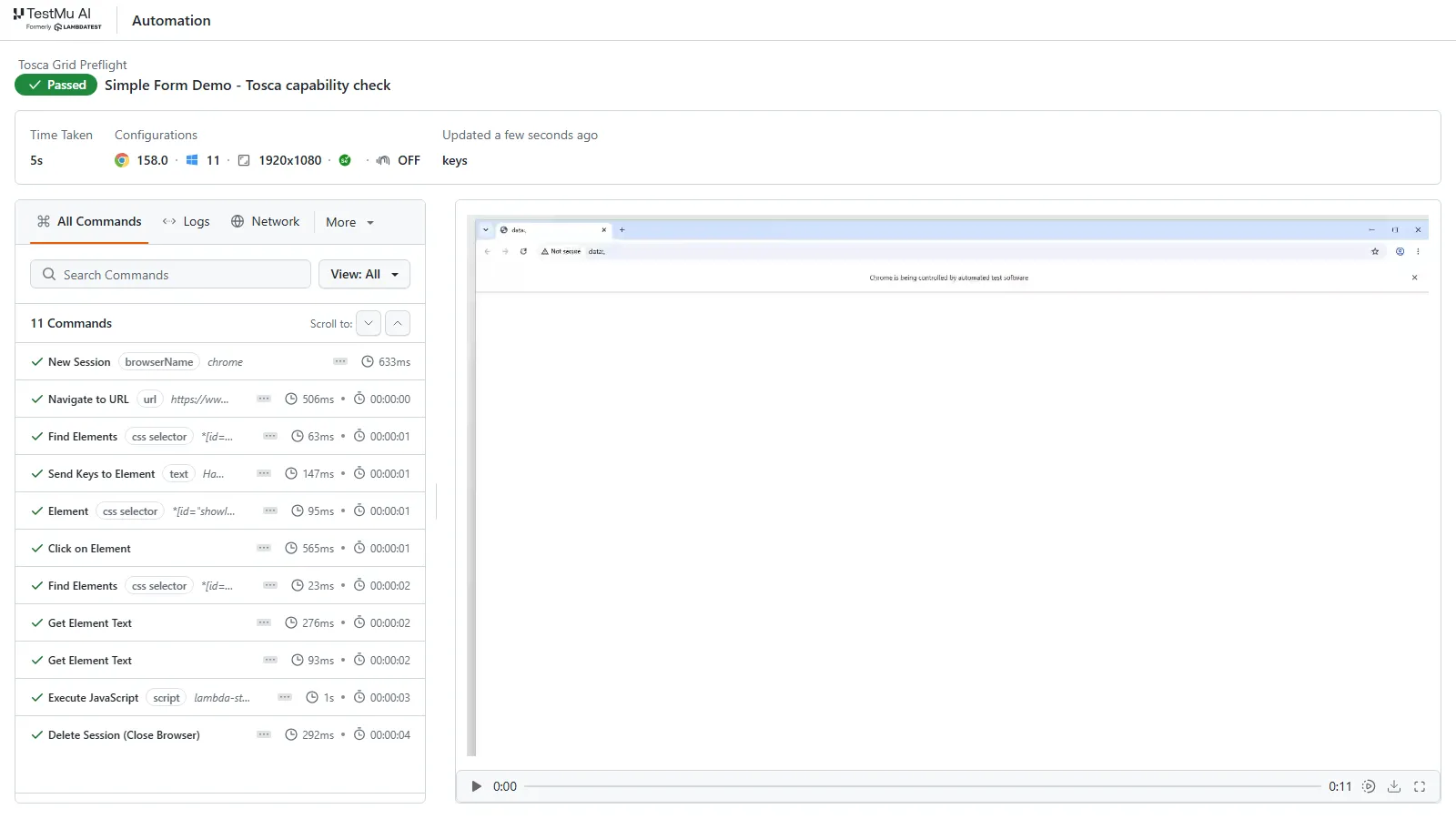
Use TestMu AI's capabilities generator to get valid browser and OS values before translating them into Tosca parameters.
How Does Tosca Compare With Code Frameworks and AI-Native Tools?
Three approaches compete for the same regression suite. None is right for every team:
| Tricentis Tosca | Code frameworks (Playwright, Selenium) | AI-native tools (for example KaneAI) | |
|---|---|---|---|
| Who writes tests | Business and QA testers, codeless | Developers and SDETs, in code | Anyone, in natural language |
| Where tests live | Tosca repository | Git | Tool repository, with export to code in some tools |
| Strongest at | Packaged enterprise apps, SAP GUI, desktop | Modern web apps, developer workflows | Fast authoring for web and mobile flows |
| Maintenance model | Update the Module once | Update locators or page objects in code | Self-healing with review |
| Platform | Windows authoring and agents | Any OS | Browser-based; runs on cloud browsers and devices |
| Pricing | Quote-based | Free and open source (infrastructure extra) | Published plans vary by vendor |
TestMu AI's KaneAI sits in the third column: describe a test in plain English, and KaneAI plans, authors and runs it on web and mobile, with versioned changes and export to Selenium, Playwright and Appium code. For SAP testing, TestMu AI covers Fiori and S/4HANA web flows but says plainly that it does not drive the SAP GUI desktop client. Teams that depend on SAP GUI automation are better served by Tosca or SAP-native tools for that part.

Note: Writing codeless tests without a Windows install? Start free with KaneAI and turn a plain-English test into a run on real browsers and devices in minutes.
If you are already planning a move off Tosca, the Tricentis Tosca alternatives page compares seven options with migration notes. For a broader view of tool categories, see this comparison of automated testing tools in software testing, and for SAP-specific options, the guide to SAP automation tools.
How Do You Learn Tosca?
A practical path for a tester starting in a Tosca team:
- Learn the sections and vocabulary above until Module, TestStep, ActionMode and TestSheet feel natural.
- Build one end-to-end TestCase on a public practice site: scan, build, verify, buffer a value, run.
- Template it with a TestSheet of five data rows to see how TestCase-Design multiplies coverage.
- Link it to a Requirement and read the risk-coverage report.
- Take Tricentis's own training through Tricentis Academy, which runs the Automation Specialist learning path and certifications for Tosca.
- Learn one code framework as well. Most Tosca shops also run Playwright or Selenium, and the Tosca Cloud Playwright integration ties them together.
Conclusion
Start with one TestCase of your own: scan a screen with XScan, build it with Input, Verify and Buffer steps, then template it with a TestSheet. When you need browsers your Windows agents do not have, add the Test Configuration parameters above and run the same TestCase on the TestMu AI cloud grid.
Testing web or mobile apps without writing code? KaneAI by TestMu AI turns plain-English instructions into tests.
Author

Japneet Singh Chawla
Blogs: 11

Japneet Singh Chawla is an Engineering Manager at TestMu AI, where he leads a team driving HyperExecute, the AI-native Test Orchestration Cloud Platform, and integrations with Cypress, Provar, Tosca, and Selenium, improving test execution efficiency and driving adoption across 500+ enterprise clients. He also spearheaded zero-downtime deployments that cut release-related downtime by 90%, and mentors new engineers into productive contributors. He brings 9+ years of experience building and scaling distributed systems, SaaS platforms, and developer tools, with deep hands-on backend engineering across Golang, Python, Node.js, Kafka, and Redis. Earlier at Sumo Logic he built award-winning developer tools, including a VS Code Parser Linter, and at Indus Valley Partners he was a founding member of the Sentiment Analyzer team, building ML-powered solutions for financial clients. Japneet holds an MCA in Computer Science from GGSIPU.
Reviewer

Anmol Gupta
Reviewer
Anmol Gupta is Vice President of Product Management at TestMu AI, driving HyperExecute, the test orchestration cloud that runs and accelerates automated test execution. He led the development of the Unified Test Execution Cloud Platform and now leads a 30-member cross-functional product organization across product lines contributing $7M+ in revenue. He brings over nine years of experience and previously co-founded the SaaS company Timble as CTO, where he grew the team from 5 to 40 and launched an AI KYC platform that processed 600K+ applications in five months while cutting verification time from 12 minutes to under 30 seconds. Anmol holds an MTech and BTech from IIT Delhi.


Tosca FAQs
Did you find this page helpful?
More Related Blogs


TestMu AI forEnterprise
Get access to solutions built on Enterprise
grade security, privacy, & compliance
- Advanced access controls
- Advanced data retention rules
- Advanced Local Testing
- Premium Support options
- Early access to beta features
- Private Slack Channel
- Unlimited Manual Accessibility DevTools Tests