
Run End-to-End Tests from Your Terminal with Kane CLI
Author and Run Tests Right from the Terminal in Natural Language, with an Evidence-Backed Pass or Fail from a Real Browser.
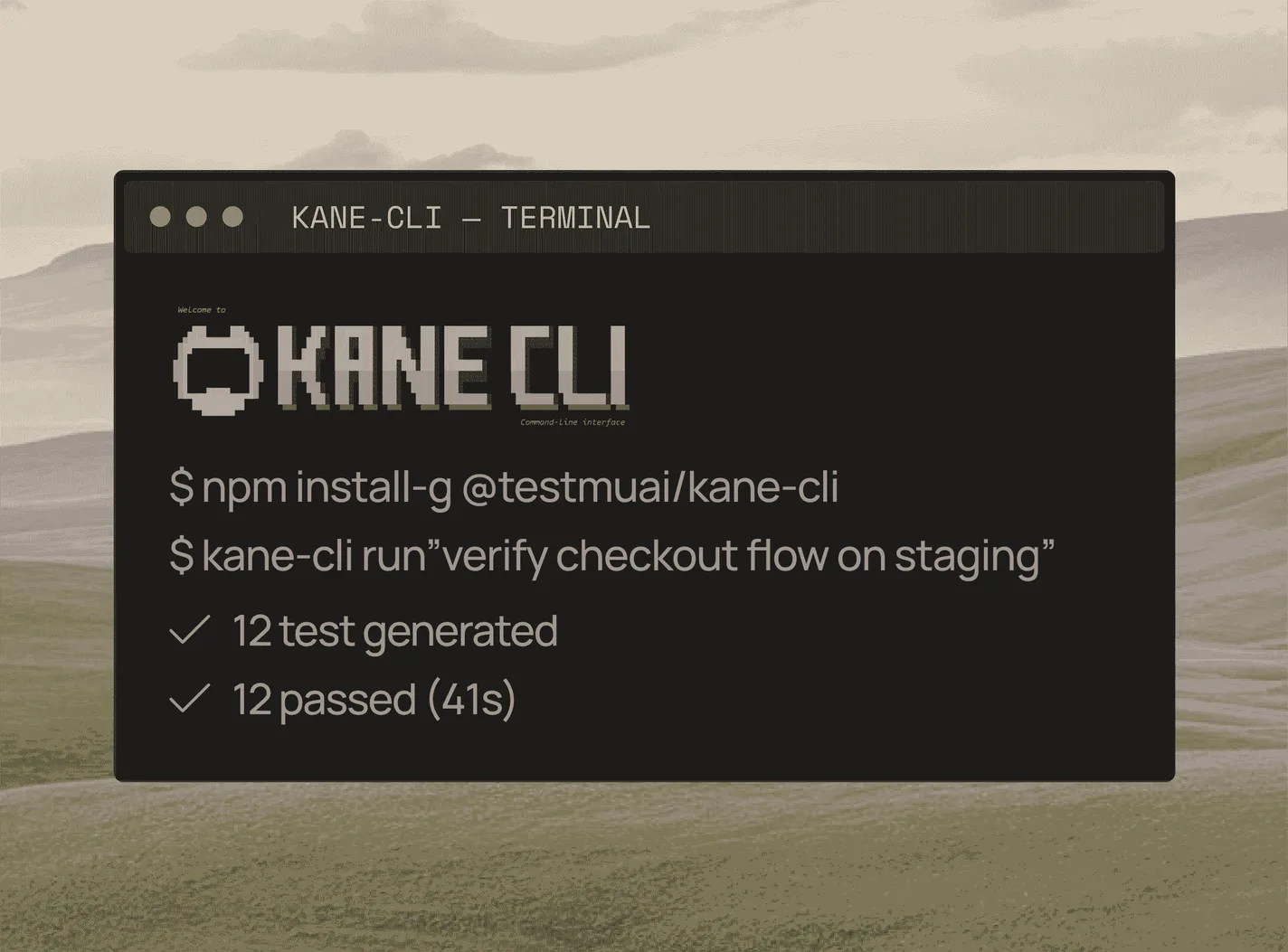
npm install -g @testmuai/kane-cli
Modern Web Guidance: What It Does and How to Test What Your Agent Builds With It
Modern Web Guidance (from Chrome) steers coding agents to native web features. We ran it on a dialog, checked Safari support, and show how to test it.
Published on:
Modern Web Guidance is an open-source set of agent skills and a CLI from the GoogleChrome GitHub org, maintained by the Chrome, Edge, Firefox and MDN teams. 1.0 was released on 10th November 2026. It enables coding agents (e.g., Claude Code, Codex, Cursor, Gemini CLI) to look up the current web platform guidance on things like native <dialog> before they go and write the code.
It doesn't test the result at all. You still have to check that the change meets your acceptance criteria in the browsers your users have.
TestMu AI has no affiliation with the Modern Web Guidance project.
Modern Web Guidance tells your agent how to build it. Kane CLI proves it works on your acceptance criteria and in your users' browsers.
This guide covers what MWG does, how to install it, what it returned when we asked for a confirmation dialog (a simple "yes/no" dialog), a dated browser support table for that dialog, and a five-step process for checking an agent's change across browsers and a real iPhone prior to merge.
TL;DR
Modern Web Guidance is an open-source agent skill and CLI from the GoogleChrome GitHub org. It tells AI coding agents the current way to build web UI before they write code, and each guide carries browser support data plus a fallback for every gap. It does not run your app, so you still test what the agent builds.
What Do You Get From Chrome Modern Web Guidance?
- Modern Web Guidance skill: The modern web guidance skill tells your agent to call the CLI before it writes web UI code. The search and retrieve commands return guides such as dialog, each with support data and a fallback where a browser lacks the feature.
- Modern Web Guidance npm package: The modern-web-guidance npm package is the CLI itself. Open source: Yes (Apache-2.0). Latest release: 1.0.0. Running npx modern-web-guidance@latest install starts the setup wizard for your agent.
- Modern Web Guidance GitHub repo: The modern web guidance GitHub repo is GoogleChrome/modern-web-guidance, and it holds the skills. The Chrome, Edge, Firefox and MDN teams steward the project, so the guidance covers every major browser engine.
- Google agent skills: Modern Web Guidance is one of the Google agent skills you can install per agent. In Claude Code, run claude plugin install modern-web-guidance@googlechrome after adding the GoogleChrome marketplace.
- Other coding agents: Codex uses codex plugin add modern-web-guidance@googlechrome, Gemini CLI uses gemini extensions install with the repo URL, and any agent that supports the skills format uses npx skills add GoogleChrome/modern-web-guidance.
How Do You Check What a Modern Web Guidance Build Does?
- Acceptance criteria first: Before an agent builds with Modern Web Guidance, write down what the user must see. Save those criteria as a Kane CLI _test.md file and run it with --no-adaptive-heal, so a replay miss fails the merge gate instead of healing.
- Real iPhone check: Modern Web Guidance flags that Safari 27.2, the shipping release on 12 November 2026, lacks closedby. Tap the dialog backdrop in a TestMu AI Real Device Cloud session to confirm the agent added the guide's fallback script.
What Is Modern Web Guidance?
Modern Web Guidance is an open-source project in the GoogleChrome GitHub organization, licensed under Apache-2.0. Its README describes it as "a set of skills that embed web platform expertise, best practices, and browser compatibility data" into coding agents. The README credits the Google Chrome, Microsoft Edge, Mozilla Firefox and MDN teams as stewards.
The v1 announcement describes Firefox and Edge as joining Chrome on the project.
An agent skill is a set of instructions that an agent loads in when a task matches it. The Modern Web Guidance skill instructs the agent to invoke the MWG CLI prior to writing any web UI code. The CLI has three commands:
searchfinds guides for the task.retrievereturns one guide by ID as Markdown.legacy-scandoes a scan of an existing codebase looking for legacy patterns that could be modernized. The v1 blog states that this first release "uses static analysis to check for a limited set of patterns".
The Chrome team says the guide database is targeting "hundreds of verified AI knowledge gaps", i.e., the places where agents are known to fall back on old patterns.
How Do You Install Modern Web Guidance?
Modern Web Guidance installs per agent. These commands are from the official get-started page:
# Interactive wizard
npx modern-web-guidance@latest install

# Claude Code
claude plugin marketplace add GoogleChrome/modern-web-guidance
claude plugin install modern-web-guidance@googlechrome

# Codex
codex plugin marketplace add GoogleChrome/modern-web-guidance
codex plugin add modern-web-guidance@googlechrome

# Gemini CLI
gemini extensions install https://github.com/GoogleChrome/modern-web-guidance --auto-update

# Any agent that supports the skills format
npx skills add GoogleChrome/modern-web-guidance
As per the v1 announcement, MWG also installs via the plugin marketplaces of Cursor, Antigravity, Copilot, WebStorm, Kimi Code and Grok Build.
What Does Modern Web Guidance Return in the Case of a Confirmation Dialog?
On 16 Nov 2026, we asked Modern Web Guidance 1.0.0 (the @latest version that day) for a confirmation dialog:
npx modern-web-guidance@1.0.0 search "confirmation dialog"It returned these guide IDs:
dialog
declarative-dialog-popover-control
html
light-dismiss-a-dialog
platform-controls-dismiss-dialog
prevent-page-scroll-under-modal-dialog
accessibility
navigation-drawer
animate-to-from-top-layer
persistent-top-layer-ui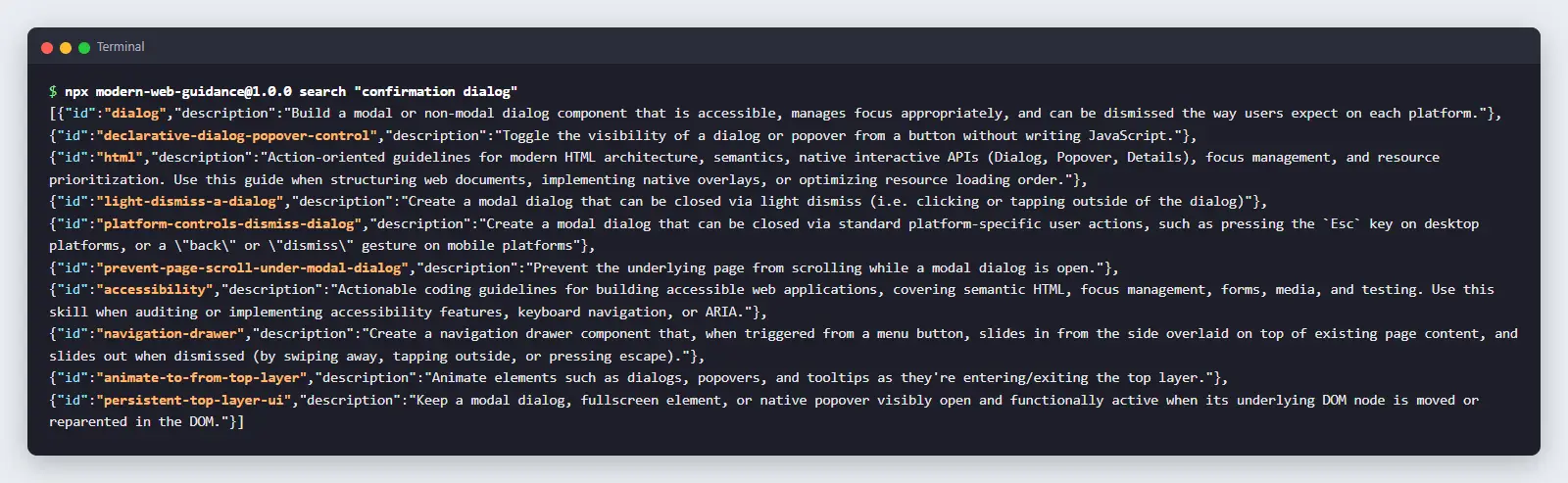
npx modern-web-guidance@1.0.0 retrieve dialog returns the main guide. For a blocking confirmation, it advises using <dialog> opened with showModal() or command="show-modal". It explicitly says not to add role="dialog", aria-modal, a manual focus trap or an Esc handler, as "the native modal already provides them".
It provides the CSS to stop the page scrolling behind the modal and says to put autofocus on the safe action (Cancel) in the case of a destructive confirmation.
The Dialog Guide states where browser support ends and provides a fallback for each gap in a section entitled 'Fallback strategies'. That's the section you need to test.
Which Dialog Features Work in Safari? (Support Table, 12 Nov 2026)
Data from MDN browser-compat-data 8.1.9 (12 Nov 2026). The Edge overscroll-behavior entry comes from the MWG dialog guide. Re-check before you rely on it, as Safari 27.x is known to ship quite frequently.
| Feature | What it does | Chrome | Edge | Firefox | Safari | What to check on an iPhone |
|---|---|---|---|---|---|---|
<dialog> + showModal() | Native modal: inert page, top layer, focus return | 37 | 79 | 98 | 15.4 | Dialog opens, page behind can't be tapped |
command="show-modal" / commandfor (Invoker Commands) | Opens the dialog from a button with no JavaScript | 135 | 135 | 144 | 26.2 (Dec 2025) | On older iOS without the polyfill, the button does nothing |
closedby="any" | Click or tap outside to close | 134 | 134 | 141 | Not in 27.2 (current). Listed for 27.3, in beta | Tapping the backdrop does nothing unless the agent added the guide's fallback script |
overscroll-behavior: contain on dialog and ::backdrop | Stops scroll on the dialog chaining to the page | 144 | 144 | 150 | Property since 16, but "no effect on scroll containers that have no scrollable overflow" | Swipe on the backdrop and see whether the page behind moves |
popover | Non-modal top-layer panels, light dismiss | 114 | 114 | 125 | 17. On iOS, tap-outside dismiss from 18.3 | Panels close on tap outside |

Does Modern Web Guidance Mean You Can Skip Testing?
No. Modern Web Guidance improves what the agent writes. It doesn't run your app at all.
The get started page states that results "may vary depending on your project requirements, model, the prompts you write, and your preferred agentic coding tools".
Adrian Roselli's critique includes a quote from a Google consultant on MWG: "Even if the relevant guide is picked up, it may not be read fully." In Roselli's own test, an MWG accordion had WCAG issues and "the animation doesn't work in Firefox" (despite the promise of baseline support and fallbacks).
The MWG team measures their own guidance by taking the agent's output and running it in a browser. Their evals dashboard states: "Playwright opens the finished app in a real browser and checks the DOM, styles, and source against each requirement."
Your app will need the same kind of verification against your requirements and in the browsers you ship to.
| Layer | Question it answers | Tools |
|---|---|---|
| Guidance | What is the current, correct way to build this? | Modern Web Guidance, MDN, framework docs |
| Generation | Write the change | Claude Code, Cursor, Codex, Gemini CLI |
| Verification | Does the change meet our acceptance criteria in the browsers and devices our users have? | Kane CLI, Playwright, Real Device Cloud sessions |
Guidance makes the right code more likely. Verification tells you whether you've actually got it.
How Do You Test What a Coding Agent Has Built Using Modern Web Guidance?
Here's the workflow using the Kane CLI (the terminal end-to-end testing agent from TestMu AI for developers and their coding agents). Acceptance criteria are simply statements of what must be true for the feature that is considered done. They are written prior to the code and then checked afterward.
Step 1: Write Acceptance Criteria Before the Agent Writes Code
Feature: Delete project confirmation
- Clicking or tapping 'Delete project' brings up a dialog called 'Delete this project?'
- While the dialog is open, the project list behind it is not clickable.
- "Cancel" closes the dialog and the project remains in the list.
- "Delete" closes the dialog, the project is removed, and the project count is reduced by exactly one.
- The user can just dismiss the dialog on every target device. On iPhone, there's no Esc key, so that means there's a visible Cancel button.
- The dialog's accessible name corresponds to its heading.
The criteria don't refer to <dialog>, closedby, or any such selector. They describe what the user sees, so any implementation that satisfies those criteria would be compliant.
Step 2: Let the Agent Build Using Modern Web Guidance
Prompt as usual: "Add a delete confirmation to the project page. Meet the criteria in docs/delete-confirmation.md." With MWG installed, the agent will search, retrieve the dialog guide, and write native <dialog> markup.
Step 3: Install Kane CLI and Its Skill
npm install -g @testmuai/kane-cli
kane-cli login --oauth            # or: kane-cli login
npx @testmuai/kane-cli-skill      # installs the Kane CLI skill for Claude Code, Codex CLI and Gemini CLI
The skill teaches your coding agent to write and run Kane CLI tests on its own changes. Kane CLI is free to install and runs on KaneAI credits.
For a quick visual walkthrough of this concept, watch the video below from TestMu AI.
Subscribe to the TestMu AI YouTube channel for more tutorials on testing and automation.
Step 4: Save the Criteria as a Test and Run It
Kane CLI saves tests as Markdown files whose names end in _test.md:
---
url: https://staging.example.com/projects
---

# Delete project confirmation

## Open the dialog

Click 'Delete project'. A dialog titled 'Delete this project?' should be visible.

## Cancel keeps the project

Click "Cancel". Make sure the dialog has actually closed and that the project is still in the list.

## Delete removes exactly one project

Note the project count. Click "Delete project", then "Delete".

Check that the dialog is closed, the project is gone, and the count has dropped by precisely one.
kane-cli testmd run tests/delete_project_test.md --agent --headlessHow a run works, in Kane CLI's own terms:
- First run. Kane CLI authors each step against the live page.
- Later runs. Kane CLI will "replay each unchanged step from its recording with no LLM cost". Commit the
output-<stem>/folder so that teammates and CI can all replay the same recording. - When the UI moves. If a replayed step no longer finds the element, then a step heal will re-find that element. If that fails, then a flow heal will rework the path. Healing will never touch the acceptance criteria, and a wrong value (e.g. the count drops by two) will be reported as a bug rather than healed to green.
- The verdict. Kane CLI's reasoning is what determines how you get through the flow. A separate assessment step then determines the verdict against your criteria.
For merge gates, add --no-adaptive-heal so a replay miss fails the run instead of healing:
kane-cli testmd run tests/delete_project_test.md --agent --headless --no-adaptive-healExit codes CI can act on:
| Exit code | Meaning |
|---|---|
| 0 | Passed |
| 1 | Failed, or the upload failed |
| 2 | Didn't start (sign-in, config, no start URL, Chrome or network). Nothing ran and no credits were used |
| 3 | Timeout or cancelled |
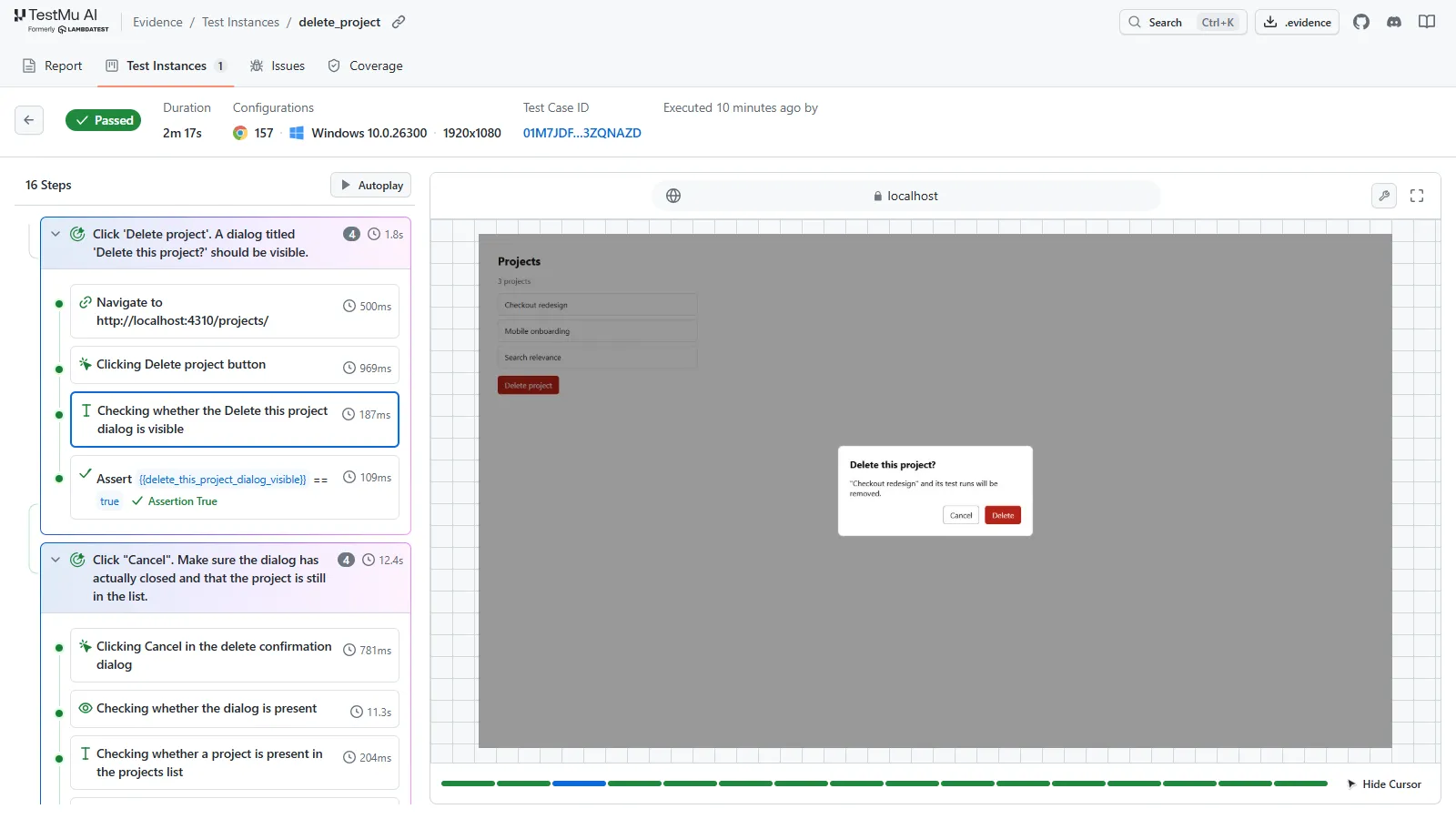
Every run that commences comes with a .evidence pack containing per-step screenshots, network and console logs, run logs and failure records. You can open it up with kane-cli evidence serve <path>. The evidence viewer will also show the root cause and failure class.
A reviewer can therefore see exactly what happened step by step without having to re-run the test.

Try it
Note: npm install -g @testmuai/kane-cli, then npx @testmuai/kane-cli-skill so your coding agent can check its own front-end changes.
Step 5: Run the Criteria on More Browsers, Then Check the iPhone
By default, Kane CLI web runs use local Chrome. If you want to run the same saved test on a remote browser on the TestMu AI grid, then just add --ws-endpoint:
kane-cli testmd run tests/delete_project_test.md --agent --headless \
  --ws-endpoint "<TestMu AI grid endpoint>"
For Safari on a physical iPhone, you'd open your staging URL in a live session on TestMu AI Real Device Cloud, walk the same six criteria, and record that session. In the Kane CLI, mobile targets (--target ios, --target android) are for native apps and don't take a URL. The iPhone check on a web change is therefore the Real Device Cloud session.
What Should You Be Looking for on a Real iPhone That a Desktop Run Won't Be Able to Show You?
Coding agents that are checking their own work will typically do so in a local desktop browser. A desktop run would miss the following on an iPhone:
- No Esc key. There must be a visible Cancel or close button that works (criterion 5).
- Tap outside to close.
closedbyisn't in shipping Safari (27.2) as of 12 Nov 2026. If the agent usedclosedby="any"without the guide's fallback script, then tapping the backdrop does nothing. - The button that opens the dialog.
command="show-modal"requires Safari 26.2 or later. If you've got users on older iOS and the agent skipped the feature-detected polyfill the guide recommends, then the Delete button will do nothing for them. - Scrolling behind the modal. In Safari, the overscroll-behavior has no effect on containers that have no scrollable overflow (that's how the guide styles the backdrop). Swipe on the backdrop and see if the page behind it moves. If it does, then that should be included as a criterion.
- Focus on tap. Per MDN, Safari doesn't give focus to a clicked button "by design". The checks written for desktop around which button had focus don't carry over. Write the iPhone version around what the user sees and what VoiceOver says.
- Accessible name. Ensure VoiceOver reads the dialog heading.
If one of them fails, first check that the agent has in fact applied the guide's fallback. Then check the fallback itself on the device.
Should You Use Playwright or the Kane CLI for Agent-Written Front-End Code?
Playwright is what the MWG evals use, and a number of teams already run it. It's a different beast from the Kane CLI:
| Criteria | Playwright | Kane CLI |
|---|---|---|
| How you write a test | Code (TS/JS, Python, Java, .NET) with selectors and assertions | Plain-language steps and checks in a _test.md file |
| Maintenance | You update the code when the UI changes | Replays unchanged steps from the recording. Heals the path when the UI moves (turn off with --no-adaptive-heal). Criteria stay fixed |
| Verdict | Your assertions | A separate verification step against your written criteria |
| Browsers | Chromium, branded Chrome and Edge, Firefox, and Playwright's WebKit build. Can connect to remote browsers | Local Chrome, or TestMu AI grid browsers via --ws-endpoint |
| Safari on a physical iPhone | Not from Playwright (WebKit build and mobile emulation; see Playwright iOS testing) | Not for web URLs. Use a Real Device Cloud live session |
| Review output | Traces, screenshots, HTML report | .evidence pack: per-step screenshots, network and console logs, verdicts |
| Cost | Free, open source | Free to install. Runs use KaneAI credits |
When Playwright is the better choice:
- Your team already has a healthy Playwright suite.
- You want fine-grained assertions on DOM and styles, network mocking and component tests.
- You want the exact test code in your repo, fully open source.
You can also run Playwright on TestMu AI's grid (Playwright testing), and Kane CLI can export tests to Playwright code.
When Kane CLI fits better:
- A coding agent does the majority of your UI changes.
- You want your tests to state the acceptance criteria rather than the selectors.
- You require an evidence pack per run for review.
- You want your coding agent to run the checks itself via the skill.
For a full comparison, see Kane CLI vs Playwright.
Where Does Modern Web Guidance Fit Into a Vibe Coding Workflow?
Agent-written front-end work goes well when three things hold:
- The agent is familiar with the current platform. Modern Web Guidance covers that.
- A human writes the criteria prior to the code.
- The change is checked in the browsers the users have prior to merge. Kane CLI deals with this for Chrome and the grid browsers (gated by exit codes), and Real Device Cloud takes care of iPhone Safari.
For team-wide merge gates, see the Vibe Coding QA process. For the bugs that those gates catch, see Vibe Coding risks. For Claude Code setup, see Claude Code testing with Kane CLI.
To style and test the dialog itself, see our guide to the HTML dialog element. For other front-end skills, see Claude Code skills.
Conclusion
Modern Web Guidance, Google's open-source set of agent skills for the web platform, steers coding agents toward native features such as <dialog> and gives them a fallback for each browser gap. What it can't tell you is whether the agent applied that fallback, or whether the result works in the browsers your users actually have.
Pick one dialog or form your agent is about to build, write its acceptance criteria first, and save them as a _test.md file. Gate the pull request on that file with --no-adaptive-heal, then walk the same criteria in Safari on a real iPhone before you merge.
The Kane CLI testmd docs cover the file format, imports and CI usage. These three commands set it up:
npm install -g @testmuai/kane-cli
kane-cli login --oauth
npx @testmuai/kane-cli-skill
Testing from the terminal? Kane CLI by TestMu AI lets SDETs and developers plan, write, run and debug tests from the command line.
Author

Asad Khan
Blogs: 5


Asad Khan is the Co-Founder and CEO of TestMu AI, with over 15 years of experience in software testing, product strategy, and leadership. Under his leadership, TestMu AI has grown into an AI-native software testing platform trusted by 2.5M+ users across 132 countries, including startups, enterprises, and Fortune 500 companies. He is a member of the Forbes Technology Council and is followed by 39,000+ professionals on LinkedIn from the software testing and quality assurance community. Before TestMu AI, Asad co-founded 360logica, a software testing company that he grew into a multi-million-dollar business before its acquisition by Saksoft. Earlier, he began his career at GlobalLogic as a Lead Engineer serving top Wall Street banks. He holds a Bachelor of Technology from JSS Academy of Technical Education, Noida.
Reviewer

Maneesh Sharma
Reviewer
Maneesh Sharma is Chief Operating Officer at TestMu AI, where he leads the company's revenue functions across go-to-market, sales, RevOps, customer success, and the partner ecosystem, driving its global expansion. He brings over 28 years of experience across product, go-to-market, and business operations. Before TestMu AI he was Managing Director and General Manager for GitHub across India and APAC, Head of Partner Sales and Ecosystem at Adobe, Chief Revenue Officer at WizIQ, and Head of Products and Solutions at SAP India. Maneesh holds an MBA from IIM Bangalore and a B.E. in Electronics and Communications from NIT Surat.


FAQs
Did you find this page helpful?
More Related Blogs



TestMu AI forEnterprise
Get access to solutions built on Enterprise
grade security, privacy, & compliance
- Advanced access controls
- Advanced data retention rules
- Advanced Local Testing
- Premium Support options
- Early access to beta features
- Private Slack Channel
- Unlimited Manual Accessibility DevTools Tests