
Power Your Software Testing with AI Agents and Cloud
The Native AI-Agentic Cloud Platform to Supercharge Quality Engineering. Test Intelligently and Ship Faster.

- TestMu AI (Formerly LambdaTest)
- /
- Blog
- /
- Claude Code Skills: How to Create, Install, and Verify Them
Claude Code gives its skill listing a budget of 1% of the model's context window and caps each skill's description at 1,536 characters, according to the skill description limits. When the listing overflows, Claude Code drops descriptions, starting with the skills you invoke least.
Claude Code skills are folders with a SKILL.md file: YAML frontmatter that says when to use the skill, and Markdown instructions Claude follows when it runs. Claude loads a skill automatically when your request matches its description, or you run it by typing /skill-name, so the description decides both what a skill costs and whether it ever fires.
This walkthrough builds one skill, ui-check, from an empty folder to a browser check. It ends by running ui-check against a demo page with a planted dark mode bug: the button label flips to Light mode, the page stays light, and a check that only reads the label still passes.
TL;DR
Claude Code skills are reusable instruction folders. Each one holds a SKILL.md with a name and description in YAML frontmatter, step-by-step instructions below it, and optional scripts or reference files. Claude reads the description on every turn and loads the full skill only when a task matches or you type its name.
Do Claude Code skills load into context all the time?
- Claude Code skill descriptions: Yes. Every skill's name and description sit in the skill listing on every turn, capped at 1,536 characters per skill, inside a budget of 1% of the context window.
- Claude Code skill body: No. The SKILL.md instructions load only when you or Claude invoke the skill, then stay in the conversation for later turns.
- Manual-only Claude Code skills: No. Setting disable-model-invocation: true takes the description out of context, and the skill runs only when you type /skill-name.
- Malformed frontmatter: A Claude Code skill with malformed frontmatter still loads, but with empty metadata, so Claude can no longer match it by description. claude plugin validate catches the parse error.
- Triggering as proof: No. A Claude Code skill that fires has not shown it changed the output. Compare runs with and without it, and check UI output in a real browser with a tool such as TestMu AI's Kane CLI.
Skills vs CLAUDE.md, Hooks, and MCP Servers
A skill is the place for a procedure you keep pasting into chat. The Claude Code skills documentation also describes custom commands as merged into skills: a file at .claude/commands/deploy.md and a skill at .claude/skills/deploy/SKILL.md both create /deploy and work the same way.
Skills sit beside five other ways to extend Claude Code, and the right one depends on when it loads:
| Mechanism | What it holds | When it loads | Reach for it when |
|---|---|---|---|
| CLAUDE.md | Project facts and conventions | Every session, in full | Claude needs the fact on almost every task |
| Skill | A procedure or reference, plus optional scripts | Description every turn; body only when invoked | You keep pasting the same steps or checklist |
| .claude/commands/ file | The older single-file form of a skill | Same as a skill | You already have commands; write new work as skills |
| MCP server | A connection to an external tool, service, or API | Its tools are callable for the whole session | Claude needs live access to a system |
| Hook | A shell command bound to a lifecycle event | Never; it runs outside the model each time its event fires | A rule must hold every time, not only when Claude remembers it |
| Plugin | A versioned package of skills, agents, hooks, and MCP servers | Whatever its components load | You want to share a set of these across repositories |
The boundaries get their own guides: MCP vs agent skills for the access-versus-procedure split, Claude Code hooks for rules that must always run, and Claude Code plugins for packaging. If you are new to the tool itself, start with Claude Code.
Step 1: Pick Where the Skill Lives
ui-check depends on how one repository serves its pages, so it belongs in the project rather than in your home folder.
Where you save a skill decides which sessions load it, according to the skill locations reference, which lists these places Claude Code looks:
- Personal - ~/.claude/skills/skill-name/SKILL.md loads in all your projects on this machine, but not in Cowork or cloud sessions.
- Project - .claude/skills/skill-name/SKILL.md loads in sessions in this repository. Commit it and your team gets it too.
- Nested - subdir/.claude/skills/ loads in sessions started in or below that folder, or once Claude works on files there.
- Additional directory - .claude/skills/ inside a folder passed with --add-dir loads for that session only.
- Plugin - plugin/skills/skill-name/SKILL.md loads wherever the plugin is enabled, as /plugin-name:skill-name.
- Enterprise - .claude/skills/ in the managed settings directory reaches every user on machines where your organization deploys it.
- claude.ai account - skills enabled for your account download into ~/.claude/skills/synced/ and load in Cowork, cloud, and signed-in terminal sessions.
Name collisions follow a fixed order, which matters when a personal skill shares a name with one your team committed:
- Enterprise, personal, project - enterprise wins over personal, and personal wins over project. With deploy in both ~/.claude/skills/ and the repository, /deploy runs your personal copy.
- Skill vs command file - a skill beats a .claude/commands/ file with the same name.
- Plugin skills - never collide, because they run under the plugin's namespace.
- Reserved folder names - a folder named synced, in any capitalization, is skipped, because Claude Code uses it for skills downloaded from claude.ai.

Note: Skills teach Claude Code how your team works. TestMu AI runs the tests that skill-guided code still needs, across real browsers and devices. Try TestMu AI free!
Step 2: Write the SKILL.md
Anthropic's first-skill walkthrough builds a skill that runs git diff HEAD and inlines its output before Claude reads the instructions.
ui-check applies the same pattern to the files a front-end edit touched, so it needs one folder and one file.
Create .claude/skills/ui-check/ and save this as SKILL.md inside it. The opening --- must be the file's first line, or Claude Code treats the whole file, markers included, as plain skill content:
---
name: ui-check
description: Checks the rendered UI in a real Chrome browser with kane-cli after front-end changes. Use when the user asks to check, verify, or screenshot a page, or after you edit components, styles, or templates.
argument-hint: "[url]"
allowed-tools: Bash(kane-cli run *)
---

## Front-end files changed since the last commit
!`git diff --name-only HEAD -- '*.html' '*.css' '*.jsx' '*.tsx' '*.vue'`

## Your task
1. From the changed files above, list each change a user should see or click.
2. For each change, run one check against the URL in $ARGUMENTS, or http://localhost:3000 if none was given:
   `kane-cli run "Go to <url>, <action>, and verify <expected result>" --agent --headless`
3. Exit code 0 is a pass. Exit code 1 is a failed check: read the `reason` field in the last output line (`run_end`), fix the code, and run the same check again.
4. Exit code 2 (environment problem: sign-in, Chrome, network) or 3 (timeout or cancellation): report it instead of editing code.
5. Finish with one line per check: PASS or FAIL, plus the reason.
Each line of that file is doing a specific job:
- The description leads with the use case - the listing truncates long entries, so the words you would actually type come first.
- The !`command` line runs before Claude reads the skill - Claude Code replaces it with the command's output, so the instructions arrive with the real list of changed files. A command that fails aborts the whole invocation.
- $ARGUMENTS carries what you type after the name - /ui-check http://localhost:5173 points the check at that URL.
- allowed-tools pre-approves kane-cli run - only for the turn that invokes the skill; the grant clears when you send your next message.
- The body stays short - keep SKILL.md under 500 lines and move long reference material into files such as reference.md that the skill points to.
The frontmatter reference makes every field optional and recommends only description. Field names must match exactly, hyphens included, because Claude Code ignores a field it does not recognize without reporting an error.
Beyond the four fields ui-check uses, these are the ones worth knowing:
- when_to_use - extra trigger phrases, appended to the description and counted toward the 1,536-character cap.
- disable-model-invocation: true - stops Claude from loading the skill on its own and takes the description out of context. Use it for skills with side effects, such as /deploy.
- user-invocable: false - hides the skill from the / menu while Claude can still use it, which suits background knowledge.
- context: fork with agent - runs the skill in a new subagent of the named type, without your conversation history.
- paths - glob patterns that limit automatic loading to matching files, useful in a monorepo.
- model and effort - override the model or effort level for the rest of the current turn.
On Claude Code v2.1.286 or later, a skill named verify or simplify that is in place when a session starts means Claude Code's commit instructions tell Claude to run it right before each commit, except for changes to docs or tests.
That makes the folder name a design decision: renaming ui-check to verify turns an on-demand check into a commit gate.
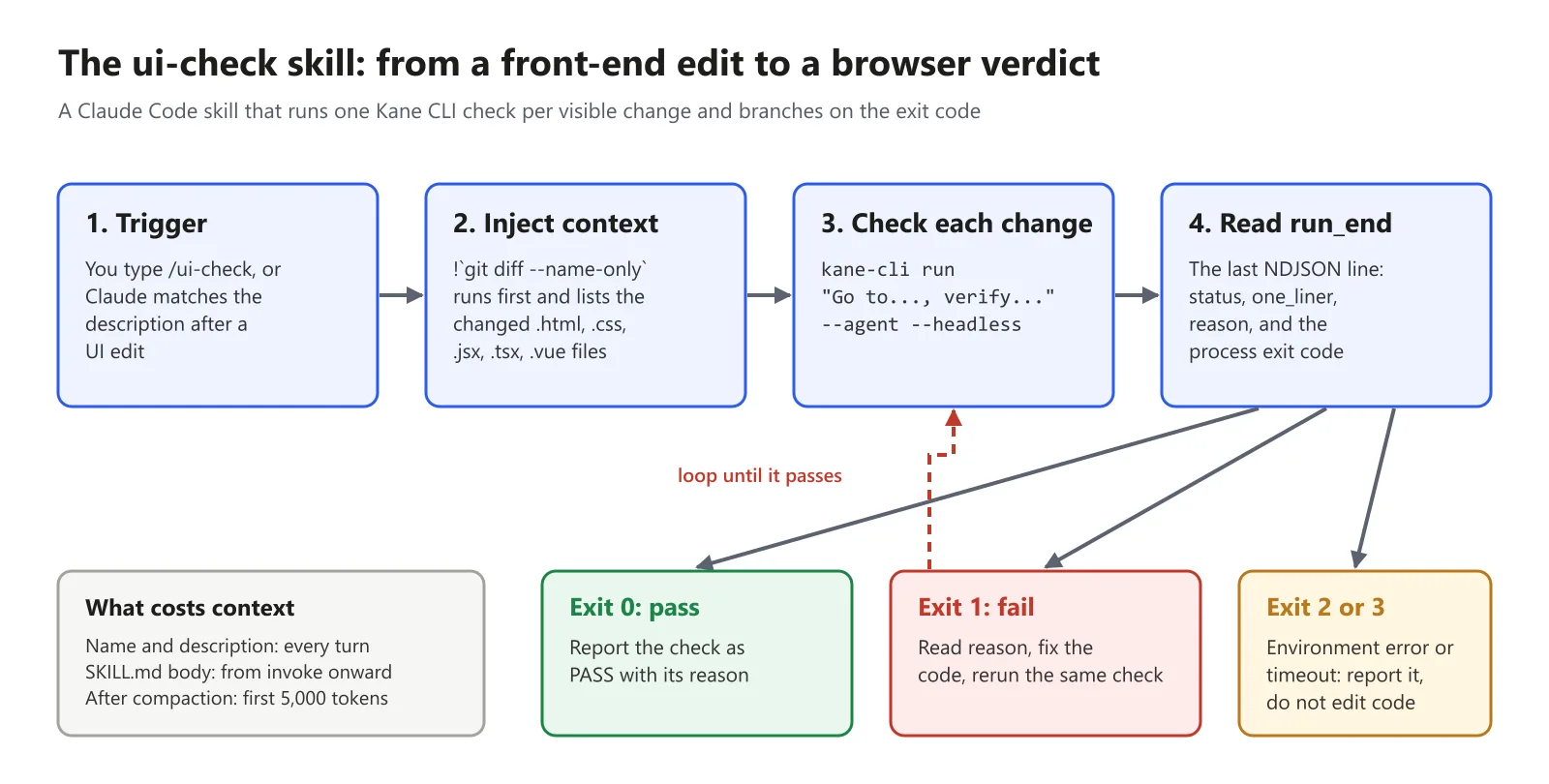
Test both entry points before moving on: type /ui-check, then ask in plain words, such as "check the page I just changed", to confirm the description matches how you actually talk.
Step 3: Validate the Frontmatter
If the frontmatter YAML is malformed, Claude Code loads the skill body with empty metadata, so /skill-name still works but Claude cannot match against the description, according to the skill troubleshooting guide. Running claude plugin validate on the skills directory, on v2.1.233 or later, finds SKILL.md files whose frontmatter does not parse.
Here is ui-check with one change: its description rewritten as a folded block (description: >) whose lines are indented with a tab instead of spaces, which is easy to do in an editor set to tabs. Claude Code 2.1.314 prints this (paths shortened):
$ claude plugin validate .claude/skills
Validating components in: .claude\skills

Validating skill: .claude\skills\ui-check\SKILL.md

✘ Found 1 error:

  ❯ frontmatter: YAML frontmatter failed to parse: YAML Parse error: Unexpected token. At runtime this skill loads with empty metadata (all frontmatter fields silently dropped).

✘ Validation failed
$ echo $?
1
The parser is more forgiving than strict YAML in other places. In the same version, these variants of the description line all passed validation:
- An unquoted colon - description: UI check: use when the user asks...
- A leading bracket tag - description: [WIP] Checks the rendered UI...
- A leading @ or backtick - characters that strict YAML reserves.
- A misspelled field - argument_hint instead of argument-hint passed even with --strict, so check field names by eye against the reference.
Run the check on ~/.claude/skills for personal skills as well, and add --strict in CI so warnings fail the build too.
Step 4: Install Skills From a Marketplace
ui-check is one skill you wrote. Most of the skills you run will come from someone else, and installing one means getting its folder into one of the locations from Step 1:
- Copy the folder - clone or copy skill-name/ with its SKILL.md into .claude/skills/ or ~/.claude/skills/.
- Official marketplace - /plugin install name@claude-plugins-official, which lands in the plugin cache as /plugin-name:skill-name.
- Any other marketplace - /plugin marketplace add owner/repo, then /plugin install name@marketplace.
- Vendor installer - for example, npx @testmuai/kane-cli-skill or npx impeccable install, which write skill folders for each agent they support.
Claude Code adds Anthropic's official marketplace for you the first time you start an interactive terminal session, according to the discover plugins guide. A script on a fresh machine has to add it first:
# fresh machine or CI: register the official catalog first
claude plugin marketplace add anthropics/claude-plugins-official

# inside a session: install a plugin that ships skills
/plugin install skill-creator@claude-plugins-official

# third-party catalog: add it, then install from it
/plugin marketplace add nextlevelbuilder/ui-ux-pro-max-skill
/plugin install ui-ux-pro-max@ui-ux-pro-max-skill
The official catalog is long, and its marketplace.json file includes:
- 315 plugin entries - each one can ship skills, agents, hooks, or MCP servers.
- frontend-design - Anthropic's design skill, filed under development.
- skill-creator - the plugin that writes and runs evals for your skills.
- playwright - Microsoft's browser automation MCP server, filed under testing.
Read a skill before you install it from a repository. Workspace trust does not gate allowed-tools: Claude Code applies a project skill's allowed-tools even in a -p run in a folder you have never trusted, so a skill can grant itself broad tool access, according to the tool pre-approval rules.
For skills built around test frameworks, TestMu AI keeps an open library of agent skills you can read end to end before copying.
Step 5: Add the Front-End Skill Stack
For UI work, TestMu AI's short ranks four add-ons for Claude Code, with an install command for each:

Here is the same list checked against each project's own README:
| Rank | Name and type | What it adds | Install in Claude Code | Know before you rely on it |
|---|---|---|---|---|
| #1 | Playwright MCP, an MCP server | Lets Claude drive a browser through structured accessibility snapshots instead of screenshots | claude mcp add playwright npx @playwright/mcp@latest | Needs Node.js 18 or newer; it is a tool connection, not a skill |
| #2 | Impeccable, a skill | 24 commands such as critique, audit, polish, and bolder, plus a slop detector with 62 deterministic rules | npx impeccable install, then /impeccable init | The installer offers a design hook, and hooks run outside model approval |
| #3 | frontend-design, a skill by Anthropic | Guidance for distinctive, intentional visual design, typography, and layout | /plugin install frontend-design@claude-plugins-official | Steers design choices; it does not check the result |
| #4 | UI UX Pro Max, a skill | A searchable design database: 79 UI styles (50 active), 192 color palettes, and 74 font pairings | /plugin marketplace add nextlevelbuilder/ui-ux-pro-max-skill, then /plugin install ui-ux-pro-max@ui-ux-pro-max-skill | Its search script needs Python 3 |
Three details from the READMEs change how you set these up:
- frontend-design has a shorter route - the short installs it through /plugin marketplace add anthropics/claude-code. That still works, since the claude-code-plugins marketplace in that repository still lists Anthropic's plugins and installs them from claude-plugins-official, but installing from the official marketplace skips the extra step.
- Impeccable stands alone - its README says it started from Anthropic's frontend-design skill, needs Node only for npx, and names no other skill as a prerequisite. Installing frontend-design first is a preference, not a dependency.
- Playwright's own team points at skills - the Playwright MCP README notes that coding agents increasingly favor CLI workflows exposed as skills, because CLI calls avoid loading large tool schemas and accessibility trees into context.
None of the three design skills checks what the page looks like after Claude writes it. That gap is what ui-check fills, and for the browser side in depth, compare Playwright MCP with Claude Code and Kane CLI vs Playwright MCP.
Step 6: Keep the Context Cost in Check
Every skill in the skill listing adds to your context on every turn, whether or not Claude ever uses it, according to the unused skills guide.
The cost has four parts, and each one has its own control:
- Name and description - in context every turn, each capped at 1,536 characters inside a listing budget of 1% of the context window. Put the key use case first, or set low-priority skills to "name-only" in skillOverrides.
- Skill body - in context from the turn it is invoked until the conversation ends, because Claude Code does not re-read the file. Keep it under 500 lines and move reference material into supporting files.
- After compaction - the first 5,000 tokens of each invoked skill are re-attached, within a 25,000-token combined budget filled newest first. Put the rules that matter most near the top.
- Manual-only skills - cost nothing until you type /skill-name, once disable-model-invocation: true is set.
Three commands show where the budget goes before you start deleting:
- /doctor - estimates the listing's context cost and names its biggest contributors.
- /context - its Skills row reports the listing size after the budget is applied, which matches what the model receives.
- /skill-doctor - on v2.1.252 or later, shows what each skill costs and how often it is used, and flags skills that have never been invoked.
If you need more room rather than fewer skills, the skillListingBudgetFraction setting defaults to 0.01, which reserves 1% of the context window, and accepts a larger fraction such as 0.02.
The SLASH_COMMAND_TOOL_CHAR_BUDGET environment variable sets a fixed character count for the listing instead.
Step 7: Prove the Skill Changed the Output
Anthropic's skill evaluation guide puts it plainly: seeing a skill trigger tells you Claude found it, not that it did what you intended. It recommends measuring two things separately, whether Claude invokes the skill on the right prompts and whether the output matches what you expect.
- Baseline comparison - run a few realistic prompts in a fresh session with the skill, then again with it set to "off" in skillOverrides. A fresh session matters, because context left over from writing the skill hides gaps in its instructions.
- skill-creator - automates that loop inside Claude Code. It stores test cases in evals/evals.json, grades each assertion into grading.json, and writes pass rate, time, and tokens with and without the skill to benchmark.json.
- Description tuning - skill-creator also generates should-trigger and should-not-trigger prompts and proposes description edits when the hit rate is off.
- claude plugin eval - for skills that ship in a plugin, it repeats each prompt with and without the plugin and exits non-zero below a threshold, so CI can gate on it.
Those checks grade what Claude writes. ui-check grades what the browser renders, so the last step is to run it against the bug from the opening: a demo landing page whose Dark mode button toggles a dark class on the html element, while the stylesheet only styles body.dark.
// before: the class lands on <html>, but the CSS targets body.dark
const dark = document.documentElement.classList.toggle('dark');
toggle.textContent = dark ? 'Light mode' : 'Dark mode';

// after: one-line fix
const dark = document.body.classList.toggle('dark');
The button label still flips to Light mode, so a check that only reads the label passes. TestMu AI's Kane CLI is a deterministic browser agent that validates rendered UI in a real Chrome browser from a natural-language objective, and the check ui-check runs looks like this:
kane-cli run "Go to http://127.0.0.1:8741/, click the Dark mode button, and verify the page background turns dark and the heading 'Notes that stay out of your way' is shown in light text" --agent --headless --timeout 300
echo $?   # 1
With --agent, Kane CLI prints one JSON event per line, and the last one, run_end, carries the verdict. Here it is trimmed to the fields a coding agent acts on:
{
  "type": "run_end",
  "status": "failed",
  "one_liner": "Clicking Dark mode changes the button label, but the page remains light and the heading stays dark.",
  "reason": "Final verification failed: \"the page background turns dark and the heading 'Notes that stay out of your way' is shown in light text\"",
  "duration": 43.3,
  "result_code": 740,
  "reason_code": "assertion_error.confirmed_product_bug",
  "verdict": {
    "confirmed": true,
    "category": "functional_defect",
    "severity": "major",
    "bug_title": "Dark mode toggle changes label without applying dark theme",
    "confidence": 0.97
  }
}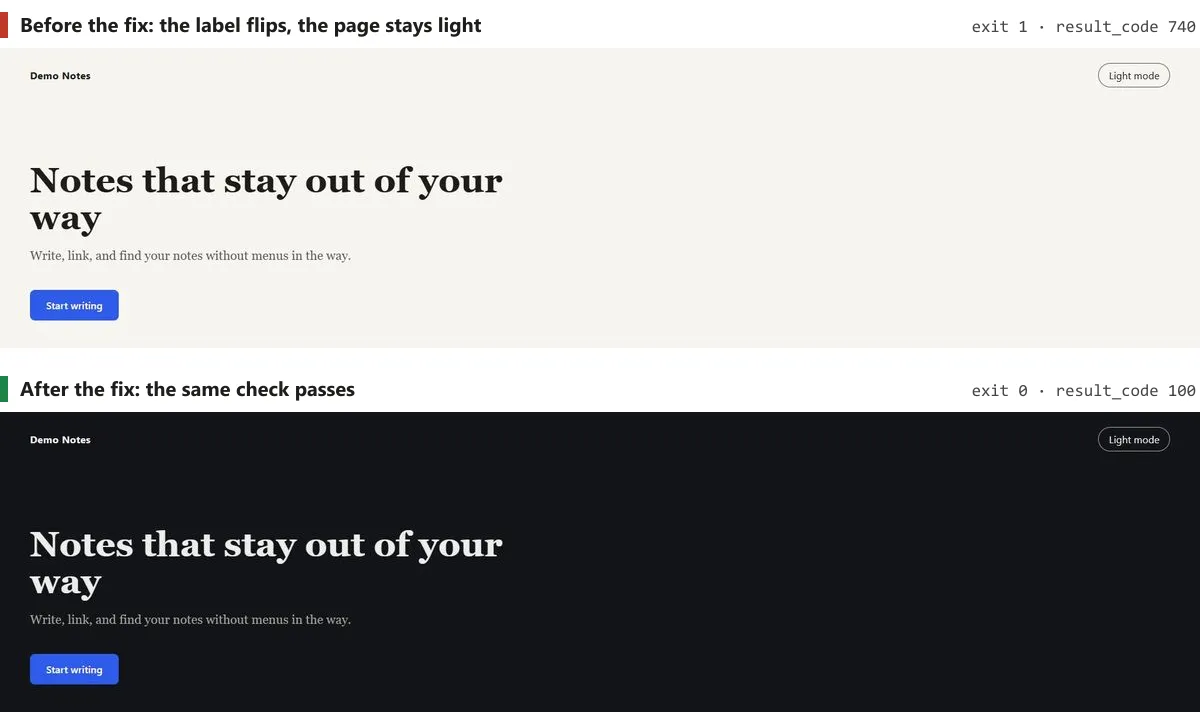
- Before the fix - exit code 1, with result code 740 marking a confirmed product bug rather than a test or environment problem.
- After the fix - the same objective on the corrected page exits 0 with result code 100 in about 42 seconds.
- The exit code is the contract - 0 passed, 1 failed, 2 environment error such as sign-in or Chrome, and 3 timeout or cancellation, which is what steps 3 and 4 of the ui-check skill branch on.
- The evidence stays on disk - each run writes an evidence pack with per-step screenshots and logs, so Claude can read the failure instead of guessing at it.
To wire it in, install Kane CLI with npm install -g @testmuai/kane-cli, then run npx @testmuai/kane-cli-skill, which writes the kane-cli skill for Claude Code, Codex CLI, and Gemini CLI. The Kane CLI with AI coding agents docs cover sign-in for headless runs, and Claude Code Kane CLI verification walks through the full verification loop.
Fixing a Skill That Does Not Trigger
Most trigger failures come down to the description, the frontmatter, or the budget.
The skills troubleshooting section starts with two checks: that the description includes keywords users would naturally say, and that the skill appears when you ask what skills are available.
Combined with the other causes it lists, that gives this order of checks:
- Check that Claude sees it - ask "What skills are available?" If the skill is missing, check the folder location and whether Claude Code refused the name.
- Run it by name - if /skill-name works but natural requests do not, the description is the problem. Add the words you actually type.
- Validate the frontmatter - run claude plugin validate .claude/skills, or start Claude Code with --debug to see the parse error.
- Check the listing budget - run /doctor. When the listing overflows, the least-used skills lose their descriptions first, and the debug log records a warning.
- Check paths - a skill with paths set activates only for files inside Claude's current working directory, not for files in a sibling worktree.
The opposite problems have their own fixes:
- The skill fires too often - make the description more specific, or set disable-model-invocation: true so it runs only on /skill-name.
- Claude follows it once, then stops - move a rule that must hold every time into a hook, which can live in the skill's own hooks frontmatter. Word judgment calls as standing instructions, such as "run the check after every edit".
- It stopped after compaction - invoke the skill again to restore its full content, and keep critical rules near the top of SKILL.md.
Conclusion
Your first skill should be the one you already paste most. Look through your last week of sessions for the checklist or command sequence you typed twice, and turn that into a SKILL.md with a description that starts with the words you used.
The Agent Skills format defines a skill as a folder containing a SKILL.md file whose metadata includes a name and description at minimum.
Claude Code only recommends description, but setting both lets the same folder carry over to other agents that support the format, as Codex skills shows.
Then validate it, run it once with and once without, and if it touches UI, finish in a browser. The Kane CLI getting started guide sets up the check that turns a skill that fired into a change that works.
Author

Anubhav Singhmaar
Blogs: 49

Anubhav Singhmaar is an AI Product Manager at TestMu AI driving Kane CLI, the command-line tool that brings browser automation to the terminal, turning natural-language flows into runs in a real Chrome browser that return pass or fail with shareable proof. He owns the roadmap and prioritization and works with engineering to ship developer-facing features. Before TestMu AI, he spent over four years at Sprinklr owning enterprise voice AI across APAC and EMEA. A mechanical engineer turned product manager, he grounds guidance in real QA workflows.
Reviewer

Samyak Goyal
Reviewer
Samyak Goyal is a Senior Member of Technical Staff at TestMu AI engineering Kane CLI, the command-line tool that runs browser automation from the terminal, where a flow described in natural language executes in a real Chrome browser and returns pass or fail with shareable proof. He is a backend engineer with 4+ years of experience, previously an SDE at Innovaccer, where he built APIs, introduced Kafka, and cut deployment from weeks to hours. Samyak also builds multi-agent systems, skill-orchestration frameworks, and a personal copilot that indexes 200+ microservice repositories.


Claude Code Skills FAQs
Did you find this page helpful?
More Related Blogs

TestMu AI forEnterprise
Get access to solutions built on Enterprise
grade security, privacy, & compliance
- Advanced access controls
- Advanced data retention rules
- Advanced Local Testing
- Premium Support options
- Early access to beta features
- Private Slack Channel
- Unlimited Manual Accessibility DevTools Tests