

Power Your Software Testing with AI Agents and Cloud
The Native AI-Agentic Cloud Platform to Supercharge Quality Engineering. Test Intelligently and Ship Faster.


- TestMu AI (Formerly LambdaTest)
- /
- Blog
- /
- Introducing Video Agent Testing
Introducing Video Agent Testing
Video agent testing is live on TestMu AI. A simulated participant joins your on-camera agent session, holds a real conversation, and grades it on your criteria.
Published on:
If you ship an on-camera agent today, you already know the shape of the problem. Someone joins the call, plays a candidate for three minutes, and writes down an opinion. Ten personalities costs a day, two reviewers disagree about whether the agent was "responsive enough", and nothing anyone wrote down can be diffed against last release.
TL;DR
Video agent testing evaluates an on-camera conversational AI agent by sending a simulated participant into its live session to hold a real conversation and grade it against criteria you wrote. It is live on TestMu AI Agent Testing, which returns a recording, a synced transcript, and a pass or fail traced to the moment that earned it.
How Video Agent Testing Works
- Integration method: A joinable web URL and nothing else. TestMu AI joins the way a person would, so the agent under test runs unmodified.
- Verdict basis: A video agent passes only when every success criterion you wrote is met, and anything the evaluator cannot confirm from the recording counts as not met.
- Evidence per criterion: Each criterion row returns Expected, Achieved, an evidence quote or timestamp, and a confidence level, so a failed criterion points at the exact turn to fix.
- Coverage fan-out: Avatar faces, personas, test profiles, and iterations multiply into sessions, turning one video scenario into a spread of them.
- Inconclusive status: When the TestMu AI test harness breaks rather than the agent under test, that run is excluded from your pass rate instead of counted against you.
What You Need to Run It
- Requires an SDK: No. It needs no library in your application and no phone number to dial.
- Requires changes to your agent: No. A staging URL that loads a camera-and-microphone session is the whole setup.
- Session length: 30 to 600 seconds per session, defaulting to 180, with two sessions running at a time per organisation.
- Supported surfaces on TestMu AI Agent Testing: Video, chat, voice, and phone. Video is the newest of them and is configured as its own agent type.
- Supports Zoom, Meet, or Teams-only agents: No. Agents reachable only inside a meeting platform are not supported yet.
Video agent testing is switched on per organisation.
Why Manual Review Does Not Survive a Release Cadence
The obvious approach is to watch the agent yourself. It works exactly once. A video agent has to be experienced in real time, so review cost scales with conversation length rather than with the number of assertions, and a tester cannot skim a conversation the way they can skim a diff.
Reaching for the model vendor's documentation does not close the gap either. Stanford HAI reports in the 2026 AI Index that average Foundation Model Transparency Index scores fell to 40 points, down from 58 the year before, and that the most capable models are now among the least transparent. What your agent does on camera is something you have to observe.
The same applies after every model upgrade. An agent moved to Claude Opus 5.5, for example, inherits a lower default effort and new tool-use rules, so its sessions need grading again.
Four things break specifically, and each one is a reason the manual version cannot be patched into a regression pack:
- Cost per run - a pass consumes a tester for the full session, so coverage is capped by headcount rather than by risk.
- No comparability - an opinion in a spreadsheet cannot be diffed against last release the way a scored criterion can, so nobody can say whether a prompt change helped.
- Cooperative-tester bias - a human playing a candidate naturally answers the question asked, which leaves hostile, silent, and distracted behaviour untested.
- Non-determinism hidden - one manual run cannot separate a real defect from a single unlucky sample of a probabilistic system.
How Video Agent Testing Runs
Create the agent, choose the video agent type, and point it at a URL. Anything reachable at a web address a person could join with a camera and microphone qualifies, which is the same bar as sending a colleague a link. Where the platform exposes its own recording and transcript, TestMu AI uses those; otherwise the session is captured browser-side.
Scenarios come next, generated from a description of what your agent does, written by hand, or bulk imported from a CSV. Group them into a suite, because a smoke pack of five to eight scenarios that runs on every change is worth more than a sprawling one nobody runs.
The run dialog asks for five things, and the last two decide how much of the conversation you actually get. Full walkthrough in the Agent Testing platform getting started guide.
| Field | What it does |
|---|---|
| Target session URL | Where the simulated participant joins. Point it at staging, because every run is a real conversation with whatever sits behind that link. |
| Candidate name | The name typed into any lobby or name field. Individual scenarios can override it when a scenario needs a specific identity. |
| Avatar face | The face the participant wears on camera. Varying it answers whether the agent behaves the same regardless of who it sees. |
| Voice | The voice the participant speaks with, grouped by how it reads to a listener rather than by raw technical parameters. |
| Session length | A ceiling of 30 to 600 seconds, defaulting to 180. The run ends at the conversation's natural close, so the ceiling only caps a conversation that would otherwise keep going. |
What Video Agent Testing Returns
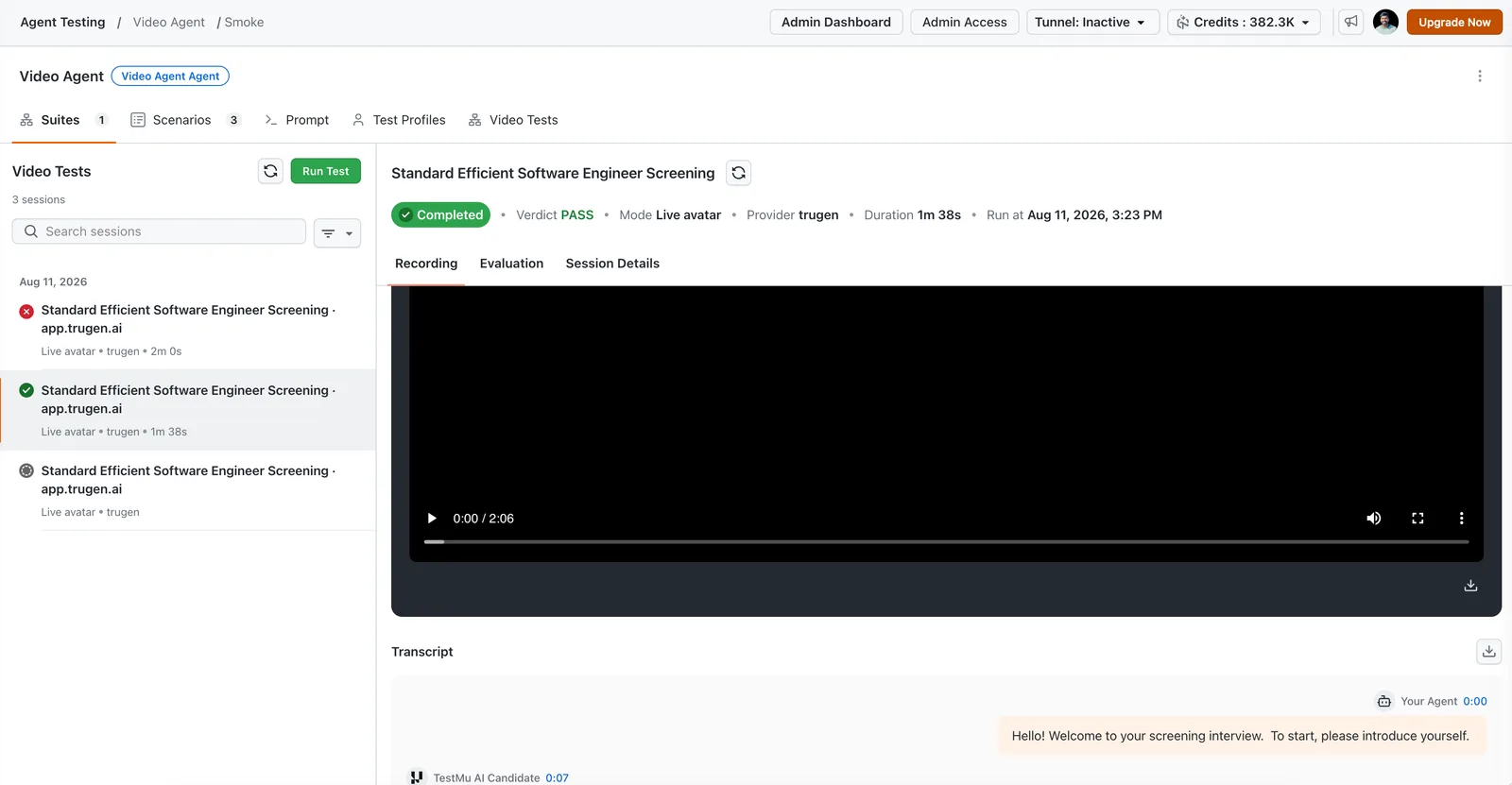
Results land per session instead of arriving in one batch at the end, so a long suite gives you findings to act on while the rest is still running. Each session carries its own state in the list, and the three below come from the same smoke suite: one passed, one failed, and one still waiting for a slot.
The session header states the verdict before you watch anything. The passed run in that list reports these facts:
| Field | Value from the run |
|---|---|
| Scenario | Standard Efficient Software Engineer Screening |
| Status and verdict | Completed, with a verdict of PASS |
| Mode | Live avatar |
| Duration | 1m 38s, against a failed sibling in the same suite at 2m 0s |
Three tabs sit under that header. Recording holds the session and its synced transcript, Evaluation holds the verdict and the criteria behind it, and Session Details holds the configuration the run used, which is what you compare when two runs behave differently.
The transcript labels every turn, so your agent's speech is distinguishable from the participant's. This run opens with the agent at 0:00 and the simulated candidate answering at 0:07:
Your Agent            0:00   Hello! Welcome to your screening interview.
                             To start, please introduce yourself.
TestMu AI Candidate   0:07   ...
Clicking any transcript line jumps playback to that moment, which is the fastest route from a verdict that says the agent did not follow up to watching it not follow up. Both the recording and the transcript download, so a failure can be attached to a bug report without a screen capture.
The Description Is a Brief, Not a Script
The simulated participant improvises. It watches your agent, listens, and responds in the moment rather than reading lines, so aim for 250 to 400 words covering the goal, the situation, the personality, and the failure mode you are hunting. Short briefs produce thin conversations.
A scenario that says "candidate answers interview questions" tests nothing. A scenario that says the candidate answers the first two questions fully, then becomes distracted and starts giving one-word answers, to see whether the agent notices and re-engages, tests something real.
Success criteria decide the verdict. The agent passes only when every criterion is met, and anything the evaluator cannot confirm from the recording counts as not met. That strictness is deliberate.
Write "agent greets the candidate on camera within the first 15 seconds" rather than "agent is friendly", because a greeting inside a stated window is observable and friendliness is not. Keep one behaviour per criterion: if a criterion contains the word "and", it is probably two.
Bulk import takes the same fields, with criteria separated by semicolons. Weight generation toward the categories where agents actually break, such as error recovery and edge cases, because the happy path usually works already.
title,description,persona,expected_output,interaction_mode,max_turns
Interrupting candidate,"Cuts the agent off mid-question twice, then pushes to skip ahead to salary and start date.",Impatient User,"Agent finishes its current question before answering the interruption; Agent explains next steps before ending the session",live,12
Silent start,"Joins the call and says nothing for the first 20 seconds, then apologises for a connection problem.",Digital Novice,"Agent greets the candidate on camera within 15 seconds; Agent checks the candidate can be heard before asking its first question",live,10
One Scenario Becomes Coverage
A single scenario tested once tells you it worked once. Each scenario expands across four independent axes, and an empty axis counts as one, so a scenario with nothing set runs exactly once.
avatar faces  x  personas  x  test profiles  x  iterations  =  sessions

2 scenarios  x  (1 face  x  3 personas  x  1 profile  x  2 iterations)  =  12 sessions
12 sessions at ~3 min each, 2 running at a time = ~18 min wall clock- Avatar faces - answers whether the agent behaves the same regardless of who it sees on camera.
- Personas - answers whether it holds up against a blunt participant as well as a chatty one.
- Test profiles - inject values such as names or reference numbers, so the participant answers with real specifics instead of placeholders.
- Iterations - up to 10 repeats of the same scenario.
Run it three times. One failure is a maybe. The same failure twice is a bug report.
Scoring Covers Your Agent Only
Four pillars are scored 0 to 10 as diagnostics rather than as the pass or fail basis: conversation flow for turn-taking and pacing, question handling for task progress, response quality for relevance and correctness, and avatar presentation for your agent's own lip-sync, facial motion, and media quality.
Every pillar scores your agent only. The simulated participant is test equipment, so its face, its voice, and any glitch on the harness side are excluded and cannot lower your score. A pass with a low conversation-flow score is still a real signal: the agent did what you asked, and the interaction was awkward while it did it.
Grading watches the session including its audio, which is why the recording rather than the transcript is treated as the source of truth. An agent that pauses a beat too long before answering, or starts speaking while its participant is still mid-sentence, produces a transcript that reads perfectly well.
That principle has its own session status. Inconclusive means the test harness broke rather than your agent.
If the participant's video stream drops mid-session the conversation may still read fine, but presentation can no longer be judged fairly, so the run is excluded from your pass rate instead of charged to you. Seeing these regularly is a defect on the TestMu AI side and worth reporting.

Note: Video agent testing is switched on per organisation on TestMu AI Agent Testing, alongside chat, voice, and phone. Point a suite at a staging URL and read the evidence behind every verdict. Try it free!
What It Does Not Do Yet
Video sessions are heavy, so throughput is capped rather than total volume. Large suites queue as Pending rather than failing.
Scheduled recurring video runs are not available. Agents reachable only inside Zoom, Meet, or Teams are not supported yet; the requirement remains a joinable web URL.
Two failure patterns are worth recognising early. Sessions that fail with no media almost always mean the URL was not joinable from a clean browser session, usually because it needs a login, a waiting room, or an invitation. An agent that barely speaks usually means a thin scenario description rather than a broken agent, since the participant improvises from that brief.
| Constraint | Value | What it means for planning |
|---|---|---|
| Session length | 30 to 600 seconds | An upper bound. Set it long enough for the conversation you expect, since a thin cap truncates multi-turn scenarios. |
| Sessions per suite run | 50 | Fan-out multiplies fast, so check the axis math before saving a suite that exceeds the cap. |
| Concurrent sessions | 2 per organisation | A 24-session suite at three minutes each takes about 36 minutes of wall clock. |
| Iterations per scenario | 10 | Three is usually enough to separate a defect from noise. |
Get Started
Pick the five conversations that would embarrass you most if they went wrong, write one scenario for each with criteria you could verify yourself from a recording, and point the suite at a staging URL with three iterations. That is under an hour of wall clock at two concurrent sessions, and it is the shape every video agent testing pack should start in. For the platform basics behind it, see testing your first AI agent.
If your agent also answers without a camera, the same platform already covers it. Start with voice AI agent testing for the audio surface, conversational AI testing for chat and phone, or the broader guide to AI agent testing for how the surfaces fit together. All of it runs on TestMu AI Agent Testing.
2M+ Devs and QAs Rely on TestMu AI for Web & App Testing Across 3000 Real Devices
 Sign up with google
Your agent has a face now. Test what your users actually see.
Author

Sirajuddin Khan
Blogs: 8

Sirajuddin Khan is Vice President of Product Management at TestMu AI (formerly LambdaTest), where he drives the company's agentic AI product strategy, building a suite of autonomous agents that includes Agentic Browsers and Agentic Visual Testing and shifting the unit of work from test execution to autonomous outcomes. One of the company's earliest product leaders, he has owned the roadmap for the high-performance execution cloud and grew the cross-browser testing products from early adoption to market leadership. He brings over a decade of experience across SaaS, B2B, and eCommerce, with earlier product roles at Wydr and ShopClues, where his catalog and search work cut delivery SLAs and lifted seller activity. Sirajuddin holds an MBA in Information Technology from Sikkim Manipal University and a B.Tech in Computer Science Engineering from Maharshi Dayanand University.
Reviewer

Samyak Goyal
Reviewer
Samyak Goyal is a Senior Member of Technical Staff at TestMu AI engineering Kane CLI, the command-line tool that runs browser automation from the terminal, where a flow described in natural language executes in a real Chrome browser and returns pass or fail with shareable proof. He is a backend engineer with 4+ years of experience, previously an SDE at Innovaccer, where he built APIs, introduced Kafka, and cut deployment from weeks to hours. Samyak also builds multi-agent systems, skill-orchestration frameworks, and a personal copilot that indexes 200+ microservice repositories.


Video Agent Testing FAQs
Did you find this page helpful?
More Related Blogs
TestMu AI forEnterprise
Get access to solutions built on Enterprise
grade security, privacy, & compliance
- Advanced access controls
- Advanced data retention rules
- Advanced Local Testing
- Premium Support options
- Early access to beta features
- Private Slack Channel
- Unlimited Manual Accessibility DevTools Tests