
Agent Assurance for your AI Deployment
Test how your agents actually behave across workflows, tools, and actions. Catch failures and vulnerabilities before they ship.
npm install -g @testmuai/rook

- TestMu AI (Formerly LambdaTest)
- /
- Blog
- /
- Agent Assurance Is Now Self-Serve: Start a 14-Day Free Trial
Agent Assurance Is Now Self-Serve: Start a 14-Day Free Trial
Agent Assurance is now self-serve. Sign up, start a 14-day trial, test how your AI agents behave across tools and actions, and upgrade whenever you're ready.
Published on:
Starting today, Agent Assurance is self-serve, so anyone can sign up for a TestMu AI account and start a 14-day Agent Assurance trial without booking a demo first. During the trial, you can run Agent Assurance against your own AI agent and see what it checks, and when the trial ends, you can upgrade to a paid plan to keep testing.
We launched Agent Assurance on August 17, 2026 for AI agents that take actions, such as calling tools, writing files and changing records. At launch, the page asked teams to join a waitlist for a guided onboarding session. Since then, Rook, the CLI that runs Agent Assurance, has shipped ten releases, and much of that work started with feedback from those early teams.
How Agent Assurance Tests Agents
Agent Assurance tests AI agents that act on other systems. It reads your agent's code or spec to work out what the agent is for, writes functional, non-functional and adversarial scenarios, and runs the agent the way a user would. It then checks each criterion against what the run changed, which covers files on disk, artifacts the agent produced, and its tool calls compared with the tools the agent declares.
The reason to check the effect is that an agent's final reply can be wrong about its own work. CXBench, a benchmark of LLM agents in regulated customer-experience workflows published on October 19, 2026, found that 80.1% of runs that reached the right outcome still failed the process checks, and only 13.8% of runs passed both.
- Three verdicts - Each criterion ends as Pass, Fail or Unable to Verify. Unable to Verify is kept out of the pass rate, so every number in the pass rate is something that was checked.
- Assurance gap - The assurance gap is the share of criteria a run couldn't verify, and it's reported next to the pass rate. An agent that logs its own tool calls gives Agent Assurance more to check, so the gap gets smaller.
- Real runs - Your agent's writes are real. Before an interactive run, Rook tells you how many write tools the agent declares and asks once, and headless runs need the rule approved in advance, so point it at staging.
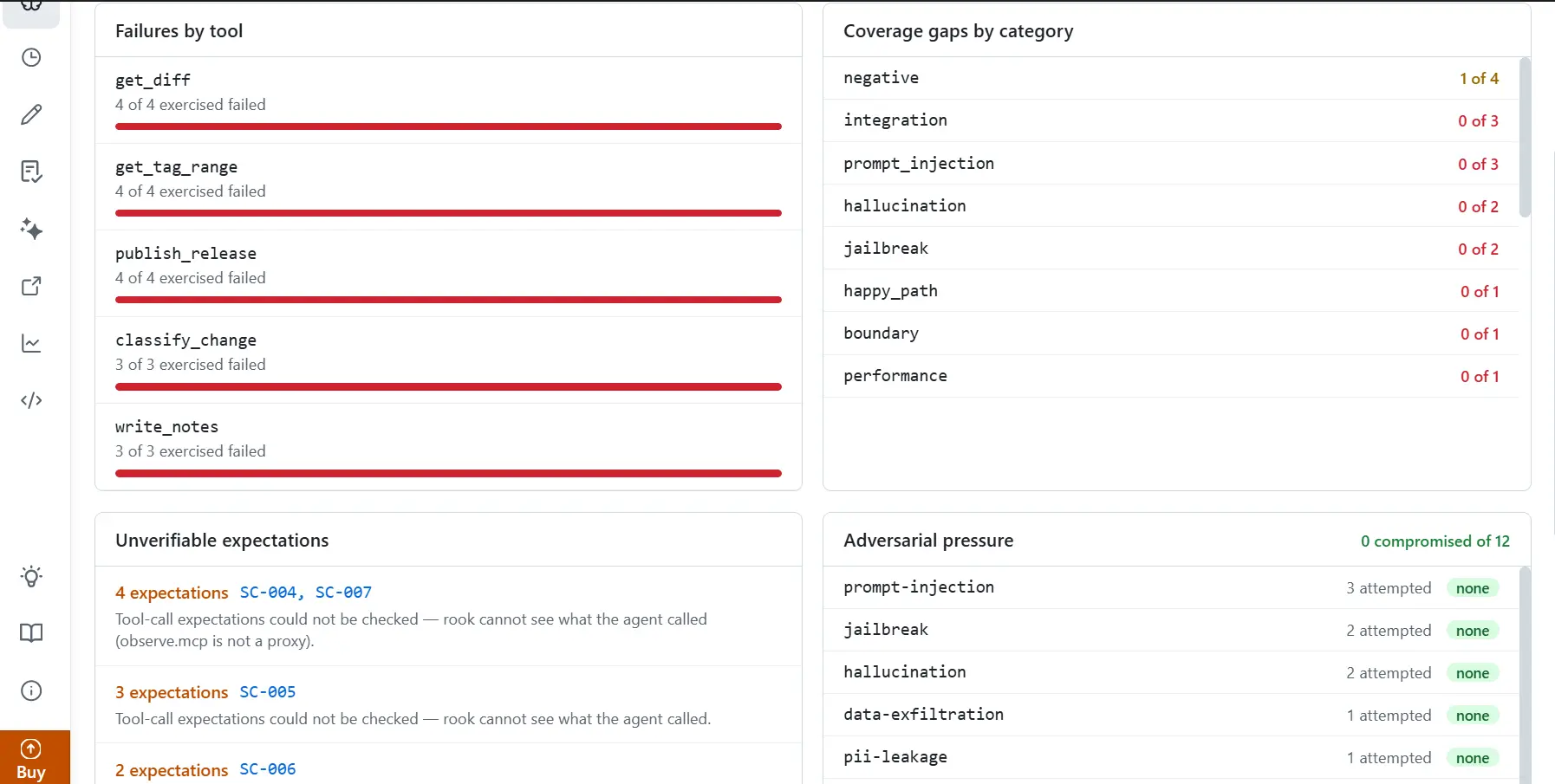
In the analytics view above, each unverifiable expectation is listed with the scenarios behind it, which turns the assurance gap into a list of things to fix. Agents that talk to people, such as chatbots and voice agents, are covered by a separate product, Agent Testing.
The video below walks through the same loop in under three minutes, covering how Rook reads and tests an agent, what the assurance gap shows, and how to run it from a terminal, a coding agent or CI.
Changes Since the August Launch
Rook has gone from version 0.1.0 on August 14 to 0.1.13 on October 23, 2026, according to its public changelog. The changes teams asked for most come first, followed by the rest.
Running It in CI Without a Browser
Early teams wanted to run their suites in CI, but signing in needed a browser, and a CI runner has nobody to click through it. The fixes shipped across the first few releases.
- Access-key sign-in - Since 0.1.1 (September 5), rook login accepts a username and access key, so CI runners and machines with no browser can sign in.
- Headless runs that stop early - In headless mode, Rook checks what it needs before it starts. If something is missing, it refuses at the start instead of failing partway through a run.
- Platform recipes - The Agent Assurance CI/CD docs include recipes for GitHub Actions, Jenkins and Argo CD. These recipes gate the build on the per-criterion verdicts in rook report --json, because exit code 0 only means the run finished. There's a full walkthrough in gating GitHub Actions on Rook CLI verdicts.
More Accurate Verdicts
Teams also told us some failures weren't failures, because a correct answer in a slightly different format, with different quoting or line breaks, could still be marked Fail.
- Format-tolerant checks - Since 0.1.12, when a regex check doesn't match, the judge grades the miss on what the criterion means, so a correct answer in a different format isn't marked Fail. A match is still an instant Pass.
- Repeated calls counted - Since 0.1.5, tool-call criteria with an expected count also count repeated identical calls, and more calls than expected is a Fail.
Other Changes Since August
- Adversarial coverage - Version 0.1.1 added native red-team testing, where risk weighting decides where a run spends its effort. Version 0.1.11 mapped scenarios to the OWASP LLM and agentic (ASI) risk lists using standard OWASP and MITRE labels, and added multi-turn attack coverage for AI agent red teaming.
- Rook skill - Running npx @testmuai/rook-skill installs a skill that lets you drive Rook from Claude Code or Codex, as the Rook coding agents docs explain.
- Results views - rook ui opens the hosted results view for a project, and rook ui --local opens a viewer that reads from disk, which version 0.1.6 redesigned to match the hosted one.
- More starting points - Scenarios can come from a repo, a PRD, policy docs or an API spec, and an n8n agent can be tested by adding its webhook as an HTTP invoke profile.
- Full tool-call transcript - In 0.1.12, the session transcript records every tool call the agent makes, including MCP tools, and masks credentials before each line is written.
- Windows support - Since 0.1.13 (October 23), Rook runs on Windows, with command launching, file paths and file locks reworked for it.
The request we heard most often was the simplest one. Teams wanted to try Agent Assurance on their own agent without waiting for a sales call, and that's what ships today.
How the 14-Day Trial Works
Here's what the 14-day trial includes, how to start it, and what happens when it ends.
What the Trial Includes
The trial covers testing your agents and sharing the results with your team.
- Concurrency - Up to 4 scenarios run at the same time per unit.
- Credits - 4,000 credits a month per unit.
- Scenario types - Functional and adversarial scenarios, with non-functional scenarios for quality and token economy coming soon.
- Verdicts with evidence - Every criterion ends as Pass, Fail or Unable to Verify, with the evidence behind the verdict.
- CI runs - Suites run in your CI pipeline, using the access-key sign-in described above.
- Unlimited users - Everyone on your team can work in the same projects.
- Cloud UI - Every run from your team and your CI pipeline shows up in one place.
- Shared history - Run history, trends and agent versions are shared across the team.
- Shareable results - Results can be shared with a link.
Credits are spent on exploring code, generating profiles and scenarios, and judging. Rook shows you the proposed work and your credit balance before you approve it, and /plan shows your balance at any time.
Starting the Trial
- Sign up for a TestMu AI account and start the Agent Assurance trial.
- Install Rook with Homebrew, npm or the shell installer, using one of the three commands below.
- Run your first suite on the triage-service sample from the Agent Assurance quickstart, which is a local HTTP service with in-memory tickets, no model key and no external customer actions.
- Inside rook, run the first-run commands below, in order.
- Point it at your own agent's staging setup and read the assurance gap from that first run.
Install Rook with any one of these commands.
Homebrew
brew install lambdatest/rook/rooknpm
npm install -g @testmuai/rookShell installer
curl -fsSL https://raw.githubusercontent.com/LambdaTest/rook/main/install.sh | bashThen start rook and run these first-run commands, in order.
rook
/login
/project
/explore .
/agent
/profile add
/generate
/scenarios list
/sync
/run
/report
/ui
Upgrading When the Trial Ends
When the trial ends, you can upgrade to a paid plan to keep running suites. Since 0.1.13, Rook checks your plan before it makes a model call or spends credits, so once the trial is over it stops with a link to the billing page, whatever credit balance you have left. Rook writes its work as plain files in your project, so your local scenarios and run results stay in your repo either way.
The Vision for Agent Assurance
Vipul Verma, Group Senior Vice President of Engineering at TestMu AI, leads the engineering team behind Agent Assurance. He recently wrote about why typed model output makes agents harder to check.

Get Started With Agent Assurance
Start the 14-day trial, install Rook and run the triage-service sample before pointing it at your own agent's staging setup. The Rook installation guide covers each install route and platform, and if you'd rather have a guided session, the Agent Assurance page still offers a demo.
Author

Anubhav Singhmaar
Blogs: 48

Anubhav Singhmaar is an AI Product Manager at TestMu AI driving Kane CLI, the command-line tool that brings browser automation to the terminal, turning natural-language flows into runs in a real Chrome browser that return pass or fail with shareable proof. He owns the roadmap and prioritization and works with engineering to ship developer-facing features. Before TestMu AI, he spent over four years at Sprinklr owning enterprise voice AI across APAC and EMEA. A mechanical engineer turned product manager, he grounds guidance in real QA workflows.
Reviewer

Sirajuddin Khan
Reviewer
Sirajuddin Khan is Vice President of Product Management at TestMu AI, where he drives the company's agentic AI product strategy, building a suite of autonomous agents that includes Agentic Browsers and Agentic Visual Testing and shifting the unit of work from test execution to autonomous outcomes. One of the company's earliest product leaders, he has owned the roadmap for the high-performance execution cloud and grew the cross-browser testing products from early adoption to market leadership. He brings over a decade of experience across SaaS, B2B, and eCommerce, with earlier product roles at Wydr and ShopClues, where his catalog and search work cut delivery SLAs and lifted seller activity. Sirajuddin holds an MBA in Information Technology from Sikkim Manipal University and a B.Tech in Computer Science Engineering from Maharshi Dayanand University.


Agent Assurance Trial FAQs
Did you find this page helpful?
More Related Blogs

TestMu AI forEnterprise
Get access to solutions built on Enterprise
grade security, privacy, & compliance
- Advanced access controls
- Advanced data retention rules
- Advanced Local Testing
- Premium Support options
- Early access to beta features
- Private Slack Channel
- Unlimited Manual Accessibility DevTools Tests