
Run the Endpoint Check From Your Terminal and CI
Install Kane CLI and Add the Search for Agents Check to Your Pipeline.
npm install -g @testmuai/kane-cli
HTTP QUERY Method (RFC 10008): How to Test Cloudflare Search for Agents
The HTTP QUERY method (RFC 10008) sends a query in the body and stays safe like GET. Compare it to GET and POST, then test it on Search for Agents.
The HTTP QUERY method (defined in RFC 10008 from June 2026) sends the query in the request body and is safe and idempotent in the same way as GET.
Cloudflare Search for Agents was launched on Nov 25th 2026 and accepts both QUERY and GET on a /.well-known/search endpoint. This guide will explain what QUERY is, then show you how to test that endpoint with curl and CI.
Key facts (checked Nov 27, 2026)
- RFC 10008 is a Standards Track RFC by Julian Reschke (greenbytes), James M. Snell (Cloudflare) and Mike Bishop (Akamai).
- QUERY is safe, idempotent and cacheable, and it has a request body. The cache key must include that body.
- Cloudflare Search for Agents indexes your site and serves search at
https://<your-domain>/.well-known/search. Cloudflare's docs list it as beta on all plans. - The launch post states that Free plans get it with limits.
- Of the 20 docs hosts that we tried on Nov 27th 2026, 3 were readable with our fetch tool; one (developers.cloudflare.com) returned 'Search for Agents' results.
The test plan below uses curl, a Playwright API test and an optional plain English check with Kane CLI (a terminal testing agent).
TL;DR
The HTTP QUERY method (RFC 10008) is a safe, idempotent HTTP method that sends a read-only query in the request body. To test it on Cloudflare Search for Agents, send GET and QUERY to /.well-known/search, confirm the same scored results, check the four agent: meta tags and confirm known questions rank in the top 3.
How Do I Tell If My Site Is Agent Ready?
- HTTP QUERY method: Safe: yes. Idempotent: yes. Cacheable: yes, with the request body in the cache key. Request body: yes, it defines the query. The query HTTP method differs from POST, which makes none of these promises, so proxies must treat a POST as a possible state change.
- Cloudflare Search for Agents: Endpoint:
/.well-known/searchon your own domain. Accepts QUERY: yes, with atext/plainor JSON body, as well as GET. Free plan: yes, with limits, in beta. Generates answers: no; a Cloudflare AI Search instance returns Markdown excerpts with relevance scores. - Cloudflare Markdown for Agents: Required plan: Pro, Business or Enterprise. With it on, an
Accept: text/markdownrequest returns the page as Markdown with the Search for Agents endpoint in YAML front matter, which helps agents whose fetch tools drop the HTML head. - Agent-ready test for a Cloudflare site: The test passes when GET and QUERY return the same scored results, all four
agent:meta tags appear on the homepage and on deep pages, and each golden question returns its expected page in the top 3. A scanner only reports whether features exist. - Browser fetch() and QUERY: Cross-origin QUERY needs a CORS preflight, and fetch() does not uppercase the method name, so write QUERY in capitals. In WHATWG fetch issue #1938, Chrome and Firefox did not cache repeated QUERY requests.
- Kane CLI by TestMu AI: Runs a plain-English check of
/.well-known/searchin a real browser. Exit codes: 0 on pass, 1 on fail, 2 on setup or auth errors, 3 on timeout. Output: NDJSON with --agent, plus an .evidence file for every run. - API checks on a QUERY endpoint: A QUERY endpoint gets the same status, schema and response assertions as any other endpoint, which the API testing guide covers, and agentic search explains how AI agents search the web.
What Is the HTTP QUERY Method?
The HTTP QUERY method asks the server to run a query as described in the request body and return the result (without altering the resource). It fills the gap between GET (where the query has to be in the URL) and POST (which can have a body but tells the client and caches nothing about its safety). RFC 10008 states, "the content of the request and its media type define the query," and the origin server sets the query's scope based on the target resource.
A QUERY request looks like this:
QUERY /.well-known/search HTTP/1.1
Host: example.com
Content-Type: application/json

{"q": "How do I verify a webhook signature?"}
How Does the QUERY Method Differ From GET and POST?
QUERY behaves as GET with respect to safety, retries and caching and as POST with respect to carrying a body.
| Property | GET | POST | QUERY |
|---|---|---|---|
| Safe (no state change intended) | Yes | No | Yes |
| Idempotent (safe to retry) | Yes | No | Yes |
| Cacheable | Yes | Only with explicit freshness and a matching Content-Location | Yes, cache key includes the body |
| Request body | No defined semantics | Yes | Yes, it defines the query |
| Typical use | Fetch a resource; short filters in the URL | Create or process something | Long or structured read-only queries, such as search and filters |
What Status Codes and Headers Does RFC 10008 Specify for QUERY?
RFC 10008 simply reuses the existing status codes and adds one response header (Accept-Query). These are the bits that the test should be asserting on.
| Situation | Status code or header |
|---|---|
| Media type of the body not supported | 415, with Accept-Query listing supported types |
| Body is valid but cannot be processed | 422 |
| Media type metadata is inconsistent | 400 |
| Accept type not supported | 406 |
| Server wants the client to repeat the query cheaply | Location (re-run the query with GET) or Content-Location (fetch that result with GET) in a 2xx |
| Method not supported at all | A server without QUERY support could respond with a 4xx such as 405 (Method Not Allowed); the RFC's discovery example shows Allow: GET, QUERY, OPTIONS, HEAD on a 200 |
The caching rule is absolutely critical for testers. A cache that simply keys on the QUERY in the URL can return the results of one query for a completely different query. RFC 10008 states that the cache key "MUST incorporate the request content and related metadata".
Which Clients and Servers Support the HTTP QUERY Method?
Support for the HTTP QUERY method is partial as of 27th Nov 2026. Clients that allow you to send any method string work fine. Security layers with method allowlists will often block it.
| Client or layer | QUERY support | Source |
|---|---|---|
| curl | Sends it with -X QUERY (we ran curl 8.5.0 locally); Cloudflare's post names curl among adopters | Cloudflare blog, local test |
| undici and Node.js fetch | undici is named by Cloudflare as adopting QUERY; both worked locally with undici 8.13.1 and Node 22.23.5 built-in fetch | Cloudflare blog, local test |
| Browser fetch() | Under discussion in WHATWG fetch issue #1938. Method names are case-sensitive, so send QUERY in uppercase. Cross-origin QUERY triggers a CORS preflight. The issue author reports Chrome and Firefox did not cache repeated QUERY requests. | whatwg/fetch #1938 |
| F5 BIG-IP LTM | Accepts unknown methods by default | F5 DevCentral, Jul 17, 2026 |
| F5 BIG-IP Advanced WAF | Flags QUERY as an "Illegal method" until you add it to allowed methods | F5 DevCentral, Jul 17, 2026 |
| F5 WAF for NGINX | NGINX rejects methods beyond GET, POST, PUT, DELETE, HEAD and OPTIONS unless a module enables them | docs.nginx.com |
| Cloudflare Search for Agents | Accepts QUERY with a text/plain or JSON body | Cloudflare docs |
If your own WAF has a rule that will only allow GET, POST and HEAD, then QUERY will fail there as well, even if the app in question does support it.
How Do You Send an HTTP QUERY Request?
You send an HTTP QUERY request by setting the method name to QUERY and putting the query in the body with a Content-Type. We ran each of the examples below on Nov 27th, 2026 against a local echo server (Python http.server with a do_QUERY handler on 127.0.0.1). Each one returned a 200, and the server saw the method QUERY, the content type and the body.
curl (tested with curl 8.5.0):
curl -X QUERY "https://example.com/.well-known/search" \
  -H "Content-Type: application/json" \
  --data '{"q":"webhook signatures"}'
Python requests (tested with requests 2.34.2, Python 3.13):
import requests

r = requests.request("QUERY", "https://example.com/.well-known/search",
                     json={"q": "webhook signatures"})
print(r.status_code, r.text)
Node.js built-in fetch (tested with Node 22.23.5, bundled undici 6.29.1):
const res = await fetch('https://example.com/.well-known/search', {
  method: 'QUERY',
  headers: { 'Content-Type': 'application/json' },
  body: JSON.stringify({ q: 'webhook signatures' }),
});
console.log(res.status, await res.text());
undici request (tested with undici 8.13.1):
import { request } from 'undici';

const { statusCode, body } = await request('https://example.com/.well-known/search', {
  method: 'QUERY',
  headers: { 'content-type': 'text/plain' },
  body: 'webhook signatures',
});
console.log(statusCode, await body.text());
Playwright APIRequestContext (tested with @playwright/test 1.65.1, no browsers installed):
const res = await request.fetch('https://example.com/.well-known/search', {
  method: 'QUERY',
  headers: { 'Content-Type': 'application/json' },
  data: { q: 'webhook signatures' },
});
A local echo server confirms the client is sending the QUERY correctly. It says absolutely nothing about proxies, WAFs or CDNs in the path between the client and a real server (which is precisely what the test plan below is about).
How Does Cloudflare Search for Agents Use the QUERY Method?
Cloudflare Search for Agents is a zone setting that makes a site searchable by AI agents via /.well-known/search on the site's own domain. It was announced by Celso Martinho, Gabriel Massadas and Nelson Duarte on the Cloudflare blog on 25th November 2026. You can enable it from the Quick Actions on the domain's Overview page or via the API.
It creates an AI Search instance called search-for-agents-<ZONE_ID>.
The endpoint accepts three request shapes:
GET /.well-known/search?q=<url-encoded text>- QUERY with
Content-Type: text/plainand the question as the body - QUERY with
Content-Type: application/jsonand{"q": "..." }
What Search for Agents is: a retrieval endpoint that returns Markdown snippets with relevance scores; agent: the meta tags that promote it; and underneath that, a standard AI Search instance which can also expose a REST API, MCP endpoints, a Workers binding or a search widget for the end user.
What Search for Agents is NOT: an answer generator (the calling agent has its own model), a way of getting around your WAF, bot management or AI Crawl Control (those rules still apply), or a ranking signal. Cloudflare makes no SEO claims whatsoever.
For a quick visual walkthrough of this concept, watch the video below from TestMu AI.

Subscribe to the TestMu AI YouTube channel for more tutorials on testing and automation.
Response Format and Indexing Defaults
On 27th Nov 2026, a GET to https://developers.cloudflare.com/.well-known/search?q=webhooks, executed via our web-fetch tool, returned a # Search results for: "webhooks" heading and result blocks in the form of ## docs/cloudflare-one/integrations/cloud-and-saas/webhooks/index.md (score: 1.000). Record your own instance's format before you go making any assertions about it.
Cloudflare's docs list these defaults. Each one is a test case:
| Setting | Default | What to test |
|---|---|---|
| Discovery | Sitemaps and links, 5 hops, up to 100,000 pages | Deep or unlinked pages are findable |
| Subdomains | Off | docs. content is searchable if you need it |
| Sync/similarity cache | 24 hours / 48 hours | New pages appear within your window |
| Results/match threshold | 10 chunks / 0.4 | Expected page lands in the top 3 |
| Reranking, query rewriting | Off | Natural-language questions return good matches |
| Crawler User-Agent | Cloudflare-AI-Search | Your own rules don't block it |
How Many Docs Sites Are Exposing Search for Agents at the Moment?
Out of the 20 docs hosts we tried on Nov 27th, 2026, 3 were readable with our fetch tool. One (developers.cloudflare.com) returned Search for Agents results. The hosts are a convenience sample rather than a full census.
Two of them answered /.well-known/search with a standard docs page, so a test that just checks for a 200 would almost certainly pass them (Anthropic's only if the test follows redirects).
Method: one GET per site to https://<host>/.well-known/search?q=<term>, performed with a web-fetch tool on 27th November 2026. The sandbox proxy would not allow a direct curl to these hosts, so we didn't measure the QUERY requests or the raw HTTP status codes. 'Not readable' in this instance means the web-fetch tool returned an error without revealing the status, so we don't know whether the path actually exists.
| Host | Query | Result |
|---|---|---|
| developers.cloudflare.com | webhooks | Search results with scores |
| docs.anthropic.com | tool use | 302 to platform.claude.com/docs/en/.well-known/search, which served a regular docs page |
| platform.openai.com | embeddings | Regular page, no results |
| tailwindcss.com | flex | Not readable (fetch tool error; status unknown) |
| docs.stripe.com, vercel.com, nextjs.org, docs.github.com, supabase.com, playwright.dev, developer.mozilla.org, docs.astro.build, docs.python.org, kubernetes.io, docs.docker.com, react.dev, docs.aws.amazon.com, learn.microsoft.com, firebase.google.com, docs.netlify.com | one relevant term each | Not readable (fetch tool error; status unknown) |
Meta tags. We confirmed agent: tags only on developers.cloudflare.com. In separate homepage fetches, docs.github.com and supabase.com/docs exposed page metadata with no agent: keys. Stripe, Vercel and Next.js docs returned Markdown to the fetch tool, so their HTML <head> wasn't visible and the tags weren't measured.
How Is Search for Agents Any Different From llms.txt, Markdown for Agents and MCP?
Search for Agents is the only option here whereby an agent can find and query on your own domain with no setup required and no API key needed. llms.txt and sitemaps just list the pages. Markdown for Agents processes one page at a time (Pro plan and above).
The AI Search MCP endpoint requires the agent to be configured first.
Cloudflare's scanner at isitagentready.com breaks its checks down into five categories: Discoverability, Content Accessibility (covers Markdown negotiation and Search for Agents), Bot Access Control, Protocol Discovery (API, auth and MCP) and Commerce.
The scanner simply reports whether or not a feature is present. Whether an agent gets the correct page back, and whether a WAF edit will break QUERY next week are things that a test suite would check.
(For a team's level of readiness to deploy agents, see the AI agent readiness quiz for teams.)
How Do You Test the QUERY Method on Search for Agents? A 10-Check Plan
Run these checks against the production hostname from outside your network. Replace example.com and the sample question with your own.
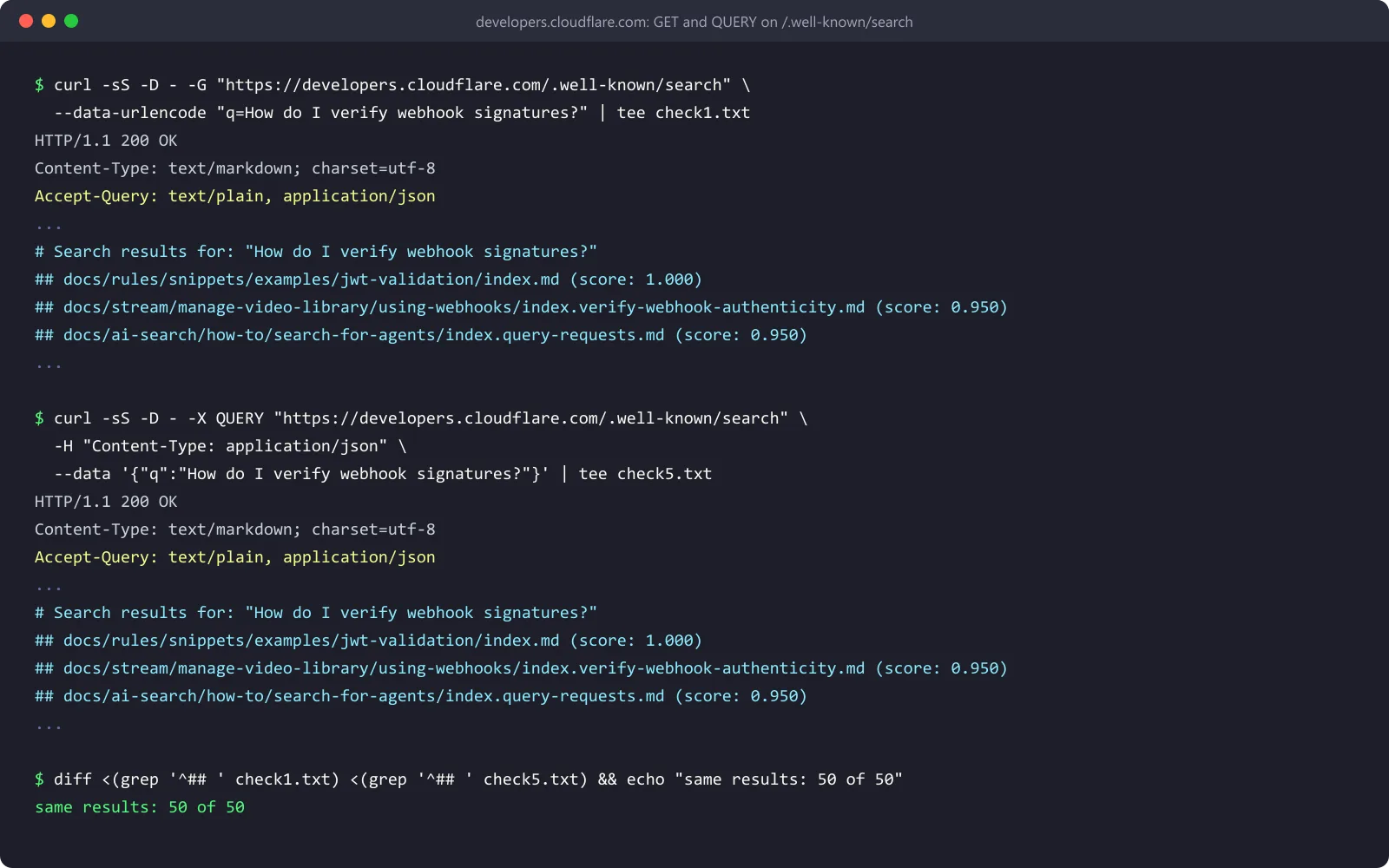
1. GET returns scored results.
curl -sS -D - -G "https://example.com/.well-known/search" \
  --data-urlencode "q=How do I verify webhook signatures?"
Expect 200 and at least one scored result in the block. The mini-study above makes it clear why the body check is important: some sites will simply serve an ordinary page at that path.
2. Discovery tags are in the raw HTML.
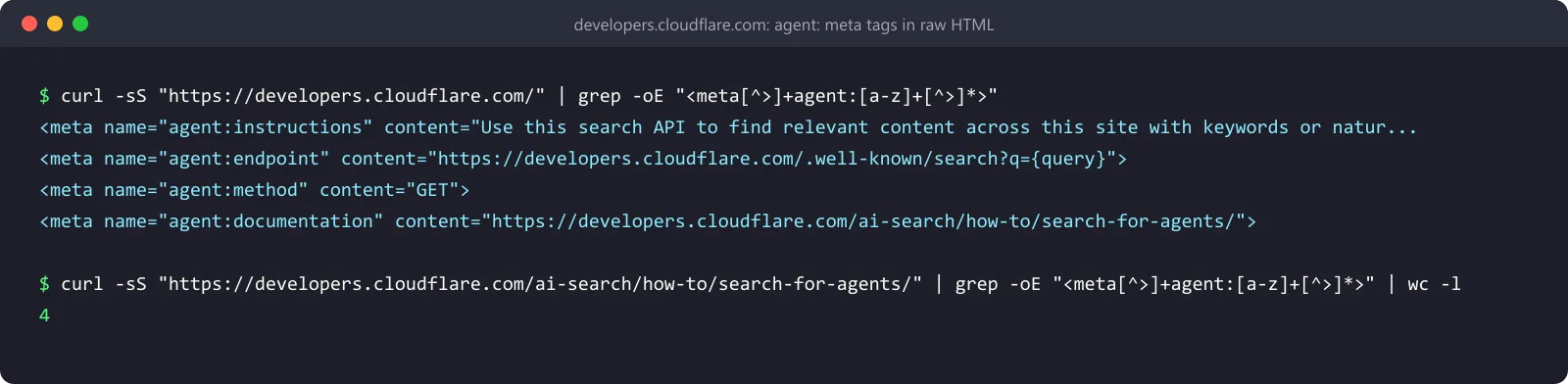
curl -sS "https://example.com/" | grep -oE "<meta[^>]+agent:[a-z]+[^>]*>"
curl -sS "https://example.com/docs/some/deep/page/" | grep -oE "<meta[^>]+agent:[a-z]+[^>]*>"
Expect four tags on the homepage and on a deep page.
3. Markdown negotiation takes the endpoint (Markdown for Agents on).
curl -sS -D - -H "Accept: text/markdown" "https://example.com/" | head -40Expect content-type: text/markdown; charset=utf-8, vary including Accept and /.well-known/search in the front matter.
4. QUERY with a text body.
curl -sS -D - -X QUERY "https://example.com/.well-known/search" \
  -H "Content-Type: text/plain" \
  --data "How do I verify webhook signatures?"
Set the Content-Type yourself. curl's --data defaults to application/x-www-form-urlencoded.
5. QUERY with a JSON body.
curl -sS -D - -X QUERY "https://example.com/.well-known/search" \
  -H "Content-Type: application/json" \
  --data '{"q":"How do I verify webhook signatures?"}'
Expect the same top results as check 1. A 403 or 405 here, whilst a GET passes the points on to a method allowlist in your WAF or proxy.
6. Bad input fails cleanly.
curl -sS -o /dev/null -w "%{http_code}\n" "https://example.com/.well-known/search"
curl -sS -o /dev/null -w "%{http_code}\n" -X QUERY "https://example.com/.well-known/search" \
  -H "Content-Type: application/xml" --data "<q>test</q>"
Cloudflare doesn't document these responses. Record them and pin them. RFC 10008 suggests 415 for the second one; a 5xx or a hang is a bug.
7. Golden questions get you the right pages. Write 10 to 20 actual user questions (with the page that should answer each one) and state that page is in the top 3. Mix in some keyword queries with some natural language queries, as hybrid search treats them very differently.
8. Nothing private appears. If you're searching for staging, draft, internal and unreleased product names, etc then you'll find those will be indexed. Anything that appears in your sitemap or is linked from your public pages will be indexed.
9. Fresh content is published on schedule. Change a page and then query for it at 0, 24 and 48 hours (given the 24-hour sync and 48-hour similarity cache).
10. A real agent does a real job. In a clean Claude Code or OpenCode session, ask a question that your docs can only answer. Check the transcript for a call to /.well-known/search and a citation of the correct page. Agent behavior will vary from run to run, so you'll need to repeat the task 3 to 5 times and record the pass rate.
| Check | Area | Pass condition |
|---|---|---|
| 1 | GET | 200 with at least one scored result |
| 2 | Meta tags | Four agent: tags in raw HTML, home and deep page |
| 3 | Markdown | text/markdown, Vary: Accept, endpoint in front matter |
| 4-5 | QUERY text / JSON | 200, same top results as GET |
| 6 | Bad input | Stable 4xx, no 5xx or timeout |
| 7 | Golden set | Expected page in top 3 |
| 8 | Leaks | Zero hits for blocked terms |
| 9 | Freshness | New page found within the sync window |
| 10 | Agent task | Endpoint called and right page cited in most runs |
To sweep the endpoint across a number of hostnames at once, you can use the bulk HTTP status code checker, which will take up to 10 URLs with a custom user agent. Pair it with check 1, as status alone can be very misleading.
How Do You Automate the Search for Agents Checks in CI?
Automate Search for Agents: checks the HTTP contract via a shell script and relevance via a Playwright API test on a daily basis, as well as after deploys and after WAF edits.
Shell Script
#!/usr/bin/env bash
# scripts/agent-ready-check.sh: contract checks for Search for Agents
set -euo pipefail

SITE="${SITE:?set SITE, e.g. https://docs.example.com}"
Q="${Q:-How do I verify webhook signatures?}"
EXPECT="${EXPECT:?set EXPECT to text the top 3 results must contain}"

fail() { echo "FAIL: $*" >&2; exit 1; }

# Discovery tags in raw HTML
html=$(curl -sS "$SITE/") || fail "could not fetch $SITE/"
for tag in instructions endpoint method documentation; do
  grep -Eq "name=[\"']?agent:$tag" <<<"$html" || fail "agent:$tag meta tag missing"
done

# GET: 200, real result blocks, expected page in the top 3
code=$(curl -sS -o /tmp/get.md -w '%{http_code}' -G "$SITE/.well-known/search" \
  --data-urlencode "q=$Q") || code=000
[ "$code" = 200 ] || fail "GET returned $code"
top3=$(grep '^## ' /tmp/get.md | head -n 3 || true)
[ -n "$top3" ] || fail "GET returned 200 but no result blocks (catch-all page?)"
grep -qF -- "$EXPECT" <<<"$top3" || fail "'$EXPECT' not in top 3"

# QUERY with a text body and a JSON body
code=$(curl -sS -o /dev/null -w '%{http_code}' -X QUERY "$SITE/.well-known/search" \
  -H 'Content-Type: text/plain' --data "$Q") || code=000
[ "$code" = 200 ] || fail "QUERY (text/plain) returned $code"
body=$(jq -nc --arg q "$Q" '{q:$q}')
code=$(curl -sS -o /dev/null -w '%{http_code}' -X QUERY "$SITE/.well-known/search" \
  -H 'Content-Type: application/json' --data "$body") || code=000
[ "$code" = 200 ] || fail "QUERY (json) returned $code"

# Markdown negotiation (CHECK_MARKDOWN=0 if Markdown for Agents is off)
if [ "${CHECK_MARKDOWN:-1}" = 1 ]; then
  hdrs=$(curl -sS -D - -o /tmp/home.md -H 'Accept: text/markdown' "$SITE/") \
    || fail "Markdown request failed"
  grep -qi '^content-type: text/markdown' <<<"$hdrs" || fail "no text/markdown response"
  grep -qi '^vary:.*accept' <<<"$hdrs" || fail "Vary: Accept missing"
  grep -qF '.well-known/search' /tmp/home.md || fail "front matter lacks the endpoint"
fi

echo "PASS: $SITE"
Notes on set -euo pipefail: each curl inside the $(...) will get || code=000 or || fail so a network error will result in a clear message rather than a silent exit. The grep | head pipeline terminates in || true as grep exits 1 on no match and pipefail would otherwise cause the script to terminate prior to the explicit check. The ^## pattern corresponds to the format we saw in the Cloudflare docs (change it if your baseline is different).
Playwright API Test
Playwright's request fixture will make HTTP endpoint calls without a browser. The repo will need a package.json with @playwright/test as a dev dependency.
// tests/agent-ready.spec.ts
import { test, expect } from '@playwright/test';

const SITE = process.env.SITE ?? 'https://docs.example.com';
const golden = [
  { q: 'How do I verify webhook signatures?', expectedText: 'webhooks' },
  { q: 'rate limits for the orders API', expectedText: 'rate-limits' },
];

test('agent: discovery tags are in raw HTML', async ({ request }) => {
  const html = await (await request.get(`${SITE}/`)).text();
  for (const tag of ['instructions', 'endpoint', 'method', 'documentation']) {
    expect(html).toMatch(new RegExp(`name=["']?agent:${tag}`));
  }
});

for (const { q, expectedText } of golden) {
  test(`top 3 results contain "${expectedText}" for: ${q}`, async ({ request }) => {
    const res = await request.get(`${SITE}/.well-known/search`, { params: { q } });
    expect(res.status()).toBe(200);
    const top3 = (await res.text())
      .split('\n')
      .filter((line) => line.startsWith('## '))
      .slice(0, 3);
    expect(top3.length).toBeGreaterThan(0);
    expect(top3.join('\n')).toContain(expectedText);
  });
}

test('QUERY with a JSON body returns results', async ({ request }) => {
  const res = await request.fetch(`${SITE}/.well-known/search`, {
    method: 'QUERY',
    headers: { 'Content-Type': 'application/json' },
    data: { q: golden[0].q },
  });
  expect(res.status()).toBe(200);
  expect(await res.text()).toContain(golden[0].expectedText);
});
Playwright's docs don't list QUERY.
However, request.fetch() with method: 'QUERY' did work in our local test using @playwright/test 1.65.1. The shell script has its own QUERY checks, so the contract is still tested even if you're not running it through Node.
GitHub Actions Workflow
# .github/workflows/agent-readiness.yml
name: agent-readiness
on:
  schedule:
    - cron: '17 6 * * *'
  workflow_dispatch:
jobs:
  check:
    runs-on: ubuntu-latest
    env:
      SITE: https://docs.example.com
      EXPECT: webhooks
    steps:
      - uses: actions/checkout@v4
      - run: bash scripts/agent-ready-check.sh
      - uses: actions/setup-node@v4
        with:
          node-version: 20
      - run: npm ci
      - run: npx playwright test tests/agent-ready.spec.ts
A hosted runner will call from cloud IPs just like the majority of agents do, so a bot rule which is designed to block that traffic will fail on this job first.
Where TestMu AI Fits
Kane CLI runs a plain English check from the terminal, from a coding agent or CI and returns a pass or fail with the evidence. It drives a real browser so it's checking what a visitor or browsing agent would see on the page. It doesn't in any way replace the HTTP-level assertions in the script above.
npm install -g @testmuai/kane-cli
kane-cli run "Open https://docs.example.com/.well-known/search?q=webhook%20signatures and verify the first result is the Webhooks guide" --headless --agent
--agent switches output to NDJSON, which a coding agent or CI step can parse. Exit codes are 0 for pass, 1 for fail, 2 for setup/auth errors, 3 for timeout/cancellation. Each run produces a .evidence file containing the steps, screenshots, console and network logs.
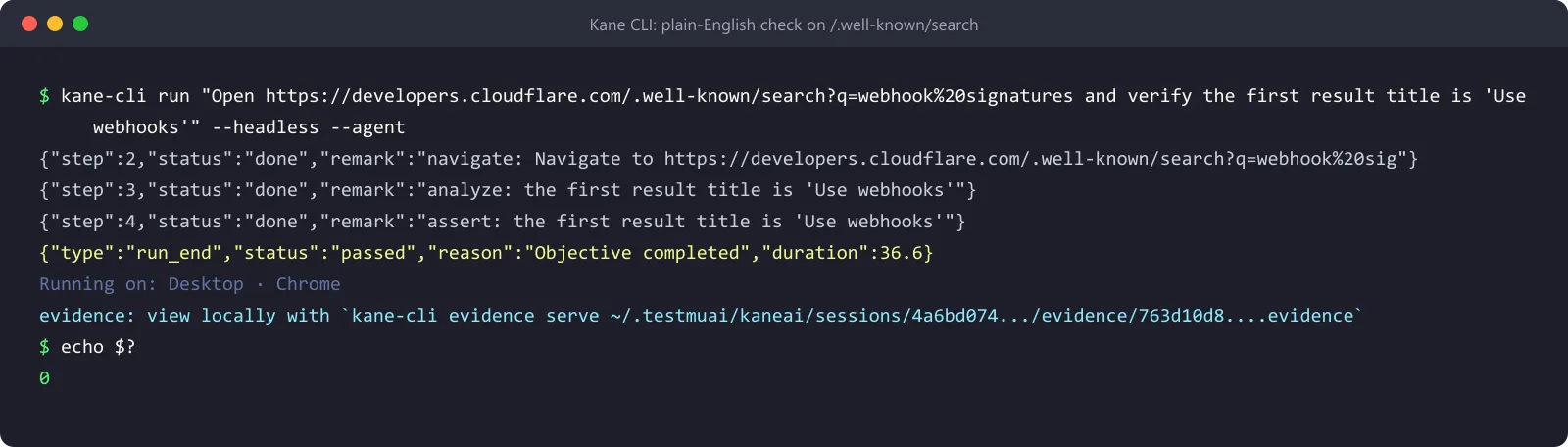
Authenticate as per the Kane CLI docs prior to running it in CI.
Teams that want to go no-code on their API checks can generate API tests from cURL via KaneAI, starting with the GET in check 1. Once the golden set has grown to hundreds of Playwright tests across sites, HyperExecute can run suites in parallel from GitHub Actions, Jenkins and other CI tools.
If you build an agent that makes calls to endpoints such as /.well-known/search and acts on the results, then Agent Assurance can be used to verify agent behavior. Rook will generate functional and adversarial test scenarios (including prompt injection), record the agent's tool calls and return pass, fail or unable to verify for each criterion with quoted evidence.
What Breaks Most Frequently in Search for Agents Set-Ups?
The vast majority of failures in Search for Agents set-ups are down to rules and defaults that are external to the feature.
| Symptom | Likely cause | Where to look |
|---|---|---|
| GET works, QUERY gets 403 or 405 | Method allowlist in a Cloudflare custom rule, F5 Advanced WAF or F5 WAF for NGINX | Security events; allow QUERY on /.well-known/search only |
| 200 but no results | Catch-all route serving a normal page, or the feature isn't on for that host | Check 1 body assertion |
| Empty index | Your rules block the Cloudflare-AI-Search crawler | Instance status under AI > AI Search; logs for that User-Agent |
| New pages missing | 24h sync, 48h cache, more than 5 hops, not in sitemap | Sitemap, link depth, re-query after the window |
| Subdomain content missing | Subdomains off by default | Instance data source settings |
| Agents ignore the endpoint | Tags missing on some templates, or the agent's fetch tool drops <head> | Check 2 on deep pages; Markdown front matter |
Accept: text/markdown returns HTML | Markdown for Agents not enabled for that host or path, or a Free plan zone (a page over 6 MiB of HTML still returns Markdown, truncated) | Zone setting and plan |
| Weak natural-language matches | Reranking and query rewriting off, threshold 0.4 | Turn on reranking, re-run the golden set |
| Agent requests challenged | Bot management or AI Crawl Control rules | Security events filtered to /.well-known/search |
Conclusion
Start by sending one question your docs answer to /.well-known/search as a GET and as a QUERY, and confirm both return the same top results. Then confirm the four agent: meta tags are in the raw HTML of your homepage and a deep page, and that each golden question returns its expected page in the top 3. Once those pass, let the daily GitHub Actions workflow run the shell script, so a WAF rule that blocks QUERY or a template that drops the tags fails a scheduled run before an agent hits it.
Run the endpoint check from your terminal and CI. Install Kane CLI with npm install -g @testmuai/kane-cli and add the check to your pipeline. Start free with Kane CLI
Testing from the terminal? Kane CLI by TestMu AI lets SDETs and developers plan, write, run and debug tests from the command line.
Was this helpful?
Authors

Shantanu Wali
Author · 27 posts
Shantanu Wali is Vice President of Product Management at TestMu AI, where he owns several product lines across the testing platform, including the Real Device Cloud and the Digital Experience Testing Cloud. He has also contributed significantly to the development and scaling of KaneAI, TestMu AI's flagship GenAI-native testing agent that uses natural language to make software testing faster and more reliable in this AI era. He brings 7+ years of experience across software development and product management, starting as a backend developer at Infosys building solutions for Fortune 500 clients. Shantanu holds an MBA from IIM Calcutta and a B.Tech in Mechanical Engineering.


Mayank Bhola
Reviewer
Mayank Bhola is Co-Founder and Head of Products at TestMu AI, where he leads the entire product portfolio across KaneAI, Kane CLI, HyperExecute, SmartUI, the Real Device Cloud, Accessibility, and other software testing product lines. As an early Lead Architect he designed and built the company's flagship Tunnel technology from scratch, created the React-based automation platform, and architected the data-intensive pipelines and FAAS services that scale it. He brings more than 10 years of experience in software development and product engineering, with earlier roles as Head of Technology at Juggernaut Books and Senior Software Engineer at PressPlay TV and Zomato. Mayank holds a B.Tech in Computer Engineering from JIIT Noida.
HTTP QUERY Method FAQs

TestMu AI forEnterprise
Get access to solutions built on Enterprise
grade security, privacy, & compliance
- Advanced access controls
- Advanced data retention rules
- Advanced Local Testing
- Premium Support options
- Early access to beta features
- Private Slack Channel
- Unlimited Manual Accessibility DevTools Tests