
Power Your Software Testing with AI Agents and Cloud
The Native AI-Agentic Cloud Platform to Supercharge Quality Engineering. Test Intelligently and Ship Faster.


- TestMu AI (Formerly LambdaTest)
- /
- Blog
- /
- AI API Testing Guide: How to Test APIs Smarter and Faster
AI API Testing Guide: How to Test APIs Smarter and Faster
Learn AI API testing to automate test generation, improve coverage, and optimize performance with modern tools, best practices, and real-world use cases.
Last Updated on:
On This Page
- AI-Driven API Testing
- AI in API Testing
- AI API Test Types
- AI in Test Automation
- AI API Testing Process
- AI Agents for Testing
- KaneAI for API Testing
- AI API Testing Tools
- Automate API Calls
- API Automation Components
- Digital Twins Verification
- Semantic vs Syntactic AI
- AI API Testing in Action
- AI API Testing Challenges
- AI vs Traditional Testing
- AI API Testing Best Practices
- Conclusion
AI API testing is the practice of using artificial intelligence to generate, execute, and maintain API tests, and to validate AI-powered APIs whose responses are not fixed. It covers two connected practices used together: (1) using AI to test APIs, where AI generates, executes, and self-heals tests for any REST or GraphQL API, and (2) testing AI-powered APIs, where the API itself returns non-deterministic outputs from an LLM or ML model and needs validation for accuracy, bias, safety, and consistency.
The shift matters because APIs now sit at the center of most software. In Postman's 2025 State of the API Report, a survey of over 5,700 developers, architects, and executives, 89% of developers said they use AI, but only 24% design APIs for AI agents. As microservices multiply and AI features ship faster, manual testing and static scripts fall behind on speed, coverage, and scalability, which is exactly the gap AI API testing is built to close.
Overview
To test APIs smarter and faster, use TestMu AI for natural language testing and self-healing test maintenance, and deploy Akto for automated security validation. This combined approach automates test generation, executes functional and security checks, and continuously validates both traditional and non-deterministic AI-powered APIs.
What Role Does AI Play in API Automation Testing?
- Autonomous Test Case Generation: This capability automatically produces test cases from API schemas, documentation, and real traffic patterns to reduce manual effort.
- Test Case Execution: This process runs tests automatically and performs exploratory checks through fuzzing and edge-case generation to improve speed and reliability.
- Anomaly Detection: This feature identifies behavioral anomalies, regressions, and unusual responses while ranking tests by risk and business impact to pinpoint regressions.
- Test Optimization and Coverage: This analysis pinpoints testing gaps, recommends new test cases, and applies prioritization and impact analysis to remove redundancy.
- Smart Test Maintenance: This function automatically detects and resolves schema mismatches so tests continue running as APIs evolve.
How Do You Use AI Agents for API Testing?
- AI Agents: These autonomous tools automate test generation, adapt to API changes, integrate with workflows, and continuously validate API behavior across evolving systems.
What Role Do AI Tools Play in Scaling API Testing?
- TestMu AI: This platform validates request payloads, response behavior, and status codes alongside UI flows in the same run, and self-heals test steps as the application changes to reduce maintenance.
- Akto: This tool continuously analyzes APIs for vulnerabilities, including injection attacks, compromised authentication, and data exposure, to strengthen security during testing.
- Postman: This application helps teams organize, execute, and manage API workflows and testing suites during functional testing and analysis phases.
What is AI-Driven API Testing?
AI-driven API testing covers two practices: using AI to generate, execute, and self-heal tests for any API, and validating AI-powered APIs whose responses are non-deterministic, requiring checks for accuracy, bias, safety, and consistency.
AI-driven API testing uses machine learning and natural language processing to automatically generate, execute, and optimize API test cases, detect anomalies, and improve coverage with minimal human intervention. The same discipline also covers the validation of AI-powered APIs (LLM and ML endpoints) whose outputs vary across runs, where assertion-based testing alone is insufficient and semantic, behavioral, and safety checks are required. Throughout this guide, AI API testing refers to both: AI as the testing mechanism, and AI-powered APIs as the system under test.
What is the use of AI in API Testing?
AI in API testing automates test generation, self-heals broken scripts, detects anomalies, expands coverage, and prioritizes execution to deliver faster, more reliable software releases.
APIs are an essential component of modern software, whether it be two microservices exchanging data or a mobile app sending data to the cloud. Understanding what AI API testing brings to this environment is the foundation for adopting it effectively.
For a deeper understanding of API testing in software development and testing, refer to this detailed API testing tutorial.
Key Features of AI API Testing
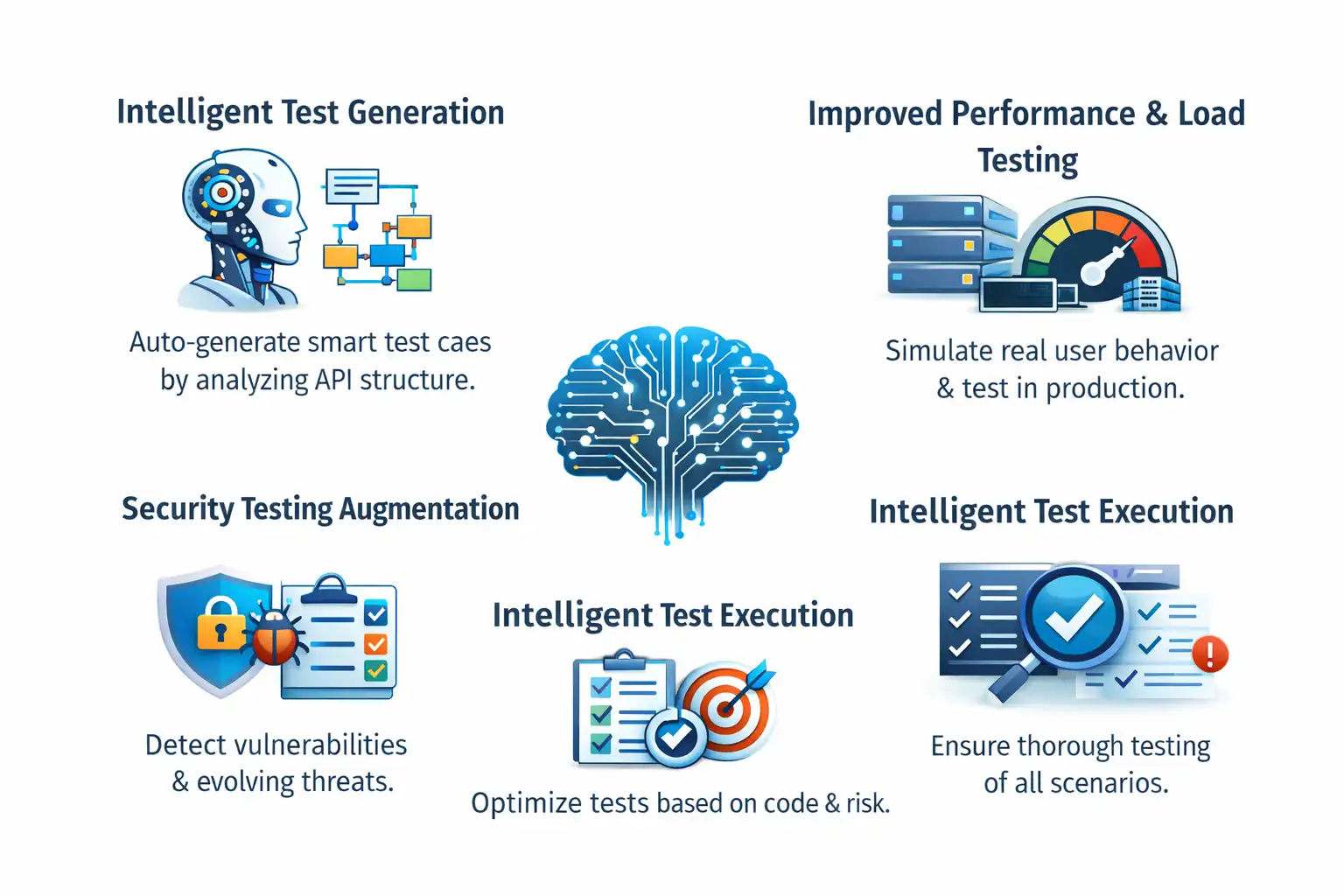
- Intelligent Test Generation - A key advantage of AI API testing is its ability to automatically generate test cases by analyzing the API's structure. Unlike traditional methods that rely on manual effort, AI creates smart, system-wide test scenarios, making the setup faster and more efficient.
- Self-Healing Test Maintenance - Maintaining tests can be complex, but AI simplifies it by detecting changes in API endpoints and automatically updating affected test scripts. This reduces fragility and minimizes ongoing maintenance for QA teams.
- Improved Performance and Load Testing - Traditional tests rely on static load patterns that don't reflect real usage. AI enhances performance testing by simulating realistic user behavior, dynamically adjusting load, and identifying bottlenecks before they impact production, while also supporting safe testing in production scenarios.
- Security Testing Augmentation - By learning from evolving threat behaviors, Security Testing Augmentation driven by AI goes beyond rule-based scanners and continuously analyses APIs for vulnerabilities, including injection attacks, compromised authentication, and data exposure. Using AI for security differs from AI security, which protects the models, data, and LLM applications themselves from attack.
- Intelligent Test Execution - AI emphasizes test execution based on code changes, risk assessment, and historical failure patterns, optimizing test runs to generate quick feedback loops while monitoring coverage of functionality.
- Increased Test Coverage - Finally, AI identifies untested scenarios, recommends additional test cases for risk areas, and ensures complete coverage of edge cases, boundary conditions, positive scenarios, and negative scenarios that manual test design may overlook.
AI empowers QA engineers rather than replacing them. AI-driven API testing helps teams deliver faster and more securely by automating the repetitive and surfacing the critical.

What are the different types of tests in AI API testing?
The main types of AI API testing are functional, security, integration, contract, and performance testing. They apply to both AI-assisted testing of any API and the validation of AI-powered APIs that return non-deterministic outputs.
For deterministic REST or GraphQL APIs, AI accelerates test creation and maintenance across these categories. For AI-powered APIs, the same categories apply but responses are not always fixed, so checks shift from exact matches to consistency, semantic similarity, and overall response behavior.
Each test type is designed to address specific risk areas, and the focus changes depending on whether the system under test is a traditional API or an AI-powered one.
The key test categories to consider are:
- Functional Testing - Functional tests verify API responses and behavior against expected outcomes, such as accurate predictions from an AI model. This includes validating request and response formats, error handling, and business logic, like ensuring a text-generation API produces logical output. The model behind such an endpoint needs testing of its own, and the guide to AI model testing covers the methods and lifecycle for it.
- Security Testing - API security testing identifies and mitigates vulnerabilities and potential risks. It focuses on content filtering, data privacy, authentication, and authorization. For AI-powered APIs, AI penetration testing extends this to the model layer, attacking prompts, retrieved documents, tool calls, and rendered output.
- Integration Testing - Integration testing ensures the API works correctly with other components like databases, message queues, or external systems. Unlike functional testing, which isolates endpoints, integration testing validates interactions across dependencies.
- Contract Testing - Contract testing validates the provider-consumer agreement. It helps prevent breaking changes, reduces ambiguity in API behavior, and ensures consistency when data structures evolve.
- Performance Testing - Performance tests evaluate how an API handles high load, large data volumes, and concurrent users. The goal is to ensure optimal response time and resource usage through scenarios like stress and load testing.
What is the role of AI in API automation testing?
AI in API automation testing applies machine learning to design, execute, manage, and optimize end-to-end API tests, improving speed, coverage, and reliability over traditional methods.
AI in API automation testing refers to the application of machine learning algorithms and intelligent automation techniques to design, execute, manage, and continuously optimize the end-to-end testing of application programming interfaces.
- Autonomous Test Case Generation - AI generates test cases from API schemas, documentation, and traffic patterns, reducing manual effort.
- Test Case Execution - AI automates execution and performs exploratory testing using fuzzing and edge-case generation, improving speed, reliability, and security.
- Anomaly Detection - AI detects behavioral anomalies, regressions, and response issues, while prioritizing tests based on risk and business impact.
- Test Optimization and Coverage - AI identifies testing gaps, suggests additional test cases, and uses techniques like test case prioritization and test impact analysis to reduce redundancy and improve efficiency.
- Smart Test Maintenance - AI handles schema changes by automatically detecting and updating mismatches, ensuring tests continue running without interruption.
How to Perform AI API Testing
Perform AI API testing in five phases: setup and configuration, quality and functional testing, security and bias checks, continuous performance testing, and reporting with analysis tools. The same phases cover both AI-assisted testing of traditional APIs and validation of AI-powered APIs.
Traditional APIs return the same result for the same request, but AI-powered APIs can produce varied outputs. The phases below apply to both: AI accelerates the work in every phase, and additional semantic, bias, and safety checks kick in when the API under test is itself AI-powered.
AI API testing follows a structured approach from setup to continuous monitoring, creating a repeatable framework as APIs evolve.
For AI-powered APIs, standard assertion-based testing alone is often insufficient due to variability in responses. The focus then shifts to whether the output is relevant, accurate, unbiased, and meets safety standards, while functional, contract, and performance checks remain.
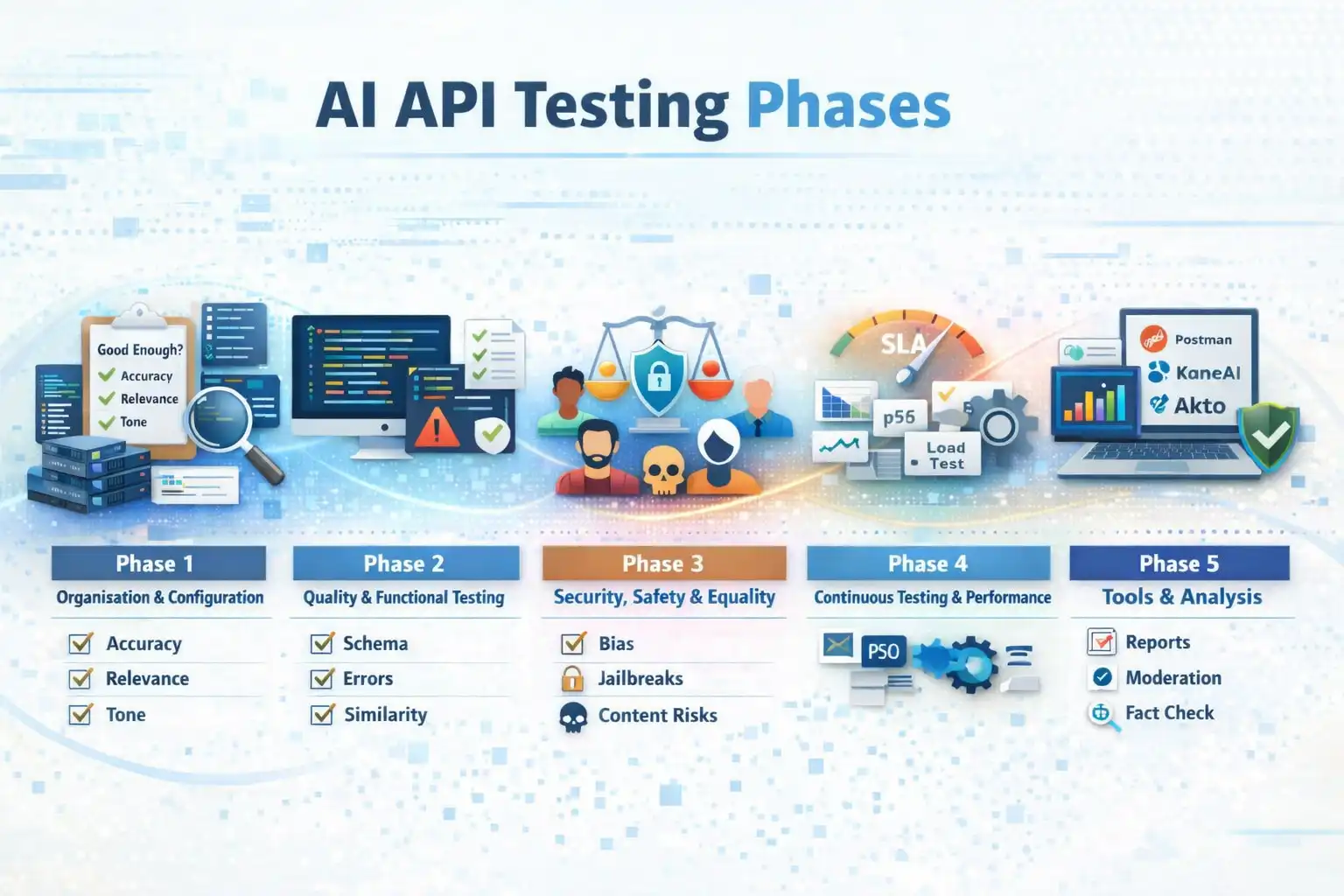
Phase 1: Organisation and Configuration: Start by defining what "good enough" means for your API, including accuracy, relevance, and tone. Set up environments that closely reflect production, including authentication and rate limits. Enable detailed logging to capture requests, responses, timing, and quality signals. Include real-world, edge, and conflicting scenarios in your test data.
Phase 2: Quality and Functional Testing: Validate the basics first: status codes, schema alignment, authentication, and rate limits. Test how the API handles invalid inputs such as missing fields, large payloads, and incorrect data types, ensuring error messages are clear. For quality, use semantic similarity methods like Sentence-BERT to compare responses when wording varies. Evaluate outputs for coherence, usefulness, and factual correctness using supporting validation tools where needed.
Phase 3: Security, Safety, and Equality: Test for bias by varying inputs such as gender, age, or race and checking if responses remain fair and consistent. For security, simulate jailbreaks, prompt injections, and adversarial inputs. Verify that harmful or restricted content is properly detected and handled according to safety policies.
Phase 4: Continuous Testing and Performance: Define SLAs and monitor response times across key percentiles (p50, p95, p99). Run load tests to identify limits and optimize cost versus performance. Build regression test suites and integrate them into CI/CD pipelines to ensure consistent validation with every change.
Phase 5: Tools and Analysis: Generate reports covering functionality, quality, bias, and performance. When issues occur, identify patterns and root causes. Use tools like Postman for API workflows, KaneAI for natural language testing, and Akto for security validation. Combine these with moderation, fact-checking, and sentiment analysis tools, and build custom evaluations for domain-specific needs.
How to Use AI Agents for AI API Testing
Use AI agents in API testing to automate test generation, adapt to API changes, integrate with workflows, and continuously validate API behavior across evolving systems. These are practical AI agent use cases in modern testing environments.
The manual workflow above covers one developer, one bug, one fix. That is the entry point. But modern systems evolve constantly, and every new endpoint, schema update, or deployment introduces potential risks.
To make agents reliable across these workflows, they need a defined set of API Agent Skills, reusable, scoped capabilities that tell the agent how to authenticate, parse a schema, generate negative tests, validate responses, or hand off to a security check.
By building and sharing a common set of API testing skills, theTestMu AI agent-skills repository packages these capabilities so the same agent can cover both traditional REST APIs and AI-powered endpoints without custom scripting per project.
This shows how AI agents can support API testing by moving from manual debugging to continuous, intelligent validation without requiring extensive scripting or rework.
The API: A FastAPI Product Inventory Service
This is the service you will use throughout both tracks. It is a simple Python-based inventory API with an intentional bug built in. The bug passes basic smoke tests but fails under real-world usage.
Working with a deliberately broken API helps you understand what AI API testing is actually solving.
Prerequisites
- Python - 3.10 or above (current FastAPI releases require it), download from python.org
- Postman - Desktop app installed, downloaded from postman.com
- Terminal - Any terminal to run the server
- KaneAI account - Free account, needed for the KaneAI track
This track walks you through running the API locally, triggering the bug, and using an AI tool to identify the root cause and fix it. It represents the starting point of any AI API testing workflow, where API testing AI assistance meets hands-on developer debugging.
- Project Setup - Open your terminal and run the following commands.
mkdir inventory-api
cd inventory-api
python -m venv venv
source venv/bin/activate        # On Windows: venv\Scripts\activate
pip install fastapi uvicorn- Create the API File - Inside the
inventory-apifolder, create a new file calledmain.pyand paste this code exactly.
from fastapi import FastAPI
from pydantic import BaseModel
from typing import Optional

app = FastAPI()

inventory = [
    {"id": 1, "name": "Wireless Mouse", "stock": 120, "price": 29.99},
    {"id": 2, "name": "Mechanical Keyboard", "stock": 45, "price": 89.99},
    {"id": 3, "name": "USB-C Hub", "stock": 0, "price": 49.99},
]

class RestockRequest(BaseModel):
    quantity: str  # Bug: accepts string instead of int

@app.get("/products")
def get_products():
    return inventory

@app.get("/products/{product_id}")
def get_product(product_id: int):
    product = next((p for p in inventory if p["id"] == product_id), None)
    if not product:
        return {"error": "Product not found"}, 404
    return product

@app.patch("/products/{product_id}/restock")
def restock_product(product_id: int, body: RestockRequest):
    product = next((p for p in inventory if p["id"] == product_id), None)
    if not product:
        return {"error": "Product not found"}
    product["stock"] = product["stock"] + body.quantity  # Bug: int + str raises TypeError
    return product
Run the Server
uvicorn main:app --reloadYou should see:
INFO: Uvicorn running on http://127.0.0.1:8000
Scenario: PATCH /products/{product_id}/restock returns 500
The bug lives in the restock endpoint. The RestockRequest model accepts quantity as a str instead of int. Everything looks fine until you actually send a restock request.
Step 1: Confirm the GET works
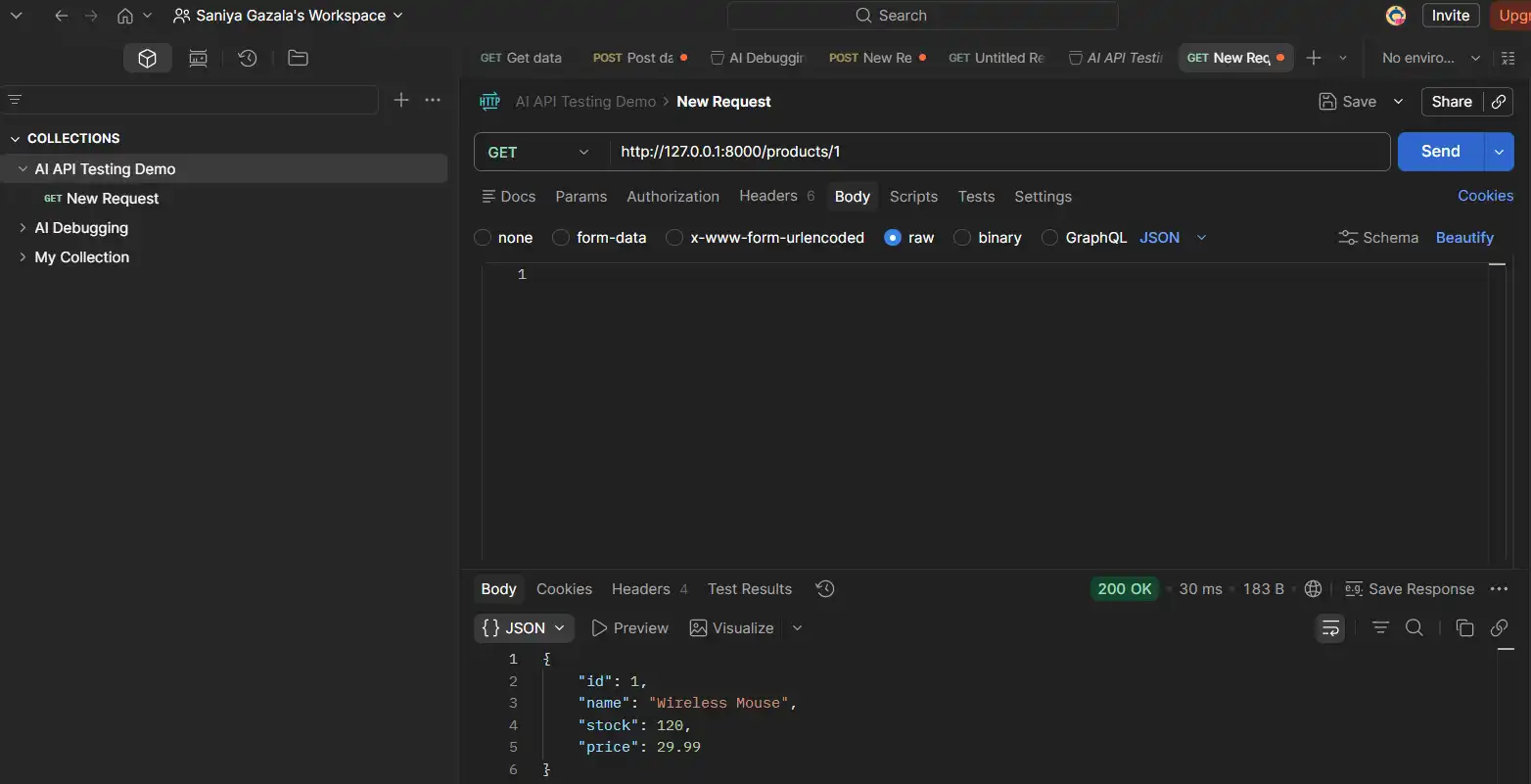
Open Postman and create a new request with these parameters.
- Method - GET
- URL -
http://127.0.0.1:8000/products/1 - Click Send
Result: You get a clean 200 with the Wireless Mouse record. Nothing looks broken yet.
Step 2: Trigger the bug
Create a new request with these parameters.
- Method - PATCH
- URL -
http://127.0.0.1:8000/products/1/restock - Body - Select raw and JSON, then paste:
{
  "quantity": "50"
}- Click Send
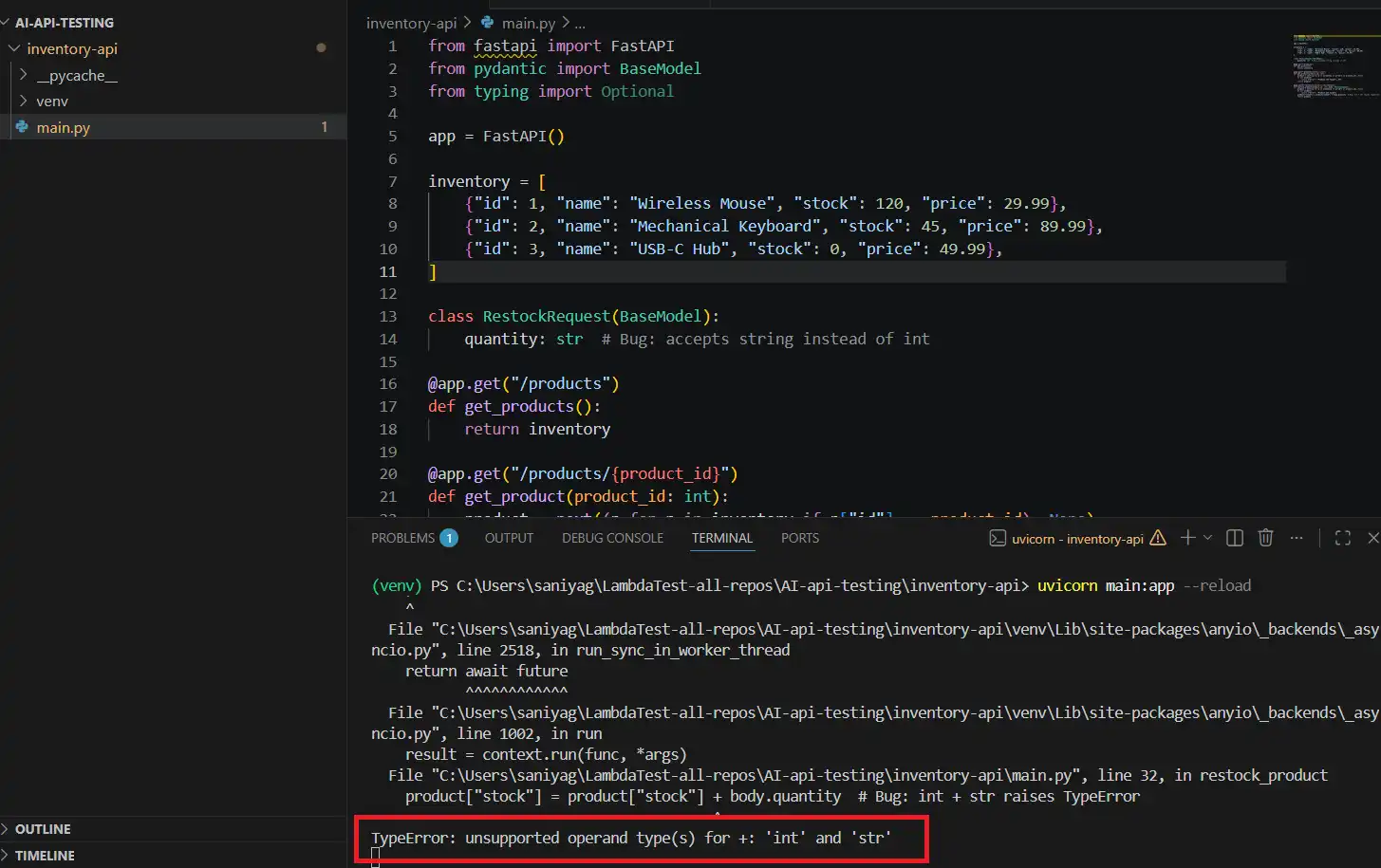
Result: The server returns 500. The terminal shows:
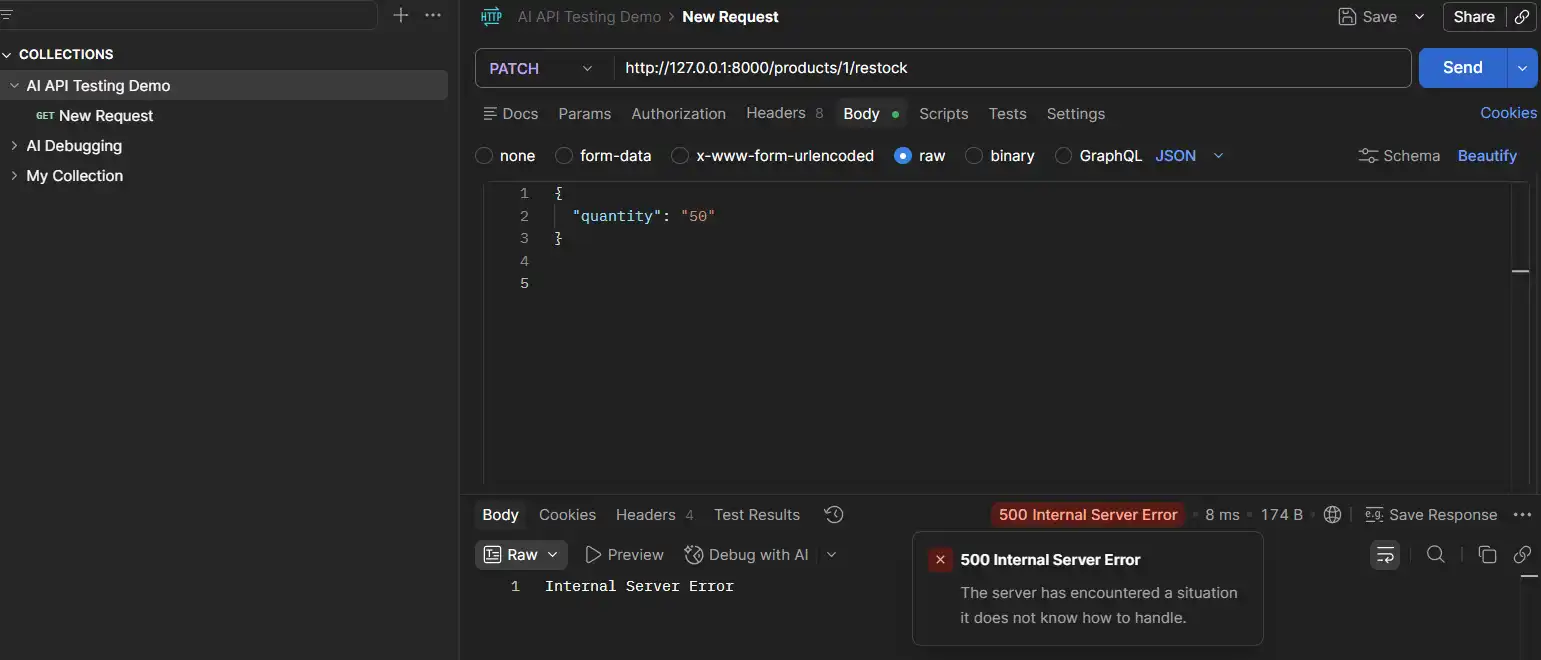
And in the terminal you will see this error: TypeError: unsupported operand type(s) for +: 'int' and 'str'
Step 3: AI Debugging in Action
This is a practical example of how AI debugging helps identify root causes faster by analyzing errors and suggesting fixes in real time.
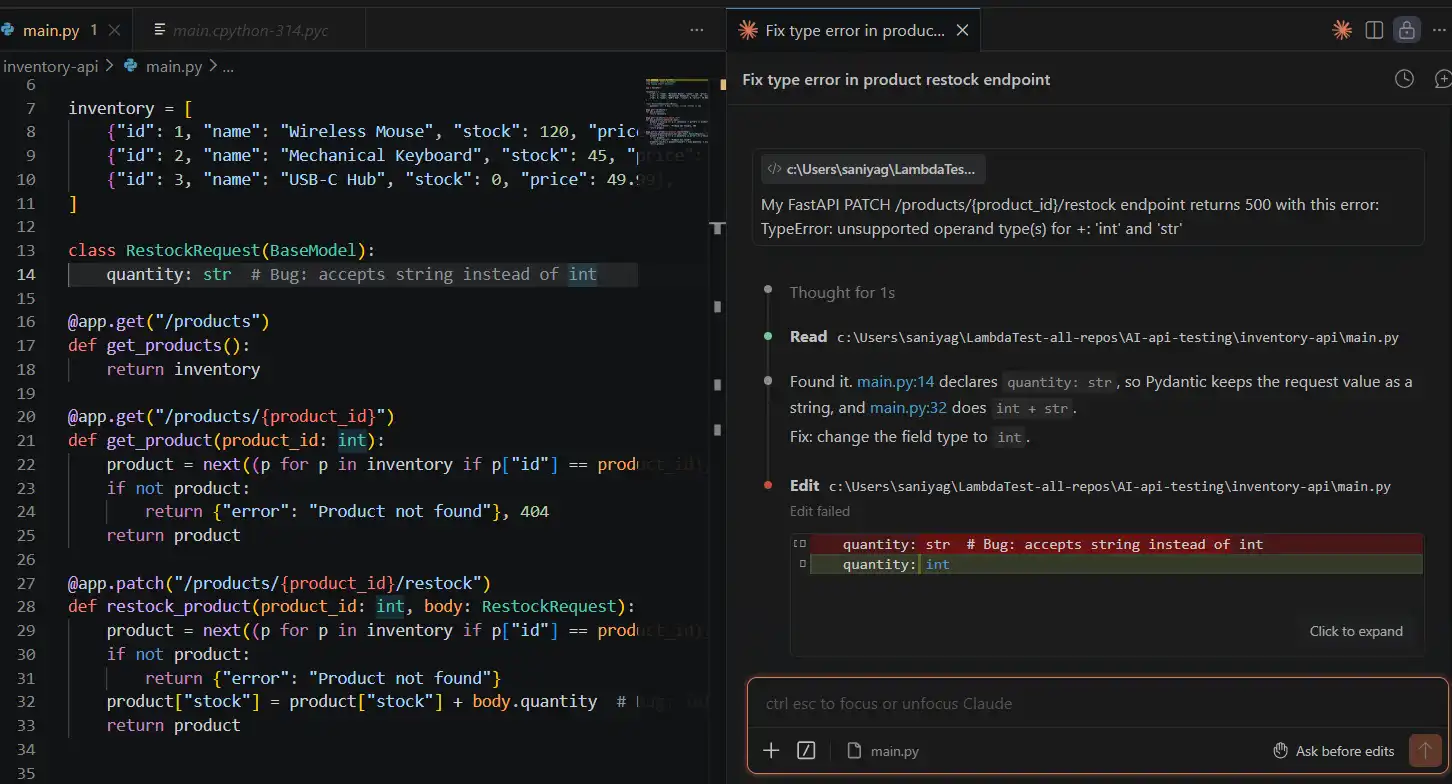
Copy the error from your terminal. Open your AI tool, Claude, Copilot Chat, or ChatGPT, and paste this prompt exactly.
My FastAPI PATCH /products/{product_id}/restock endpoint returns 500 with this error:
TypeError: unsupported operand type(s) for +: 'int' and 'str'
Here is the relevant code that is causing the error.
class RestockRequest(BaseModel):
    quantity: str  # Bug: accepts string instead of int

@app.patch("/products/{product_id}/restock")
def restock_product(product_id: int, body: RestockRequest):
    product = next((p for p in inventory if p["id"] == product_id), None)
    if not product:
        return {"error": "Product not found"}
    product["stock"] = product["stock"] + body.quantity
    return product
The request body sends quantity as "50" (a JSON string). What is the root cause, and how do I fix it?
What AI identifies: The RestockRequest model declares quantity: str, so Pydantic accepts string values without complaint. When the route tries to add product["stock"] (an int) to body.quantity (a str), Python raises a TypeError. The fix is to change the type annotation to int.
Pydantic will then automatically reject non-numeric input and coerce valid numeric strings before they reach your logic.
Step 4: Apply the Fix
Change the RestockRequest model in main.py.
class RestockRequest(BaseModel):
    quantity: int  # Fixed: Pydantic now validates and coerces correctly
Save the file. Uvicorn reloads automatically. Resend the PATCH request in Postman.
Result:
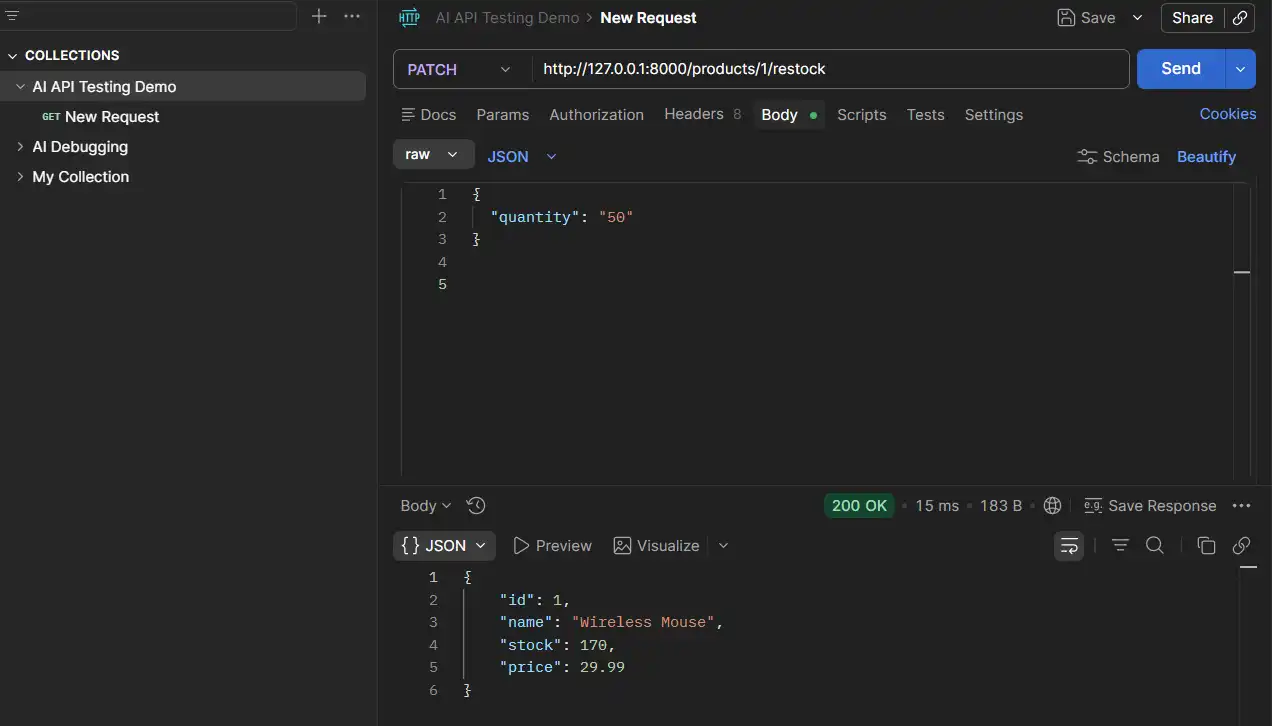
The bug is fixed. Stock updated correctly.
Step 5: Ask AI to audit the whole file
Before moving on, ask your AI tool to review everything.
Review this entire FastAPI app for missing input validation, type issues
or any other bugs you can spot.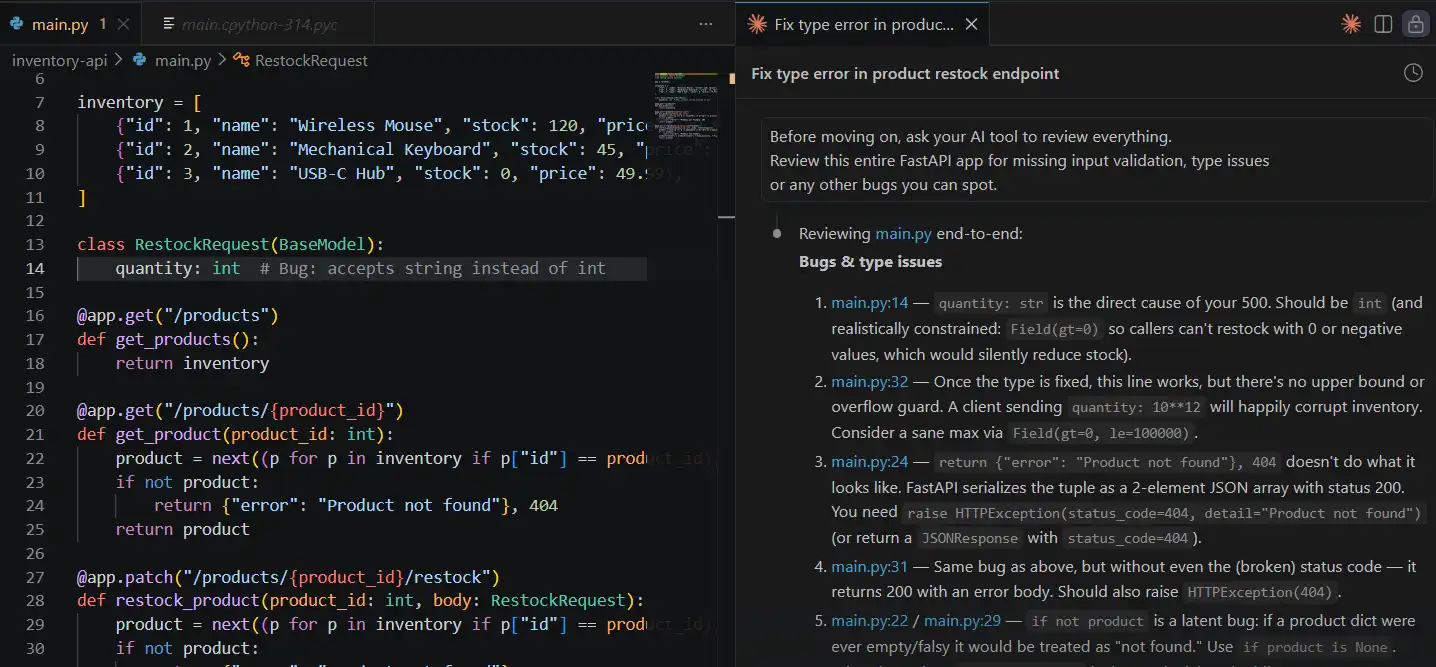
What AI surfaces: The get_product route returns a tuple ({"error": "Product not found"}, 404) instead of a proper FastAPI JSONResponse. FastAPI silently serializes the tuple as a list, so clients receive a 200 with a malformed body instead of a real 404. This is the kind of bug you would only catch in production.
That is the manual track. One developer, one endpoint, two bugs, found and fixed in under 30 minutes.
But this workflow does not scale. The moment a second developer touches this API, or a new endpoint is added, or this service connects to a frontend, you need something that validates every layer, on every code change, automatically.
That is where API testing AI tools built for scale make the real difference, and where AI API testing moves from reactive to preventive.
To scale API testing, you need a cloud-based platform that can automatically validate APIs across environments, teams, and continuous code changes.
This is where tools like KaneAI by TestMu AI (formerly LambdaTest) come in. They enable teams to move beyond manual testing by using natural language to create, execute, and maintain tests at scale.
With AI-driven automation, test coverage expands, execution becomes faster, and issues are caught earlier, making API testing more proactive and reliable.
Where Does KaneAI Fit in Scaling API Testing?
KaneAI fits into scaling API testing as a GenAI-native agent that lets teams plan, author, and execute tests in natural language, simplifying validation of complex AI-driven APIs at scale.
KaneAI by TestMu AI is a GenAI-native testing agent designed to simplify AI test automation for modern API-driven systems. It enables teams to plan, author, and execute tests using natural language, reducing the effort required to validate complex AI APIs.
API testing with KaneAI brings multiple layers of validation into a single workflow:
- API Testing - Validate request payloads, response behavior, and status codes, with detailed logs for tracing issues that appear under specific API conditions.
- End-to-End Validation - Ensure that changes at the API layer do not break downstream systems like web or mobile interfaces.
- Data Validation - Verify backend data consistency to catch cases where APIs return success responses but fail to persist or process data correctly.
- Self-Healing Tests - Re-anchors test steps when the application changes, so maintenance becomes reviewing a heal instead of rewriting the test.
- PR-Based Validation - The TestMu AI GitHub App triggers tests on pull requests and posts results back to the PR, so regressions surface before merge.
- Integrated Issue Tracking - Failures are captured and logged instantly, keeping debugging and resolution within a single, connected workflow.
Instead of validating APIs in isolation, KaneAI helps teams continuously test behavior, reliability, and edge cases across the entire system, making AI API testing more scalable and consistent.
Manual Track vs KaneAI Track
This comparison shows exactly where manual API testing with AI assistance ends and where automated, scalable AI API testing tools take over. The shift is not just about speed; it is about coverage and confidence on every single code change.
| Local (Manual) | KaneAI (Scaled) | |
|---|---|---|
| Test authoring | Postman, by hand | Plain English in KaneAI |
| Bug detection | After it surfaces in testing | On every pull request |
| Negative test coverage | Written manually if remembered | Generated alongside the happy path |
| Regression protection | Re-run manually after each fix | Runs automatically on every change |
| Team visibility | Lives on one developer's machine | Shared, reportable, CI/CD integrated |
You can explore KaneAI's full API Testing and Network Assertions capability, which lets you validate both frontend behavior and backend API responses in a single test flow.

Austin Siewert
Co-Founder, Steadfast Systems
Discovered @TestMu AI yesterday. Best browser testing tool I've found for my use case. Great pricing model for the limited testing I do 👏
3M+ Devs and QAs rely on TestMu AI
Deliver immersive digital experiences with Next-Generation Mobile Apps and Cross Browser Testing Cloud

What tools support AI-driven API testing?
Tools that support AI-driven API testing include KaneAI, Postman, Akto, ZAP, and pytest, designed to handle AI-specific validation, security, automation, and performance testing.
AI API testing is evolving quickly to meet modern testing needs. New tools are being developed to handle the unique challenges of testing both AI-powered and traditional APIs. Some AI-native tools go further and build digital twins of production, recording real API traffic and replaying it as ready-made test suites, an approach covered in detail later in this guide.
Choosing the right tool depends on what you are validating. Match the tool to your primary need rather than picking the most feature-heavy option:
- Natural-language authoring and scale - pick a GenAI-native agent like KaneAI when non-engineers need to write and maintain tests across web, mobile, and APIs.
- Exploratory and collaborative workflows - pick an assistant built into your existing API client when the team already lives in that workspace.
- Security and DevSecOps - pick an AI-native security platform when continuous vulnerability discovery and red teaming are the priority.
- Open-source budget constraints - pick community-maintained scanners and combine them with scripting when licensing cost rules out commercial suites.
- Enterprise and legacy estates - pick a model-based suite when you need service virtualization and governance across complex, integrated systems.
The latest tools highlight how AI tools for developers are improving and transforming API testing.
KaneAI by TestMu AI (formerly LambdaTest)
KaneAI is an AI app testing agent within TestMu AI that enables test creation and execution using natural language across web, mobile, and APIs.
Key AI Features: Natural language test creation, smart execution, auto-healing, AI test generation, analytics, and visual regression testing.
Suitable For: Teams looking for AI-driven, cloud-based testing with automation and orchestration capabilities.
Postman (Postbot)
Postbot is Postman's AI assistant for API testing, documentation, and collaboration; Postman now also offers Agent Mode, and its old Postbot product page redirects there.
Key AI Features: AI test generation, intelligent documentation, smart autocomplete, anomaly detection, and test optimization.
Suitable For: Development and QA teams using Postman who want AI-assisted workflows across the SDLC.
Akto
Akto is an open-source, AI-native API security testing platform designed for modern DevSecOps teams. It automatically discovers APIs, tests for vulnerabilities, and enforces security during development and runtime.
Key AI Features: Autonomous API discovery, AI-driven vulnerability testing, GenAI security testing, sensitive data detection, automated red teaming, and CI/CD integration.
Suitable For: Application security and DevSecOps teams needing continuous, automated API security coverage.
ZAP (Formerly OWASP ZAP)
ZAP (formerly OWASP ZAP) is a free, open-source security scanner maintained by the ZAP Dev Team and now backed by Checkmarx. While not AI-native, it pairs well with AI-assisted workflows to fuzz endpoints, replay requests, and surface common API vulnerabilities like injection and broken authentication.
Key Features: Automated and manual vulnerability scanning, API import via OpenAPI and SOAP definitions, scriptable scan rules, and CI/CD integration.
Suitable For: Teams adding open-source security coverage to an AI API testing pipeline without licensing cost.
Enterprise AI Test Automation Suites
Several enterprise-grade, AI-augmented automation suites cover functional, security, and performance API testing across complex or legacy systems using model-based or codeless approaches. They typically add ML-driven test impact analysis, schema-change automation, and service virtualization for environments that cannot be easily mirrored.
Key AI Features: Natural language or model-based test generation, smart parameterization, risk-based prioritization, non-deterministic validation, and service virtualization.
Suitable For: Large enterprises and regulated industries managing complex, integrated, or legacy API estates.
How to Automate API Calls (Postman, Power Automate, and Code)
You can automate API calls with no-code workflow builders like Power Automate, with API clients like Postman using Monitors and Newman, and with code-based schedulers such as Cron or Celery. Each option triggers requests on a schedule or in response to an event, so the same call runs repeatedly without manual clicks.
Automating API calls serves two related goals. In workflow automation, the aim is to move data between systems on a schedule. In API testing, the aim is to run the same requests continuously and assert that responses stay correct. The mechanics overlap, and the tools below cover both.
Can Power Automate do API calls?
Yes. Power Automate can call any REST API through its built-in HTTP action or through a custom connector built from an OpenAPI definition. You define the endpoint, HTTP method, headers, and request body, then trigger the flow on a schedule or from an event such as a new record or an incoming message. This makes Power Automate a common choice for wiring API calls into business workflows, where the priority is orchestration rather than functional test coverage.
Custom connectors are the key to reuse. Once you register an API as a connector, teams across an organization can call it from any flow without re-entering authentication or endpoint details, which keeps automated API calls consistent and governed.
Can you automate API calls in Postman?
Yes. Postman automates API calls in two main ways. Postman Monitors run a saved collection on a schedule from the cloud and alert you when requests fail or assertions break. Newman, the Postman command-line runner, executes the same collections from a terminal or inside a CI/CD pipeline, so every build can replay your API calls automatically.
A typical setup keeps requests and assertions in a Postman collection, runs it locally with Newman during development, and schedules it as a Monitor for production checks. That gives you scheduled runs, pipeline runs, and alerting from a single collection.
Automating API Calls with Code (Cron and Celery)
For teams that prefer code, schedulers trigger API calls directly from a script. Cron, the Unix job scheduler, runs a script at fixed times, which suits simple, time-based calls. Celery, a distributed task queue for Python, handles event-driven and higher-volume calls, with retries and concurrency built in. Both approaches pair well with AI-generated test scripts that assert on each response before the next step runs.
Key Components of API Automation: Data Transformation and Error Handling
The key components of an API automation pipeline are data transformation, which maps payloads between different API formats, and error handling, which manages rate limits, quotas, retries, and backoff. Getting both right is what keeps automated calls reliable when they run at volume.
Data Transformation and Payload Mapping
Two systems rarely speak the same schema. Data transformation reshapes the payload from a source API into the format a destination API expects, renaming fields, converting types, and restructuring nested objects. Integration platforms such as Qlik Talend Cloud handle this mapping visually for enterprise data flows, while lightweight pipelines do it in code. In AI API testing, transformation logic is itself a test surface, since a wrong mapping can pass every status-code check while corrupting the data downstream.
Rate Limits, Quotas, Retries, and Backoff
Automated calls hit limits that manual testing never reaches. Sound error handling respects each API's rate limits and quotas, retries transient failures, and applies exponential backoff so a burst of retries does not overwhelm the service. API gateways such as IBM API Connect enforce these limits centrally and expose the headers that tell a client when to slow down. Well-designed automation reads those signals and adapts instead of failing the whole run.
| Component | What it handles | Failure it prevents |
|---|---|---|
| Data transformation | Mapping payloads between API formats | Silent data corruption behind a 200 response |
| Rate limit handling | Respecting quotas and throttle headers | 429 errors and blocked API keys |
| Retries and backoff | Re-sending transient failures with delay | Flaky runs from momentary network blips |
AI-Native Verification: Leveraging Digital Twins of Production
AI-native verification builds digital twins of production by recording real API traffic, database reads and writes, and gRPC calls, then replaying them as automated test suites. Instead of writing assertions by hand, the tool captures how the system actually behaves and turns that behavior into a regression baseline.
A digital twin is a faithful copy of production behavior. When a request flows through a service, the AI layer records the outbound dependencies, the responses, and the resulting data changes. On the next run it replays the captured request and compares the new response against the recorded one, flagging any drift. Because gRPC and other binary protocols are captured at the wire level, services that never exposed a REST surface still get coverage.
The payoff is coverage without scripting. Teams get test suites generated from real usage, including the edge cases that manual test design tends to miss, and those suites stay current as traffic patterns shift. Pairing digital twins of production with a validation agent like KaneAI adds smart assertions on top of the replayed calls, so a run confirms both that a response matched and that the response shape and data state are correct.
Semantic vs. Syntactic Awareness in AI API Testing
AI brings two kinds of awareness to API testing. Syntactic awareness understands schema rules and structure, such as field types, required properties, and formats. Semantic awareness understands the meaning and context of a payload, such as whether a returned price is plausible or whether a message actually answers the request. Together they surface logical gaps that schema validation alone would miss.
Syntactic Awareness
Syntactic awareness is structural. The model reads the OpenAPI or GraphQL schema and checks that each response conforms to it: correct data types, required fields present, enums within range, and formats valid. This catches contract violations and breaking changes quickly, and it is deterministic enough to gate a build.
Semantic Awareness
Semantic awareness is about meaning. A response can be perfectly valid syntactically and still be wrong: a discount that exceeds the item price, a translation that changes the intent, or an AI-generated answer that is fluent yet off-topic. By understanding context, AI evaluates coherence, plausibility, and relevance, which is essential when the API under test returns non-deterministic output from an LLM.
The most reliable AI API testing combines both. Syntactic checks confirm the response is well-formed, and semantic checks confirm it makes sense, closing the coverage gap between a valid schema and correct behavior.
Case Studies: AI API Testing in Action
Real-world case studies show AI API testing driving faster deployments in e-commerce, improving fraud detection in fintech, and reducing security assessment cycles across regulated industries.
Examining real implementations across many industries makes the theoretical benefits associated with AI-powered API testing tangible.
These case studies highlight AI in action, showing how enterprises have successfully implemented AI API testing strategies, the challenges they encountered, and the quantifiable results achieved.
Netflix: APIs for Customization and Suggestions
With a large microservice estate and frequent deployments, Netflix relies heavily on AI-driven APIs for recommendations and personalization. While traditional API tests ensure endpoint stability and schema accuracy, AI-specific testing focuses on recommendation quality, model drift after retraining, and performance at scale.
This approach reflects key lessons from designing Netflix's experimentation platform, where continuous validation of model outputs and automated regression checks help detect shifts in user relevance before they impact viewer engagement.
Capital One: DevOps and API Security Testing
Following the Capital One cyber incident, Capital One introduced AI-driven continuous security testing to address the gaps left by conventional, inconsistent penetration testing. The company recognized that annual security reviews were insufficient for rapidly evolving API ecosystems.
AI models now continuously monitor APIs for vulnerabilities, detect unusual behavior patterns, and integrate security validation directly into CI/CD pipelines through automated adversarial testing.
The approach shows how continuous, automated security checks fit a highly regulated financial environment, where every release still has to clear compliance review.
Challenges and Limitations in AI API Testing
Challenges in AI API testing include limited interpretability, non-deterministic outputs, data quality issues, model drift, CI/CD integration hurdles, and cost, privacy, and compliance risks.
Understanding limitations is just as important as understanding capabilities. Even though AI and ML are increasingly being used in API testing, a number of intrinsic challenges and constraints still limit their use in real-world applications. Teams that go into AI API testing with a clear view of these limitations tend to adopt more effectively than those who treat it as a magic solution.
Challenges in Debugging and Limited Interpretability of the Model
One of the biggest challenges with AI-powered API testing is in regulated industries, where you need to trace every decision and justify every outcome and because even the most advanced models, especially LLMs, work like black boxes, root cause analysis is difficult.
Subjective Validation and Non-Deterministic Outcomes
Testing AI APIs differs from traditional testing because you can't rely on exact output matching. The same input might generate several relevant but differently worded responses, which contrasts traditional pass/fail logic.
Data Quality Constraints and Model Drift Over Time
AI-based testing tools learn from historical test data, so if that data is incomplete or poorly labeled, the results will reflect that. In many real projects, test records are inconsistent, missing context, weak labels, or gaps that were never filled in. This directly affects how accurately the AI generates tests and predicts failures.
Scalability and CI/CD Integration Challenges
CI/CD pipelines and AI-driven testing don't always get along well. Most pipelines expect tests to behave the same way every time. AI models are not built like that. Throw in a large number of microservices with frequent releases, and the processing demands of keeping AI models running, handling feedback, and pushing updates start to pile up.
Performance, Cost, Security, and Privacy Risks
Running AI-powered tests continuously is not cheap. Compute and token costs add up faster than most teams expect. Teams in regulated industries have it even harder, since data privacy and compliance requirements around how models are used and managed aren't something you can figure out on the fly.
Understanding these limitations helps teams adopt AI API testing strategically, improve reliability, and set realistic expectations for scaling AI-driven testing.
For those looking to strengthen their fundamentals, exploring common API testing interview questions can also help reinforce key concepts and real-world problem-solving approaches.
AI API Testing vs Traditional Methods: When to Use Each
Use AI API testing for complex, frequently changing, or AI-driven APIs that benefit from adaptive testing, and stick with traditional methods for stable, deterministic, and simple APIs.
Knowing when to use each approach helps teams make smarter decisions about where to invest their testing effort. Not every API needs AI API testing, and knowing where the line falls saves time and budget.
API testing has traditionally relied on labor-intensive and deterministic scripts, but as modern technologies have become more sophisticated and dynamic, AI-driven testing methods have become increasingly common.
| Aspect | Traditional API Testing | AI-Driven API Testing |
|---|---|---|
| Test Creation | Manually scripted by QA engineers; time-consuming for complex APIs. | Automatically generated from API specs, schemas, and traffic patterns. |
| Setup and Maintenance | Time-consuming setup; frequent manual updates when endpoints change. | Faster initial setup; self-healing tests detect and repair broken scripts automatically. |
| Test Coverage | Limited by tester time and expertise. | Broader coverage with automated edge-case and boundary-condition detection. |
| Handling Changes | Low adaptability; tests break when APIs change. | High adaptability; AI adjusts to evolving APIs and schema drifts. |
| Execution and Speed | Sequential or basic parallel execution. | Intelligent prioritization and optimized execution via Test Impact Analysis (TIA). |
| Resource Usage | High human effort, low compute usage. | Lower human effort, higher compute requirements. |
| Skills Needed | Strong API testing and scripting skills. | Testing basics plus AI/tool configuration skills. |
| Cost Profile | Lower upfront cost, higher ongoing labor cost. | Higher initial cost, lower long-term maintenance cost. |
| Best Fit | Simple, stable, deterministic APIs. | Complex, data-driven, frequently changing APIs. |
Best Practices for AI API Testing
Best practices for AI API testing include using realistic test data, validating model outputs, monitoring production behavior, building feedback loops, and tracking performance, latency, and cost.
Following best practices in AI API testing helps teams catch issues early instead of discovering them in production. These practices apply across tools and focus on functionality, reliability, performance, and security.
- Start with Realistic Test Data - AI systems behave differently with clean versus real-world data. Use inputs that reflect actual user behavior, anomalies, and inconsistencies to uncover issues that ideal conditions would miss.
- Validate Model Outputs, Not Just API Responses - A 200 OK does not guarantee correctness. Outputs can still be wrong, biased, or irrelevant. Check if responses are meaningful and aligned with the input, and ensure confidence levels are reasonable.
- Continuously Monitor AI Behavior in Production - Testing does not stop after release. Data drift, user behavior changes, and model updates can impact performance. Monitor response quality, accuracy, latency, and error patterns in real time to detect issues early.
- Build Feedback Loops into Testing - Incorporate real-world signals like user feedback, flagged outputs, and low-confidence predictions into test design. This improves coverage and keeps testing aligned with how the system evolves. In eval-driven development, each failure found this way becomes an eval item that must fail before the fix, pass after it, and stay in the regression set.
- Monitor Performance, Latency, and Cost - Beyond accuracy, track latency, throughput, and cost drivers like token usage. Sudden spikes often indicate issues in configuration or traffic. Continuous monitoring and AI performance testing help optimize performance and scalability.
Conclusion
Start small: pick one frequently changing endpoint, run the FastAPI debugging track in this guide to see how AI surfaces root causes, then graduate to a scaled workflow that validates every pull request automatically. That single step moves a team from reactive bug-fixing to preventive coverage.
To scale that step, write the same restock checks in KaneAI in plain English and run them on every pull request; the KaneAI API Testing and Network Assertions doc linked above shows how to assert on backend responses in the same flow as the UI.
Citations
- Netflix Research, Lessons from Designing Netflix's Experimentation Platform (linked above in the case studies section).
- Capital One, 2019 cyber incident information (linked above in the case studies section).
- TestMu AI, KaneAI API Testing and Network Assertions documentation (linked above in the KaneAI section).
Author

Piyusha Podutwar
Blogs: 4


Piyusha Podutwar is a Senior Software Engineer at DPS with over 12 years of experience in mainframe application and system programming. She has authored 20+ technical tutorials for TestMu AI on API testing, Agile, DevOps automation, software testing, automation testing, and digital transformation. She is skilled in Assembler, COBOL, DB2, and JCL, and has led large-scale modernization and migration projects across banking, finance, retail, and insurance domains. A Certified Scrum Master, Piyusha previously worked with IBM, TCS, BMC Software, and T-Systems.
Reviewer

Swapnil Biswas
Reviewer
Swapnil Biswas is a Product Marketing Manager at TestMu AI, leading product marketing for KaneAI and HyperExecute while orchestrating GTM campaigns and product launches. With 5+ years of experience in product marketing and growth strategy, he specializes in AI, SEO, and content marketing. Certified in Selenium, Cypress, Playwright, Appium, KaneAI, and Automation Testing, Swapnil brings hands-on expertise across web and mobile automation. He has authored 20+ technical blogs and 10+ high-ranking articles on CI/CD, API testing, and defect management, enabling 70K+ testers to improve automation maturity. His work earned him multiple awards, including Top Performer, Value of Agility, and Wall of Fame. Swapnil holds a PG Certificate in Digital Marketing & Growth Strategy from IIM Visakhapatnam and a BBA in Marketing from Amity University.


AI API Testing FAQs
Did you find this page helpful?
More Related Blogs

TestMu AI forEnterprise
Get access to solutions built on Enterprise
grade security, privacy, & compliance
- Advanced access controls
- Advanced data retention rules
- Advanced Local Testing
- Premium Support options
- Early access to beta features
- Private Slack Channel
- Unlimited Manual Accessibility DevTools Tests