

Power Your Software Testing with AI Agents and Cloud
The Native AI-Agentic Cloud Platform to Supercharge Quality Engineering. Test Intelligently and Ship Faster.


- TestMu AI (Formerly LambdaTest)
- /
- Blog
- /
- How To Test Websites On Different Browsers Remotely?
How To Test Websites On Different Browsers Remotely?
Wondering how to test your website on different browsers while working remotely? Read this article to know how!
Last Updated on:
Remote teams can test websites across different browsers without a physical device lab by moving cross-browser testing to a cloud-based platform, which needs no setup cost, lets you switch between browsers and operating systems within seconds, and avoids the bandwidth drain of spinning up local virtual machines. This became essential once remote work took hold during the pandemic.
Implementing cross browser testing without an in-house device lab is still a real challenge for a distributed team. This article covers how to solve that with a cloud-based setup instead of physical infrastructure. Before that, we need a cross browser testing strategy.

Test Websites On Different Browsers, The Right Way!
Cross browser testing could be overwhelming unless you have the right plan in hand. Your customers may be visiting your websites from a variety of browsers & OS combinations, it could be hundreds of such combinations. You can’t just go ahead and test on Safari, Chrome, Mozilla different browsers versions in random bases. You need to plan things well here. Here is how you can.
Analyse Your Website Audience
Before starting anything, it is very important that you analyse the audience of your website and what browsers are they majorly using. If your website is already published, you can use Google Analytics or any other similar tools to gain insights to your audience. If you are about to publish the website, look for the results of similar websites and then analyse the audience. Keeping track of the most used browsers and operating systems can help you target a specific audience which would be genuinely interested in the website.
Prepare A Cross Browser Testing Matrix
A browser matrix is the list of browsers (along with their versions) and operating systems on which you will test your website. Preparing a browser matrix can help you eliminate a number of browsers and perform testing quickly. For example, if I have certain elements on my website that I cannot remove and I know will not render correctly on an older browser version in my matrix, I will remove it from my testing list. This helps in devising your testing properly. On top of it, if you have used web analytics tools as discussed in the above points, you can prioritize the browsers (and operating systems) on which you can put your focus during testing. The final goal is, you can know what browsers and operating systems you are aiming for and especially a few that you derived from analytics. Preparing a browser matrix also lays down the systematic plan in testing which will save a lot of time.
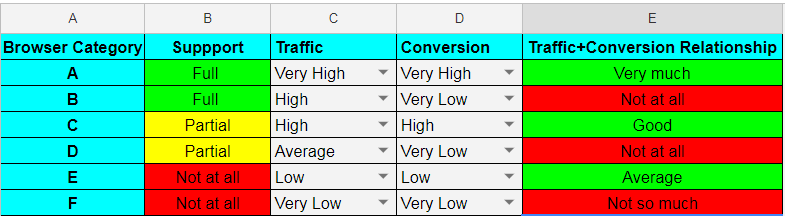
Creating Browser Compatibility Matrix for Testing Workflow
Now, that you have the list ready with you and you know which browsers you need to prioritize over others. It is time to get your hands dirty and test your website over different browsers. However, this is the most struggling part if you are working from home because you can't get access to your device labs. Not to mention, device labs aren't an affordable option for everyone. To those testers, an on-premise infrastructure for browser compatibility testing makes more sense where they could set up virtual machines and maintain it over time. However, when you are setting up your own on-premise infrastructure for browser testing, it can be very struggling over time. Just think about it. New browser versions ship constantly. According to Chrome's own release notes, Chrome now ships a new stable version every two weeks. If you continue with on-premise setup, chances are you are going to end up spending more time managing your infrastructure and less time over your browser testing scripts.
Another major concern for you as a tester while working from home is going to be communication. As you may have to exchange information from different team members on-board around a particular feature. At the same time, you may also have to send your test reports and bug reports to the right point of contact in your team. Since different testers perform different types of tests, they all need to be in sync with others in terms of the reports, videos, screenshots, screencasts etc.
Either option, your own device labs or an on-premise setup of virtual machines, leaves you managing infrastructure instead of testing. So what can you do? How can you overcome the challenge of cross browser testing remotely?
Remote testing is considered a major challenge while testing a website on different browsers. Especially, if you don’t have the pocket to invest in a device lab. This can be solved by setting up virtual machines or installing software to help you do the same. This ends up taking more bandwidth as the entire testing team has to set up the VMs and sharing bugs with the team becomes quite cumbersome too.
Another major concern for the testers is that they need to communicate and share their test to their respective teams continuously. It becomes vital to continue onto the next tests and to analyze the reports. Since different testers perform different types of tests, they all need to be in sync with others in terms of the reports, videos, screenshots, screencasts etc.
Problems keep on piling if we were to nitpick every single problem faced while testing websites on different browsers remotely. All these efforts can be easily solved by moving to a cloud solution. Let’s further explore how a cloud solution can help in cross browser testing.
Why Go For Cloud Based Cross Browser Testing?
Cloud based cross browser testing is performed by testing your website on remote devices (virtual or physical) and controlling it from your own system. The problem is that the website needs to be tested every time a browser is released and believe me, they are released too often than you think. With time, cloud based browser compatibility testing has turned out to be the best option for testing your website easily, quickly and within budget. There are a number of reasons for that.
No Setup Cost
Cloud based cross browser compatibility testing ensures that there are no physical devices that are required to be carried and maintained with different browsers and operating systems. In addition, there is no setup cost. Just login and start testing on the platform.
Fast and Secure
Cloud based cross browser testing is very fast. You can switch between the browsers and operating systems within seconds and test your website. All you need to work upon is the cross browser compatibility matrix which will show the benchmark versions of the browsers.
A Large Number Of Browser and Operating System
Cloud based cross browser testing provides a very high number of browsers and operating systems (along with their different versions). So, if I want to test the latest Chrome release on Windows 11, I can do it within seconds.
Round The Clock Up-Time
While working remotely from different places, the most important thing to note is that employees do not have fixed hours to work. This means that the system should be up all the time so that any employee can access and test anytime he wants. This is what cloud based cross browser testing tools ensure. It provides high up-time to enable people at different time zones to access the tool anytime.
Easy Code Sharing
Cloud based browser compatibility testing also ensures that the selenium automation tests that you were trying to run on physical devices, run with the same grace on the remote system. Along with Selenium, cloud based testing platforms provide a number of languages to execute your automation tests.
Scalable
Scaling is not an issue while considering cross browser testing. Testing always requires scaling up and down according to the website and the magnitude of the project. While using cross browser testing, you can scale as much as you can without worrying about the extra devices.
Easy To Communicate
Cloud based cross browser testing tools ease out the process of sharing screenshots, comments, videos etc with different teams of the project such as development, DevOps, testing etc. With all of the teams viewing the results, they can work as if sitting at a single place. This provides high efficiency in testing delivering the projects faster.
Start your free testing on remote browsers today.

Testing Website on Different Browsers With TestMu AI
Now, that we have noted down the pros of moving to a cross browser testing cloud. You can get right into the action with TestMu AI, the fastest-growing cross browser testing cloud. With TestMu AI, you can test across a browser farm of 3000+ real browsers for both mobile and desktop. TestMu AI offers a variety of features to ensure you deliver a website which renders seamlessly across all browsers and operating systems.Start your testing on different browser farms.

Real-Time Testing
You can test website on different devices and browsers over Windows, macOS, iOS, and Android hosted by TestMu AI cloud servers. To perform real-time testing, choose “Real-Time Testing” from the dashboard.
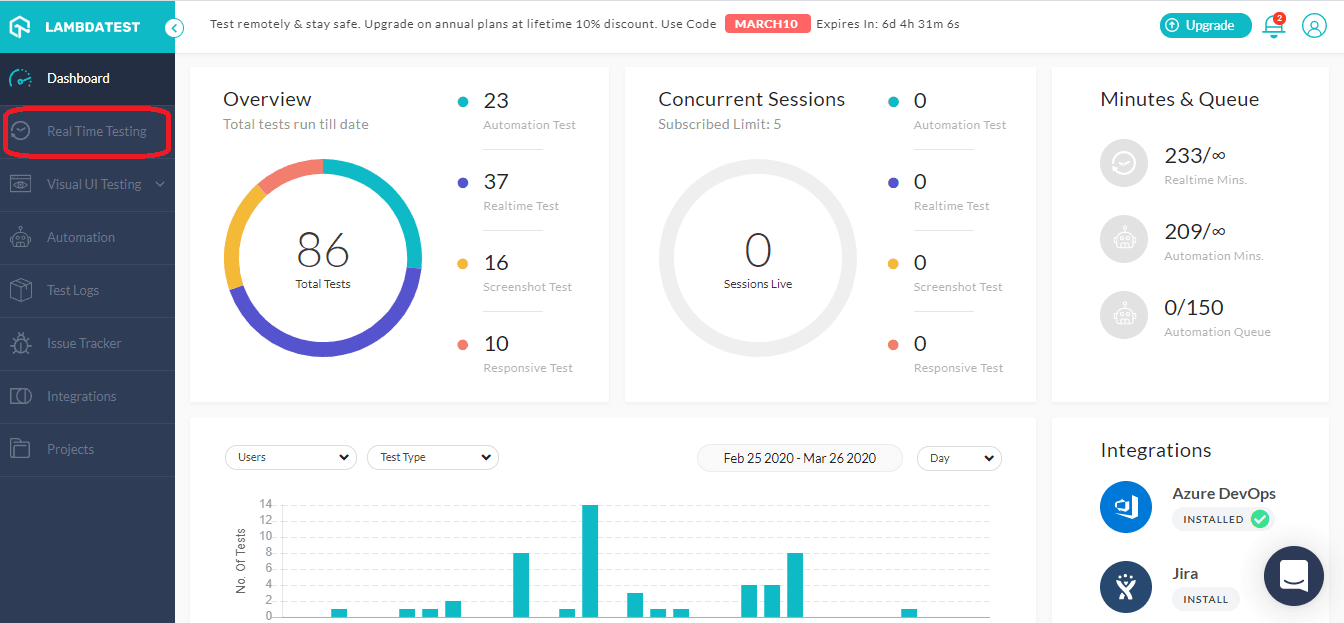
Just enter your URL, select the browsers and test the website on different browsers.
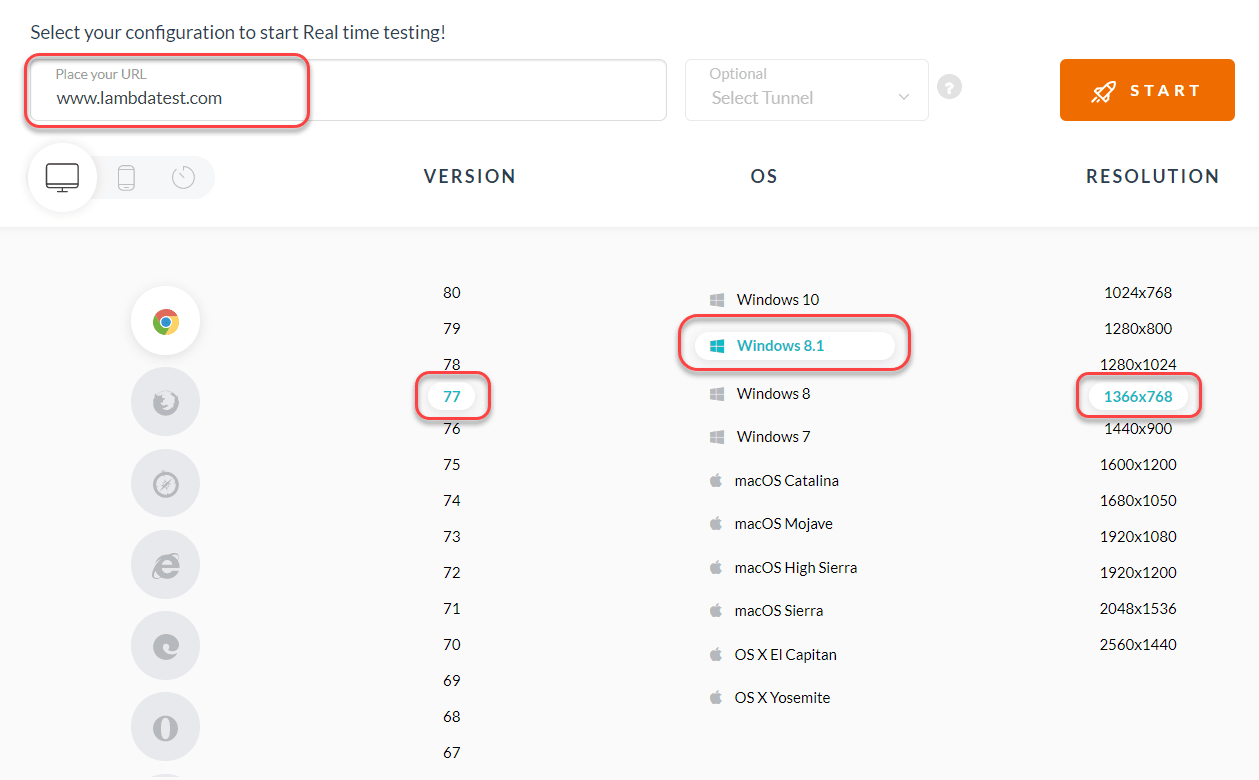
It’s as simple as that.
Screenshot Testing
Screenshot testing allows you to take full-page screenshots of your website automatically across numerous browsers & OS (maximum 25) in a single test session.
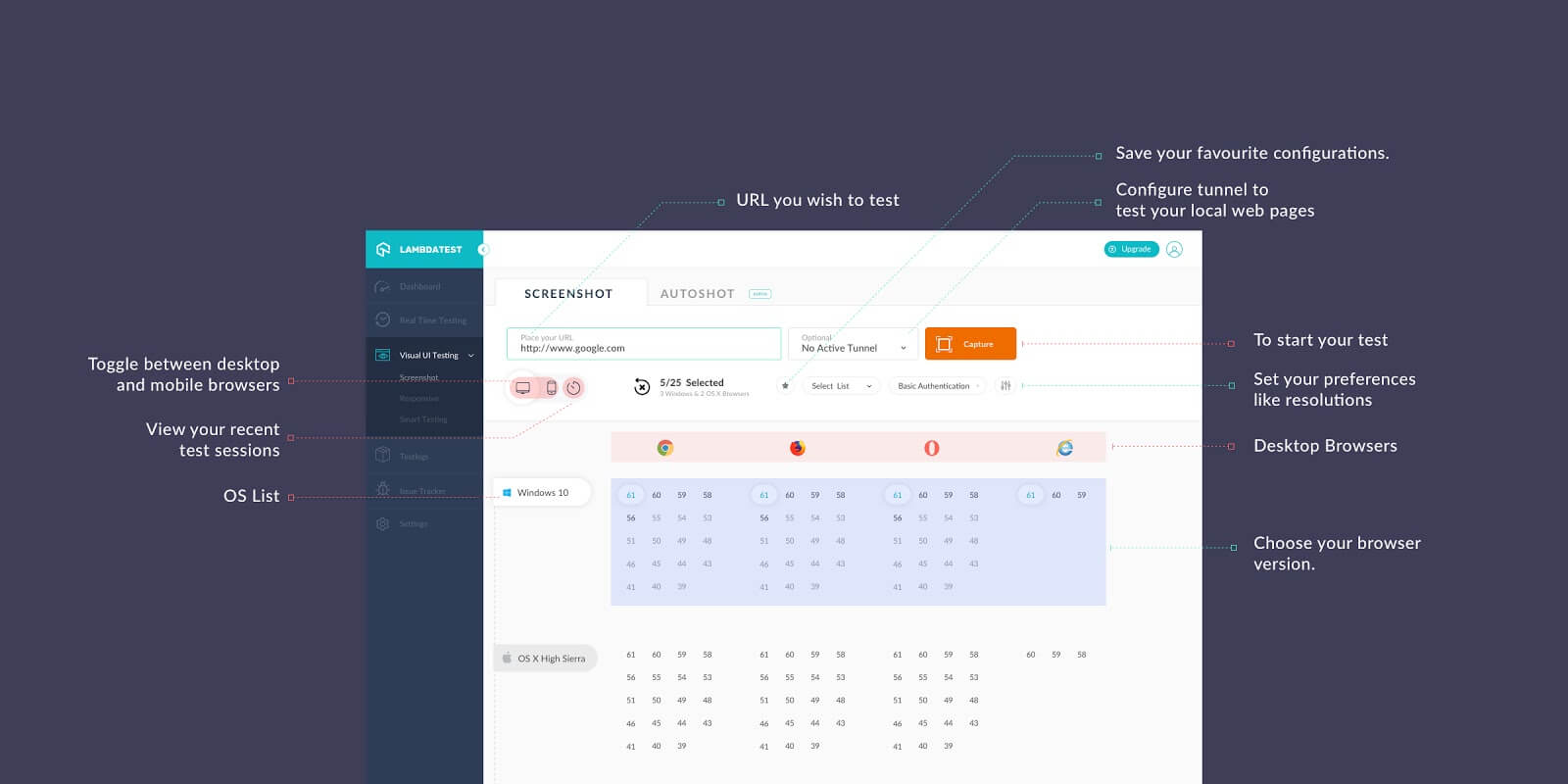
10 Must Try Features Of Automated Screenshot Testing On TestMu AI
But if we think for a moment, if there are so many browsers and so many operating systems, testing them, again and again, is really time consuming. To decrease this time and increase our efficiency, we try to automate this process of testing by writing automation scripts.
Writing Automation Script In Cross Browser Testing
Automation scripts are tests in the form of a set of instructions. They are executed to tell the computer to execute them automatically on the system under test in different intervals of time. The best thing about the automation scripts is that no matter how complex and long these tests may be, they can be run repeatedly as many times on different intervals. So, I need to just add one browser in the browser matrix I previously tested and run the tests again when a new browser arrives in the market.
Selenium Automation tests do not need the engineer to sit and watch or intervene in any way. They can be run round the clock without any intervention. TestMu AI provides the feature of writing automation scripts to execute tests on your website. Performing cross browser testing with automation is more powerful and efficient. Okay, so now we have increased our speed and throughput from the manual testing point. Can we increase it furthermore? Definitely, we can.
Perform Parallel Testing With Selenium Grid
By leveraging Selenium Grid of TestMu AI, you can execute your Selenium testing scripts in parallel. So, if you have 5 different tests, all of which takes around 5 minutes to execute, they would take 25 minutes when performed sequentially one after the other. However, if you are running them in parallel with 5 concurrencies then the total time taken would be just 5 minutes. Parallel testing can help you truly accelerate your cross browser testing process.
TestMu AI’s LT Browser is a next-gen browser to build, test & debug mobile websites. Try it now, for free!
How Do AI Agents Handle Remote Cross-Browser Testing in 2026?
AI agents can now drive a remote browser directly from a plain-language instruction, but someone still has to tell the agent which browsers, operating systems, and versions belong in the test matrix.
- Writing the scripts: Coding agents such as GitHub Copilot, Cursor, and Claude Code can generate the Selenium or Playwright automation script this guide describes writing by hand, from a description of the test steps, which shortens the step covered earlier in this article.
- Driving the browser directly: An agent connected to the Playwright MCP server or built with browser-use can skip the script entirely and act on a remote browser step by step from a natural-language instruction, which is useful for a one-off check on a single browser that does not justify a maintained script.
Neither approach picks your browser matrix for you. An agent still runs only the browser, operating system, and version combination it is pointed at, so the audience analysis and matrix work covered earlier on this page stay a human decision in 2026, not something an agent infers on its own.

Author

Harish Rajora
Blogs: 102


Harish Rajora is a Software Developer 2 at Oracle India with over 6 years of hands-on experience in Python and cross-platform application development across Windows, macOS, and Linux. He has authored 800 + technical articles published across reputed platforms. He has also worked on several large-scale projects, including GenAI applications, and contributed to core engineering teams responsible for designing and implementing features used by millions. Harish has worked extensively with Django, shell scripting, and has led DevOps initiatives, building CI/CD pipelines using Jenkins, AWS, GitLab, and GitHub. He has completed his post-graduation with an M.Tech in Software Engineering from the Indian Institute of Information Technology (IIIT) Allahabad. Over the years, he has emphasized the importance of planning, documentation, ER diagrams, and system design to write clean, scalable, and maintainable code beyond just implementation.


Did you find this page helpful?
More Related Blogs
TestMu AI forEnterprise
Get access to solutions built on Enterprise
grade security, privacy, & compliance
- Advanced access controls
- Advanced data retention rules
- Advanced Local Testing
- Premium Support options
- Early access to beta features
- Private Slack Channel
- Unlimited Manual Accessibility DevTools Tests