
Run End-to-End Tests From GitHub Actions
Install Kane CLI and Pass LT_USERNAME and LT_ACCESS_KEY From Repository Secrets.
npm install -g @testmuai/kane-cli
GitHub Actions Secrets: How to Store, Use and Protect Them
GitHub Actions secrets explained: create repo, environment and org secrets, pass them to tests safely, and fix secrets that come back empty or leak.
GitHub Actions secrets are encrypted values (e.g., API keys, test passwords) that a workflow will read via the secrets context. They can be created at the repository, environment or organization level.
You pass them into steps using either env: or with:. Registered secret values are redacted from logs. Forks, Dependabot runs, and unpassed reusable workflows will not get these secrets.
When a new pipeline fails at the login step, check the secret first. GitHub will return an empty string for a secret that the run simply can't read and will generate no error. This guide is for teams running automation testing in GitHub Actions, and all the limits quoted are from GitHub's own documentation as of November 2026.
TL;DR
GitHub Actions secrets are encrypted values, such as API keys and test passwords, that a workflow reads through the secrets context. To use GitHub secrets in Actions, store each at the narrowest scope that works (environment, repository or organization), pass it to a step through env:, and fail with a :? guard when a required secret comes back empty.
GitHub Actions Secrets at a Glance
- GitHub repository secrets: Available to every workflow in the repository, up to 100 per repository, and read when the run is queued. Repository secrets suit CI keys that belong to one repo, such as the LT_USERNAME and LT_ACCESS_KEY pair a test platform needs.
- GitHub environment secrets: Reach only jobs that declare environment: with the environment's name, and can wait for a required reviewer before the job reads them. Public repositories on GitHub Free: yes. Private repositories on GitHub Free: no; they need Pro, Team or Enterprise.
- GitHub organization secrets: Shared with all, private or selected repositories, up to 1,000 per organization. Private repositories on GitHub Free: no access. A repository with more than 100 assigned sees only the first 100, sorted alphabetically.
- GitHub Actions secrets vs variables: Secrets are encrypted and redacted from logs, while configuration variables in the vars context render unmasked in build output. Keep URLs and browser names in variables, and keys, tokens and passwords in secrets.
- Empty secrets: GitHub returns an empty string, not an error, when a run cannot read a secret or the name does not exist. Fork pull requests, Dependabot runs, reusable workflows that were not passed the secret and jobs missing environment: are the usual causes.
- pull_request_target default policy: GitHub now adds a default policy that blocks GitHub Actions workflows triggered by pull_request_target in public repositories that have no applicable Actions event policy. The policy runs in evaluate mode today, and GitHub enforces it on December 2, 2026 for affected repositories.
- Test credentials in CI/CD testing: An end-to-end job in a CI/CD testing pipeline reads two kinds of secret: platform credentials such as LT_USERNAME and LT_ACCESS_KEY from repository secrets, and test-account logins such as TEST_EMAIL and TEST_PASSWORD from environment secrets that a required reviewer can gate.
- Kane CLI by TestMu AI: Runs plain-English end-to-end tests in GitHub Actions with credentials passed from repository secrets. A variable marked "secret": true is masked in run output, every run seals an evidence pack in .testmuai/evidence/, and exit codes 0, 1, 2 and 3 gate the pipeline.
What Are GitHub Actions Secrets?
GitHub Actions secrets are named, encrypted values that a workflow will read at runtime via ${{ secrets.NAME }}.
GitHub's secrets reference has the following rules:
- Names: Consist of letters, numbers and underscores only. They cannot begin with a number or with
GITHUB_and are case-insensitive when referenced (GitHub stores them in uppercase). - Size: Capped at 48KB per secret.
- Counts: Capped at 1,000 organization secrets, 100 repository secrets and 100 environment secrets.
- Redaction: GitHub replaces registered secret values with *** in the run logs.
A secret is not the same as a configuration variable. Variables (the vars context) hold non-sensitive settings such as a staging URL or a browser name, and only secrets get log redaction. Use a secret when exposure would let someone act as you.
| Context | secrets.NAME | vars.NAME |
|---|---|---|
| Redacted in logs | Yes (exact match on the stored value) | Not covered by secret redaction |
| Typical use in tests | LT_ACCESS_KEY, test-account password, API tokens | Base URL, browser, region, feature-flag name |
Repository, Environment or Organization? Which GitHub Secret Scope Should You Use?
Pick the narrowest possible scope that still works.
| Scope | Who can create it | Who can use it | When it is read | Plan availability | Limit |
|---|---|---|---|---|---|
| Repository secret | Users with write access (org repos) or collaborators (personal repos) | Every workflow in the repo | When the run is queued | All plans | 100 per repo |
| Environment secret | Repo admin (org repos) or repo owner (personal repos) | Only jobs that declare environment: <name> | When the job referencing the environment starts | Free plan: public repos only. Private/internal repos need Pro, Team or Enterprise | 100 per environment |
| Organization secret | Organization owners | Repos chosen in the access policy (all, private only, or selected) | When the run is queued | Not available to private repos on GitHub Free | 1,000 per org; a repo with more than 100 assigned sees only the first 100, sorted alphabetically |
When the same name exists at more than one level, the lowest level wins. An environment secret will override a repository secret, and a repository secret will override an organization secret. So, for example, a shared TEST_PASSWORD at the org level can be overridden in a production-smoke environment.
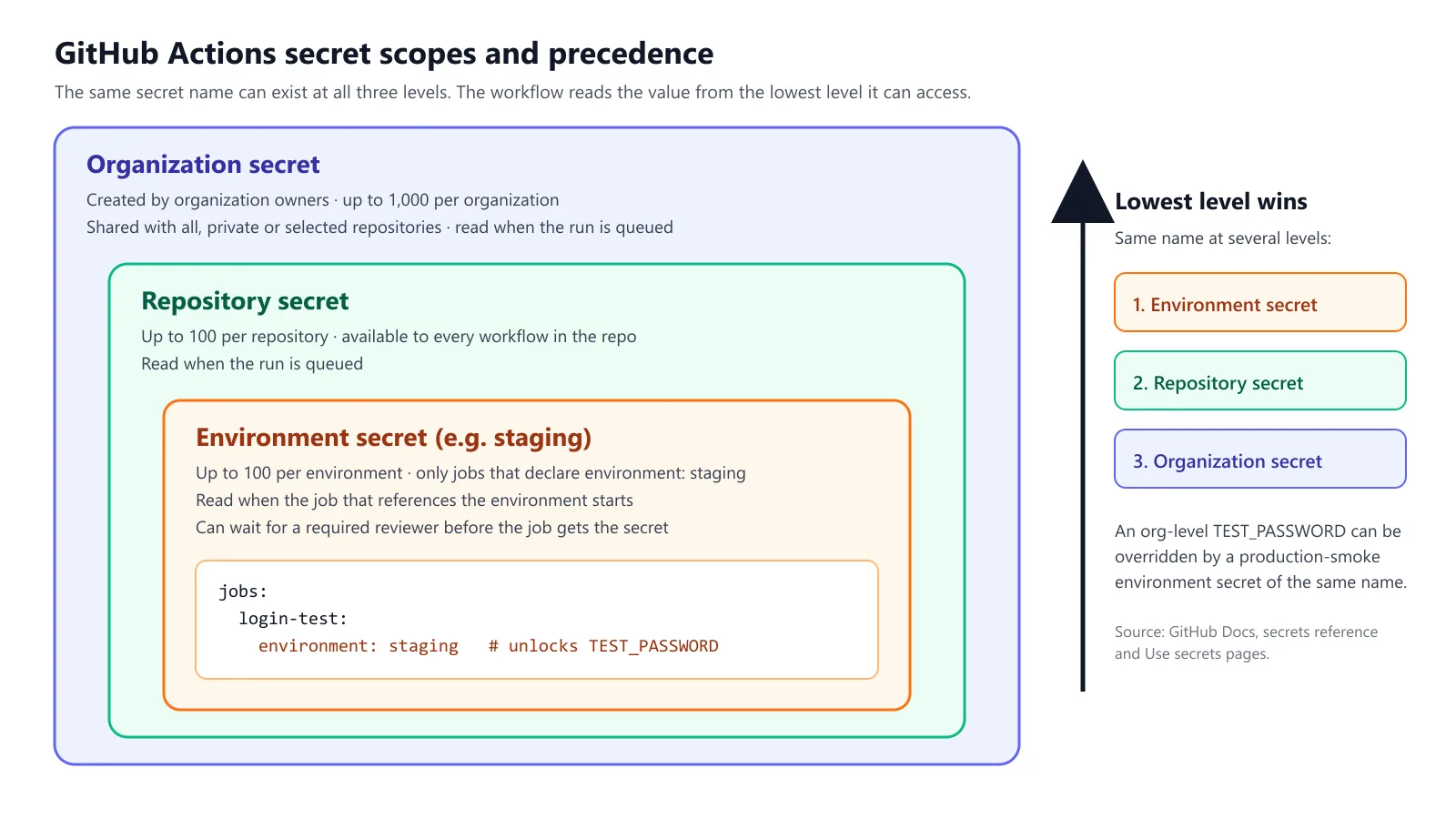
Environment secrets are the only scope that has an approval gate. An environment can have up to six reviewers, a wait timer of up to 43,200 minutes and branch/tag restrictions. A job won't be able to read the environment's secrets until one of the required reviewers has approved it.
Required reviewers on the Free, Pro and Team plans only work on public repos, so be sure to check your plan before you rely on them.
How Do You Create a GitHub Actions Secret?
In the web UI
- Repository secret: Settings → Secrets and variables → Actions → Secrets → New repository secret.
- Environment secret: Settings → Environments → pick the environment → Environment secrets → Add secret.
- Org secret: Settings → Secrets and variables → Actions → New organization secret, then select the repository access policy.
With the GitHub CLI
# Repository secret (prompts for the value, so it never lands in shell history)
gh secret set LT_ACCESS_KEY
# Read the value from a file instead (one value per secret)
gh secret set CERTIFICATE_BASE64 < cert.base64
# Environment secret
gh secret set TEST_PASSWORD --env staging
# Organization secret limited to two repos (needs the admin:org scope)
gh auth login --scopes "admin:org"
gh secret set LT_USERNAME --org my-org --repos web-app,mobile-app
# List secrets
gh secret list
gh secret list --env staging
How Do You Use Secrets in a GitHub Actions Workflow?
A workflow can pass a secret to a step either via env: (as an environment variable) or with: (as an action input). The GitHub docs recommend using environment variables rather than command-line arguments, as other users on the same machine will be able to see the process arguments via ps.
steps:
  - name: Call an API with a token
    env:
      API_TOKEN: ${{ secrets.API_TOKEN }}
    run: |
      curl --fail -sS -H "Authorization: Bearer $API_TOKEN" https://api.example.com/health
  - name: Pass a secret to an action input
    uses: some-org/some-action@v1   # pin to a full commit SHA in real workflows
    with:
      token: ${{ secrets.API_TOKEN }}
Keep these behaviors in mind:
- Secrets can't be used directly in an
if:. Set the secret as a job-level environment variable and test that instead. - An unset secret will result in an empty string with no error. Add a check that will fail the step (as shown in the next section).
- Quote the variable when a secret needs to go on a command line:
"$API_TOKEN"in Bash,"$env:API_TOKEN"in PowerShell.
jobs:
  e2e:
    runs-on: ubuntu-latest
    env:
      LT_ACCESS_KEY: ${{ secrets.LT_ACCESS_KEY }}
    steps:
      - name: Run cloud tests only when the key exists
        if: ${{ env.LT_ACCESS_KEY != '' }}
        run: echo "Key present, running cloud tests"
Can you run end-to-end tests from GitHub Actions?
Note: Kane CLI (the terminal testing agent from TestMu AI) authenticates in CI using two repository secrets: LT_USERNAME and LT_ACCESS_KEY and returns an exit code of 0, 1, 2 or 3 so your pipeline can gate on the result. Install it via npm install -g @testmuai/kane-cli and then follow the Kane CLI CI/CD setup guide.
How Do You Pass Test Credentials to an End-to-End Test Securely?
End-to-end tests need two types of secret: platform credentials for the test service and test account credentials for the app under test. The workflow below keeps them in separate scopes, validates them prior to the test running and passes them to the Kane CLI without ever writing them to a file.
Setup
- Repository secrets:
LT_USERNAME,LT_ACCESS_KEY(from the TestMu AI dashboard under Credentials). - Environment staging with environment secrets
TEST_EMAILandTEST_PASSWORD, plus a required reviewer (if your plan supports one). - Repository variable
STAGING_URL(not a secret).
name: e2e-login
on:
  pull_request:
  workflow_dispatch:
permissions:
  contents: read
jobs:
  login-test:
    runs-on: ubuntu-latest
    environment: staging          # unlocks TEST_EMAIL / TEST_PASSWORD
    timeout-minutes: 15
    steps:
      # Tags shown for readability. Pin every action, including the third-party
      # browser-actions/setup-chrome, to a full commit SHA in production.
      - uses: actions/checkout@v4
      - uses: actions/setup-node@v4
        with:
          node-version: '20'
      - uses: browser-actions/setup-chrome@v1   # third-party: pin to a full commit SHA
      - run: npm install -g @testmuai/kane-cli
      - name: Run login test
        env:
          LT_USERNAME: ${{ secrets.LT_USERNAME }}
          LT_ACCESS_KEY: ${{ secrets.LT_ACCESS_KEY }}
          TEST_EMAIL: ${{ secrets.TEST_EMAIL }}
          TEST_PASSWORD: ${{ secrets.TEST_PASSWORD }}
          APP_URL: ${{ vars.STAGING_URL }}
        run: |
          # Fail fast with a clear message if any required value is empty
          : "${LT_USERNAME:?LT_USERNAME secret is missing or empty}"
          : "${LT_ACCESS_KEY:?LT_ACCESS_KEY secret is missing or empty}"
          : "${TEST_EMAIL:?TEST_EMAIL environment secret is missing (is the job using environment: staging?)}"
          : "${TEST_PASSWORD:?TEST_PASSWORD environment secret is missing}"
          : "${APP_URL:?STAGING_URL repository variable is missing}"
          # Build the variables JSON with jq so quotes in a password cannot break it
          VARS=$(jq -n --arg e "$TEST_EMAIL" --arg p "$TEST_PASSWORD" \
            '{email: {value: $e}, password: {value: $p, secret: true}}')
          set +e
          kane-cli run "Log in as {{email}} with {{password}} and verify the dashboard loads" \
            --url "$APP_URL" \
            --variables "$VARS" \
            --name login-test \
            --headless --timeout 300 \
            --username "$LT_USERNAME" --access-key "$LT_ACCESS_KEY"
          code=$?
          set -e
          if [ "$code" -eq 2 ]; then
            echo "::error::Kane CLI did not start (sign-in, configuration, start URL, Chrome or network). Check LT_USERNAME and LT_ACCESS_KEY."
          fi
          exit "$code"
      - name: Upload evidence
        if: always()
        uses: actions/upload-artifact@v4
        with:
          name: kane-evidence
          path: .testmuai/evidence/
          include-hidden-files: true
What each part does:
: "${VAR:?message}"will stop the step if the variable is unset or empty, so an empty secret will fail with a clear error message.jq -n --argproduces valid JSON even if the password contains quotes or backslashes. The--variablesshape (including"secret": trueon the password) is in accordance with the Kane CLI CI/CD doc. jq must be available on the runner; if it isn't, then it should be installed in an earlier step.- Exit code 2 from the Kane CLI means the run didn't start (sign in, config, no start URL, Chrome or network) and used no credits. With a new pipeline, you'll want to check your credentials first. Exit 1 means the test ran and failed, or the upload failed. Exit 3 means it timed out or was canceled.
include-hidden-files: trueis required, as upload-artifact will by default skip dot folders (such as.testmuai/).- Never run
kane-cli loginin CI as it will open a browser for OAuth.
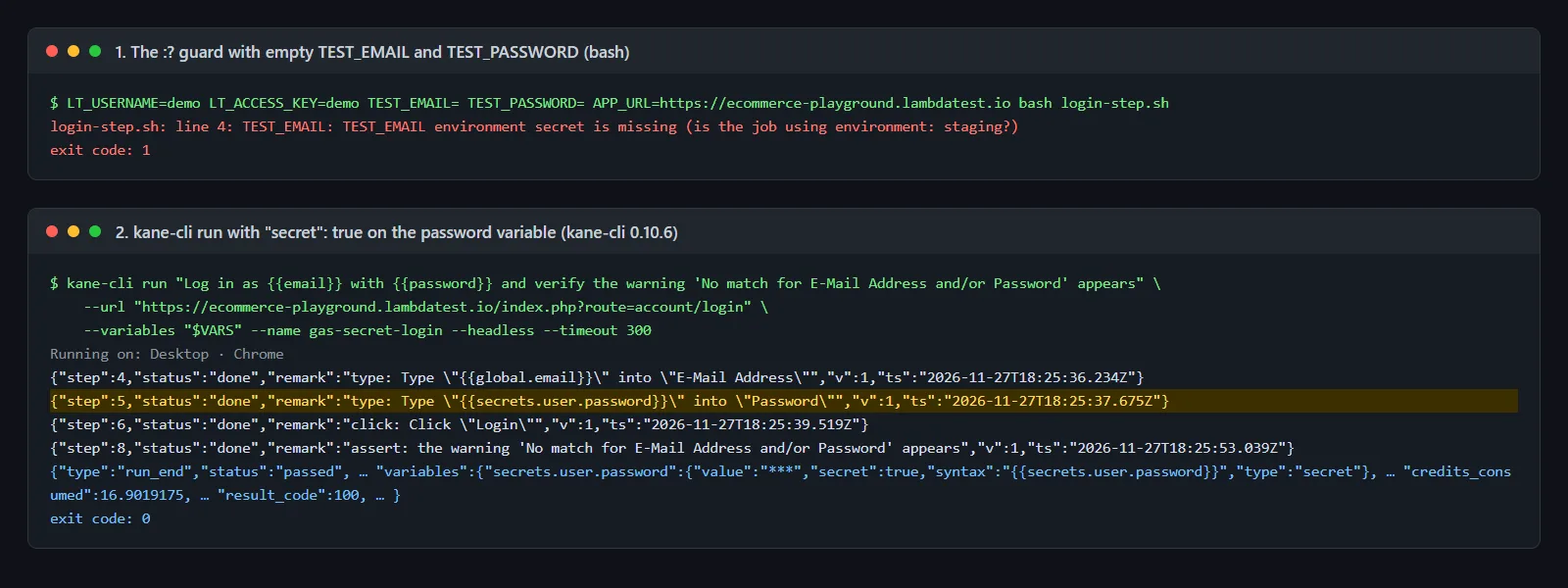
Kane CLI's documented CI pattern is to pass --username and --access-key as quoted flags, so in light of GitHub's ps warning, prefer GitHub-hosted or single-use self-hosted runners.
For a shorter setup, the official action LambdaTest/kane-cli/integrations/github-action/kane-cli-browser-run@main will take username and access key inputs (pass ${{ secrets.LT_USERNAME }} and ${{ secrets.LT_ACCESS_KEY }}), install Node.js, Chrome and Kane CLI, upload the evidence and post a PR comment. Pin a full commit SHA rather than @main if you want a fixed version. The step-by-step Kane setup is in how you connect Kane CLI to GitHub Actions.
If your suite is running on HyperExecute rather than a GitHub-hosted runner, then HyperExecute has its own store. Project-level secrets in HyperExecute are added via the project's Secrets tab and referenced in the YAML as ${{.secrets.token}}.
Why Does My GitHub Actions Secret Come Up as Empty?
A GitHub Actions secret will appear empty if the run isn't permitted to access it or if the name of the secret doesn't match an existing secret. GitHub returns an empty string rather than an error in this case, so the failure manifests itself later as an auth error.
| Symptom | Cause | Fix |
|---|---|---|
| Empty only on pull requests from forks | Secrets (except GITHUB_TOKEN) are not passed to runs triggered from forks | Expected behavior. Run credentialed tests on push or after review; see the fork section below |
| Empty only on Dependabot PRs | Workflows triggered by Dependabot events do not get Actions secrets | Store the value as a Dependabot secret (the only secrets these runs can read), or skip credentialed jobs on Dependabot PRs |
| Empty inside a reusable workflow | Secrets are not passed to called workflows automatically | Pass them by name or with secrets: inherit; add required: true |
| Environment secret empty, repo secrets fine | The job has no environment: key, or the environment name is misspelled | Add environment: <name> to the job that reads the secret |
| Org secret empty in one repo | Repo not in the secret's access policy, private repo on GitHub Free, or more than 100 org secrets assigned (only the first 100 alphabetically are visible) | Update the access policy, upgrade, or prune org secrets |
| Environment secret empty in a private repo | Environment secrets in private repos need Pro, Team or Enterprise | Upgrade, or use a repository secret |
| Kane CLI exits with code 2 | Run did not start (sign-in, configuration, start URL, Chrome or network); no credits used | Check the :? guard output first, then the Kane CLI message |
Names are case-insensitive (secrets.lt_access_key is equal to secrets.LT_ACCESS_KEY), though a typo will result in an empty string.
Can a Pull Request From a Fork Access the GitHub Actions Secrets?
Pull requests from forks cannot access the GitHub Actions secrets when using the pull_request trigger. The only thing that GitHub passes to those runs is the GITHUB_TOKEN, so the forked code doesn't get access to your secrets. The same applies to the Kane CLI GitHub Action, which also follows this rule: PRs from forks get a read-only token, so the action will simply skip the PR comment.
The pull_request_target trigger is different. It runs in the context of the base repo, and GitHub's page on securely using pull_request_target makes it clear that the job will have the base repo's GITHUB_TOKEN and access to both repository and organization secrets. If that workflow checks out the fork's head commit and then does its build/test, then any script in the PR will run with your secrets.
Safer patterns for open-source repos:
- Use
pull_requestfor tests on fork PRs and accept that the credentialed end-to-end tests will just skip on those. - Run credentialed tests after merge on push, or on a maintainer-triggered
workflow_dispatch. - If you absolutely have to use
pull_request_target, don't check out or run the PR's code in that job at all and keep yourGITHUB_TOKENpermissions as low as possible.
How Do You Keep GitHub Secrets From Ending Up in Your Logs?
GitHub redacts registered secret values from logs by means of exact match, so anything that alters the value's shape can slip through. The GitHub secure use reference covers the first three of these:
- Don't store structured data as a secret. A JSON or YAML blob may have been printed out in a different form from the one it was stored as, and redaction will miss it. One secret per value.
- Register derived values. GitHub states that any values derived from a secret (e.g. a Base64 encoded value or a signed JWT) should themselves be registered as secrets. Within a run, you can achieve this via
echo "::add-mask::$DERIVED"which will do the registration prior to anything printing the value. - If a secret is found to be unredacted, then delete the log and rotate the secret.
- Large secrets are not redacted. For files over 48KB, GitHub's Use secrets page will tell you to GPG-encrypt the file and store only the passphrase as a secret. It will also warn you that GitHub will not redact secrets that are printed to logs using this workaround.
- Review workflow changes like code. In September 2025, GitGuardian reported the GhostAction campaign: attackers pushed workflows named "Github Actions Security" that sent CI secrets to an outside server, leaking 3,325 secrets across 817 repositories.
Should You Be Using OIDC Rather Than Secrets for Cloud Access?
OpenID Connect (OIDC) lets a workflow get a short-lived cloud token instead of reading a long-lived key from GitHub secrets. GitHub's OpenID Connect overview says you set up a trust relationship with the cloud provider (AWS, Azure, GCP and HashiCorp Vault are named), GitHub issues a JWT for each job, and the provider returns an access token valid only for that job.
The job must request the id-token: write permission, which only enables fetching and setting the OIDC token and grants no write access to other resources.
permissions:
  id-token: write   # required to request the OIDC JWT
  contents: read    # required for actions/checkout
OIDC only replaces the cloud keys. The test account passwords and API keys for the various services that don't support OIDC (i.e., the LT_USERNAME and LT_ACCESS_KEY pair used in the workflow above) remain in secrets.
How Do Reusable Workflows Get Secrets?
Reusable workflows only get the secrets when the caller passes them to them. You declare them in the called workflow and pass them explicitly, or use secrets: inherit if both workflows are in the same org/enterprise.
# .github/workflows/e2e-reusable.yml (called workflow)
on:
  workflow_call:
    secrets:
      LT_ACCESS_KEY:
        required: true

# Caller
jobs:
  e2e:
    uses: my-org/ci/.github/workflows/e2e-reusable.yml@main
    secrets:
      LT_ACCESS_KEY: ${{ secrets.LT_ACCESS_KEY }}
    # or: secrets: inherit
As per GitHub's reuse workflows guide, required: true only checks that the caller passed the secret; it doesn't check that the secret has a value in it.
So keep the :? in the job.
Environment secrets only work if the job in the called workflow has environment: set. The job which is calling the workflow cannot set environment:, but it must still pass them.
Secrets also only pass one level down. If you have a chain A → B → C, then workflow B must pass the secrets on to C.
The GitHub Actions Secrets Checklist (10 Checks Before You Merge)
- Narrowest scope: environment secret for anything that's production-facing, repository secret for the CI keys for a single repo, org secret only for the values that are genuinely shared across many repos.
- Approval gate: production or paid service credentials are held behind an environment that requires a reviewer (where that's an option in your plan).
- One value for each secret: Don't use JSON or YAML blobs.
- Guarded: every job checks required secrets with
: "${NAME:?message}"or an equivalent step that fails. - No echo: nothing prints a secret, and derived values are masked with
::add-mask::. - Env, not arguments: secrets go in through
env:; when a tool needs a flag, the variable is quoted. - Fork-safe: no job checks out PR head code under
pull_request_target. - Least privilege:
permissions:set at workflow level (start withcontents: read), and actions locked with a dependency lockfile where you have one (GitHub's strongest option), otherwise pinned to a full commit SHA. - Reusable workflows: secrets passed by name or inherit, declared
required: truein the callee. - Rotation: an owner and a rotation date for each secret, and unused secrets deleted (
gh secret listmakes this a two-minute review).
Watch: Kane CLI in a GitHub Actions Pipeline
For a quick visual walkthrough of this concept, watch the video below from TestMu AI.
Subscribe to the TestMu AI YouTube channel for more tutorials on testing and automation.
The GitHub Actions matrix guide now covers the next step: once the secrets are in place, you can run the same tests across OS, browsers and shards.
Conclusion
Before you go and blame a test, make sure the secret is actually stored at the correct scope and that this run is permitted to receive it. Guard all the secrets you need so that if any of them are missing, the job fails with a clear error. Keep your production credentials behind an environment and never run any fork code with secrets in scope.
Next step: wire your end-to-end tests into the same pipeline. Kane CLI runs your plain English browser tests in GitHub Actions using two repository secrets and gives you a pass, fail or did-not-start exit code. Start free with Kane CLI.
Testing from the terminal? Kane CLI by TestMu AI lets SDETs and developers plan, write, run and debug tests from the command line.
Was this helpful?
Authors

Japneet Singh Chawla
Author · 11 posts
Japneet Singh Chawla is an Engineering Manager at TestMu AI, where he leads a team driving HyperExecute, the AI-native Test Orchestration Cloud Platform, and integrations with Cypress, Provar, Tosca, and Selenium, improving test execution efficiency and driving adoption across 500+ enterprise clients. He also spearheaded zero-downtime deployments that cut release-related downtime by 90%, and mentors new engineers into productive contributors. He brings 9+ years of experience building and scaling distributed systems, SaaS platforms, and developer tools, with deep hands-on backend engineering across Golang, Python, Node.js, Kafka, and Redis. Earlier at Sumo Logic he built award-winning developer tools, including a VS Code Parser Linter, and at Indus Valley Partners he was a founding member of the Sentiment Analyzer team, building ML-powered solutions for financial clients. Japneet holds an MCA in Computer Science from GGSIPU.


Mayank Bhola
Reviewer
Mayank Bhola is Co-Founder and Head of Products at TestMu AI, where he leads the entire product portfolio across KaneAI, Kane CLI, HyperExecute, SmartUI, the Real Device Cloud, Accessibility, and other software testing product lines. As an early Lead Architect he designed and built the company's flagship Tunnel technology from scratch, created the React-based automation platform, and architected the data-intensive pipelines and FAAS services that scale it. He brings more than 10 years of experience in software development and product engineering, with earlier roles as Head of Technology at Juggernaut Books and Senior Software Engineer at PressPlay TV and Zomato. Mayank holds a B.Tech in Computer Engineering from JIIT Noida.
GitHub Actions Secrets FAQs

TestMu AI forEnterprise
Get access to solutions built on Enterprise
grade security, privacy, & compliance
- Advanced access controls
- Advanced data retention rules
- Advanced Local Testing
- Premium Support options
- Early access to beta features
- Private Slack Channel
- Unlimited Manual Accessibility DevTools Tests