

Next-Gen App & Browser Testing Cloud
Trusted by 2 Mn+ QAs & Devs to accelerate their release cycles


Cypress vs WebdriverIO: Which One To Choose
In this guide on Cypress vs WebdriverIO, learn the differences between Cypress and WebdriverIO and choose the one based on your web project requirements.

Ioan Solderea
March 2, 2026
When it comes to automated testing frameworks, there are a plethora of options out there. Two of the most popular ones are Cypress and WebdriverIO. However, despite having similar functionalities, they have several key differences you need to consider when choosing between them.
In this guide on Cypress vs WebdriverIO, we will look at Cypress (version 12.4.1) and WebdriverIO (version 8) and compare their features, advantages/disadvantages, and overall suitability for different kinds of web applications.
Here, we will not explore which automation testing framework is better because, as much as we prefer a clear-cut answer, there’s no “best tool or framework.” Everything depends on the situation your team is in: what, how, why, and when you’re testing.
The question that I want to answer here is: What situations does each framework excel in? We’ll also provide a few tips on Cypress vs WebdriverIO and how to make your choice easier. If you are preparing for an interview you can learn more through WebdriverIO interview questions.
Read on to learn more about Cypress vs WebdriverIO.
What is Cypress?
Cypress is a front end testing framework built for modern web applications. It supports JavaScript and TypeScript, and is becoming a viable alternative to Selenium for many testers. In Cypress, you don’t need to install multiple dependencies; most required things for writing the test cases come as a bundle in Cypress.
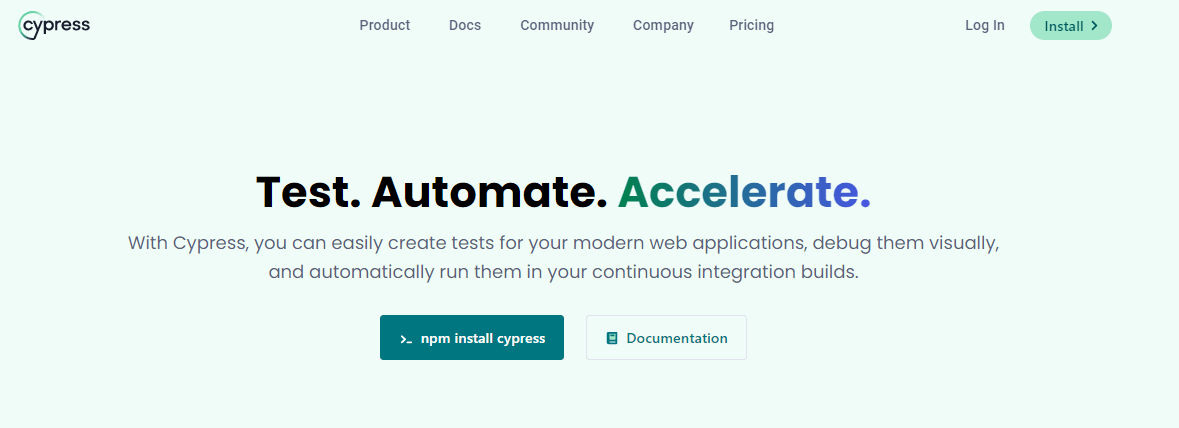
It uses a unique DOM manipulation technique and works directly in the web browser. Cypress supports different browsers, including Google Chrome, Mozilla Firefox, Microsoft Edge(Chromium-based), Electron, and WebKit. It runs a test suite inside the browser faster than frameworks like Selenium.
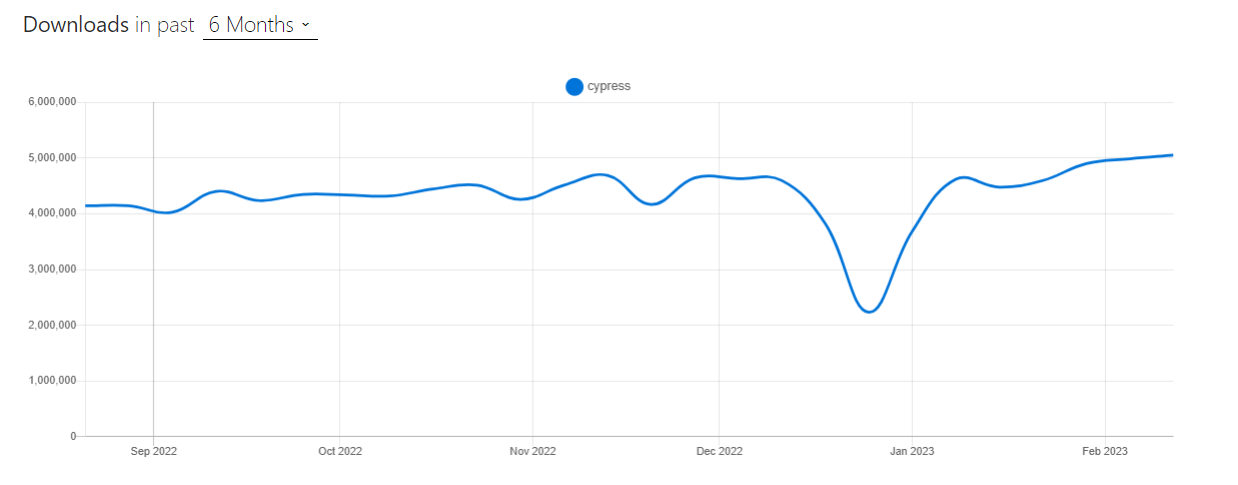
When writing this, the latest version of Cypress is 12.6.0. Below are the Cypress trends based on records from npm and GitHub.
- Weekly Downloads: 4.9M+
- Fork: 2.7k+
- Star: 42.5k+
- Contributors: 420+
You can also Subscribe to the TestMu AI YouTube Channel and stay updated with the latest tutorials around Appium, Playwright, and more.
Features of Cypress:
- Cypress captures screenshots when you run tests, allowing you to hover over commands to see what happened at each step.
- Debug your failed tests from tools like Developer Tools. Its readable errors and stack traces make debugging much faster.
- You don’t need to add waits or sleeps to your tests because it automatically waits for commands and assertions.
- Cypress checks the behavior of functions, responses from the server, and timers. You get the same functionality from unit testing.
- You can easily control, stub, and test edge cases without involving your server. If you wish, you can stub network traffic as per your wish.
- The combination of Cypress and cloud-based testing platforms like TestMu AI can be used for parallel testing, eventually reducing your software release cycle and enhancing test coverage.
Limitations:
- Cypress cannot instantiate two browsers at once
- As of now, it does not support multi-tabs.
- Supports JavaScript for the preparation of test cases.

What is WebdriverIO?
WebdriverIO is a browser and automation test framework written in Node.js. It is easy to add helper functions to WebdriverIO. Moreover, it can run WebDriver and Chrome Devtools protocols, making it efficient for Selenium testing and Chromium-based automation. In addition, since WebdriverIO is open source, you get a lot of plugins.
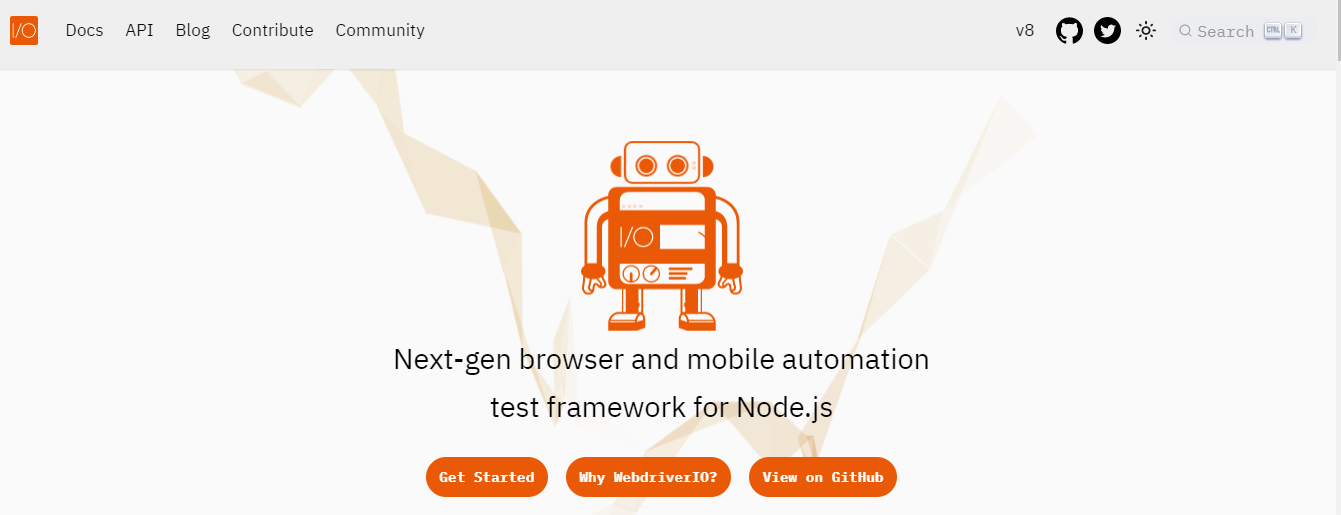
It enables you to run small and lightweight component tests and e2e test scenarios in the browser or on a mobile device. This ensures that you do the testing in an environment your users use.
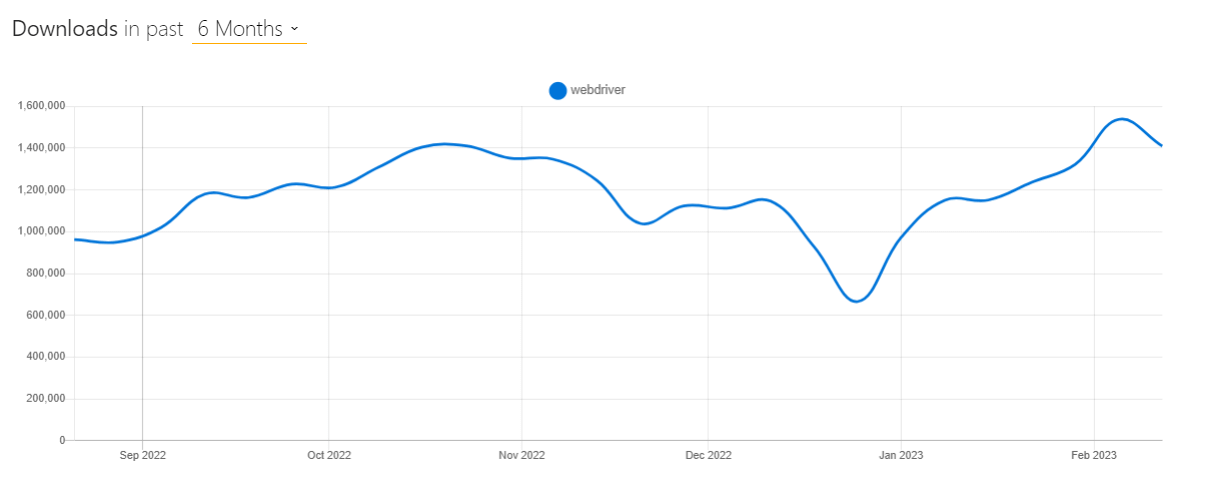
When writing this guide on Cypress vs WebdriverIO, the latest version of WebdriverIO is 8. Below are the WebdriverIO trends based on records from npm and GitHub.
- Weekly Downloads: 1.4M+
- Fork: 2.3k+
- Star: 8k+
- Contributors: 470+
Features of WebdriverIO:
- WebdriverIO allows you to test on real browsers and real mobile devices.
- Before interacting with an element, WebdriverIO waits for it to appear first.
- With WebDriver and WebDriver Bidi, you can automate web browsers.
- It has an active support channel with over 8k members and a rich ecosystem of plugins.
- Through Appium, you can run WebdriverIO on real mobile devices, smart TVs, or other IoT devices.
Limitations:
- WebdriverIO syntax can be confusing for beginners.
- Any challenges faced with Selenium also apply to WebdriverIO since WebdriverIO is a custom implementation of Selenium.
- Network control and interception can be a challenging task.
- The setup process for WebdriverIO with TypeScript is usually time-consuming.
If you wish to learn more here is webdriverio interview questions.
Cypress vs WebdriverIO: Key Differences
In this section of the Cypress vs WebdriverIO guide, we will touch upon the key differences between Cypress and WebdriverIO.
Cypress is a newer framework that has gained popularity due to its ease of use and powerful features. WebdriverIO is a more mature framework with a broader range of tooling and support. Both have pros and cons, but which is right for your web application? Let’s take a closer look at the key differences between Cypress vs WebdriverIO.
Architecture
Cypress and WebdriverIO are both popular testing frameworks used for web applications, but they have different architectures and approaches to testing.

Cypress
Most testing frameworks run outside the browser and execute remote commands across the network. Cypress is the exact opposite. Cypress is executed in the same run loop as your application.
Cypress is, in essence, an Electron application that uses Node server processes. Cypress and the Node process constantly communicate, synchronize, and perform tasks on behalf of each other.
Having access to both components (front and back) gives you the ability to respond to the application’s events in real-time while at the same time working outside of the browser for tasks that require a higher privilege.
WebdriverIO
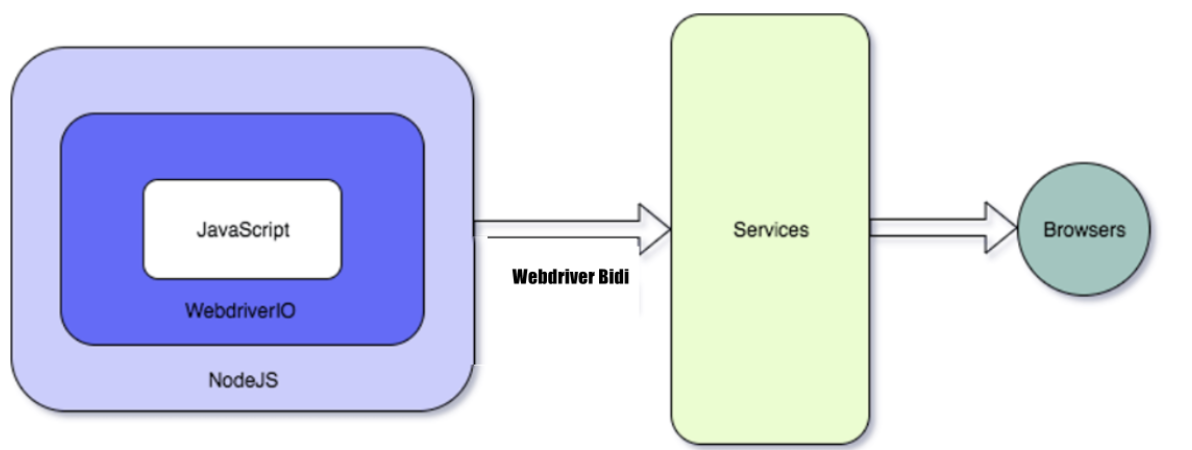
In the case of WebdriverIO, the WebDriver and WebDriver-BiDi protocols are used. These are developed and supported by all browser vendors and guarantee a true experience.
Furthermore, WebdriverIO also supports Chrome DevTools for debugging and introspection purposes. This allows users to seamlessly switch between conventional commands based on WebDriver and powerful browser interactions through Puppeteer.
Synchronization
One of the key differences between Cypress and WebdriverIO is how they handle synchronization. In this section of the Cypress vs WebdriverIO guide, we will look into Cypress and WebdriverIO approaches to synchronization in more detail.
Cypress
This is arguably one of the most crucial Cypress concepts you need to understand. How Cypress handles things asynchronously is often misunderstood and can lead to issues and confusion later on, especially when trying to debug your tests.
Cypress automatically waits for elements to appear on the page and for animations to avoid the need to add explicit or implicit waits completely.
Because of this, Cypress tests are less flaky than the ones from other frameworks like Selenium. You can refer to the blog on Explicit Waits in Selenium to get more information about the types of waits in Selenium.
WebdriverIO
When writing this guide on Cypress vs WebdriverIO, the WebdriverIO test runner can handle async and sync execution within the same test suite. Synchronous execution was popular in WebdriverIO because it removed the complexity of dealing with promises. Mainly if you have written tests in programming languages (apart from JavaScript) where this concept doesn’t exist this way, it can be confusing in the beginning.
However, the WebdriverIO team announced it would deprecate synchronous command execution by April 2023. Synchronization will be handled after that point in the form of async / await syntax.
According to their documentation, transitioning step-by-step is possible. In many cases, it only requires making the function that calls WebdriverIO commands async and adding an await keyword before every command.
For example:
export default (selector: Selector) => {
    $(selector).clearValue();
 };
 Will need to change to
 export default async (selector: Selector) => {
    await $(selector).clearValue();
 };
Debugging
When it comes to finding errors in your tests or finding out why a specific test has failed, being able to debug is key.
Cypress
Cypress seems to have the upper hand when it comes to debugging by using:
- Cypress takes snapshots as your tests run. You can hover over commands in the Command Log to see exactly what happened at each step.
- Cypress allows debugging directly with familiar tools like Developer Tools. Providing readable errors and easy-to-read stack traces. Refer to the blog to read more about Cypress Debugging.
Below is an example of how Time Travel works on the TestMu AI eCommerce Playground.
WebdriverIO
WebdriverIO allows you to use browser.debug() to pause your test and inspect the browser. However, to achieve more flexibility, it requires you to use external tools for debugging, like Visual Studio Code.
The browser.debug() lets you debug your integration tests. You can then jump into the running browser and check the state of your application. By transforming your terminal into a REPL interface, you can test out specific commands, find elements, and perform actions on them.
Assertions
One key aspect of writing effective tests is the ability to make assertions, which allow you to verify that the application behaves as expected. Both Cypress and WebdriverIO have powerful and flexible assertion capabilities that can help developers write reliable and effective automated tests for their web applications.
In this section of the Cypress vs WebdriverIO guide, we’ll explore the assertion capabilities of Cypress and WebdriverIO.
Cypress
Cypress assertions are built on top of the Chai assertion library and helpful extensions for Sinon and jQuery. Cypress provides a built-in set of commands for interacting with web elements, making writing tests that interact with the application easy. Besides these, it also supports building custom assertions over the existing ones that Chai provides.
describe( 'Ecommerce Playground', ( ) => {
    it ( 'should load the homepage', ( ) => {
      cy.visit('https://ecommerce-playground.lambdatest. to/index.php?route=common/home')
     cy.get('h1').contains( 'Welcome to our online store!')})
 })
WebdriverIO
WebdriverIO assertions are based on the Webdriver protocol and provide a similar syntax as Cypress but with a more “technical” way to interact with the application.
It also provides a built-in set of commands for interacting with web elements and supports multiple assertion libraries like chai-webdriver, expect.js, should.js, and assert.
describe( ('Ecommerce Playground’, ( ) {
    it( 'should load the homepage', ( ) => {
      browser url(‘ https://ecommerce-playground.lambdatest. io/index.php7route-common/home’)
      expect(browser. getText( 'h1')). .to. equal( ‘Welcome to our online store!')
    })
Both frameworks provide the ability to write automated tests that interact with the web application in a browser. However, Cypress has a more user-friendly approach, while WebdriverIO has a more technical approach.
Syntax
Cypress and WebdriverIO provide developers with a straightforward syntax for writing tests, making it easier to interact with web elements and write reliable automated tests for their web applications.
Cypress
The syntax for Cypress is based on a more modern and intuitive syntax, focusing on making the test authoring experience more enjoyable. Cypress tests are written using Mocha and Chai, and the syntax is similar to writing unit tests. It also provides its own set of commands (such as cy.visit() and cy.get()) for interacting with the web page. You can learn more about it, you can go through this blog on finding HTML elements using Cypress locators.
Shown below is an example of Cypress on the TestMu AI eCommerce Playground.
describe( 'Ecommerce Playground', () => {
    it( 'should load the homepage',() => {
      су.visit("https://ecommerce-playground.lambdatest.io/index. php?route-common/home")
      cy.get('h1').contains( 'Welcome to our online store!')
    })
    it( 'should add an item to the cart', ( ) =>{
     cy.get('.product-grid > :nth-child(1) > .caption > .button-group > .btn-cart').click()
     cy.get('.alert').contains('You have added MacBook to your shopping cart!')
    })
  })
WebdriverIO
WebdriverIO, on the other hand, uses the W3C WebDriver protocol. The syntax for WebdriverIO is based on the WebDriver protocol, and it uses the Selenium WebDriver API to interact with the browser. The syntax is more similar to writing functional tests.
Shown below is the same test on WebdriverIO.
describe( 'Ecommerce Playground', ( ) => {
    it( 'should load the homepage',( ) => {
      browser.url('https://ecommerce-playground.llambdatest.io/index.php7route-common/home')
      expect(browser.getText('h1')).to.equal( 'Welcome to our online store!')
    })
    it( 'should add an item to the cart',( )  => {
      browser.click('.product-grid > :nth-child(1) > .caption > .button-group > .btn-cart')
      expect(browser.getText('alert')).to.equal( 'Success: You have added MacBook to your shopping cart!')
    })
  })
In summary, Cypress has a more modern and intuitive syntax, focused on making the test authoring experience more enjoyable, while WebdriverIO’s syntax is based on the industry standard for web automation.
Speed
Cypress is known for its fast execution speed, while WebdriverIO can still provide fast and efficient test execution with proper optimization and use of its features. The choice of framework ultimately depends on the specific needs of the testing process and the application being tested.
Cypress
Cypress runs tests directly in the browser, eliminating the need for a separate browser automation tool like Selenium. This means that Cypress tests tend to run faster than WebdriverIO tests, as there is less overhead involved in running the tests.
To check the speed of Cypress, a small test was used on the TestMu AI eCommerce Playground. In the test, a new user was registered.
describe('Register', ( ) => {
    it( 'Register New User', ( ) => {
      су.visit("https://ecommerce-playground.lambdatest.to/index.php?route=account/register")
      су.get("#input-firstname").type('FirstNAme');
      су.get("#input-lastname").type('LastName');
      су.get("#input-email").type('[email protected]');
      су.get("#input-telephone").type('12345678');
      су.get("#input-password").type('12345');
      су.get("input-confirm").type('12345');
      су.get(".float-right > .custom-control > .custom-control-label").click();
      су.get("#input-agree").check();
      су.get(".float-right > .btn").click();
      су.get(".page-title").should('have. text','Your Account Has Been Created!');
      cy.get(".page-title").should('be. visible');
     })
The whole process, including assertion, ran in 12 seconds in Cypress.
WebdriverIO
WebdriverIO, on the other hand, uses Selenium as its browser automation tool, which can add some additional latency to the tests. We used WebdriverIO in the test and performed the same action.
describe("Register", () => {
    it("Register", async () => {
      await browser.setWindowSize(1520, 753)
      await browser.url("https://ecommerce-playground.lambdatest.io/index.php?route=account/register")
      await browser.$("#input-firstname").click()
      await browser.$("#input-firstname").setValue("FirstName")
      await browser.$("#input-lastname").click()
      await browser.$("#input-lastname").setValue("LastName")
      await browser.$("#input-email").click()
      await browser.$("#input-email").setValue("[email protected]")
      await browser.$("#input-telephone").click()
      await browser.$("#input-telephone").setValue("124214")
      await browser.$("#input-password").click()
      await browser.$("#input-password").setValue("1q1q1q1q1q")
      await browser.$("#input-confirm").click()
      await browser.$("#input-confirm").setValue("1q1q1q1q1q")
      await browser.$("//*[@id="content"]/form/div/div/div/label").click()
      await browser.$("//*[@id="content"]/form/div/div/input").click()
      await expect(browser).toHaveUrl("https://ecommerce-playground.lambdatest.io/index.php?route=account/success")
      await expect($('.page-title').toHaveText('Your Account Has Been Created!'))
      await expect($('.page-title').toBePresent())
    });
  });
The whole process, including assertion, ran in 11 seconds in WebdriverIO.
To keep the comparison as clean as possible, the code was not optimized, and no design patterns and variables were used. The above examples are just for testing.
Since the numbers were so close, we cannot say which one is faster. In conclusion, we could say that it depends on the code structure optimization, framework customizations, and system load.

Note: Execute WebdriverIO tests across 3000+ real browser environments. Try TestMu AI Now!
Community
Both Cypress and WebdriverIO communities are valuable resources for developers who use these frameworks, providing a supportive and collaborative environment for learning, sharing knowledge, and improving the quality of automated testing for web applications.
In this section of the Cypress vs WebdriverIO guide, let’s explore what Cypress and WebdriverIO communities have to offer.
Cypress
Cypress is newer compared to WebdriverIO, which has been around for longer and had a larger community at the time Cypress appeared on the market.
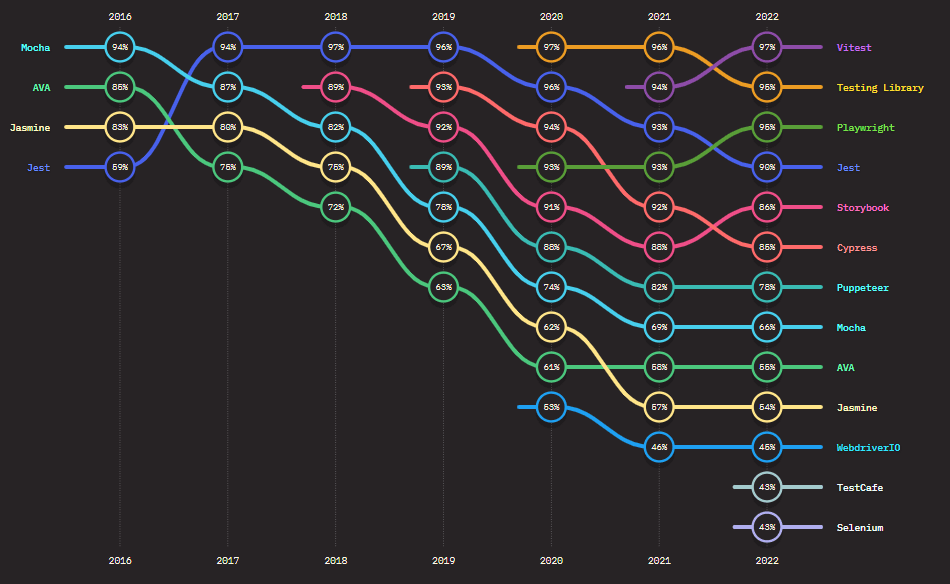
However, if we consider the information from the State of JavaScript 2022, Cypress has grown a lot in popularity in usage and community in the last few years. Its usage growth has constantly increased over time.
WebdriverIO
As per the above State of JavaScript 2022, the WebdriverIO community is still popular among developers and testers.
Reporting
Reporting is an inevitable factor in any test automation framework. Cypress and WebdriverIO offer reporting capabilities but differ in how they provide and display the reports.
Cypress
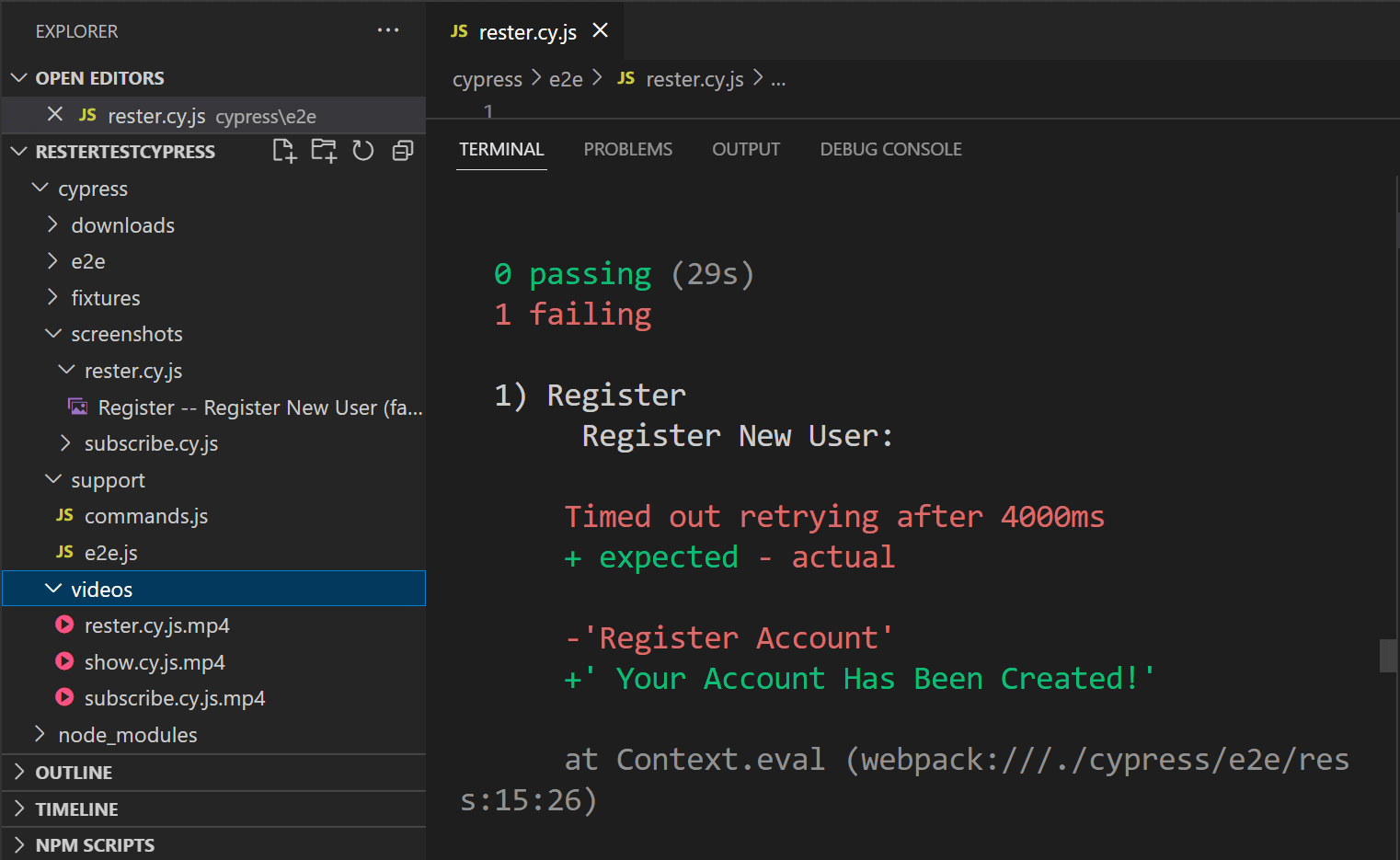
Cypress is bundled with Mocha. So, any test reports generated for Mocha can also be utilized with Cypress. Per default, Cypress will use its specs reporter and make a video and screenshots of the test runs.
Shown below is the output of the same.
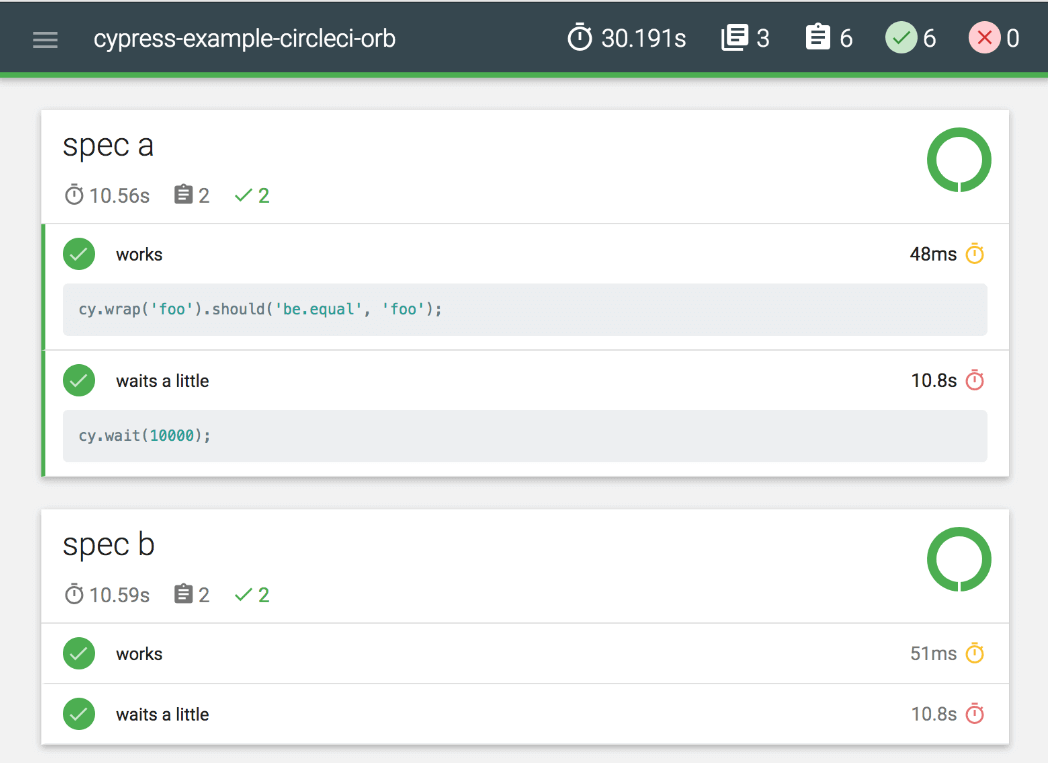
As stated above, you can install and configure custom reports generated for Mocha. Shown below is an example of the Mochawesome Report.
WebriverIO
WebdriverIO supports a variety of reporting methods. Per default, it has a similar specs reporter as Cypress. However, without the default capabilities or video recording and screenshots.
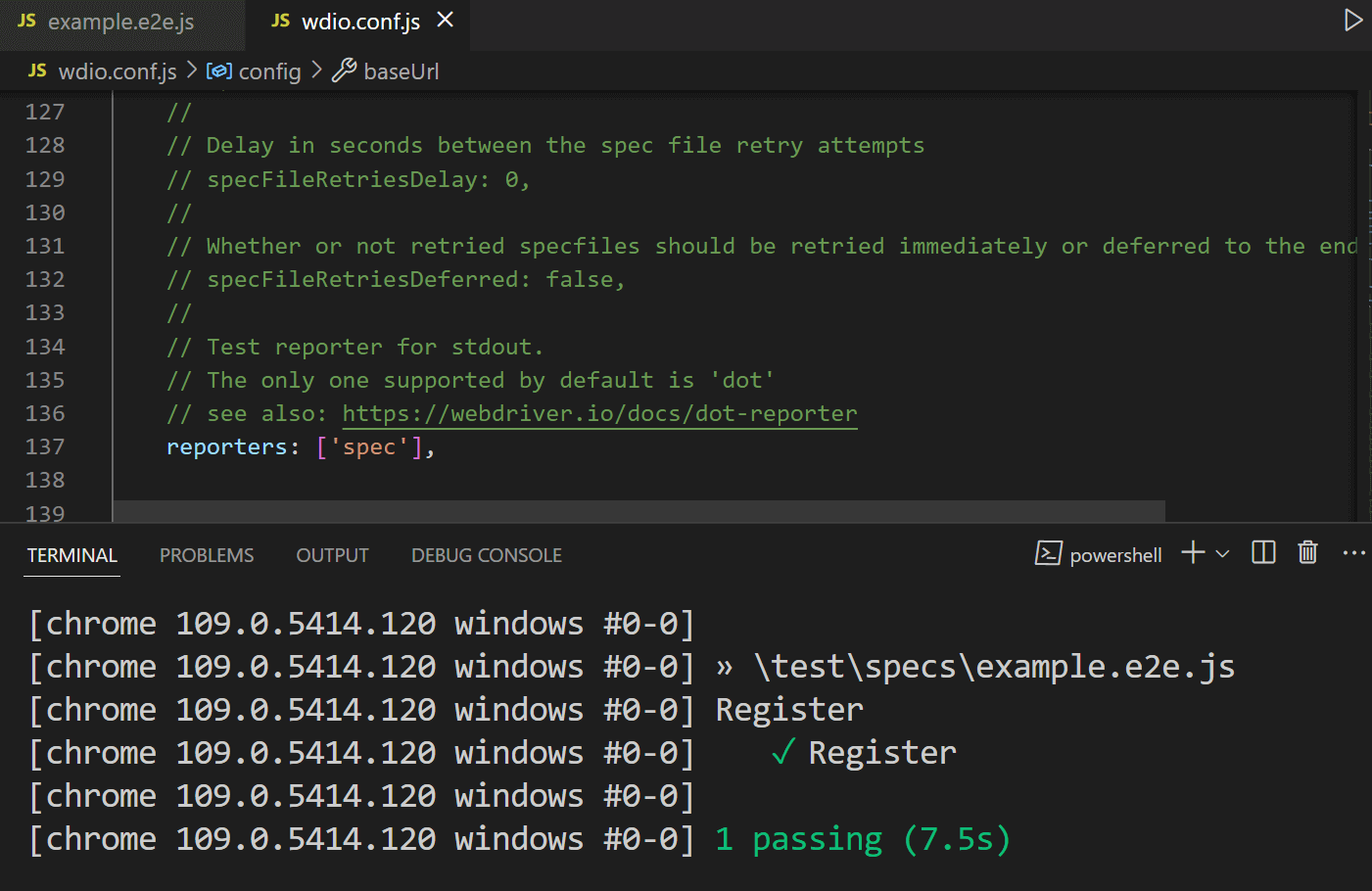
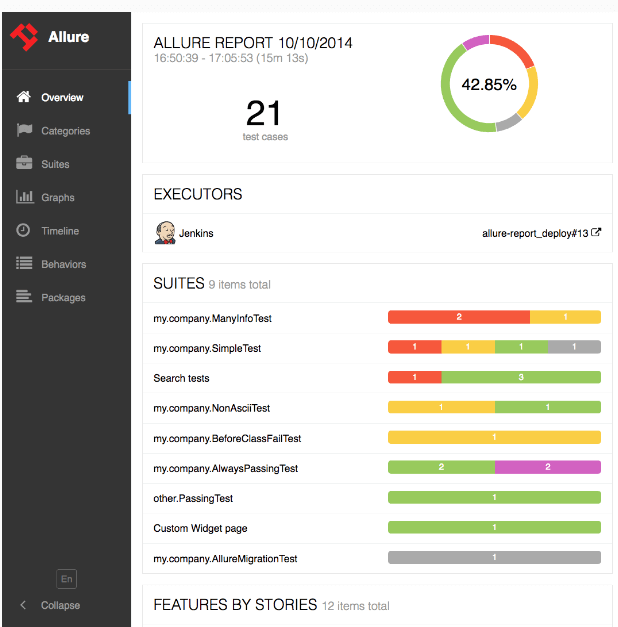
What the specs recorder lacks in functionality can easily be achieved in WebdriverIO using plugins. Like Cypress, you can also use the Mochawesome Report in WebdriverIO. One of the most well-known reports that WebdriverIO supports is Allure Reports.
The list of supported plugins can be seen in the following comparison table.
Comparison Table: Cypress vs WebdriverIO
We have explored every nook and corner of Cypress vs WebdriverIO. In this comparison, let’s look at how they fare at the feature level.
| Feature | Cypress | WebdriverIO |
|---|---|---|
| Setup Complexity | Easy Setup | Easy Setup |
| Open Source | Yes | Yes |
| Programming Language Support | JavaScript/TypeScript | JavaScript/TypeScript |
| Browser Support | Chrome, Edge, Firefox, Safari (Webkit), Electron | Chrome, Edge, Firefox, Safari, Internet Explorer |
| Assertion Libraries/Test Framework | Mocha, Chai | Jasmine, Mocha, and Cucumber |
| Multiple Tab/Window Support | No | Yes |
| iFrame Support | Possible with third-party libraries | Yes |
| File Upload | Possible with third-party libraries | Conditional Support |
| Interactive Window | Yes | No |
| Parallel Test Execution | Only one browser session at the time | Supports parallel browser Testing |
| Reporter | Default Reporter Spec. Extendable Junit, Mocha supported reporter and Custom Reporters | WebdriverIO can be extendable to configure reporters like Allure Reporter, Concise Reporter Dot Reporter, JUnit Reporter, HTML Reporter ( see reporting section above) |
| Documentation & Community Support | Well-written documentation, Growing community | Good Community Support. , mostly robust documentation, which can sometimes be confusing |
| Premium Features | Cypress Cloud | No Commercial/Premium Features |
| Cross-Origin Support | Yes | Yes |
| Debugging | Interactive window, and instant screen capture helps debug and analyze test cases | No interactive window. Debugging can be done using native debug commands |
| Native Mobile Application Testing | Doesn’t support | Configurable to test Native Mobile Application |

Wrapping up
In conclusion, Cypress and WebdriverIO provide two distinct solutions to automated web testing. With these key differences in mind, it is important that you understand your needs when it comes to website testing before deciding between the two.
While both frameworks have advantages and disadvantages, they offer different approaches to solving the same problem of automated functional tests for websites. Weighing out each option carefully can help you make an informed decision about which tool will best suit your team’s needs.


Frequently asked questions
Did you find this page helpful?
More Related Hubs
TestMu AI forEnterprise
Get access to solutions built on Enterprise
grade security, privacy, & compliance
- Advanced access controls
- Advanced data retention rules
- Advanced Local Testing
- Premium Support options
- Early access to beta features
- Private Slack Channel
- Unlimited Manual Accessibility DevTools Tests