

Power Your Software Testing with AI Agents and Cloud
The Native AI-Agentic Cloud Platform to Supercharge Quality Engineering. Test Intelligently and Ship Faster.


- TestMu AI (Formerly LambdaTest)
- /
- Learning Hub
- /
- Web Application Development: A Complete Guide With Examples
Web Application Development: A Complete Guide With Examples
Learn the web application development process, costs and timelines, AI and low-code shifts, cloud deployment, and best practices for building web apps.
Last Updated on:
On This Page
- What Are Web Applications?
- Web App vs Website vs Native App
- What Is Web Application Development?
- Web Application Development Skills
- Technologies and Tools for Web Application Development
- Web Application Development Process
- Cost and Timeline
- Low-Code and No-Code Platforms
- Cloud Infrastructure & Deployment
- Challenges and Solutions in Web Application Development
- Best Practices for Web Application Development
- Web Application Development Trends
- Is Web Development Dead Due to AI?
- Conclusion
OVERVIEW
Web application development is the process of creating software applications that can be accessed through a web browser on any device with an Internet connection. This involves designing, building, and maintaining web applications.
Web applications can be easily adjusted and expanded to meet changing needs, ensuring continued relevance and efficiency. In the digital era, web application development helps improve communication, simplify processes, and drive business growth.
Key Takeaways
- Web application development is the process of building software that runs in a web browser on any internet-connected device, using a client-server architecture.
- A website informs, a web application performs tasks such as editing, transactions, and dashboards, and a native app performs tasks with full access to device features.
- The application development software market was projected to reach $182.70 billion in 2024 and $250.70 billion by 2028, according to Statista.
- A mid-complexity web application with payments, roles, and third-party integrations typically takes 3 to 6 months and costs about $50,000 to $150,000.
- Low-code and no-code platforms such as Bubble, Webflow, and Retool suit idea validation and internal tools, while a custom stack such as React and Node.js gives more control at scale.
- Generative AI tools handle boilerplate and scaffolding, but AI does not replace developer judgment on system architecture, user experience, and verification.
What Are Web Applications?
Web applications, or web-based applications, are software programs accessed through web browsers using various web technologies to perform tasks online. They are hosted on remote servers, enabling users to interact with them via any web browser, unlike traditional applications that are installed locally on a device.
You already use web applications daily. Recognizable examples include:
- Google Docs: full document editing and real-time collaboration, entirely in the browser.
- Trello: project boards that sync instantly across every collaborator.
- Netflix: streaming, profiles, and recommendations served as a web app on any device.
- Canva: a graphics editor that would once have required installed desktop software.
- Figma: professional interface design running fully in the browser, with multiplayer editing.
To develop a successful web application, it's crucial to understand how it works. The standard procedure for the functioning of a web application can be divided into the subsequent stages:
- User Interaction: A user begins to use a web application, exploring information, products, or services via a web browser or mobile app.
- Request Forwarding: The user's request is forwarded to the correct web application server.
- Server Processing: The web application server executes the necessary functions, such as handling new data, and produces the needed results.
- Response Transmission: After finishing the task, the results and any requested data are sent back to the web server by the web application server.
- Client Response: Once the web server responds to their client device (such as a mobile phone, desktop, or tablet), the user receives the requested information.
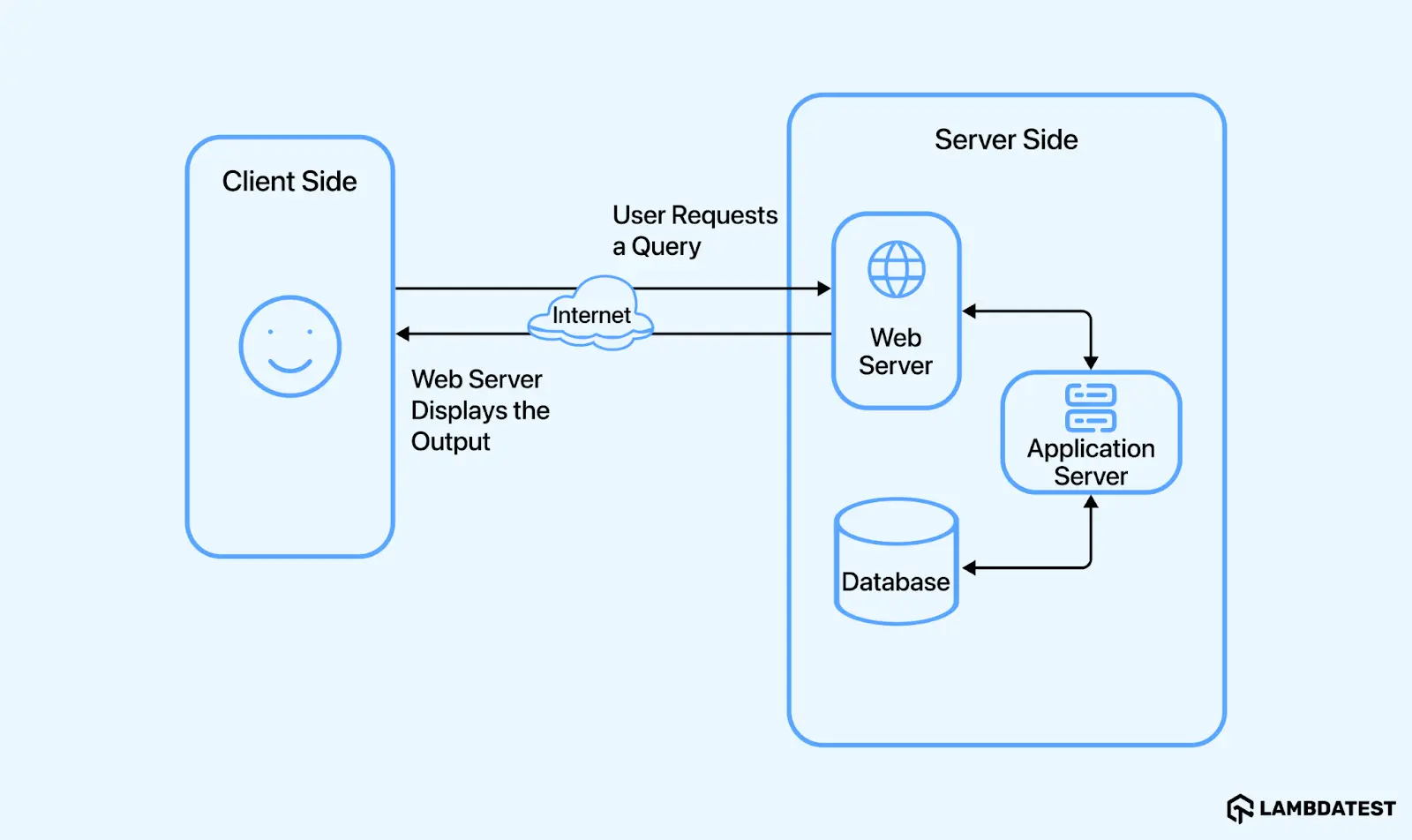
Web applications include two primary types of scripts that work concurrently:
- Client-Side Script: This script runs in the user's browser and responds to interactions on the website. Written in JavaScript, CSS, and HTML, the browser processes these codes, allowing users to see and interact with the content.
- Server-Side Script: This script runs on the server and responds to user browser requests. The development team determines the tasks handled by the server-side code about the client-side code. Languages such as Java, JavaScript, C#, Python, Ruby, and PHP are used to write server-side functions.
For seamless operation, a web application necessitates both a web server and an application server. The web server, a software component, responds to client requests by delivering static data like images, files, and text. Conversely, an application server enhances the web server's response by incorporating business logic to process and compute the requested data. These servers receive and manage client requests, executing the tasks as the user requests.
Web applications can be categorized based on functionalities and appearances, typically falling into nine distinct groups, each with unique characteristics and features.
- Static Web Applications
- Dynamic Web Applications
- eCommerce Web Applications
- CMS Web Applications or Web Apps
- Portal Web Applications
- Single-page Applications
- Multi-page Applications
- Rich-Internet Web Applications
- Progressive Web Apps (PWAs)
Now that you have understood the functions and types of web applications, any developer needs to start with web application development. Let's learn more about web application development, including its benefits, technologies, skills, tools, processes, and more in detail.
Key Takeaway: Web applications are software programs hosted on remote servers and used through a web browser, and everyday examples include Google Docs for document editing and real-time collaboration.

Note: Test your web apps across 3,000+ browser and OS combinations. Try TestMu AI Now!
Web Application vs. Website vs. Native App: What's the Difference?
These three terms get used interchangeably, but they are different builds with different costs and reach. The one-line test: a website informs, a web application does, and a native app does it with full device access.
| Criteria | Website | Web Application | Native / Hybrid App |
|---|---|---|---|
| Primary purpose | Present content: blogs, marketing pages, documentation. | Perform tasks: editing, transactions, dashboards. | Tasks needing deep device integration or offline-first use. |
| Where it runs | Browser, mostly static pages. | Browser, interactive client plus server logic. | Installed from an app store; hybrid apps wrap web code in a native shell. |
| Device access | Minimal. | Growing via browser APIs (camera, location, notifications). | Full: sensors, background services, platform UI. |
| Updates | Instant on deploy. | Instant on deploy, no user action. | App store review plus user updates. |
| Cost profile | Lowest. | One codebase for every platform. | Highest: separate iOS/Android builds, or a hybrid compromise. |
When to choose which: a content-led business starts with a website; a product whose value is a workflow (booking, editing, analytics) needs a web application; go native or hybrid only when you depend on device hardware, offline reliability, or app-store presence. Many teams ship the web application first and add a native app once usage justifies the second codebase.
Key Takeaway: A content-led business should start with a website, a product whose value is a workflow such as booking, editing, or analytics needs a web application, and a native or hybrid app is justified only when the product depends on device features.
What Is Web Application Development?
Web application development is a process of creating software applications for specific Internet platforms that utilize a server-client programming architecture.
The demand for web application development is rapidly increasing. According to a Statista report, the application development software market was projected to reach $182.70 billion in 2024, with a compound annual growth rate (CAGR) of 6.87% from 2024 to 2028.
That growth trajectory puts the market volume at $250.70 billion by 2028. The growing focus on web application development underscores its importance in today’s technology-driven world.
Web application development is crucial for any organization's operations as it quickly showcases the product portfolio and attracts attention. Additionally, it is a highly cost-effective way for entrepreneurs to engage with their users across various platforms.
Let's understand a few of the other benefits of developing web applications.
- Global Reach: It can be accessed globally with an Internet connection from any location. This extensive availability allows companies to reach a larger pool of potential customers and individuals to utilize services regardless of location.
- Ease of Access: Unlike mobile apps, it can be accessed through web browsers without needing to be installed.
- Cross-Platform Compatibility: They are compatible across different OS (Windows, macOS, Linux, etc.) and browsers (Chrome, Firefox, Safari, etc.) without needing to be developed for different platforms.
- Enhanced Security: It often has stronger security features because it runs on specialized servers with robust security systems, which are more secure than apps installed on personal devices.
- Streamlined Tasks: It streamlines tasks, minimizing the need for manual work and improving effectiveness. They can handle tasks like data entry, transaction processing, and inventory management, saving time and resources.
- Cost-Effective: They are frequently more economical than traditional desktop software. They eliminate the necessity to distribute and update software on each separate machine, thus lowering maintenance costs.
Key Takeaway: Web application development builds browser-based software on a server-client architecture, and web applications cost less than traditional desktop software because no software has to be distributed and updated on each machine.
Web Application Development Skills
When it comes to developing web applications, web development skills are critical for building robust applications. Below are the skills that must be considered when developing web applications.
- Programming Languages: One of the most crucial skills is familiarity with programming languages. This lets you develop web applications and communicate your requirements to a development team.
- Front-End/Back-End Technologies: Robust web app development focuses on front-end and back-end skills. Front-end skills include good knowledge of HTML, CSS, and JavaScript. Back-end development requires proficiency in languages like Java, Python, PHP, and more based on the project requirements.
- UI/UX: Understanding the basics of user interface and user experience is key to building user-friendly web applications. One should also know the techniques to make applications responsive to different screen sizes.
- Database Management: Developers must understand relational databases and database storage techniques to store and retrieve data efficiently.
- Debugging and Testing: Debugging skills are required when using different browser developer tools. Also, familiarity with popular testing tools like Selenium, Playwright, etc., provides a comprehensive foundation for developing robust and scalable web applications.
Next, you will learn about the basic technologies used for developing web applications. These technologies can vary based on the organization and specific project requirements.
Key Takeaway: Web application development requires programming languages, front-end skills in HTML, CSS, and JavaScript, and back-end development skills, which together let a developer build and communicate requirements for robust applications.
Technologies and Tools for Web Application Development
Web application development is a complex process involving various technologies and tools that work together to create an interactive user experience.
Some of the important technologies that are used while building a web application are as follows:
- HTML: Undergoes compilation into a Document Object Model (DOM) to depict its structure.
- CSS: Functions as a framework for styling and formatting visual elements of web applications.
- JavaScript: It is a dynamic programming language primarily used to create interactive and dynamic website content. It is one of the core web development technologies used alongside HTML and CSS.
- CSS Preprocessors: Tools like LESS and SASS help write and organize CSS code efficiently, offering features such as variables, mixins, and nesting, thereby assisting developers in maintaining reusable styles across web applications.
- Databases: Databases like MySQL and PostgreSQL store and retrieve data in web application development.
- APIs: Integrated with third-party services, allowing communication between different systems or front and back-end components.
- Security: Measures like HTTPS, SSL/TLS certificates, CSRF protection, and SQL injection protection are incorporated to secure the web application.
- Web Servers: Critical for serving web pages to users. Common web servers include Apache and Microsoft IIS.
The technologies mentioned above are key for developing user-friendly and interactive web applications. However, many web development frameworks and tools help developers build robust, interactive, and efficient web applications.
- Vue.js (JavaScript): As one of the top JavaScript libraries, Vue.js facilitates the creation of lightweight and adaptable interactive UI elements. It delivers data-reactive components through a flexible and intuitive API, enabling a seamless transition from smaller to larger projects.
- React JS (JavaScript): React, or ReactJS, is a front-end JavaScript library for making user interfaces and associated components. It uses the Virtual DOM to efficiently manage document access and manipulation. It develops a tree-like structure similar to HTML and XML documents, where each HTML element functions as an object.
- Express.js (Node.js): It was developed in 2010, and it is a Node.js web application framework scripted in JavaScript that supports REST API applications. Renowned for its speed, impartiality, and minimalism, Express.js forms the backend component of the MEAN and MERN stack, which is used for constructing interactive mobile and web applications. It integrates with NoSQL databases like MongoDB and Node.js to manage GET, PUT, POST, and DELETE requests.
- Spring (Java): It is a comprehensive framework for enterprise applications in Java. It is widely used for developing complex, high-performance web applications.
- Flask (Python): It is a lightweight microweb framework for Python. It is designed to be simple and flexible, making it a good choice for small to medium-sized web applications.
- Django (Python): Django is a robust Python framework for developing high-quality web applications. Initially developed to meet tight deadlines in fast-paced newsrooms and satisfy the demands of seasoned web developers, Django is praised for its exceptional speed, security, scalability, and versatility.
- ASP.NET Core (C#): It is an open-source framework that helps build modern cloud-based and Internet-connected applications. Microsoft developed it and is known for its high performance and scalability.
- Ruby on Rails (Ruby): It is a server-side web application framework that follows the MVC pattern. It focuses on convention over configuration (CoC), and the Don't Repeat Yourself (DRY) rule makes it highly efficient for developers.
- Laravel (PHP): It is an open-source PHP framework introduced in 2011 that adopts the MVC (Model-View-Architecture) structure. It offers many libraries, API assistance, and an intuitive interface.
In addition, there are several other tools that streamline and accelerate web application development. Many of these web development tools are freely available and open source.
A selection of these tools includes:
- Bootstrap: A popular open-source front-end framework that provides prebuilt UI components and responsive design templates. It helps developers quickly build and customize responsive web pages.
- Docker: A widely used containerization platform, it allows web applications to be encapsulated within portable runtime environments, facilitating deployment across diverse locations and servers. This develops collaboration among developers.
- GitHub: As a version control platform, GitHub functions as a repository for code, enabling developers to access modules and components essential for web application development.
- jQuery: An open-source JavaScript library, jQuery simplifies HTML-related tasks and automates numerous coding functions.
- Node.js: As a back-end tool, Node.js provides a JavaScript runtime environment, enabling developers to validate the functionality of their code.
- Sublime Text: This code and text editor streamlines web application development, offering a toolkit that organizes components for easy modification.
- Visual Studio Code: A versatile code editor, developers can edit and debug their code efficiently. It supports programming languages commonly employed in web application development.
- CI/CD Tools: CI/CD tools like Jenkins, Travis CI, and GitLab CI, containerization platforms like Docker, and orchestration tools like Kubernetes are commonly used in web development workflows.
As you have learned about various technologies and tools in web application development, let us further understand the process.
Key Takeaway: Web applications are built from front-end technologies such as HTML, which the browser turns into a Document Object Model, CSS, and JavaScript, combined with back-end languages, databases, and supporting development tools.
Web Application Development Process
Web application development is a step-by-step process involving creating, designing, and maintaining software applications accessible via web browsers.
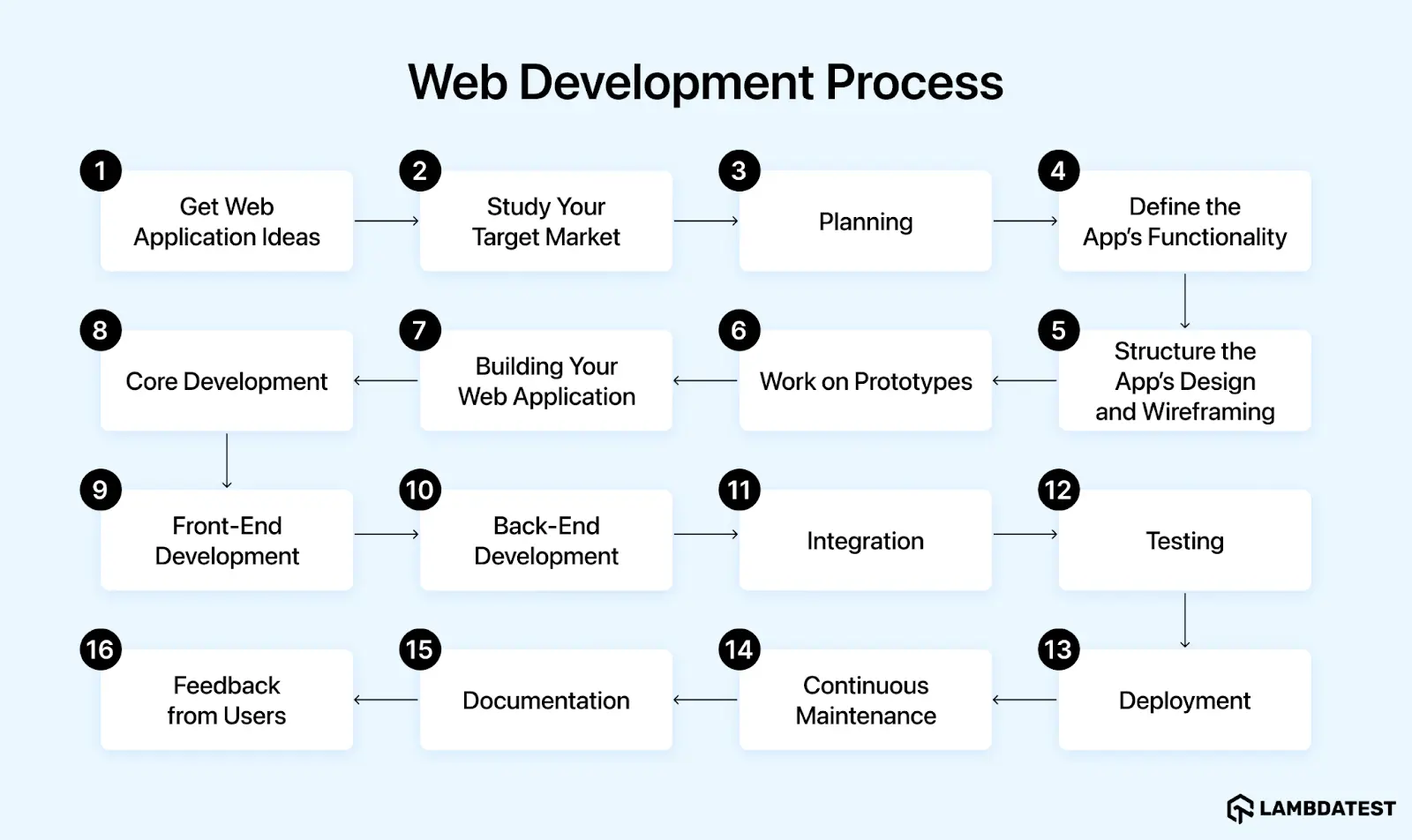
- Get Web Application Ideas: Develop a clear concept for the web app, focusing on solving specific problems or improving users' daily lives.
- Study Your Target Market: Research competitors and potential users. Gather data on existing products, user demographics, and company information.
- Planning: Create a project outline detailing scope, schedule, budget, milestones, and resources. Identify the technology stack and tools required.
- Define the App’s Functionality: Determine the web application's core functions and focus on essential features for the Minimum Viable Product (MVP).
- Structure the App’s Design and Wireframing: Outline the app using flowcharts and sketches to define the framework, using industry-standard design tools like Figma or Adobe XD for wireframes. Include elements like screen transitions, branding, and user interface components.
- Work on Prototypes: Develop wireframes and interactive prototypes. Validate the prototype to ensure it meets the desired functionality before full development.
- Building Your Web Application: Begin construction by developing the database, front-end, and back-end components.
- Core Development: Code the application, implementing business logic for both front-end and back-end. Use relevant programming languages based on project needs.
- Front-End Development: Create the client-side interface using HTML, CSS, JavaScript, and relevant frameworks.
- Back-End Development: Develop server-side components, including database management, server logic, and authentication.
- Integration: Connect front-end and back-end systems, install the database server, finalize the backend, and integrate APIs for data exchange.
- Testing: Conduct thorough web application testing to ensure functionality, usability, compatibility, security, and performance. Utilize manual and automation testing methods.
- Deployment: Launch the web app using platforms like GitHub, Beanstalk App, or Bitbucket App. Set up the codebase in a production environment and gather user feedback.
- Continuous Maintenance: Regularly update and maintain the web application to address issues and implement improvements.
- Documentation: Provide comprehensive user guides, tutorials, and training for effective navigation and usage.
- Feedback from Users: Market the application, collect user feedback, and analyze metrics to guide future updates and enhancements.
Key Takeaway: The web application development process runs from forming the app idea and studying the target market through design, development, testing, and launch, and ends with marketing the application and collecting user feedback for future updates.
How Much Does It Cost and How Long Does It Take to Build a Web App?
There is no single price for a web application, but the math behind every quote is the same: team size, multiplied by duration, multiplied by the blended rate of the people building it. Scope, third-party integrations, and region move each of those three variables. Companies such as a web development company like Aalpha may work across different project sizes and technology requirements, making these factors important when assessing development cost
- Simple MVP (2-3 months): one core workflow, a handful of screens, standard authentication. With a small team or a low-code build, projects in this bracket commonly land in the low tens of thousands of dollars, roughly the $10,000-$50,000 range depending on region and team.
- Mid-complexity product (3-6 months): payments, roles and permissions, third-party integrations, real database design. Typical quotes run from about $50,000 to $150,000.
- Enterprise build (6+ months): compliance requirements, high availability, custom infrastructure, and dedicated QA push budgets well past $150,000.
Treat these brackets as planning guidance rather than fixed prices: the same scope quoted across regions and team structures can differ several-fold. Two levers consistently cut both cost and timeline: trimming the MVP to one core workflow, and catching defects early, since bugs found after launch cost far more to fix than bugs caught in development testing.
Key Takeaway: Web application cost equals team size multiplied by duration and blended rate: a simple MVP takes 2 to 3 months, a mid-complexity product takes 3 to 6 months at roughly $50,000 to $150,000, and quotes for the same scope vary several-fold by region.
The Rise of Low-Code and No-Code Web App Platforms
Low-code and no-code platforms have changed the MVP economics of the section above. Bubble builds full web applications visually, Webflow powers design-led sites with CMS logic, and Retool assembles internal tools on top of existing databases and APIs, each shipping in days what custom code delivers in weeks.
The trade-off against a custom stack like React and Node.js is control at scale:
- Choose low-code/no-code when: you are validating an idea, building internal tools, or shipping a standard CRUD product where speed matters more than architectural freedom.
- Choose custom code when: you need complex business logic, fine-grained performance tuning, unusual integrations, or the ability to migrate infrastructure freely; platform lock-in and per-seat pricing compound as products grow.
- The common path: validate on a low-code platform, then rebuild the proven core in a custom stack once scale or product complexity demands it. Either way, the app still needs cross-browser and responsive testing, since platform-generated markup is not immune to rendering bugs.
Key Takeaway: A common path is to validate a web app idea on a low-code or no-code platform and rebuild the proven core in a custom stack once scale or product complexity demands more architectural control.
Cloud Infrastructure and Web App Deployment
Modern web applications are rarely deployed to a single local server. The three major cloud providers, Amazon Web Services (AWS), Microsoft Azure, and Google Cloud Platform (GCP), supply the hosting, scaling, and security layers that used to require a physical data center.
- Hosting models: managed app platforms (AWS Elastic Beanstalk, Azure App Service, GCP App Engine) for teams that want deployment without server management; containers with Kubernetes for teams that need portability; serverless functions for event-driven workloads that bill only on use.
- Scaling: auto-scaling adds capacity with traffic and releases it after the spike, replacing capacity guesswork with configuration.
- Security and delivery: managed TLS certificates, DDoS protection, and global CDNs come as configuration options rather than separate projects.
In practice, deployment pipelines connect the CI/CD tools covered earlier to these platforms: a merged pull request builds a container, runs the test suite, and rolls out to staging and production automatically. The cloud provider choice matters less than having that path automated at all.
Key Takeaway: Modern web applications deploy to AWS, Microsoft Azure, or Google Cloud Platform using managed app platforms or containers with Kubernetes, with auto-scaling adding capacity as traffic grows and CI/CD pipelines rolling out each merged change.
Challenges and Solutions in Web Application Development
Web application development comes with its own set of challenges, ranging from security concerns to performance optimization. Dealing with such challenges is crucial for creating reliable and efficient web applications.
Some common challenges and their solutions are mentioned below.
- Challenge 1: Businesses starting to create a website or web-based application find it challenging to determine the best development strategy that aligns with their objectives.
Solution: Utilizing DevOps services is crucial to streamline the entire web development process, enhancing development with automated processes across development, testing, deployment, and maintenance stages. Furthermore, following established development methodologies such as Agile and Scrum is crucial.
- Challenge 2: Choosing the right technology stack depends on various factors such as website complexity - including features, functions, integrations, etc. - budget limitations, and developer resources. Due to the wide range of factors involved, finding the appropriate technology stack for your project can be difficult.
Solution: Before starting the web development process, it is crucial to establish clear project requirements, including development scale and budget. After identifying and analyzing the requirements, choosing the appropriate technology stack becomes more effortless.
- Challenge 3: A positive user experience is improved by a good user interface that makes web applications user-friendly. As a result, web developers face crucial challenges in the form of web design obstacles.
Solution: To effectively tackle design issues, it is crucial to have the expertise of web designers with significant industry experience to refine design goals. Utilizing A/B testing helps identify the best design choices by presenting users with two options. Moreover, examining a range of front-end frameworks with diverse designs helps determine the best choice for your individual needs.
- Challenge 4: Platform compatibility is a common challenge in web development that organizations often face in project development.
Solution: Performing tests on a cloud-based platform optimizes web application testing. One such platform is TestMu AI, an AI-native test execution platform that allows you to test websites on different browsers and validate browser compatibility across 3,000+ browser and OS combinations and 10,000+ real devices. It provides a ready-to-use test infrastructure for manual and automated tests, enabling scalable testing across different platforms.
- Challenge 5: Developers frequently face challenges after their projects have been deployed, especially during the launch of websites. Encountering different problems and glitches is unavoidable when dealing with recently developed web applications, highlighting the significance of proper maintenance and support after the website's launch.
Solution: Continuous maintenance for your web applications is crucial and can be achieved by monitoring them around the clock and performing regular tests. Adopting microservices architecture to reduce dependencies is essential in improving website performance, increasing efficiency and functionality.

Key Takeaway: Common web application development challenges include choosing a development strategy that fits business objectives and keeping applications maintained, and the solutions include round-the-clock monitoring, regular testing, and a microservices architecture.
Best Practices for Web Application Development
Some of the best practices for web application development that will help in building robust web applications include the following:
- Improve data security with HTTPS encryption to protect it from interception and tampering. Enhance access controls by utilizing either password protection or implementing two-factor authentication.
- It is crucial to create designs that best align with various devices. Today, the Internet goes beyond desktop usage, requiring the development of responsive web applications that can be accessed on devices such as desktops, tablets, and smartphones.
- It is essential to consider the usability of every aspect of your product for a range of user demographics. Color contrast and font size must be evaluated to ensure readability for everyone. Following web standards during website development is equally important to ensure compatibility across various browsers.
- Choosing the right web development tools is the first step in developing a high-quality web application.
- Incorporating organized navigation and easily accessible features improves the overall attractiveness of your application.
- Give priority to search engine optimization (SEO) efforts. Start by focusing on basic strategies such as optimizing titles for appropriate search terms and including URLs with keywords.
By adhering to these guidelines, developers can enhance the overall user experience, ensure better performance, maintain high standards of security and accessibility, and avoid common mistakes.
Key Takeaway: Web application development best practices include protecting data with HTTPS encryption, strengthening access with passwords or two-factor authentication, and building responsive designs that work across devices.
Web Application Development Trends
Developers need to stay updated with the latest trends in web application development. These trends enable developers to leverage new technologies and methodologies to enhance functionality, security, and overall user experience.
Some of the web development trends are mentioned below.
- BlockChain: They act as a secure database storage system by grouping data into interconnected blocks, which differs from conventional systems. The benefits are numerous, especially in improving the safety and precision of transactions. Blockchain Technology helps web developers streamline the development process by enabling the use of open-source systems in projects.
- Progressive Web Application (PWA): Progressive Web Applications is software created using familiar web technologies like HTML and JavaScript. PWAs function smoothly on any device that has a typical Internet browser. Several international web design companies have started providing PWA solutions, taking advantage of their lower development expenses. They can be used without relying on app distribution platforms like the App Store or Play Store, offering quick installation and automatic updating capabilities.
- IoT: IoT is a system of connected devices on the Internet that allows for automatic data transmission using data from sensors and cloud networks. IoT ensures accurate data transmission without delays or errors, streamlining tasks and operations to improve productivity and reduce costs. It includes strong security technologies protecting both business and user data.
- Cloud Computing: It involves using cloud-based resources like storage, networking, software, analytics, and intelligence, providing flexibility and convenience. This technology helps prevent data loss and overload while offering various advantages, such as decreased development costs, flexibility, and robust architecture. Here are multiple ways that Cloud computing can transform web development:
- Developers do not have to worry about storage constraints.
- Collaboration is made easier for developers from different locations.
- Numerous security features are available, such as encryption and access control.
- It allows you to stay ahead of rivals by quickly implementing new features.
- It increases global outreach by being accessible worldwide.
These trends are important for any developer to stay ahead in the world of technology and help deliver an application that is interactive, easy to navigate, and meets modern user expectations.
Staying ahead with these trends ensures that developers can create functional web applications that provide an exceptional user experience.
Key Takeaway: Web application development trends include blockchain, which stores data in interconnected blocks for stronger security, and developers who follow current trends can improve the functionality, security, and user experience of web applications.
Is Web Development Dead Due to AI?
No, but the job has changed shape. Generative AI tools like GitHub Copilot and ChatGPT now handle a real share of the mechanical work: generating boilerplate and scaffolding, converting designs into component markup, writing unit tests, and explaining unfamiliar code. Treating them as autocomplete for entire functions rather than lines is now the baseline workflow.
What AI does not replace is the judgment around the code:
- System architecture: deciding how services, data, and teams fit together is a constraint-balancing exercise AI can draft options for, not own.
- UX judgment: models generate plausible interfaces; knowing what your specific users need still requires research and product sense.
- Security accountability: AI-generated code can carry vulnerabilities such as injection flaws or unsafe defaults, and it ships with no one accountable for it. A developer must review, test, and own every generated line, which makes code review and security testing more important, not less.
The practical takeaway: developers who use AI to compress the mechanical work, and redirect that time into architecture, UX, and verification, are more productive than either the AI alone or the developer alone. Demand is shifting toward that combined skill set rather than disappearing.
Key Takeaway: Web development is not dead because of AI: tools such as GitHub Copilot and ChatGPT take over mechanical coding work, and developers who redirect the saved time into architecture, UX, and verification are the most productive.
Conclusion
In this tutorial, we have discussed web application development and highlighted its need, importance, process, best practices, and other crucial concepts. The importance of web development for organizations and businesses globally cannot be exaggerated. However, many difficulties and barriers arise while building a durable web application. It is crucial to have a comprehensive plan in place to tackle these diverse challenges. From planning web development and choosing technology to ensuring security and upkeep, every aspect needs careful attention to ensure customers receive a top-quality product or service. This tutorial will help you gain a good understanding of web application development.
Author

Nazneen Ahmad
Blogs: 39


Nazneen Ahmad is a freelance Technical Content SEO Writer with over 6 years of experience in crafting high ranking content on software testing, web development, and medical case studies. She has written 60+ technical blogs, including 50+ top-ranking articles focused on software testing and web development. Certified in Automation Basic and Advanced Training - XO 10, she blends subject knowledge with SEO strategies to create user focused, authoritative content. Over time, she has shifted from quick, keyword-heavy drafts to producing content that prioritizes user intent, readability, and topical authority to deliver lasting value.
Reviewer

Shubham Soni
Reviewer
Shubham Soni is a Senior Member of Technical Staff at TestMu AI (formerly LambdaTest), building the Real Device Cloud and real-time testing infrastructure. He optimized the WebRTC services that power live testing to sub-100ms latency with adaptive bitrate streaming, led a frontend migration from Angular to React that cut page load time from 5-6 seconds to 1-1.5 seconds, and contributes to the official Device SDK. He led a team of four to build an accessibility testing product covering manual and automated testing and mentored a team of six on a real-time testing product. He brings over eight years of experience and earlier scaled a cloud code platform to 200K+ monthly users. Shubham holds a B.Tech in Computer Science.


Web Application Development FAQs
Did you find this page helpful?
More Related Learning Hubs
TestMu AI forEnterprise
Get access to solutions built on Enterprise
grade security, privacy, & compliance
- Advanced access controls
- Advanced data retention rules
- Advanced Local Testing
- Premium Support options
- Early access to beta features
- Private Slack Channel
- Unlimited Manual Accessibility DevTools Tests