

Power Your Software Testing with AI Agents and Cloud
The Native AI-Agentic Cloud Platform to Supercharge Quality Engineering. Test Intelligently and Ship Faster.


- TestMu AI (Formerly LambdaTest)
- /
- Learning Hub
- /
- Faker.js Tutorial: Generate Realistic Test Data
Faker.js Tutorial: Generate Realistic Test Data
Learn Faker.js: npm install, generate realistic test data, integrate with Selenium, Playwright, Cypress, and Jest, and compare it to hand-crafted seed data.
Last Updated on:
On This Page
- What Is Faker.js?
- Key Features of Faker.js
- How to Set Up and Use Faker.js?
- Using the Faker CLI
- Running Faker.js in Your Project
- Running Faker.js Tests at Scale
- Common Use Cases of Faker.js
- Faker.js vs. Hand-Crafted Data
- Database Seeding with Prisma
- Data Obfuscation and GDPR
- How to Work with Locales in Faker.js (Multilingual Support)?
- How to Use Faker.js with Popular Testing Frameworks?
- Best Practices & Tips for Using Faker.js
- Conclusion
Effective testing requires more than just scripts; it demands realistic, varied, and safe data to uncover hidden issues before they reach production. Faker.js empowers QA teams to generate dynamic test scenarios on the fly, simulate diverse user interactions, and validate workflows under multiple conditions.
By integrating Faker.js into your testing process, you reduce repetitive setup, increase coverage, and catch potential bugs earlier, making your test automation smarter and more reliable.
Overview
To generate realistic, region-specific test data without using real user information, use the community-maintained Faker.js library (@faker-js/faker). This flexible library allows developers to generate complex, structured datasets on demand and integrates with testing frameworks to automate dynamic, reproducible test scenarios.
- Best for generating mock data: Faker.js - This community-maintained library generates realistic, region-specific datasets like names, emails, and addresses across 70+ locales, supporting data seeding for reproducible test runs.
- Best for browser automation: Selenium - This framework integrates with Faker.js to automate web browser interactions, allowing QA teams to fill forms with dynamically generated usernames and emails during automated test execution.
- Best for modern end-to-end testing: Playwright - This tool works with Faker.js to execute fast, reliable browser automation tests using dynamically generated mock datasets instead of hardcoded values.
- Best for frontend testing: Cypress - This framework integrates with Faker.js to simulate real-world user interactions in the browser by injecting realistic, randomized data into UI components and forms.
- Best for unit and integration testing: Jest - This testing framework uses Faker.js to generate dynamic mock inputs for testing JavaScript functions, API responses, and database seeding scripts without relying on static fixtures.
- Best for scalable cloud execution: TestMu AI - This cloud-based platform runs Faker.js-powered tests across 3,000+ browser and OS combinations, ensuring parallel execution and consistent data seeding to reduce test flakiness.
- Ensure you install the community-maintained @faker-js/faker package rather than the deprecated original faker package, and do not confuse it with Python's Faker or Java's Datafaker libraries.
What Is Faker.js?
Faker.js is a popular JavaScript library used to generate fake yet realistic data, including names, emails, phone numbers, addresses, and business details. Supporting more than 70 locales, it has become a standard tool for creating mock datasets in development, testing, and prototyping.
In January 2022, the original Faker.js package was suddenly unpublished, sparking widespread disruption across projects. The open-source community quickly stepped in, reviving the project on GitHub as @faker-js/faker, published on npm and now actively maintained by a dedicated group of contributors.
With features like data seeding for determinism, Faker.js ensures your automated tests can simulate real-world scenarios in a scalable, reproducible, and safe way.
Faker.js vs Faker (Python) vs Datafaker (Java)
Searching for "Faker" turns up several unrelated libraries, so it is worth being precise about which one this guide covers. They share a name and an idea, but they are separate projects by different authors, and none of them is a port of another.
| Parameters | Faker.js | Faker (Python) | Datafaker (Java) |
|---|---|---|---|
| Package | @faker-js/faker | Faker (pip install Faker) | net.datafaker:datafaker |
| Language | JavaScript and TypeScript | Python | Java and Kotlin |
| Typical call | faker.person.fullName() | fake.name() | faker.name().fullName() |
| Used with | Jest, Playwright, Cypress, Node, Prisma | pytest, Django, pandas | JUnit, Spring, TestNG |
| Note | The successor to the unmaintained faker.js package | Independent project, not a port | The maintained fork of JavaFaker |
Two naming details cause most of the confusion. On the JavaScript side, the original faker.js package was deprecated in 2022 and the community fork @faker-js/faker is what is maintained today, so install that one rather than the bare faker package. On the Java side, JavaFaker is no longer actively maintained and Datafaker is the fork that continues it. Everything in this guide refers to @faker-js/faker.
Key Features of Faker.js
Faker.js comes packed with a wide range of capabilities designed to simplify test data generation. From multilingual support to customizable data seeding, it provides developers with versatile tools to simulate real-world scenarios efficiently.
- Extensive Data Types: Generate fake names, addresses, emails, phone numbers, dates, images, and more.
- Locale Support: Over 70 locales to create region-specific data.
- Data Seeding: Use seeds to generate deterministic and reproducible datasets.
- Thematic Categories: Built-in modules for internet, commerce, company, finance, lorem text, and more.
- Lightweight & Modular: Import only the data modules you need.
- Randomization Utilities: Functions to shuffle, pick, and generate random values beyond predefined data.
- Actively Maintained: Available under the new package @faker-js/faker with ongoing community support.

Note: Generate realistic test data with Faker.js and run it across 3,000+ browser and OS combinations effortlessly. Try TestMu AI Now!
How to Set Up and Use Faker.js?
Getting started with Faker.js is simple and fast. In just a few steps, you can install the library, set it up in your project, and begin generating realistic test data within minutes.
Prerequisites:
Before you begin, make sure you have:
- Node.js and npm are installed on your system. (You can verify using node -v and npm -v).
- A basic JavaScript project or a test environment is ready.
Setting Up Faker.js:
- Install the package: To start using Faker.js, you first need to install the package in your project. Run the following command in your terminal:
npm install @faker-js/faker --save-devimport { faker } from '@faker-js/faker';const user = {
id: faker.string.uuid(),
name: faker.person.fullName(),
email: faker.internet.email(),
phone: faker.phone.number(),
address: faker.location.streetAddress(),
};
console.log(user);
If you need multiple users, faker.helpers.multiple makes it simple to generate an array of mock objects in one line:
const users = faker.helpers.multiple(() => ({
id: faker.string.uuid(),
name: faker.person.fullName(),
email: faker.internet.email(),
phone: faker.phone.number(),
address: faker.location.streetAddress(),
}), { count: 5 });
console.log(users);
In just a few steps, you'll have Faker.js up and running, ready to generate realistic test data for your applications.
How to Use Faker.js Directly from the Terminal (Faker CLI)
Everything so far assumes you are writing a script. Often you do not need one. You want a throwaway email to fill a signup form, ten zip codes to paste into a fixture, or a plausible name for a bug report. Writing a file, importing the library, and running Node for that is more ceremony than the task deserves.
The faker-cli package exposes Faker from the command line. With npx you do not even have to install it:
# generate a single fake name, no install required
npx faker-cli person.fullName

# or install it globally to keep it around
npm install -g faker-cli
The argument is the same API path you would use in code, so anything available to faker.location.zipCode() is available as location.zipCode on the command line:
npx faker-cli location.zipCode        # 84021
npx faker-cli person.fullName         # Erica Bergstrom
npx faker-cli phone.number            # (555) 219-4471
npx faker-cli internet.email          # elyssa.hane@yahoo.com
npx faker-cli location.streetAddress  # 4021 Kuhic Islands
Because the output is plain text on stdout, it composes with the rest of your shell, which is where it starts to earn its place. You can pipe it, loop it, or drop it straight into a file:
# 10 zip codes, one per line, into a fixture file
for i in {1..10}; do npx faker-cli location.zipCode; done > zips.txt

# copy a fake email straight to the clipboard (macOS)
npx faker-cli internet.email | pbcopy
One caveat worth knowing: each npx invocation spins up a fresh process, so looping it hundreds of times is slow. The CLI is built for quick, ad hoc values during manual testing and exploratory work. Once you need volume, or you need the same data reproducibly, go back to a script with a seed.
Running Faker.js in Your Project
Once Faker.js is installed and set up, the next step is to put it into action. You can use Faker.js to generate test data that simulates real-world scenarios, making your automated tests more reliable and effective.
Test Scenario:
- Launch the Chrome browser.
- Open the Selenium Playground's Input Form Demo.
- Enter a randomly generated name, email address, and password using Faker.js.
- Click the Submit button.
- Close the web browser.
Code Implementation:
const { Builder, By } = require("selenium-webdriver");

(async function runFakerTest() {
  // @faker-js/faker is ESM-only as of v9+, so a CommonJS file needs a
  // dynamic import() instead of require() - this works fine inside an async function
  const { faker } = await import("@faker-js/faker");

  let driver = await new Builder().forBrowser("chrome").build();
  try {
    // Navigate to the Selenium Playground's Input Form Demo
    await driver.get("https://www.testmuai.com/selenium-playground/input-form-demo/");

    // Generate fake data
    let fakeName = faker.person.fullName();
    let fakeEmail = faker.internet.email();
    let fakePassword = faker.internet.password();

    // Fill in the signup form
    await driver.findElement(By.id("name")).sendKeys(fakeName);
    await driver.findElement(By.id("inputEmail4")).sendKeys(fakeEmail);
    await driver.findElement(By.id("inputPassword4")).sendKeys(fakePassword);

    // Submit the form
    await driver.findElement(By.css(".bg-lambda-900")).click();
    console.log("Test executed with name:", fakeName, "and email:", fakeEmail);
  } catch (err) {
    console.error("Error during test execution:", err);
  } finally {
    await driver.quit();
  }
})();
Code Walkthrough:
Here is the code walkthrough of the executed test on a local grid using Selenium WebDriver with Node.js and Faker.js.
- Import Modules: Imports Selenium WebDriver, enabling your script to control and interact with the browser.
const { Builder, By } = require("selenium-webdriver"); const { faker } = await import("@faker-js/faker"); let driver = await new Builder().forBrowser("chrome").build(); await driver.get("https://www.testmuai.com/selenium-playground/input-form-demo/"); const fakeName = faker.person.fullName();
const fakeEmail = faker.internet.email();
const fakePassword = faker.internet.password();driver.findElement(By.id("name")).sendKeys(fakeName);
driver.findElement(By.id("inputEmail4")).sendKeys(fakeEmail);driver.findElement(By.css(".bg-lambda-900")).click(); console.log("Test executed with name:", fakeName, "and email:", fakeEmail);catch (err) { /* handle error */ }finally { await driver.quit(); }Test Execution:
To execute your test, click the "Run" button, or right-click the test file/class and select "Run"
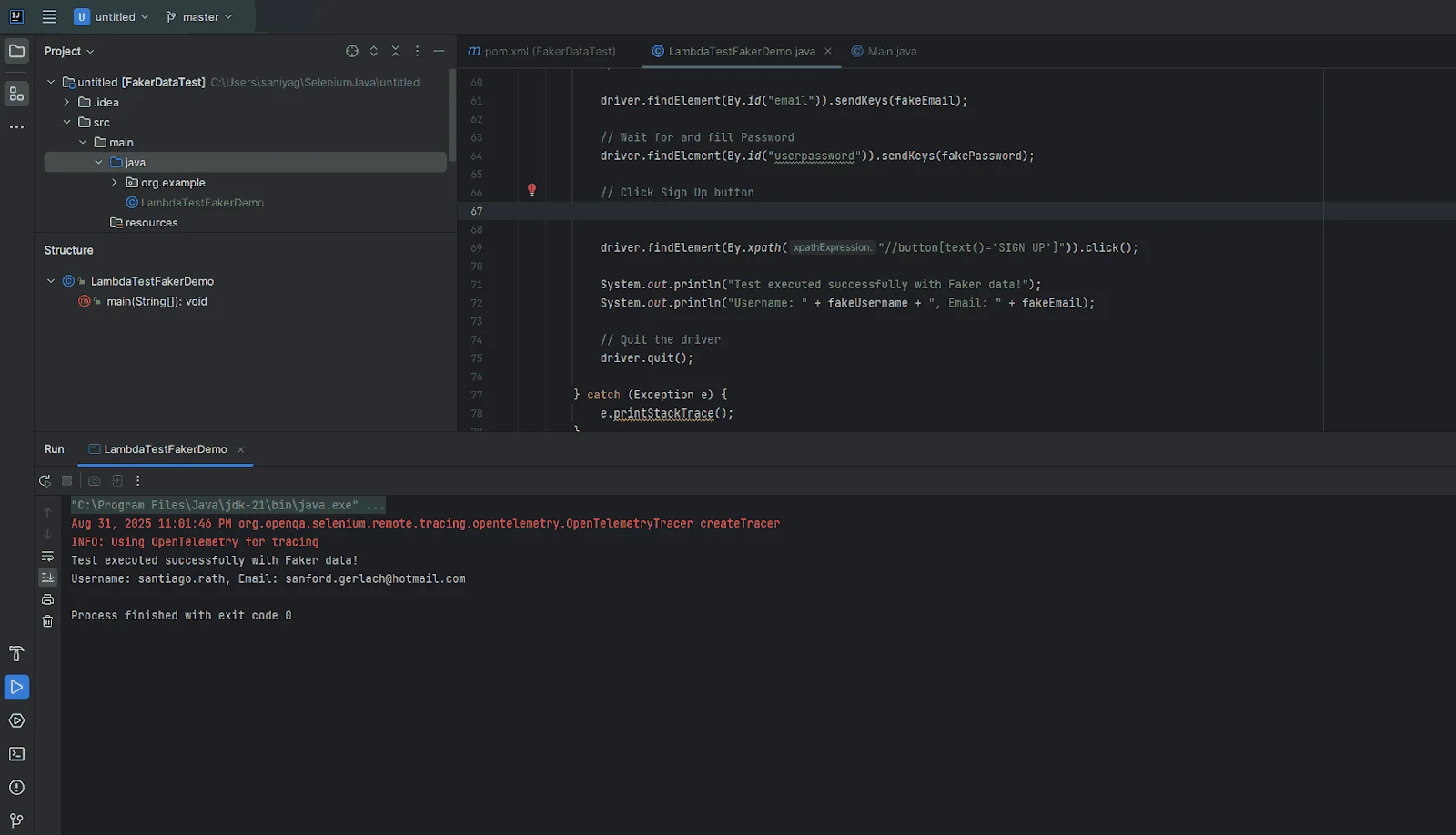
Faker.js is widely used to generate realistic fake data for testing applications. Whether it's names, emails, or phone numbers, Faker.js helps you avoid hardcoding values and makes your tests more dynamic and closer to real-world scenarios.
This flexibility is especially valuable when testing form validations, workflows, or data-driven features. While Faker.js makes tests more realistic, it also introduces a unique challenge.
A common challenge with Faker.js is keeping test data stable and predictable. Random values can make tests pass in one environment but fail in another, which makes debugging and maintenance frustrating.
In CI/CD pipelines, this problem grows as tests may behave differently across browsers, operating systems, or parallel runs. Teams need a setup where Faker.js data stays consistent across all runs and platforms.
Cloud-based platforms like TestMu AI offer controlled, scalable environments that ensure Faker.js-powered tests execute reliably across a wide range of browsers and OS combinations, minimizing flakiness, improving reproducibility, and providing faster, more dependable feedback to developers and QA teams.

Running Faker.js Tests at Scale
TestMu AI provides scalable, cloud-based browsers where you can run your Faker.js-powered Selenium, Playwright, or Cypress tests.
Features like parallel execution, data seeding, and environment replication ensure your tests are predictable, reproducible, and easier to maintain.
By leveraging TestMu AI for cross-browser testing, you can execute tests across 3,000+ browser and OS combinations, reducing flakiness and delivering faster, dependable feedback.
To get started with TestMu AI, you need to follow a few steps given below:
- Set Up Your TestMu AI Account: Sign up or log in to TestMu AI and get your Username and Access Key from the profile section, which are required to connect your test scripts to the TestMu AI cloud.
- Add Testing Framework Dependencies: Depending on your preferred framework, install the necessary dependencies: Selenium, Playwright, or Cypress.
- Configure TestMu AI Remote URL: Replace your local WebDriver setup with TestMu AI's remote WebDriver URL to execute tests in the cloud. You'll need your TestMu AI username and access key:
// For Selenium WebDriver const driver = await new Builder() .usingServer("https://undefined:undefined@hub.lambdatest.com/wd/hub") .forBrowser("chrome") .build(); - Generate Test Data Using Faker.js : Import Faker.js in your test file and create dynamic test data:
import { faker } from "@faker-js/faker"; const fakeUser = { name: faker.person.fullName(), email: faker.internet.email(), username: faker.internet.username() }; - Parallel Execution: TestMu AI supports parallel execution, which allows multiple browsers and OS combinations to run simultaneously.
Configure your test capabilities to specify browsers, versions, and OS combinations:
const capability = {
"browserName": "Chrome",
"browserVersion": "latest",
"lt:options": {
"username": process.env.LT_USERNAME,
"accessKey": process.env.LT_ACCESS_KEY,
"visual": true,
"video": true,
"platformName": "Windows 10",
"build": "FakerJS Test Build",
"project": "Faker JS",
"name": "Faker JS",
"w3c": true,
"plugin": "node_js-node_js"
}
}
You can generate the above Node.js capabilities from the TestMu AI Automation Capabilities Generator.
- Seed Data for Reproducibility: Ensure your Faker.js data is consistent across runs by using seeding:
faker.seed(12345);As it guarantees that tests will behave deterministically even across multiple browsers and parallel executions.
Note: For this demonstration, we will use Selenium. Install the required Selenium WebDriver package:
Test Execution:
Access your TestMu AI dashboard to check live execution, review logs, screenshots, and videos, and quickly identify flaky tests or failures.
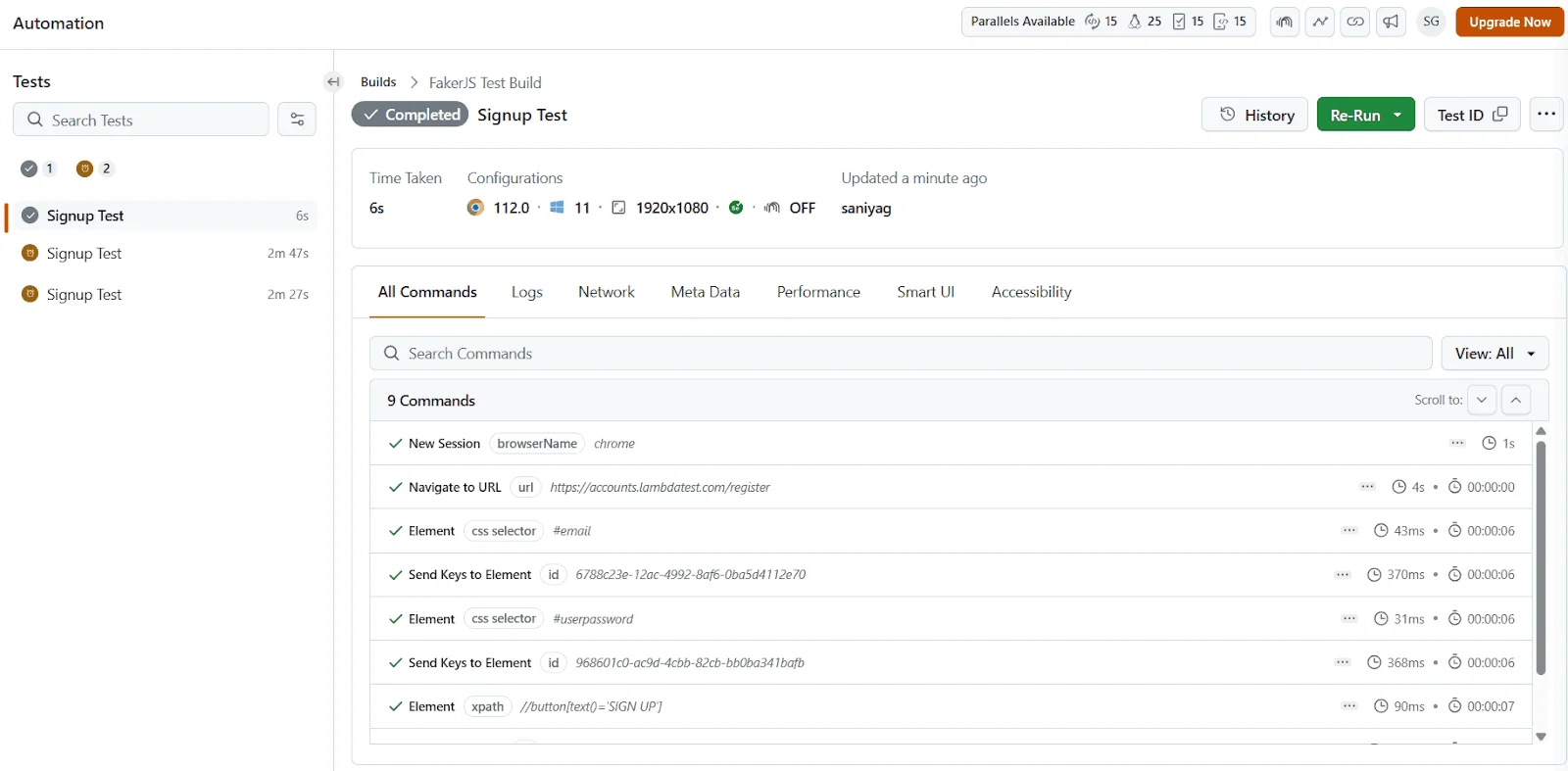
To get started with TestMu AI, follow this support documentation on Selenium automation testing using TestMu AI.
Common Use Cases of Faker.js
Faker.js shines when you need realistic but fake data that behaves like production inputs without risking sensitive information. Below are some of the most common scenarios where developers rely on it.
Testing and QA
In automated testing, you often need user profiles, transactions, or order data to validate workflows. Faker.js helps you create these datasets on the fly, ensuring that test runs don't rely on hardcoded or repetitive data.
import { faker } from '@faker-js/faker';
const user = {
  name: faker.person.fullName(),
  email: faker.internet.email(),
  phone: faker.phone.number()
};
This snippet generates a random user profile for testing sign-up flows or data validation.

Frontend Development
When building UI components, placeholder text and static data don't always showcase how designs hold up with real-world variation. Faker.js can populate cards, tables, or lists with dynamic sample data.
import { faker } from '@faker-js/faker';
const product = {
  title: faker.commerce.productName(),
  price: faker.commerce.price(),
  image: faker.image.url()
};
Useful for quickly filling a product grid or catalog preview in frontend applications.
API Development
If your backend isn't ready yet, Faker.js can generate realistic mock responses for REST or GraphQL APIs. This allows frontend teams to continue building against simulated endpoints.
import { faker } from '@faker-js/faker';
app.get('/api/user', (req, res) => {
  res.json({ id: faker.string.uuid(), name: faker.person.fullName() });
});
Great for mocking endpoints during integration testing or when backend services are under development.
Database Seeding
To test performance and scalability, databases need to be populated with large amounts of dummy data. Faker.js makes it easy to seed thousands of records quickly - the full walkthrough, including seeding related records through an ORM like Prisma, is covered next.
Faker.js vs. Hand-Crafted Seed Data
Faker.js is not the right choice for every test fixture. The tradeoff comes down to whether the test needs realistic variety or an exact, known value.
- Faker.js wins for volume and variety: populating a dev database with 1,000 varied user records, generating hundreds of edge-case form inputs, or filling a UI with data that exposes layout bugs a handful of static rows never would.
- Hand-crafted data wins when a test asserts on a specific business scenario: an invoice total that must equal exactly $129.99, a user whose subscription expired exactly 3 days ago, or a known edge case a bug report was filed against. Faker.js can approximate these with constraints, but a literal fixture is clearer to read and harder to accidentally break.
- Hand-crafted data also wins for referential correctness that a generator can't infer on its own: a specific order needs to reference a specific customer with a specific shipping address, and that chain of exact IDs is easier to hardcode than to constrain a random generator into producing.
Most production test suites use both, not one exclusively. A common split: Faker.js seeds the bulk of the database for volume and realism, while a small set of hand-crafted fixtures covers the specific scenarios the test suite's assertions actually depend on. Treating this as an either/or choice is where teams get into trouble - an all-Faker.js suite produces tests that pass on one run and fail on the next when random data happens to hit an edge case nobody wrote an assertion for, while an all-hand-crafted suite misses the bugs that only show up with volume and variety.
Database Seeding with Faker.js and Modern ORMs (Prisma Example)
Generating a fake name in a test is useful. Filling an entire local database with realistic, related records is where Faker.js pays for itself. An empty dev database is close to useless: pagination looks fine with three users, search returns nothing interesting, and the layout that breaks on a 60-character product name never gets exercised.
Prisma has a first-class hook for this. Point the seed script at a seed.ts file and Prisma runs it on demand, or automatically after a migration reset.
1. The schema
Take a simple schema.prisma with a relation, since relations are the part that makes seeding awkward:
// schema.prisma
model User {
  id        Int      @id @default(autoincrement())
  email     String   @unique
  name      String
  createdAt DateTime @default(now())
  posts     Post[]
}

model Post {
  id       Int     @id @default(autoincrement())
  title    String
  body     String
  authorId Int
  author   User    @relation(fields: [authorId], references: [id])
}
2. Register the seed script
Tell Prisma how to run the file, in package.json:
{
  "prisma": {
    "seed": "ts-node prisma/seed.ts"
  }
}
3. Write seed.ts
// prisma/seed.ts
import { PrismaClient } from '@prisma/client';
import { faker } from '@faker-js/faker';

const prisma = new PrismaClient();

async function main() {
  // deterministic data: same seed, same database, every run
  faker.seed(123);

  // clear first so re-seeding does not duplicate
  await prisma.post.deleteMany();
  await prisma.user.deleteMany();

  for (let i = 0; i < 20; i++) {
    await prisma.user.create({
      data: {
        name: faker.person.fullName(),
        email: faker.internet.email(),
        createdAt: faker.date.past({ years: 2 }),
        // create each user's posts in the same call
        posts: {
          create: faker.helpers.multiple(
            () => ({
              title: faker.lorem.sentence(),
              body: faker.lorem.paragraphs(2),
            }),
            { count: { min: 0, max: 5 } }
          ),
        },
      },
    });
  }
}

main()
  .catch((e) => {
    console.error(e);
    process.exit(1);
  })
  .finally(async () => {
    await prisma.$disconnect();
  });
Run it with npx prisma db seed, and you have 20 users each owning between zero and five posts.
Three details in that file matter more than the rest. faker.seed(123) makes the data deterministic, so every developer and every CI run gets the identical database and a bug someone reports is reproducible on your machine. The deleteMany calls run in child-then-parent order because the foreign key forbids the reverse, and without them re-seeding either duplicates or fails on the unique email. And the min: 0 on post count is deliberate: seeding every user with posts means the empty state never appears in dev, and the empty state is exactly what breaks in production.
The same pattern transfers to other ORMs. Drizzle, TypeORM, and Sequelize all differ in the create call, but the shape stays the same: seed for determinism, clear in dependency order, then generate parents with their children.
Using Faker.js for Data Obfuscation and GDPR Compliance
There is a habit in a lot of teams that quietly creates real legal exposure: restoring a copy of the production database into staging, or onto a laptop, to debug something. It is understood as pragmatic. Under GDPR and CCPA it is processing personal data for a purpose the customer never consented to, on systems that usually have weaker access controls than production.
Obfuscation is the standard answer. You take the production copy and overwrite every field of PII (personally identifiable information) with fake but structurally valid data before anyone works with it. The result keeps what makes production copies useful, namely realistic volume, distribution, and relational shape, while containing nothing that belongs to a real person.
Faker.js is well suited to this because the replacement values look like the originals. Swapping a real email for xxxxx breaks validation and every UI that renders it. Swapping it for a generated address keeps the system behaving normally.
// obfuscate a restored production dump before anyone touches it
import { PrismaClient } from '@prisma/client';
import { faker } from '@faker-js/faker';

const prisma = new PrismaClient();

async function obfuscate() {
  const users = await prisma.user.findMany();

  for (const user of users) {
    await prisma.user.update({
      where: { id: user.id },
      data: {
        // overwrite every PII field, keep everything else intact
        name:  faker.person.fullName(),
        email: faker.internet.email(),
        phone: faker.phone.number(),
        address: faker.location.streetAddress(),
        // keep non-PII columns (createdAt, plan, status) untouched
        // so behaviour and analytics still look like production
      },
    });
  }
}
Four things to get right if you do this seriously:
- Obfuscate before the data lands anywhere shared: Run it as part of the restore, not as a step someone remembers afterwards. A dump that sits unmasked on staging overnight has already been a breach for a night.
- Find every field, not the obvious ones: Names and emails are easy. PII hides in free-text support notes, delivery instructions, uploaded filenames, and audit logs, and those are the fields that get missed.
- Be consistent where relationships depend on it: If the same customer appears in three tables, they need the same fake identity in all three, or the joins stop making sense. Seeding Faker per record ID gives you that stability.
- Do not obfuscate in production: Stating the obvious because the script is one connection string away from doing exactly that. Guard it on the environment variable and fail loudly.
Done properly, this removes an entire category of risk: developers get data that behaves like production, and the organisation is no longer copying customer records onto laptops. This is general guidance rather than legal advice, so have your data protection lead confirm what counts as PII in your jurisdiction and industry.
How to Work with Locales in Faker.js (Multilingual Support)?
Faker.js makes it easy to generate realistic test data across multiple languages and regions with its built-in locale support. You can also seed data for consistency, ensuring reliable and repeatable test runs in global-scale applications.
Working with Locales
One of the standout features of Faker.js is its support for 70+ locales, allowing you to generate data in different languages and cultural formats. This is especially useful when you're testing applications that will be used by a global audience.
For instance, a German user expects addresses, names, and phone numbers to look different from those in the US or Japan. By setting the locale, you can instantly adapt your test data to match regional conventions, making your testing more realistic and inclusive.
Example:
// Import the pre-built German locale instance directly
import { fakerDE as faker } from "@faker-js/faker";

console.log(faker.person.fullName());
// Example output: "Norman Jonas"
With just one line, your fake data aligns with the region you're targeting. This makes it easier to test UI rendering, form validations, and business logic across different cultures without manually curating sample data. The older faker.setLocale() method and the default-instance faker.locale property are both deprecated - importing a locale-specific instance like fakerDE, fakerFR, or fakerJA directly is the current approach, and it starts up faster since only that locale's data loads.
Seeding Data for Consistency
When running automated tests, consistency matters. If your test data changes on every run, debugging failures becomes a nightmare. Faker.js solves this problem with data seeding. By providing a fixed seed value, you ensure that the same fake data is generated every time the code runs.
This deterministic behavior is crucial in CI/CD pipelines, where reproducible results help identify real bugs rather than random data mismatches. It also makes collaboration easier since developers across teams will see the same test outputs when using the same seed.
Example:
import { faker } from "@faker-js/faker";
// Seed Faker.js with a fixed value
faker.seed(123);
console.log(faker.person.fullName());
// Outputs the same name every run for a given faker-js version: "Darrin Reichel"
With seeding, your fake data becomes predictable and reliable. This guarantees that test runs are stable, repeatable, and easier to debug, which is exactly what teams need when scaling automation.
How to Use Faker.js with Popular Testing Frameworks?
Faker.js isn't limited to generating mock data in isolation; it shines when paired with popular testing frameworks.
By plugging Faker.js into unit tests with Jest, end-to-end browser tests using Cypress, cross-browser automation through Selenium, and modern Playwright headless browser testing, you can make your test coverage stronger, more reliable, and closer to real-world scenarios without relying on static data.
Using Faker.js with Selenium (Cross-Browser Testing)
Selenium is a leading tool for cross-browser automation, widely used to validate applications across Chrome, Firefox, Edge, and Safari. By integrating Faker.js, you can dynamically generate test data such as user accounts, addresses, or form inputs during Selenium testing
Seeding ensures reproducibility while still allowing randomized input for broader coverage. To deep dive and get started with Selenium, follow this detailed guide on the Selenium tutorial.
Example: Filling out a signup form in Selenium with Faker.js (JavaScript)
const { Builder, By } = require("selenium-webdriver");
(async function signupForm() {
  const { faker } = await import("@faker-js/faker");
  let driver = await new Builder().forBrowser("chrome").build();
  try {
    const fakeUser = {
      username: faker.internet.username(),
      email: faker.internet.email(),
      password: faker.internet.password(),
    };


    await driver.get("https://example.com/signup");
    await driver.findElement(By.name("username")).sendKeys(fakeUser.username);
    await driver.findElement(By.name("email")).sendKeys(fakeUser.email);
    await driver.findElement(By.name("password")).sendKeys(fakeUser.password);
    await driver.findElement(By.css("button[type='submit']")).click();
  } finally {
    await driver.quit();
  }
})();
You can also use Selenium with Java alongside Faker.js for more robust test automation, enabling you to generate dynamic test data, simulate diverse user interactions, and maintain consistent, reproducible results across different browsers and environments.
Using Faker.js with Playwright (Modern E2E Testing)
Playwright is designed for reliable, fast, and cross-browser end-to-end testing. By integrating Faker.js, you can dynamically generate names, emails, and messages to make your tests more realistic.
Seeding keeps results consistent while still allowing randomized input for broader test coverage. To deep dive into getting started, you can follow this detailed Playwright tutorial for step-by-step guidance on setup, writing tests, and leveraging its full potential in modern test automation.
Example: Submitting a contact form in Playwright with Faker.js
import { test, expect } from "@playwright/test";
import { faker } from "@faker-js/faker";

test("should submit the form successfully with fake data", async ({ page }) => {
  const fakeUser = {
    name: faker.person.fullName(),
    message: faker.lorem.sentence(),
  };

  await page.goto("https://example.com/contact");
  await page.fill("#name", fakeUser.name);
  await page.fill("#message", fakeUser.message);
  await page.click("button[type=submit]");

  await expect(page.locator(".success")).toHaveText(
    "Thank you for contacting us!"
  );
});
Using Playwright to run tests allows you to evaluate how your website performs across different browsers, including Chromium, Firefox, and WebKit. As your testing requirements expand, challenges may arise around maintaining scalability, ensuring consistent results, and managing test reliability across multiple environments.
Using Faker.js with Cypress (End-to-End Browser Testing)
Cypress is built for end-to-end testing in the browser. Instead of manually creating test users, you can use Faker.js to auto-generate credentials, addresses, or payment details during test execution. This helps validate how your UI and backend handle realistic input at scale.
To explore Cypress in more detail and get started step by step, you can follow this comprehensive Cypress tutorial for guidance on setup, writing tests, and maximizing test automation efficiency.
Example: Filling out a signup form in Cypress with Faker.js
import { faker } from "@faker-js/faker";
describe("Signup form with Faker.js data", () => {
  it("should submit the form successfully with fake user data", () => {
    const fakeUser = {
      firstName: faker.person.firstName(),
      lastName: faker.person.lastName(),
      email: faker.internet.email(),
      password: faker.internet.password(),
    };
    cy.visit("/signup");
    cy.get("input[name='firstName']").type(fakeUser.firstName);
    cy.get("input[name='lastName']").type(fakeUser.lastName);
    cy.get("input[name='email']").type(fakeUser.email);
    cy.get("input[name='password']").type(fakeUser.password);
    cy.get("form").submit();
    cy.contains("Welcome, " + fakeUser.firstName).should("be.visible");
  });
});
Running Cypress test cases is crucial for comprehensive and accurate testing of modern web applications. By integrating Faker.js with Cypress testing, you can generate dynamic test data that mirrors real-world scenarios, which not only improves test coverage but also reduces test execution time and minimizes repetitive setup. This ensures faster feedback and more reliable results across your automation suite.
Using Faker.js with Jest (Unit Testing)
Jest is widely used for testing JavaScript and TypeScript applications. Normally, developers hardcode values in their unit tests, which can make tests brittle and repetitive. Faker.js solves this by supplying dynamic, realistic test inputs.
To deep dive and get started, you can follow this detailed Jest tutorial for step-by-step guidance on setup, writing tests, and maximizing unit testing efficiency.
Example: Testing a user validation function with Faker.js in Jest
import { faker } from "@faker-js/faker";
import { validateUser } from "../utils/validateUser"; // Example utility to test

describe("User validation with Faker.js", () => {
  it("should validate a user with generated name and email", () => {
    const fakeUser = {
      name: faker.person.fullName(),
      email: faker.internet.email(),
    };
    const result = validateUser(fakeUser);
    expect(result).toBe(true);
  });
  it("should reject invalid user data", () => {
    const fakeUser = {
      name: faker.person.fullName(),
      email: "invalid-email", // forcing an invalid case
    };

    const result = validateUser(fakeUser);
    expect(result).toBe(false);
  });
});
By integrating Faker.js with Jest testing, you can dynamically generate diverse test inputs for your unit tests, making them more robust and closer to real-world scenarios. This approach reduces reliance on hardcoded values, improves coverage, and ensures your test cases are flexible, maintainable, and capable of detecting edge-case issues efficiently.

Best Practices & Tips for Using Faker.js in Test Automation
When working with Faker.js in test automation, it's easy to get carried away with the endless variety of data you can generate. While randomized inputs improve coverage, there are certain practices you should follow to ensure tests remain stable, fast, and meaningful.
- Use Seeding in CI/CD to Avoid Flaky Tests: Random data is excellent for catching edge cases, but in CI/CD pipelines, you want repeatability. By setting a seed value, Faker.js will always generate the same set of test data across runs. This helps debug failing builds because you know the exact data used when a test failed.
Example:
faker.seed(12345); // Ensures reproducibility in CI/CDThink of seeding as a safety net, your test is still realistic but no longer unpredictable.
- Don't Over-Generate Data (Performance Matters): Generating hundreds of random names, emails, or phone numbers when you only need a handful will slow down your tests unnecessarily. Faker.js is lightweight, but large-scale data generation can still impact performance.
Tip: Only generate what you'll actually use in the test case. If a form needs one user, don't pre-generate 50.
- Choose Relevant Locales for Better Coverage: Faker.js supports multiple locales, which makes it easy to test applications that serve global users. Using the right locale ensures test data matches real-world formats (e.g., addresses in Japan, phone numbers in Germany). This helps uncover localization issues early.
Example:
import { fakerDE as faker } from "@faker-js/faker"; // German locale
console.log(faker.phone.number());
// Example output: "+49-990-0610179"
Matching locales to your application's target regions ensures that you don't miss region-specific formatting bugs.
- Separate Test Data Generation Logic from Test Execution:A common mistake is mixing data generation logic directly inside test scripts. This makes tests harder to maintain and less reusable. Instead, create a data utility layer where all Faker.js calls live. Your tests can then call this utility whenever fresh data is needed.
- Cleaner, more readable test scripts.
- Centralized control over how data is generated.
- Easier updates if you want to change the way fake data is seeded or structured.
In short: Treat Faker.js as a powerful helper, not just a randomizer. Use it smartly, seed for stability, generate only what's needed, respect locales, and keep data logic modular. Done right, Faker.js elevates your automation suite without introducing unnecessary noise.
Conclusion
Faker.js transforms how QA teams approach test data, shifting from static, repetitive inputs to dynamic, realistic, and context-aware datasets. Enabling automated generation of diverse user profiles, transactions, and content helps uncover edge cases that might otherwise go unnoticed. Its support for locales, seeding, and modular data generation ensures tests are reliable, reproducible, and globally relevant.
When integrated into modern frameworks like Selenium, Playwright, Cypress, or Jest, Faker.js elevates test automation by reducing manual effort, minimizing flaky results, and increasing confidence in software quality. Ultimately, it empowers teams to simulate real-world scenarios at scale, accelerate development cycles, and deliver more robust applications without compromising data safety or efficiency.
Faker.js is not a replacement for hand-crafted seed data in every case - use it where you need volume and variety, and write specific fixtures where a test depends on an exact value. Run the resulting suite on TestMu AI's cloud grid to confirm your Faker.js-generated test data behaves the same way across every browser and OS your users actually run, not just the one on your machine.
Author

Saniya Gazala
Blogs: 44


Saniya Gazala is a Product Marketing Manager and Community Evangelist at TestMu AI with 2+ years of experience in software QA, manual testing, and automation adoption. She holds a B.Tech in Computer Science Engineering. At TestMu AI, she leads content strategy, community growth, and test automation initiatives, having managed a 5-member team and contributed to certification programs using Selenium, Cypress, Playwright, Appium, and KaneAI. Saniya has authored 15+ articles on QA and holds certifications in Automation Testing, Six Sigma Yellow Belt, Microsoft Power BI, and multiple automation tools. She also crafted hands-on problem statements for Appium and Espresso. Her work blends detailed execution with a strategic focus on impact, learning, and long-term community value.
Reviewer

Sri Harsha
Reviewer
Sri Harsha is Engineering Manager of the Open Source Program Office at TestMu AI (formerly LambdaTest), where he leads open-source engineering behind the Selenium and Appium automation grid and builds agentic AI systems for quality engineering. He is a member of the Selenium Technical Leadership Committee and a committer to WebdriverIO and Appium, and was recognized with the LambdaTest Delta Award 2023 for Best Contributor in open-source testing. He brings over 10 years of experience in software testing and automation, with earlier roles at EPAM Systems and ZenQ. Sri Harsha holds a B.Tech in Computer Science from Jawaharlal Nehru Technological University.


Faker.js FAQs
Did you find this page helpful?
More Related Learning Hubs
TestMu AI forEnterprise
Get access to solutions built on Enterprise
grade security, privacy, & compliance
- Advanced access controls
- Advanced data retention rules
- Advanced Local Testing
- Premium Support options
- Early access to beta features
- Private Slack Channel
- Unlimited Manual Accessibility DevTools Tests