
Power Your Software Testing with AI Agents and Cloud
The Native AI-Agentic Cloud Platform to Supercharge Quality Engineering. Test Intelligently and Ship Faster.


- TestMu AI (Formerly LambdaTest)
- /
- Blog
- /
- LLM Test Automation With Real Code Examples [2026]
LLM Test Automation With Real Code Examples [2026]
A practical guide to LLM test automation covering test case generation, script writing, log analysis, a real Python integration, benefits, limitations, and best practices with industry data.
Last Updated on:
Test automation enables teams to move fast, but writing and maintaining test scripts is still manual work. LLM test automation changes this by using large language models to generate, adapt, and analyze tests automatically.
Powered by models like GPT-4o and Claude, it automates not just execution but also test case creation, script writing, and failure analysis in real time.
The result is faster, more accurate, and scalable testing, all driven by AI.
Overview
LLM test automation uses large language models to generate test cases, write scripts, and analyze failures through natural language. Teams can implement this by using TestMu AI's KaneAI for autonomous test authoring and self-healing, or deploying Claude to analyze complete CI run logs.
- Best for automated test case generation: TestMu AI's test management platform - This platform generates structured test cases with steps, expected outcomes, and priority labels from user stories, bug reports, spreadsheets, screenshots, and audio notes.
- Best for test script writing and optimization: GPT-4o - This model writes and refactors automation scripts through natural language, ensuring proper selectors, assertions, and error handling while supporting Page Object Model refactoring.
- Best for intelligent bug reporting: LLM APIs - These models generate structured, Jira-ready bug reports containing severity, reproduction steps, expected versus actual behavior, and root cause analysis directly from raw failure logs.
- Best for realistic test data generation: LLMs - These models produce diverse, privacy-compliant, and schema-aware synthetic test datasets while maintaining referential integrity across complex, interconnected entities like users, orders, and products.
- Best for log analysis and failure diagnosis: Claude - This model uses its 200K-token context window to analyze complete CI run logs without truncation, summarizing failures, distinguishing patterns, and recommending next steps.
- Best for end-to-end autonomous QA: TestMu AI's KaneAI - This QA agent authors tests from plain English, automatically self-heals UI changes, and exports tests to Playwright, Selenium, Cypress, or Appium without vendor lock-in.
- Best for self-hosted data privacy: LLaMA or Mistral - These open-source models can be self-hosted to run test automation workflows locally for teams with strict data privacy requirements.
What Is LLM-Powered Test Automation
LLM-powered test automation uses large language models to generate, optimize, and analyze testing artifacts through natural language interactions.
Test automation using LLM works by describing what you want tested in plain English. The model produces comprehensive test scenarios, executable code, realistic test data, or detailed failure analyses.
The key distinction from traditional automation is flexibility: conventional tools execute predefined instructions within rigid frameworks, but LLMs understand context, reason about requirements, and adapt outputs based on natural language feedback.
Teams approaching this within a broader quality strategy will find that AI ML testing covers the full spectrum of techniques, from narrow ML models to general-purpose LLMs.
How LLMs Differ From Traditional AI in Testing
Traditional AI testing tools are narrow and task-specific. LLM-powered testing is general-purpose, adapting to diverse testing needs through natural language across the entire workflow.
| Aspect | Traditional AI Testing Tools | LLM-Powered Testing |
|---|---|---|
| Scope | Narrow, task-specific (e.g., visual regression, test prioritization) | General-purpose, multi-functional |
| Flexibility | Limited to predefined use cases | Adapts to diverse testing needs |
| Training | Rule-based systems or narrow ML models | Trained on vast code and language datasets |
| Capabilities | Single function per tool | Generate test cases, write scripts, analyze failures, draft bug reports, suggest fixes, all in one conversation |
| Interaction | Requires specific inputs/formats | Natural language prompts |
| Versatility | Effective within a defined scope | Transformative across the entire testing workflow |
This versatility is what sets LLM automation testing apart from every tool that came before it. A single model can generate test cases, write a Selenium script, analyze a stack trace, draft a bug report, and suggest a fix, all in one conversation.
This is the core shift that makes AI testing different from adopting another narrow tool: one model replaces an entire toolchain.
I routinely use this capability: I'll generate test cases, immediately ask the model to convert the critical ones into Playwright scripts.
Then I feed it a failure log from the last CI run, all without switching tools or context.
How LLMs Are Transforming Automation Testing
LLMs are transforming automation testing by replacing manual test authoring with natural language prompts, cutting failure analysis time, and enabling non-technical team members to contribute to QA coverage.
According to Capgemini's World Quality Report 2025, 89% of organizations are now piloting or deploying Gen AI-augmented quality engineering workflows, with 72% reporting faster automation processes as a direct result.
Organizations that have integrated Gen AI into their QE practices report an average productivity boost of 19%.
Here's where I've seen the biggest impact in practice:
1. Automated Test Case Generation
Automatic test case generation is the most immediate win in any test automation LLM workflow. Traditionally, QA engineers manually translate requirements into structured test scenarios, a slow and error-prone process.
LLMs automate this by:
- Generating comprehensive test suites in seconds from user stories, covering scenarios a human might overlook.
- Producing structured outputs that cover valid inputs, boundary conditions, and system constraints.
- Extrapolating edge cases such as rate limiting, expired links, and injection attacks without being explicitly prompted.
Note: LLM-generated test cases should always be reviewed. The model may produce redundant cases (I typically see 10-15% overlap in large batches), miss domain-specific constraints, or generate technically infeasible scenarios.
Teams that want the output without building the API wrapper themselves can use TestMu AI's test management platform. It accepts user stories, bug reports, spreadsheets, screenshots, and audio notes as input.
The AI generates structured test cases with steps, expected outcomes, and priority labels, then organizes them into reviewable suites. This cuts the manual triage overhead that usually follows LLM generation.

Note: Generate test cases with AI-native Test Manager. Try TestMu AI Today!
2. Test Script Writing and Optimization
Beyond generating test cases, LLMs can write actual automation scripts. GitHub's controlled study found that developers using AI coding assistants completed tasks 55.8% faster than those without them.
LLMs excel at initial script generation with proper selectors, assertions, and error handling, refactoring legacy code to use the Page Object Model pattern, and updating tests when UI elements change. For a deep dive into how this applies specifically to interfaces, see LLM UI testing.
They also serve as code reviewers, identifying hard-coded waits, overly broad selectors, missing assertions, and race conditions. Qodo's 2025 survey found that 81% of teams integrating AI-powered code review reported quality improvements.
3. Intelligent Bug Reporting and Documentation
LLMs transform bug reporting by generating structured reports that include clear titles, severity assessment, detailed reproduction steps, expected versus actual behavior, environment details, root cause analysis, and suggested remediation.
In my workflow, I pipe test failure logs directly into the LLM API and ask it to generate a Jira-ready bug report. The output takes seconds instead of minutes.
Documentation Generation
Beyond bug reports, LLMs can generate and maintain:
- Test plans and strategy documents: Generated from requirement inputs and kept current as scope evolves.
- Test coverage reports and matrices: Produced from latest test results without manual compilation.
- Release readiness summaries: Highlight what was tested and what risks remain for each release.
- Sprint testing summaries: Condensed from test execution data for stakeholder review.
- Risk assessments for releases: Identify high-risk areas based on test results and defect patterns.
For teams that struggle to keep documentation current (which is most teams), this is a significant time-saver.
For teams new to this, understanding what a strong bug report looks like before automating it with LLMs leads to significantly better outputs.
You can feed the LLM your latest test results and ask it to update the test coverage matrix or generate release notes highlighting what was tested and what risks remain.
4. Realistic Test Data Generation
LLMs generate test data that is realistic, contextually appropriate, diverse across demographics, and privacy-compliant.
Capgemini's World Quality Report 2024 notes that synthetic data use in testing has surged from 14% in 2024 to 25% in 2025.
Where LLMs really shine is generating complex, interconnected test data while maintaining referential integrity across entities like users, orders, and products.
Structuring prompts for schema-aware, privacy-compliant datasets requires deliberate prompt design. The same principle applies across every LLM use case in testing.
5. Intelligent Log Analysis and Failure Diagnosis
This is the use case where I've seen LLMs deliver the fastest ROI.
LLMs dramatically accelerate failure diagnosis by providing natural language summaries, distinguishing failure patterns, identifying relationships between unrelated failures, and recommending next steps.
For log analysis, larger context windows are crucial. I use Claude specifically for this task because I can feed it the complete log output from a CI run without truncation.
For structured visibility beyond individual failures, test observability gives teams a framework for understanding health patterns across the entire test pipeline.
How to Integrate LLMs Into Your Testing Pipeline
Integrating LLMs into your testing pipeline follows four steps: choose an LLM platform, identify your highest-value touchpoints, build the API wrapper, and establish a review loop before scaling.
Here's a practical, step-by-step approach to get started:
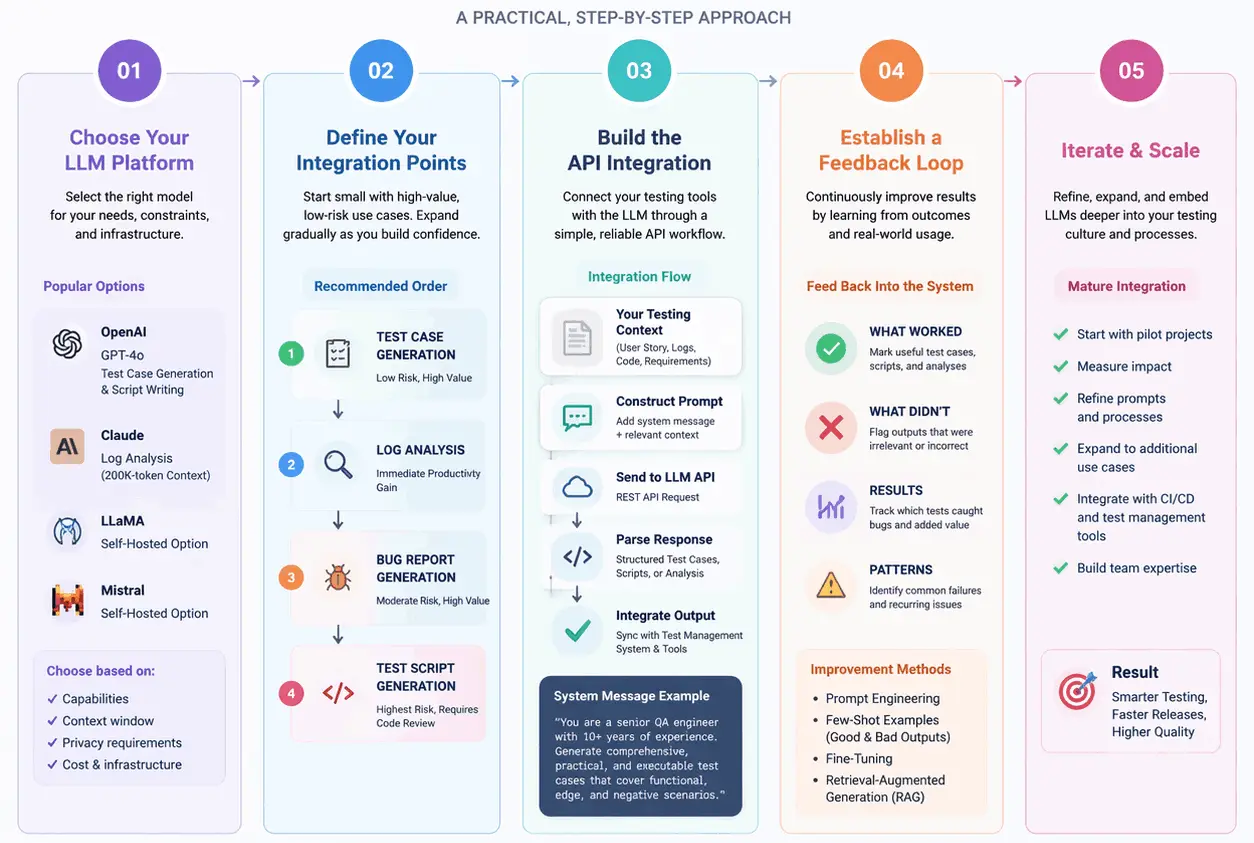
Step 1: Choose Your LLM Platform
I started with the OpenAI API (GPT-4o) for test case generation and script writing, then switched to Claude for log analysis because the 200K-token context window lets me process entire test suite outputs without chunking.
For teams with strict data privacy requirements, open-source models like LLaMA or Mistral can be self-hosted.
Teams that want LLM-powered test automation without the API plumbing can use TestMu's KaneAI, a purpose-built QA agent with test generation, execution, and reporting built in.
Features:
- Natural language test authoring: Author test steps in plain English; KaneAI converts them into executable tests, no scripting needed.
- Multi-format test generation: Converts Jira tickets, PRDs, GitHub PRs, PDFs, and images into structured test cases automatically.
- AI-native self-healing: Detects UI changes and updates affected test steps automatically, significantly reducing maintenance overhead.
- Framework export: Exports tests to Playwright, Selenium, Cypress, or Appium with no vendor lock-in.
- Reusable test modules: Converts common flows like login or navigation into reusable blocks for scaling across suites.
To set it up, refer to the KaneAI getting started guide in the official documentation.

Step 2: Define Your Integration Points
Don't try to integrate LLMs everywhere at once. Start by identifying the highest-value, lowest-risk integration points in your testing workflow.
Start with test case generation (low risk, high value), then log analysis (immediate productivity gain), then bug report generation, and finally test script generation (highest risk, requiring code review).
Step 3: Build the API Integration
Most LLM providers offer straightforward REST APIs. Construct a prompt with relevant context (user story, test logs, code under test), send it to the API, parse the response, and integrate the output into your workflow.
The code examples in the next section show exactly how I built this.
In a typical setup, create a helper function that sends a prompt to the LLM API. Include a system message instructing the model to act as a senior QA engineer.
The API returns structured test cases that your test management system can ingest.
This pattern is the foundation of any scalable AI automation workflow: encode domain expertise into a prompt, and let the model operationalize it at scale.
Step 4: Establish a Feedback Loop
The real power of LLMs in testing emerges over time. Feed the LLM information about which generated test cases were useful versus discarded, which scripts ran successfully, and what common failure patterns exist.
This feedback can be incorporated through prompt engineering (including examples of good and bad outputs), fine-tuning, or retrieval-augmented generation (RAG).
I maintain a prompt library that I refine after every sprint.
When a generated test case catches a real bug, I note the prompt pattern that produced it.
When a generated script needs significant modification, I update the prompt to include the correction as an example.
Real Code Example: LLM-Based Test Case Generation
To tie together the concepts above, let's build a Python utility that uses an LLM to generate test cases from a user story and convert them into executable Selenium scripts.
This example demonstrates the full pipeline: requirement in, runnable tests out.
Project Setup
Before writing any code, you need three things: the OpenAI Python SDK (to communicate with the LLM API), Selenium WebDriver (to run browser-based tests), and pytest (to structure and execute the tests).
Open your terminal and run:
pip install openai selenium pytestThis installs all three packages into your current Python environment. If you're using a virtual environment (recommended to avoid dependency conflicts), activate it first:
python -m venv llm-testing-env

source llm-testing-env/bin/activate   # macOS/Linux
llm-testing-env\Scripts\activate      # Windows

pip install openai selenium pytest
Next, you need an OpenAI API key to authenticate your requests. If you don't have one yet, sign up at platform.openai.com, navigate to API Keys in your account settings, and generate a new secret key.
Once you have your key, set it as an environment variable so the code can access it without hardcoding sensitive credentials into your scripts:
# macOS/Linux, add to your terminal session or ~/.bashrc / ~/.zshrc
export OPENAI_API_KEY="sk-your-actual-key-here"

# Windows Command Prompt
set OPENAI_API_KEY=sk-your-actual-key-here

# Windows PowerShell
$env:OPENAI_API_KEY="sk-your-actual-key-here"
You can verify the variable is set correctly by running:
echo $OPENAI_API_KEY          # macOS/Linux
echo %OPENAI_API_KEY%         # Windows CMD
echo $env:OPENAI_API_KEY # Windows PowerShellNote:This example uses the OpenAI Python SDK, but the same approach works with any LLM provider. To use Anthropic's Claude, install pip install anthropic and swap the client initialization. For Google's Gemini, use pip install google-generativeai.
If you're running a self-hosted model (like LLaMA or Mistral) behind an OpenAI-compatible API server such as vLLM or Ollama, you only need to change the base_url parameter in the client; the rest of the code stays identical.
Generate Test Cases From a User Story
The core function takes a user story and returns structured test cases as JSON:
# llm_test_generator.py

import os, json
from openai import OpenAI

client = OpenAI(api_key=os.getenv("OPENAI_API_KEY"))

MODEL = "gpt-4o"

def generate_test_cases(user_story: str) -> list[dict]:
    """Generate structured test cases from a user story using an LLM."""

    prompt = f"""You are a senior QA engineer. Analyze the following user story
and generate comprehensive test cases.

USER STORY:
{user_story}

Return a JSON array of test case objects with these fields:
- "id", "title", "category", "preconditions", "steps", "expected_result", "priority"

Generate at least 8 test cases covering happy path, negative scenarios,
edge cases, and security concerns. Return ONLY valid JSON, no markdown fences."""

    response = client.chat.completions.create(
        model=MODEL,
        messages=[{"role": "user", "content": prompt}],
        temperature=0.3,
    )

    return json.loads(response.choices[0].message.content.strip())
The same pattern applies to the two other utility functions in the project: generate_selenium_script takes a test case dict and returns a Selenium script string, and analyze_failure_log takes a log string and returns a structured diagnosis.
Both use identical prompt-and-parse logic with a lower temperature (0.2) for more deterministic output.
Using the Generator
Here is how you would use this utility in practice. The script below takes a user story, generates test cases, writes them to a JSON file for review, and then converts each test case into an executable Selenium script:
# run_generation.py

from llm_test_generator import generate_test_cases, generate_selenium_script
import json, os

user_story = """
As a user, I want to log in to my account using my email and password
so that I can access my personalized dashboard.

Acceptance Criteria:
- Valid credentials redirect to /dashboard
- Invalid credentials show "Invalid email or password"
- 5 failed attempts lock the account for 30 minutes
- "Forgot Password" link redirects to the reset page
"""

# Generate and save test cases for human review
test_cases = generate_test_cases(user_story)

with open("generated_test_cases.json", "w") as f:
    json.dump(test_cases, f, indent=2)

# Generate Selenium scripts for high-priority cases
output_dir = "generated_tests"
os.makedirs(output_dir, exist_ok=True)

for tc in [t for t in test_cases if t["priority"] in ("critical", "high")]:
    script = generate_selenium_script(tc, base_url="https://staging.example.com")
    with open(f"{output_dir}/test_{tc['id'].lower().replace('-', '_')}.py", "w") as f:
        f.write(script)
Sample Output
The generator produces test cases like this (abbreviated):
[
  {
    "id": "TC-001",
    "title": "Successful login with valid credentials",
    "category": "happy_path",
    "steps": ["Navigate to login page", "Enter valid email and password", "Click Log In"],
    "expected_result": "User is redirected to /dashboard",
    "priority": "critical"
  },
  {
    "id": "TC-005",
    "title": "Account lockout after 5 failed attempts",
    "category": "security",
    "steps": ["Enter incorrect password 5 times", "Attempt 6th login with correct password"],
    "expected_result": "Account is locked for 30 minutes; login rejected even with correct credentials",
    "priority": "critical"
  }
]
For TC-001, the generated Selenium script follows the Page Object Model pattern with explicit waits and descriptive assertions:
# generated_tests/test_tc_001.py (abbreviated)

class LoginPage:

    def __init__(self, driver):
        self.driver = driver
        self.wait = WebDriverWait(driver, 10)

    def navigate(self, base_url):
        self.driver.get(f"{base_url}/login")
        self.wait.until(EC.presence_of_element_located(
            (By.CSS_SELECTOR, "[data-testid='login-form']")))

    def login(self, email, password):
        self.wait.until(EC.element_to_be_clickable(
            (By.CSS_SELECTOR, "[data-testid='email-input']"))).send_keys(email)
        self.wait.until(EC.element_to_be_clickable(
            (By.CSS_SELECTOR, "[data-testid='password-input']"))).send_keys(password)
        self.wait.until(EC.element_to_be_clickable(
            (By.CSS_SELECTOR, "[data-testid='login-button']"))).click()

def test_successful_login(driver):
    """TC-001: Verify valid credentials redirect to /dashboard."""
    LoginPage(driver).navigate("https://staging.example.com")
    LoginPage(driver).login("user@example.com", "ValidPassword123!")
    assert "/dashboard" in driver.current_url, f"Expected /dashboard, got {driver.current_url}"
Analyzing Failures
When tests fail in CI/CD, pipe the log through analyze_failure_log for an instant diagnosis:
diagnosis = analyze_failure_log(failure_log)

# Output:
# Summary:    The login page failed to load; staging server returned HTTP 503.
# Type:       environment_issue
# Root Cause: Staging environment unavailable
# Fix:        Check staging server health; retry once environment is confirmed up.
# Confidence: high
Key Takeaways From the Code
Structured prompts produce structured outputs. The generate_test_cases function uses a detailed schema in the prompt, which pushes the LLM to return consistent, machine-parseable JSON.
- Temperature matters: Test case generation uses 0.3 for creative variation, while code generation uses 0.2 for deterministic output.
- Human review is non-negotiable: The script saves outputs for review rather than injecting anything into the test suite automatically.
- Prompt specificity drives code quality: By specifying Page Object Model, explicit waits, and data-testid selectors in the prompt, the generated code aligns with modern best practices.
Limitations of LLM Test Automation
LLMs can hallucinate, lack system context, produce non-deterministic outputs, raise data privacy concerns, and generate costs that require careful budget planning.
LLMs are powerful but not infallible. Understanding their limitations is critical to using them effectively. Here's what I've encountered:
- Hallucinations: LLMs can generate plausible-sounding but incorrect information. A generated test script might use API methods that don't exist, or a test case might reference a feature that isn't part of the application. Human review is non-negotiable.
- Lack of system context: LLMs don't inherently understand your application architecture, database schema, or infrastructure constraints. They work with the context you provide, so an incomplete context produces incomplete results.
- Non-determinism: The same prompt can produce different outputs on different runs. This can be managed with temperature settings and seed parameters, but it means LLM outputs should be treated as suggestions rather than canonical artifacts.
- Data privacy: Sending test logs, code, and requirements to external LLM APIs may expose sensitive information. Evaluate your organization's data governance policies before integrating.
- Cost: API-based LLMs charge per token. High-volume usage (such as analyzing every test run's logs) can become expensive. Budget planning is essential.
Best Practices for LLM-Powered Test Automation
Successful LLM testing integrations always review outputs before use, invest in prompt engineering, provide rich context, measure results per sprint, and start with one use case before scaling. For the strategy layer around these examples, covering test types, evaluation metrics, and frameworks, see LLM testing.
Based on what I've learned through hands-on implementation, here are the practices that separate successful LLM testing integrations from failed experiments:
- Always review LLM outputs: Never push generated test cases or scripts directly into your test suite without human review. This is the single most important practice.
- Invest in prompt engineering: The quality of your prompts is the single biggest factor in the quality of outputs. Develop a library of tested, effective prompts for each use case.
- Provide rich context: Include relevant code, existing test patterns, and domain-specific terminology in your prompts. The more context the model has, the better its outputs.
- Measure and iterate: Track metrics like time saved per sprint, test coverage improvement, and defect escape rate. Use these metrics to refine your approach.
- Start small, scale gradually: Begin with one team, one use case, and one framework. Expand only after proving value.
- Stay current: The LLM landscape evolves rapidly. What was state-of-the-art six months ago may be surpassed by newer, more capable, or more affordable models.
Prompt quality is a discipline on its own. A dedicated AI prompt engineering practice gives your team a reusable library that compounds in value across every LLM use case.
The Future of LLM-Driven Testing
LLM-driven testing is moving toward fully autonomous agents, multimodal input support, and tighter CI/CD integration that shifts quality decisions earlier in the development cycle.
- Autonomous testing agents: We are moving toward AI agents that can autonomously explore applications, identify testable behaviors, generate and execute tests, and report findings with minimal human guidance.
- Multimodal testing: Next-generation LLMs process images, videos, and audio alongside text. For testing, this means an AI that can look at a screenshot and identify visual bugs, accessibility issues, or design inconsistencies without needing coded visual regression tools.
- Self-healing test suites: Self-healing test automation means when a UI change breaks a locator, the LLM analyzes the new page structure, identifies the replacement selector, and re-runs the test automatically.
- Domain-specific fine-tuned models: A model fine-tuned on your company's codebase, test history, and bug database produces dramatically better results than a general-purpose model.
As this shift accelerates, AI agent testing is emerging as a discipline with its own evaluation frameworks and failure modes worth understanding before adopting agents at scale.
Conclusion
Large Language Models represent the most significant shift in testing methodology since the adoption of automation frameworks. They don't replace testers; they amplify them.
They handle the tedious, repetitive, and time-consuming aspects of testing, freeing human testers to focus on user intent, risk judgment, and business-driven strategy. That division of labor is what a QA agent formalizes: describe a flow in natural language, and it authors the test, runs it across 3,000+ browser and OS combinations, and repairs the steps a UI change breaks, leaving the judgment work with you.
- Integration path: Start with a single use case, prove the value, iterate on your prompts and workflows, and gradually expand.
- Accessibility: The tools are available today. The APIs are accessible. The cost is manageable.
- Adoption window: The only question is whether your team gains a competitive edge as an early adopter, or catches up later.
- Present reality: LLM-driven testing is not a future possibility. The question is not whether to adopt it, but how fast you can do it well.
Citations
- The Potential of LLMs in Automating Software Testing: https://arxiv.org/html/2501.00217v1
Author

Salman Khan
Blogs: 138


Salman is a Test Automation Evangelist and Community Contributor at TestMu AI, with over 6 years of hands-on experience in software testing and automation. He has completed his Master of Technology in Computer Science and Engineering, demonstrating strong technical expertise in software development, testing, AI agents and LLMs. He is certified in KaneAI, Automation Testing, Selenium, Cypress, Playwright, and Appium, with deep experience in CI/CD pipelines, cross-browser testing, AI in testing, and mobile automation. Salman works closely with engineering teams to convert complex testing concepts into actionable, developer-first content. Salman has authored 120+ technical tutorials, guides, and documentation on test automation, web development, and related domains, making him a strong voice in the QA and testing community.


Frequently asked questions
Did you find this page helpful?
More Related Blogs

TestMu AI forEnterprise
Get access to solutions built on Enterprise
grade security, privacy, & compliance
- Advanced access controls
- Advanced data retention rules
- Advanced Local Testing
- Premium Support options
- Early access to beta features
- Private Slack Channel
- Unlimited Manual Accessibility DevTools Tests