

Power Your Software Testing with AI Agents and Cloud
The Native AI-Agentic Cloud Platform to Supercharge Quality Engineering. Test Intelligently and Ship Faster.


- TestMu AI (Formerly LambdaTest)
- /
- Blog
- /
- 9 Best Android Emulators for Linux
9 Best Android Emulators for Linux
Most Linux Android emulators are abandonware. These 9 still ship in 2026, with setup notes, KVM tips, and a cloud route to real-device testing.
Last Updated on:
Linux held 7.53% of the worldwide desktop operating system market in July 2026, per Statcounter Global Stats. That is still a minority share, but it is a growing one, and it includes most kernel hackers, embedded developers, and the build agents that ship every Android APK to Google Play. The same engineers regularly need to run an Android app on Linux to debug, demo, or screenshot a feature. Native Android does not run on a stock Linux desktop, so an emulator (or a Linux-friendly cloud device) is the only path.
This guide covers 9 Android emulators online for Linux that still ship in 2026, what each is good for, and which ones to skip. The shortlist filters out projects that have been deprecated or unmaintained for several years, since shipping Android-on-Linux on a dead project is a security risk. The last section shows how to run the same test on TestMu AI cloud when an emulator session is not enough.
Key Takeaways
- Pick an Android emulator for Linux by use case: Android Studio with AVD for building Android apps, Waydroid for running Android apps next to Linux apps, and TestMu AI cloud for testing across many devices.
- Android Studio Panda 4, released on April 21, 2026 per Wikipedia, is the latest stable Android Studio, and the Linux build is a 1.5 GB tar.gz that runs on Ubuntu, Fedora, and Arch.
- The Android Studio emulator on Linux depends on KVM acceleration, and an x86_64 Android 14 image without KVM runs at only 3 to 5 FPS, so confirm acceleration with kvm-ok before starting an AVD.
- Linux hosts without /dev/kvm can still run the Android emulator headless with -accel off, -no-window, and -gpu swiftshader_indirect, but boot takes minutes, so CI timeouts must be raised.
- Waydroid runs Android in a Linux namespace on a LineageOS image with near-native performance and, per Wikipedia, is the community-maintained successor to Anbox, which was deprecated on February 3, 2023.
- Genymotion Desktop suits sensor and network-condition testing but is free for personal use only, while Anbox Cloud is a commercial Canonical platform for streaming Android workloads at scale on Ubuntu infrastructure.
- Android-x86, ARChon, and AndroVM are no longer actively developed, and the last stable Android-x86 release was Android 9.0 r2 on March 25, 2020, so treat all three as legacy options.
- TestMu AI runs Android emulators and a real device cloud of 10,000+ iOS and Android devices from a Linux browser tab, and Appium tests switch between the two with the isRealMobile capability.

Note: Local emulators miss hardware-level bugs (camera, GPS drift, battery, biometrics). Run the same APK on TestMu AI cloud across 10,000+ real Android devices and emulators, no Linux install required. Try TestMu AI free.
Why Linux Needs an Android Emulator
Android shares the Linux kernel, but the userland is built on the Android Runtime (ART), Bionic libc, and the Java/Kotlin SDK. None of those ship by default on Ubuntu, Fedora, or Arch. Without an emulator or container layer, an APK has nothing to bind against on a desktop Linux box.
Three concrete jobs push Linux developers toward an emulator:
- Daily development: compile, run, and debug an Android app from a Linux laptop without leaving the IDE.
- CI and headless test runs: spin up an Android image on a build agent for instrumented and UI tests.
- App-on-desktop use: launch an Android-only app (banking, messaging) on a Linux desktop.
For the testing job in particular, a single emulator on a laptop misses bugs that only show up on a specific device. A real device cloud with both emulators and physical devices is the production answer. The emulator vs simulator vs real device guide walks through the tradeoffs in detail.

How to Pick the Right One
Before scrolling the list, narrow by use case. The wrong tool for a use case wastes a weekend on configuration:
- Building an Android app on Linux: Android Studio with AVD. Anything else fights the official toolchain.
- Running Android apps next to Linux apps: Waydroid (free) or Anbox Cloud (commercial).
- Testing across many Android versions and devices: TestMu AI cloud, Genymotion Desktop, or AVD with multiple system images.
- Booting Android as a desktop OS: Bliss OS or Android-x86 (note: Android-x86 is no longer actively developed).
- Running Android in a Chrome tab: ARChon (legacy ARC fork; works only on older Chrome builds).
Two filters cut another half of the search results. First, check the project's last release date. Second, confirm KVM acceleration is supported on your CPU; without it, every QEMU-backed emulator runs at single-digit FPS on Linux.
9 Best Android Emulators for Linux
The list runs cloud first (lowest setup, broadest device coverage), then official local tooling, then container layers, then bootable distributions, and ends with niche or legacy options. Each entry calls out the install effort, what it is good for, and the active-maintenance status so you can skip dead projects.
1. Android Studio with Android Virtual Device (AVD)
Android Studio is the official Android IDE from Google and the AVD it ships is the reference emulator. Per the Android Studio entry on Wikipedia, the latest stable release is Android Studio Panda 4 (2025.3.4), released on April 21, 2026. The Linux build is a 1.5 GB tar.gz that runs on Ubuntu, Fedora, and Arch with no third-party PPAs.
AVD uses QEMU under the hood and depends on KVM for performance. On a recent Intel or AMD CPU, an x86_64 image of Android 14 boots to home screen in roughly 30 seconds. Without KVM, the same image runs at 3-5 FPS, which is why most Linux emulator slowness questions resolve to a missing kvm group membership or a disabled VT-x bit in BIOS.
Best for: daily Android development on Linux. The official tooling, debugger, layout inspector, and Gemini coding assistant are all wired into the IDE.
Confirm KVM acceleration before you start an AVD:
# Ubuntu and Debian
sudo apt install cpu-checker
kvm-ok
# Expected: "KVM acceleration can be used"

# Add your user to the kvm group (one-time)
sudo usermod -aG kvm $USER
newgrp kvm
For headless CI runs, launch the emulator from the command line:
emulator -avd Pixel_7_API_34 -no-window -no-audio -no-snapshot -gpu swiftshader_indirect2. TestMu AI (formerly LambdaTest)
TestMu AI runs Android emulators and real devices from a browser tab on Linux, so there is no local APK installer, KVM tuning, or graphics driver work. The dashboard exposes manual sessions for ad-hoc QA and Appium endpoints for automation. The platform pairs the cloud emulator with a real device cloud of 10,000+ iOS and Android devices, so the same suite can target an emulator for fast feedback and a flagship Pixel for the final pass.
For Linux teams, the practical wins are the TestMu AI tunnel for testing locally hosted apps, Underpass for proxy-bound corporate networks, and CI integrations that do not require a build agent with KVM. Apps upload as .apk, .aab, or .zip files, or install directly from the Play Store inside a session. The Test Intelligence module surfaces flaky test patterns across runs, and KaneAI lets you describe a flow in natural language and execute it on the cloud Android device.
Best for: Linux teams that want broad device coverage, CI without local emulator infrastructure, and a single dashboard for emulator and real-device runs.
Active and supported: yes, with regular product releases. Setup effort: none on the Linux box; sign in to the dashboard.
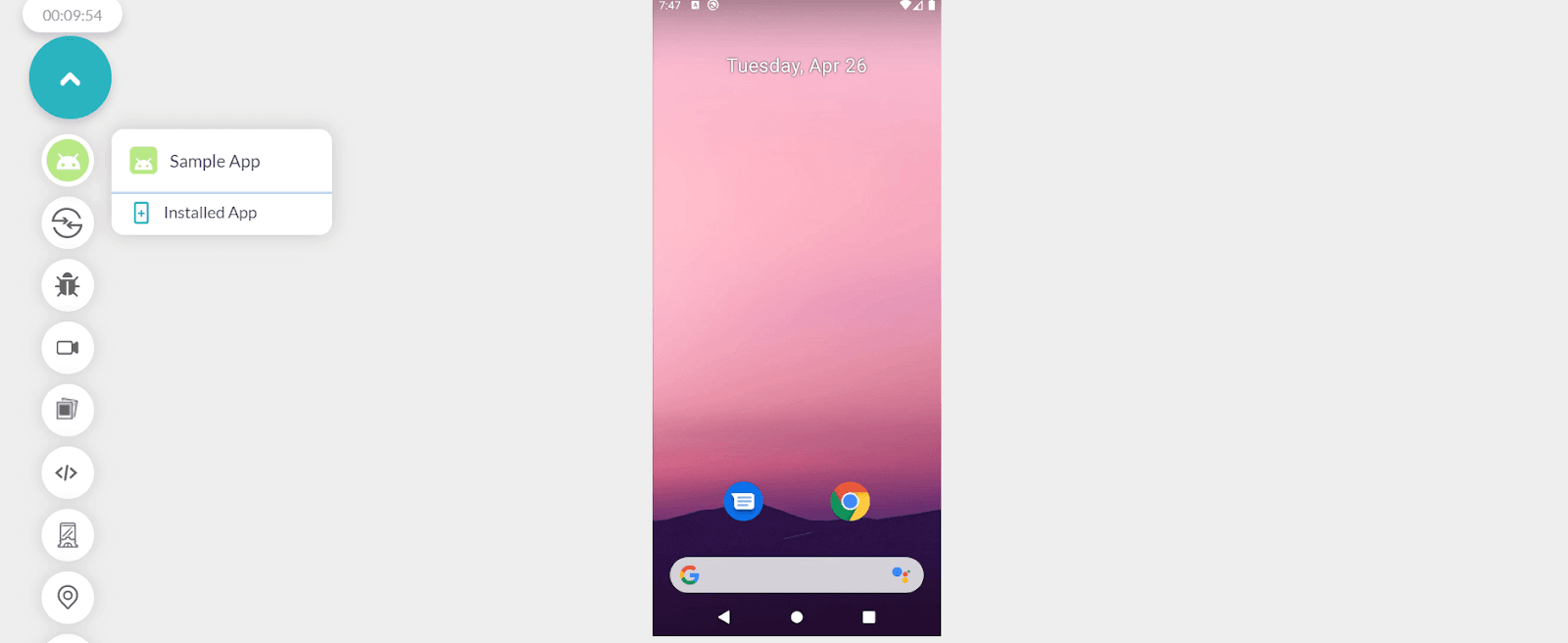
Quick start from a Linux machine:
- Sign in to the TestMu AI dashboard, open Real Time Testing, then App Testing, and pick Android.
- Upload your .apk or .aab, choose a device manufacturer and Android version, and click START.
- For automation, point your Appium suite at
https://mobile-hub.lambdatest.com/wd/hubwith your username and access key.
See the Appium getting-started docs for the full capabilities matrix and a sample Appium session running on Linux.
3. Genymotion Desktop
Genymotion Desktop is a VirtualBox-backed Android emulator that ships pre-built device profiles, simulated sensors (accelerometer, gyroscope, GPS, network throttling), and integrations with Android Studio and the Android SDK tools. It runs on Debian-family and RPM-family distributions.
Best for: sensor and network-condition testing where AVD's defaults are too thin and a real device is overkill. The free edition is personal-use only; teams need the paid plan.
Genymotion exposes an Espresso, Appium, and Robotium-friendly interface, so existing test frameworks attach without code changes. The same project also publishes Genymotion Cloud (formerly Genymotion SaaS), which is a separate product from the desktop emulator covered here.
4. Waydroid
Waydroid is a container-based compatibility layer that runs Android in a Linux namespace using a LineageOS system image. Per the Waydroid Wikipedia article, it works on any device with a Linux kernel and is the community-maintained successor to Anbox, which was deprecated on February 3, 2023.
Best for: running Android apps next to Linux apps on a desktop. Performance is close to native because the Android userland shares the host kernel rather than running through QEMU.
Waydroid is not a drop-in CI choice because the container does not isolate as cleanly as a virtual machine, and snapshotting a fresh state per test is harder than with AVD. For production test runs across many Android versions, the mobile app testing basics guide explains why a cloud farm pays back the setup cost.

5. Anbox Cloud
Anbox Cloud is the commercial successor to the original Anbox project, maintained by Canonical. The Anbox Wikipedia entry describes it as a cloud platform for running Android instances at scale, built for server and cloud infrastructure rather than the desktop, with GPU acceleration and support across AWS, Azure, and Google Cloud. It is not the open-source Anbox you might find in older tutorials.
Best for: streaming Android workloads at scale (cloud gaming, telco app previews, automotive HUDs) on Ubuntu infrastructure. It is overkill for a single developer testing one APK on a laptop; pick Waydroid or AVD for that case.
Anbox Cloud does not replace a mobile QA cloud. It runs Android on Linux servers; it does not provide a managed Android device matrix for app QA. For QA across the actual Android device long tail, a real device cloud is the right fit.
6. Android-x86
Android-x86 is an unofficial port of Android to x86 hardware, originally launched in 2009. Per the Android-x86 Wikipedia article, the latest stable release is Android 9.0 r2 from March 25, 2020, and the project is listed as inactive or discontinued as of 2025.
Active and supported: no. Listed here because the ISO still boots and is still useful for one-off legacy testing on Android 9.
Best for: running an Android 9 environment on bare metal or in a virtual machine when no patched build is needed. Skip if: you need security updates, a current Play Store, or anything past Android 9.
7. Bliss OS (BlissRoms)
Bliss OS is an open-source Android distribution targeting desktop, tablet, and PC use. It boots from a USB or DVD and supports both 32-bit and 64-bit x86 hardware. Recent builds track Android 11 and 12, with an Android 14 alpha as of 2026.
Best for: using Android as a desktop OS, especially on older hardware where Bliss runs faster than a current Linux distribution plus a heavyweight emulator. It is not a fit for app QA because the user is the OS, not a contained sandbox.
Optional integrations include F-Droid and microG for a Google-services-free experience.
8. ARChon
ARChon is a Chrome extension that runs APKs in a fork of Google's discontinued App Runtime for Chrome (ARC). It does not need a virtual machine and treats every APK as a Chrome packaged app.
Active and supported: partial. ARC was discontinued by Google in favor of ARC++ on ChromeOS, and ARChon only loads on older Chrome builds that still allow packaged-app loading.
Best for: a no-VM Android sandbox for very small experiments. Skip if: you need current Chrome, Play Services, or anything beyond Android 4-5 era APKs.
9. AndroVM
AndroVM is the original VirtualBox-based Android image that became Genymotion. The standalone AndroVM project itself is no longer the active path; the same engineering moved into Genymotion Desktop. Some legacy ROMs and tutorials still reference AndroVM by name.
Best for: nothing new. Choose Genymotion Desktop instead for the same lineage with current updates. Listed here because guides still link to it; treat it as historical context, not a 2026 install target.
Running the Android Emulator Without KVM on Linux
Not every Linux box can use KVM. Nested virtualisation is often disabled on cloud VMs, shared CI runners rarely expose /dev/kvm, and some hosting providers block it outright. The emulator still runs in that situation, just slowly, and the flags that make it work are worth knowing before you conclude the tooling is broken.
First confirm what you are actually dealing with. If /dev/kvm is absent, no group membership or BIOS change will help, because the hypervisor is not exposed to the machine at all:
# Is the KVM device even present?
ls -l /dev/kvm || echo "no /dev/kvm on this host"

# Is the CPU capable, and is virtualisation enabled?
egrep -c '(vmx|svm)' /proc/cpuinfo   # 0 means disabled in BIOS or unsupported
Per the Android emulator command-line reference, -accel takes three values: auto (the default, which uses acceleration when it is available), off (disables acceleration entirely, documented as useful for debugging), and on (forces it, and the emulator refuses to start with an error if KVM is not usable). Acceleration applies only to x86 and x86_64 system images; the flag is ignored on other ABIs.
For a headless run on a host with no KVM, combine -accel off with software GPU rendering and a clean boot:
emulator -avd Pixel_7_API_34 \
  -accel off \
  -no-window \
  -no-audio \
  -no-snapshot \
  -gpu swiftshader_indirect
Two expectations to set. Boot takes minutes rather than seconds, so raise any CI timeout that assumes an accelerated start. And -gpu swiftshader_indirect is doing software rendering on the CPU, which is what keeps the screen working at all when there is no GPU or display attached.
This is a workaround, not a fix. An unaccelerated emulator is slow enough that a full instrumented suite can outlast the CI job that started it, and the failures it produces are usually timeouts rather than real defects. If your build agents cannot expose KVM, running the suite on cloud Android devices sidesteps the problem entirely, since the acceleration happens on infrastructure you do not maintain. The Appium example in the next section shows the same suite pointed at that cloud.
Comparison Table at a Glance
Match the emulator to the use case. The status column reflects the latest activity verifiable in 2026.
| Emulator | Best Use Case | Setup on Linux | Active in 2026 |
|---|---|---|---|
| Android Studio + AVD | Daily Android development, official IDE workflow | Medium (KVM, SDK) | Yes (Panda 4, 2026) |
| TestMu AI | Cross-version Android testing, CI without local infra | None (browser) | Yes |
| Genymotion Desktop | Sensor and network simulation | Medium (VirtualBox) | Yes (paid for teams) |
| Waydroid | Run Android apps on Linux desktop | Easy (most distros) | Yes |
| Anbox Cloud | Streaming Android workloads at scale | High (Ubuntu Pro) | Yes (commercial) |
| Android-x86 | Legacy Android 9 testing | Medium (ISO) | No (last release 2020) |
| Bliss OS | Android as desktop OS | Medium (USB boot) | Yes |
| ARChon | Chrome-tab Android sandbox | Easy (Chrome ext) | Partial (legacy Chrome) |
| AndroVM | Historical context only | Medium (VirtualBox) | No (folded into Genymotion) |
Run an Appium Test on TestMu AI from Linux
A local AVD is fine for one device, but most apps ship to dozens of Android-OS combinations. The same Appium suite that drives a local AVD can target the TestMu AI cloud by changing the hub URL and capability block. The example below opens the Selenium Playground in a Chrome browser running on a cloud Android device:
// node 18+, sample Appium WebDriver session against TestMu AI cloud
const wdio = require('webdriverio');

const opts = {
  protocol: 'https',
  hostname: 'mobile-hub.lambdatest.com',
  port: 443,
  path: '/wd/hub',
  capabilities: {
    platformName: 'Android',
    'appium:deviceName': 'Pixel 8',
    'appium:platformVersion': '14',
    'appium:automationName': 'UiAutomator2',
    'appium:browserName': 'Chrome',
    'lt:options': {
      username: process.env.LT_USERNAME,
      accessKey: process.env.LT_ACCESS_KEY,
      build: 'Android Emulators for Linux article demo',
      name: 'Open Selenium Playground',
      isRealMobile: false,
      visual: true
    }
  }
};

(async () => {
  const driver = await wdio.remote(opts);
  await driver.url('https://www.testmuai.com/selenium-playground/');
  const heading = await driver.$('h1');
  console.log('Heading:', await heading.getText());
  await driver.deleteSession();
})();
Set isRealMobile: false to target a cloud emulator session, or flip to true to run the same script against a real Android device from the same dashboard. The Appium getting-started docs list every supported capability and the matching device matrix.
For visual regression on top of the functional pass, the visual testing tool diffs screenshots across Android versions and device sizes. Test Analytics tracks pass-rate, build duration, and flakiness per device, so the team can see whether failures cluster on one Android version before sinking a sprint into a debug spike.

Conclusion
Pick by use case, not by reputation. Building an Android app on Linux means Android Studio with AVD; running Android apps next to Linux apps means Waydroid; testing across the Android device long tail means TestMu AI cloud. The other six entries on this list cover narrower jobs, and three of them are no longer in active development, so plan for a migration if you are still on them. The same use-case-first logic applies if you ever need to run Android apps on iPhone instead of on a Linux desktop.
If your next job is regression testing on more devices than your laptop can hold, start with TestMu AI's real device cloud and the Appium getting-started docs. The mobile app testing learning hub walks through the broader QA workflow that surrounds the emulator pick.
Author

Shivam Singh
Blogs: 4

Shivam Singh is a Lead Member of Technical Staff at TestMu AI (formerly LambdaTest), architecting the Real Device Cloud that runs automated app and web tests on real Android and iOS devices. He designed the architecture for real-device app and web automation and wrote the microservices from scratch in Golang, including the XCUITest and Espresso execution layers for iOS and Android. His platform reached peak parallel concurrency of 150+ for app automation while handling roughly 500,000 tests a month, and he leads the team that keeps the automation grid running. He brings over eight years of engineering experience and holds a B.Tech in Computer Science.
Reviewer

Siddhant Sinha
Reviewer
Siddhant Sinha is a Lead Member of Technical Staff at TestMu AI architecting Kane CLI, the command-line tool for browser automation from the terminal, where natural-language flows run in a real Chrome browser and return pass or fail with shareable proof. He has spent over three years at TestMu AI (formerly LambdaTest) building scalable platforms that run tests at scale on real Android and iOS devices. His expertise covers platform architecture, large-scale distributed systems, and CLI design, shaped by earlier cloud-native engineering at Semut.io, including building Elasticsearch as a service.


Android Emulators for Linux FAQs
Did you find this page helpful?
More Related Blogs
TestMu AI forEnterprise
Get access to solutions built on Enterprise
grade security, privacy, & compliance
- Advanced access controls
- Advanced data retention rules
- Advanced Local Testing
- Premium Support options
- Early access to beta features
- Private Slack Channel
- Unlimited Manual Accessibility DevTools Tests