
Author End-to-End Tests in Natural Language with KaneAI
Plan, Author, and Evolve E2E Tests for Web and Mobile Apps in Natural Language.

Happy Path Testing: What It Is and How to Go Beyond It
Happy path testing checks the default flow a user takes when nothing goes wrong. See checkout examples, unhappy paths, a checklist and how to automate it.
Published on:
Happy path testing is the testing of the default route that a user will take through a feature when all the inputs are valid, and nothing goes wrong (e.g., a shopper buying an in-stock item with a valid card). It verifies that the core flow works. It doesn't in any way prove that the software can deal with errors, which is the remit of the unhappy path tests.
Wikipedia lists "sunny day scenario" and "golden path" as synonyms. The thing that teams get wrong isn't the definition per se but the scope. A happy path test passing is a baseline; it's not a decision to release.
This guide covers what to include, where it stops and how you can take a single happy path and turn it into real coverage without having to rewrite it.
TL;DR
Happy path testing checks the default route a user takes through a feature when every input is valid and nothing goes wrong, such as a shopper buying an in-stock item with a valid card. A passing happy path test proves the core flow works; error handling needs separate unhappy path tests.
Happy Path vs Sad Path
- Happy path: Valid inputs, the default route and one clear end state, such as correct credentials landing on the dashboard or a valid card reaching an order confirmation. Run it on every deploy as the smoke check for the revenue path.
- Unhappy path testing: Also called sad path testing, unhappy path testing feeds a realistic mistake such as a wrong password or an expired card. The flow should stop with a clear message and no side effects, so no order is created.
- Alternate path: A different but still valid route to success, such as a saved passkey, SSO, a discount code or a wallet payment. Each alternate path becomes a new data row on the existing happy path test.
Happy Path Test Cases
- Test case template: An ID, a title, preconditions, test data passed as parameters, the steps, one expected result and a priority. A guest checkout with a valid card is P0 and blocks the release when it fails.
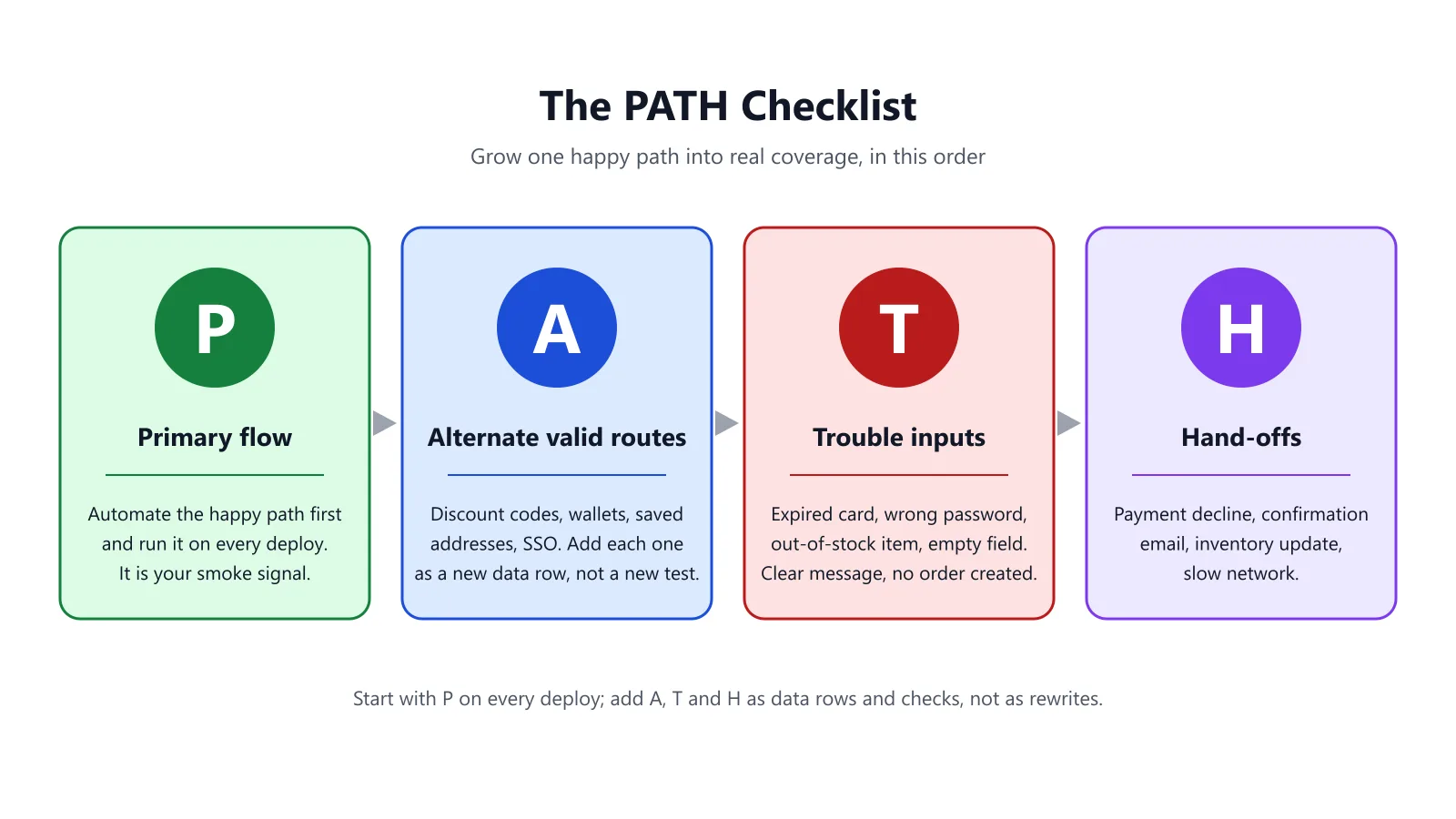
- PATH checklist: Primary flow, Alternate valid routes, Trouble inputs and Hand-offs, worked in that order. It grows one happy path into real coverage by adding data rows and checks instead of rewriting the test.
- KaneAI: KaneAI by TestMu AI authors the checkout happy path from plain-English steps with variables for test data. Code required: No. Its AI Test Case Generator turns a Jira, Azure DevOps or Linear issue into test cases tagged Positive, Negative and Edge.
What Is Happy Path Testing?
Happy path testing is the simple case of running the one expected, error-free flow through a feature and verifying that it achieves the correct result. TechTarget describes it as tightly scripted testing with known inputs and a known output. Ministry of Testing refers to it as testing that the product works when everything goes right.
Three things define a happy path test:
- Valid inputs only. Correct credentials, product in stock, working card.
- The default route. The route that the majority of users take, with no detours.
- One very clear end state. An order number, a logged-in dashboard and a message that's been sent.
Example: a login form. Correct username and correct password, and the dashboard loads. That's the happy path. A mistyped password is not.
In UX design and product analytics, "happy path" also means the ideal journey you want the user to take, measured via funnels and conversion rates. This guide uses the testing definition: a test that drives that journey and then checks the outcome.
Why Does Happy Path Testing Matter for an Online Store?
In e-commerce testing, the happy path is the revenue path: browse, add to cart, check out, pay, confirm. If it breaks, then nobody can buy, so it's the very first thing to automate and the very first thing you run after every deploy. Our e-commerce testing guide covers the full range of test types and funnel stage test cases; happy path testing is the common thread that runs through all of them.
A store's checkout happy path, written as plain test steps:
- Open the product page for an item that is in stock.
- Select a size and add to cart.
- Open the cart and check the item, the quantity and the price.
- Start checkout as a guest and enter a valid shipping address.
- Choose standard shipping.
- Pay with a valid test card (on Shopify, here's how to place a Shopify test order using the test gateway or test mode).
- Check that the confirmation page has the correct order number and the right total.
Every step has one expected result. If any step fails, the release is blocked (regardless of how many other steps pass).
The same applies to every stage of the store funnel. One happy path check per stage gives you a short smoke suite that covers the entire revenue path:
| Funnel stage | Happy path check | Expected result |
|---|---|---|
| Search | Search for an existing product name | The product appears in the results |
| Product page | Open the product and select an available variant | Price, stock status and Add to cart are shown |
| Cart | Add the item and open the cart | Item, quantity and subtotal are correct |
| Checkout | Enter a valid address, shipping method and test card | Order is accepted and a confirmation page loads |
| Order email | Check the inbox used for the test order | Confirmation email arrives with the same order number |
What's the Difference Between the Happy, the Alternate and the Unhappy Paths?
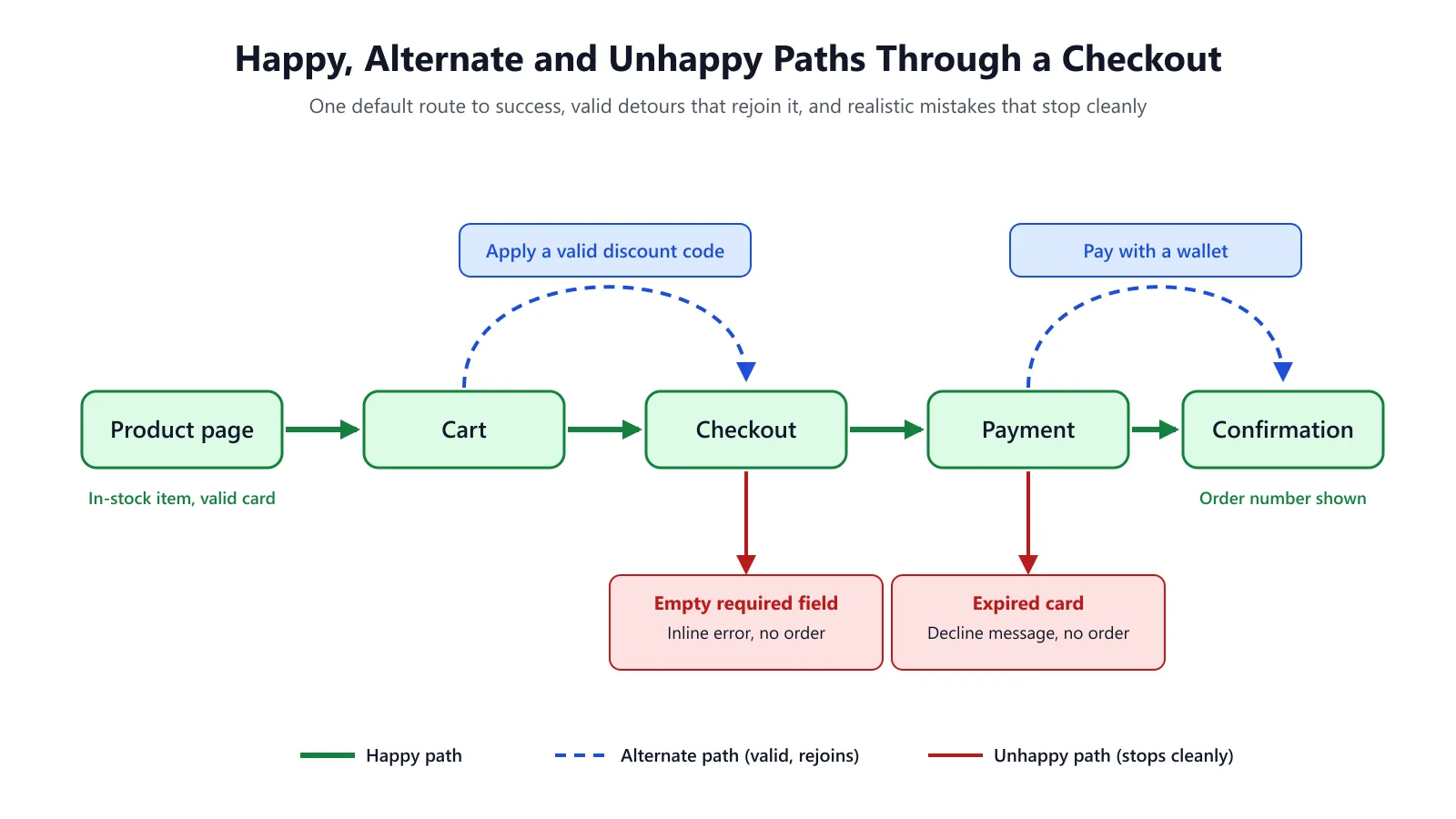
Happy path testing sits inside a larger picture. These terms get mixed up, so here is how they differ:
| Path type | What it is | Login example | Checkout example |
|---|---|---|---|
| Happy path | Default flow, valid inputs, expected result | Correct email + password -> dashboard | In-stock item, valid card -> order confirmation |
| Alternate path | A different but still valid route to success | Sign in with a saved passkey or SSO | Apply a valid discount code, pay with a wallet |
| Unhappy (sad) path | A realistic user mistake or rejected input; flow should stop with a clear message | Wrong password -> "Incorrect password" | Expired card -> decline message, no order created |
| Edge case | Valid but extreme values at the limits | Password at the maximum length | Quantity at the stock limit, a 1-cent order |
Wikipedia points out there's no agreed-upon term for the opposite of a happy path (sad path, bad path and exception path are all used; "unhappy path" is starting to get some traction). TechTarget makes a distinction between a sad path (e.g., you've got the wrong password) and a bad path (e.g., you've entered some junk characters). For the full panoply of input validation (including boundary values and injection checks) see our guide to negative testing, which covers what happens after the happy path.

Write this test in plain English.
Note: KaneAI (from TestMu AI) allows manual testers and PMs to author end-to-end tests in plain English and then run them across browsers and devices. Try KaneAI
How Do You Write a Happy Path Test Case?
A good happy path test case is short, specific, and repeatable. Use this template:
| Field | Value |
|---|---|
| ID | CHK-HP-01 |
| Title | Guest checkout with a valid card places an order |
| Preconditions | Item SKU in stock; payment provider in test mode |
| Test data | SKU, size, shipping address, test card (passed as parameters, not hard-coded) |
| Steps | The seven steps above |
| Expected result | Confirmation page shows an order number and the cart total |
| Priority | P0 - blocks release |
Keep the test data outside the steps. When you come to add the alternative and unhappy paths later on, you just reuse the same steps with different data rather than writing entirely new tests.
How Do You Automate a Happy Path Test?
Here's the checkout happy path as a Playwright test. The store URL is from an environment variable, and the product data is a parameter, so it'll run against both staging and production-like environments. The locators are just illustrative; match them to the actual accessible names on your store.
// checkout.happy-path.spec.ts
import { test, expect } from '@playwright/test';

const STORE_URL = process.env.STORE_URL ?? 'http://localhost:3000';
const TEST_CARD_OK = process.env.TEST_CARD_OK; // approve-only test card from your CI secrets

// All test data lives in the rows; add a row to cover an alternate path
const checkoutRows = [
  {
    sku: 'tee-basic',
    size: 'M',
    email: 'guest+happy@example.test',
    address: '1 Test Street',
  },
];

checkoutRows.forEach(({ sku, size, email, address }) => {
  test(`guest checkout happy path: ${sku}`, async ({ page }) => {
    test.skip(!TEST_CARD_OK, 'TEST_CARD_OK is not set; add the test card to your CI secrets');

    await page.goto(`${STORE_URL}/products/${sku}`);
    await page.getByRole('radio', { name: size }).check();
    await page.getByRole('button', { name: 'Add to cart' }).click();

    await page.goto(`${STORE_URL}/cart`);
    await expect(page.getByRole('row', { name: new RegExp(sku, 'i') })).toBeVisible();
    await page.getByRole('button', { name: 'Checkout' }).click();

    await page.getByLabel('Email').fill(email);
    await page.getByLabel('Address').fill(address);
    await page.getByLabel('Card number').fill(TEST_CARD_OK!);
    await page.getByRole('button', { name: 'Pay now' }).click();

    await expect(page.getByRole('heading', { name: /thank you/i })).toBeVisible();
    await expect(page.getByText(/order #/i)).toBeVisible();
  });
});
The .forEach parameter pattern follows Playwright's parameterized tests docs. If the card secret is missing, the test is skipped with a clear message instead of failing later at "Pay now" with a misleading error. Keep card numbers and any account credentials in environment variables or your CI secret store, never in the test file or the URL.
One change you'll almost certainly need on a real store: the hosted card fields from the payment providers will usually be rendered inside an iframe, so page.getByLabel('Card number') won't find them. You'll need to reach into the frame first, e.g., page.frameLocator('iframe[title*="card" i]').getByLabel('Card number'), finding the element within the iframe that your provider has rendered.
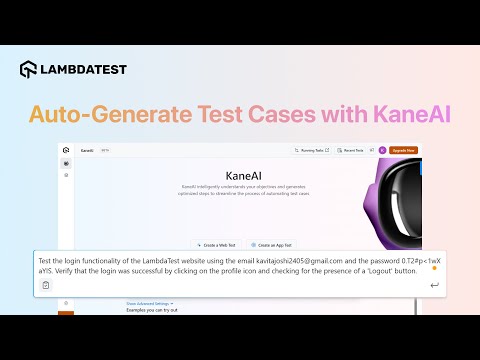
Same test in KaneAI. With KaneAI test authoring, you can write the steps pretty much as they appear in the plain English list above ("add the item to the cart", "pay with the test card", "check the order number is displayed"), use Variables & Parameters for your test data and save shared steps (e.g. login) as reusable Modules. The video below (published April 2025, so some of the button labels have changed since) shows KaneAI generating the steps from a high-level objective (assert login). For a worked example of this, see the booking flow test without any code.
Subscribe to the TestMu AI YouTube channel for more tutorials on testing and automation.
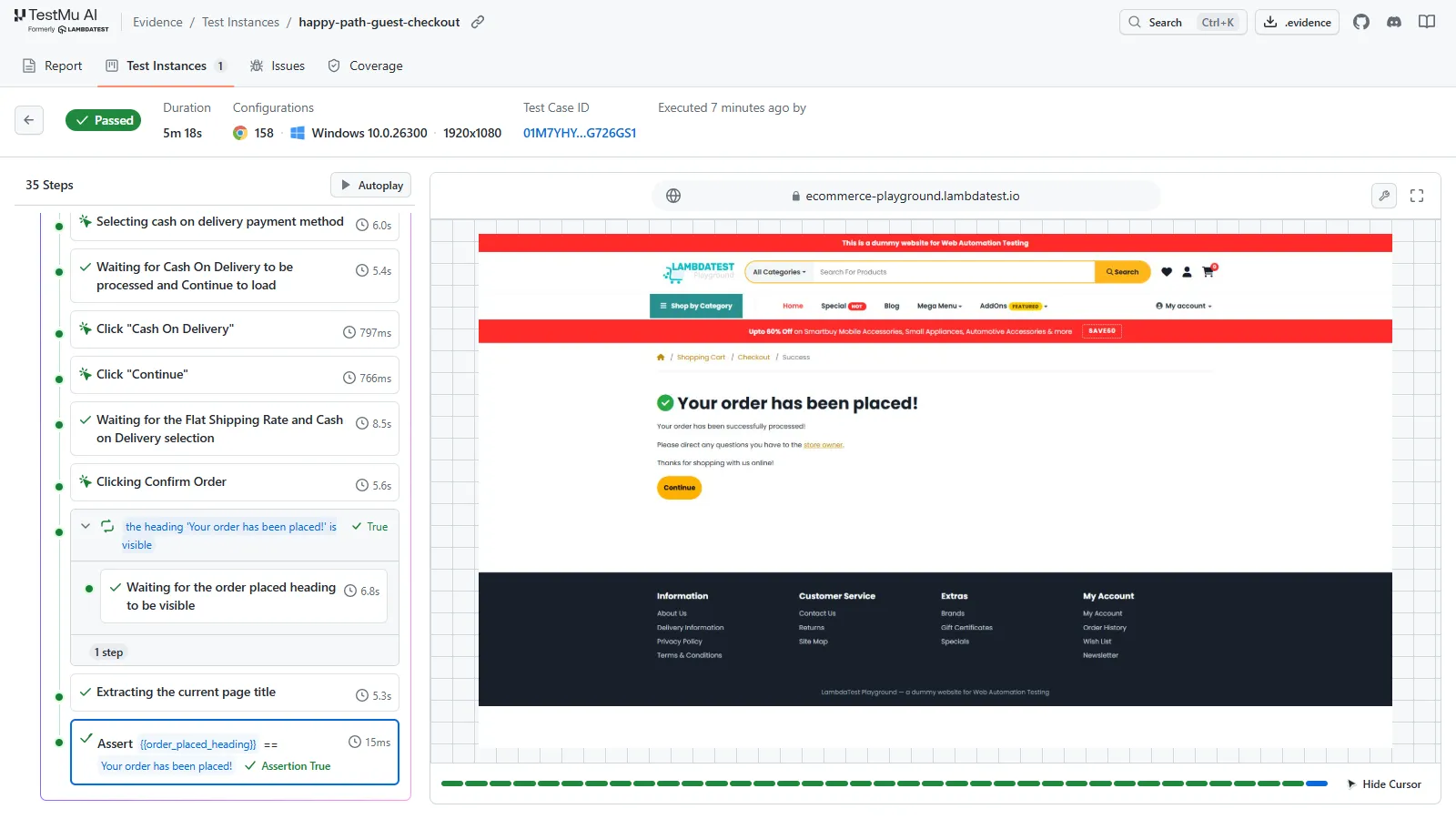
The same plain-English steps also run from the terminal with Kane CLI by TestMu AI. Run against the Ecommerce Playground demo store with the store URL, product and guest details passed as variables, the checkout passes end to end: the product shows In Stock, the cart lists one HTC Touch HD, guest checkout goes through with flat-rate shipping and Cash On Delivery, and the final assertion finds "Your order has been placed!".
What Does a 'Happy Path' Test Look Like at the Unit and API Level?
Happy path testing isn't just a UI thing. At the lower levels, it's the same principle: one valid input, one expected result, and then you add the failure cases alongside it. A happy-path API test for creating an order, as a Playwright API test, with the payload passed in as data:
// orders.api.happy-path.spec.ts
import { test, expect } from '@playwright/test';

const API_URL = process.env.API_URL ?? 'http://localhost:3000';
const API_TOKEN = process.env.API_TOKEN; // from CI secrets, never in the URL

const validOrder = { sku: 'tee-basic', quantity: 1 };

test('POST /orders happy path returns 201', async ({ request }) => {
  test.skip(!API_TOKEN, 'API_TOKEN is not set');

  const res = await request.post(`${API_URL}/orders`, {
    data: validOrder,
    headers: { Authorization: `Bearer ${API_TOKEN}` },
  });

  expect(res.status()).toBe(201);
});
The unhappy path is right next to it, actually: the same call with a quantity of 0 or an unknown SKU should return a 4xx status and produce nothing. Only check the fields that your API's own documentation commits to; the example above explicitly states only the status code.
The PATH Checklist: From One Happy Path to Real Coverage
A happy path is the first test, not the final one. Use the PATH checklist to build it up in a fixed order:
- P - Primary flow. Get the happy path automated first and run that on every deploy. That's your smoke signal.
- A - Alternate valid routes. List the other ways users can succeed (discount codes, wallets, saved addresses, SSO) and add each of those as a new data row rather than a new test.
- T - Trouble inputs. The inputs that users actually encounter in an unhappy path (expired card, wrong password, out-of-stock item, empty required field, etc.). These should all terminate with a clear message and no side effects (i.e., no order should be created).
- H - Hand-offs. Check what happens at the boundaries with the other systems: payment provider decline, email confirmation, inventory update, slow network.
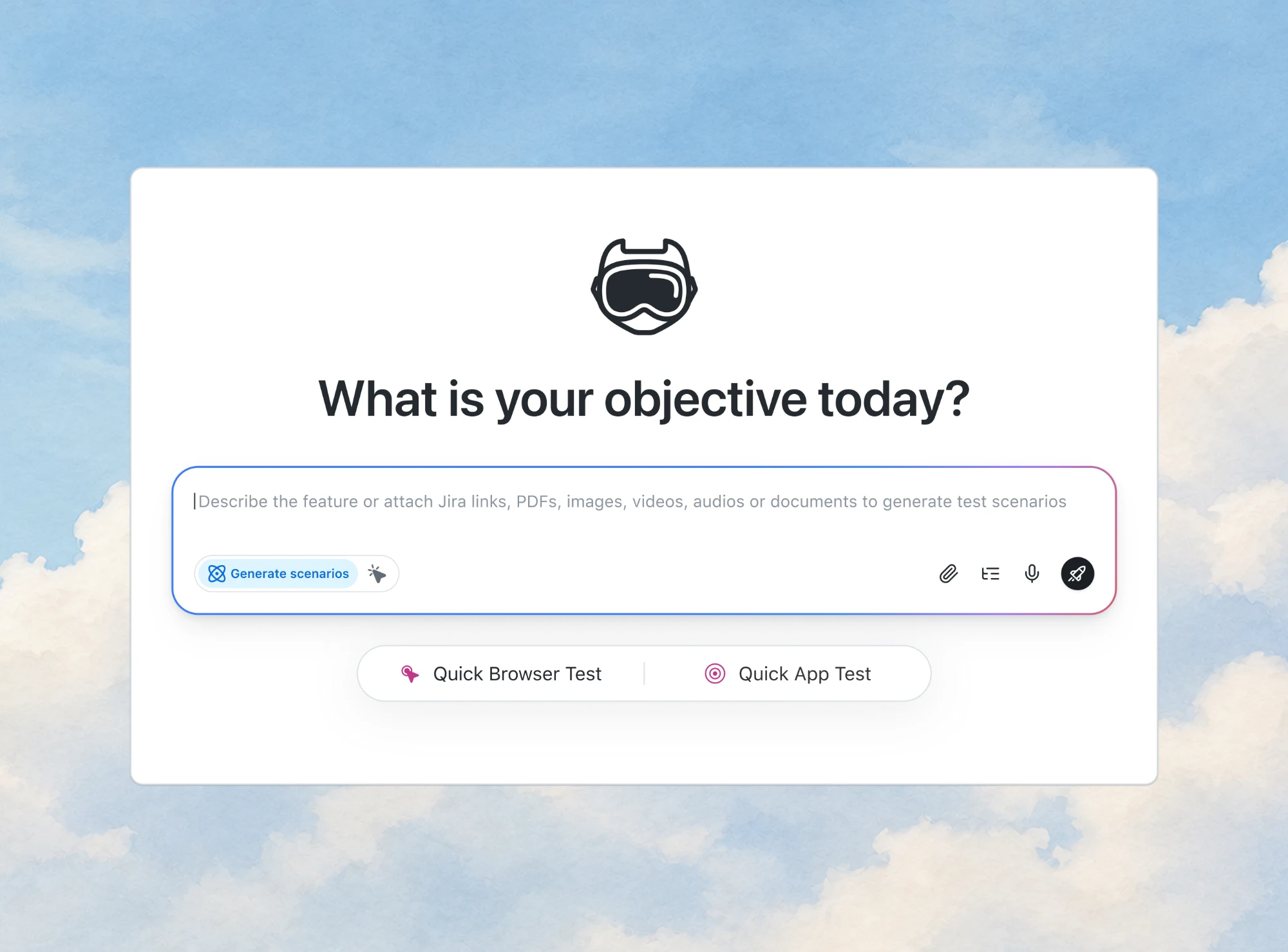
The quickest way through the A and T steps is to stop writing scenarios from memory. TestMu AI's AI Test Case Generator will take a Jira, Azure DevOps or Linear issue, a PDF or plain text and return test cases tagged Positive, Negative and Edge. Click Generate Scenarios on the KaneAI Agent page, go through the list, and then use Create and Automate to turn the ones you want into tests.
What Are the Limits of Happy Path Testing?
Happy path testing has three known blind spots:
- False confidence. That's the main criticism, as TechTarget points out (testing only well-defined scenarios gives a false sense of security). Wikipedia goes on to say it doesn't guarantee graceful handling of error conditions.
- Real users take detours. They'll press back, they'll refresh during the payment process, they'll open two tabs, they'll paste a postcode with a space at the end. None of that is on the happy path.
- It hides integration failures. A happy path test that only ever uses the approve card will pass even if decline handling is broken. Payment test modes do provide decline cards for this very purpose (see how to test your payment gateways with declined card scenarios).
Qase's guidance is the practical one: run happy and unhappy path tests together, early, before user acceptance testing.
When Should You Run Your Happy Path Tests?
| When | Run happy path tests? | Why |
|---|---|---|
| Every pull request | Yes, for the flows the change touches | Cheap and fast; catches broken core flows early |
| Every deploy to staging | Yes, all P0 happy paths | Smoke check before deeper suites run |
| Before user acceptance testing | Yes, with unhappy paths | Qase recommends both, early |
| After production deploy | Yes, a read-only or test-mode subset | Confirms the live revenue path |
| Nightly regression | Yes, plus alternate, unhappy and edge cases | Full coverage when time allows |

Conclusion
Start with your checkout: automate the seven-step happy path as one parameterized test, run it on every deploy, and then work through the PATH checklist one data row at a time.
Turn one happy path into full coverage. Generate the positive, negative and edge test cases from your ticket and then automate the ones you keep with KaneAI.
Testing web or mobile apps without writing code? KaneAI by TestMu AI turns plain-English instructions into tests.
Author

Harshit Paul
Blogs: 97


Harshit Paul is Director of Product Marketing at TestMu AI, with over 8 years of experience in product and growth marketing for developer and QA tools, leading the Agentic AI in Quality Engineering space. He has authored 80+ technical articles for TestMu AI on software testing and automation, and hosted webinars on Selenium, automation testing, browser compatibility, DevOps, and continuous testing. He has led go-to-market and technical marketing initiatives across software testing products, contributing to SEO, content strategy, and developer marketing. He began his career as a certified Salesforce developer at Wipro Technologies, where he worked for 2 years before moving into marketing. Harshit holds a degree in computer programming from Vivekananda Institute of Professional Studies.
Reviewer

Srinivasan Sekar
Reviewer
Srinivasan Sekar is Director of Engineering at TestMu AI, where he leads engineering and open-source initiatives behind the Selenium and Appium automation grid and owns TestMu AI's MCP Server. A committer to Appium and a contributor to Selenium, WebdriverIO, Taiko, and AppiumTestDistribution, he brings over 15 years of experience in quality engineering and open-source technologies. He is the author of the Apress book 'The MCP Standard: A Developer's Guide to Building Universal AI Tools with the Model Context Protocol,' a Certified Kubernetes and Cloud Native Associate, and an international conference speaker. Before TestMu AI he spent over eight years at Thoughtworks as a Principal Consultant and Quality Architect. Srinivasan holds a B.Tech in Information Technology from Anna University.


Happy Path Testing FAQs
Did you find this page helpful?
More Related Blogs


TestMu AI forEnterprise
Get access to solutions built on Enterprise
grade security, privacy, & compliance
- Advanced access controls
- Advanced data retention rules
- Advanced Local Testing
- Premium Support options
- Early access to beta features
- Private Slack Channel
- Unlimited Manual Accessibility DevTools Tests