

Power Your Software Testing with AI Agents and Cloud
The Native AI-Agentic Cloud Platform to Supercharge Quality Engineering. Test Intelligently and Ship Faster.


- TestMu AI (Formerly LambdaTest)
- /
- Blog
- /
- How to Perform Spec-Driven Development From the Command Line
In METR's 2025 randomized trial of experienced open-source developers, 56% said they often had to make major changes to clean up AI-generated code, and developers accepted fewer than 44% of Cursor's generations. Spec-driven development moves that intent into a file the agent reads before it writes any code.
This guide runs spec driven development with Claude Code from the command line: GitHub's Spec Kit 1.0.11 scaffolds the project, Claude Code turns one feature description into spec.md, plan.md, and tasks.md and implements them, and Kane CLI from TestMu AI designs browser tests from the same spec.md and reports which acceptance criteria a real browser has proven. A final walkthrough runs the whole chain in Kane CLI alone, from a PRD to a coverage report and a reconciled suite.
TL;DR
Spec-driven development from the command line is a workflow where a written spec.md, not a chat prompt, drives an AI coding agent. The specify CLI scaffolds the project, the agent writes the spec, plan, and tasks, implements them, and a converge step checks the code against them, while tests trace back to each acceptance criterion.
- specify init: The Spec Kit CLI command that scaffolds a project for an AI coding agent. In Spec Kit 1.0.11, specify init coupon-demo --integration claude --script sh installs 10 Claude Code skills; the older --ai and --no-git flags were removed in 0.10.0. Accepts --ai: No (use --integration claude).
- Spec Kit constitution: The file .specify/memory/constitution.md holds project rules that every Spec Kit skill reads. A rule requiring an ID and a named test for every acceptance criterion is what makes spec.md traceable to tests.
- /speckit-specify: The Spec Kit skill in Claude Code that converts a short feature description into spec.md, with prioritized user stories, Given/When/Then acceptance scenarios, and numbered functional requirements. One paragraph produced 7 scenarios (AC-1 to AC-7) and 9 requirements.
- /speckit-analyze: The read-only Spec Kit skill that checks spec.md, plan.md, and tasks.md for coverage gaps before any code exists. It reported 0 critical issues and 2 untested rules across 21 tasks. Blocks implementation: No (only CRITICAL findings do).
- /speckit-converge: The Spec Kit skill that compares the code with spec.md, plan.md, and tasks.md and appends a task for each gap without editing code. It caught a spec edit that 9 passing unit tests missed. Unit tests catch spec drift on their own: No (they keep the old text).
- Kane CLI: TestMu AI's CLI that turns spec.md into browser tests tagged with the acceptance criteria they verify, then reports proven coverage with kane-cli cover. Eight designed tests covered 29 criteria, and 3 authored tests proved 18 in a real browser. Designing tests spends credits: Yes (ingest, review, and cover are free).
- kane-cli maintain reconcile: When a spec changes, reconcile compares the new text with the version the use cases came from and plans ADD, MODIFY, and ARCHIVE updates to the suite for you to approve. Tests patched by hand: No.
How Do You Set Up Spec Kit for Claude Code From the Command Line?
Install uv, then the specify CLI pinned to a release. Spec Kit's installation guide recommends installing from the GitHub source pinned to a tag, and lists Python 3.11 or later and uv as requirements:
# uv, then the Specify CLI pinned to a release tag
pip install uv                     # or the official uv installer
uv tool install specify-cli --from git+https://github.com/github/spec-kit.git@v1.0.11

# one-off alternative, without installing the CLI
uvx --from git+https://github.com/github/spec-kit.git@v1.0.11 specify init coupon-demo --integration claude --script sh
$ uvx --from git+https://github.com/github/spec-kit.git@v1.0.11 specify init coupon-demo --integration claude --script sh --non-interactive --ignore-agent-tools
Selected coding agent integration: claude
Selected script type: sh
Initialize Specify Project
├── ● Check required tools (ok)
├── ● Select coding agent integration (claude)
├── ● Select script type (sh)
├── ● Install integration (Claude Code)
├── ● Install shared infrastructure (scripts (sh) + templates)
├── ○ Ensure scripts executable
├── ● Constitution setup (copied from template)
├── ● Install bundled workflow (speckit installed)
└── ● Finalize (project ready)
Project ready.
...
┌──────────────────────────────── Next Steps ─────────────────────────────────┐
│ │
│ 1. Go to the project folder: cd coupon-demo │
│ 2. Start Claude in this project directory; spec-kit skills were installed │
│ to .claude/skills │
│ 3. Start using skills with your coding agent: │
│ 3.1 /speckit-constitution - Establish project principles │
│ 3.2 /speckit-specify - Create baseline specification │
│ 3.3 /speckit-plan - Create implementation plan │
│ 3.4 /speckit-tasks - Generate actionable tasks │
│ 3.5 /speckit-implement - Execute implementation │
│ 3.6 /speckit-converge - Assess the codebase and append remaining work │
│ as tasks │
│ │
└─────────────────────────────────────────────────────────────────────────────┘
$ echo $?
0- --integration claude - non-interactive runs default to GitHub Copilot, so name the agent. The --ai flag from older tutorials fails with "No such option: --ai".
- --script sh - Windows defaults to PowerShell scripts, so pass sh when you run Git Bash; macOS and Linux default to sh.
- --ignore-agent-tools - init checks for a claude executable on PATH. When Claude Code runs as an IDE extension, the check fails with "claude not found", and this flag skips it.
- Skills folder - the Claude integration writes .claude/skills/speckit-*/SKILL.md, so the commands run as /speckit-specify with a hyphen.
$ uvx --from git+https://github.com/github/spec-kit.git@v1.0.11 specify check
...
Checking for installed tools...
Check Available Tools
...
├── ● Claude Code (not found)
...
├── ● Kiro CLI (not found)
...
├── ● Visual Studio Code (available)
...
Specify CLI is ready to use!
$ echo $?
0
$ git show --name-only --format= f0c6649 # the files specify init created
.claude/skills/speckit-analyze/SKILL.md
.claude/skills/speckit-checklist/SKILL.md
.claude/skills/speckit-clarify/SKILL.md
.claude/skills/speckit-constitution/SKILL.md
.claude/skills/speckit-converge/SKILL.md
.claude/skills/speckit-implement/SKILL.md
.claude/skills/speckit-plan/SKILL.md
.claude/skills/speckit-specify/SKILL.md
.claude/skills/speckit-tasks/SKILL.md
.claude/skills/speckit-taskstoissues/SKILL.md
.specify/.gitignore
.specify/init-options.json
.specify/integration.json
.specify/integrations/claude.manifest.json
.specify/integrations/speckit.manifest.json
.specify/memory/.constitution-template.json
.specify/memory/constitution.md
.specify/scripts/bash/check-prerequisites.sh
.specify/scripts/bash/common.sh
.specify/scripts/bash/create-new-feature.sh
.specify/scripts/bash/resolve-template.sh
.specify/scripts/bash/setup-plan.sh
.specify/scripts/bash/setup-tasks.sh
.specify/templates/checklist-template.md
.specify/templates/constitution-template.md
.specify/templates/plan-template.md
.specify/templates/spec-template.md
.specify/templates/tasks-template.md
.specify/workflows/speckit/workflow.yml
.specify/workflows/workflow-registry.jsonThe terminal steps stay with you. JetBrains' State of Developer Ecosystem 2025 found 54% of developers would still perform terminal and CLI actions themselves rather than delegate them to AI, against 18% who would delegate. For the concept behind each artifact, see spec-driven development.
| Step | Runs in | Writes |
|---|---|---|
| specify init, specify check | Terminal | .claude/skills/, .specify/ |
| /speckit-constitution | Claude Code | .specify/memory/constitution.md |
| /speckit-specify | Claude Code | specs/001-*/spec.md, checklists/requirements.md |
| /speckit-plan | Claude Code | plan.md, research.md, data-model.md, contracts/, quickstart.md |
| /speckit-tasks, /speckit-analyze | Claude Code | tasks.md; analyze writes nothing |
| /speckit-implement, /speckit-converge | Claude Code | Code and tests; converge only appends tasks |
| node --test, kane-cli | Terminal | Test results, .testmuai/tests/, evidence packs |
What Is the Spec Kit Constitution?
The constitution is .specify/memory/constitution.md: standing rules that every later command reads. Write rules that a machine can check, because /speckit-plan gates on them and /speckit-analyze treats any conflict as critical:
/speckit-constitution Every acceptance criterion in spec.md gets an ID and at least one automated
test that names it. Pricing logic lives in a pure JavaScript module tested with node --test, and
money is handled in integer cents. No runtime dependencies beyond the browser and the Node.js
standard library. Every user-facing acceptance scenario must also pass in a real browser before a
feature counts as done.
# .specify/memory/constitution.md
### I. Traceable Acceptance Criteria
Every acceptance criterion in a feature's spec.md MUST carry a stable ID (for example `AC-1`).
Every criterion MUST be covered by at least one automated test whose name or tag states that ID.
A criterion with no test is an open defect in the specification work, not a finished feature.
Rationale: the spec is the source of truth only if each promise in it can be checked mechanically.
...
### V. Browser-Verified Done
Every user-facing acceptance scenario MUST also pass in a real browser against the served page
before the feature is marked done. Unit tests alone do not satisfy this principle.
Rationale: a correct pricing module can still sit behind a broken button.
...
**Version**: 1.0.0 | **Ratified**: 2026-09-25 | **Last Amended**: 2026-09-25- Principle I does the traceability work - every AC in the spec gets an ID, and every later test name starts with it.
- Sync Impact Report - the command writes an HTML comment at the top listing the version change (template to 1.0.0 here); remove it before committing.
- Version the rules - the file carries a semantic version, so a new principle is a MINOR bump and a removed one is MAJOR.
What Does spec.md Look Like After /speckit-specify?
Requirements work is one of the steps teams hand to AI less often. The DORA 2025 State of AI-assisted Software Development report lists analyzing requirements (49%) among the less common AI uses, and 61% of its respondents never use AI tools in an agentic mode. /speckit-specify is where that step happens:
/speckit-specify Add a coupon code box to the cart page at http://localhost:8000/cart.html.
The cart subtotal is $80.00. Codes SAVE10 and SAVE20 take 10% and 20% off the subtotal. Codes are
case-insensitive and ignore surrounding spaces. An unknown code shows "Code not recognised" and
leaves the total unchanged. Only one code can be active: applying a new valid code replaces the old
one. A Remove button clears the code and restores the subtotal.
# specs/001-coupon-code-box/spec.md (excerpt)
# Feature Specification: Coupon Code Box
**Feature Branch**: `001-coupon-code-box`
**Created**: 2026-09-25
**Status**: Draft
...
### User Story 1 - Apply a discount code (Priority: P1)
A shopper on the cart page at http://localhost:8000/cart.html types a discount code into the coupon
box, selects Apply, and sees the discount and the reduced total straight away.
**Why this priority**: applying a valid code is the whole point of the feature; without it no other
story has value.
**Independent Test**: open the cart page, apply SAVE10, and confirm the discount line and total.
**Acceptance Scenarios**:
1. **AC-1**: **Given** the cart subtotal is $80.00 and no code is applied, **When** the shopper enters
`SAVE10` and selects Apply, **Then** a discount line shows `-$8.00` and the total shows `$72.00`.
2. **AC-2**: **Given** the cart subtotal is $80.00 and no code is applied, **When** the shopper enters
` save10 ` (lower case, with surrounding spaces) and selects Apply, **Then** the discount line
shows `-$8.00` and the total shows `$72.00`.
...
### Functional Requirements
- **FR-001**: The cart page MUST show a coupon box with a text field and an Apply button.
- **FR-002**: The system MUST accept exactly two codes: `SAVE10` (10% off the subtotal) and `SAVE20`
(20% off the subtotal).
- **FR-003**: Code matching MUST ignore letter case and leading or trailing spaces.
- **FR-004**: When a code is applied, the page MUST show a discount line and a total equal to the
subtotal minus the discount.
- **FR-005**: An unrecognised code MUST show `Code not recognised` and MUST NOT change the active code
or the total.
- **FR-006**: At most one code MAY be active; applying a second valid code MUST replace the first.
- **FR-007**: A Remove button MUST clear the active code, hide the discount line, and restore the
total to the subtotal.
- **FR-008**: Selecting Apply with an empty or whitespace-only box MUST show `Enter a code` and change
nothing.
- **FR-009**: Discounts MUST be rounded to the nearest cent, with halves rounded up, and all amounts
MUST display in US dollars with two decimal places.- Given/When/Then - acceptance scenarios use the same shape as behavior-driven development, and the constitution added the AC-n IDs.
- Informed defaults - the description never said what an unknown code does while SAVE10 is active; the spec chose "keep SAVE10" and recorded it under Assumptions instead of guessing silently.
- Quality checklist - the command also writes checklists/requirements.md; all 16 items passed on the first validation pass, so no [NEEDS CLARIFICATION] markers remained.
- Exact values - the URL, codes, and amounts are in the spec, which lets browser tests designed from it run without placeholders.
How Do You Turn the Spec Into plan.md and tasks.md?
/speckit-plan takes the technology stack as its input and checks the design against the constitution before it writes research.md, data-model.md, a UI contract, and quickstart.md:
/speckit-plan Static HTML, CSS and vanilla JavaScript in public/, served with
python -m http.server 8000 from public/. Pricing logic in public/pricing.js as an ES module with unit
tests under tests/ run by node --test. No npm dependencies.
# plan.md (excerpt)
## Constitution Check
*GATE: Must pass before Phase 0 research. Re-check after Phase 1 design.*
| Principle | Gate | Status |
|-----------|------|--------|
| I. Traceable Acceptance Criteria | Every AC-n in spec.md maps to at least one test named with that ID | PASS (tasks will create one unit test per AC; browser checks cover AC-1 to AC-7) |
| II. Pure Pricing Logic | Discount and total logic in one pure module tested with `node --test` | PASS (`public/pricing.js`, no DOM access) |
| III. Integer-Cent Money | Cents internally, formatting only at the UI boundary, rounding stated | PASS (FR-009: half-up to the cent; `formatCents` used by the page only) |
| IV. Zero Runtime Dependencies | No build step, no runtime packages | PASS (static files; `package.json` only declares `"type": "module"`) |
| V. Browser-Verified Done | Acceptance scenarios pass in a real browser | PASS (quickstart.md defines the browser run against http://localhost:8000/cart.html) |
Post-design re-check: PASS. The design adds no dependencies and keeps the page free of pricing rules./speckit-tasks turned the plan into 21 tasks grouped by user story, with a test task for every AC because the constitution requires one:
# tasks.md (excerpt)
## Phase 3: User Story 1 - Apply a discount code (Priority: P1) 🎯 MVP

**Goal**: A shopper applies SAVE10 and sees `-$8.00` and a `$72.00` total.

**Independent Test**: Apply `SAVE10` and `  save10 ` on /cart.html and confirm the discount and total.

### Tests for User Story 1

- [ ] T006 [P] [US1] Write test `AC-1: SAVE10 takes $8.00 off an $80.00 subtotal` in tests/pricing.test.js
- [ ] T007 [P] [US1] Write test `AC-2: code match ignores case and surrounding spaces` in tests/pricing.test.js

### Implementation for User Story 1

- [ ] T008 [US1] Implement `normalizeCode(input)` as `input.trim().toUpperCase()` and `discountFor(percent, subtotalCents)` as `Math.round(subtotalCents * percent / 100)` ("rounded to the nearest cent, with halves rounded up", FR-009) in public/pricing.js
- [ ] T009 [US1] Implement `applyCode(state, input)` returning `{ state, message }` for valid codes without mutating `state` in public/pricing.js
- [ ] T010 [US1] Wire the Apply button to `applyCode` and render `#subtotal`, `#discount-row`, `#discount`, and `#total` with `formatCents` in public/cart.js

**Checkpoint**: User Story 1 is fully functional and testable independently
Run /speckit-analyze before any code. It reads spec.md, plan.md, tasks.md, and the constitution, writes nothing, and reports gaps by severity:
## Specification Analysis Report

| ID | Category | Severity | Location(s) | Summary | Recommendation |
|----|----------|----------|-------------|---------|----------------|
| C1 | Coverage Gap | MEDIUM | spec.md:L100, tasks.md:L54 | FR-009 requires halves to round up, but the $80.00 subtotal never produces a half cent, so no test exercises the rounding rule | Add a unit test for `discountFor` with a subtotal that yields a half cent (for example 10% of 1005 cents) |
| C2 | Coverage Gap | MEDIUM | spec.md:L79 | Edge case "applying the code that is already active" has no task or test | Add a unit test that re-applies SAVE10 and expects the same total and no message |
| C3 | Coverage Gap | LOW | spec.md:L113, plan.md:L31 | SC-001 (update within 1 second) has no measuring task | Accept as a manual check in T021, or add a timing assertion to the browser run |
| I1 | Inconsistency | LOW | plan.md:L73, tasks.md:L54 | plan.md lists four pricing.js exports; tasks add `initialState` and `removeCode` | Update the plan's structure comment, or accept the tasks as the source of detail |

...

**Metrics:**

- Total Requirements: 13 (9 functional, 4 success criteria)
- Total Tasks: 21
- Coverage %: 92% (12 of 13 requirements have at least one task)
- Ambiguity Count: 0
- Duplication Count: 0
- Critical Issues Count: 0- C1 and C2 became tasks - two test tasks were added to tasks.md before implementing, one for the half-cent rounding rule and one for re-applying the active code.
- Only CRITICAL blocks - with zero critical findings, analyze leaves the go/no-go to you.
How Do You Implement From tasks.md Without Drifting From the Spec?
/speckit-implement works phase by phase, writes each story's tests before its code, and ticks tasks as it goes. The first test run also caught a defect in the plan itself: every artifact said node --test tests/, and Node 22 treats that argument as a file:
$ node --test tests/
# Error: Cannot find module 'C:\\sdd-demo\\coupon-demo\\tests'
...
not ok 1 - tests
...
# tests 1
# pass 0
# fail 1
$ echo $?
1
The fix went into plan.md, quickstart.md, and tasks.md as well as the command, so the spec artifacts stay the source of truth. Bare node --test finds tests/pricing.test.js on its own:
$ node --test --test-reporter=spec
✔ AC-1: SAVE10 takes $8.00 off an $80.00 subtotal (2.2129ms)
✔ AC-2: code match ignores case and surrounding spaces (1.1089ms)
✔ AC-3: unknown code shows Code not recognised and keeps $80.00 (0.203ms)
✔ AC-4: unknown code keeps the active SAVE10 and $72.00 (0.1865ms)
✔ AC-5: SAVE20 replaces SAVE10, discount $16.00, total $64.00 (0.127ms)
✔ AC-6: removeCode restores the $80.00 total (0.1182ms)
✔ AC-7: empty or whitespace-only input shows Enter a code (0.2324ms)
✔ FR-009: discountFor rounds half a cent up (0.0919ms)
✔ Edge: re-applying the active code keeps the total and shows no message (0.4328ms)
ℹ tests 9
ℹ pass 9
ℹ fail 0
ℹ duration_ms 172.6096
$ echo $?
0
Then run /speckit-converge. It compares the code with spec.md, plan.md, tasks.md, and the constitution, treats an unchecked task as unproven, and may only append tasks:
## Convergence Findings

| ID | Gap Type | Severity | Source | Evidence | Remaining Work |
|----|----------|----------|--------|----------|----------------|
| F1 | missing | HIGH | Constitution V, SC-002 | tests/pricing.test.js covers AC-1 to AC-7 at the module level only; T023 (browser walk) is unchecked and no browser run is recorded | Run AC-1 to AC-7 in a real browser against http://localhost:8000/cart.html |
| F2 | partial | LOW | SC-001 | public/cart.js updates the DOM synchronously on click, but nothing measures the 1-second budget | Record the time from Apply to the updated total in the browser run |

**Summary metrics:**

- Requirements / acceptance criteria checked: 9 FR, 4 SC, 7 AC
- Plan decisions checked: 5 (research.md decisions 1-5)
- Constitution principles checked: 5
- Findings by gap type: missing 1, partial 1, contradicts 0, unrequested 0
- Findings by severity: HIGH 1, LOW 1

Appended 2 tasks under Phase 7: Convergence. Run /speckit-implement to complete them.- Module tests need a browser run - constitution Principle V requires a real browser, and converge would not accept module tests as proof of it.
- One commit per phase - the git history reads as the Spec Kit workflow, which makes review and rollback per phase straightforward.
- Gating the agent - to stop an agent from finishing while tests fail, see the Stop-hook gate in test-driven development command line.
$ git log --oneline
3fd5197 converge: append Phase 7 (browser verification, SC-001 timing)
00ec87f implement: polish tests (FR-009 rounding, re-apply edge case)
690d989 implement: US3 (AC-5, AC-6, AC-7)
d189449 implement: US2 (AC-3, AC-4)
a9a53a3 implement: setup, foundation, US1 (AC-1, AC-2)
93eb292 tasks: add FR-009 rounding and re-apply tests from /speckit-analyze (C1, C2)
a8558dd tasks: 001-coupon-code-box (21 tasks)
88302f6 plan: 001-coupon-code-box (plan, research, data model, UI contract, quickstart)
89fdc25 spec: 001-coupon-code-box (AC-1..AC-7)
edc843b docs: ratify constitution v1.0.0
f0c6649 chore: specify init (Spec Kit 1.0.11, claude integration)
How Do You Verify the Build Against spec.md With Kane CLI?
Kane CLI validates rendered UI in a real Chrome browser from natural language, and its requirements-to-coverage commands read a spec directly. The Kane CLI assurance docs describe the loop that turns spec.md into tests tagged with the criteria they verify:
# free: snapshot the spec (pass --as: every Spec Kit spec file is named spec.md)
kane-cli context ingest specs/001-coupon-code-box/spec.md --as 001-coupon-code-box --mode ci

# credits: propose use-cases with cited criteria, then approve them
kane-cli context extract --source 001-coupon-code-box --mode agent
kane-cli context review --approve uc-1

# credits: design acceptance criteria, scenarios, and one _test.md per scenario
kane-cli design tests --use-case uc-1 --mode agent --max 8
kane-cli context review --approve <designed scenario, criterion, test, and gap ids>

# credits on the first run: author each test in a real Chrome against the served page
python -m http.server 8000 --directory public &
kane-cli testmd run .testmuai/tests/apply-save10-to-the-cart_test.md --agent --headless --timeout 300

# replay the authored tests as one execution, then measure against the spec
kane-cli testrun run --from-context t-1,t-2,t-4 --headless
kane-cli cover
kane-cli cover gaps uc-1
$ kane-cli context ingest specs/001-coupon-code-box/spec.md --as 001-coupon-code-box --mode ci
created 001-coupon-code-box source sha256:131d4a247d98c090a7c6df7a0cd4e3c2085e8a5664dce22d58c94e249f4fe6c1 blob sha256:0fe58d41c38d8f29d65fafeba76e4b13e138e7a52f6d3102d07ed0c973ccd2c3
added .context/ to .gitignore
landed 1 source(s) - run kane-cli context extract to extract them
$ echo $?
0Extract proposed one use-case, "Manage a cart coupon discount", with 12 criteria; each one quotes the spec line it came from, from FR-001 to SC-004. After approval, design wrote 8 tests. Each assert step carries @verifies tags that name its acceptance criteria:
# .testmuai/tests/apply-save10-to-the-cart_test.md (written by design tests)
---
assurance:
  id: t-1
  base: sha256:0a62179c6cb143a7f89b9775cbd7cdd67d8824eee77f3e6e0f0be83c304f7e9f
---
# Apply SAVE10 to the cart

> Prove a shopper can apply SAVE10 to the $80.00 cart and see its discount and reduced total.

## Step 1 @verifies ac-1

Open http://localhost:8000/cart.html and locate the coupon text field and its Apply button, then assert both controls are visible.

## Step 2 @verifies ac-2, ac-5, ac-6, ac-7, ac-9, ac-10, ac-11, ac-12, ac-13

On the cart page, enter SAVE10 in the coupon field and select Apply, then assert within 1 second that a -$8.00 discount line and a $72.00 total are shown in US-dollar two-decimal formatting, exactly one coupon is active, and the cart remains displayed without a page navigation.| Step | Result | Credits reported |
|---|---|---|
| context extract | 1 use-case, 12 cited criteria | 7.45 |
| design tests --max 8 | 29 criteria, 8 scenarios, 8 tests, 2 gaps (rounding fixture, normalized SAVE20) | 38.26 |
| testmd run, apply SAVE10 | Passed, 51s, recording committed | 17.44 |
| testmd run, replace with SAVE20 | Passed, 60.3s | 21.70 |
| testmd run, remove the coupon | Passed, 76.8s | 20.17 |
| testmd run, " save10 " | Exit 1, agent stuck after the totals showed correctly; classified as an automation misstep, not a product bug | 32.67 |
| testrun run (3 authored tests) | 3 passed in 21s, 35s, and 16s; one sealed evidence pack | Replay |
$ kane-cli cover
coverage - 14a963cb-077c-460e-9f66-5cf6a05feb0c.evidence

depth (proven by the pack):
  ◐ █████░░░░░  52%  uc-1 - partial (15/29 ACs proven)

completeness (live graph):
  [high] create ac-8 - no live test verifies this acceptance criterion
         → kane-cli design tests --use-case uc-1
  [med] create gap-1 - Normalized SAVE20
         → kane-cli design explain gap-1
  [med] create gap-2 - Rounding fixture
         → kane-cli design tests --use-case uc-1
$ echo $?
0
$ kane-cli cover gaps uc-1
UC-1 · Manage a cart coupon discount - risk high · lenient · last run just now
designed 97% ██████████ 28/29 ACs have a verifying test
proven 62% ██████░░░░ 10 to run
STATE RISK ACCEPTANCE CRITERION
AC-1 proven ✓ high The cart page provides a coupon text field and an Apply button.
AC-2 proven ✓ high SAVE10 is accepted for 10% off the subtotal.
AC-3 proven ✓ high SAVE20 is accepted for 20% off the subtotal.
AC-4 proven ✓ high Coupon matching ignores letter case and leading or trailing spaces.
AC-5 proven ✓ high An applied coupon shows a discount line.
AC-6 proven ✓ high When a coupon is applied, the total equals the subtotal minus the
discount.
AC-7 proven ✓ high At most one coupon is active.
AC-8 needs test high Coupon discounts round to the nearest cent with halves rounded up.
AC-9 proven ✓ high All amounts display in US dollars with two decimal places.
AC-10 proven ✓ high Selecting Apply updates the discount and total within 1 second.
AC-11 proven ✓ high A shopper can apply, replace, and remove a coupon without reloading the
page.
AC-12 proven ✓ high Applying SAVE10 with no active coupon shows a discount of -$8.00.
AC-13 proven ✓ high Applying SAVE10 with no active coupon shows a total of $72.00.
AC-14 proven ✓ high Replacing SAVE10 with SAVE20 shows a discount of -$16.00.
AC-15 proven ✓ high Replacing SAVE10 with SAVE20 shows a total of $64.00.
AC-16 proven ✓ high Removing an active coupon hides the discount line.
AC-17 proven ✓ high Removing an active coupon shows a total of $80.00.
AC-18 to run high Submitting BOGUS with no active coupon shows Code not recognised.
AC-19 to run high Submitting BOGUS with no active coupon leaves the total at $80.00.
AC-20 to run high Submitting BOGUS while SAVE10 is active shows Code not recognised.
AC-21 to run high Submitting BOGUS while SAVE10 is active leaves SAVE10 active.
AC-22 to run high Submitting BOGUS while SAVE10 is active leaves the total at $72.00.
AC-23 to run high Submitting an empty or whitespace-only coupon shows Enter a code.
AC-24 to run high Submitting an empty or whitespace-only coupon leaves the total at $80.00.
AC-25 proven ✓ high Submitting lowercase SAVE10 with surrounding spaces shows a discount of
-$8.00.
AC-26 proven ✓ high Submitting lowercase SAVE10 with surrounding spaces shows a total of
$72.00.
AC-27 to run high Reapplying the active coupon leaves the discount unchanged.
AC-28 to run high Reapplying the active coupon leaves the total unchanged.
AC-29 to run high Reapplying the active coupon shows no error.
next
design kane-cli design tests --use-case uc-1
first run kane-cli testrun run (10 ACs never executed)
all use-cases: kane-cli cover gaps
$ echo $?
0- Proven versus owed - the dossier shows exactly which spec criteria a browser proved and which still need a run, the per-criterion view a requirements traceability matrix is meant to give.
- AC-8 needs a test - Kane CLI reached the same conclusion as /speckit-analyze: the $80.00 page cannot produce a half cent, so the rounding rule is covered by the FR-009 unit test instead.
- Stuck runs - the designed step for " save10 " packed 11 criteria into one assert, and the agent stopped before checking the totals. Split such steps before authoring.
- Related reading - Gherkin-bound specs are covered in executable specifications, and lineage and evidence sealing in Kane CLI from PRD to evidence.

Note: Run the same spec-to-coverage loop on your own spec.md with Kane CLI from TestMu AI. Sign up for free.
What Happens When the Spec Changes After Implementation?
The code and tests keep the old behavior until a check compares them with the new spec. Here the unknown-code message changed in spec.md, and the unit tests kept passing, because they asserted the old text:
$ git diff 3fd5197 835a285 -- specs/001-coupon-code-box/spec.md
+**Amended**: 2026-09-25: the unknown-code message is now `This code is not valid` (FR-005, AC-3, AC-4)
+
-   `BOGUS` and selects Apply, **Then** the message `Code not recognised` appears and the total stays
+   `BOGUS` and selects Apply, **Then** the message `This code is not valid` appears and the total stays
-   `BOGUS` and selects Apply, **Then** the message `Code not recognised` appears, `SAVE10` stays
+   `BOGUS` and selects Apply, **Then** the message `This code is not valid` appears, `SAVE10` stays
-- **FR-005**: An unrecognised code MUST show `Code not recognised` and MUST NOT change the active code
+- **FR-005**: An unrecognised code MUST show `This code is not valid` and MUST NOT change the active code
$ node --test --test-reporter=spec # after the spec edit, before any code change
✔ AC-1: SAVE10 takes $8.00 off an $80.00 subtotal (1.0506ms)
✔ AC-2: code match ignores case and surrounding spaces (0.9498ms)
✔ AC-3: unknown code shows Code not recognised and keeps $80.00 (0.152ms)
✔ AC-4: unknown code keeps the active SAVE10 and $72.00 (0.152ms)
✔ AC-5: SAVE20 replaces SAVE10, discount $16.00, total $64.00 (0.1239ms)
✔ AC-6: removeCode restores the $80.00 total (0.1147ms)
✔ AC-7: empty or whitespace-only input shows Enter a code (0.2162ms)
✔ FR-009: discountFor rounds half a cent up (0.0874ms)
✔ Edge: re-applying the active code keeps the total and shows no message (0.4616ms)
ℹ tests 9
ℹ pass 9
ℹ fail 0
ℹ duration_ms 153.6936
$ echo $?
0/speckit-converge caught it on the next run, and Kane CLI flagged the use-case designed from the old spec as stale once the file was re-ingested:
## Convergence Findings

| ID | Gap Type | Severity | Source | Evidence | Remaining Work |
|----|----------|----------|--------|----------|----------------|
| F1 | contradicts | HIGH | FR-005, US2/AC3, US2/AC4 | public/pricing.js returns `Code not recognised`; spec.md now requires `This code is not valid` | Change the unknown-code message in public/pricing.js |
| F2 | contradicts | HIGH | Constitution I, US2/AC3, US2/AC4 | tests/pricing.test.js asserts the old message, so AC-3 and AC-4 pass against outdated behavior | Update the AC-3 and AC-4 tests to assert `This code is not valid` |

**Summary metrics:**

- Requirements / acceptance criteria checked: 9 FR, 4 SC, 7 AC
- Plan decisions checked: 5
- Constitution principles checked: 5
- Findings by gap type: missing 0, partial 0, contradicts 2, unrequested 0
- Findings by severity: HIGH 2
- Open from Phase 7: T024 (browser run of AC-3, AC-4, AC-7 still owed), T025

Appended 2 tasks under Phase 8: Convergence. Run /speckit-implement to complete them.
$ kane-cli context ingest specs/001-coupon-code-box/spec.md --as 001-coupon-code-box --mode ci
versioned 001-coupon-code-box source sha256:4e36ffe31cdde785fcaed7c2dc602923813002b296e1306605a8bd01e938c1ba blob sha256:9b1bb040ae11c9247b2842dbcf28cea3dd90312e77190acead06c8d5bc69fec2
landed 1 source(s) - run kane-cli context extract to extract them
$ echo $?
0
$ kane-cli context list --stale
trust · fresh · title · id
── usecase · 1 ──
trusted stale Manage a cart coupon discount uc-1
$ echo $?
0/speckit-implement then ran the appended tasks, tests first, so the red run proves the tests now follow the spec:
$ node --test --test-reporter=spec   # T027: tests updated, code not yet
✔ AC-1: SAVE10 takes $8.00 off an $80.00 subtotal (2.9857ms)
✔ AC-2: code match ignores case and surrounding spaces (2.4278ms)
✖ AC-3: unknown code shows This code is not valid and keeps $80.00 (2.9917ms)
✖ AC-4: unknown code keeps the active SAVE10 and $72.00 (0.432ms)
✔ AC-5: SAVE20 replaces SAVE10, discount $16.00, total $64.00 (0.2736ms)
✔ AC-6: removeCode restores the $80.00 total (0.6995ms)
✔ AC-7: empty or whitespace-only input shows Enter a code (0.718ms)
✔ FR-009: discountFor rounds half a cent up (0.141ms)
✔ Edge: re-applying the active code keeps the total and shows no message (0.5941ms)
ℹ tests 9
ℹ pass 7
ℹ fail 2

✖ failing tests:

test at tests\pricing.test.js:17:1
✖ AC-3: unknown code shows This code is not valid and keeps $80.00 (2.9917ms)
  AssertionError [ERR_ASSERTION]: Expected values to be strictly equal:
  + actual - expected

...
$ echo $?
1

$ node --test --test-reporter=spec   # T026: message changed in public/pricing.js
ℹ tests 9
ℹ pass 9
ℹ fail 0
$ echo $?
0- Converge after every spec edit - converge reads the spec, while unit tests and replays only check themselves. The broader practice is verification-driven development.
- Re-ingest with the same --as - Kane CLI versions the source instead of creating a second one, which is what makes stale detection work.
- Stale does not show in cover gaps - the coverage numbers stayed at 62% after the edit; kane-cli context list --stale is where the drift appears, and re-designing the use-case spends credits.
- Reconcile instead of re-ingest - kane-cli maintain reconcile records the new version and plans the suite update in one step; the Kane CLI walkthrough below uses it.
How to Perform Spec-Driven Development With Kane CLI
Spec-driven development makes the requirement the source of truth and derives everything else from it: the use cases, the acceptance criteria, the tests, and the proof. The sections above ran part of that chain on a Spec Kit spec.md; Kane CLI can also run all of it from the terminal, starting from any requirements document.
A spec is ingested into a context graph, use cases are extracted from it with the exact lines they came from, a person approves the ones that matter, tests are designed from the approved ones, runs seal evidence, and a coverage report says what the spec has proven and what it still owes. When the spec changes, the suite is reconciled against the new text rather than patched by hand.
The walkthrough runs the chain on a one-page checkout PRD for the Shoplify demo store, built from five Shopify use cases in the Kane CLI library: guest checkout, discount codes, checkout extensions, admin order creation and theme updates. The commands and output shown are from Kane CLI 0.8.18 on Windows 11; they run unchanged on macOS and Linux.
Step 1: Install Kane CLI and Log In
Install the @testmuai/kane-cli package from npm, confirm the version, and log in once. Web runs also need Google Chrome installed; Kane CLI launches and drives it itself. Full setup steps are in the Kane CLI getting started docs.
npm install -g @testmuai/kane-cli
kane-cli --version
kane-cli login0.8.18Step 2: Write the Spec
The spec is a plain Markdown document a product owner can read. Each section names a capability, why it matters, and the acceptance criteria as observable outcomes. Save this as docs/checkout-prd.md in the project folder.
# Shoplify checkout PRD

## Guest checkout
A shopper can buy without an account. Guest checkout removes the account
step from a first purchase.
- The cart subtotal, the order summary and the confirmation page show the same
  total for the same items.
- A test card 4242 4242 4242 4242 reaches a Thank you page that shows an order
  number and the charged total.
- A declined test card shows a clear error and leaves the cart intact.

## Discount codes
A shopper can enter a code at checkout.
- A valid code adds a discount line naming the code and reduces the total by
  the code's percentage.
- An unknown code shows Code not recognised and leaves the total unchanged.
- The discount survives a page reload.

## Checkout extensions
Merchant-installed extensions render in checkout without breaking payment.
- Custom fields and the upsell block appear before the payment section.
- The payment step completes with the extension present.

## Admin order creation
A merchant can create a draft order for a customer in admin and mark it paid.
- The order appears in the customer's order history with the paid status.

## Theme updates
Publishing a theme must not break buying.
- After a theme publish, the storefront renders with the new theme and the
  path from home page to the checkout payment section is reachable.
The criteria are the point. Each is something a browser can show, so each can become a test with a machine-checkable oracle. Requirements written as feelings (fast, intuitive) cannot be proven in a browser and will show up later as gaps.
Step 3: Ingest the Spec and Extract Use Cases
Ingest snapshots the document into .context/, an append-only store where every later stage commits; --mode ci lands the file without extracting, and --as names the source so later versions of the file land on it. Extract reads the snapshot and proposes use cases, each with the exact line it was read from; a proposal without a quoted line is rejected before anything is written.
kane-cli context ingest docs/checkout-prd.md --as checkout-prd --mode ci
kane-cli context extract --source checkout-prd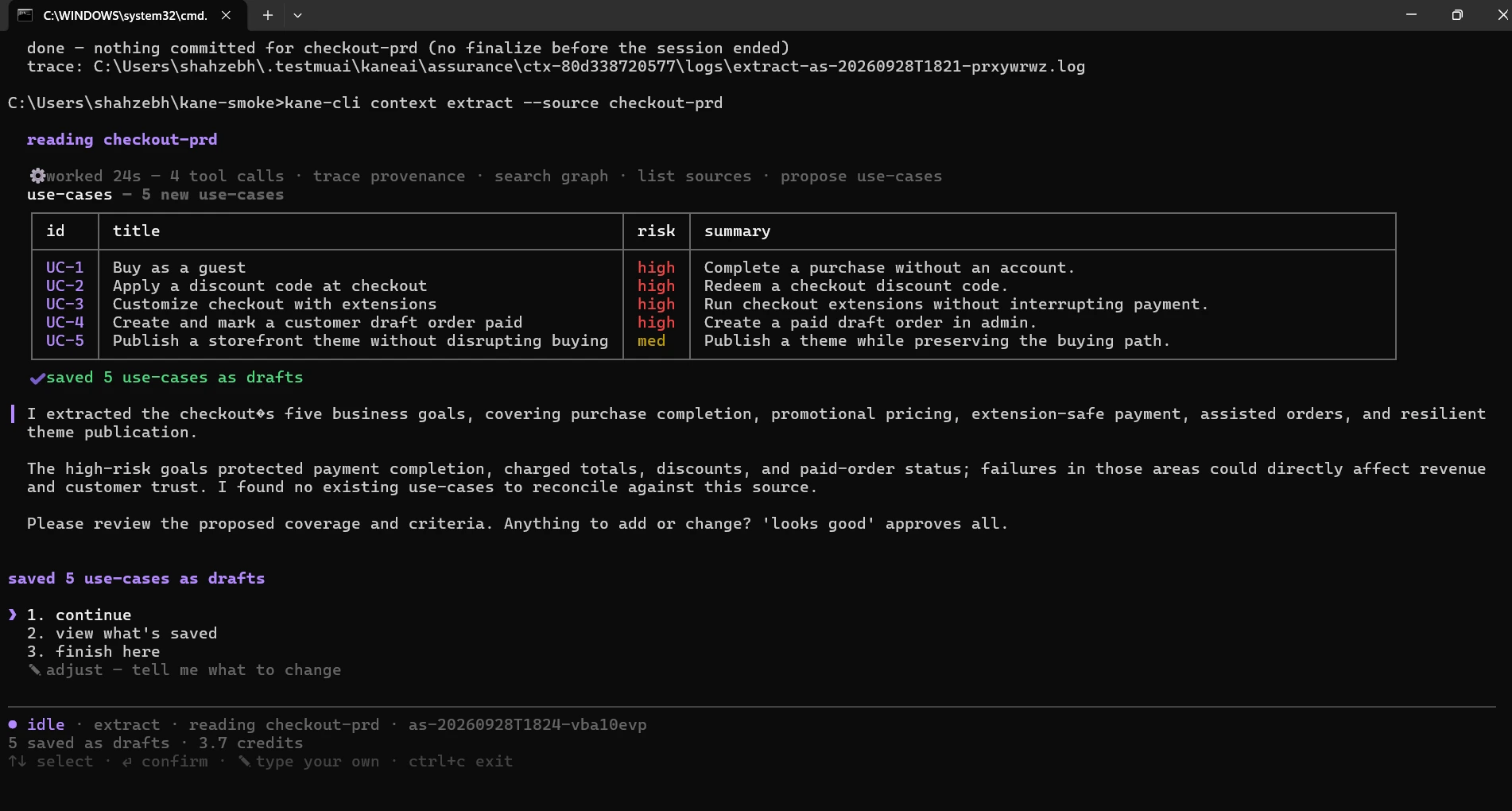
Extraction took 24 seconds and 3.7 credits and proposed five use cases, uc-1 to uc-5, one per PRD section, with four rated high risk and the theme update rated medium. Run interactively, it ends by asking for a review: looks good approves every proposal, or you can finish and review later.
Every proposal is saved as a draft until a person reviews it. kane-cli context list --type usecase prints the graph, and kane-cli context explain uc-1 replays the history behind any node, back to the lines it was read from.
Step 4: Review and Approve
Review walks each proposal and asks for a verdict: approve, edit, reject or skip. Approving promotes it to trusted; rejecting archives it. Nothing downstream designs from a proposal that is still derived, which is what keeps the graph honest.
kane-cli context reviewFor a scripted review, approve by reference:
kane-cli context review --approve uc-1 uc-2 uc-5
kane-cli context review --skip uc-4
review: 3 approved (trusted), 1 skipped, 1 left derivedThe skipped and derived use cases stay in the graph as proposals, and kane-cli context review --queue skipped lists the skipped ones, so leaving them out stays visible. Reject a use case instead when leaving it out is a decision you want on the record.
Step 5: Design Tests From an Approved Use Case
Design turns a trusted use case into acceptance criteria that hold across every path, scenarios that cover the happy path plus negative, boundary, edge and security cases, and exactly one _test.md per scenario. Each assertion step carries a @verifies tag naming the criteria it proves, and --max caps the number of scenario and test pairs.
kane-cli design tests --use-case uc-1 --max 6design: uc-1
acceptance criteria 4 ac-guest-1 ... ac-guest-4
scenarios 6
tests written 6 (.testmuai/tests/)
happy-path-test-card_test.md @verifies ac-guest-1, ac-guest-2
declined-card-keeps-cart_test.md @verifies ac-guest-3
total-parity-cart-to-confirm_test.md @verifies ac-guest-1
empty-cart-cannot-checkout_test.md @verifies ac-guest-4
...Open one generated file. It has the same shape as the designed test in the Spec Kit section above, with the spec's own numbers pinned and unpinned values left as {{variables}}:
# .testmuai/tests/happy-path-test-card_test.md (written by design tests)
---
assurance:
  id: t-1
  base: sha256:...
---
# Pay as a guest with the test card

> Prove a guest can pay with the test card and see the same total from the cart to the Thank you page.

## Step 1 @verifies ac-guest-1

Open {{store_url}}, click Add to cart on the first product, open the cart, and click Checkout, then assert the order summary total matches the cart subtotal.

## Step 2 @verifies ac-guest-2

Enter card 4242 4242 4242 4242, expiry 12/30 and CVC 123 and place the order, then assert the Thank you page shows an order number and the same total.
Design declares store_url as an empty stub in .testmuai/variables/assurance.json; fill it before the first run, because a designed test refuses to author until its variables have values. The design is derived too, so approve it the same way before anything runs:
kane-cli context review --approve <designed criterion, scenario, and test ids>kane-cli design explain with a test's id replays why that test exists: the technique that produced it, the boundary values considered, and the criteria it verifies.
Step 6: Run the Designed Tests
The generated files run like any other suite: with no path, testrun run discovers every _test.md in the project, the first run authors each step in a real browser, and later runs replay the recordings. Each run seals an evidence pack that records, per step, which criteria it proved.
kane-cli testrun run --parallel 36 test(s) selected - plan valid
...
testrun : failed (5 passed, 1 failed)
declined-card-keeps-cart_test.md ✗ Reason: after the decline the cart is emptied; the spec requires it intact
[application_issue/state_transition_bug, confidence 0.90]
evidence: sealed pack 8f0e...f2.evidence (6 tests, 4 criteria recorded)A designed test that fails like this points at a gap between the spec and the app, not at a broken test: the PRD says a declined card leaves the cart intact, and this run shows the cart emptied. No one wrote that test by hand; it exists because the spec said so. Your results will differ.
Step 7: Cover, Proven vs Owed
Coverage has two axes. Depth is what the sealed pack proved, read from its records and never recomputed. Completeness is what the design still owes, computed live from the graph, so a green run can still owe coverage.
kane-cli cover
kane-cli cover gaps --top 3
coverage - 8f0e...f2.evidence
depth (proven by the pack):
◐ ███████░░░ 75% uc-1 - partial (3/4 ACs proven, 1 failed)
completeness (live graph):
[high] create uc-2 - trusted, no tests designed
→ kane-cli design tests --use-case uc-2
[med] create uc-5 - trusted, no tests designed
→ kane-cli design tests --use-case uc-5The gaps list is the backlog: design the two trusted use cases next and fix the app for the declined-card criterion. The skipped admin use case stays in the skipped queue until someone approves or rejects it.
kane-cli cover exits 0 even with criteria owed, as the Spec Kit run above shows, so a release gate reads kane-cli cover gaps --json and fails the job on the proven number you set.
Step 8: Change the Spec and Let the Suite Follow
Specs change. In spec-driven development the edit happens in the document, and the tests are reconciled from it rather than patched by hand. Change the discount rule in docs/checkout-prd.md so an unknown code now also clears any previously applied discount, then let maintain reconcile compare the new text with the version the use cases came from:
kane-cli maintain reconcile --from docs/checkout-prd.md --source-id checkout-prdreconcile: checkout-prd new version (sha256:a17c...) changed at checkout-prd.md:17
MODIFY uc-2 criteria changed; 2 tests to re-stamp
ADD scenario: unknown code clears an applied discount
plan: 1 modify, 1 add, 0 archiveReconcile records the new version and triages the change into an ADD, MODIFY and ARCHIVE plan you approve, so nothing in the suite changes without a decision. A bare re-ingest, as in the Spec Kit section above, only marks the use case stale; kane-cli context review --queue drift lists stale nodes, and kane-cli maintain evolve with a use case's id re-designs one that went stale from an older change.
The next run authors only the changed and added scenarios; everything else replays. The spec's history and the suite's history are the same history, and kane-cli context explain answers where any test came from.
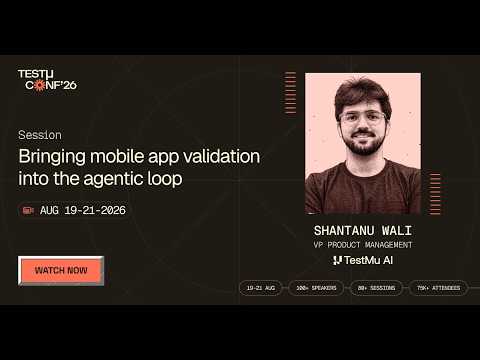
The five use cases in the PRD are published in the Kane CLI library with their test.md and command: storefront guest checkout, discount code application, checkout extension render, admin order creation and theme update smoke. Each stage of the chain has its own docs page: Kane CLI assurance context, Kane CLI assurance design and Kane CLI assurance coverage. The Testμ 2026 session on mobile app validation in the agentic loop shows the same chain producing 18 tests carrying 46 acceptance criteria from a PRD.
How Do You Gate Spec-Driven Changes in CI?
Run the deterministic checks on every pull request and keep the agent steps local. The unit tests carry the AC IDs, and the authored Kane CLI tests replay from their committed recordings:
name: spec-gate
on: [pull_request]

jobs:
  spec:
    runs-on: ubuntu-latest
    steps:
      - uses: actions/checkout@v7
      - uses: actions/setup-node@v7
        with:
          node-version: 22
      - run: node --test                    # every AC-n unit test
      - name: Replay the authored Kane CLI tests against the served page
        env:
          LT_USERNAME: ${{ secrets.LT_USERNAME }}
          LT_ACCESS_KEY: ${{ secrets.LT_ACCESS_KEY }}
        run: |
          python -m http.server 8000 --directory public &
          npx -y @testmuai/kane-cli@0.8.17 testrun run \
            --match "(apply-save10-to-the-cart|replace-save10-with-save20|remove-an-active-cart-coupon)_test" \
--headless --username "$LT_USERNAME" --access-key "$LT_ACCESS_KEY"| Step, run locally in CI form | Exit code | Output |
|---|---|---|
| node --test | 0 | 9 tests, 9 passed |
| kane-cli testrun run --match ... --username --access-key | 0 | 3 tests, 3 passed, 0 authored, 81.8s |
- Commit .testmuai/tests - the _test.md files and their output-* recordings are what CI replays; the .context/ store is gitignored and shared with kane-cli context push and pull.
- Select by path - --match replays only authored tests; a never-authored member would be authored in CI and spend credits.
- Keep converge in the loop - it needs an agent session, so run it before opening the pull request rather than in CI.

Austin Siewert
Co-Founder, Steadfast Systems
Discovered @TestMu AI yesterday. Best browser testing tool I've found for my use case. Great pricing model for the limited testing I do 👏
2M+ Devs and QAs rely on TestMu AI
Deliver immersive digital experiences with Next-Generation Mobile Apps and Cross Browser Testing Cloud

Troubleshooting Spec-Driven Development From the CLI
Each row starts from the message the terminal prints.
| Symptom | Likely cause | Fix |
|---|---|---|
| "No such option: --ai" | Removed in Spec Kit 0.10.0 | Use --integration claude |
| "No such option: --no-git" | Also removed in 0.10.0; git is now an opt-in extension | Drop the flag; add --extension git or run git init yourself |
| "Agent Detection Error ... claude not found" | No claude executable on PATH, as with the IDE extension | Install the Claude Code CLI or pass --ignore-agent-tools |
| /speckit.specify is not recognised | Claude Code loads the commands as skills | Type /speckit-specify and start Claude Code in the project folder |
| "[WinError 3] The system cannot find the path specified" | Windows path length limit during init or extension install | Use a short project path such as C:\sdd-demo |
| "Cannot find module '...\tests'" from node --test tests/ | Node 22 treats the argument as a file | Run bare node --test, or pass a glob such as "tests/*.test.js" |
| "assurance agent not found - your platform package may be missing" | kane-cli 0.8.17 run through npx did not locate its hoisted platform package | npm install --install-strategy=nested @testmuai/kane-cli@0.8.17 and run that install |
| A second ingest prints "versioned spec" | Every Spec Kit spec is named spec.md, so the source id defaults to spec | Always pass --as with the feature folder name |
| Unit tests pass after a spec edit | The tests still assert the old behavior | Run /speckit-converge after every spec change |
| Kane CLI authoring exits 1 with stuck.ap_stuck on a page that looks right | One designed step bundles too many asserts | Split the step, or re-design with a lower --max per scenario |
| Credit balance drops more than the runs report | Bug triage, uploads, and replays also draw on the balance | Check kane-cli balance before and after a paid step |
| design tests exits 2 on a use case | The use case is still an unreviewed proposal | kane-cli context review --approve with its id, then design again |
| "not a *_test.md file" from kane-cli testrun run | A folder path was passed; testrun run takes files or no path | Drop the path, or select with --from-context or --match |
Conclusion
Start spec driven development with Claude Code by running specify init and writing a constitution that forces an ID on every acceptance criterion. Then run /speckit-analyze before implementing and /speckit-converge after every implement pass and every spec edit.
For the browser half, the Kane CLI introduction covers installation and sign-in before your first spec.md ingest. Without Spec Kit, the same chain runs from any PRD with kane-cli context ingest, design tests, cover, and maintain reconcile.
Author

Sirajuddin Khan
Blogs: 6

Sirajuddin Khan is Vice President of Product Management at TestMu AI (formerly LambdaTest), where he drives the company's agentic AI product strategy, building a suite of autonomous agents that includes Agentic Browsers and Agentic Visual Testing and shifting the unit of work from test execution to autonomous outcomes. One of the company's earliest product leaders, he has owned the roadmap for the high-performance execution cloud and grew the cross-browser testing products from early adoption to market leadership. He brings over a decade of experience across SaaS, B2B, and eCommerce, with earlier product roles at Wydr and ShopClues, where his catalog and search work cut delivery SLAs and lifted seller activity. Sirajuddin holds an MBA in Information Technology from Sikkim Manipal University and a B.Tech in Computer Science Engineering from Maharshi Dayanand University.
Reviewer

Mayank Bhola
Reviewer
Mayank Bhola is Co-Founder and Head of Products at TestMu AI (formerly LambdaTest), where he leads the entire product portfolio across KaneAI, Kane CLI, HyperExecute, SmartUI, the Real Device Cloud, Accessibility, and other software testing product lines. As an early Lead Architect he designed and built the company's flagship Tunnel technology from scratch, created the React-based automation platform, and architected the data-intensive pipelines and FAAS services that scale it. He brings more than 10 years of experience in software development and product engineering, with earlier roles as Head of Technology at Juggernaut Books and Senior Software Engineer at PressPlay TV and Zomato. Mayank holds a B.Tech in Computer Engineering from JIIT Noida.


Spec-Driven Development CLI FAQs
Did you find this page helpful?
More Related Blogs
TestMu AI forEnterprise
Get access to solutions built on Enterprise
grade security, privacy, & compliance
- Advanced access controls
- Advanced data retention rules
- Advanced Local Testing
- Premium Support options
- Early access to beta features
- Private Slack Channel
- Unlimited Manual Accessibility DevTools Tests