

Power Your Software Testing with AI Agents and Cloud
The Native AI-Agentic Cloud Platform to Supercharge Quality Engineering. Test Intelligently and Ship Faster.


- TestMu AI (Formerly LambdaTest)
- /
- Blog
- /
- Enterprise Application Testing: Types and Strategy
Enterprise Application Testing: Types and Strategy
Enterprise application testing explained: the core testing types, a risk-tiered strategy, common challenges, and how to validate complex business apps at scale.
Last Updated on:
Enterprise application testing validates large, integrated business software (ERP, CRM, and custom web and mobile apps) across functionality, integrations, performance, security, and compliance, so a change in one module does not break the systems around it.
The difficulty is structural. In Capgemini's World Quality Report 2024-25, 57% of organizations named the absence of a comprehensive test automation strategy as a key barrier to advancing automation.[1]
This guide covers the core testing types, a risk-tiered strategy, running tests at scale across browsers and devices, AI-native testing, and the challenges and best practices that keep enterprise QA reliable.
Key Takeaways
- Prioritize testing by business risk: Rank every workflow by the cost of a failure, in revenue, affected users, and compliance exposure, so the highest-risk flows get the deepest testing and the first automation while low-risk areas get lighter checks.
- Integration seams cause the most defects: Most enterprise defects appear at integration seams, where modules and third-party services exchange data, so cover those handoffs with explicit contract and integration tests.
- Run coverage in parallel on a cloud grid: Run the suite in parallel on a cloud grid that covers the browser, OS, and real-device combinations your users run, so feedback stays in minutes even as the test count grows into the thousands.
- Traceability is your audit evidence: Keep a traceability matrix that links every requirement to its tests, runs, and defects, so a regulated release automatically produces the coverage evidence auditors expect for SOX, HIPAA, GDPR, and PCI DSS.
What Is Enterprise Application Testing?
Enterprise application testing is the process of validating business-critical software that many teams depend on. It checks 4 things: features work as specified, integrations between systems hold, the app performs under load, and it stays secure and compliant. Each of those maps to a distinct test type, covered in the types section below. It covers ERP, CRM, HR, finance, and custom internal apps that run the day-to-day operation, including sector-specific suites such as the higher education ERP covered in our guide to Ellucian Banner testing. On the ERP side, how much of that surface you must test yourself depends on the ERP configuration vs customization split, since vendor-tested settings and self-owned custom code carry very different regression loads.
4 traits, beyond size, change how you test an enterprise application. Together they widen the test surface and make testing any screen in isolation unreliable:
- Deep integration: One workflow, such as order-to-cash, crosses several modules and third-party services, so testing a screen in isolation misses the real risk at the seams.
- Many concurrent roles: Admins, managers, and field staff use different permissions and views of the same data, so role-based paths multiply the test cases.
- Business-critical stakes: Downtime or a wrong calculation hits revenue, payroll, or reporting directly, which raises the cost of an escaped defect.
- Regulatory weight: Finance, healthcare, and public-sector apps must produce an audit trail and meet standards, so evidence of what was tested matters as much as the pass rate.
- Named compliance regimes: Depending on the domain, that evidence must satisfy specific frameworks such as SOX for financial reporting, HIPAA for healthcare data, GDPR for personal data, PCI DSS for card data, and WCAG for accessibility.
Consumer app testing targets one happy path and fast iteration. Enterprise testing targets coverage across integrations, roles, and environments, because the most damaging defects surface only when two systems exchange data at those integration seams.
Why Is Enterprise Application Testing Difficult?
Enterprise application testing is harder because one business workflow crosses many modules, roles, integrations, and environments, so the amount to test, the cost of a missed defect, and the compliance burden all grow at once. The two barriers enterprises cite most in that same Capgemini World Quality Report are aging legacy systems and the absence of a comprehensive test automation strategy.
Both lead to the day-to-day problems QA teams run into:
- Large test surface: Thousands of workflows across modules, roles, and environments mean full manual coverage is not feasible on a release timeline.
- Fragile integrations: A change in one service or a third-party API can silently break a downstream flow that no unit test covers.
- Environment gaps: Test environments rarely match production data volumes or configurations, so bugs go unnoticed until they ship.
- Test data complexity: Realistic, compliant test data for finance or healthcare flows is hard to create and harder to keep current.
- Compliance overhead: Every release needs evidence of coverage, not just a green build, which manual processes struggle to produce.
- Legacy coupling: Older systems often lack test hooks or APIs, so changes elsewhere must be validated through slow end-to-end paths instead of isolated tests.
The pattern is consistent: enterprises that build and maintain a standing automation strategy, with owned suites, environments, and a schedule, ship faster than teams that automate piecemeal, one test at a time. Our take on why automation is the way forward for enterprises covers how that shift happens across a large QA organization.
What Are the Types of Enterprise Application Testing?
No single test type covers an enterprise app, because one business workflow crosses many modules, roles, and environments. Enterprise apps need 8 core test types: functional, integration, performance and load, security, user acceptance, regression, compatibility, and accessibility testing. The table below maps each core type to what it validates and the enterprise-specific concern that raises the stakes at enterprise scale.
| Testing Type | What It Validates | Enterprise-Specific Concern |
|---|---|---|
| Functional testing | Each feature behaves per the requirement | Role-based paths and permissions multiply the cases per feature |
| Integration testing | Modules and services exchange data correctly | Seams between ERP, CRM, and third-party APIs are the top defect source |
| Performance and load | The app holds up under expected and peak load | Concurrent users and batch jobs overload shared back-ends |
| Security testing | Data and access controls resist attack and misuse | Sensitive records and compliance rules raise the stakes of a breach |
| User acceptance testing | The app fits the real business process | Domain experts, not QA, must sign off before rollout |
| Regression testing | New changes do not break existing behavior | Large suites make manual regression impractical each release |
| Compatibility testing | The app works across browsers, OS, and devices | Global workforces use a wide, mixed device and browser mix |
| Accessibility testing | The app meets WCAG and accessibility law | Public-sector and regulated apps face legal accessibility mandates |
Two types break enterprise apps most often: functional testing of role-based paths and integration testing across module and API seams. Two more turn a failure into a costly one: performance testing catches failures that appear only under peak load, when many users and batch jobs run at the same time, and security testing catches the failures whose cost is a breach of sensitive records or a compliance violation. Mapping security tests to a recognized framework like the OWASP Top 10 keeps that coverage aligned with the risks that matter.[2]

Note: Testing a business-critical app across every browser, OS, and real device by hand does not scale. TestMu AI runs your enterprise suite in parallel on 3,000+ browser and OS combinations and 10,000+ real devices. Start testing free on TestMu AI.
How Do You Build an Enterprise Testing Strategy?
Testing everything equally is how enterprise QA runs out of time. Enterprise defects are expensive because a single business-critical failure hits revenue, payroll, or regulatory reporting directly, so a risk-tiered strategy spends effort where an escaped defect would cost the most: rank each application and workflow by business impact (revenue exposure, number of users affected, regulatory or compliance requirement, and downtime cost), then set the test depth, automation level, environment, and schedule per tier.
| Risk Tier | Example Workflows | Test Depth & Automation | Schedule |
|---|---|---|---|
| Tier 1: Business-critical | Payments, order-to-cash, payroll, regulatory reporting | Full functional, integration, performance, and security; high automation with cross-browser and device coverage | Every build in CI/CD, plus load and security before release |
| Tier 2: Important | Reporting dashboards, admin config, internal portals | Functional and regression automation; targeted integration checks | Nightly regression and per-release smoke |
| Tier 3: Low-risk | Static content, rarely used utilities, internal tooling | Lightweight smoke and exploratory checks | Per-release or on change |
The strategy only holds if the environment holds. Tier 1 flows need production-like data and configuration in staging. Without it, tests pass on thin staging data and then fail against real production volume and edge cases, so a green run gives false confidence. Treating test environment management as part of the strategy, not an afterthought, is what keeps risk-based testing honest.
Write the tier for each application down once, review it every quarter, and let it guide where automation investment goes. A shared, documented risk map keeps every team aligned on which flows get the deepest testing first, so coverage decisions are consistent across teams and reviewable in the next quarterly check instead of made one-off per release.
How Do You Test Enterprise Applications at Scale?
Running enterprise tests at scale means moving the suite onto a cloud grid that runs cross-browser, real-device, and parallel coverage on demand, instead of a fixed in-house lab. A global workforce uses a wide mix of browsers, operating systems, and devices, so an enterprise suite has to run against that mix in parallel on cloud machines: a few local machines cannot cover that many browser, OS, and device combinations at once. Cloud infrastructure supplies that mix on demand instead of a device lab you buy and maintain.
- Cross-browser coverage: A few local machines cannot reproduce every browser and OS a global workforce uses, so configuration-specific bugs slip to production. Running the same suite across 3,000+ browser and OS combinations on the Automation Cloud by TestMu AI catches them first.
- Real-device coverage: Validate mobile enterprise apps on 10,000+ real Android and iOS devices with the TestMu AI real device cloud, since emulators miss hardware and OS-specific defects.
- Parallel orchestration: As a suite grows into the thousands, a slow grid can push feedback out to hours and block every merge. HyperExecute by TestMu AI keeps each test and its infrastructure in one isolated environment and runs suites up to 70% faster, so a suite that took hours on a serial grid returns feedback in minutes without holding up merges.
Moving enterprise tests onto the cloud grid changes only where the tests run, not how they are written: you point the same test code at the cloud endpoint and keep your existing scripts. The smoke-check below uses the TestMu AI Browser Cloud SDK to render a business app on real cloud Chrome and read what a user sees, with credentials supplied as environment variables rather than hardcoded:
import { Browser } from '@testmuai/browser-cloud';

const client = new Browser();

// Smoke-check that a business web app renders correctly on real cloud Chrome
const data = await client.scrape({
  url: 'https://ecommerce-playground.lambdatest.io/index.php?route=product/search&search=macbook',
  format: 'text',
  lambdatestOptions: {
    'LT:Options': {
      username: process.env.LT_USERNAME,
      accessKey: process.env.LT_ACCESS_KEY,
    },
  },
});

console.log(data); // rendered product names and prices, straight from the DOM
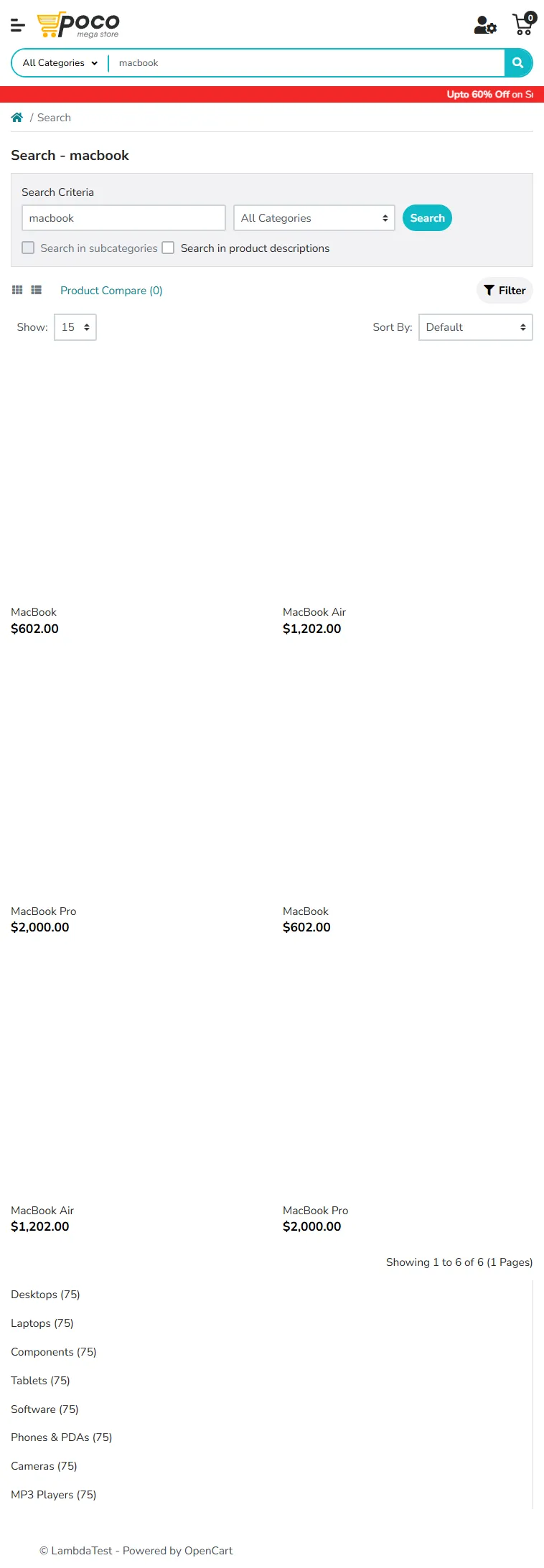
Running that snippet on TestMu AI cloud for this article returned the rendered results a raw HTTP request would miss: MacBook at $602.00, MacBook Air at $1,202.00, and MacBook Pro at $2,000.00, with the search page reporting 6 matches. The screenshot below is the same run captured on cloud Chrome, showing the JavaScript-rendered listings a headless-only smoke test would never see.

How Is AI Changing Enterprise Application Testing?
AI has moved from a pilot to the standard way enterprise QA teams write tests: instead of hand-coding each script, testers now describe a test in plain English and the tool generates and maintains it. For large organizations the hard part is scaling it across many teams. The real constraints are 2: who can author reliable tests, and whether coverage stays visible as the suite grows. The model itself is rarely the limit.
Two capabilities solve that while keeping the existing toolchain in place:
- Natural-language authoring and self-healing: The bottleneck is that reliable test authoring stays stuck with a few coders while the suite grows. KaneAI by TestMu AI lets QA and domain experts write tests in plain English, generate them from requirements or tickets, and reattach steps automatically when the UI changes, so a UI change means reviewing a fix, not rewriting the test. Tests export to Selenium, Playwright, Cypress, or Appium, so the team keeps its code and is not stuck with one vendor.
- Traceability and unified reporting: In large organizations the hard part is that once tests are authored, no one can see what is actually covered. Test Manager by TestMu AI solves that: it traces every requirement to its tests, runs, and defects in one matrix and pulls manual and automated results into a single view, so a release decision rests on measured coverage, which requirements passed, which have open defects, and which are still untested.
An enterprise stack usually combines a test management platform for planning and traceability, an automation framework such as Selenium, Playwright, Cypress, or Appium, a cloud grid for cross-browser and real-device execution, and orchestration for parallel runs.
TestMu AI provides a complete ecosystem of AI agents that cover the enterprise testing life cycle, with a dedicated agent for test authoring, execution, visual validation, and AI-feature testing. Each stage gets a purpose-built agent, so together they form an end-to-end quality layer across an enterprise application. I've used these agents at different stages of the testing life cycle, and a dedicated agent per stage keeps coverage consistent from the first test case to release sign-off.
Cover the test cycle with AI agents

What Are the Common Enterprise Testing Challenges?
The same obstacles recur across enterprise QA programs. The 5 challenges that most often slow down enterprise testing are integration complexity, test data management, environment parity, flaky tests, and siloed reporting. Each one below has a specific fix you can apply, listed next to the challenge it solves.
- Integration complexity: The seams between ERP, CRM, and third-party services are where enterprise defects concentrate. Test them explicitly with contract and integration tests, and use service virtualization to simulate systems that are slow or costly to call. For the ERP side specifically, compare the purpose-built SAP testing tools that handle these flows, and note that the finance layer above the ledger, such as Oracle EPM, updates on its own vendor schedule.
- Test data management: Generate realistic, masked data sets per environment and version them alongside the tests, so a finance flow is not blocked waiting on a compliant record and no real PII lands in a lower environment that auditors will flag.
- Environment parity: Keep test environments close to production configuration and data volume; a Tier 1 flow validated on thin staging data is a false pass.
- Flaky tests: Isolate infrastructure-induced flakiness by running on a managed grid with full logs, and quarantine any test that fails intermittently across reruns instead of letting those reruns wear down trust in the suite.
- Siloed reporting: Manual outcomes and automated results in separate tools hide the real coverage number; unify them in one platform so no one has to compare spreadsheets before a release.
What Are the Best Practices for Enterprise Application Testing?
The strategy above sets what to test; these 7 practices set how to run it as a repeatable program that stays consistent as teams and release schedules grow. Use them as a checklist when standing up or reviewing an enterprise QA program.
- Prioritize by risk: Test Tier 1 workflows deepest and first, and give lower-risk modules proportionally lighter coverage so effort tracks where a failure hurts most.
- Shift testing left and run it continuously: Add regression and smoke suites to CI/CD so every commit runs them and defects surface within minutes of the change that caused them.
- Validate integration seams explicitly: Cover API contracts and module boundaries directly, since that is where enterprise defects concentrate.
- Parallelize on the cloud: Run cross-browser and real-device coverage in parallel so feedback stays in minutes as the suite grows.
- Unify manual and automated coverage: Keep both in one reporting view so release readiness is a single number backed by the actual pass/fail data from every manual and automated run.
- Trace requirements to tests to defects: Maintain a traceability matrix that links each requirement to its tests, runs, and defects, so compliance and audit evidence comes straight out of the testing you already do.
- Treat test data as a key resource: Version, mask, and refresh it deliberately, the same way you manage the code under test.
How Do You Get Started With Enterprise Application Testing?
In my experience, do not automate everything at once. That creates more test maintenance than the team can handle, and the whole effort slows down. Start with the highest-risk flow, prove value there, then widen coverage in steps. This is the sequence I would follow.
- Rank your applications by risk: Score each app and workflow by revenue, users affected, compliance exposure, and downtime cost, then tag each as Tier 1, 2, or 3. Do this with the business owners in the room, because a risk map QA builds alone tends to miss the flows the business cares about most.
- Automate one Tier 1 workflow end to end: Pick the flow where a failure hurts most, write its regression path, and connect it to CI/CD so it runs on every build. Keep this first suite small and stable, since a flaky first run is the quickest way to lose the team's trust in automation.
- Move execution to a cloud grid: Run cross-browser and real-device coverage in parallel across 3,000+ browser and OS combinations and 10,000+ real devices so feedback stays in minutes. Watch your concurrency limit here, because a suite that runs green locally can still queue for hours if parallel runs are capped.
- Centralize planning and results: Pull manual and automated runs into one traceability view so coverage and release readiness are visible to every team. Keep manual results out of side spreadsheets, or the day before release nobody can match up the two and coverage becomes a guess.
- Expand tier by tier: Repeat the pattern across the rest of Tier 1, then Tier 2, adding performance and security checks ahead of each release. Do not chase 100% automation, since some exploratory and UAT paths are cheaper and safer to keep manual.
The Test Manager documentation walks through setting up projects, cycles, and requirement traceability. This article was researched and drafted with AI assistance, then reviewed and fact-checked against primary sources before publication, per our editorial process and AI use policy.
Author

Prince Dewani
Blogs: 30

Prince Dewani is a Community Contributor at TestMu AI specializing in AI agents, software testing, QA, and SEO. He is certified in Selenium, Cypress, Playwright, Appium, Automation Testing, and KaneAI, and presented academic research on AI agents at PBCON-01. At TestMu AI, he has also carried out extensive cross-browser research on the support of modern web technologies such as WebGPU, WebAssembly, WebXR, WebGL2 and other web technologies, validating their compatibility and feature parity across major browsers and rendering engines through rigorous hands-on testing. Prince has hands-on experience building AI agent workflows using Anthropic Claude, Google Antigravity, n8n, LangChain, and other agentic frameworks, and works regularly with MCP and A2A protocols. He shares his work with 5,500+ QA engineers, developers, DevOps experts, tech leaders, and AI agent practitioners on LinkedIn.
Reviewer

Shahzeb Hoda
Reviewer
Shahzeb Hoda is the Associate Director of Marketing and a Community Contributor at TestMu AI, leading strategic initiatives in developer marketing, content, and community growth. With 10+ years of experience in quality engineering, software testing, automation testing, and e-learning, he has authored and reviewed 70+ technical articles on software testing and automation. Shahzeb holds an M.Tech in Computer Science from BIT, Mesra, and is certified in Selenium, Cypress, Playwright, Appium, and KaneAI. He brings deep expertise in CI/CD pipeline automation, cross-browser testing, AI-driven testing practices, and framework documentation. On LinkedIn, he is followed by 3,700+ engineers, developers, DevOps professionals, tech leaders, and enthusiasts.


Enterprise Application Testing FAQs
Did you find this page helpful?
More Related Blogs
TestMu AI forEnterprise
Get access to solutions built on Enterprise
grade security, privacy, & compliance
- Advanced access controls
- Advanced data retention rules
- Advanced Local Testing
- Premium Support options
- Early access to beta features
- Private Slack Channel
- Unlimited Manual Accessibility DevTools Tests