

Power Your Software Testing with AI Agents and Cloud
The Native AI-Agentic Cloud Platform to Supercharge Quality Engineering. Test Intelligently and Ship Faster.


- TestMu AI (Formerly LambdaTest)
- /
- Blog
- /
- Ellucian Banner Testing: A Guide for Higher Ed ERP Teams
Ellucian Banner Testing: A Guide for Higher Ed ERP Teams
What changes in Banner 9, which flows deserve automation, how wide the browser matrix really is, and the accessibility deadline that now applies to public campuses.
Published on:
Overview
Ellucian Banner testing is the regression, cross-browser, and accessibility validation an institution runs against its own configured Banner environment after each upgrade. Ellucian builds and tests the base product. Every campus-specific page, workflow, and integration is the institution's responsibility to verify before registration opens.
What should you test after a Banner upgrade?
- Administrative pages: Banner 9 replaced the Oracle Forms interface with standard web pages, so staff-facing screens for Student, Finance, HR, and Financial Aid can now be driven by ordinary browser automation.
- Banner Self-Service flows: student registration, account balances, and financial aid status are the paths with fixed calendar deadlines, which makes them the first candidates for automated regression.
- Institutional customizations: Ellucian's extensibility framework lets each campus configure fields and branding without changing source code, and those local changes are outside the vendor's test coverage.
- WCAG 2.1 Level AA conformance: public institutions running Banner are covered by the ADA Title II web rule, with compliance dates of April 26, 2027 and April 26, 2028 depending on population served.
How do you run Banner tests at scale?
- Automation frameworks: Banner 9 pages respond to Selenium, Playwright, and Cypress like any other web application, so driving Banner needs no Banner-specific tooling.
- Execution capacity: Banner 9 supports Chrome, Firefox, Safari, and Edge, so parallel cloud execution across that matrix is the practical constraint rather than script authoring.
- Private environment access: Banner test instances are rarely public, so a secure tunnel lets cloud browsers reach them without exposing the host. TestMu AI provides both the grid and the tunnel.
It is the Saturday before fall registration opens. The Banner upgrade finished at 2 a.m., and someone has to confirm that a student can still add a course, that financial aid still packages correctly, and that the advisor dashboard still renders in Safari. At most institutions that confirmation is a spreadsheet, a shared login, and a long afternoon.
That afternoon is the part of Ellucian Banner testing nobody plans for properly, and it is where higher education ERP testing parts company with the corporate kind. The upgrade itself is well documented; the verification of your own configured environment is not. This guide covers what actually needs testing after a Banner release, how much of it can be automated, and the one deadline that has turned accessibility from a backlog item into a dated obligation.
What Ellucian Does Not Test
The same Banner 9 brochure describes an extensibility framework that gives institutions "the tools you need to customize your applications without modifying source code," including configuring fields to meet institutional requirements and adding institutional branding.
That design is good for upgrades and it draws a hard line around vendor testing. Ellucian validates the shipped product. It cannot validate the field you made required, the rule you added to a registration override, the branding that changed your color contrast, or the third-party tool your campus bolted onto Self-Service.
So the practical question at upgrade time is not "did Ellucian test this release." It is "which of our own changes does this release touch." Answering that with a spreadsheet is what turns a two-hour verification into a two-day one.

Note: Banner regressions surface where institutional configuration meets a vendor release. TestMu AI runs your existing Selenium, Cypress, and Playwright suites in parallel so the post-upgrade check finishes before registration opens. Try TestMu AI free!
Building the Regression Suite
A Banner regression suite does not need to cover Banner. It needs to cover the paths where a failure has a date attached to it.
Pick the Critical Paths
Rank candidate flows by what breaks if they fail on the worst possible day. A registration path that fails during add/drop affects every enrolled student within hours. A rarely used administrative report that fails affects one analyst who can wait.
- Student registration, including prerequisite checks, holds, waitlists, and enrollment caps, because these carry the hardest calendar deadlines.
- Financial aid packaging and disbursement, where an error is both a student-facing and a compliance problem.
- Account balances and payment posting, since money movement failures escalate immediately.
- Admissions application intake, which runs continuously and often integrates with external systems.
- Grade entry and transcript generation, concentrated at term end and unforgiving of downtime.
Five automated paths that run on every change beat forty manual ones that run once a year. Our regression testing guide covers selection techniques in more depth.
Handle Login and Sessions
Banner sits behind institutional single sign-on, and that is where most first automation attempts stall. The sign-in page belongs to the identity provider, not to Banner, so it changes on a schedule your Banner team does not control.
Treat authentication as infrastructure rather than as a test step. Authenticate once, reuse the session across the suite, and keep a single dedicated test identity per role so a permission change shows up as one clear failure instead of forty ambiguous ones.
Write Locators That Survive
Banner 9 pages are generated, so element attributes are not always stable across releases or between your configured environment and a vanilla one. Locators pinned to generated identifiers break the moment Ellucian regenerates that page in an upgrade, which is how a suite that passed in August fails in October without anyone changing a test.
Anchor on what the page means rather than how it is built. Visible labels, field names drawn from the Banner data dictionary, and accessible roles all survive cosmetic changes better than positional or auto-generated selectors do.

Running Across Browsers
Banner's user population is unusually wide. Staff run managed desktops on a controlled refresh cycle, while students arrive on personal laptops and phones running whatever shipped with the device. The same Self-Service page has to work for both groups.
Since Banner 9 supports Chrome, Firefox, Safari, and Edge, the honest test matrix is those four families across current and previous versions, on Windows and macOS, plus mobile Safari and Chrome for the student-facing paths. That is a realistic scope for a cloud grid and an unrealistic one for a lab of institutional machines.
TestMu AI's test automation cloud runs existing Selenium, Cypress, and Playwright scripts across 3,000+ browser and OS combinations in parallel, with video, console, and network logs captured on every run. For a Banner team, the artifacts matter as much as the coverage: a registrar reporting "it did not work in Safari" becomes a session recording rather than a reproduction attempt. The broader approach is covered in our complete guide to cross browser testing.
Banner Accessibility Testing and the WCAG 2.1 AA Deadline
This is the section that changes Banner testing priorities, and it has dates. According to the ADA.gov fact sheet on the web rule, the U.S. Department of Justice rule for state and local governments sets WCAG 2.1, Level AA as the technical standard, explicitly covers public schools, community colleges, and public universities, and carries compliance deadlines of April 26, 2027 for entities with a population of 50,000 or more and April 26, 2028 for entities under 50,000 and special district governments.
| Public entity size | WCAG 2.1 Level AA compliance date |
|---|---|
| Population of 50,000 or more | April 26, 2027 |
| Population under 50,000, and special district governments | April 26, 2028 |
The same ADA.gov fact sheet records that those dates are already an extension of the originals, so treat them as firm rather than as a schedule likely to slip again. For a campus on a single annual Banner upgrade, the nearer deadline leaves very few release windows to work with.
Vendor conformance does not transfer to you. Ellucian states on its WCAG accessibility blog post that "Many Ellucian products are on track to be WCAG 2.2 compliant in 2026." That describes the shipped product, not the pages your institution configured, branded, and extended, which are the pages a complaint would actually name.
If you need the distinction between conformance levels before scoping this work, our explainer on the difference between WCAG A, AA, and AAA levels covers what Level AA actually requires.
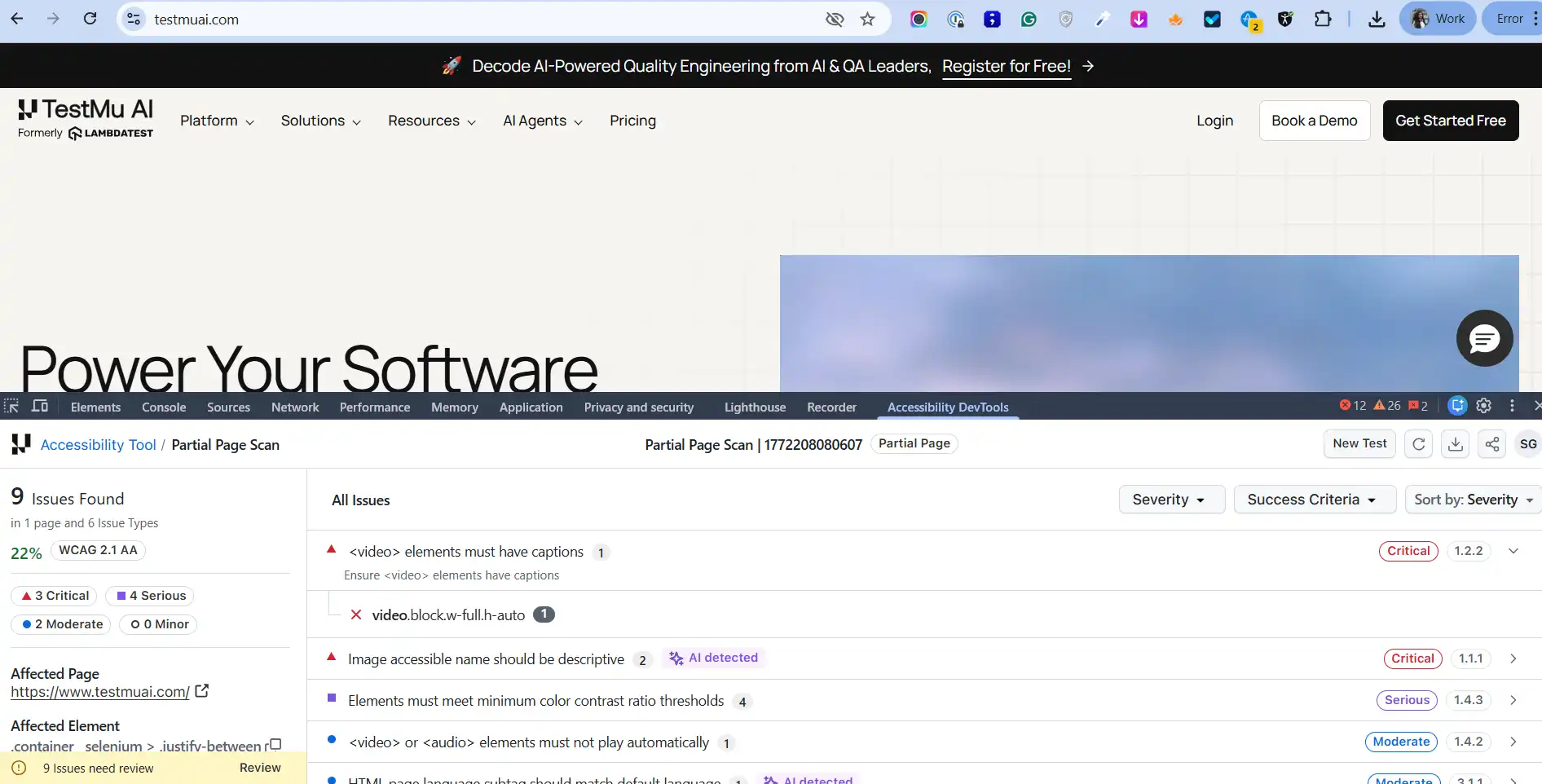
The report above is what the TestMu AI accessibility testing platform returns from a partial page scan graded against WCAG 2.1 AA: 9 issues across 6 issue types, split into 3 critical, 4 serious, and 2 moderate. Each row names the success criterion it violates, such as 1.2.2 for missing video captions, 1.4.3 for contrast, and 3.1.1 for a mismatched language subtag.
That criterion mapping is the part worth copying into a Banner remediation plan, because it converts a list of defects into evidence against the standard the deadline names. TestMu AI runs the Axe-core rules engine with 39 WCAG-aligned automated checkpoints for web, and grades against WCAG 2.0, 2.1, and 2.2 at Levels A, AA, and AAA, which is what maps its output onto ADA Title II and Section 508 obligations. For Banner specifically, the useful capability is scheduled scanning: URLs can be discovered from a sitemap, CSV, or crawler, and saved login credentials or tunnel access let scans reach Self-Service pages that sit behind authentication.
One limitation is worth stating plainly, because conformance claims built on the wrong assumption are the expensive kind. TestMu AI puts automated coverage at roughly 30 to 40 percent of accessibility issues, the machine-verifiable ones such as contrast ratios, missing labels, and malformed ARIA. By the same TestMu AI guidance, the remaining 60 to 70 percent needs human judgment through keyboard navigation testing and screen readers including NVDA, JAWS, VoiceOver, and TalkBack. Setup for the automated half is documented in the accessibility testing documentation.
Testing Behind the Firewall
Banner test and staging environments are almost never publicly reachable. They sit on campus networks or behind a VPN, which is the correct security posture and an obstacle for any cloud-based test execution.
A secure tunnel solves this without exposing the environment. The tunnel client runs inside your network, and cloud browsers reach the private host through it, so no Banner instance is published to the internet. In practice the change is a few capability lines rather than a network project:
import { chromium } from "playwright";

// Playwright capabilities for a private Banner environment
const capabilities = {
  browserName: "Chrome",
  browserVersion: "latest",
  "LT:Options": {
    platform: "Windows 11",
    build: "Banner 9 Post-Upgrade Regression",
    name: "Self-Service registration - happy path",
    user: process.env.LT_USERNAME,
    accessKey: process.env.LT_ACCESS_KEY,
    tunnel: true,                       // reach the private Banner host
    tunnelName: "campus-banner-test",
    console: true,
    network: true
  }
};

const wsEndpoint =
  "wss://cdp.lambdatest.com/playwright?capabilities=" +
  encodeURIComponent(JSON.stringify(capabilities));

const browser = await chromium.connect({ wsEndpoint });
const page = await browser.newPage();
await page.goto("https://banner-test.your-campus.edu/StudentRegistrationSsb/");
Name builds after the release being verified rather than after the date. When a registrar asks whether a defect predates the upgrade, a build named for the release answers the question without archaeology.
Test Data and Student Privacy
This is where higher education ERP testing diverges hardest from the corporate kind, and it is the step most Banner test plans skip. The fastest way to build a realistic test environment is to clone production, which means cloning real student records.
Those records are federally protected. The U.S. Department of Education describes the Family Educational Rights and Privacy Act (FERPA) as a federal law giving control over the disclosure of personally identifiable information from education records, and it applies to institutions receiving funding from the Department. The same guidance notes that when a student enters a postsecondary institution at any age, FERPA rights transfer from the parents to the student.
Read together, that makes every cloned Banner environment a system of record holding protected data, governed by the same rules as production but usually with weaker access controls. Four practices keep the test estate defensible:
- Anonymize on the way in, not on request. Names, SSNs, dates of birth, and contact details should be replaced during the refresh itself, so no window exists where the clone holds live identifiers.
- Keep referential integrity after masking, because a student whose registration rows no longer join to their aid rows will fail tests for reasons that have nothing to do with the upgrade.
- Preserve the edge cases that break Banner: holds, transfer credits, dual enrollment, name changes, and prior-year aid awards. Random synthetic data rarely reproduces the records that actually surface defects.
- Restrict access to the test environment with the same role model as production, and expect access lists to be asked for during an audit.
Anonymized data also removes the main objection to running tests on external infrastructure, since the records leaving your network are no longer identifiable. Where that objection stands, the tunnel approach above keeps the environment private instead.

A Release-Cycle Test Plan
ERP regression testing usually answers to one clock. Banner answers to two: Ellucian's release cadence and your academic calendar. The plan below sequences the work against both.
- Inventory your customizations before the release notes arrive, so the impact review compares the vendor's change list against a current record rather than institutional memory.
- Map the release notes to your critical paths and mark which of the five critical paths are touched: registration, financial aid, payments, admissions intake, and grades. Everything untouched can stay on a lighter smoke check.
- Run the automated suite in the test environment across the four supported browser families, in parallel, and triage failures by whether they are vendor-side or configuration-side.
- Run the accessibility scan on Self-Service pages in the same pass, since branding and field changes are exactly what moves contrast and label conformance.
- Reserve manual effort for the parts automation cannot judge: keyboard traps, screen reader announcements, and any workflow a human has to interpret.
- Re-run the suite in production immediately after cutover, because environment differences in configuration and data are common and the failures they cause are not visible in test.
- Schedule the same suite to run continuously between releases, so configuration drift surfaces on the day it is introduced rather than on the next upgrade weekend.
Step seven is the one most institutions skip and the one that pays. Between-release drift, not the upgrade itself, is what produces the mysterious registration failure in week three.
Where Teams Get It Wrong
Four failure patterns show up repeatedly in ERP test programs, and Banner's calendar makes each of them more expensive.
- Testing only what the vendor changed. Release notes describe the product, not your configuration, so an untouched module can still break through a shared dependency.
- Automating breadth before depth. A hundred shallow page-load checks find fewer real defects than five complete registration journeys that assert on outcomes.
- Treating accessibility as a pre-audit sprint. Conformance decays with every branding tweak and new form field, which is why it belongs in the regression cycle rather than in a project.
- Running everything against one browser because that is what the old process assumed. Banner 8 justified it; Banner 9 does not.
Teams coming from other ERP platforms will recognize the shape of these problems. Our walkthrough of SAP ERP testing covers the same tension between vendor releases and local configuration, and our roundup of ERP testing tools compares the tooling categories.
Getting Started
Start with one flow: automate the student registration happy path end to end, and run it on Chrome, Firefox, Safari, and Edge. That single test exercises authentication, session handling, locator stability, and the browser matrix at once, so it tells you what the rest of the suite will cost before you commit to building it.
Then add the accessibility scan to the same pipeline stage while the WCAG 2.1 Level AA dates are still ahead of you. Both halves run on TestMu AI, and the setup steps for the accessibility half are in the documentation linked above. Done in that order, Ellucian Banner testing stops being an upgrade-weekend scramble and becomes a pipeline stage that reports for itself.
The measure of success is narrow and checkable: on the Saturday after the next upgrade, the verification finishes before lunch and the result is a report rather than an opinion.
Note: AI assistance was used in researching and drafting this article. Rahul Mishra (Lead Member of Technical Staff at TestMu AI, expertise in Accessibility Testing, WCAG Compliance, and ADA Compliance) verified every statistic, link, and product claim against primary sources before publication, following our editorial process and AI use policy. Regulatory statements in this article cite the U.S. Department of Justice ADA.gov fact sheet on the Title II web rule directly.
Author

Rahul Mishra
Blogs: 15

Rahul Mishra is a Lead Member of Technical Staff at TestMu AI (formerly LambdaTest), leading frontend engineering and accessibility testing across the quality engineering platform. He mentors frontend engineers, runs code reviews and sprint planning, optimizes React.js rendering performance, and makes product features accessible to users with disabilities through WCAG and ADA-compliant accessibility audits. He brings 10+ years of experience across React.js, VueJS, TypeScript, Swift, Objective-C, and AWS, with earlier work as a Technical Lead at VectoScalar Technologies. Rahul holds a B.E. in Information Technology.
Reviewer

Himanshu Sheth
Reviewer
Himanshu Sheth is the Director of Marketing (Technical Content) at TestMu AI, with over 8 years of hands-on experience in Selenium, Cypress, and other test automation frameworks. He has authored more than 130 technical blogs for TestMu AI, covering software testing, automation strategy, and CI/CD. At TestMu AI, he leads the technical content efforts across blogs, YouTube, and social media, while closely collaborating with contributors to enhance content quality and product feedback loops. He has done his graduation with a B.E. in Computer Engineering from Mumbai University. Before TestMu AI, Himanshu led engineering teams in embedded software domains at companies like Samsung Research, Motorola, and NXP Semiconductors. He is a core member of DZone and has been a speaker at several unconferences focused on technical writing and software quality.


Ellucian Banner Testing FAQs
Did you find this page helpful?
More Related Blogs
TestMu AI forEnterprise
Get access to solutions built on Enterprise
grade security, privacy, & compliance
- Advanced access controls
- Advanced data retention rules
- Advanced Local Testing
- Premium Support options
- Early access to beta features
- Private Slack Channel
- Unlimited Manual Accessibility DevTools Tests