
Test Your Website on Real Desktop and Mobile Browsers
Run live and automated cross browser tests on Chrome, Safari, Firefox, and Edge across 3,000+ browser-OS combinations. No setup, no device lab.

- TestMu AI (Formerly LambdaTest)
- /
- Blog
- /
- Cross Browser Testing Is Not Only About Browsers
Cross Browser Testing Is Not Only About Browsers
Cross browser testing covers browser versions, operating systems, screen sizes, and user locations, not browsers alone. Learn the metrics that matter.
Last Updated on:
On This Page
- Cross Browser Testing Matrix
- Operating System Dependencies
- Responsive Testing
- Geolocation Testing
- Knowing What To Automate
- AI Agents in Cross Browser Testing
- Exploratory Browser Testing
- Documentation Of Cross Browser Test Cases
- Issues and Bug Management
- Regression Testing Plan
- Right Testing Solution and Framework
- Conclusion
Cross browser testing validates a web application across browser versions, operating systems, screen sizes, and user locations, not browsers alone. The same Safari build renders differently on two macOS releases, and the same site served from Japan can return different content than it does in the United States. This guide covers the browser matrix, operating system dependencies, responsive testing, geolocation testing, what to automate, AI agents, exploratory testing, documentation, bug management, regression planning, and framework choice.
Key Takeaways
- Cross browser testing covers browser versions, operating system versions, screen sizes, and user location, not browser names alone.
- A browser matrix built from web analytics traffic data decides which browser and operating system combinations get tested first.
- The same browser build can render a page differently on two operating system releases, so operating system coverage is separate from browser coverage.
- Geolocation testing covers geoblocking, geotagging, geofencing, geotargeting, and localization, because one site can serve different content per country.
- Exploratory testing finds browser-specific defects that scripted regression suites never cover, so automated and manual passes both stay in the plan.
- AI coding agents can drive a real browser through Model Context Protocol servers, but a human still confirms visual rendering differences.
Cross Browser Testing Matrix
Browser compatibility testing is not only about testing over various major browsers, but you also need to consider browser versions in your testing checklist. Legacy browsers and latest ones, both deserver adequate attention from your testing team.
However, there are so many browser versions. Especially, if you consider Google Chrome and Mozilla Firefox who follow agile release cycles. New stable versions keep arriving between your test cycles, which makes it really painful for testers to decide where to begin their cross browser testing cycle. Because you can’t go around testing every browser version in a random manner.
A good starting point here would be to decide on a dozen or so browser versions to start off the cross browser testing process. You can look up your web analytics and decide which browsers are bringing you the majority of your traffic and prioritize testing on them before looking into browsers that are not so prominent contributors to your website traffic.
Read More: Web Analytics Tools to Help You Understand Your Users
Based on your research from web analytics you can create a matrix that may look like the below one.
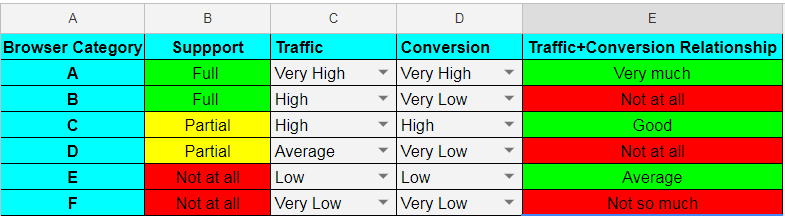
For more information, read our article on creating a cross browser testing matrix.
Operating System Dependencies
If you thought your website is going to behave well on Google Chrome in Mac, just because you tested it over Google Chrome in Windows, then you thought wrong!
Operating systems play a very vital role in your cross browser testing checklist. The reason being, a browser deployed for Windows will have to match a different set of norms in order to deploy on macOS, Linux or any other operating system. Just like browsers versions, you need to consider operating system versions as well.
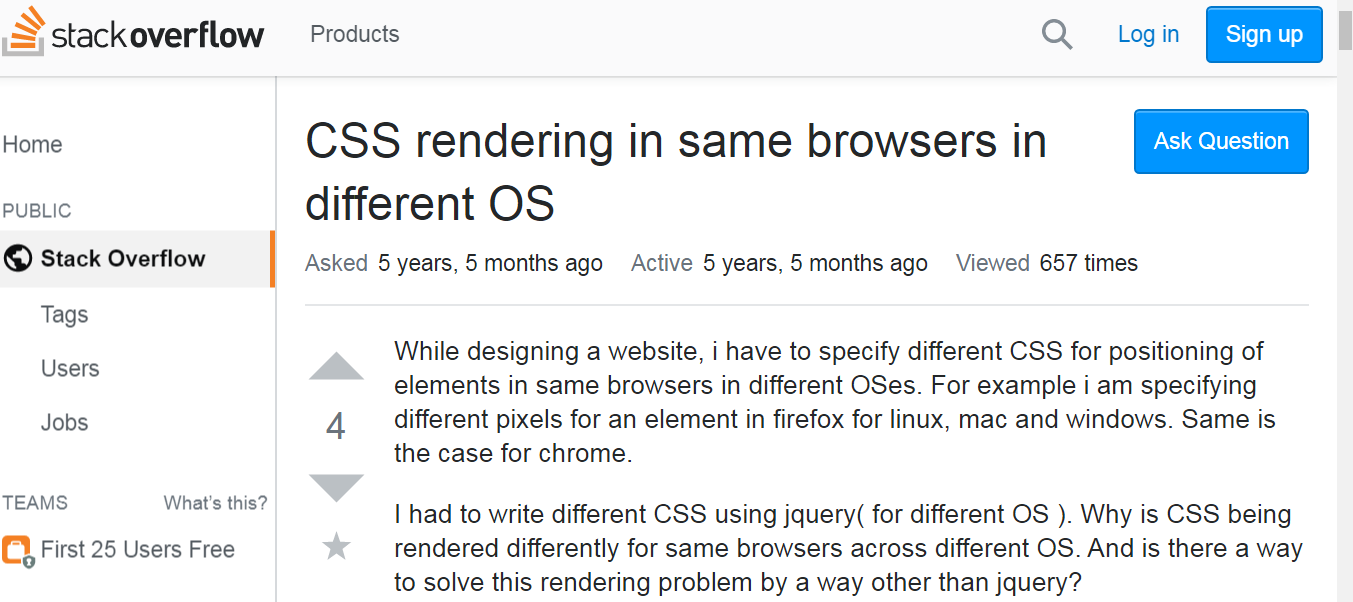
Basically, a Safari browser running on macOS Sonoma may render a website differently than a Safari browser running on macOS Sequoia. Find it hard to believe? Well, here is one of the threads where people are curious about CSS rendering in the same browser in different OS.
Test Your Web-App On Mobile Operating Systems Too
You also need to consider various operating systems for different mobile devices such as iOS versions, and Android versions. Then there are tabs as well, iPads, Samsung Galaxy tabs and more.
Talking about mobile website testing, the next metric to consider is going to be around validating RWD(Responsive Web Design) of your web application or website.
Responsive Testing
We are living in a mobile-first era, where every business running online is either planning to or has already adapted a responsive web design approach for their website or web application. Different mobile devices will have different screen resolutions and viewport, keeping that in mind, developers would have to declare break-points for their website or web app.
Validating your website or web application over different mobile browsers is also crucial for ensuring a seamless and robust UI. Responsive testing is a subset of cross browser testing. Many confuse it to be the same as cross browser testing but it really isn’t.
With this Responsive testing tutorial for beginners, you will learn how to perform Responsive Testing of your website on the TestMu AI platform.
Know The Difference Between Cross Browser Testing & Responsive Testing
Geolocation Testing
Did you know that your website can be accessed in a different way when accessed from the same browser using 2 different locations? There are multiple aspects that one has to keep in mind if they plan to cater their services to different countries. The process to test your website from different countries is called Geolocation testing and it contains the following activities.
- Geoblocking
- Geotagging
- Geofencing
- Geotargeting
- Localization
Let us take an example for Localization, For example, here is a website that is accessed from the U.S.

Now, if we try to leverage the TestMu AI Geolocation testing feature for viewing this website from Japan then this is how it looks.

There are so many countries that you may have to perform browser compatibility testing with. Fortunately, TestMu AI offers Selenium automation testing wherein you have the capability to test from particular geolocation. You can configure the capability for Selenium automation testing using our Desired Capabilities Generator.
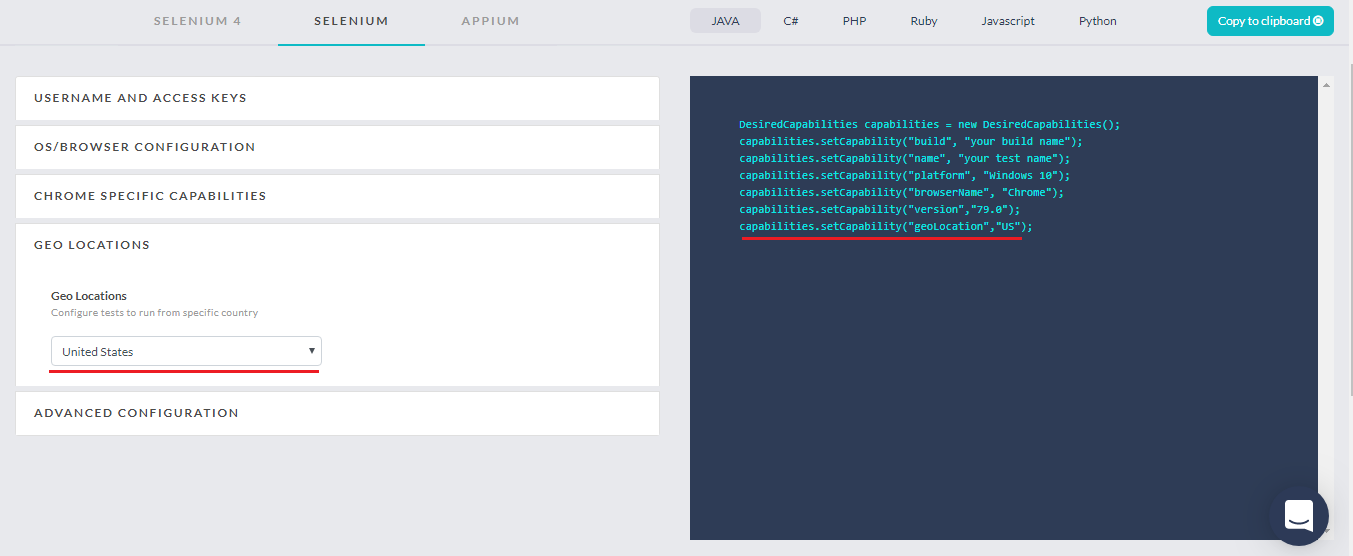
You can have a look at the examples for other activities involved in geolocation testing from the below article, where we have discussed Geolocation testing in great detail.
Why Is It Important To Test Website From Different IP locations?
Knowing What To Automate
Browser compatibility testing may feel like a never-ending process and it continues to be more and more exhausting as you scale your web application, also because of the rapid pace at which different browsers are being released. Cheers to open-source test automation frameworks such as Selenium who have made browser compatibility testing a lot easier and less time-consuming.
However, implementing Selenium automation testing requires adequate planning and resource management. Many times people hurry and start Selenium automation testing without proper planning and deliverables. This can be problematic in the long run. Also, people believe that they could perform a 100% automation using Selenium. But they can’t!
So that next question that pops up is what should we automate then?
The answer to this question could either help you pass the Selenium implementation with flying colors or could sink your automation ship down the ocean floor. If you are just starting with Selenium automation testing, we have got a good read for you.
Starting Automation Testing From Scratch? Here Is What You Need To Know!
How Do AI Agents Change Cross Browser Testing?
AI agents now drive a real browser directly, so a plain-language instruction can open a page, walk a flow, and report what broke. Agents change how tests get written and repaired, not what has to be covered.
Four capabilities are worth knowing before you plan a browser compatibility suite around them.
- Playwright MCP: the Model Context Protocol server from Microsoft lets an agent drive Chromium, Firefox, and WebKit from the accessibility tree instead of pixel coordinates.
- Chrome DevTools MCP: exposes performance traces, network requests, and console errors to an agent, so a broken render can be inspected without a person opening the browser.
- Self-healing locators: the agent re-resolves a selector after a DOM change instead of failing the run, which cuts maintenance on long-lived suites.
- Flow-to-script generation: an agent records one manual pass through a signup or checkout and emits a script you can replay on every browser and operating system pair.
The limits are equally concrete. An agent runs in whatever browser it is handed, so it still needs a grid of real browser and operating system combinations to catch a layout bug that only appears in Safari on macOS.
Agent runs are also non-deterministic. The same instruction can take a different path on two runs, which makes a failure harder to reproduce than a fixed script. Use an agent to author and repair tests faster, and keep the browser matrix as the thing that decides coverage.
Exploratory Browser Testing
Even after you have tested your regular test scripts across sufficient browsers. You would still have to prepare for unexpected scenarios. Why? Well, because each browser has its own performance scale. Now, what better way is there to find such unexpected scenarios than to perform exploratory testing?
Make sure you have a team on-board with relevant skills for exploratory testing and then decide over the type of exploratory testing you wish to execute. There are 3 different styles for exploratory testing.
- Scenario-based Exploratory Testing
- Strategy Based Exploratory Testing
- Freestyle Exploratory Testing
Documentation Of Cross Browser Test Cases
Writing test cases is one of the most basic drills for a software tester. Yet, I have seen it going miserably wrong oftentimes for browser compatibility testing. Which is slightly understandable considering that you have to validate your web application across hundreds of browser + OS combination. However, this is no excuse! With thorough documentation of test cases, you can end up saving a lot of time for your fellow developers and testers.
If you encounter a UI bug, then you need to report it in an easy-to-understand manner. You would also need to specify a detailed document for Selenium automation testing, specifying which modules have been automated, to help others understand the ripple effect of an outage under these modules.
Read More: 17 Lessons I Learned For Writing Effective Test Cases
Issues and Bug Management
Cross browser testing could sometimes be very frustrating. Especially, in the early stages of your website or web application. As your website is new, and you are planning to start off with a full-scale browser compatibility testing process then you are bound to encounter numerous UI browser compatibility issues. And if you don’t have an efficient setup with a bug management tool such as JIRA, ClickUp, Trello, or more then you are eventually going to end up with a headache.
Which is why TestMu AI, a cross browser testing tool, offers integrations with multiple third-party tools for bug tracking tool, project management tool, CI/CD pipelines, instant messengers, and more.
Regression Testing Plan
One of the most adored parts of a release cycle, Regression testing has to be planned thoroughly for automated browser testing. The reason being is that there are multiple browsers + OS combinations incorporated in your test script.
Now, say you had a successful deployment today and the next release deployment is a month after. Within that month, you not only have few new browser versions that have come up but you also came to discover few deprecated CSS properties that were being used on your website. You would now have to re-evaluate your automated regression testing suite with respect to these new changes. Meaning your Selenium automation testing plan has to be flexible enough for an ever-changing regression testing suite.
TestMu AI’s LT Browser is a next-gen browser to build, test & debug mobile websites. Try it now, for free!
Right Testing Solution and Framework
This is one of the game-changer for your cross browser test cycles. Selecting which test automation framework to choose and which cross browser testing cloud to go for is pivotal. Here are a few considerations before selecting the right automation framework.
- Is it open-source?
- Does it offer good community support?
- Does it offer parallel testing capabilities?
- Is the learning curve too high?
- If commercial, does it provide you with a support representative to help your team become proficient with the framework usage?
- Is the support documentation sufficient?
- Are there any video tutorials of the framework to help you get started immediately?
Similarly, here are a few things to consider before opting for the right cross browser testing cloud.
- A total number of browsers available.
- Does it offer legacy and latest browsers on the platform?
- What is the average time window to bring a newly launched browser?
- Does the platform offer good support documentation?
- Does it offer active customer support to help resolve your queries?
- Does it offer mobile browsers? Responsive testing
- Does it offer test automation?
- Does it offer parallel testing with Selenium?
- Does it offer Appium capabilities?
- Does it offer scalable and affordable pricing plans?
- How does the platform cope up with latency issues?
- Integrations to third-party tools for project management, CI/CD etc.
- Customer reviews are definitely going to be helpful.
And the list may go on, but these are the most prominent questions to consider when comparing different test automation frameworks and tools for cross browser testing.
Conclusion
Cross browser testing although it is about testing your website on different browsers, but there is a lot more to it than just browsers. I have come up and shared some important metrics for browser testing with you. Now it is up to you to prioritize them based on your business and website requirements. Remember though:

The above metrics are definitely important to consider but if you are someone who is just starting with browser compatibility testing of your web application then I won’t recommend you focus on all of them simultaneously. Take one at a time and focus on how you can work your way through that metric. Baby steps my friend, baby steps.
Let me know if there is any metric that is important for you and I forgot to mention it here. I would love to make an edit. You can drop your thought in the comment section below. Happy testing! 🙂
Testing web or mobile apps without writing code? KaneAI by TestMu AI turns plain-English instructions into tests.
Author

Rahul Jain
Blogs: 6


Rahul Jain is a community contributor with 7+ years of experience working within the software testing and QA platform ecosystem. At TestMu AI, he supports the adoption and visibility of cloud-based testing solutions, including KaneAI and HyperExecute, collaborating closely with product, engineering, and QA teams. Rahul contributes to initiatives that connect software testing platforms with developer and tester communities, helping teams understand and adopt modern testing workflows. He holds a Bachelor’s degree in Commerce and brings long-term experience working alongside large-scale testing products.


Cross Browser Testing FAQs
Did you find this page helpful?
More Related Blogs

TestMu AI forEnterprise
Get access to solutions built on Enterprise
grade security, privacy, & compliance
- Advanced access controls
- Advanced data retention rules
- Advanced Local Testing
- Premium Support options
- Early access to beta features
- Private Slack Channel
- Unlimited Manual Accessibility DevTools Tests