

Power Your Software Testing with AI Agents and Cloud
The Native AI-Agentic Cloud Platform to Supercharge Quality Engineering. Test Intelligently and Ship Faster.


- TestMu AI (Formerly LambdaTest)
- /
- Blog
- /
- How to Test a Website From Any Country or Location
How to Test a Website From Any Country or Location
See how to test a website from another country or location, no VPN needed. Check local search results, pricing, and geo-blocked content by region.
Last Updated on:
Your website can look and behave differently for people in different countries, from search results to prices to which media is even allowed to play. Geolocation testing checks how your site performs by loading it from IP addresses in those regions.
This guide covers geolocation testing end to end: why it matters, and step by step how to test your site from any country or location.
Overview
To test a website from any country without a VPN, use a cloud-based platform like TestMu AI to route your browser sessions through local IP addresses. This allows you to instantly verify region-specific translations, local currencies, and geo-blocked media as a local user would.
What is geolocation testing?
Geolocation testing loads a website from IP addresses in different countries to verify how it behaves for users in each region, catching location-specific issues a single-location test misses.
Why does a website behave differently by country?
Sites detect a visitor's IP and adapt: search results, currency and pricing, geo-blocked media, and load speed all change by region, so the same URL can serve a different experience in each country.
What issues does geolocation testing catch?
Wrong translations, incorrect local currency, region-specific search results, geo-blocked media, broken geofencing, and slow load times over regional networks.
How do you test a website from another country without a VPN?
- Best for manual geolocation checks: TestMu AI live testing - This feature lets you manually set your target location and interact with your website through a proxied local IP address to verify localized content.
- Best for automated cross-browser testing: TestMu AI Selenium Grid - This platform allows you to run automated scripts across 3,000+ browser and OS combinations while routing traffic through specific country IPs using its capabilities generator.
- Best for mobile performance testing: TestMu AI's LT Browser - This tool lets you preview and debug mobile websites across different device viewports with built-in network throttling to simulate regional bandwidth conditions.
How Does Geolocation Testing Give You a Competitive Edge?
Your website is the face of your business. A strong first impression can drive conversions, while a broken or poorly localized experience can cost you customers before they ever engage.
The number of websites online keeps growing fast, and more sites means more competition for the same audience. The more crowded the web gets, the more a page that renders badly in another country costs you.
So how do you stay ahead? Start by making sure your website renders and behaves correctly for people using different browsers from different geographies. That means you cannot sideline cross browser testing and geolocation testing in your upcoming release cycles.

Note: Set a live browser session to any country and see your site exactly as local users do, with no VPN or extra devices. Start testing free with TestMu AI
How Can You Perform Geolocation Browser Testing?
With TestMu AI, you can perform cross browser testing across 3,000+ browser and OS combinations from different geolocations.
Geolocation testing works for both manual cross browser testing and automated testing using an online Selenium Grid. For a step-by-step walkthrough, see how to perform cross-browser testing from various geo locations.
By default, TestMu AI uses IP2Location to determine your geolocation and routes you to the nearest data center for the best performance.
For geolocation-sensitive testing, you can bypass that routing: the TestMu AI machine is proxied through the location you set, so testing behaves as if you are in that country.
What Is IP2Location?
IP2Location is a service that lets you identify the IP address responsible for your internet access. It can surface details about that IP address such as the time zone, net speed, and area code.
Testing Geolocation From the TestMu AI Dashboard
Geolocation is built into TestMu AI real-time testing, so you can switch countries from inside a live session in a few clicks:
- Launch a live session. Start a real-time session for the URL you want to check on any browser and OS.
- Open IP Geolocation. Click IP Geolocation in the left toolbar.
- Choose a country. Pick the geolocation you want to test from, and the session reloads through an IP in that region.
- Verify the experience. Check that the language, currency, content, and any geo-blocked media match what a local user would see.
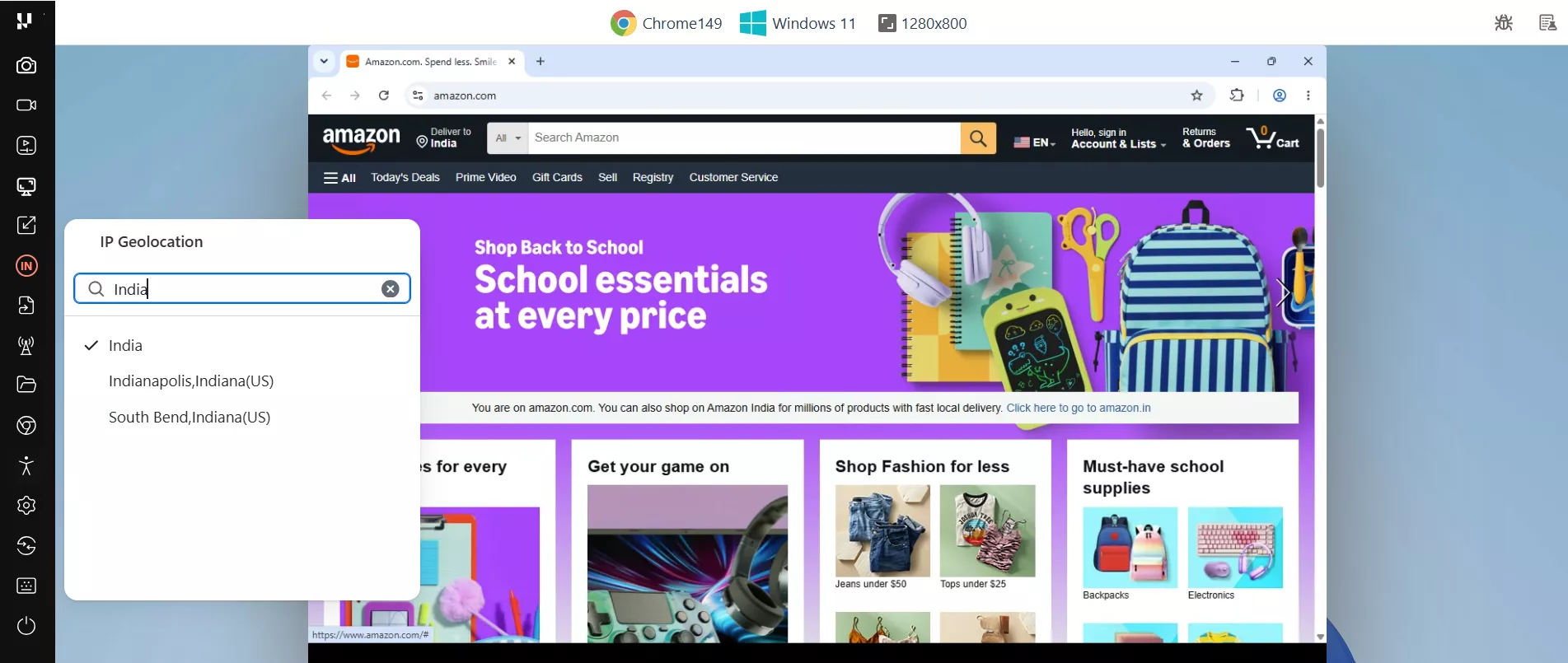
Here is that flow in action. With IP Geolocation set to India, Amazon loads its India experience inside the live session, showing a Deliver to India address and prompting a switch to the local amazon.in store:
For the full walkthrough, see the docs on desktop browser real-time testing.
IP Geolocation vs GPS Location
IP geolocation changes where the server thinks the visitor is, by routing the session through an IP address in the chosen country. That is what drives localized content, currency, and geo-blocking. GPS location changes what the device reports to the browser's Geolocation API or to an app, which is what maps, store finders, and delivery zones read. On TestMu AI, IP geolocation works on desktop and mobile sessions, and GPS coordinates can be set on mobile browser and app sessions. If the country you need is not listed, contact support to check availability.
Leveraging Geolocation Feature For Online Selenium Grid
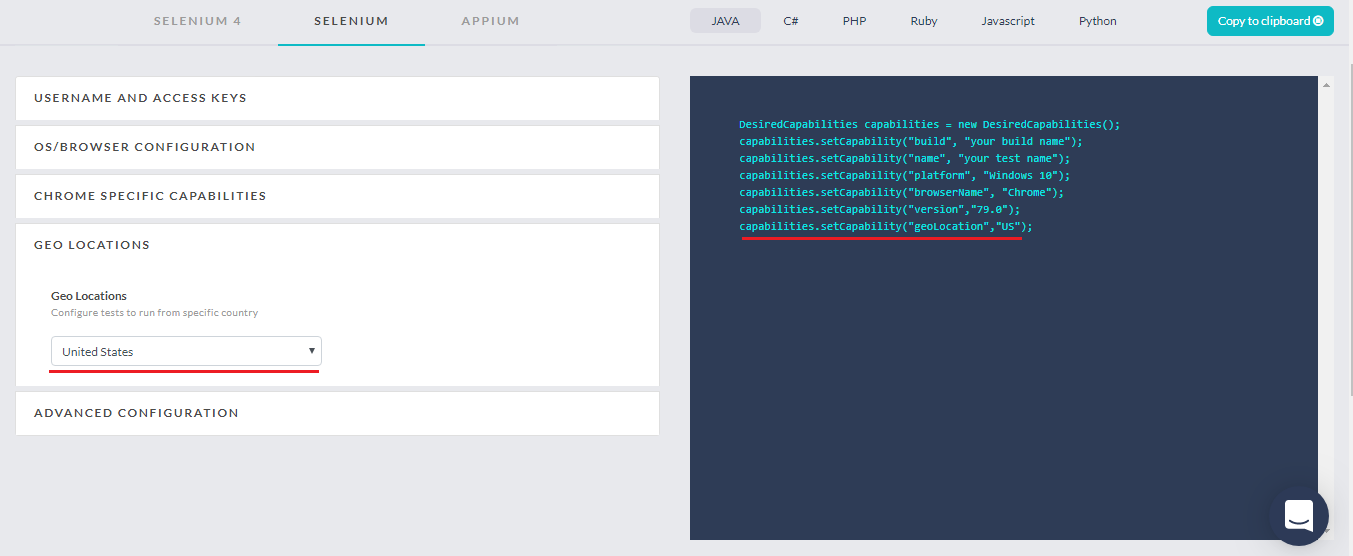
If you wish to incorporate Geolocation testing under your Selenium automation testing scripts then you can do so with the help of the TestMu AI Selenium Desired Capabilities Generator. You will find a drop-down to select a country at which you wish to perform automated geolocation browser testing.
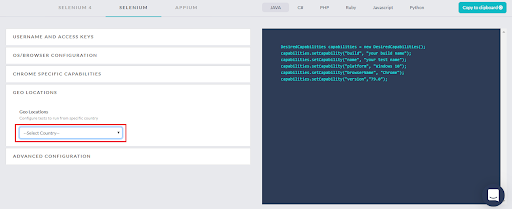
Once you select a country from the drop-down, you will find our Capabilities Generator automatically adding a capability for geolocation in the Capabilities class on the right side.
What Can You Test By Incorporating Geolocation Browser Testing?
Now that you can load your site from any country, here is what to actually check.
Geotargeting To Evaluate SERP(Search Engine Result Pages)
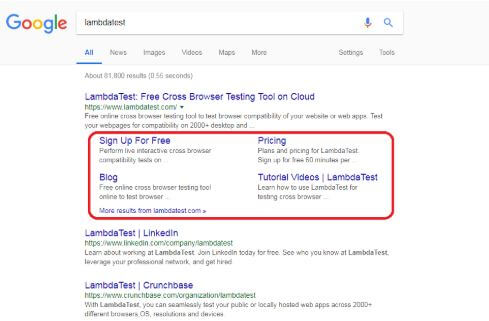
Search engines tailor results by region, so the same query can return a noticeably different results page from one country to the next. Here it is in practice:
1. When searched through an IP from France.
2. When searched through an IP from United Kingdom.
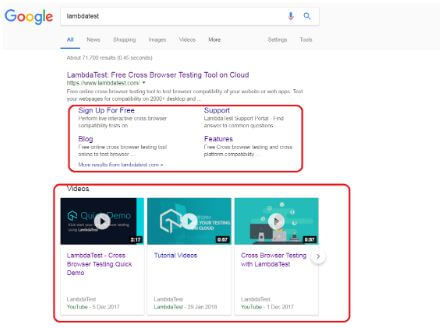
You can notice the differences through the area highlighted.

Geofencing To Drive Personalized Notifications
Geofencing sends notifications to your users based on the geographic area they are in while using your web application. For example, if you want to push an exclusive notification for an upcoming regional festival, you can test how it appears from an IP belonging to that country.

Src: Eventya
Geotagging For Identifying Geospatial Metadata
Geotagging attaches a geographical tag to elements such as photos, videos, and QR codes. You can use it to add geography-based authentication through QR codes, or to serve images that should only be accessible to people in a particular location.
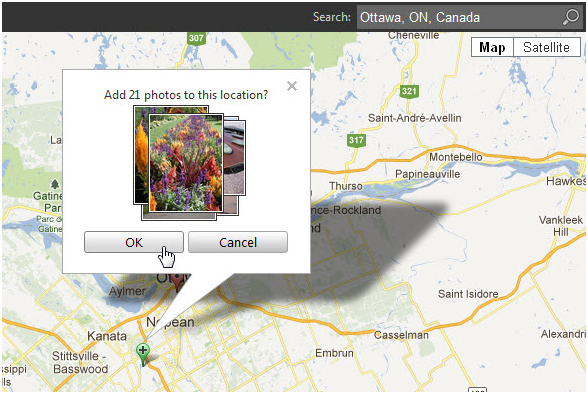
Src: PaintShop Pro
Geo-blocking To Display Content According To Country Laws
Geo-blocking applies restrictions to your website based on the laws and norms of a country.
Many online streaming companies such as Hulu, Netflix, HBO Max, and more use geo-blocking to deliver rich-media content according to each country's norms. You may have seen the image below when a video would not play on YouTube.

That message is geo-blocking in action. If you run a website, make sure the photos and videos you display comply with the norms of the countries your audience lives in.
Localization For Adapting To Specific Locale
Localization means making your web application look and feel native to the specific locale a visitor is accessing it from.
So if you run a business that caters to multiple countries, you may want your pricing page to show prices in the country-specific currency, or even serve a fully translated page in your customers' native language.

You can use geolocation browser testing to evaluate how well your website is able to localize.
Test Your Website For Different Internet Bandwidth
Network speed varies widely by country, so a page that feels fast in one region can crawl in another. Pair geolocation testing with testing on different network conditions to see how your site loads over 3G or 4G where your users actually are.
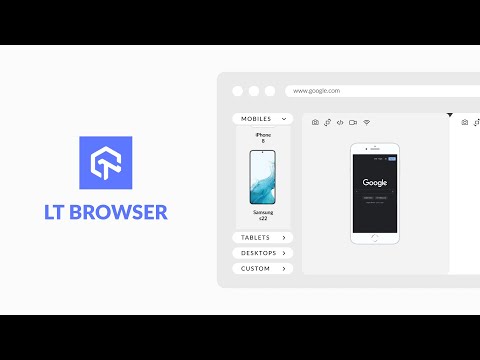
TestMu AI's LT Browser lets you preview and debug your mobile website across device viewports, with network throttling built in, so you can check load behavior before running location-specific tests.
Which Browsers Support Geolocation?
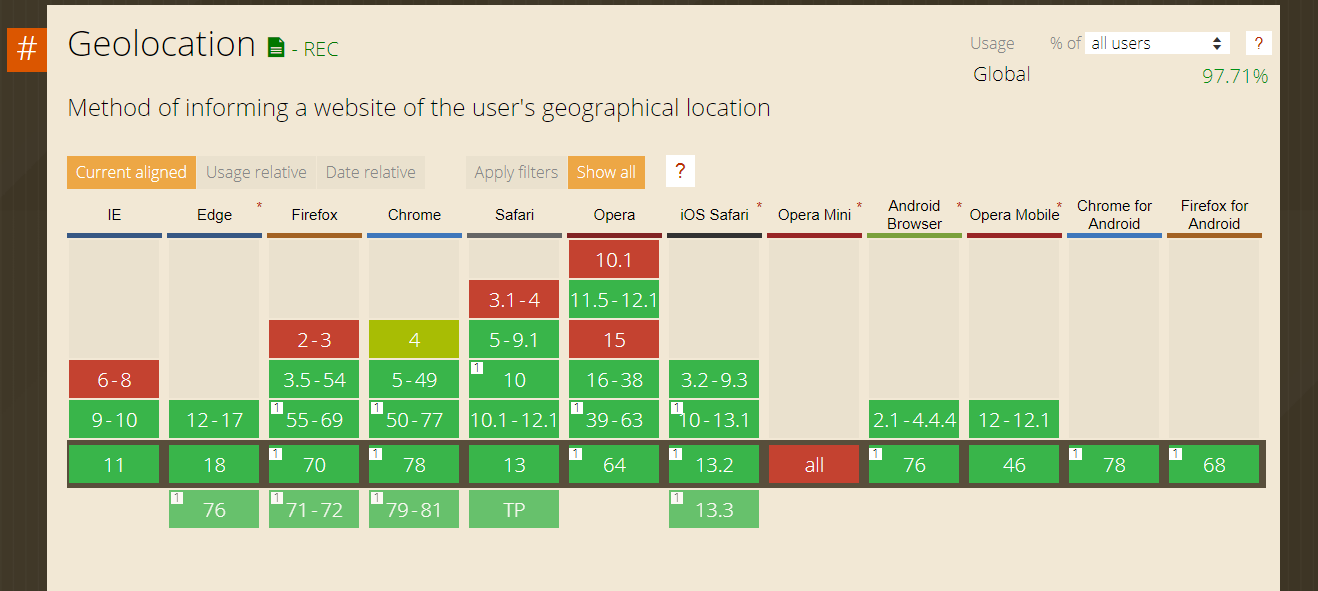
Geolocation offers good browser compatibility. Still, if you are concerned about audiences on older or less common browsers, it is worth running cross browser testing for your targeted geolocations straight away.
TestMu AI offers a free plan so you can run browser compatibility checks across geolocations on a scalable cloud, with automation minutes included to get you started.
Test From Where Your Users Are
Your users do not all browse from where your team sits, and your testing should not either. Geolocation testing shows you the search results, currency, translations, geo-blocked media, and load speed that people in each country actually experience, so regional issues surface before they reach real users.
The quickest way to start is a live session: open your site, set the country, and watch how it responds. Pair that with automated runs across browsers and network conditions, and you can cover every market you serve without a VPN or a single extra device.

Austin Siewert
Co-Founder, Steadfast Systems
Discovered @TestMu AI yesterday. Best browser testing tool I've found for my use case. Great pricing model for the limited testing I do 👏
2M+ Devs and QAs rely on TestMu AI
Deliver immersive digital experiences with Next-Generation Mobile Apps and Cross Browser Testing Cloud

Author

Harshit Paul
Blogs: 93


Harshit Paul is Director of Product Marketing at TestMu AI (formerly LambdaTest), with over 8 years of experience in product and growth marketing for developer and QA tools, leading the Agentic AI in Quality Engineering space. He has authored 80+ technical articles for TestMu AI on software testing and automation, and hosted webinars on Selenium, automation testing, browser compatibility, DevOps, and continuous testing. He has led go-to-market and technical marketing initiatives across software testing products, contributing to SEO, content strategy, and developer marketing. He began his career as a certified Salesforce developer at Wipro Technologies, where he worked for 2 years before moving into marketing. Harshit holds a degree in computer programming from Vivekananda Institute of Professional Studies.


Geolocation Testing FAQs
Did you find this page helpful?
More Related Blogs
TestMu AI forEnterprise
Get access to solutions built on Enterprise
grade security, privacy, & compliance
- Advanced access controls
- Advanced data retention rules
- Advanced Local Testing
- Premium Support options
- Early access to beta features
- Private Slack Channel
- Unlimited Manual Accessibility DevTools Tests