
Power Your Software Testing with AI Agents and Cloud
The Native AI-Agentic Cloud Platform to Supercharge Quality Engineering. Test Intelligently and Ship Faster.


- TestMu AI (Formerly LambdaTest)
- /
- Blog
- /
- AI Web Scraping: How It Works, Tools & Implementation (2026)
AI Web Scraping: How It Works, Tools & Implementation (2026)
Learn how AI web scraping works, compare the 7 best tools, and run a real scraping agent on TestMu AI BrowserCloud with stealth and auth persistence.
Last Updated on:
On This Page
- What Is AI Web Scraping?
- AI vs Traditional Scraping
- Why AI Scraping Is Taking Over
- How AI Web Scraping Works
- 8 Best AI Web Scraping Tools
- Where AI Scraping Fails
- Running Agents with BrowserCloud
- Running Puppeteer Tests Using Agent Skills
- Integrating BrowserCloud into DevOps
- Why BrowserCloud for AI Scraping?
- Avoid Getting Blocked
- Is AI Web Scraping Legal?
- Best Practices for Scraping
- Conclusion
- Citations
Web scraping has existed for decades. But the moment AI entered the picture, everything changed. You no longer need to write brittle CSS selectors that break every time a website updates its layout. You no longer need to maintain complex XPath trees or reverse-engineer JavaScript-heavy pages by hand. AI web scraping handles all of that for you, and it does it at a speed and scale that traditional scrapers simply cannot match.
Whether you are extracting product prices for a competitor analysis, gathering research data, building training datasets for your own AI model, or monitoring brand mentions across the web, AI-powered scraping tools have become the default choice for developers, data teams, and no-code users alike. Today, AI agents handle entire scraping workflows autonomously, and AI automation pipelines process millions of pages without a human touching a single line of selector logic.
The scale of automated traffic is exactly why scraping keeps getting harder. According to the Imperva 2024 Bad Bot Report, almost half of all internet traffic now comes from non-human sources, and bad bots alone make up nearly a third of it. Sites have answered with aggressive bot defenses, which is why getting clean data reliably has become an infrastructure problem as much as a parsing one.
Overview
To extract structured data from dynamic websites without writing brittle selectors, use AI web scraping tools like TestMu AI to run parallel, stealthy cloud browser sessions, or deploy Firecrawl to convert entire web pages into clean markdown and structured JSON for LLM applications.
Why AI-Powered Scraping is the Default
- Best for parallel browser scaling: TestMu AI - This platform runs real Chrome sessions in parallel to execute JavaScript, bypass bot detection with stealth mode, and persist login states across automated scraping runs.
- Best for LLM data pipelines: Firecrawl - This tool converts entire websites into clean markdown or structured JSON, utilizing LLMs to extract specific fields based on plain-language schemas.
- Best for no-code monitoring: Browse AI - This visual scraper lets users train extraction robots by demonstration and screenshot-based vision models, making it ideal for scheduled price tracking and competitive intelligence.
- Best for workflow automation: Gumloop - This visual builder connects AI web scraping nodes directly to downstream actions like updating Google Sheets, sending Slack notifications, or triggering email sequences.
- Best for Python developers: ScrapeGraphAI - This Python library combines large language model intelligence with traditional scraping techniques to let developers define flexible data extraction pipelines.
Where AI Web Scraping Still Falls Short
- AI web scraping can become expensive at scale and may truncate very long pages due to model context limits.
- Language models can occasionally hallucinate missing fields and struggle to accurately parse complex tables with merged or nested cells.
What Is AI Web Scraping?
AI web scraping uses artificial intelligence, like large language models and computer vision, to extract structured data from websites instead of relying on hardcoded CSS or XPath selectors.
Traditional scrapers follow explicit instructions: "find the element with class product-title, grab its text, move to the next page." This works fine until the website changes its HTML structure, adds anti-bot measures, or renders content dynamically via JavaScript. Then your scraper breaks, and you are back to writing new rules.
AI-powered scrapers work differently. Instead of relying on fixed patterns, they understand the semantic meaning of a page. You tell them what you want ("get me all product names and prices from this page") and the AI figures out where that data lives, regardless of how the page is structured.

Note: Handle Dynamic Sites, Anti-Bot Systems, and Parallel Scraping at Scale. Try TestMu AI free
AI Scraping vs Traditional Scraping: What Is the Difference?
Traditional scraping relies on fixed rules like CSS selectors and XPath, while AI web scraping uses machine learning to adapt to changing layouts with far less manual setup.
While traditional scrapers work well for stable websites, AI-powered scrapers are better suited for dynamic pages, evolving site structures, and content-heavy platforms where flexibility matters most.
| Feature | Traditional Scraping | AI Web Scraping |
|---|---|---|
| Setup method | Manual CSS/XPath selectors | Natural language instructions |
| Handles dynamic JS pages | Needs Selenium/Puppeteer | Built into most tools |
| Breaks on layout changes | Yes, frequently | Rarely |
| Handles unstructured text | No | Yes |
| Learning curve | High (coding required) | Low to medium |
| Cost | Low (open source) | Higher (API/subscription) |
| Speed | Fast at scale | Slightly slower per page |
The core tradeoff is flexibility versus cost. Traditional scrapers are cheaper and faster for stable, well-structured sites. AI scrapers are more resilient, more capable, and far easier to maintain for complex or changing targets.
Why Is AI-Powered Scraping Taking Over?
AI scraping took over because websites got harder to scrape, LLMs became good enough to read pages like humans, and agentic AI enabled multi-step scraping without extra engineering.
First, websites became harder to scrape. Anti-bot technologies, JavaScript-rendered content, dynamic SPAs, and CAPTCHA systems made simple HTML parsing ineffective for most modern targets, pushing teams toward full screen scraping that renders the page before reading it.
Second, LLMs became good enough to understand HTML and extract information the way a human would read a page. Models like GPT-4 and Claude can parse an entire page, identify what is a product name versus a category label, and return clean, structured data without being told exactly where to look.
Third, the rise of agentic AI, where AI models can autonomously navigate multi-step workflows, browse pages, click buttons, fill forms, and handle pagination, made scraping pipelines dramatically more powerful without additional engineering effort.
This shift is part of a broader trend: Artificial Intelligence in software engineering is moving from assistive tooling to autonomous execution, and web scraping is one of the clearest examples of that transition.
How Does AI Web Scraping Work?
AI web scraping works by feeding a page's HTML or a screenshot into an LLM or vision model, which reads the content semantically and returns structured data without fixed selectors.
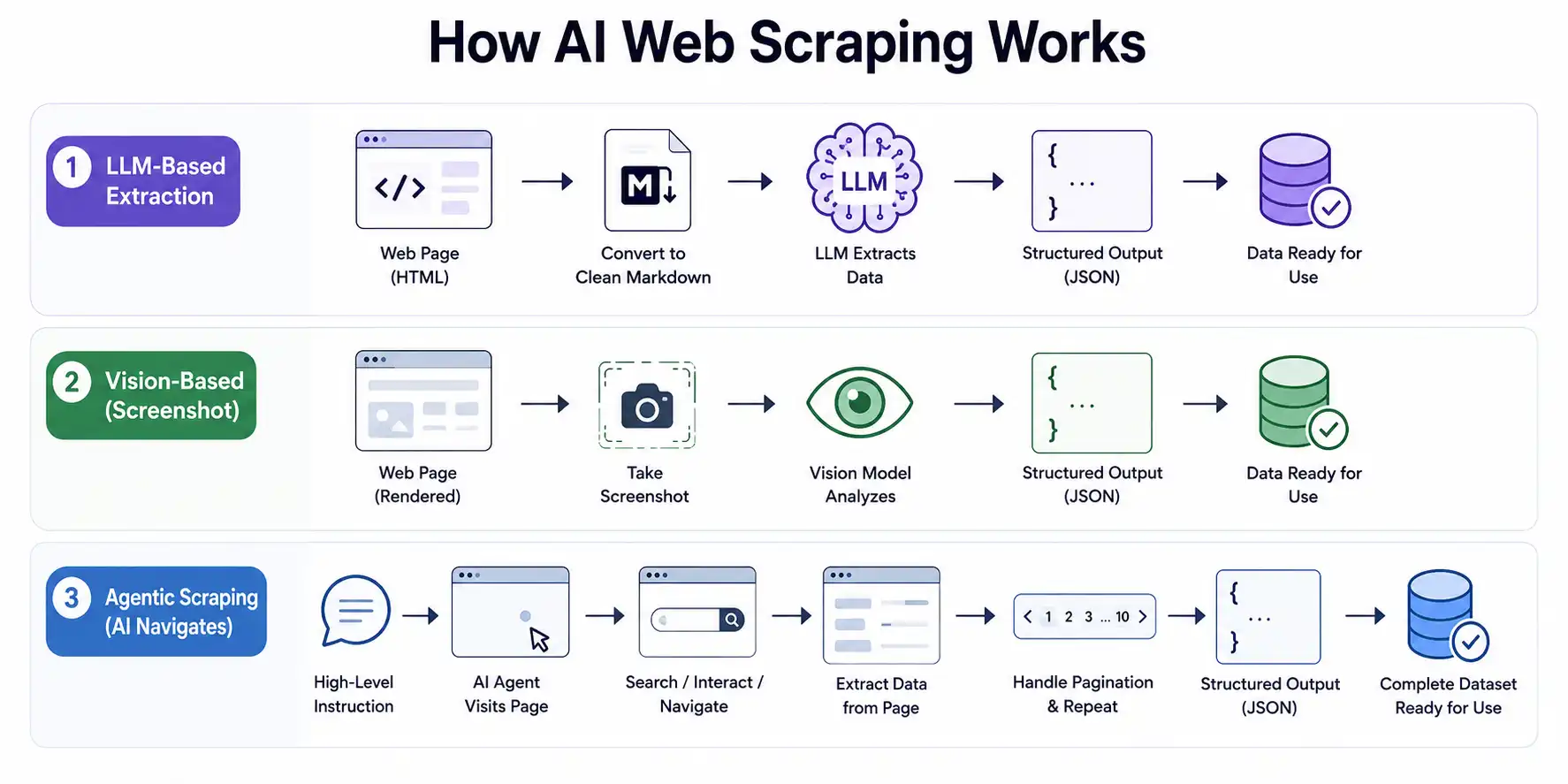
LLM-Based Extraction
The most common approach is feeding HTML (or a cleaned markdown version of a page) into an LLM with a prompt that describes what data you want. The model reads the content, identifies the relevant fields, and returns structured output, typically in JSON.
Tools like Firecrawl convert raw HTML to clean markdown first, stripping navigation, ads, and boilerplate. This reduces noise and keeps costs low because you are sending fewer tokens to the LLM. The extracted output is clean, schema-aware, and ready for downstream use.
Vision Models and Screenshot-Based Scraping
Some AI scrapers, particularly Browse AI and newer multimodal tools, take a screenshot of the rendered page and pass it to a vision model. This is especially powerful for pages where the visual layout matters more than the HTML, such as complex tables, dashboards, or pages where the text is embedded in images.
Vision-based extraction is slower and more expensive per page, but it handles cases that pure HTML parsing cannot: PDF-style web pages, canvas-rendered content, and heavily obfuscated markup designed to block scrapers.
Agentic Scraping: When AI Navigates Like a Human
Agentic scraping goes beyond single-page extraction. The AI model acts as a browser operator: it loads a page, reads the content, decides what to click next, handles login flows, navigates pagination, and collects data across multiple pages, all from a single high-level instruction.
The emerging pattern of MCP and AI agents takes this further still: AI models connect to external tools including browsers, storage systems, and notification services through a standardized protocol, so a single agent loop can scrape a page, write the result to a database, and trigger a Slack alert without any glue code between steps.
You might say "go to this e-commerce site, search for running shoes, and collect the name, price, and rating of every result across the first 10 pages." An agentic scraper will execute that entire workflow without you specifying each step.
This is why agentic AI tools have become the go-to choice for enterprise AI agents running competitive intelligence, market research, and data aggregation workflows at scale. The best AI agents in this category are not just scrapers: they are autonomous research pipelines that happen to use the web as their data source.
This is where tools like Browse AI and Gumloop shine, and it is also where testing and QA become critical. Agentic software testing, where AI-driven test agents validate multi-step workflows the same way agentic scrapers execute them, is the natural counterpart to agentic scraping. You need one to trust the other.
The 8 Best AI Web Scraping Tools in 2026
The 8 best AI web scraping tools in 2026 are Firecrawl, Browse AI, TinyFish, Gumloop, ScrapeGraphAI, webscraping.ai, Apify, and Diffbot.
Each of the eight tools below is assessed on four things: how reliably it renders JavaScript-heavy pages, extraction accuracy, integration effort, and how it holds up at production scale. TestMu AI builds Browser Cloud, so rather than rank our own product inside that list, we cover it first as a separate pick and let the eight tools stand on their own.
TestMu AI Browser Cloud (Formerly LambdaTest)
TestMu AI Browser Cloud is browser infrastructure built for AI agents and data teams: real, full-featured Chrome sessions on demand instead of a stripped headless shell. That distinction is the whole point of AI scraping. A plain HTTP request to a modern single-page app returns an almost-empty HTML shell, while Browser Cloud runs real Chrome so JavaScript executes, the page hydrates, and your agent reads the fully rendered DOM the way a user would.
For scraping specifically, the platform layer carries the work your scraper code usually has to:
- Massive parallelism on demand: spin up many isolated cloud sessions at once instead of serializing through one machine, so throughput scales with the job rather than with hardware you pre-bought.
- Session persistence: cookies, local storage, and login state carry across runs, so a scheduled scraper logs in once and resumes authenticated instead of re-authenticating on every run.
- Stealth Mode (best-effort): fingerprint masking, CAPTCHA solving, and ad blocking reduce how often automated sessions get flagged. It is best-effort, not a guarantee that any given site is bypassed.
- Built-in tunnel: cloud browsers can reach localhost, staging, and VPN-only environments, so you can scrape internal or pre-production data without exposing it publicly.
- Full session transparency: every session records video, console logs, network logs, and step-by-step command replay, so when a scrape breaks you can watch what the browser actually saw instead of guessing.
You drive it with standard Playwright, Puppeteer, or Selenium through the Browser Cloud SDK, plus a CLI and MCP server for agent loops, so existing scraper code connects with minimal change. Install Browser Cloud to get started:
npm install -g @testmuai/browser-cloudBest for: AI agents and data teams scraping JavaScript-heavy or login-gated sites in parallel at production scale.
1. Firecrawl
Firecrawl converts entire websites into clean markdown or structured JSON, making it the go-to choice for teams building RAG pipelines, AI applications, or data ingestion workflows. You point it at a URL, tell it what schema you want, and it returns structured data.
The crawl endpoint handles multi-page scraping automatically, following links across a site and aggregating results. The extract endpoint uses LLMs to pull out specific fields based on a schema you define in plain language.
Best for: Developers, AI/LLM data pipelines, RAG applications. Consistently ranked among the best AI tools for developers building data-intensive backends.
2. Browse AI
Browse AI lets you train a robot by demonstration. You open a website in the Browse AI interface, click through the data you want to capture, and the tool learns the pattern. It then runs that job on a schedule and alerts you when monitored data changes, which is ideal for price tracking, job board monitoring, or competitive intelligence.
No coding required. The visual interface makes it accessible to non-technical users, while the monitoring features make it genuinely useful for ongoing business workflows rather than one-off extractions.
Best for: Non-technical users, monitoring workflows and scheduled scraping.
3. TinyFish
TinyFish is a web infrastructure platform for AI agents that combines web search, content extraction, managed browser sessions, and multi-step web automation. For scraping workflows, its Fetch API renders dynamic and JavaScript-heavy pages in a real browser and returns clean Markdown, JSON, or HTML, giving AI applications structured page context without the noise of raw page content.
Where TinyFish goes beyond traditional scraping is when a workflow needs to operate on a website, not just read it. Its Web Agent can navigate pages, work through filters and pagination, fill forms, maintain authenticated sessions, and return structured results, making it useful for production workflows that grow from data extraction into multi-step web automation.
Best for: Developers and AI teams building reliable web data pipelines that may need to extend from extraction into authenticated, multi-step web workflows.
4. Gumloop
Gumloop is a visual workflow builder that connects AI web scraping to downstream actions: send extracted data to a Google Sheet, trigger a Slack notification, pass it into an email sequence, or push it to a CRM. Think of it as Zapier but with a native AI scraping node built in. Among AI automation tools available in 2026, it sits at the intersection of data extraction and workflow orchestration in a way that few competitors match.
If your use case is "scrape this, then do something with the result automatically," Gumloop removes the need to stitch together multiple tools.
Best for: Multi-step automation workflows that combine scraping with other actions
5. ScrapeGraphAI
ScrapeGraphAI is a Python library that combines LLM intelligence with traditional scraping. You define a scraping pipeline using a simple API, choose your LLM backend (OpenAI, local Ollama, etc.), and run it locally. The fact that it is open source and supports local models means your data never has to leave your infrastructure.
It is genuinely powerful and highly customizable for developers who want control over every step of the pipeline.
Best for: Developers, privacy-sensitive use cases, self-hosted setups.
6. webscraping.ai
WebScraping AI offers a straightforward REST API for scraping any page. It handles JavaScript rendering, proxy rotation, and CAPTCHA solving out of the box. You send a URL, and you get back clean HTML or extracted text. It is not the most sophisticated AI tool on this list, but it is reliable, well-documented, and affordable for high-volume use cases.
Best for: High-volume scraping, proxy management, simple API integration.
7. Apify
Apify is one of the most mature platforms in the space. It offers a marketplace of community-built "Actors" (ready-made scrapers for popular sites like LinkedIn, Amazon, Google Maps, and hundreds more), plus the ability to build and deploy your own. The AI-enhanced features let you extract structured data from unstructured pages using LLM-powered parsing.
Best for: Enterprise-grade scraping with a marketplace of pre-built actors
8. Diffbot
Diffbot uses proprietary machine learning models to automatically detect the type of page you are scraping (article, product, job listing, etc.) and extract the relevant fields without you having to define a schema. It also offers a Knowledge Graph built from billions of web-scraped entities, which is useful for research and enrichment use cases.
Best for: Automatic schema detection and large-scale knowledge graph building
Quick Comparison Table - AI Webscraping Tools
Here's a quick comparison of popular AI web scraping tools based on free tier availability, ease of use, and ideal use cases.
| Tool | Free Tier | No-Code | Best For |
|---|---|---|---|
| Firecrawl | Yes | Partial | Developers, LLM pipelines |
| Browse AI | Yes | Yes | Monitoring, recurring jobs |
| TinyFish | Yes | Partial | Agentic, multi-step web workflows |
| Gumloop | Yes | Yes | Workflow automation |
| ScrapeGraphAI | Yes | No | Self-hosted, devs |
| webscraping.ai | No | Partial | High-volume API use |
| Apify | Yes | Yes | Enterprise, ready-made scrapers |
| Diffbot | Yes | Yes | Enterprise knowledge graphs |
| TestMu AI Browser Cloud | Yes | Partial | AI agents, JS-heavy SPAs at scale |
Where AI Web Scraping Actually Fails?
AI web scraping fails on very long pages, high per-page costs at scale, hallucinated field values, complex tables with merged cells, and constantly evolving anti-bot detection.
- Token context limits on very long pages: LLMs can only process a limited amount of content at once, so very large pages may get truncated or become expensive to analyze. Chunking the page into smaller sections is usually required.
- High per-page cost at scale: AI extraction can become costly when processing thousands of pages daily. Many teams combine traditional scraping with AI only for difficult pages to reduce expenses.
- Hallucinated field values: LLMs may occasionally guess missing information instead of returning empty values, which can silently introduce inaccurate data into pipelines.
- Structured table extraction: Complex HTML tables with merged cells or nested layouts are still difficult for AI models to interpret correctly without specialized parsers.
- Anti-bot evolution: Websites continuously improve bot-detection systems, so scraping setups that work today may suddenly fail after detection rules are updated.
While these limitations are real, most production-grade AI scraping systems solve them through better infrastructure rather than better prompts alone. Scalable browser cloud platforms help manage dynamic rendering, parallel execution, anti-bot handling, session reliability, and large-scale orchestration, all of which are critical for running AI scraping agents reliably in production.
Using browser cloud platforms like TestMu AI (formerly LambdaTest) can help address many of these challenges. TestMu AI is a full-stack Agentic AI Quality Engineering platform that provides AI-native infrastructure with support for real browsers, real devices, and customizable environments for large-scale automation workflows.
With TestMu AI's BrowserCloud, teams can run AI scraping agents more reliably on modern, JavaScript-heavy, and dynamically rendered websites without managing browser infrastructure manually.
Note: Run AI web scraping agents at scale with TestMu AI BrowserCloud. Try TestMu AI free
How to Run AI Web Scraping Agents with TestMu AI Browser Cloud
To run AI web scraping agents with TestMu AI BrowserCloud, create stealth-enabled cloud browser sessions, persist auth with profiles, run them in parallel, and replay sessions to debug.
TestMu AI BrowserCloud provides a managed browser automation environment designed for AI-driven workflows. Instead of managing local browser clusters or virtual machines manually, teams can run scraping agents in isolated cloud browser sessions with built-in scalability and observability.
The platform supports modern automation testing frameworks like Playwright, Puppeteer, and Selenium, making it easier to execute AI scraping workflows across JavaScript-heavy and dynamically rendered websites. Features such as parallel browser execution, persistent sessions, debugging logs, and session replay help improve reliability for long-running scraping pipelines.
For teams whose scraping agent logic lives in an LLM rather than a fixed script, this guide to Playwright LangChain covers wrapping Playwright actions as LangChain tools and constraining them with host allowlists to prevent SSRF when scraping user-supplied URLs.
Unlike general-purpose infrastructure setups, AI Browsers like BrowserCloud are optimized specifically for browser automation and AI agent workflows, reducing the operational overhead involved in maintaining large-scale scraping systems.
What TestMu AI Browser Cloud Gives Your Scraping Stack
Before diving into implementation, here are some of the key capabilities BrowserCloud adds on top of your existing AI scraping tools:
- Stealth Mode: Automatically patches common browser fingerprints, such as navigator.webdriver, WebGL metadata, user-agent strings, and viewport settings. It also simulates human-like interaction patterns to help reduce bot detection risks.
- Session Persistence via Profiles: Let's have scraping agents log in once and reuse the same authenticated browser profile across future runs without repeated login flows or MFA prompts.
- Parallel Browser Sessions: Run multiple scraping jobs simultaneously in isolated browser environments, each with its own cookies, storage, and fingerprint configuration.
- Built-In Observability: Captures video recordings, console logs, and network activity for every session, making debugging and monitoring easier when scraping workflows fail unexpectedly.
These are some of the extended BrowserCloud capabilities that go beyond basic scraping infrastructure. To get started with stealth-enabled scraping workflows, refer to the support documentation for avoiding bot detection with Stealth Mode BrowserCloud.
Now, to get started with TestMu AI's BrowserCloud, let us take a real end-to-end scenario by building an AI automation pipeline that scrapes competitor pricing across multiple URLs, stays logged in between runs, avoids bot detection, and gives you full observability into every session.
Installation and Setup:
- Install the TestMu AI Browser SDK: Run the following command in your terminal
npm i @testmuai/browser-cloud- Set up environment variables: Create a .env file in your project root with your credentials from the TestMu AI dashboard under Settings → Account Settings:
LT_USERNAME=your_username
LT_ACCESS_KEY=your_access_key
Add .env to your .gitignore before committing.
AI Agent That Scrapes Competitor Pricing Across Multiple URLs
Objective: Build a production-ready scraping agent that collects product name, price, and availability from three competitor URLs in parallel, stays authenticated between scheduled runs, bypasses bot detection, and gives you full session replay for debugging.
Tools used: TestMu AI Browser Cloud (cloud browser sessions, stealth, profiles, parallel execution), Puppeteer (browser control), TypeScript.
Step 1: Create a Stealth-Enabled Session
The first thing your scraping agent needs is a browser session that will not get flagged. You configure stealth at session creation time, and BrowserCloud handles the rest automatically.
import { Browser } from '@testmuai/browser-cloud';

const client = new Browser();

async function createStealthSession(sessionName: string) {
    const session = await client.sessions.create({
        adapter: 'puppeteer',
        stealthConfig: {
            humanizeInteractions: true,   // Random delays on click/type
            randomizeUserAgent: true,     // Picks from pool of real Chrome/Firefox UAs
            randomizeViewport: true,      // Adds ±20px jitter to viewport
        },
        timeout: 600000,                  // 10-minute timeout for multi-page jobs
        lambdatestOptions: {
            build: 'Competitor Price Monitor',
            name: sessionName,
            'LT:Options': {
                username: process.env.LT_USERNAME,
                accessKey: process.env.LT_ACCESS_KEY,
                video: true,              // Record session for replay
                console: true,            // Capture console logs
            }
        }
    });

    console.log(`Session created: ${session.id}`);
    console.log(`Watch live: ${session.sessionViewerUrl}`);

    return session;
}
The humanizeInteractions flag monkey-patches page.click() and page.type() with random delays that mimic human behavior. The randomizeUserAgent flag picks from a pool of 7 realistic Chrome and Firefox user-agent strings. Both are handled automatically once you set them in the session config; there is nothing else to configure.
Step 2: Set Up Auth Persistence with Profiles
If your target sites require a login, you do not want your agent re-authenticating on every run. BrowserCloud's Profiles feature saves the browser's cookie state to disk after the first login and reloads it automatically on every subsequent run using the same profileId.
async function scrapeWithPersistentAuth(targetUrl: string) {
    const session = await client.sessions.create({
        adapter: 'puppeteer',
        profileId: 'competitor-site-login',   // Auto-saves on close, auto-loads on next run
        stealthConfig: {
            humanizeInteractions: true,
            randomizeUserAgent: true,
        },
        lambdatestOptions: {
            build: 'Competitor Price Monitor',
            name: `Scrape: ${targetUrl}`,
            'LT:Options': {
                username: process.env.LT_USERNAME,
                accessKey: process.env.LT_ACCESS_KEY,
                video: true,
            }
        }
    });

    try {
        const browser = await client.puppeteer.connect(session);
        const page = (await browser.pages())[0];

        // On first run: navigate to login, authenticate manually or via script.
        // On all subsequent runs: cookies are already restored, this goes straight to dashboard.
        await page.goto(targetUrl);

        // Extract pricing data
        const data = await page.evaluate(() => {
            return {
                productName: document.querySelector('.product-title')?.textContent?.trim(),
                price: document.querySelector('.price')?.textContent?.trim(),
                availability: document.querySelector('.stock-status')?.textContent?.trim(),
                scrapedAt: new Date().toISOString(),
            };
        });

        console.log('Extracted:', data);

        await browser.close();  // Profile auto-saves here
        return data;

    } finally {
        await client.sessions.release(session.id);  // Always release explicitly
    }
}
The profile is stored at .profiles/competitor-site-login.json as a JSON file containing the session cookies. Add .profiles/ to your .gitignore since profile files contain session tokens in plain text.
On the first run, the profile file does not exist yet and will be created when browser.close() is called. Every subsequent run loads the saved cookie state and skips login entirely, which is exactly what you want for a cron-scheduled scraping agent.
Step 3: Run Parallel Sessions for Batch Scraping
This is where BrowserCloud's AI automation capabilities become visible at scale. Rather than scraping URLs sequentially, you spin up multiple isolated sessions in parallel. Each session has its own browser, its own cookies, its own fingerprint, and its own stealth configuration, running simultaneously on TestMu AI's cloud infrastructure.
import { scrapeWithAgent, batchScrape } from '@testmuai/browser-cloud';

async function runParallelPriceScrape() {
    const competitorUrls = [
        'https://competitor-a.com/pricing',
        'https://competitor-b.com/pricing',
        'https://competitor-c.com/pricing',
    ];

    // Run 3 concurrent sessions, one per URL
    const results = await batchScrape(competitorUrls, 3);

    results.forEach((result, index) => {
        console.log(`URL ${index + 1}:`, result.content);
    });

    return results;
}

// For more control over what each session does after loading the page,
// you can manage parallel sessions manually using Promise.all:
async function parallelScrapeWithControl(urls: string[]) {
    const scrapeUrl = async (url: string, index: number) => {
        const session = await client.sessions.create({
            adapter: 'puppeteer',
            stealthConfig: { humanizeInteractions: true, randomizeUserAgent: true },
            lambdatestOptions: {
                build: 'Parallel Price Scrape',
                name: `Session ${index + 1}: ${url}`,
                'LT:Options': {
                    username: process.env.LT_USERNAME,
                    accessKey: process.env.LT_ACCESS_KEY,
                    video: true,
                }
            }
        });

        try {
            const browser = await client.puppeteer.connect(session);
            const page = (await browser.pages())[0];

            await page.goto(url);

            const pricing = await page.evaluate(() => ({
                name: document.querySelector('[data-product-name]')?.textContent?.trim(),
                price: document.querySelector('[data-price]')?.textContent?.trim(),
                currency: document.querySelector('[data-currency]')?.textContent?.trim(),
            }));

            await browser.close();
            return { url, pricing, sessionId: session.id };

        } finally {
            await client.sessions.release(session.id);
        }
    };

    // Fire all sessions simultaneously
    const results = await Promise.all(urls.map((url, i) => scrapeUrl(url, i)));
    return results;
}

// Handle clean shutdown if the agent process is interrupted
process.on('SIGINT', async () => {
    await client.sessions.releaseAll();
    process.exit(0);
});
Each URL gets its own isolated session with a different randomized user-agent and viewport, making each session look like a distinct human user to the target site's bot detection systems.
Step 4: Use Quick Actions for One-Off Extractions
Not every scraping task needs a full session lifecycle. For quick, stateless extractions where you just need the page content in a usable format, BrowserCloud's Quick Actions API handles session creation, navigation, extraction, and cleanup in a single call:
async function quickExtract(url: string) {
    // Returns clean markdown, ready for an LLM to process
    const result = await client.scrape({
        url,
        format: 'markdown',        // 'html' | 'markdown' | 'text' | 'readability'
        delay: 3000,               // Wait 3 seconds for JS-heavy pages to fully render
        waitFor: '.price-table',   // Wait for this selector before extracting
    });

    console.log('Title:', result.title);
    console.log('Content:', result.content);

    // Take a screenshot for visual verification
    const screenshot = await client.screenshot({
        url,
        fullPage: true,
        format: 'png',
        delay: 2000,
    });

    require('fs').writeFileSync('page-snapshot.png', screenshot.data);

    return result;
}
The markdown format is particularly valuable for AI scraping workflows because it strips navigation, ads, and boilerplate and returns clean, formatted text that is immediately ready to pass into an LLM extraction prompt without additional preprocessing.
Step 5: Debug and Replay Sessions on the TestMu AI Dashboard
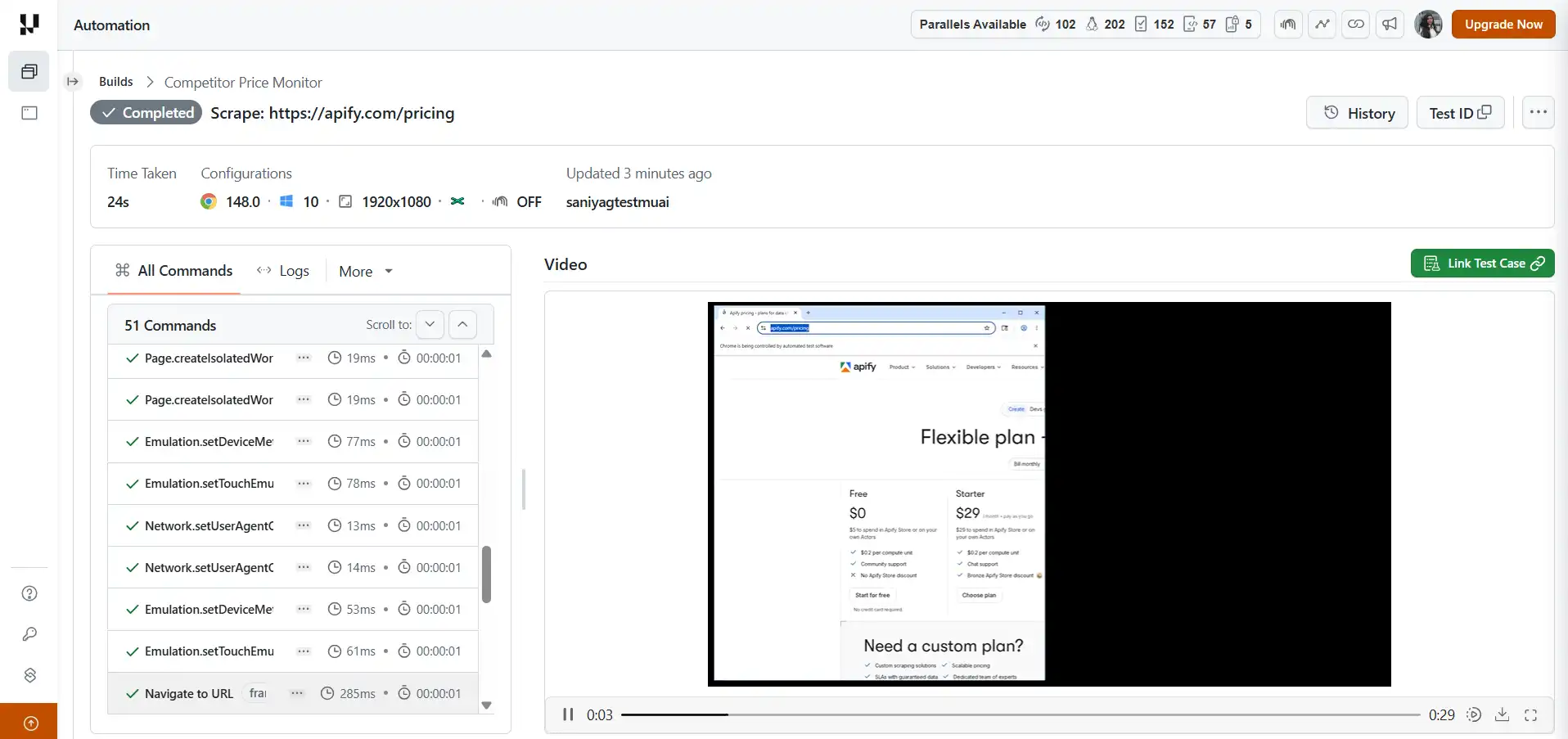
Every session automatically records video, console logs, and network requests, providing a complete execution history without additional setup.
These artifacts support AI debugging workflows by helping teams analyze browser behavior, trace agent actions, and quickly identify where the actual outcome diverged from the expected result.
When a scraping session returns unexpected data or fails silently, you open the dashboard, find the session by its build and name labels, and watch the exact sequence of page loads, clicks, and extractions that occurred. You see what the browser rendered, what network requests fired, and where the agent's behavior diverged from your expectations.
// During session creation, log the viewer URL so you can monitor it live
const session = await client.sessions.create({ /* ... */ });
console.log('Live session viewer:', session.sessionViewerUrl);
console.log('Dashboard link:', session.debugUrl);
For AI performance testing of your scraping pipeline, the network capture in the dashboard gives you response times per request, which helps you identify slow pages or rate-limited endpoints before they become production problems.
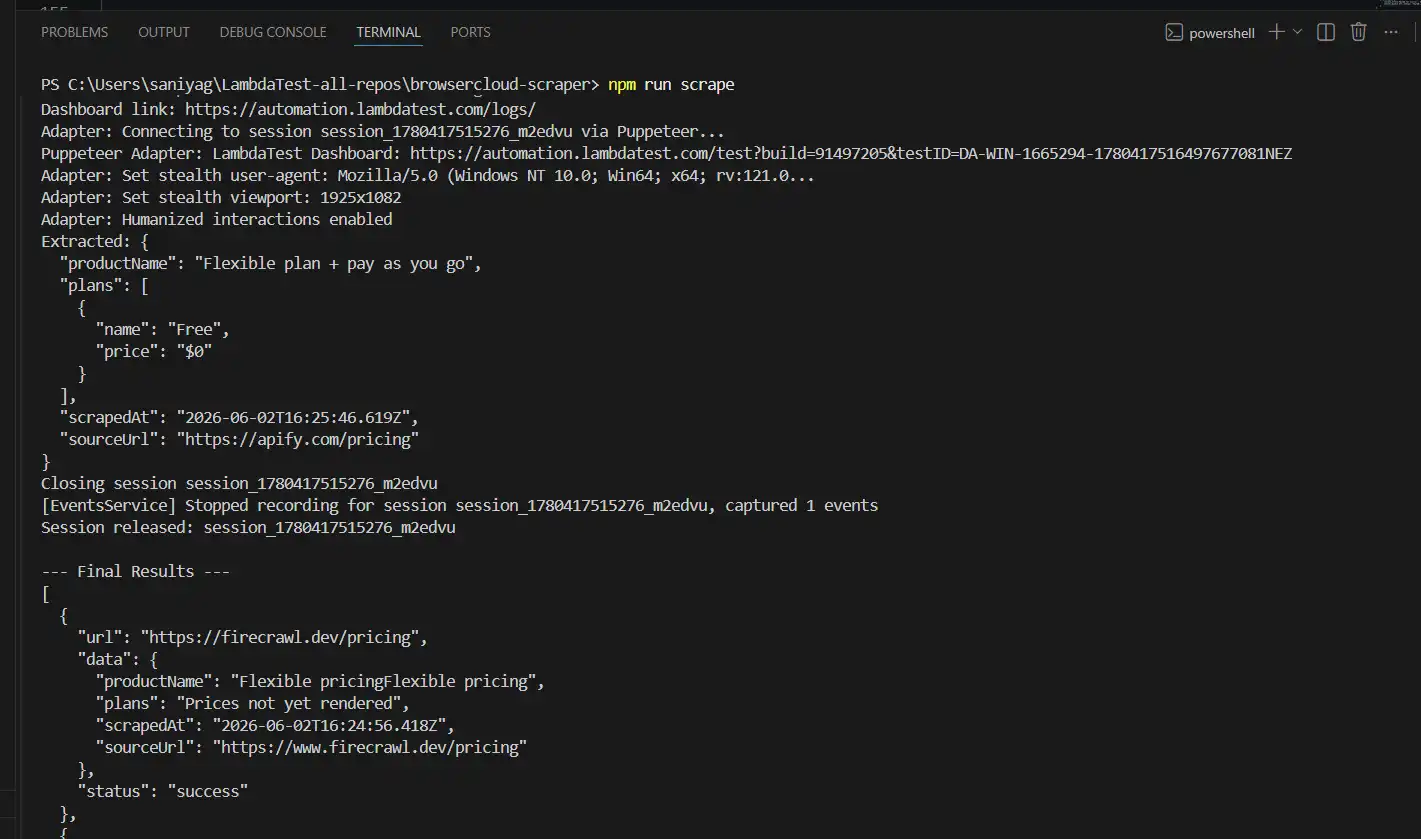
The SDK also logs every connection step to stdout as sessions run:
Adapter: Connecting to session session_123_abc via Puppeteer...
Adapter: Set stealth user-agent: Mozilla/5.0 (Windows NT 10.0...
Adapter: Set stealth viewport: 1907x1063
Adapter: Humanized interactions enabled
Adapter: Loading profile competitor-site-login
This output is your first line of debugging. If a session connects with an unexpected user-agent or viewport, you see it immediately in the logs rather than discovering it after bad data reaches your downstream consumers.
Results:
Local Run:
Cloud Run:
Getting started is simple. Connect your Puppeteer tests to the TestMu AI platform and run them on real browsers in the cloud without the overhead of managing your own infrastructure. To set up and execute your first test run, follow this support documentation on getting started with Puppeteer testing.
Build Stealth AI Scraping Agents in Minutes

Running Puppeteer Tests Using Agent Skills
While BrowserCloud provides the infrastructure to execute Puppeteer tests at scale, TestMu AI Agent Skills simplify the process of creating, configuring, and maintaining those tests.
Instead of manually setting up a Puppeteer project, managing dependencies, and configuring cloud execution, you can install the puppeteer-skill and use natural language prompts to generate production-ready automation code.
Agent Skills act as framework-specific knowledge packages for AI coding assistants such as Claude Code, GitHub Copilot, Cursor, and Gemini CLI. They provide built-in guidance for project structure, dependency management, cloud execution patterns, debugging workflows, and CI/CD integration.
Install the Puppeteer Agent Skill
To get started, clone the Agent Skills repository and copy the Puppeteer skill into your AI tool's skills directory:
git clone https://github.com/LambdaTest/agent-skills.git

# For Claude Code
cp -r agent-skills/puppeteer-skill .claude/skills/

# For Cursor
cp -r agent-skills/puppeteer-skill .cursor/skills/

# For GitHub Copilot
cp -r agent-skills/puppeteer-skill .github/skills/

# For Gemini CLI
cp -r agent-skills/puppeteer-skill .gemini/skills/
Once the skill is installed and your TestMu AI credentials are configured, you can simply describe what you want your automation to do.
For example:
- Prompt 1: Write Puppeteer tests to scrape product data and run them on the TestMu AI cloud
- Prompt 2: Set up Puppeteer with Jest for E2E testing and generate PDF reports
- Prompt 3: Run headless Chrome tests on TestMu AI with network interception
The Puppeteer Agent Skill automatically handles project setup, selects the appropriate JavaScript or TypeScript configuration, and configures execution for either local environments or the TestMu AI cloud.
This approach is particularly useful for teams looking to accelerate test creation, standardize automation practices, and reduce the amount of boilerplate code required to get started with Puppeteer.
To install the Puppeteer Skill and generate your first AI-assisted Puppeteer test, follow the Puppeteer Agent Skills support documentation.
Integrating BrowserCloud into Your DevOps Pipeline
Once your scraping agent is running reliably, the next step is integrating it into your DevOps AI workflow so it can execute automatically, validate results, and alert your team whenever something goes wrong.
In this example, the scraping logic is wrapped inside a scheduled job that executes your BrowserCloud-powered Puppeteer scripts, validates the extracted data, and exits with an error if required fields are missing.
// scraper-agent.ts - the file your cron job or CI pipeline calls

async function runScheduledScrape() {
    const urls = [
        'https://competitor-a.com/pricing',
        'https://competitor-b.com/pricing',
        'https://competitor-c.com/pricing',
    ];

    const results = await parallelScrapeWithControl(urls);

    // Validate results before writing to your data store
    const failures = results.filter(r => !r.pricing.price || !r.pricing.name);

    if (failures.length > 0) {
        console.error('Scrape validation failed for:', failures.map(f => f.url));
        // Trigger your alerting system (Slack, PagerDuty, Email, etc.)
        process.exit(1);
    }

    console.log('All extractions validated. Writing to data store...');
    // Write results to your database, Google Sheet, or downstream system
}

runScheduledScrape().catch(err => {
    console.error('Agent error:', err);
    client.sessions.releaseAll();
    process.exit(1);
});
You can then schedule the agent using GitHub Actions to run at regular intervals.
# .github/workflows/price-monitor.yml

on:
  schedule:
    - cron: '0 6 * * *'    # Runs every day at 6am UTC

jobs:
  scrape:
    runs-on: ubuntu-latest
    steps:
      - uses: actions/checkout@v3
      - uses: actions/setup-node@v3
        with:
          node-version: '18'
      - run: npm install
      - run: npx ts-node scraper-agent.ts
        env:
          LT_USERNAME: "${{ secrets.LT_USERNAME }}"
          LT_ACCESS_KEY: "${{ secrets.LT_ACCESS_KEY }}"}
With this setup, GitHub Actions automatically triggers your scraping workflow on the defined schedule. The job launches parallel BrowserCloud sessions, executes the scraping tasks, validates the extracted data, and stores the results in your downstream systems.
If validation fails or a scraping target changes unexpectedly, the workflow exits with a non-zero status code, causing the GitHub Actions run to fail. This makes it easy to integrate notifications through Slack, email, PagerDuty, or other incident management tools.
By combining BrowserCloud with your CI/CD platform, you can build a fully automated scraping pipeline that runs continuously, scales with demand, and provides immediate visibility when failures occur.
Why BrowserCloud Is the Right Infrastructure Layer for AI Scraping?
BrowserCloud is the right infrastructure layer because it delivers pages to your agent cleanly at scale, avoids blocks, persists auth between runs, and gives full visibility into every session.
Most AI scraping tools solve the extraction problem: given a page, pull out the right data. BrowserCloud solves the infrastructure problem: getting the page in front of your agent cleanly, at scale, without getting blocked, without losing auth state between runs, and with full visibility into what happened.
The benefits of AIOPS are clearest here. Self-managing sessions, automatic stealth fingerprinting, profile-based auth persistence, and built-in video replay reduce the operational burden that typically falls on the team maintaining the scraping pipeline and testing AI applications in production environments. You write the extraction logic. BrowserCloud handles everything underneath it.
For any AI automation pipeline running in production, this is the cloud browser layer that makes the difference between a script that works on your laptop and a data infrastructure that runs reliably every day.
How to Avoid Getting Blocked While Scraping
Getting blocked is the single most common reason a scraping pipeline that worked yesterday returns empty data today. Modern bot defenses such as Cloudflare Bot Management and DataDome do not just check your IP. They fingerprint the browser, inspect TLS handshakes, watch request timing, and score behavior. Avoiding blocks is about looking like a real user across all of those signals, not defeating any single check.
The techniques below are the ones that actually move the needle, ordered roughly by impact per unit of effort:
- Randomize the browser fingerprint: Rotate realistic user-agent strings and viewport sizes, and reset the automation signals (such as navigator.webdriver) that headless browsers leak by default. A static fingerprint repeated across thousands of requests is the easiest pattern for a detector to flag.
- Use residential proxies for protected targets: Datacenter IP ranges are widely blocklisted. Residential and mobile IPs cost more but pass reputation checks that datacenter IPs fail, so reserve them for the targets that actually block you rather than paying for every request, and consider a residential proxy alternative when that cost is hard to justify.
- Throttle and randomize request timing: Human users do not request 50 pages a second at perfectly even intervals. Add jitter to your delays, respect any crawl-delay directive, and back off when you see 429 or 503 responses instead of retrying immediately.
- Render real JavaScript: Many sites serve a near-empty shell to plain HTTP clients and only reveal data after client-side rendering. A real browser executes that JavaScript, so the page looks the same to the site as it does to a human and avoids the no-JS signal that detectors watch for.
- Persist authenticated sessions: Logging in repeatedly from fresh sessions is itself a detection trigger. Saving and reusing cookie and storage state lets an agent stay logged in across runs the way a returning user would.
- Handle CAPTCHAs lawfully and sparingly: Treat a CAPTCHA as a signal to slow down, not just an obstacle to clear. Solving challenges only makes sense where the target's terms and applicable law permit automated access in the first place.
Doing all of this in your own scraper code is a maintenance burden that grows every time a detector updates, which is where managed browser infrastructure earns its place. TestMu AI BrowserCloud handles fingerprint masking, user-agent and viewport randomization, and profile-based session persistence at the session layer, so your scraper focuses on extraction while the cloud absorbs the cat-and-mouse with bot detection. For high-volume jobs, see how these patterns hold up in the guide to price scraping at scale.
One honest caveat: no technique makes a scraper undetectable, and stealth features are best-effort by design. Detection systems change constantly, so the durable practice is to monitor your success and block rates, treat a spike in failures as a signal to adapt, and stay within each site's terms and the law as you do.
Is AI Web Scraping Legal? What You Need to Know
AI web scraping is generally legal when you collect publicly available data, but it depends on a site's robots.txt, its Terms of Service, and privacy laws like GDPR.
Understanding robots.txt and Terms of Service
A website's robots.txt file indicates which pages the site owner permits automated access to. Google's robots.txt documentation covers the specification in detail. While violating robots.txt is not automatically illegal in most jurisdictions, it can be used as evidence of bad faith in legal disputes. You should always check robots.txt before scraping a site at scale.
Terms of Service agreements are more significant. Many websites explicitly prohibit automated data collection in their ToS. Violating ToS can result in your IP being banned, your account being terminated, or, in some cases, legal action. The hiQ Labs v. LinkedIn Corporation case established important precedent in the United States around the legality of scraping publicly accessible data, but the legal landscape continues to evolve.
The general principle: scraping publicly available data that does not require authentication is generally lower risk than scraping data behind login walls.
GDPR and Personal Data Concerns
If you are scraping from websites that serve European users and your extraction includes personal data (names, email addresses, phone numbers), you are likely touching GDPR territory. The regulation requires a lawful basis for processing personal data, even if that data is publicly available.
For most business intelligence, pricing, and research use cases, you can avoid this issue entirely by scraping aggregate or non-personal data. If personal data is part of your use case, you should consult a legal professional before proceeding at scale.
Best Practices to Stay on the Right Side
Web scraping exists in a legal and ethical gray area that depends heavily on how the data is collected, used, and stored. Following responsible scraping practices helps reduce legal risk, prevents unnecessary strain on websites, and makes your automation infrastructure more sustainable long term.
- Respect robots.txt directives: Always review the site's robots.txt file to understand which parts of the website are restricted from automated access.
- Rate-limit your requests: Avoid sending large volumes of requests in a short period of time. Responsible throttling helps prevent server overload and reduces the likelihood of getting blocked.
- Avoid scraping private or restricted data: Do not collect information that is clearly intended to remain private, even if it is technically accessible through the frontend.
- Handle personal data carefully: Avoid storing, sharing, or distributing personally identifiable information (PII) unless you have a lawful basis and compliance process in place.
- Review the website’s Terms of Service: Many websites explicitly define what types of automated access are allowed or prohibited. Understanding these terms can help reduce legal exposure.
- Use authentication responsibly: If your scraping workflow involves logged-in sessions, ensure credentials are securely managed and never reused in ways that violate platform policies.
- Implement monitoring and replay systems: Logging, session replay, and request tracing make it easier to audit scraping activity and investigate failures or abuse scenarios.
- Separate extraction logic from browser infrastructure: Keeping scraping logic modular improves maintainability and makes compliance updates easier when site policies change.
- Get legal advice for commercial use cases: If you are building a commercial product or monetizing scraped data, consult legal counsel to evaluate your specific jurisdiction and use case.
The goal is to extract value from public information without causing harm to the site, its users, or the wider web ecosystem.
Conclusion
AI web scraping is no longer a niche trick. It now powers data pipelines, competitive intelligence, and AI training workflows at organizations of every size. The scraping itself has become the easy part; the real challenge is the infrastructure around it: getting clean pages in front of your agent, staying authenticated across runs, avoiding detection, and knowing when something breaks.
That is exactly what TestMu AI BrowserCloud handles, turning a fragile script that runs on your laptop into a reliable pipeline that runs every day. Start small with one tool and one target, get the data flowing, then add the testing layer and scale from there.
Citations
- Google's robots.txt documentation (developers.google.com), linked in the legal section above.
- hiQ Labs v. LinkedIn Corporation opinion, U.S. Court of Appeals for the Ninth Circuit, No. 17-16783 (cdn.ca9.uscourts.gov), linked in the legal section above.
- TestMu AI Browser Cloud Stealth Mode documentation, linked in the implementation section above.
- BrowserCloud Installation
Author

Saniya Gazala
Blogs: 44


Saniya Gazala is a Product Marketing Manager and Community Evangelist at TestMu AI with 2+ years of experience in software QA, manual testing, and automation adoption. She holds a B.Tech in Computer Science Engineering. At TestMu AI, she leads content strategy, community growth, and test automation initiatives, having managed a 5-member team and contributed to certification programs using Selenium, Cypress, Playwright, Appium, and KaneAI. Saniya has authored 15+ articles on QA and holds certifications in Automation Testing, Six Sigma Yellow Belt, Microsoft Power BI, and multiple automation tools. She also crafted hands-on problem statements for Appium and Espresso. Her work blends detailed execution with a strategic focus on impact, learning, and long-term community value.


Frequently asked questions
Did you find this page helpful?
More Related Blogs

TestMu AI forEnterprise
Get access to solutions built on Enterprise
grade security, privacy, & compliance
- Advanced access controls
- Advanced data retention rules
- Advanced Local Testing
- Premium Support options
- Early access to beta features
- Private Slack Channel
- Unlimited Manual Accessibility DevTools Tests