

Power Your Software Testing with AI Agents and Cloud
The Native AI-Agentic Cloud Platform to Supercharge Quality Engineering. Test Intelligently and Ship Faster.


- TestMu AI (Formerly LambdaTest)
- /
- Blog
- /
- Run Your PyUnit Script With Selenium Automation Testing
Run Your PyUnit Script With Selenium Automation Testing
PyUnit, also called unittest, is Python's built-in unit testing framework. Structure a Selenium Python test suite with setUp, tearDown and assertions.
Last Updated on:
On This Page
- Building Blocks Of Selenium with Python Unit Test [PyUnit] Framework
- PyUnit/unittest Overview
- setUp() and tearDown() - Initialization & De-Initialization
- PyUnit - Classes and Functions
- class unittest.TestSuite(tests=())
- class unittest.TestResult
- Assertions In PyUnit Test Framework
- How Do You Run a PyUnit Selenium Test Suite From the Command Line?
- How Do AI Coding Assistants Change a PyUnit Selenium Test Suite?
PyUnit, Python's built-in unittest framework, runs a Selenium Python test suite as a class that subclasses unittest.TestCase. setUp() opens the browser session before every test method with webdriver.Firefox(), and tearDown() closes it with driver.quit(). This guide covers the PyUnit building blocks, the unittest overview, setUp and tearDown, PyUnit classes and functions, the run method, TestSuite, TestResult, assertions, running a suite from the command line, and how AI coding assistants change a PyUnit Selenium suite.
Key Takeaways
- PyUnit, also called unittest, is Python's built-in unit testing framework, and a PyUnit test is written as a class that subclasses unittest.TestCase with methods named with a test_ prefix.
- In PyUnit, setUp() and tearDown() run before and after every single test method, while setUpClass() and tearDownClass() run only once for the whole test class.
- A Selenium PyUnit test suite creates the browser session inside setUp() with a call such as webdriver.Firefox() and closes the session inside tearDown() with driver.quit().
- Selenium 4.6 and later ship Selenium Manager, which downloads the matching browser driver automatically, so a PyUnit setUp() method no longer needs a geckodriver or chromedriver path.
- Python 3.12 removed the legacy unittest aliases such as assertEquals and assert_, so a PyUnit suite has to use assertEqual and the other current assertion names to run on Python 3.12 or later.
- The command python -m unittest discover runs a whole PyUnit Selenium suite in one process by collecting every file that matches the pattern test*.py.
Building Blocks Of Selenium with Python Unit Test [PyUnit] Framework
Let's start the Selenium with Python tutorial by understanding the building blocks of PyUnit framework. The unittest framework contains the following core-modules that are core to test case development & execution:
- Test Loader: The Test Loader Python class is used to load test cases and test suites. It is also termed as 'Test Fixture'. Test Cases and Test Suite can be created locally or can be loaded from an external file/database. On successful execution, Test Suite object is released by the Test Loader and the same object can be used throughout the execution of the Test Case.
- Test Runner: Responsible for displaying the output of the executed test to an end user using a runnable interface. The output could be represented in a variety of ways. It could be displayed as a standard code, in the form of GUI or through a textual representation.
- Test Suite: Test Suite is a group of test cases that are 'grouped logically' based on the functionalities that are under test. Test suites are used for making the test code more modular & maintainable.
- Test Case: A Test Case contains the actual implementation of the test code, so how you write test cases effectively decides what this class checks. In case some functionality is not ready, a developer can make use of Stubs i.e. dummy source code to test source code at a unit level.
- Test Report: Test Reports are ideally used to organize the results of test case execution i.e. whether test case execution result is pass/fail. It also details the time taken for execution, execution summary, etc. Better the maintenance of test report, easier it extracts useful information from it.
TestCase class is used to create new tests and the FunctionTestCase acts as a subclass to TestCase class and make use of tests which are appended to the existing unittest framework. setUp() and tearDown() are important components of the TestCase class that are used for initialization & cleanup of the test fixture (that was created using setUp()). The primary purpose of using FunctionTestCase class is to aid the goal of code reusability.

Austin Siewert
Co-Founder, Steadfast Systems
Discovered @TestMu AI yesterday. Best browser testing tool I've found for my use case. Great pricing model for the limited testing I do 👏
2M+ Devs and QAs rely on TestMu AI
Deliver immersive digital experiences with Next-Generation Mobile Apps and Cross Browser Testing Cloud

This certification is for professionals looking to develop advanced, hands-on expertise in automation testing Selenium with Python and take their career to the next level.
Here's a short glimpse of the Selenium Python 101 certification from TestMu AI:
Key Takeaway: The PyUnit framework is built from five core parts, the Test Loader, the Test Runner, the Test Suite, the Test Case and the Test Report, and the Test Case part holds the actual test code.
PyUnit/unittest Overview
PyUnit also referred as Python unittest and works in a similar manner as xUnit which is a very popular unit testing framework whose structure & functionality is derived from Smalltalk's SUnit. Hence, a developer who has prior experience with xUnit or other popular unit testing frameworks would find unittest easier to understand.
Testcase/Testsuite written using unittest module follows a common format
- Define a class derived from unittest.TestCase(). We discuss TestCase() in more detail in subsequent sections.
- Define testcases having the nomenclature test_name
- Execute the testcases/testsuites by having unittest.main() which is normally placed at the bottom of the file i.e. after the necessary classes for testcase execution have been implemented.
We would have a look at the important classes in the unittest package in further sections.
Key Takeaway: A PyUnit test file follows one format: define a class derived from unittest.TestCase, name every test method with a test_ prefix, and call unittest.main() at the bottom of the file to execute them.
setUp() and tearDown() - Initialization & De-Initialization
The setUp() method is an entry point to the test cases. It does not have any arguments. Since it is the entry point, some of the important initialization steps are performed in the implementation of the setUp() method. Below are some things related to initialization that can be included in setUp()
- Load the test data.
- Creation of a browser instance e.g. Firefox using the WebDriver interface.
- Opening files for I/O (Input/Output) operation, either for reading the test data or appending the results of the test execution.
Below is an example of the initialization & cleanup activity performed via setUp() and tearDown() methods
import unittest
#Import other modules that are required for testing

class SearchText(unittest.TestCase):
	def setUp(self):
		#create a new Firefox session
		self.driver = webdriver.Firefox()
		.................................
		.................................
		self.driver.get("https://www.testmuai.com/")

	def tearDown(self):
		.................................
		.................................
		self.driver.quit()
In the above example, an instance of Firefox browser is created using the WebDriver API (Line 7). On successful creation, the Home Page https://www.testmuai.com is opened on the Firefox browser. All the necessary operations which are required for unit testing are then performed. Once the unit test is complete, the cleanup is performed in the tearDown() API (Line 12). In a nutshell, setUp() & tearDown() are executed before & after each every test method.
Selenium 4.6 and later ship Selenium Manager, a command line tool that detects the installed browser, downloads the matching driver and caches it under ~/.cache/selenium. Your setUp() method no longer needs a geckodriver or chromedriver path, so webdriver.Firefox() on its own is enough, and browser preferences now travel through an Options object passed as webdriver.Firefox(options=options). The Selenium project describes this in its Selenium Manager documentation.
Now that you have understood the basics of the initialization & de-initialization of a Unit test case written in Python, let's have a look at some of the important classes in this selenium with python tutorial.
Key Takeaway: setUp() takes no arguments and runs before every test method to load the test data and open the browser, and tearDown() runs after every test method to close the browser.
PyUnit - Classes and Functions
class unittest.TestCase(methodName='TestName')
We would have a look at the important classes in the unittest package in further sections of this Selenium with Python tutorial. Specific test cases are implemented in subclasses. In many scenarios, no changes would be required in methodName nor runTest() needs to be implemented. We have already discussed the important initialization methods setUp() and tearDown(), now we would have a look at the other methods.
setUpClass()
A class method is called before any of the individual tests are called. @classmethod is the identifier with which you can identify a setUpClass(). setUpClass() has only one argument i.e. the class name.
tearDownClass()
This method is called after all the tests in the class are executed. Similar to setUpClass(), tearDownClass() also as only one argument i.e. the class name. The 'class name' should match with the name which is used in the setUpClass(), else it might result in an error. A sample implementation citing the usage of setUpClass() and tearDownClass() is shown below:
import unittest

class Example(unittest.TestCase):
    @classmethod
    def setUpClass(class_name):
        print("setUpClass executed")

    def setUp(self):
        print("setUp executed")

    def test_1(self):
        print("test-1 executed")

    def test_2(self):
        print("test-2 executed")

    def tearDown(self):
        print("tearDown executed")

    @classmethod
    def tearDownClass(class_name):
        print("tearDownClass executed")
One question that could arise - What is the basic difference between setUp() and setUpClass() [or tearDown() & tearDownClass()]? setUp() [and its de-initialization counterpart tearDown()] are loaded & executed before each test method, whereas setUpClass() [and its de-initialization counterpart tearDownClass()] are executed once for the whole class. Let's have a look at a simple example to understand the difference.
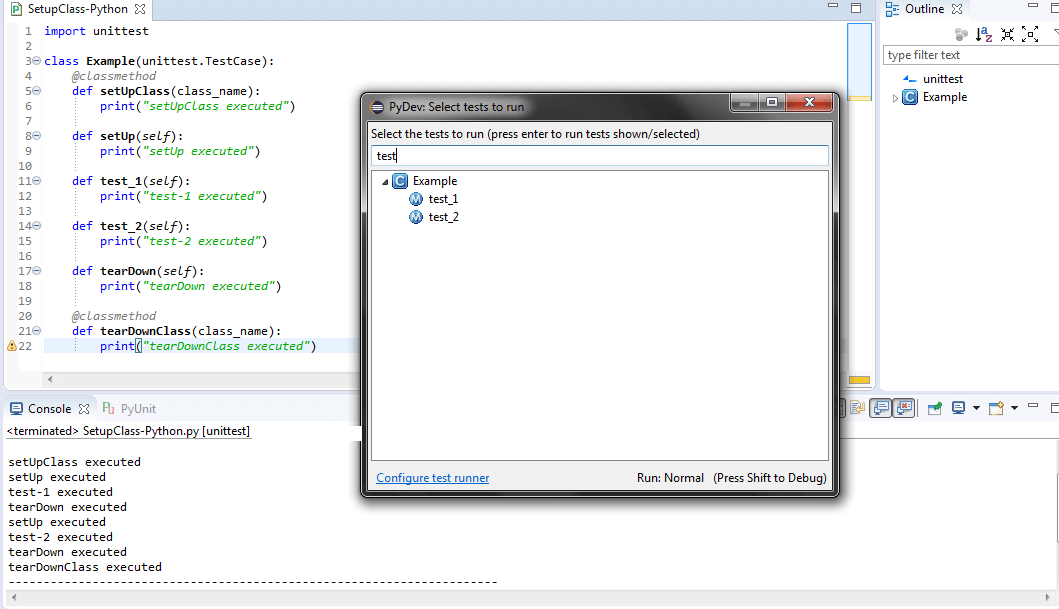
As seen in the below example [SetupClass-Python.py], depending on the test case being executed [test_1 or test_2], setUpClass gets executed once in the beginning and then the corresponding test case is executed. After the execution of the test case, the code in tearDownClass() is executed.
In order to execute the code, press CTRL+F9. As seen in the snapshot below, both the test cases observed in this Selenium with Python tutorial were executed in the below sequence of execution:
- Implementation under setUpClass() is executed
- test_1 is executed (setUp & tearDown is called for test_1 i.e. initialization & cleanup after execution of test_1)
- test_2 is executed (setUp & tearDown is called for test_2 i.e. initialization & cleanup after execution of test_2)
- Implementation under tearDownClass() is executed
As explained earlier, setUpClass() & tearDownClass() are executed only once, whereas setUp() & tearDown() are executed for each test method.
Key Takeaway: setUpClass() and tearDownClass() carry the @classmethod decorator and run once per test class, so the order of execution is setUpClass, then setUp and tearDown around each individual test, then tearDownClass.
run(result=None):
TestResult object is passed as a parameter to the run() method. The parameter is optional and if the object is not supplied to the method, a temporary object is created & used to store the results. The result is passed to the caller of the run() method. We would discuss the TestResult object in detail in a subsequent section.
Key Takeaway: The run() method takes an optional TestResult object, and when no TestResult object is supplied PyUnit creates a temporary object to store the results and passes that object back to the caller of run().
class unittest.TestSuite(tests=())
The TestSuite class is an aggregation of individual testcases & test suites. Instead of executing testcases on an iterative basis, developers & testers can make use of this class since makes the code maintenance easy.
Unlike the TestCase() class, the TestSuite() class does not contain any implementation of test code since it is used to group testcases on a logical/functional basis. Some of the methods that can be used along with TestSuite() class are mentioned below
- addTest(test): It is used to add TestCase or TestSuite
- addTests(tests): In case you plan to iterate through the testcases or testsuites, you can make use of addTests().
- debug(): This method is primarily used for debugging purpose since it does not return the execution results.
- run(result): In case you plan to execute testcases associated with a testsuite, you can make use of run(result). The result object stores the execution results.
To build a suite out of an existing test class, call unittest.TestLoader().loadTestsFromTestCase(AddTest), which the unittest documentation defines as returning a suite of all test cases contained in the TestCase derived class. Pass that suite to unittest.TextTestRunner().run(suite), a basic runner that writes the results to a stream and uses sys.stderr by default. Use this route rather than unittest.makeSuite(), which Python 3.13 removed.
Key Takeaway: unittest.TestSuite groups existing test cases and other test suites instead of holding test code, and the addTest, addTests, debug and run methods on TestSuite build and execute that group.
class unittest.TestResult
TestResult class is used to gather information about the number of test cases that have passed/failed/skipped. As discussed earlier, the TestCase & TestSuite classes are used to record the results of the testcase/testsuite execution. Some of the important attributes of TestResult are failures, errors, skipped, expectedFailures, unexpectedSuccesses.
Key Takeaway: unittest.TestResult records how many test cases passed, failed or were skipped, and exposes the failures, errors, skipped, expectedFailures and unexpectedSuccesses attributes.
Assertions In PyUnit Test Framework
Assertions are very popular in testing, irrespective of the programming language being used for test-code development. An assertion is nothing but a Boolean expression (representing 'True/False') which would carry a value 'True' till the time it finds bugs in the test code. Three types of assertions are available to check equivalence, comparison, and performing actions in case of exceptions.
Next in this Selenium with Python tutorial, we will have a look at some of the important Python assertions for PyUnit framework.
| Checking Mechanism | Signifinance | Summary | Python Version [onwards] |
|---|---|---|---|
| assertEqual(a, b [,msg]) | a==b | Checks whether 'a' equates 'b'. msg is an optional parameter which can be used to pass a 'message' string | |
| assertNotEqual(a,b[,msg]) | a!=b | Checks whether 'a' is not equal to 'b'. msg is an optional parameter which can be used to pass a 'message' string | |
| assertTrue(x[,msg]) | bool(x) is True | Verify if the given expression is True | |
| assertFalse(x[,msg])) | bool(x) is False | Verify if the given expression is False | |
| assertIsNot(a, b[,msg]) | a is not b | Checks whether a is not b | 2.7 |
| assertIs(a, b) | a is b | Checks whether a is b | 2.7 |
| assertIsNotNone(x[,msg]) | x is not None | Test whether expression x is Not None | 2.7 |
| assertIsNone(x[,msg]) | x is None | Test whether expression x is None | 2.7 |
| assertNotIn(x, y[,msg]) | x is not in y | Test whether 'x' is not a subset of 'y' | 2.7 |
| assertIn(x, y[,msg]) | x is in y | Test whether 'x' is a subset of 'y' | 2.7 |
| assertNotIsInstance(x, y[,msg]) | x is not an instance of y | Test whether 'x' is not an instance of 'y' | 2.7 |
| assertIsInstance(x, y[,msg]) | x is an instance of y | Test whether 'x' is an instance of 'y' | 2.7 |
Use the assertEqual spelling shown in the table, not the older camelCase one. Python 3.12 removed the long deprecated aliases assertEquals, assertNotEquals, assert_, assertRegexpMatches, assertRaisesRegexp, assertNotRegexpMatches, failUnless, failIf and assertDictContainsSubset, so a suite that still calls them breaks on Python 3.12 or later. Python 3.13 then removed unittest.makeSuite(), unittest.findTestCases() and unittest.getTestCaseNames(), and TestLoader methods replace all three. Python 3.10 reaches end of life in October 2026, so target Python 3.11 or newer. These changes are recorded in the Python 3.12 and Python 3.13 release notes and on the Python version status page.
With the basics of PyUnit/unittest covered, let's have a look at a sample code which can delve into the aspects which have discussed so far
'''This sample program demonstrates the PyUnit/unittest framework'''

# Inclusion of the PyUnit Test Framework
import unittest

def addition(x,y,z=0):
   # Add the three parameters which are passed to the addition function
   return x+y+z

# This is where the test case is implemented
class AddTest(unittest.TestCase):
   def setUp(self):
      # initialization code for the testcase/testsuite can be added here
      pass

   # These are tests that should be performed once the basic premise is set
   # Unit Tests start with test_
   # The addition method which was implemented earlier will be used here

   def test_addtion(self):
      self.assertEqual(addition(10,11,12), 33)
      # x=11, y=12, z=44 if (x+y)=z, the test would raise an assert since
      # the test is for assertNotEqual operation
      self.assertNotEqual(addition(11,12), 44)

   def test_negative_values(self):
      self.assertEqual(addition(-9,25), 16)
      self.assertNotEqual(addition(-9,25), 17)

   def tearDown(self):
      # Deinit and cleanup should be done here
      pass

if __name__=='__main__':
   unittest.main()
The above code comprises of two testcases - test_addition() and test_negative_values(). A method named addition() [Line 6~ Line 8] is created to add three parameters that are passed to that method. assertNotEqual and assertEqual are used in the testcases. Respective Testcases would pass if the conditions in the Assert equate to TRUE. When the above code is executed, the final test result is PASS as conditions mentioned in assertEqual and assertEqual are fulfilled e.g. In test_addition() testcase, assert would be invoked if addition of x=10,y=11,z=12 does not equate 33 since it is testing for 'Equate' operation. Below is the screenshot of the output when the code is compiled & tested from the command prompt [file - Python-unittest-output1.png]

In order to invoke an Assert, we make a small change in the test_negative_values() testcase. Below is the modified source code [changes are marked as comment]
'''This sample program demonstrates the PyUnit/unittest framework'''

# Inclusion of the PyUnit Test Framework
import unittest

def addition(x,y,z=0):
   # Add the three parameters which are passed to the addition function
   return x+y+z

# This is where the test case is implemented
class AddTest(unittest.TestCase):
   def setUp(self):
      # initialization code for the testcase/testsuite can be added here
      pass

   # These are tests that should be performed once the basic premise is set
   # Unit Tests start with test_
   # The addition method which was implemented earlier will be used here

   def test_addtion(self):
      self.assertEqual(addition(10,11,12), 33)
      # x=11, y=12, z=44 if (x+y)=z, the test would raise an assert since
      # the test is for assertNotEqual operation
      self.assertNotEqual(addition(11,12), 44)

   def test_negative_values(self):
      self.assertNotEqual(addition(-9,25), 16)   #Changed Values#

   def tearDown(self):
      # Deinit and cleanup should be done here
      pass

if __name__=='__main__':
   unittest.main()
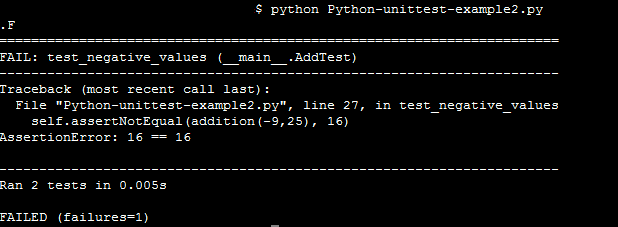
As seen on Line-27, assert would be issued if (x+y)!=z. In our example, x=-9, y=25, and z=16. As the test condition fails, it issues assert. As you can see below in this Selenium with Python Tutorial, the snapshot of the output.
Key Takeaway: PyUnit assertions such as assertEqual and assertNotEqual decide whether a test case passes or fails, and Python 3.12 removed the older aliases including assertEquals and assert_.
How Do You Run a PyUnit Selenium Test Suite From the Command Line?
Run the whole suite with python -m unittest discover from the project directory. Discovery imports every file that matches the pattern test*.py, collects the TestCase subclasses inside them and runs them in one process, so no file needs its own unittest.main() call and no separate runner script is required. Plain python -m unittest is a shortcut for the same command, but the discover sub-command has to be written out when you want to pass it arguments. Use -s to start discovery in a subdirectory, -p to change the file pattern, and -t to set the top level import directory when the tests sit outside the package.
Three options matter once browser tests make the run slow. The -k option, added in Python 3.7, runs only the tests whose fully qualified name matches a substring or a wildcard pattern, so you can repeat one failing browser test without opening every other session. The -f or --failfast option stops the run at the first error or failure. The --durations option, added in Python 3.12, prints the slowest test cases, so you can see which page loads dominate the wall clock time. All of them are listed in the unittest command line documentation.
The same command is your check on test code that an AI assistant wrote. Coding assistants still produce Selenium Python that calls driver.find_element_by_id and the other find_element_by_ helpers, because those calls fill years of older tutorials. Selenium removed find_element_by_* and find_elements_by_* in version 4.3.0, as its Python changelog records, and the current form is driver.find_element(By.ID, 'search'). Selenium 4.10.0 then removed a further set of deprecated arguments, most of which now belong on the Options and Service classes. Generated suites also still use the assert aliases that Python 3.12 deleted. A discovery run raises all three problems in a single pass, so run the suite before you trust the generated file.
Key Takeaway: The command python -m unittest discover runs a PyUnit Selenium suite in one process, and the -k, --failfast and --durations options narrow a run to one test, stop at the first failure, or print the slowest test cases.
How Do AI Coding Assistants Change a PyUnit Selenium Test Suite?
AI coding assistants now write most of the boilerplate in a PyUnit Selenium suite, so the work moves from typing the TestCase class to checking what the assistant produced. GitHub Copilot Chat ships a /tests slash command that the GitHub documentation describes as "Generate unit tests for the selected code", and lists it for Visual Studio Code, Visual Studio, JetBrains IDEs and Xcode in its Copilot Chat cheat sheet. What comes back has the shape described earlier in this tutorial, a class derived from unittest.TestCase with test_ prefixed methods and the driver created in setUp(), because the unittest naming contract is fixed. That fixed shape is the reason a generated file usually runs under python -m unittest discover without hand editing.
Self-healing locators are the second change. Healenium is an open source library that acts as a proxy between the client and the Selenium server, and its README lists Python among the Selenium languages it works with. When a locator stops matching, it replaces the failed control at runtime with the value that matches best and records the substituted control with a screenshot, as the Healenium project page describes. The limitation is the part to plan for. A healed locator can bind to a different element than the test author intended, so an assertEqual can pass against the wrong control. Read a healing report as a list of locators to correct in the source, not as a clean run.
unittest itself has no AI feature and receives no model updates, and that is what makes it the checkpoint. The runner reports pass, fail, error and skip against exactly the code in the file, whoever or whatever wrote it.
Key Takeaway: GitHub Copilot Chat generates unittest test cases from selected code and Healenium substitutes a failed locator at runtime, so a PyUnit run remains the check that a generated or healed Selenium test asserted the right thing.
Summary:
This Selenium with Python tutorial helped us to understand some of the important aspects of PyUnit. Especially how this effective Unit testing framework can be used to automate cross browser testing code and how 'asserts' can be used effectively while testing your code. PyUnit can also be used to perform module-level testing since you also have the flexibility to execute corner test cases as well. During the course of the article, we used Notepad++ & 'command line Python' for writing PyUnit code & execution. As a developer, you should use the IDE & programming environment of your choice & comfort. Though PyUnit was written for 'C' Python, the Jython project also runs Python test code on the Java virtual machine. Its current release still targets Python 2.7 only, so it is not a practical route for new Selenium test code. You can find the PyUnit/unittest official documentation here.

Author

Harshit Paul
Blogs: 93


Harshit Paul is Director of Product Marketing at TestMu AI (formerly LambdaTest), with over 8 years of experience in product and growth marketing for developer and QA tools, leading the Agentic AI in Quality Engineering space. He has authored 80+ technical articles for TestMu AI on software testing and automation, and hosted webinars on Selenium, automation testing, browser compatibility, DevOps, and continuous testing. He has led go-to-market and technical marketing initiatives across software testing products, contributing to SEO, content strategy, and developer marketing. He began his career as a certified Salesforce developer at Wipro Technologies, where he worked for 2 years before moving into marketing. Harshit holds a degree in computer programming from Vivekananda Institute of Professional Studies.


PyUnit FAQs
Did you find this page helpful?
More Related Blogs
TestMu AI forEnterprise
Get access to solutions built on Enterprise
grade security, privacy, & compliance
- Advanced access controls
- Advanced data retention rules
- Advanced Local Testing
- Premium Support options
- Early access to beta features
- Private Slack Channel
- Unlimited Manual Accessibility DevTools Tests